
With every passing project I feel like my basement is being converted from a living only area, to a work and project area. Computers being built, gadgets being taken apart, Lego projects all around. I’m not complaining by any means, but I do feel as my basement becomes populated with more and more tech based projects that the environment is missing something organic, something natural to balance things out.
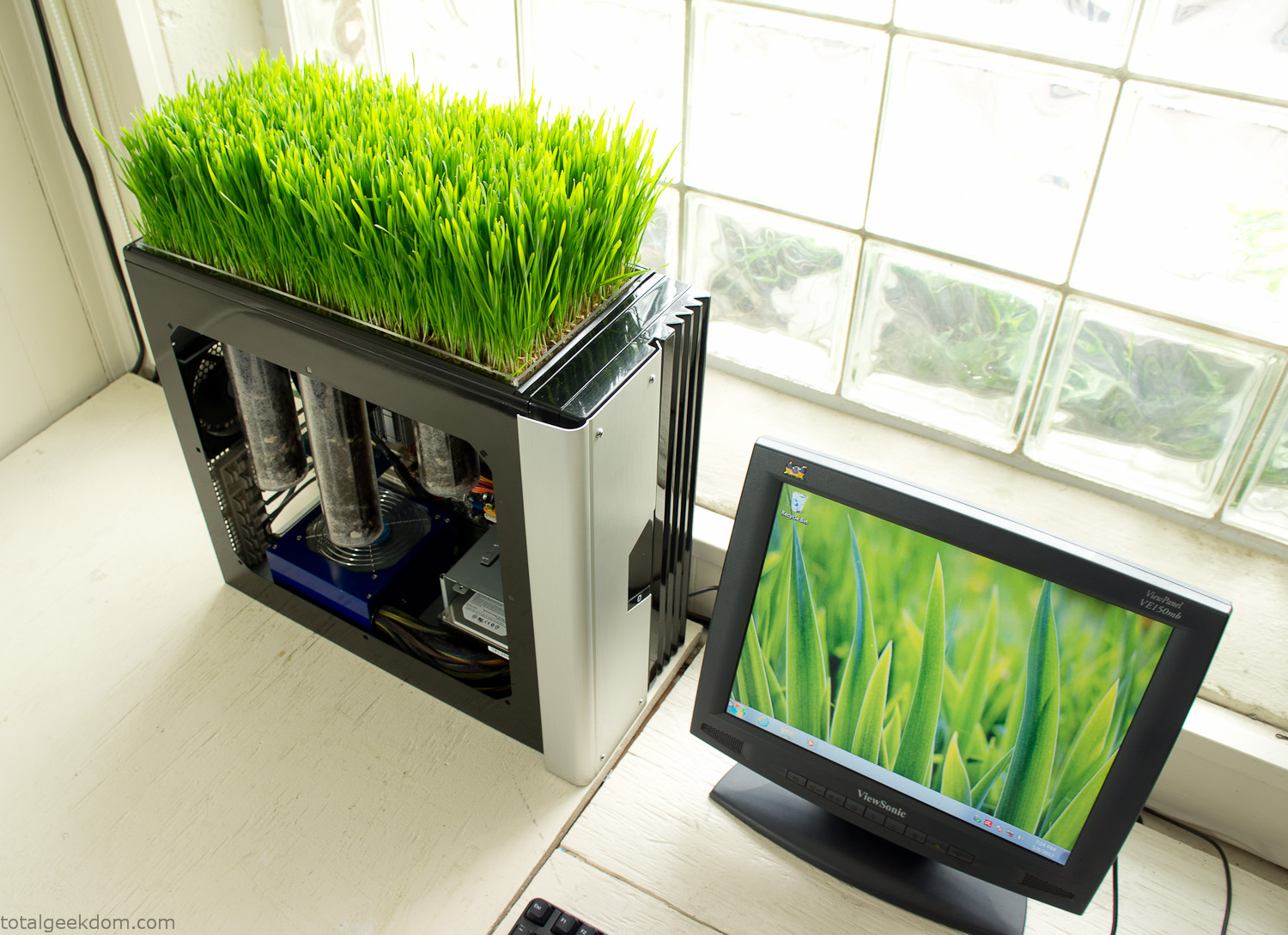
Bio Computer
I’ve been interested in working on a project for while that would combine something tech-based with something organic. Mixing the two elements intrigued me for a while. I’ve wanted to add flowers, or maybe plants of some sort to blend a little bit of nature into the space. I do receive a bit of sunlight through a glass block window, but the temperature in the basement is usually on the colder side. In the winter I don’t really heat the space because the folding farm outputs enough heat to keep the temperature comfortable. I didn’t want to change that aspect so I needed to come up with something that would tolerate slightly cooler temperatures and limited sunlight.
I can’t exactly recall when the idea came to me, but at some point I started wanting to use the heat from a computer as a way to warm the soil and help with germination/growth. I’m about as far from a botanist as it comes, I did some reading online and became pretty interested in the effects of soil temperature on germination/growth. I read different studies and papers from various universities. It was not too long into that process that I became hooked on the idea of using computer heat as a way to control the soil temperature of some sort of living plant life.
As the idea developed further I started looking into wheatgrass as a plant option. There is something clean and natural about the look and idea of a piece of grass growing in my basement. I thought the look would alter the space a little bit and add a bit of color along with something more than just metals and plastics. After reading enough studies and papers on the effects of soil temperature and germination with wheatgrass I felt like I had a good enough handle on the basics to tackle this.
The first step was finding a computer to adapt for the project. Luckily I had a lot of donated computers that people had given me for various project purposes. Most of them didn’t work, but by cobbling together various components from a bunch of different old computers I was able to come up with enough good parts to make a working computer.
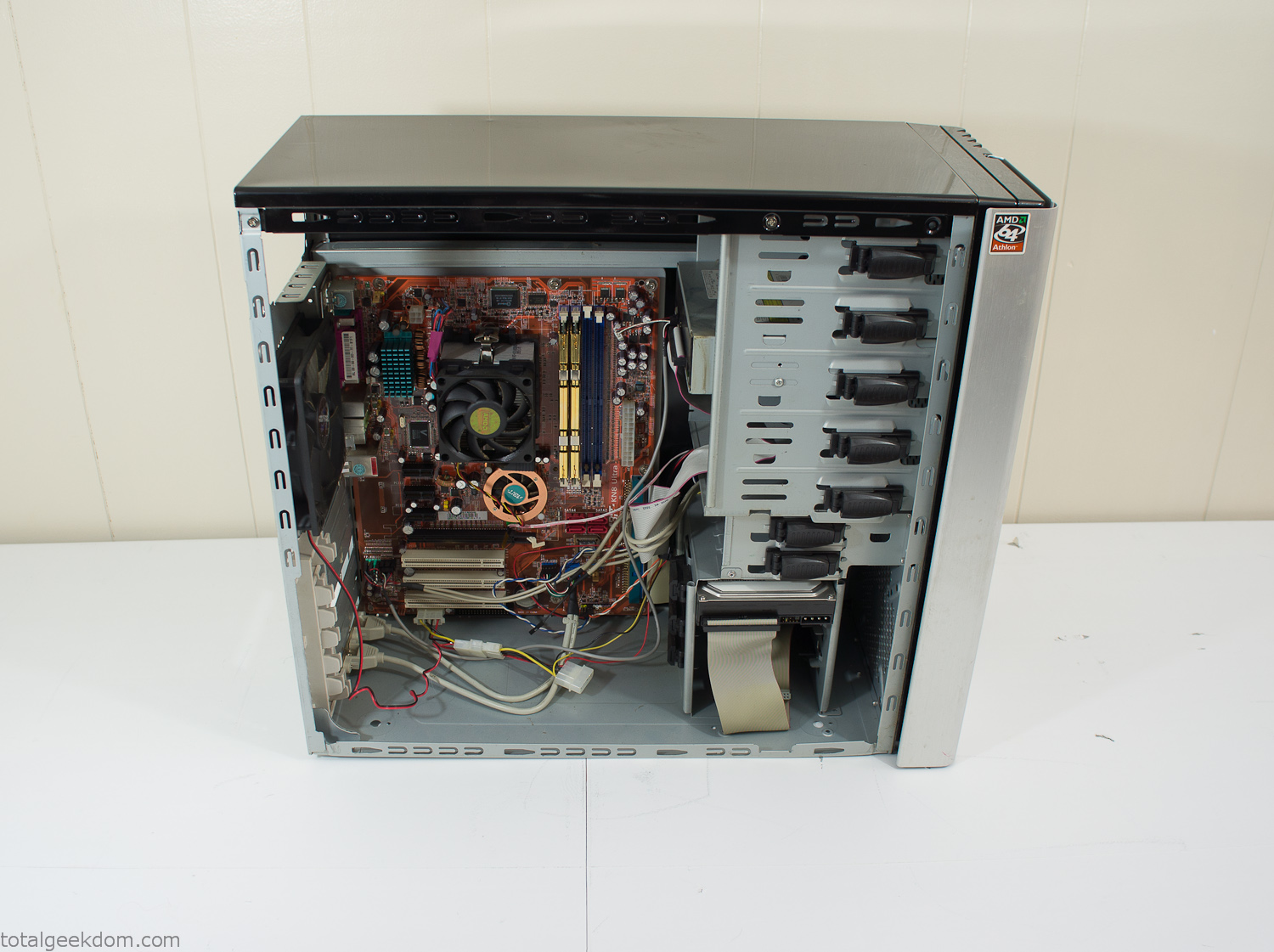
Donor Computer
At the time I was starting to get a formalized plan together for this project, another idea popped into my head. I’ve got a 5 yr. old who is already fairly geeky (just ask him to do his Jabba the Hutt impression for you) but he really does not get that much computer time. He’s getting to an age where he’s more inquisitive about tech stuff and I think he’s ready for his first computer. Since I was already well underway with this project it seemed like a perfect opportunity to orient the computer itself towards a learning tool for him in addition to using it as a way to blend something organic with a piece of technology.
With all of these goals in mind I started tinkering away. The computer hardware itself was nothing fancy, definitely outdated, but perfectly suited towards this project.
CPU- Pentium 4 (3 GHz)
Dell Factory Motherboard
Various Ram Sticks- 2gb
Old Maxtor 120gb IDE Hard Drive
Old FPS Power Supply
Donated Old Computer Case
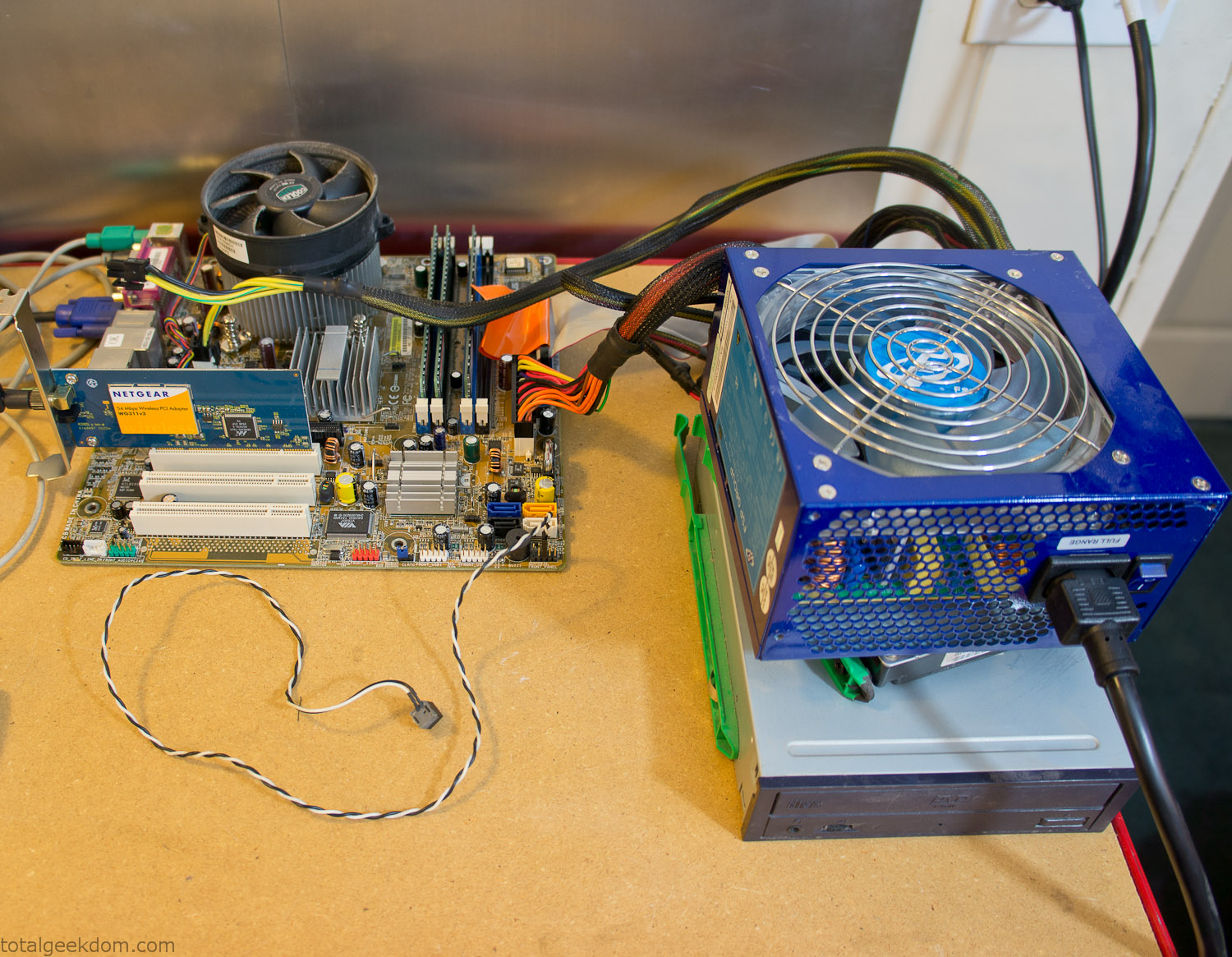
Computer Parts Testing
If you’ve spent any time around computer hardware in the last decade you’re probably well aware that Pentium 4 has a reputation for running hot. The 90nm Pentium 4 was named Prescott and it didn’t take long before the nickname Pres-hot popped up. In this case though that extra heat is going to be put towards good use.
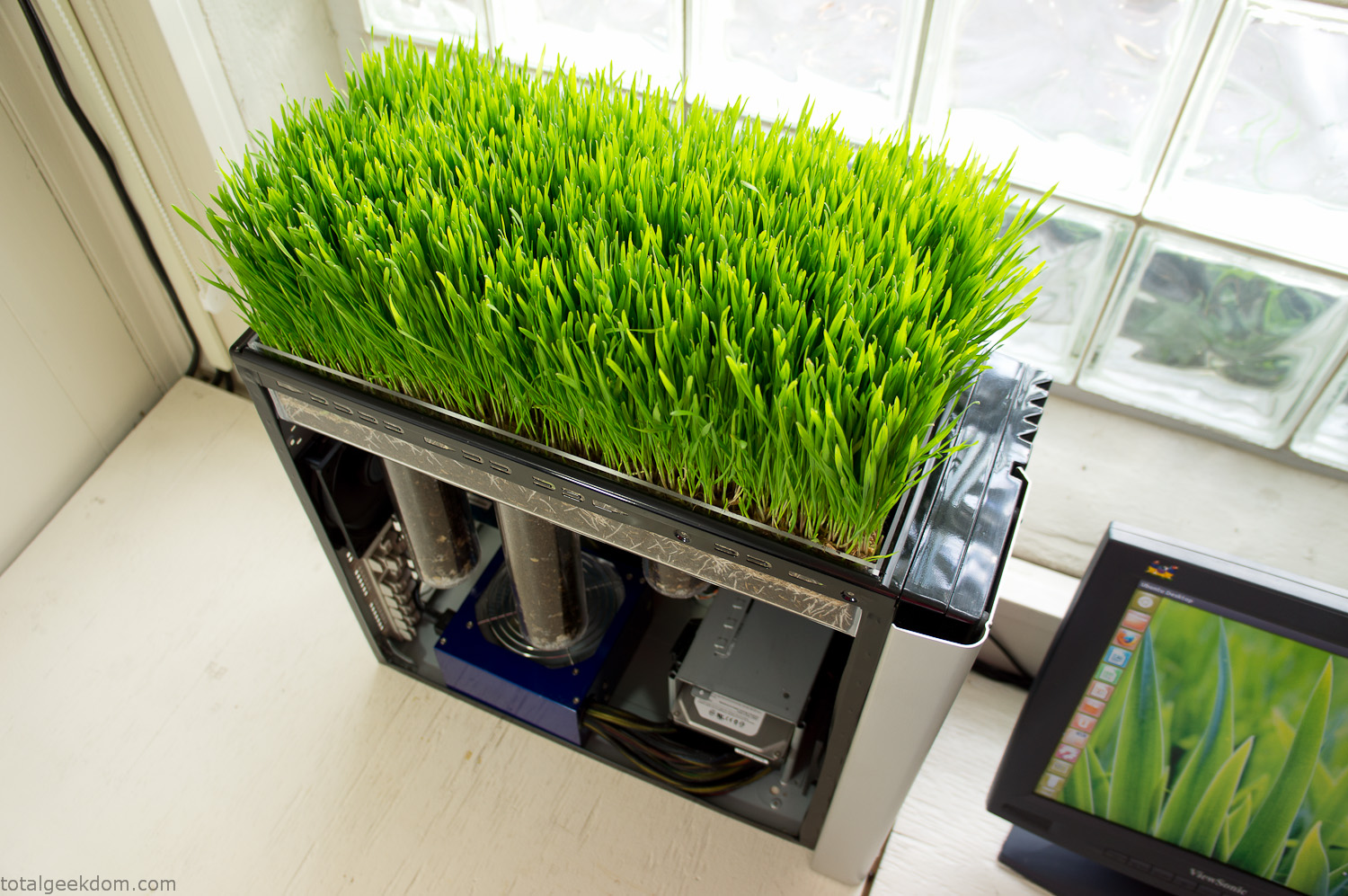
Once the hardware was all in order I started working on the layout and arrangement for the case. I had originally envisioned the grass growing out of the top of the computer case. This seemed like it would provide a good blend between the hard edges of the computer and the soft feel of the grass. This also worked well with putting the soil area in the upper portion of the case, where the most heat should collect. After doing some initial tests with this configuration I found the measured temperature near the top of the case was the hottest. The placement of the CPU near the top of the case and the lack of airflow in that area contributed to these higher recorded temps.
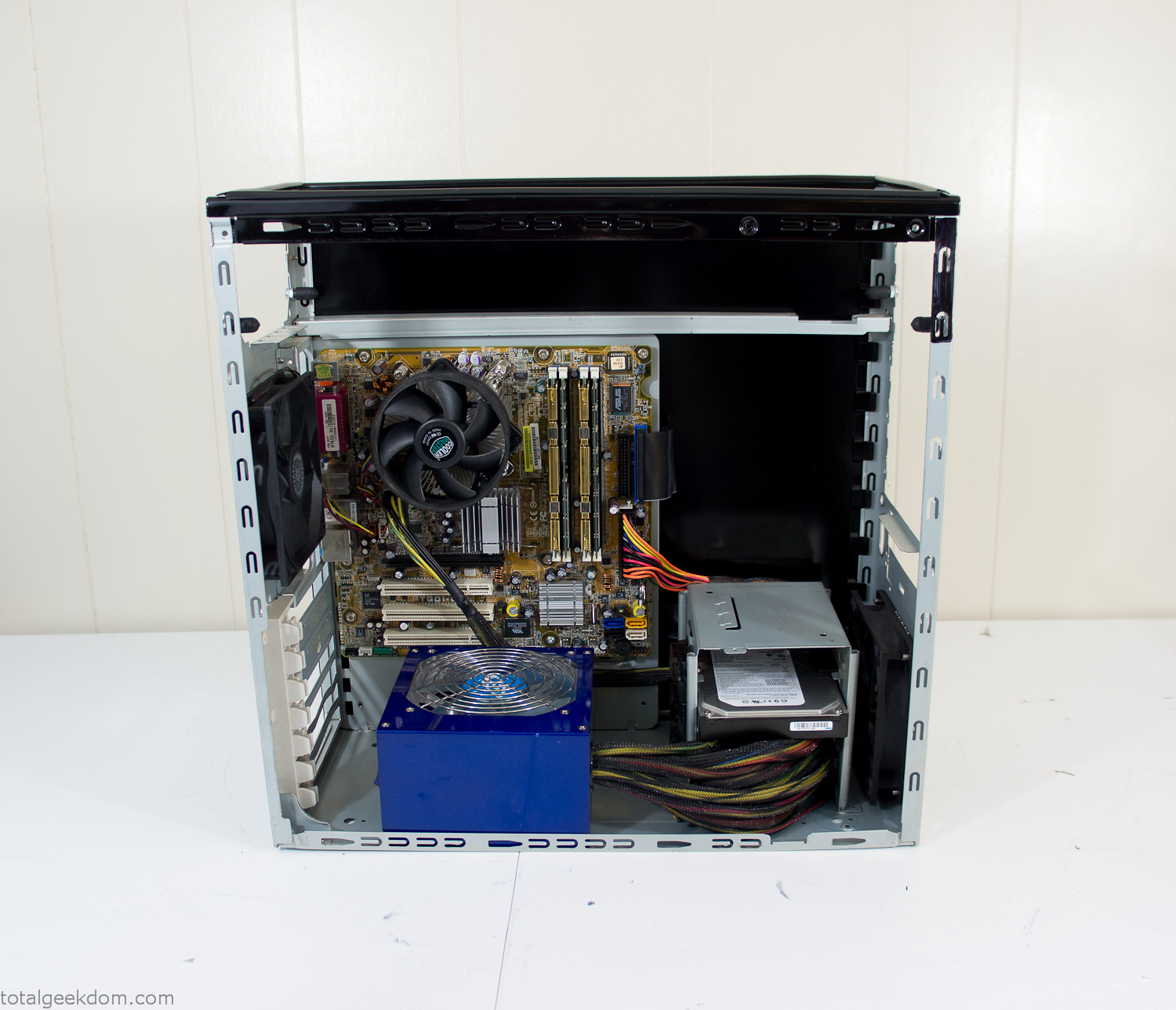
After finishing with some initial tests I decided to completely strip the case down and start removing all the unnecessary brackets and pieces inside of the case. Like most computer cases all the internal brackets and mounts are riveted together, so I drilled all the rivets out of the components I wanted to remove and pulled them out. The gutted case looked pretty barren after being stripped.
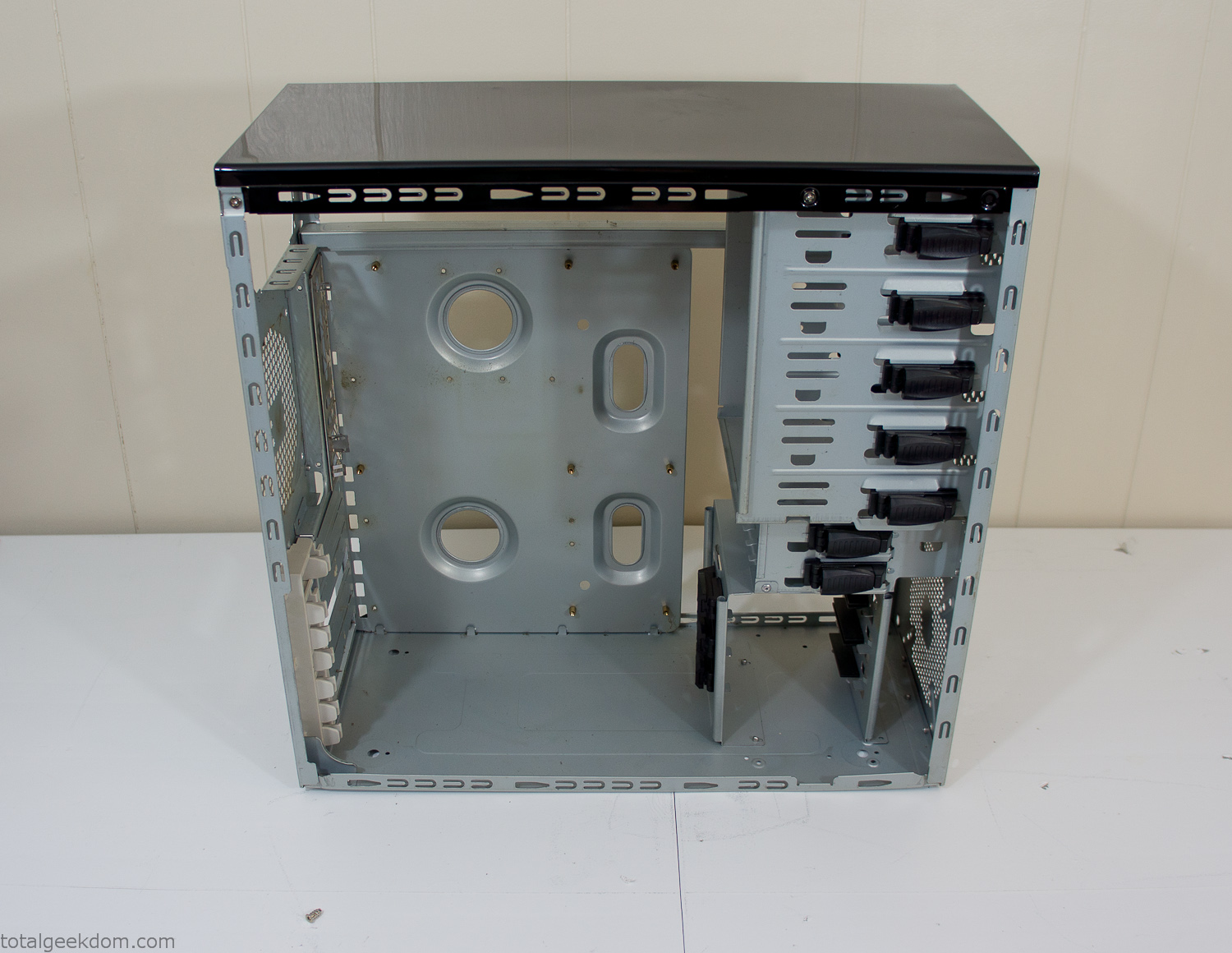
Empty Computer Case
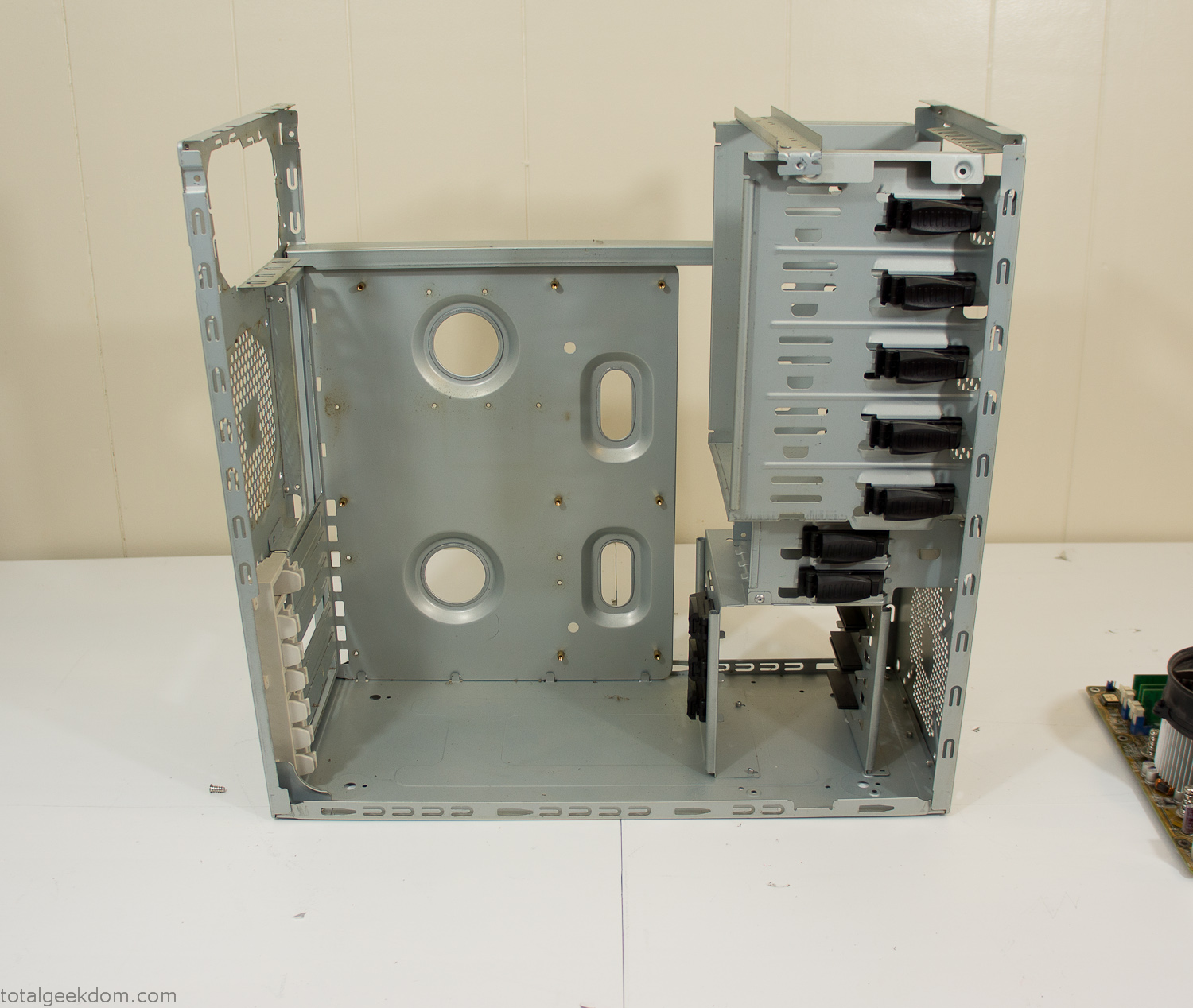
Dismantled Computer Case

Stripped Computer Case
In keeping with my original plan of having the computer blended with the organic grass I wanted it to be easy to see the inner workings of the computer and also the soil from the grass growing above. I needed something that was translucent, which left me with either glass or acrylic/polycarbonate as my options. I ended up choosing acrylic because I was able to find a cheap, used, die-cast model car display case top that was the perfect dimensions for the top of the case. Couldn’t go wrong for 5 bucks.
I test-fit the acrylic over the top of the computer case and marked my layout on the top of the case. My plan was to cut open the top of the computer case and insert the acrylic display case into the section I cut out. To cut open the top of the computer case I drilled a hole as a starting point and then used tin snips to cut through the thin gauge metal.
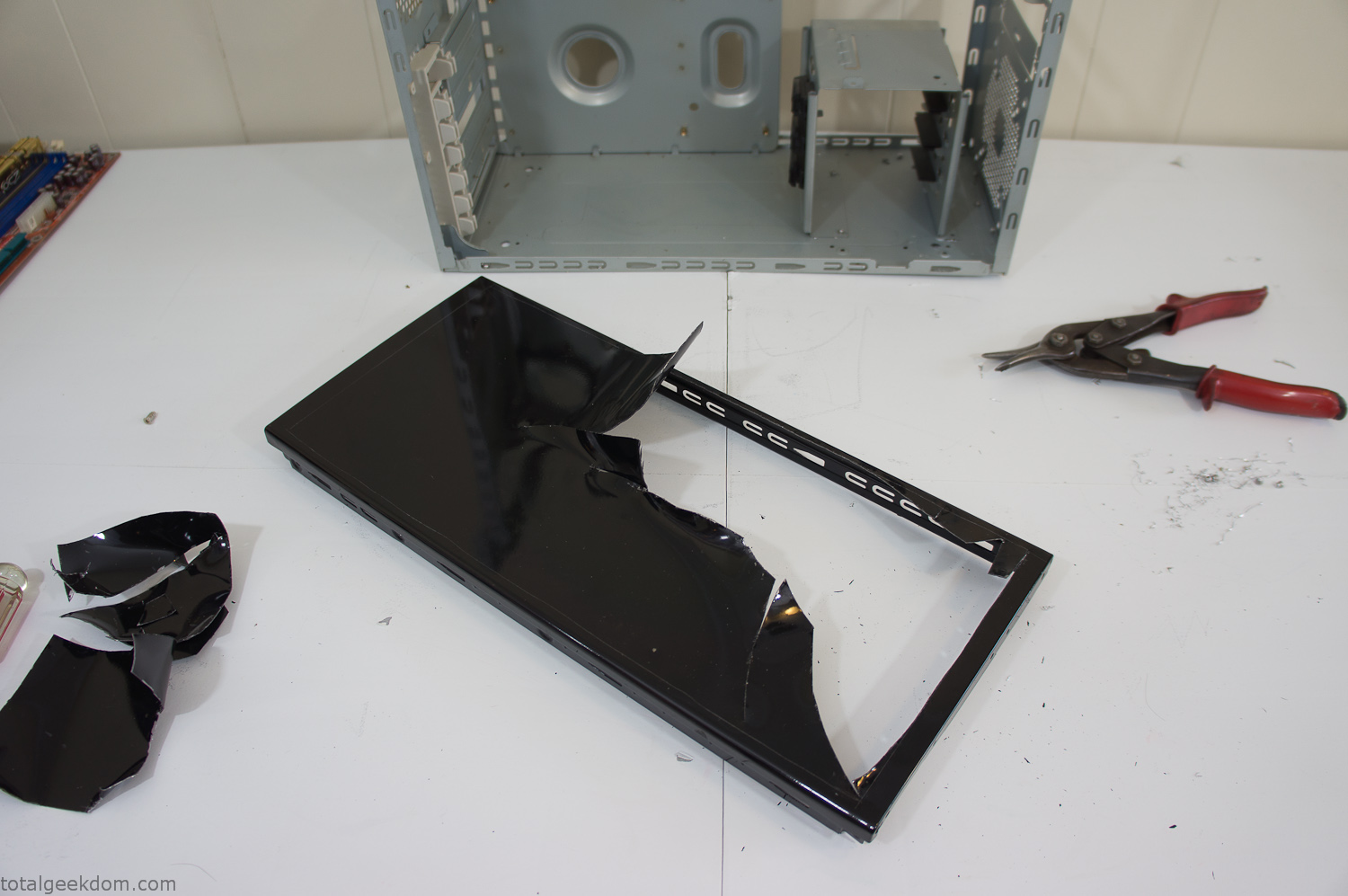
Computer Case Lid Modding
Once I had the metal opening cutout, I needed something to put along the edges of the freshly cut opening to create a clean and finished look. For $2 I was able to find some black, car-door-edge, plastic molding that worked perfectly.
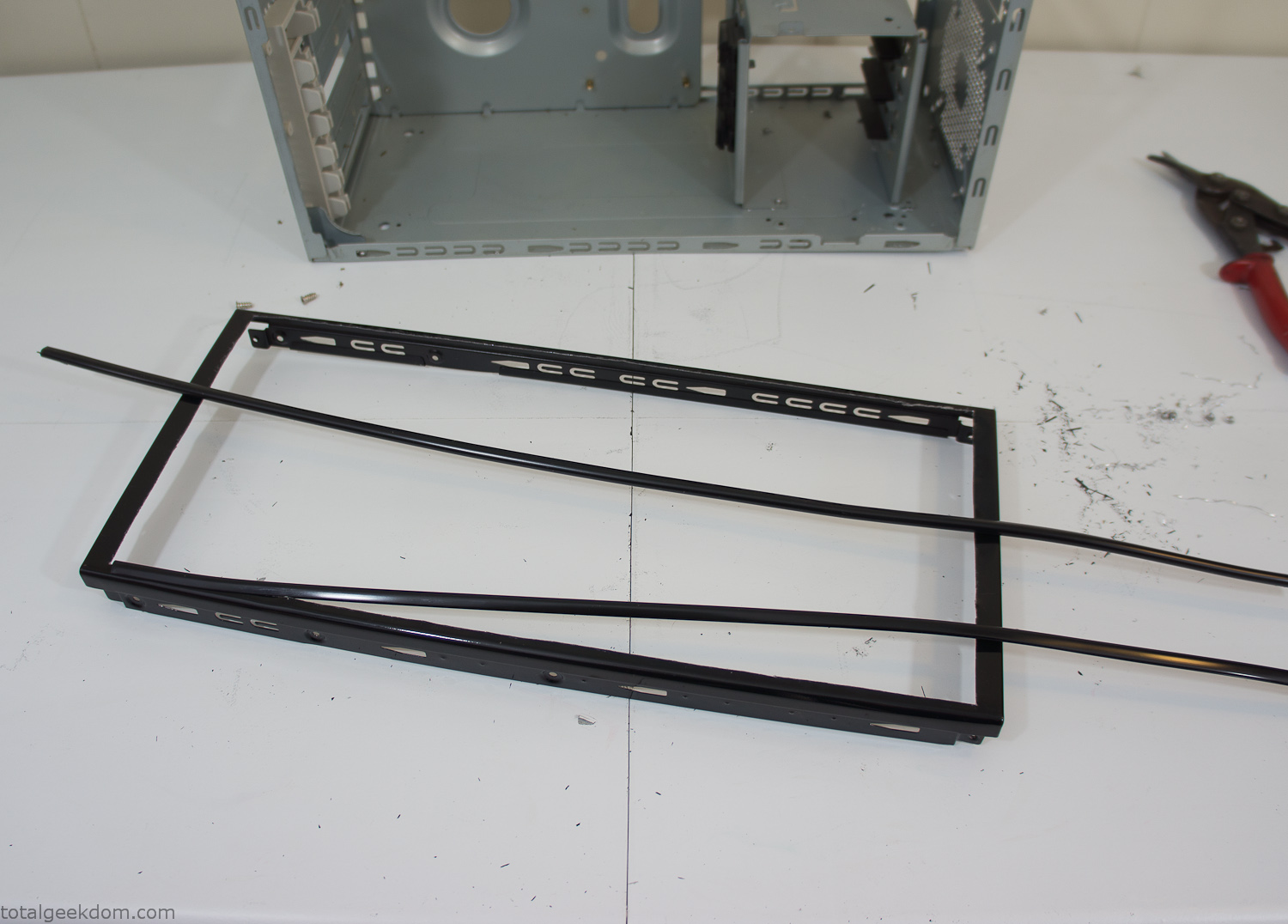
Modified Computer Case Lid
After getting the opening of the top of the computer handled and the acrylic case properly fitted, I moved onto some more testing with soil in the acrylic and the computer running. I wanted to see what kind of heat transfer I would get and how it would affect the soil temperature. I knew that using acrylic over glass would make it a little more difficult to heat the soil as acrylic is not that good at transferring heat. Luckily though I didn’t really need to alter the soil temperature that much, I just needed a little extra heat. Testing showed that heat transfer with just the single acrylic display case as my soil container was slow. So I decided to add some acrylic tubes. This would allow more surface are for soil to acrylic contact and also give me an area where I could add a mixed substrate to allow for soil drainage.
I went online and found a 3ft long section of 2 1/4″ clear acrylic tubing for $8 dollars. I wanted to add a couple of hanging cylinders off the main of the acrylic display case in the top of the computer case. To do this I needed to cut holes into the bottom of the display case. Cutting holes in acrylic is not always easy, it’s likely to chip and craze at the edges. To get around this I used a buildup of masking tape on both sides of the acrylic, to provide a little bit of resistance and strength. I placed the acrylic display case back into the computer and marked my layout for the tubes. I needed to leave clearance for the CPU cooler, power supply and hard drive mount.
After marking the layout, I used an air-powered pencil grinder and carbide tipped bit and cut through the acrylic case along my marked lines. After the initial shape was cutout I used a tube piece as a template and slowly worked on grinding the holes as perfectly round as I could get them so that the tube had a snug fit all the way around. The fit is pretty important as the acrylic cement that I used needs there to be a tight fit so that the acrylic can bond correctly.
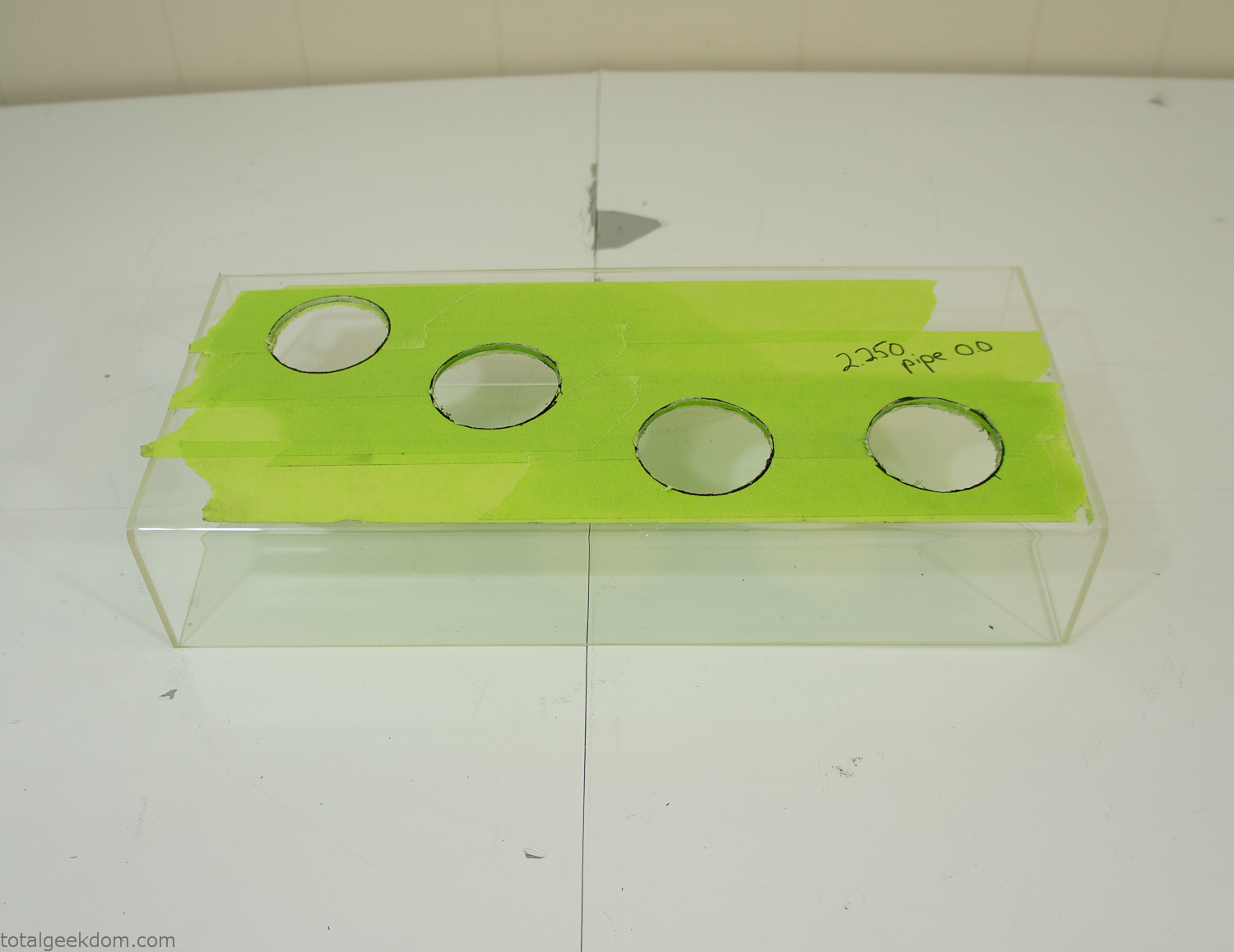
Acrylic Case Modifications
I placed the tubes into the acrylic case and mounted it in the computer and test fit the placement and height of the tubes. After getting everything lined up and oriented correctly I moved towards bonding the acrylic together. Using a needle dropper applicator I applied the cement to all the joints. After letting it set overnight I came back the next night and applied a thin coating of clear silicone caulk around all the joints just to ensure they were completely water tight
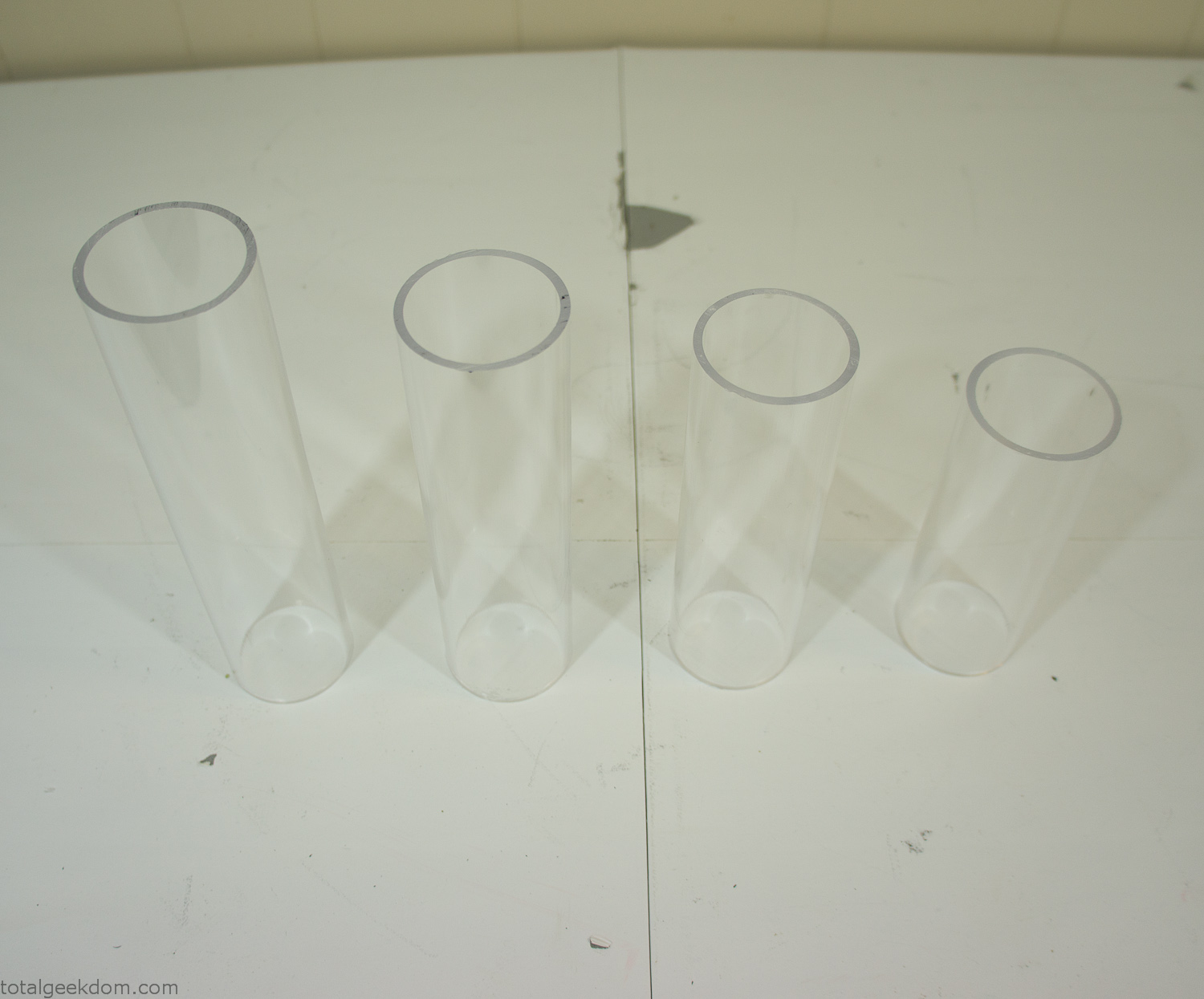
Acrylic Tubes
The next step was sealing up the bottom of the acrylic tubes. I looked at a couple of different options before realizing that the discs I had cut out of the acrylic case to fit the tubes would be almost the perfect size. Using a bench grinder and a test piece of tube I slowly ground each disc to the perfect size for a tight fit all the way around. I placed the clear acrylic discs into the bottom of each tube and repeated the same cementing and silicone caulking procedure to ensure they were water-tight. After a couple of days’ worth of drying I tested the case by filling it with water overnight and checking in the morning to make sure that no leaks had popped up.
In order to hold the weight of the acrylic case after adding soil, I drilled and installed a machine screw with a rubber cap at each corner of the computer case to bear the weight of the acrylic case.
Once all the work was done with the acrylic case section I started reinstalling all the components. The motherboard, hard drive and power supply were added and then wired up.
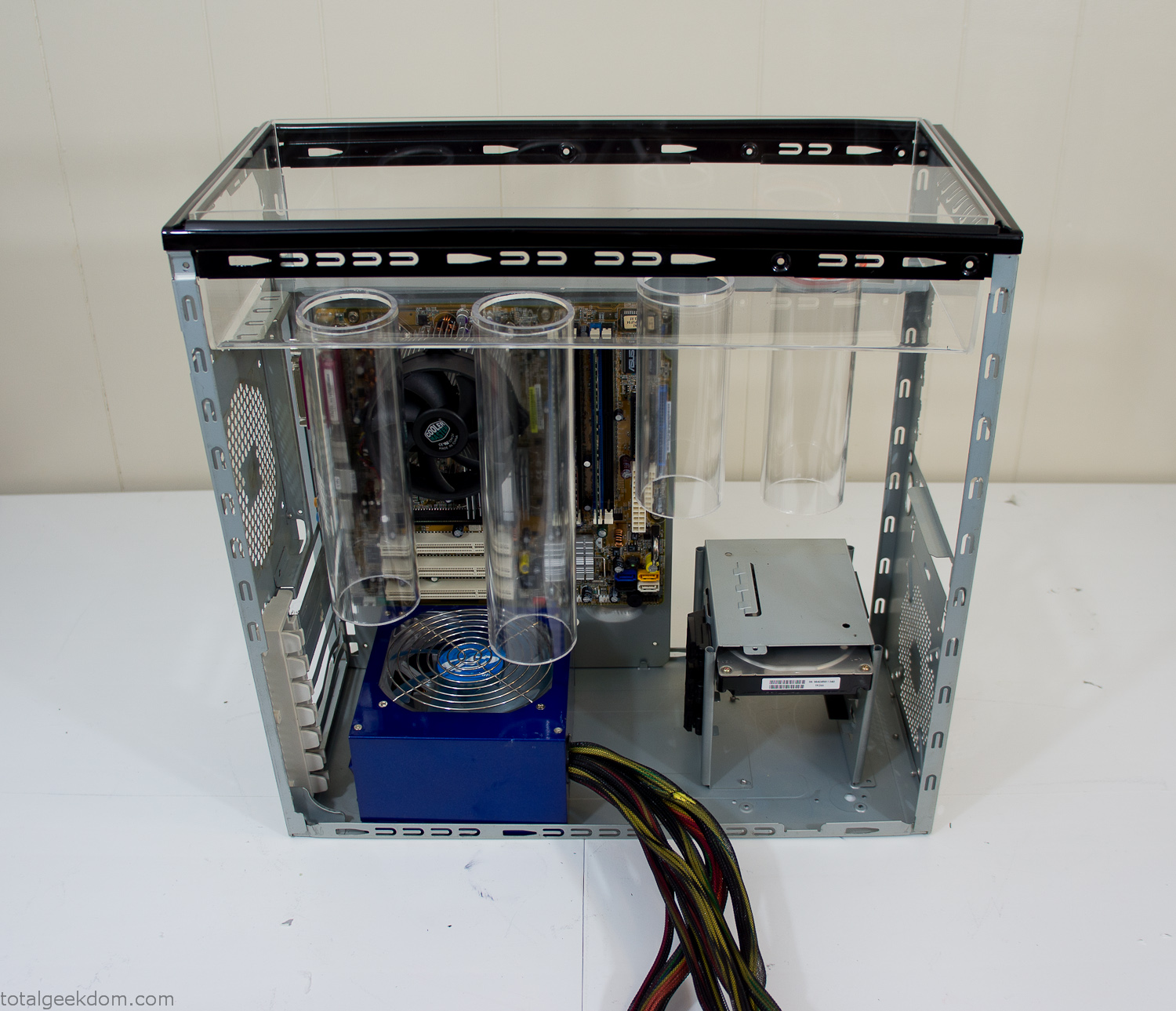
Mocked Up Computer Case
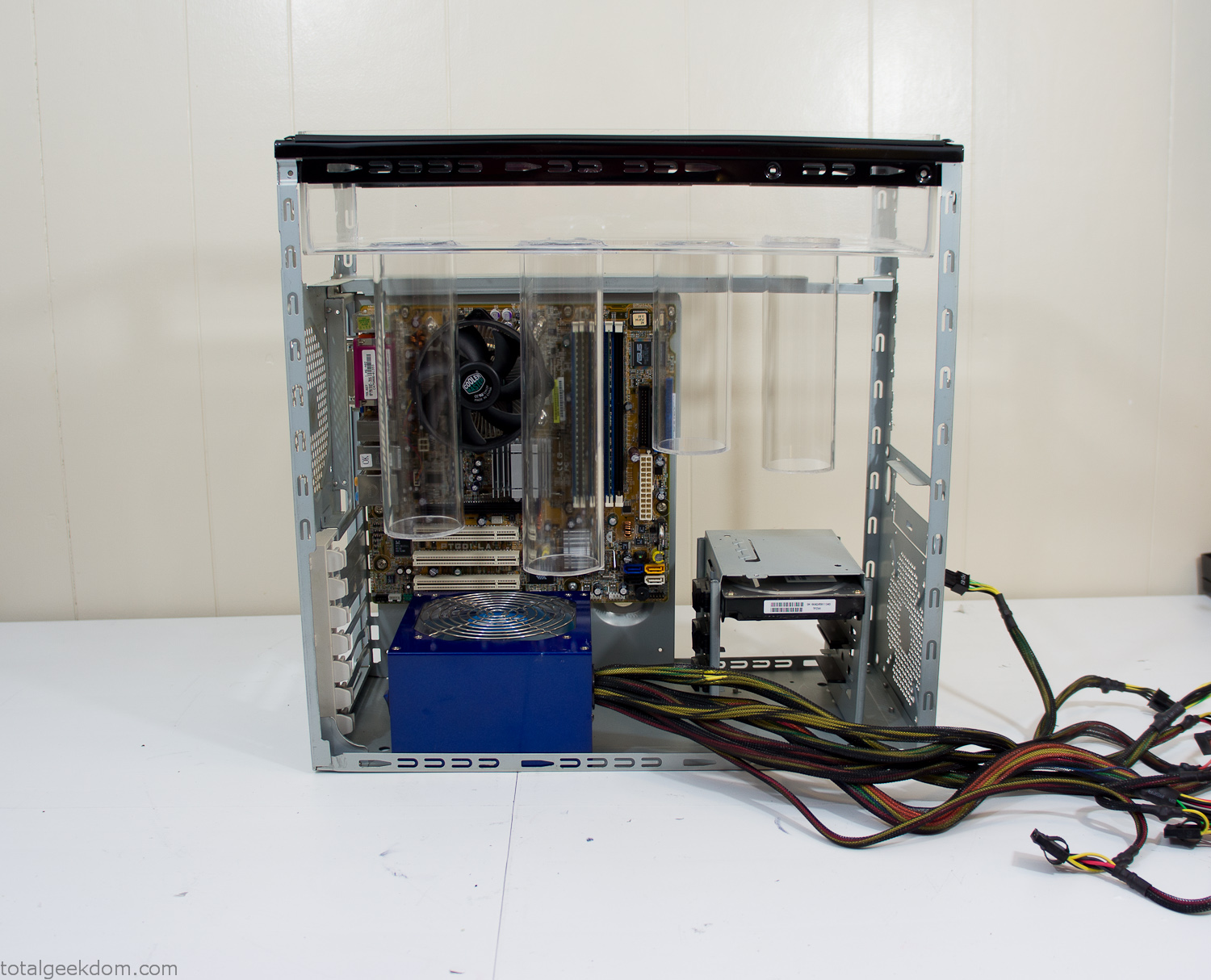
Power Supply Mockup
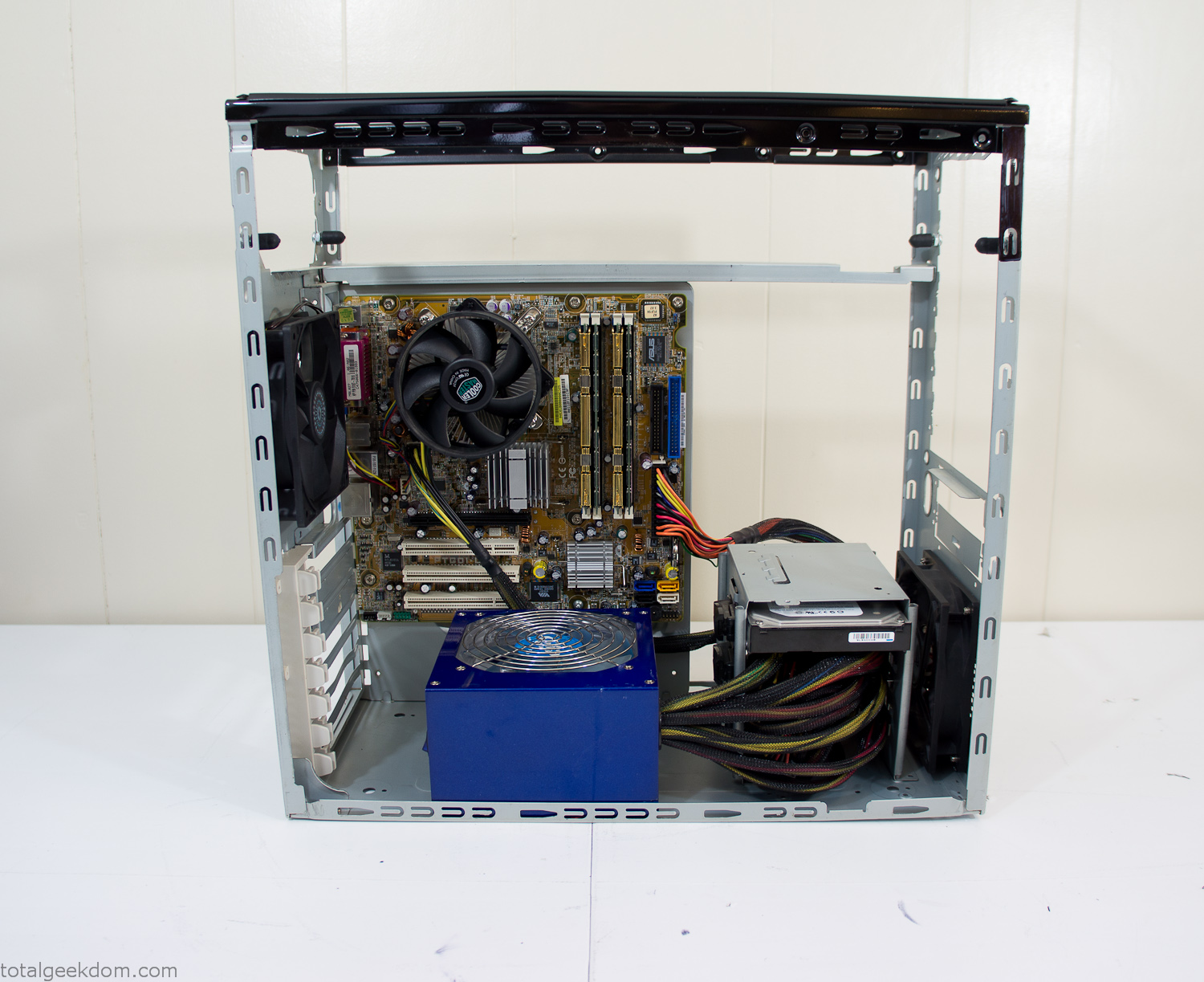
Computer Components Wired
Case Panel Installed
At this point all that was left was to make a clear panel for the side of the case. I had some left over acrylic sheets from a different project that were really close to the right size, after test fitting, marking and cutting I then had a clear side panel to see into the case. (I left this off for the pictures because it caused a reflection)
The final step was filling the case with soil and adding some wheatgrass. I had been test growing other samples of wheatgrass during the build process. So I had already a couple of different patches of grass growing. I tried to keep the soil level just below the top of the acrylic case edge to make it a little more seamless.
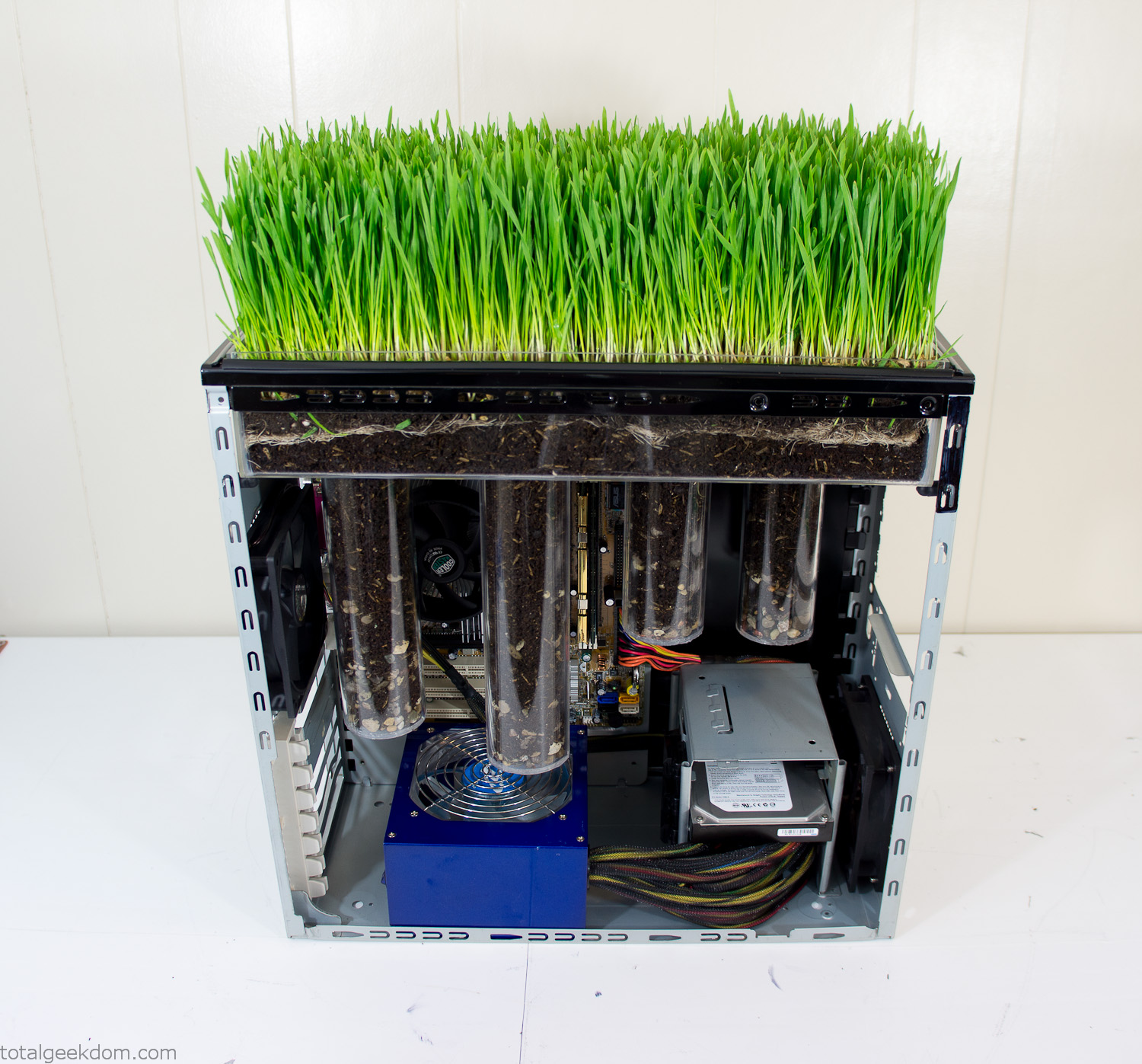
Grass Planted in Computer
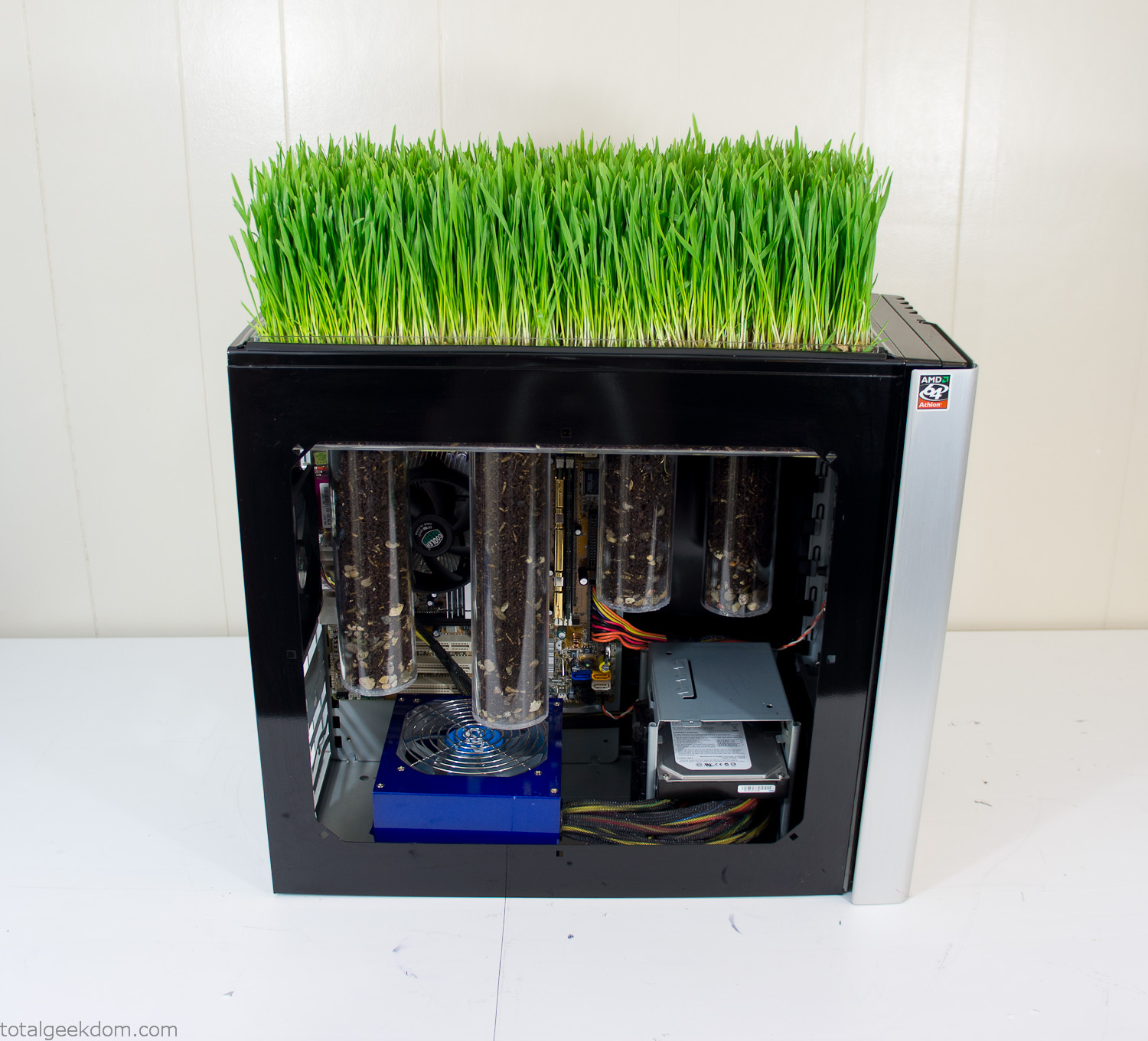
Grass and Case Panel Installed

Grass in Computer
For the computer itself I ended up installing Windows as well as Linux in a dual boot setup. Since the computer was going to be used by my son as something to play with I figured I should put both on there so he can tinker with them and learn as he goes. Besides, for important life decisions like picking an OS (Operating System) I think any good parent should present the options and then let their kid decide for themselves.
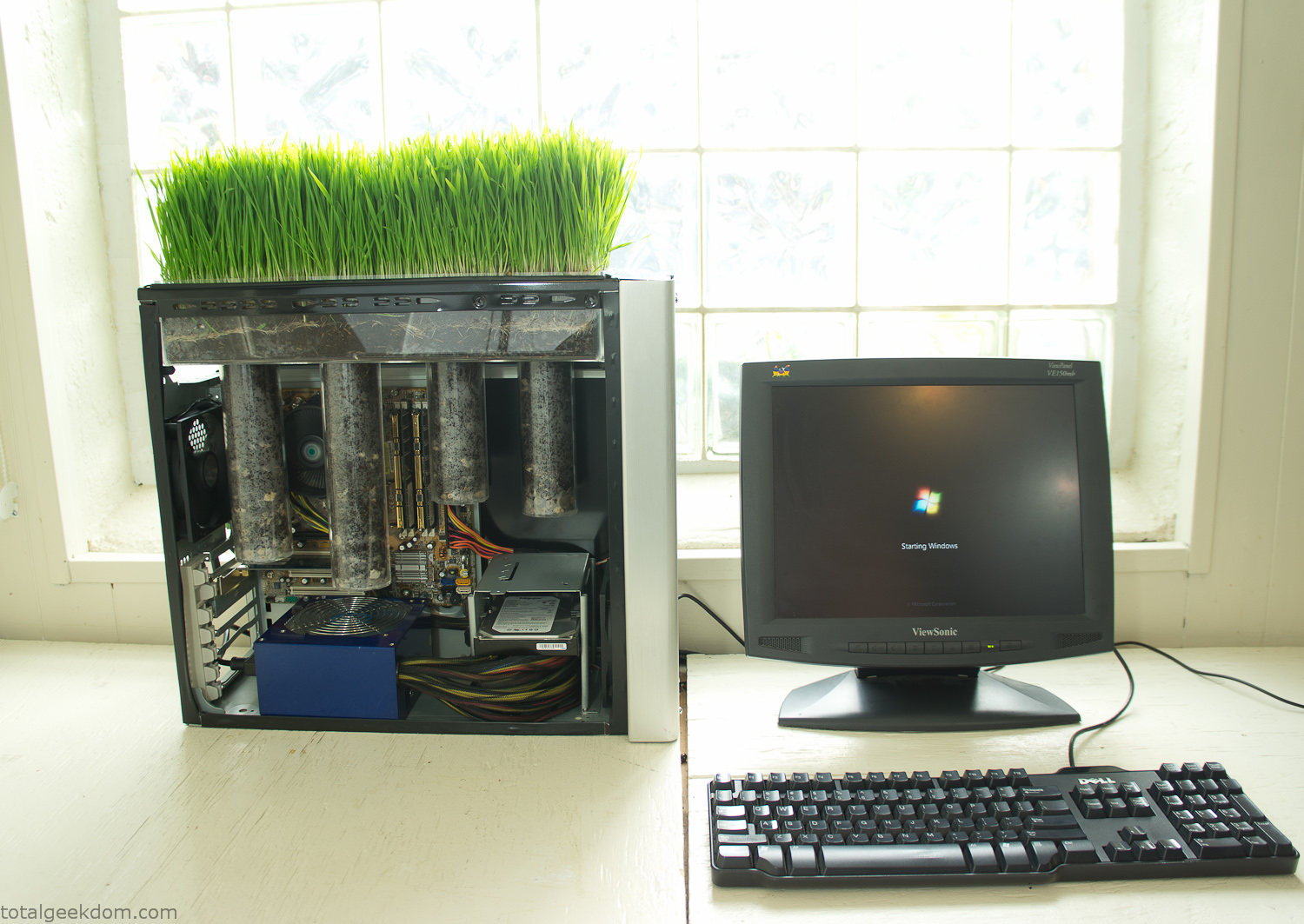
Starting Windows
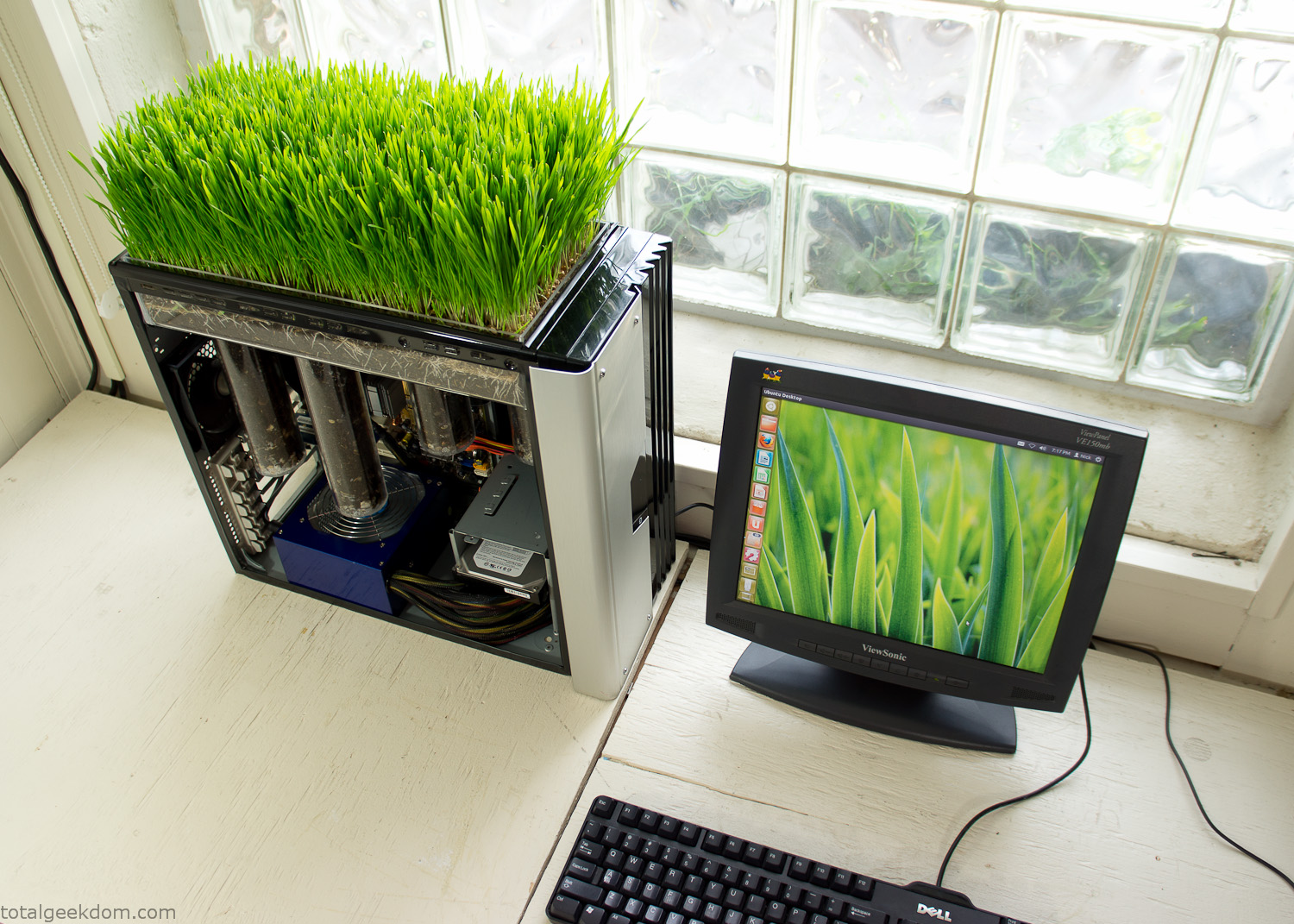
Linux Running
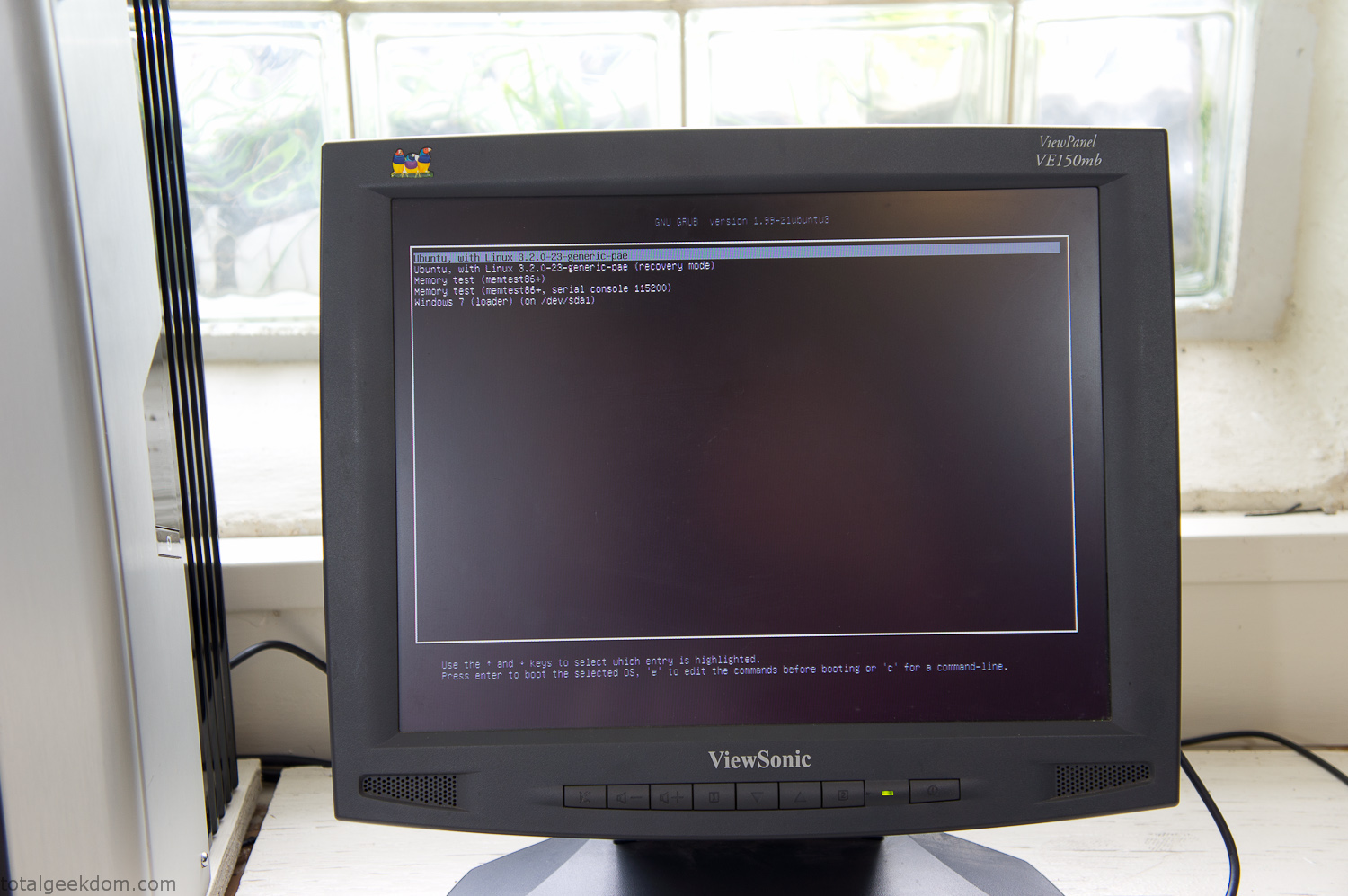
Dual Boot Screen
In the end I’m happy with the result of the project. It’s been fun experimenting with growing wheatgrass and I like how the natural look of grass is blended with the very modern, inorganic case.
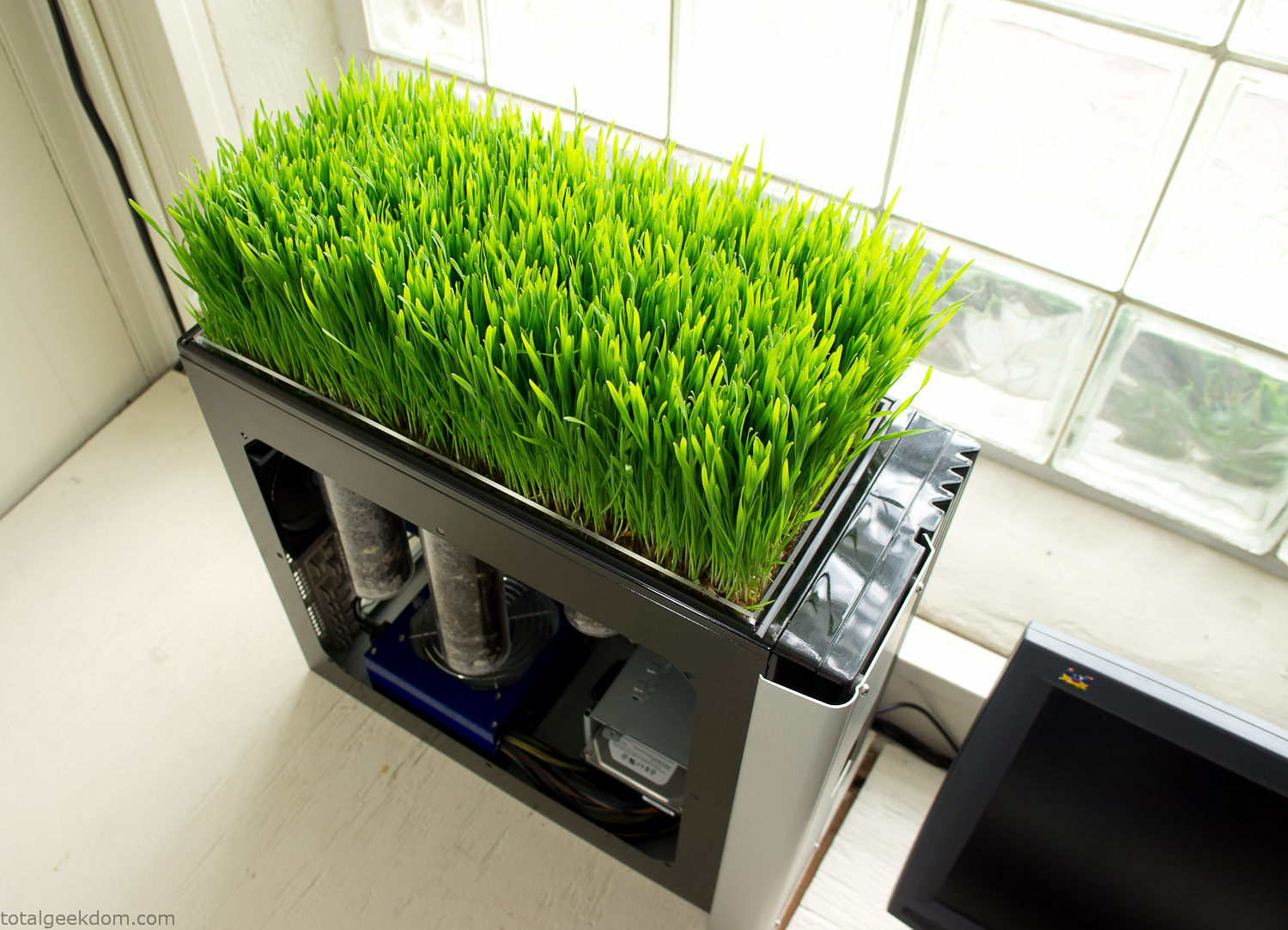
Computer Grass Growing
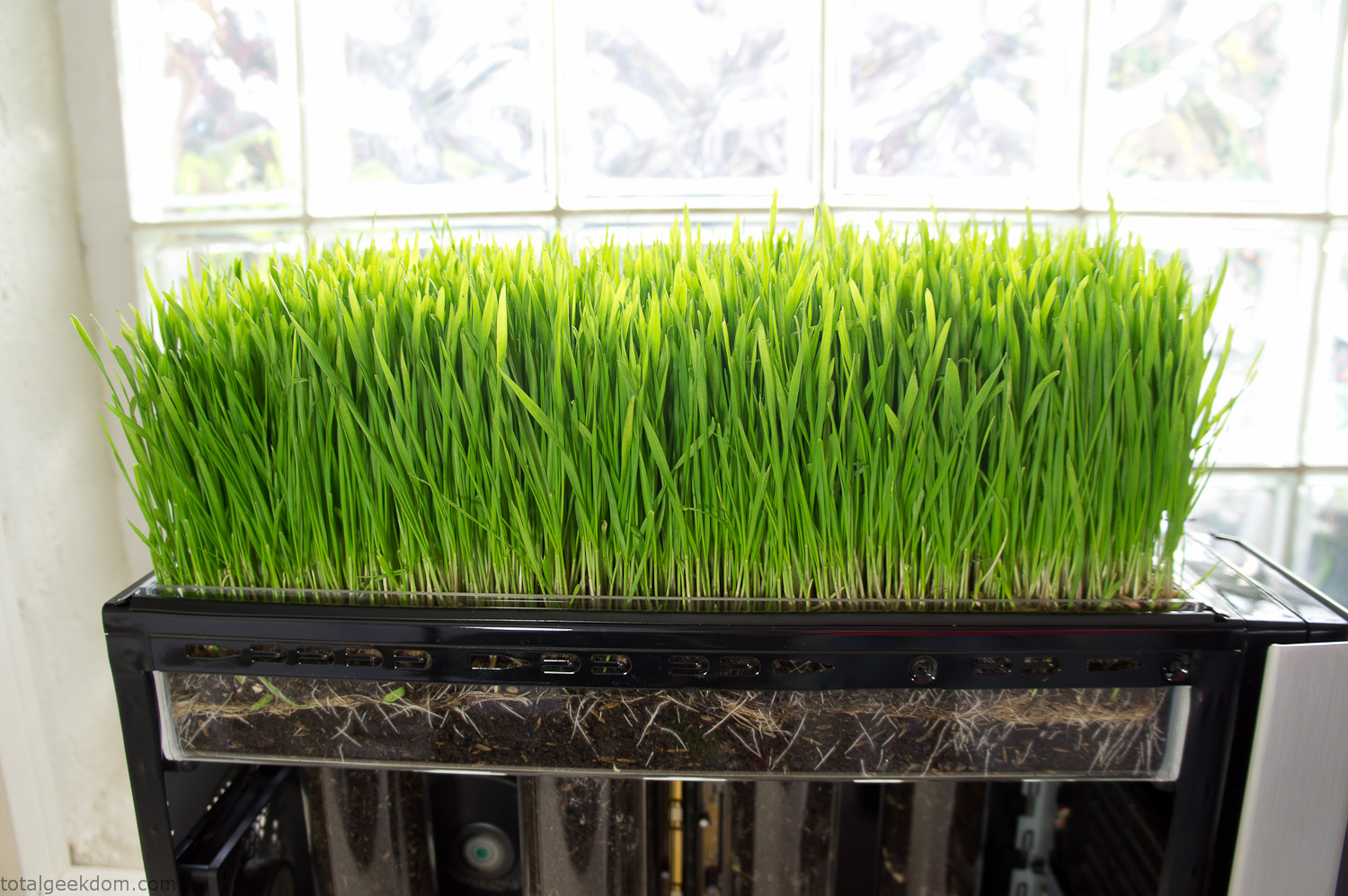
Grass in Computer Section
Notes
Temperature Testing
In testing the case temperature versus the soil temperature I found it was easiest to control the case temperature by using a variable fan speed control on both the inlet and outlet fans. By turning the fan speed down I could increase the temperature inside the case and correspondingly raise the soil temperature.
In order to maximize output of heat during these tests I used Prime95 to run the CPU at 100% load.
Using this method to control the case and soil temperature I played around with adjusting the soil temperature and then tracking the rate of growth of the Wheatgrass. The target temperature for peak growth seemed to fall around 66°F (19°C).
Using the fans to control the case temperature allowed me to vary the temperature inside the case from a low of 75°F (24°C) to a high of 91°F (33°C). In order to achieve the desired increase in soil temperature, I had to run the case temperature toward the higher end of the scale.
When the soil temperature was too high, the growth of the wheatgrass would slow.
Wheatgrass
The wheatgrass I used for my tests was nothing special, it can be found as seeds (berries) in a lot of health food stores and it grows relatively easily.
Caring for the wheatgrass is just a matter of keeping it watered. It’s a pretty easy plant to work with and doesn’t require any special skills.
Wheatgrass is often used as a nutritional supplement; it can be juiced and mixed into smoothies and other beverages. I plan on harvesting some of the grass and making some juices.
Plant Options
While wheatgrass offers a nice, attractive and easily grown option I do plan on trying other plants as well in the future. Since I already have the “planter” built all I have to do is add a different plant and see how it goes. I’m sure there will be some plants that don’t like the lower light environment, but it will be fun experimenting with other plants as well and seeing how they take.
Materials
Donated Computer- Free
Clear Acrylic Display Case- $5
Clear Acrylic Tube- $5
Plexiglass Side Panel- Free
Total- $10
Bio Computer Running
 29.2k
29.2k
 13.2k
13.2k 7.1k
7.1k

 2.1k
2.1k 813
813 2.6k
2.6k
Comments 54,448
слоты без депозита с бонусом фриспины без вейджера за регистрацию
бонус за регистрацию который можно сразу снять где дают бесплатные фриспины при регистрации без депозита
контракт на год на сво служба по контракту сво
I appreciate how this post manages to keep a considered and conversational tone while still presenting the topic in a easy-to-follow and organized way, which helps make the content feel more engaging and easier for readers to connect with on a personal level.
BEST FREE PORN VIDEOS
Знакомства Луганск ТГ
деньги за регистрацию с выводом сразу бездепозитный фриспины за регистрацию с выводом без пополнения
игровые автоматы бонус 1000 рублей за регистрацию без депозита слоты с фриспинами без депозита
бездепозитный бонус при регистрации бездепозитный бонус с выводом без пополнения
спины за регистрацию в подарок без депозита bezdepov
สล็อตเว็บตรง
สล็อต คืออะไร? รู้จักเกมยอดนิยมออนไลน์
สล็อตออนไลน์ เป็นรูปแบบความบันเทิงที่เข้าถึงได้ผ่านอินเทอร์เน็ต ผู้เล่นสามารถเข้าถึงเกมผ่านมือถือหรือคอมพิวเตอร์ โดยแต่ละเกมมีธีมและฟีเจอร์เฉพาะตัว
หลักการทำงานของสล็อต
สล็อตในระบบออนไลน์ทั่วไป ทำงานผ่าน RNG หรือ Random Number Generator ซึ่งกำหนดผลลัพธ์ของแต่ละรอบแบบสุ่ม เมื่อสัญลักษณ์เรียงตรงตามเงื่อนไข ระบบจะประมวลผลรางวัลตามเงื่อนไข
รู้จักฟีเจอร์เกมสล็อต
เกมสล็อตรุ่นใหม่ มาพร้อมระบบโบนัสที่แตกต่างกัน เช่น Wild, Scatter, Free Spins และตัวคูณรางวัล โดย Wild มีหน้าที่ทดแทนสัญลักษณ์ที่กำหนด ส่วน Scatter มักเกี่ยวข้องกับการเปิดโบนัส ทั้งนี้รายละเอียดต้องตรวจสอบจากตารางข้อมูลเกม
เข้าใจค่า RTP ของเกมสล็อต
RTP หรือ Return to Player คือค่าทางสถิติที่ใช้แสดงผลตอบแทนระยะยาว ตัวอย่างเช่น RTP 96% ไม่ได้หมายความว่าทุกรอบจะได้รับรางวัล
คำว่า สล็อตแตกง่าย จึงไม่สามารถใช้รับประกันผลการเล่น เพราะผลลัพธ์แต่ละรอบไม่สามารถคาดการณ์จากรอบที่ผ่านมาได้
เรียนรู้เกมผ่านโหมดทดลอง
ฟีเจอร์ทดลองเกม ช่วยให้ผู้เล่นทำความเข้าใจฟีเจอร์ต่างๆ ก่อนตัดสินใจ โดยสามารถเรียนรู้การทำงานของสัญลักษณ์ อย่างไรก็ตาม ผลจากการทดลองไม่ได้บอกว่ารอบถัดไปจะชนะหรือแพ้
สล็อตเว็บตรงและการเลือกเว็บไซต์
ก่อนเลือกแพลตฟอร์มสล็อตออนไลน์ ควรศึกษาข้อมูลเว็บไซต์อย่างละเอียด รวมถึงข้อกำหนดบัญชีและค่าธรรมเนียม
FAQ เกี่ยวกับสล็อต
**สล็อตมือถือแตกต่างจากคอมพิวเตอร์หรือไม่?**
ความแตกต่างหลักอยู่ที่หน้าจอและการควบคุม ไม่ได้หมายความว่าอุปกรณ์ใดมีโอกาสชนะสูงกว่า
บทสรุปเกมสล็อตออนไลน์
สล็อตออนไลน์มีรูปแบบการเล่นและระบบรางวัลแตกต่างกัน การทำความเข้าใจความผันผวนและฟีเจอร์ต่างๆ ช่วยให้เข้าใจข้อจำกัดของเกมมากขึ้น และควรมองเกมสล็อตเป็นความบันเทิงมากกว่าช่องทางสร้างรายได้
https://clothoff.co.il/blog/
фриспины бездеп спины за регистрацию без депозита
ставки на спорт с бонусом за регистрацию без первого депозита где дают деньги за регистрацию с выводом без пополнения
Crie Letras Diferentes para copiar e colar gratuitamente com facilidade.
Escolha entre diversos estilos de letras, símbolos e molduras para personalizar nomes, bios de redes sociais e nicks de jogos.
O site Letras Diferentes Ja permite transformar
textos comuns em opções criativas para destacar seu perfil e deixar suas mensagens com um visual original.
Combine diferentes formatos e caracteres para encontrar o estilo que combina com você.
Tudo funciona online, sem cadastro e sem custo, oferecendo
uma maneira prática de personalizar textos para uso em plataformas digitais.
Выбирайте [url=https://ekrany-dlya-proektorov01.ru/]экраны для проекторов купить[/url], чтобы получить качественный и надежный [экран для проектора|проекционный экран|экран проектора], идеально подходящий для вашего дома или офиса.
Важными аспектами при покупке являются материал, формат и способ крепления экрана.
В свою очередь, узкоплёночные экраны обеспечивают более яркое и контрастное изображение.
Часто используют экран с диагональю от 100 до 300 дюймов, в зависимости от условий.
Подводя итог, можно сказать, что правильный выбор экрана для проектора зависит от множества факторов.
ищу модель москва ищу моделей по москве
lan
Современные интерьеры отлично дополнят [url=https://www.elitnaya-dvukhyarusnaya-krovat.ru/]элитная двухъярусная кровать[/url], обеспечивая комфорт и стильный внешний вид.
Современные дизайнеры все чаще выбирают элитные двухъярусные кровати для оформления спальных зон . Эта мебель отлично сочетает в себе функциональность и стиль, создавая уютную атмосферу в любой комнате. Она подходит для тех, кто ценит комфорт и эстетичность в интерьере.
Является ли эта кровать идеальным решением для вашего интерьера? Благодаря продуманному дизайну, она позволяет сэкономить место в небольших квартирах и домах. Кроме того, такие кровати обычно изготавливаются из высококачественных материалов, что обеспечивает их долговечность.
Дизайн элитных моделей отличается уникальностью и изящностью . Кроме эстетических преимуществ, она обладает высокой степенью безопасности, что особенно важно для детей. Разнообразие материалов и фурнитуры позволяет выбрать кровать, идеально подходящую под любой интерьер.
Консультация с дизайнером поможет подобрать наиболее подходящий вариант. Это гарантирует долгий срок службы и сохранение великолепного вида. В целом, такие кровати остаются достойным вложением в комфорт и стиль любой квартиры или дома.
The rewards system here is actually generous. I managed to get a decent bonus just by signing up. It is a great place for both new and pro players. idkayaraya
Выбирайте [url=https://ekrany-dlya-proektorov01.ru/]проекционный экран для проектора[/url], чтобы получить качественный и надежный [экран для проектора|проекционный экран|экран проектора], идеально подходящий для вашего дома или офиса.
При выборе экрана следует учитывать его тип, размеры и материал.
Важно выбрать тип, который лучше всего соответствует вашим задачам и бюджету.
Часто используют экран с диагональю от 100 до 300 дюймов, в зависимости от условий.
Некоторые экраны оснащены антибликовым покрытием и светозащитными технологиями.
https://clothoff.co.in/blog/
Североуральск купить закладку Ecstasy: Pink Heart 200mg спайс в смоленске Купить Кокаин, Марихуану, Бошки, Мефедрон Будапешт купить Скорость a-pvp
สล็อตเว็บตรง
คู่มือทดลองเล่นสล็อต TKBNEKO สำหรับผู้สนใจ PG Slot
TKBNEKO รวบรวมข้อมูลเกี่ยวกับ PG Slot และเกมสล็อตหลายรูปแบบ ผู้สนใจสามารถทำความรู้จักเกมผ่านมือถือหรือคอมพิวเตอร์ โดยควรตรวจสอบรายละเอียดและเงื่อนไขของแต่ละเกมก่อนเริ่มใช้งาน
เกมสล็อตออนไลน์มีรูปแบบและธีมที่แตกต่างกัน เช่น โลกแฟนตาซี การสำรวจ และเกมธีมโชคลาภ บางเกมมีฟีเจอร์หมุนฟรี ตัวคูณรางวัล และสัญลักษณ์โบนัส ซึ่งมีกติกาเฉพาะของแต่ละเกม
ทดลองเล่นสล็อตฟรีช่วยให้เข้าใจวิธีเล่นโดยไม่ใช้เงินจริงในโหมดทดลอง ผู้เล่นสามารถดูรูปแบบการจ่ายรางวัลและทดลองฟีเจอร์ต่างๆ ก่อนตัดสินใจว่าจะเล่นต่อหรือไม่
การทำความเข้าใจค่า RTP เป็นอีกขั้นตอนสำคัญก่อนเลือกเกมสล็อต รวมถึงระดับความผันผวนและตารางการจ่ายรางวัล ทั้งนี้ RTP เป็นค่าเฉลี่ยทางสถิติระยะยาว ไม่สามารถใช้ทำนายผลของแต่ละรอบได้
หากต้องการสมัครสมาชิก TKBNEKO ควรตรวจสอบข้อมูลเว็บไซต์ให้รอบคอบ โดยพิจารณาใบอนุญาต นโยบายข้อมูลส่วนบุคคล และเงื่อนไขการเงิน ไม่ควรเชื่อข้อความอ้างว่าแตกง่ายหรือทำกำไรได้แน่นอน
ผู้เล่นควรกำหนดวงเงินและเวลาการเล่นไว้ล่วงหน้า ไม่ควรไล่ตามเงินที่เสียไปหรือมองเกมสล็อตเป็นแหล่งรายได้
สรุปแล้ว การทดลองเล่นสล็อต TKBNEKO ช่วยให้ผู้สนใจศึกษาระบบเกม PG Slot ได้ก่อน การตรวจสอบเงื่อนไขและเล่นเพื่อความบันเทิงเป็นสิ่งสำคัญ
Анфитомин купить клад Курчатов Купить Кокаин, Марихуану, Бошки, Мефедрон Кандалакша купить закладку Метадон, чистота 99%
знакомства днр тг тсг
Закладки спайс в Армавире Красноярск купить Ecstasy: Red Stars 280 mg Купить Кокаин, Марихуану, Бошки, Мефедрон Нюрба купить марихуану
Москва Котловка купить Мефедрон в мелких камнях/муке Москва Красносельский купить MDPV Купить Кокаин, Марихуану, Бошки, Мефедрон Самарская область купить Марки LSD
Австрия купить Триптамины Козельск купить Гидропоника Afgan Kush Купить Кокаин, Марихуану, Бошки, Мефедрон Ипатово купить закладку Ecstasy: Red Stars 280 mg
бонусы за регистрацию без депозита с выводом игровые автоматы с бездепозитным бонусом за регистрацию
https://clothoff.mx/blog/
สล็อตเว็บตรง
TKBNEKO: รู้จัก 15 เกม PG SOFT ผ่านเรื่องราว ตัวละคร และธีมที่แตกต่าง
เกมแต่ละเกมมีสิ่งที่ทำให้คนจดจำแตกต่างกัน บางเกมดึงดูดความสนใจด้วยบุคลิกของตัวละคร บางเกมนำเสนอภาพและสัญลักษณ์ที่มีเอกลักษณ์ ส่วนบางเกมชวนให้ทำความรู้จักผ่านบรรยากาศของการผจญภัย จุดเริ่มต้นของการสำรวจเกมจึงอาจเป็นธีม งานภาพ หรือเรื่องราว ไม่ใช่เพียงชื่อที่ปรากฏอยู่บนหน้าปก
TKBNEKO นำแนวคิดนี้มาใช้ในการจัดแสดงคอลเลกชันเกม PG SOFT จำนวน 15 เกม โดยให้ความสำคัญกับธีม ตัวละคร และข้อมูลที่สำรวจได้ง่าย ผู้เข้าชมสามารถดูภาพรวมของคอลเลกชัน ค้นหาชื่อเกม หรือเลือกหมวดที่สนใจ ก่อนเข้าไปทำความรู้จักรายละเอียดของแต่ละเกมเพิ่มเติม
รู้จักคอลเลกชัน 15 เกมผ่านสามหมวดหลัก
คอลเลกชันของ TKBNEKO แบ่งออกเป็นสามหมวด ได้แก่ ไพ่นกกระจอก โชคลาภ และผจญภัย การแยกเกมตามธีมช่วยให้ผู้เข้าชมมองเห็นภาพรวม และค้นหากลุ่มที่สนใจได้โดยไม่จำเป็นต้องเปิดดูทุกเกม
Mahjong Ways และ Mahjong Ways 2 เป็นสองเกมที่อยู่ในหมวดไพ่นกกระจอก ทั้งสองชื่อถูกจัดไว้ในกลุ่มเดียวกันเพื่อให้สำรวจได้ต่อเนื่อง สำหรับ Mahjong Ways เว็บไซต์ยังนำเสนอหัวข้อ “เมื่อประเพณีมีชีวิต” เพื่อพาไปทำความรู้จักโลกของเกมผ่านแนวคิดและภาพที่เกี่ยวข้องกับไพ่นกกระจอก
หมวดโชคลาภเป็นกลุ่มที่มีจำนวนเกมมากที่สุด รวมทั้งหมดแปดเกม ได้แก่ Fortune Tiger, Lucky Neko, Fortune Ox, Fortune Mouse, Fortune Dragon, Double Fortune, Ganesha Fortune และ Caishen Wins แม้ทั้งหมดจะถูกจัดอยู่ในกลุ่มเดียวกัน แต่ผู้เข้าชมยังสามารถทำความรู้จักความแตกต่างด้านตัวละครและวิธีนำเสนอของแต่ละเกมได้ ทั้งนี้ “โชคลาภ” เป็นชื่อที่ใช้แบ่งหมวดตามธีมเท่านั้น ไม่ได้เป็นการรับรองผลลัพธ์จากเกม
ส่วนหมวดผจญภัยประกอบด้วยห้าเกม ได้แก่ Treasures of Aztec, Wild Bandito, Ways of the Qilin, Wild Bounty Showdown และ The Great Icescape การจัดเกมเหล่านี้ไว้ในหมวดเดียวกันช่วยให้ผู้เข้าชมสำรวจบรรยากาศที่หลากหลาย และเลือกทำความรู้จักโลกของเกมที่ตรงกับความสนใจ
มองโลกของเกมผ่านเรื่องราวและบุคลิกของตัวละคร
นอกเหนือจากรายชื่อเกม TKBNEKO ยังมีพื้นที่สำหรับเนื้อหาที่พาผู้เข้าชมมองรายละเอียดเบื้องหลังภาพหน้าปก เนื้อหาเหล่านี้ครอบคลุมทั้งการแนะนำโลกของเกม การนำเสนอตัวละคร และการเปิดประเด็นให้สำรวจเรื่องราวต่อ
Fortune Tiger ได้รับพื้นที่ในส่วนเกมเด่น และปรากฏในเนื้อหาเกี่ยวกับตัวละครภายใต้แนวคิด “ตัวละครเล็ก บุคลิกที่ยิ่งใหญ่” การนำเสนอจึงขยายจากชื่อเกมไปสู่บุคลิกและเอกลักษณ์ทางภาพของตัวละครที่อยู่ในเกม
สำหรับ Mahjong Ways เนื้อหาแนวแนะนำโลกของเกมใช้ประเด็นเรื่องประเพณีเป็นจุดเริ่มต้น ขณะที่ Treasures of Aztec ปรากฏในส่วนสำรวจเพิ่มเติมภายใต้แนวคิดการปล่อยให้ความอยากรู้นำทาง รูปแบบดังกล่าวช่วยให้แต่ละเกมมีบริบทและเรื่องราวประกอบ แทนที่จะปรากฏเป็นเพียงชื่อกับภาพในคอลเลกชัน
ความแตกต่างของแนวทางเหล่านี้ช่วยให้ผู้เข้าชมเลือกวิธีทำความรู้จักเกมได้ตามความสนใจ ผู้เข้าชมบางคนอาจจดจำเกมจากตัวละคร ขณะที่บางคนต้องการรู้จักแนวคิดของธีม หรือสำรวจบรรยากาศที่ถ่ายทอดผ่านงานภาพ
ค้นหาเกมตามชื่อและหมวดหมู่
TKBNEKO รวบรวมเกมไว้ในหน้าสำรวจที่มีทั้งช่องค้นหาตามชื่อและตัวเลือกสำหรับกรองหมวดหมู่ ผู้เข้าชมที่รู้ชื่อเกมสามารถค้นหารายการนั้นได้โดยตรง ขณะที่ผู้ต้องการดูภาพรวมสามารถเลือกสำรวจหมวดไพ่นกกระจอก โชคลาภ หรือผจญภัยก่อน
หน้ารวมมีทั้งการแสดงเกมบางส่วนและตัวเลือกสำหรับเปิดดูครบทั้ง 15 เกม จึงรองรับการสำรวจสองรูปแบบ คือการดูรายการเบื้องต้นอย่างรวดเร็วและการไล่ดูคอลเลกชันทั้งหมดอย่างเป็นลำดับ
แต่ละรายการแสดงชื่อเกมควบคู่กับผู้พัฒนาและหมวดหมู่ รายละเอียดที่แสดงร่วมกันช่วยให้ระบุเกมและกลุ่มธีมได้ชัดเจน รวมถึงมองเห็นว่าเกมใดอยู่ในหมวดเดียวกัน โดยไม่จำเป็นต้องพิจารณาจากภาพเท่านั้น
ทำความรู้จักเกมผ่านอุปกรณ์และภาษาที่คุ้นเคย
เว็บไซต์ TKBNEKO ระบุว่าสามารถเข้าถึงได้ทั้งจากคอมพิวเตอร์และมือถือ และมีตัวเลือกทั้งหมด 14 ภาษา การมีตัวเลือกด้านภาษาและอุปกรณ์ช่วยให้ผู้เข้าชมเลือกวิธีอ่านข้อมูลและสำรวจเว็บไซต์ได้ตามความคุ้นเคย
เว็บไซต์วางแนวทางการสำรวจไว้สามส่วน คือค้นหาธีมที่ชอบ รู้จักตัวละครและฟีเจอร์ และอ่านข้อมูลในภาษาของผู้เข้าชม องค์ประกอบเหล่านี้เชื่อมการดูภาพรวมของคอลเลกชันเข้ากับการทำความรู้จักรายละเอียดของเกมแต่ละรายการ
เมื่อมีทั้งหน้ารวมเกม ระบบกรองหมวด และบทความประกอบ ผู้เข้าชมจึงเลือกจุดเริ่มต้นในการสำรวจได้หลายแบบ การทำความรู้จักเกมอาจเริ่มจากการค้นหาชื่อ การเลือกหมวด หรือการอ่านเนื้อหาเกี่ยวกับเรื่องราวและตัวละครของเกม
ทำความเข้าใจภาพประกอบและเครื่องหมายการค้า
เว็บไซต์ระบุว่าภาพประกอบเกมสร้างด้วย AI และเครื่องหมายการค้าเกมเป็นของเจ้าของแต่ละราย รายละเอียดนี้ช่วยแยกบทบาทของภาพที่ใช้สื่อแนวคิดและบรรยากาศออกจากภาพหน้าจอจริง จึงไม่ควรถือว่าภาพประกอบทุกภาพแสดงสิ่งที่ปรากฏภายในเกมโดยตรง
TKBNEKO จึงนำเสนอคอลเลกชันในลักษณะพื้นที่ทำความรู้จักเกมผ่านข้อมูล ธีม และภาพประกอบ คุณค่าของการจัดคอลเลกชันไม่ได้จำกัดอยู่ที่การรวบรวมเกม 15 ชื่อ แต่รวมถึงการจัดหมวดและนำเสนอเนื้อหาที่ช่วยให้ผู้เข้าชมทำความรู้จักเอกลักษณ์ของแต่ละโลกได้ชัดเจนขึ้น
Медынь купить Шишки HQ АК47 Купить ханка Жиздра Купить Кокаин, Марихуану, Бошки, Мефедрон Муравленко купить Molly: MDMA HQ
300 рублей за регистрацию фриспины без отыгрыша за регистрацию с выводом
Кингисепп купить закладку Марки LSD Провайдер заблокировал сайт как обойти Купить Кокаин, Марихуану, Бошки, Мефедрон Москва Войковский купить закладку DMT
фриспины за регистрацию без депозита без отыгрыша бездепозитный бонус за регистрацию 1000р
The discussion here feels very well paced and easy to engage with, because the ideas are introduced clearly and the overall tone remains balanced, positive, and approachable for readers who want to participate in the conversation.
ME ESTAFARON – SITIO DE ESTAFAS
бездепозитный фриспины игровые автоматы с бонусом без депозита
заявление на сво отбор на военную службу по контракту
амфетамин глаза Торопец купить закладку Mephedrone (4mmc, мяу) Купить Кокаин, Марихуану, Бошки, Мефедрон Тверская область купить закладку Ecstasy: Yellow Stars 350 mg
https://aviasm.com/profile/1xbetbonuscode/
Киренск купить Afgan Kush Уфа купить закладку LSD Купить Кокаин, Марихуану, Бошки, Мефедрон Сертолово купить закладку LSD-25 (HQ) 250мкг
игровые автоматы с бездепозитным бонусом за регистрацию промокод на бездепозитный бонус
фриспины за регистрацию без депозита с выводом без отыгрыша бесплатные фриспины без депозита
бездепозит игровые автоматы онлайн с выводом средств на карту без депозита
фриспины без отыгрыша фриспины без отыгрыша
Купить насос гидравлики
https://www.motejlekskocdopole.com/wp-content/uploads/?1xbet_registration_promo_code_welcome_bonus.html
типография пакеты с логотипом Популярные крафт пакеты с логотипом сочетают в себе доступную стоимость и стильный эко-дизайн. Они прекрасно подходят для подарков, пекарен, косметики и маркетплейсов. Сделайте выбор в пользу экологичной рекламы.
деньги за регистрацию без депозита с выводом игровые автоматы бонус без депозита
слот игры бесплатно и без регистрации играть бездепы
1000р за регистрацию реальные деньги за регистрацию с выводом без пополнения
слоты играть бесплатно и без регистрации бесплатные фриспины без депозита
без депозита бонус за регистрацию 1000 рублей за регистрацию вывод
Элитная двухъярусная кровать, представленная на [url=https://www.elitnaya-dvukhyarusnaya-krovat.ru/]двухъярусная кровать премиум[/url], отличается высоким качеством и эксклюзивным дизайном.
Некоторые варианты включают в себя ящики и полки, что позволяет разместить вещи удобно и аккуратно.
промокод бездепозитный бонус casino без регистрации
без депозита бонусы без депозита бонусы
Thanks for finally talking about > Bio Computer Living
Grass Computer | Total Geekdom human reaction time
джойказино зеркало на сегодня рабочее официальный игровые автоматы с бонусом за регистрацию
бездепозитный бездеп
фриспины без депозита деньги без депозита
бонус без депозита клуб слотов
1000р за регистрацию где дают деньги за регистрацию с выводом без пополнения
Hello! In this topic we talk about Inter-M equipment. And also about loudspeakers — where to buy: https://gatchina-forum.wixom.ru/viewtopic.php?t=21541
GoSun Sport Pro Pack GoSun solar stove
outdoor photography and ski club personal projects and stories
узнать цену баллона 10 литров
картриджи тольятти барахолка поды тлт
https://cypress-cowl-a5d.notion.site/payment-methods-3fdb3a641046808d89cdde465249daf5?source=copy_link
Чат с ии девушкой Ии девушка 18
https://shinegpl.com/