
With every passing project I feel like my basement is being converted from a living only area, to a work and project area. Computers being built, gadgets being taken apart, Lego projects all around. I’m not complaining by any means, but I do feel as my basement becomes populated with more and more tech based projects that the environment is missing something organic, something natural to balance things out.
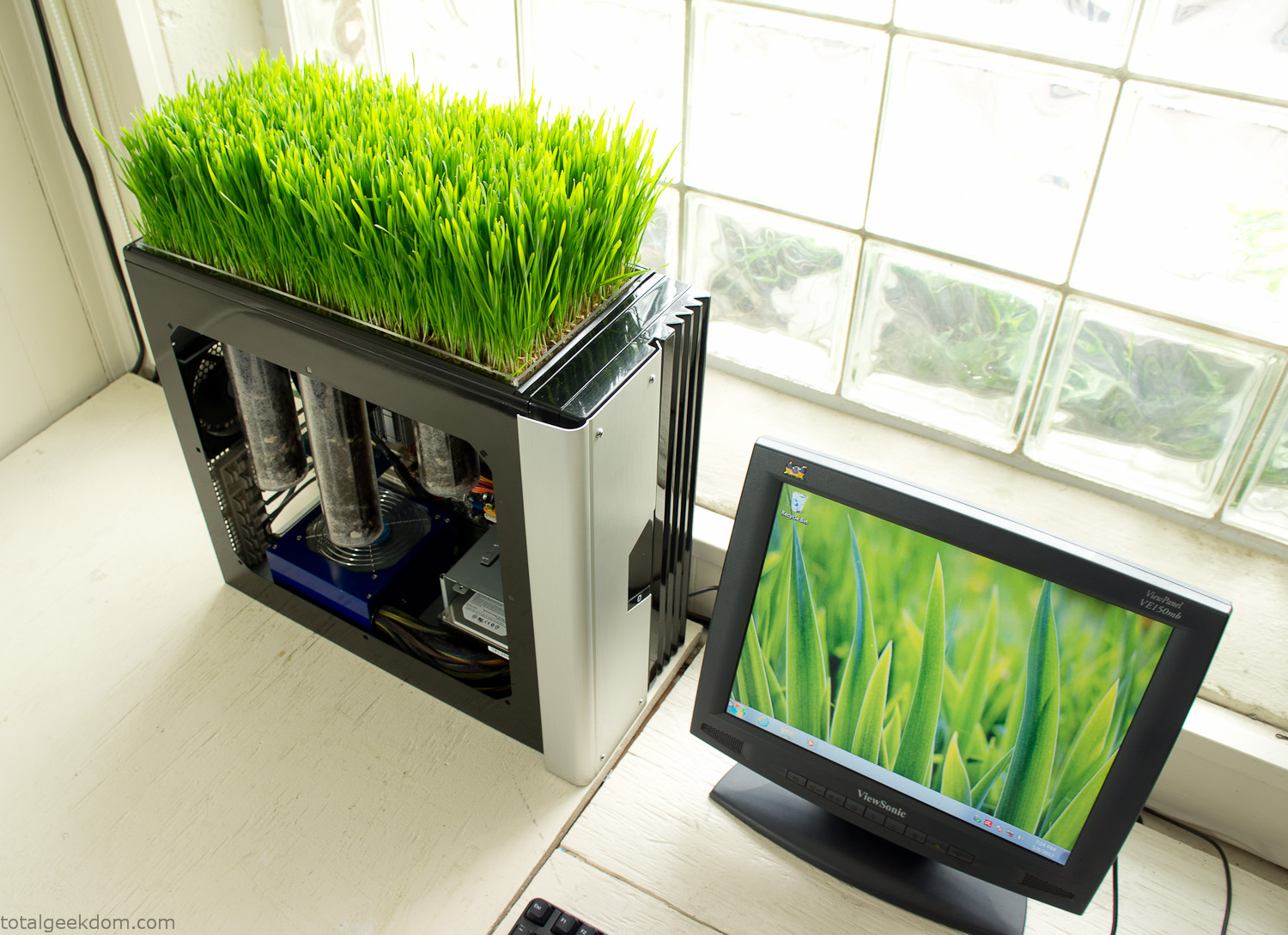
Bio Computer
I’ve been interested in working on a project for while that would combine something tech-based with something organic. Mixing the two elements intrigued me for a while. I’ve wanted to add flowers, or maybe plants of some sort to blend a little bit of nature into the space. I do receive a bit of sunlight through a glass block window, but the temperature in the basement is usually on the colder side. In the winter I don’t really heat the space because the folding farm outputs enough heat to keep the temperature comfortable. I didn’t want to change that aspect so I needed to come up with something that would tolerate slightly cooler temperatures and limited sunlight.
I can’t exactly recall when the idea came to me, but at some point I started wanting to use the heat from a computer as a way to warm the soil and help with germination/growth. I’m about as far from a botanist as it comes, I did some reading online and became pretty interested in the effects of soil temperature on germination/growth. I read different studies and papers from various universities. It was not too long into that process that I became hooked on the idea of using computer heat as a way to control the soil temperature of some sort of living plant life.
As the idea developed further I started looking into wheatgrass as a plant option. There is something clean and natural about the look and idea of a piece of grass growing in my basement. I thought the look would alter the space a little bit and add a bit of color along with something more than just metals and plastics. After reading enough studies and papers on the effects of soil temperature and germination with wheatgrass I felt like I had a good enough handle on the basics to tackle this.
The first step was finding a computer to adapt for the project. Luckily I had a lot of donated computers that people had given me for various project purposes. Most of them didn’t work, but by cobbling together various components from a bunch of different old computers I was able to come up with enough good parts to make a working computer.
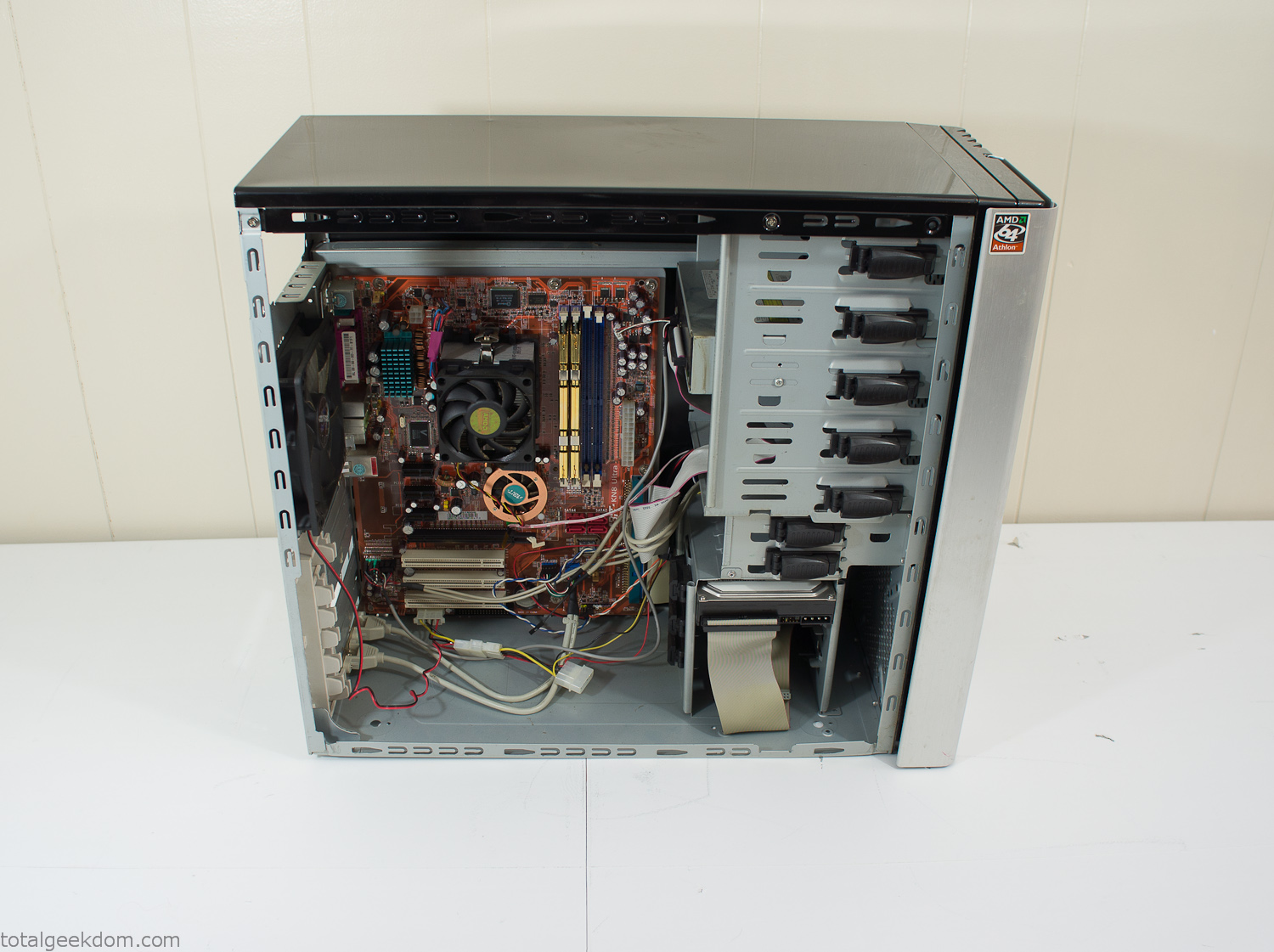
Donor Computer
At the time I was starting to get a formalized plan together for this project, another idea popped into my head. I’ve got a 5 yr. old who is already fairly geeky (just ask him to do his Jabba the Hutt impression for you) but he really does not get that much computer time. He’s getting to an age where he’s more inquisitive about tech stuff and I think he’s ready for his first computer. Since I was already well underway with this project it seemed like a perfect opportunity to orient the computer itself towards a learning tool for him in addition to using it as a way to blend something organic with a piece of technology.
With all of these goals in mind I started tinkering away. The computer hardware itself was nothing fancy, definitely outdated, but perfectly suited towards this project.
CPU- Pentium 4 (3 GHz)
Dell Factory Motherboard
Various Ram Sticks- 2gb
Old Maxtor 120gb IDE Hard Drive
Old FPS Power Supply
Donated Old Computer Case
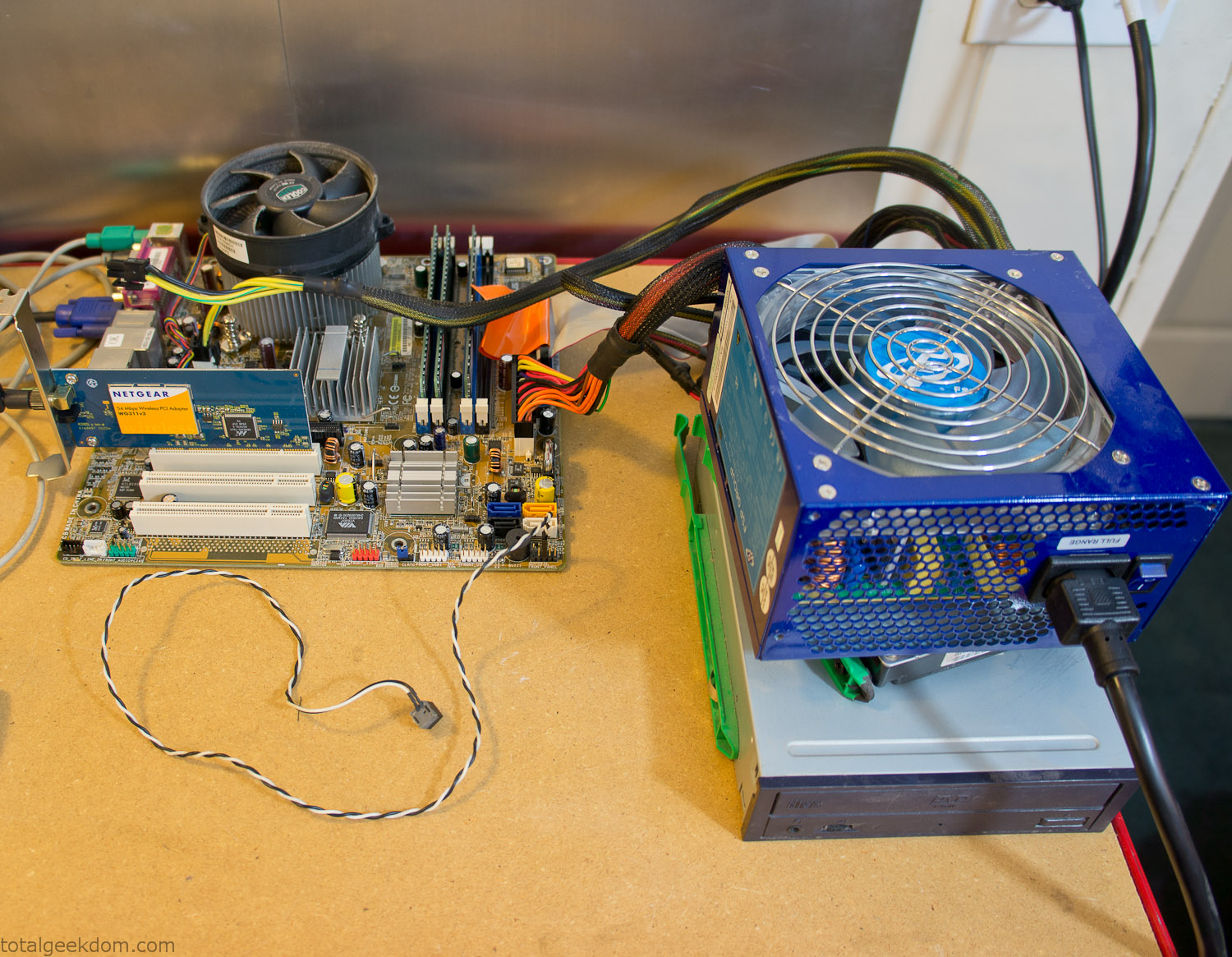
Computer Parts Testing
If you’ve spent any time around computer hardware in the last decade you’re probably well aware that Pentium 4 has a reputation for running hot. The 90nm Pentium 4 was named Prescott and it didn’t take long before the nickname Pres-hot popped up. In this case though that extra heat is going to be put towards good use.
Once the hardware was all in order I started working on the layout and arrangement for the case. I had originally envisioned the grass growing out of the top of the computer case. This seemed like it would provide a good blend between the hard edges of the computer and the soft feel of the grass. This also worked well with putting the soil area in the upper portion of the case, where the most heat should collect. After doing some initial tests with this configuration I found the measured temperature near the top of the case was the hottest. The placement of the CPU near the top of the case and the lack of airflow in that area contributed to these higher recorded temps.
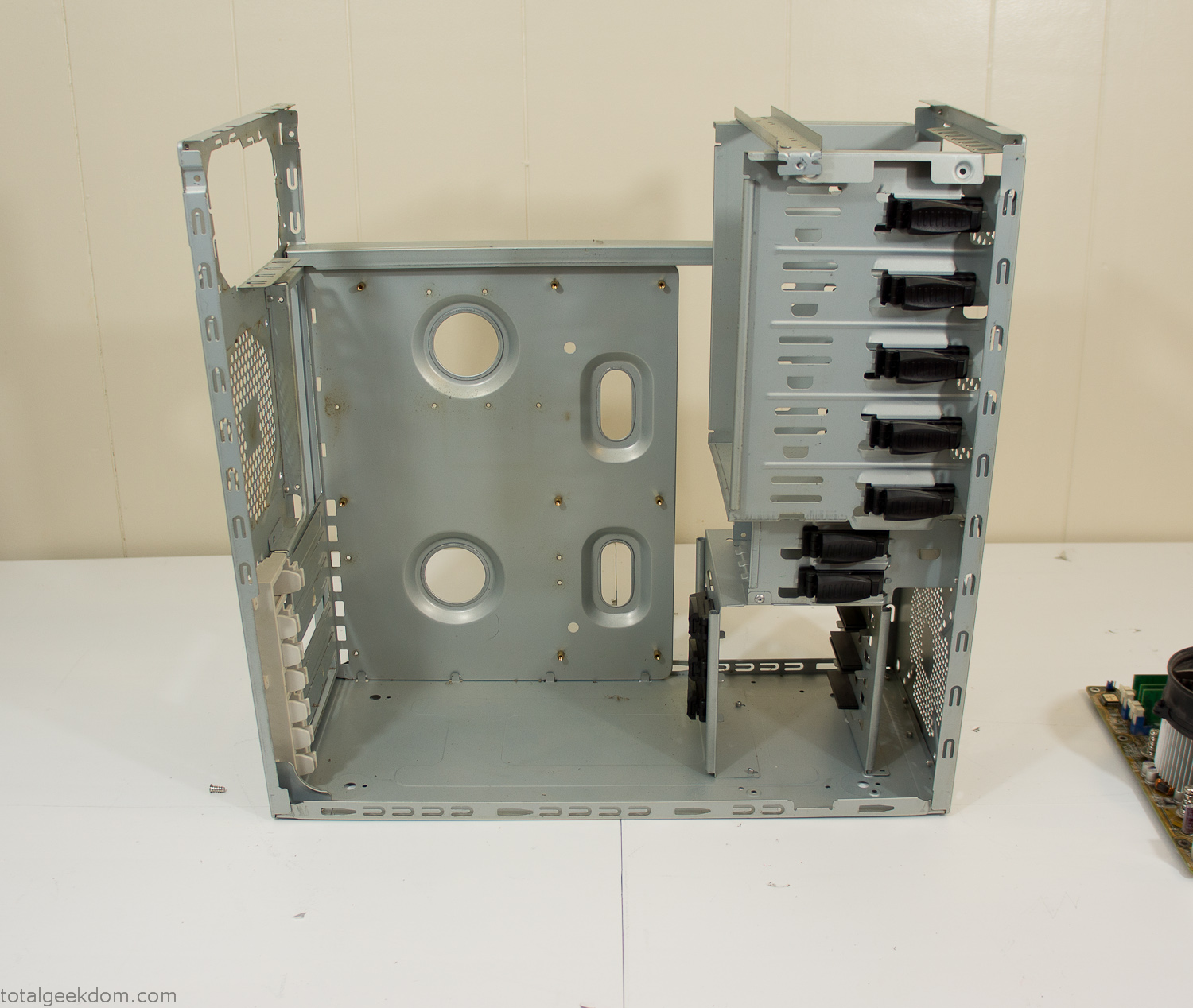
After finishing with some initial tests I decided to completely strip the case down and start removing all the unnecessary brackets and pieces inside of the case. Like most computer cases all the internal brackets and mounts are riveted together, so I drilled all the rivets out of the components I wanted to remove and pulled them out. The gutted case looked pretty barren after being stripped.
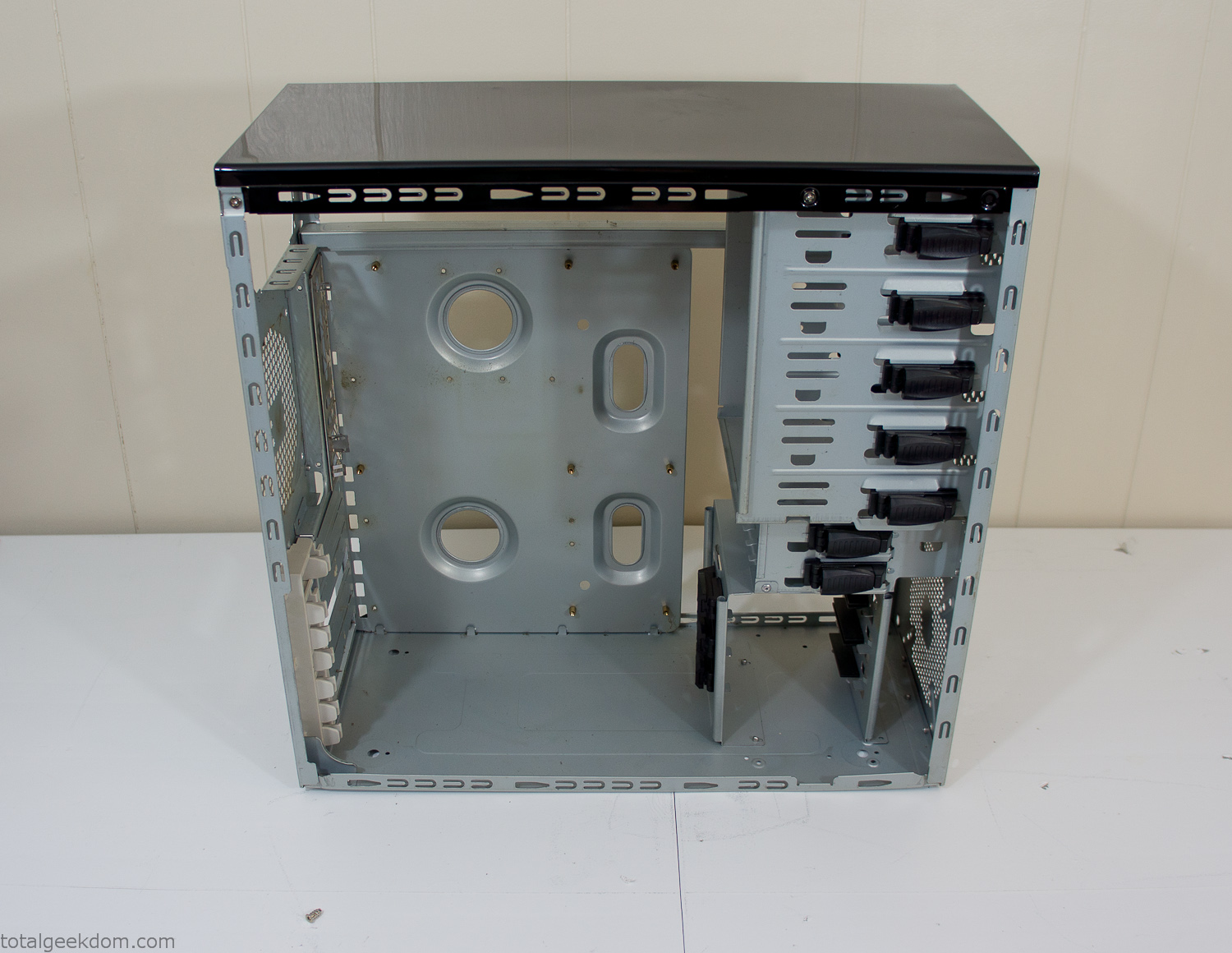
Empty Computer Case
Dismantled Computer Case

Stripped Computer Case
In keeping with my original plan of having the computer blended with the organic grass I wanted it to be easy to see the inner workings of the computer and also the soil from the grass growing above. I needed something that was translucent, which left me with either glass or acrylic/polycarbonate as my options. I ended up choosing acrylic because I was able to find a cheap, used, die-cast model car display case top that was the perfect dimensions for the top of the case. Couldn’t go wrong for 5 bucks.
I test-fit the acrylic over the top of the computer case and marked my layout on the top of the case. My plan was to cut open the top of the computer case and insert the acrylic display case into the section I cut out. To cut open the top of the computer case I drilled a hole as a starting point and then used tin snips to cut through the thin gauge metal.
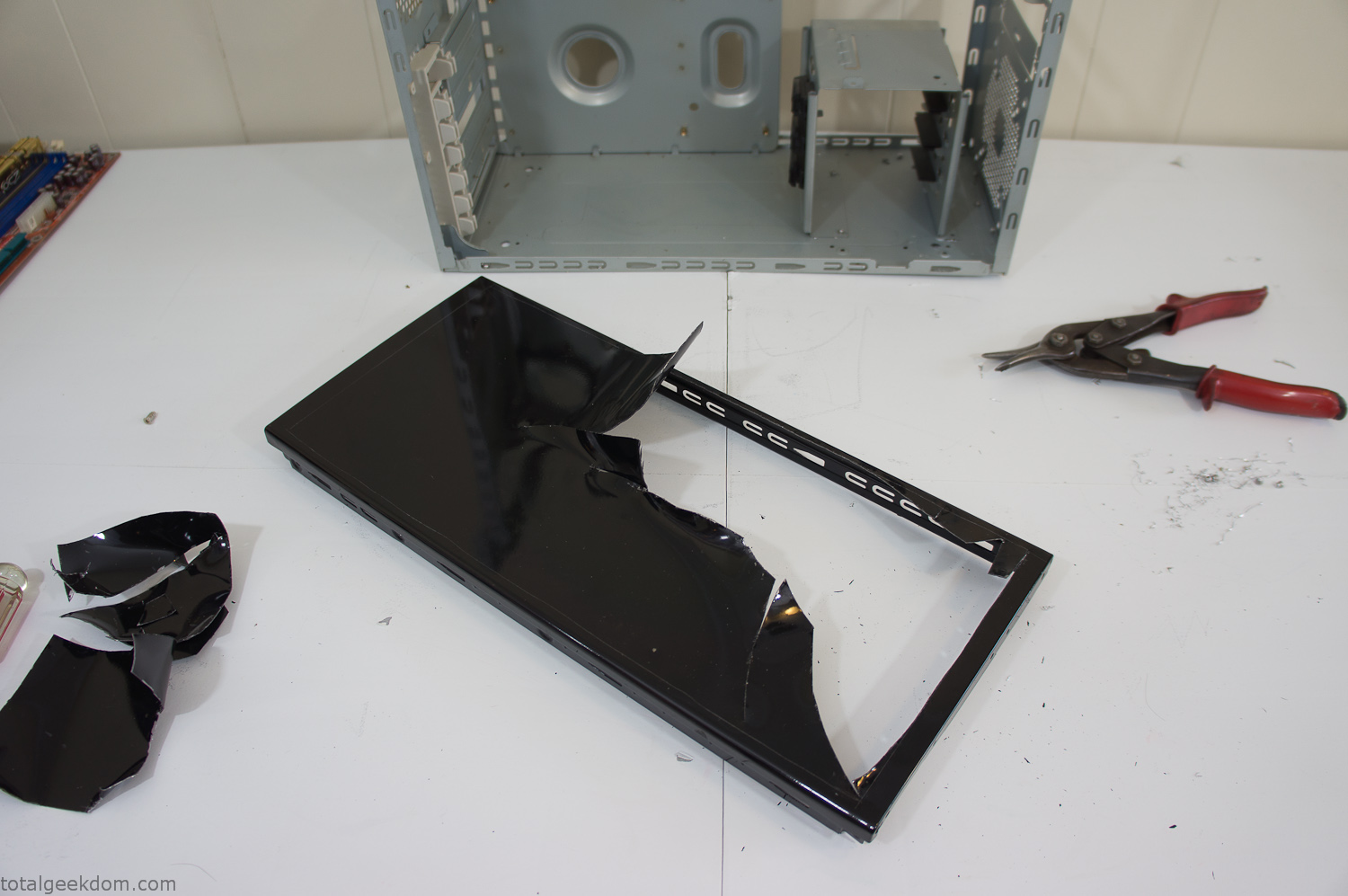
Computer Case Lid Modding
Once I had the metal opening cutout, I needed something to put along the edges of the freshly cut opening to create a clean and finished look. For $2 I was able to find some black, car-door-edge, plastic molding that worked perfectly.
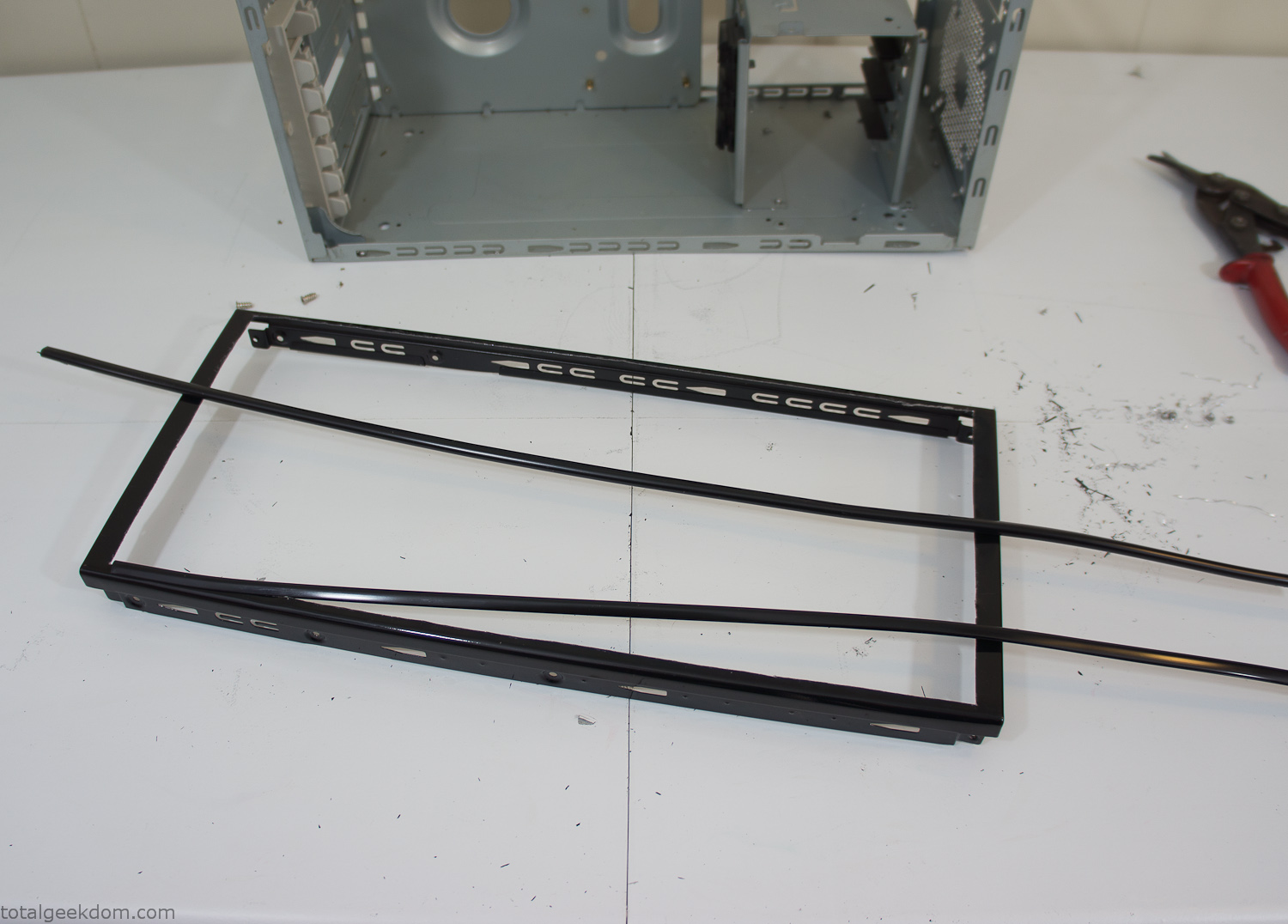
Modified Computer Case Lid
After getting the opening of the top of the computer handled and the acrylic case properly fitted, I moved onto some more testing with soil in the acrylic and the computer running. I wanted to see what kind of heat transfer I would get and how it would affect the soil temperature. I knew that using acrylic over glass would make it a little more difficult to heat the soil as acrylic is not that good at transferring heat. Luckily though I didn’t really need to alter the soil temperature that much, I just needed a little extra heat. Testing showed that heat transfer with just the single acrylic display case as my soil container was slow. So I decided to add some acrylic tubes. This would allow more surface are for soil to acrylic contact and also give me an area where I could add a mixed substrate to allow for soil drainage.
I went online and found a 3ft long section of 2 1/4″ clear acrylic tubing for $8 dollars. I wanted to add a couple of hanging cylinders off the main of the acrylic display case in the top of the computer case. To do this I needed to cut holes into the bottom of the display case. Cutting holes in acrylic is not always easy, it’s likely to chip and craze at the edges. To get around this I used a buildup of masking tape on both sides of the acrylic, to provide a little bit of resistance and strength. I placed the acrylic display case back into the computer and marked my layout for the tubes. I needed to leave clearance for the CPU cooler, power supply and hard drive mount.
After marking the layout, I used an air-powered pencil grinder and carbide tipped bit and cut through the acrylic case along my marked lines. After the initial shape was cutout I used a tube piece as a template and slowly worked on grinding the holes as perfectly round as I could get them so that the tube had a snug fit all the way around. The fit is pretty important as the acrylic cement that I used needs there to be a tight fit so that the acrylic can bond correctly.
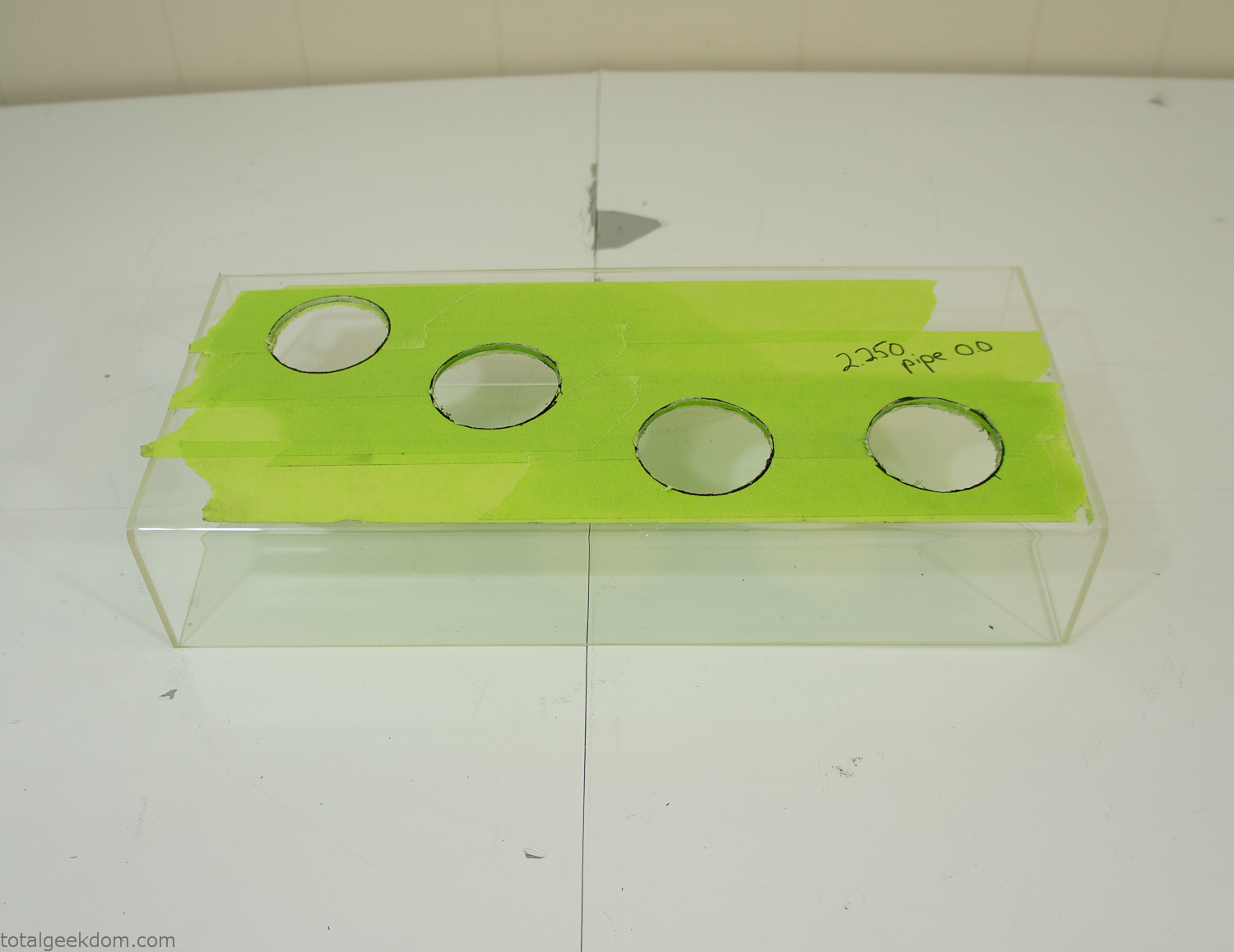
Acrylic Case Modifications
I placed the tubes into the acrylic case and mounted it in the computer and test fit the placement and height of the tubes. After getting everything lined up and oriented correctly I moved towards bonding the acrylic together. Using a needle dropper applicator I applied the cement to all the joints. After letting it set overnight I came back the next night and applied a thin coating of clear silicone caulk around all the joints just to ensure they were completely water tight
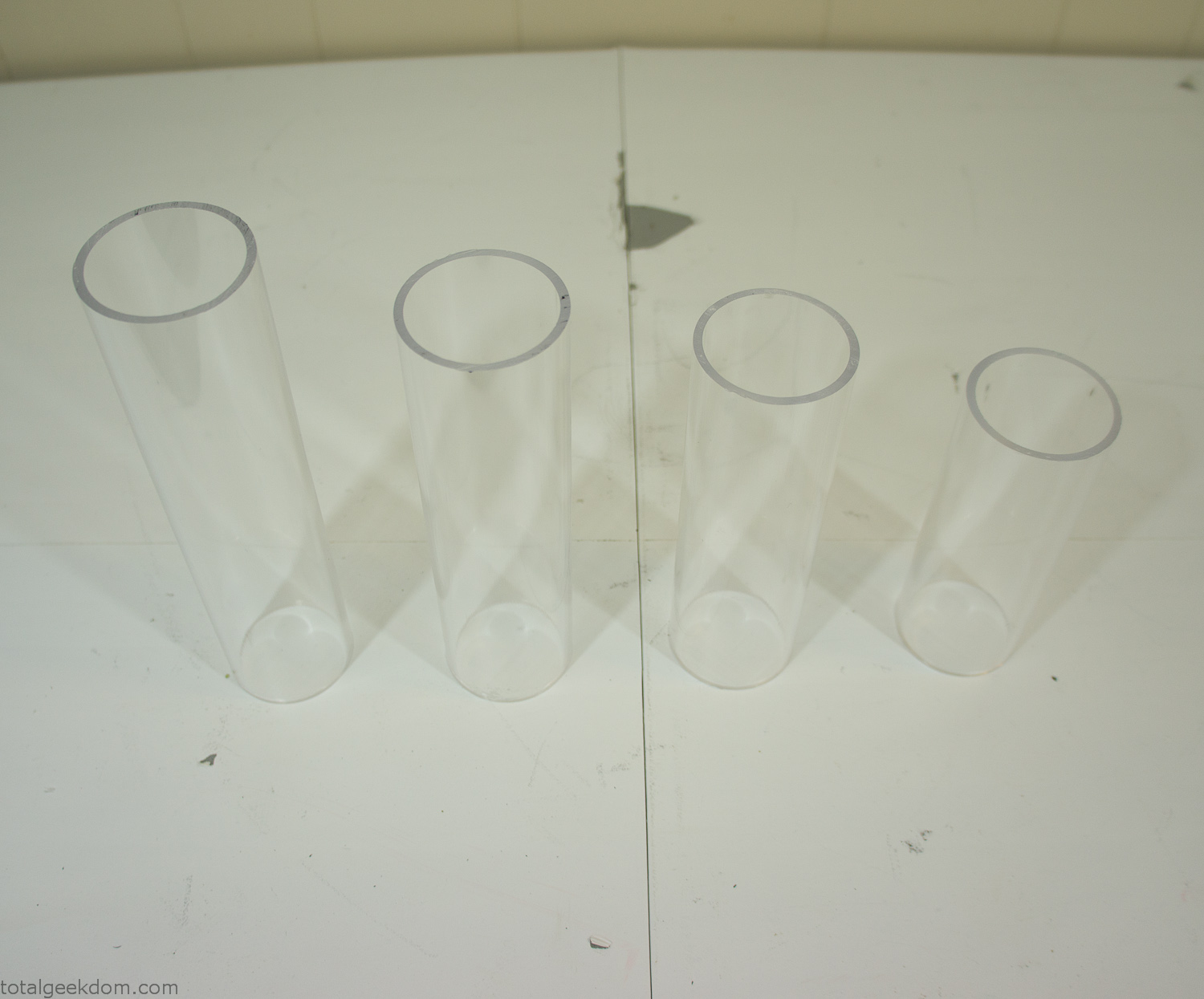
Acrylic Tubes
The next step was sealing up the bottom of the acrylic tubes. I looked at a couple of different options before realizing that the discs I had cut out of the acrylic case to fit the tubes would be almost the perfect size. Using a bench grinder and a test piece of tube I slowly ground each disc to the perfect size for a tight fit all the way around. I placed the clear acrylic discs into the bottom of each tube and repeated the same cementing and silicone caulking procedure to ensure they were water-tight. After a couple of days’ worth of drying I tested the case by filling it with water overnight and checking in the morning to make sure that no leaks had popped up.
In order to hold the weight of the acrylic case after adding soil, I drilled and installed a machine screw with a rubber cap at each corner of the computer case to bear the weight of the acrylic case.
Once all the work was done with the acrylic case section I started reinstalling all the components. The motherboard, hard drive and power supply were added and then wired up.
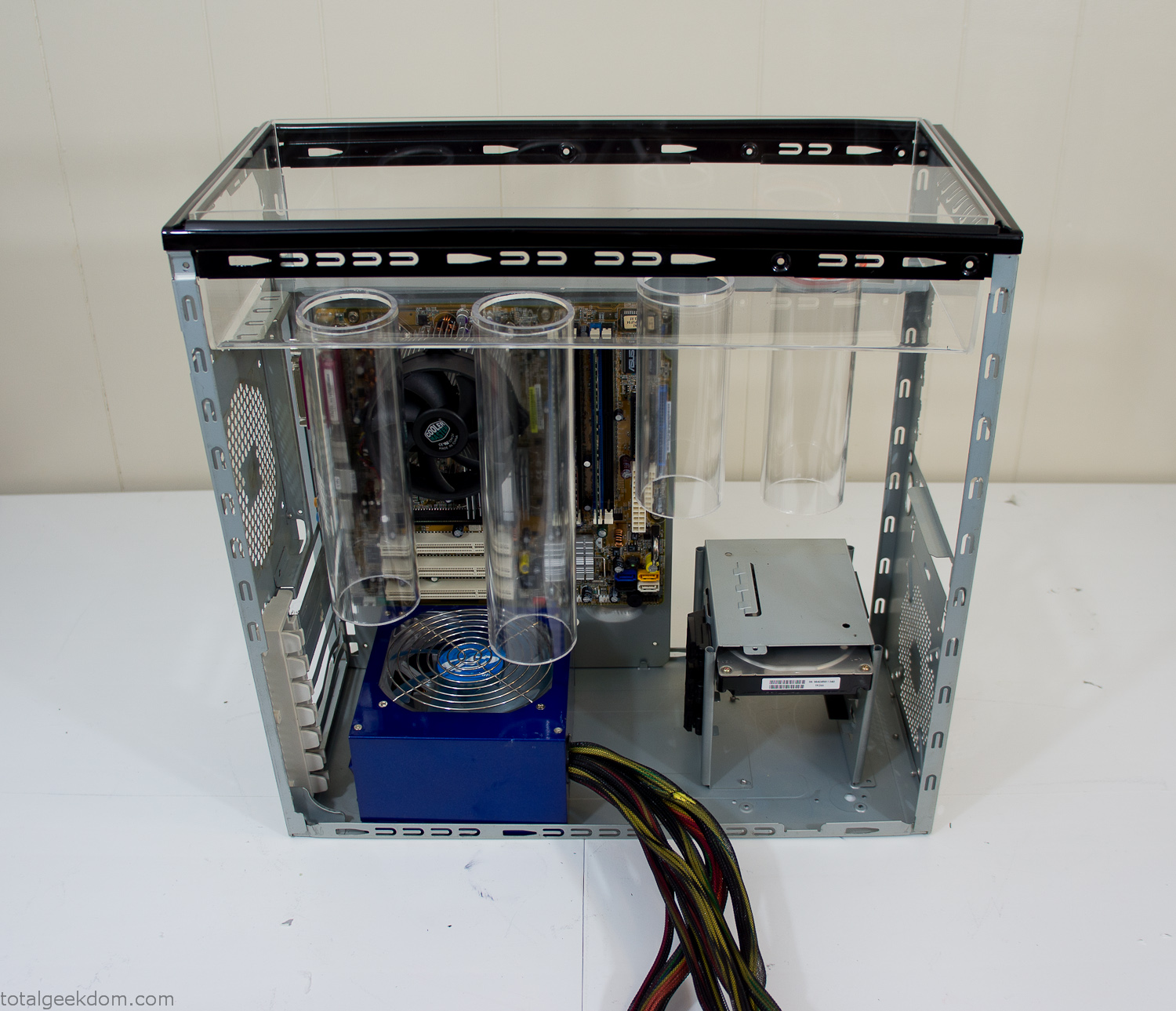
Mocked Up Computer Case
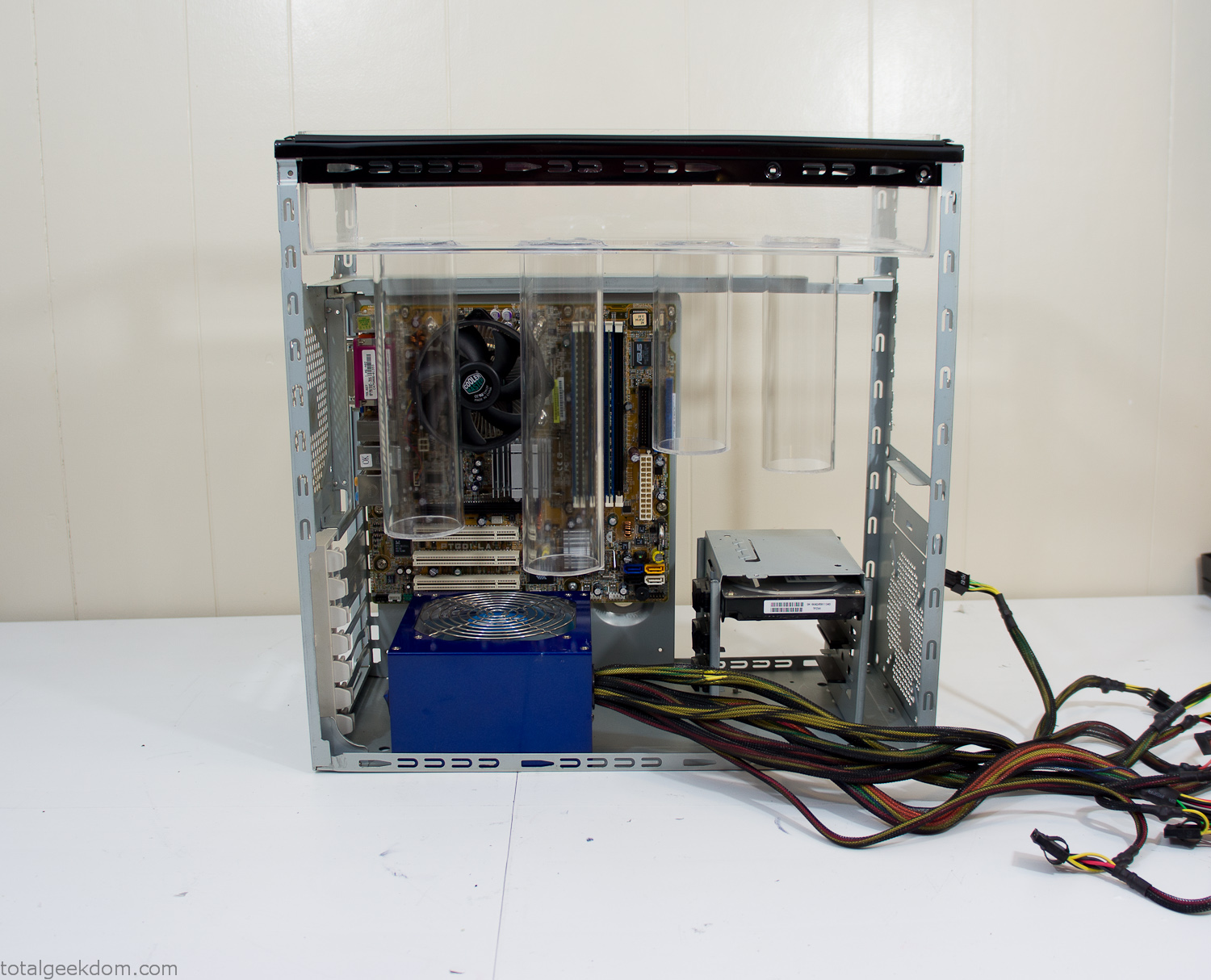
Power Supply Mockup
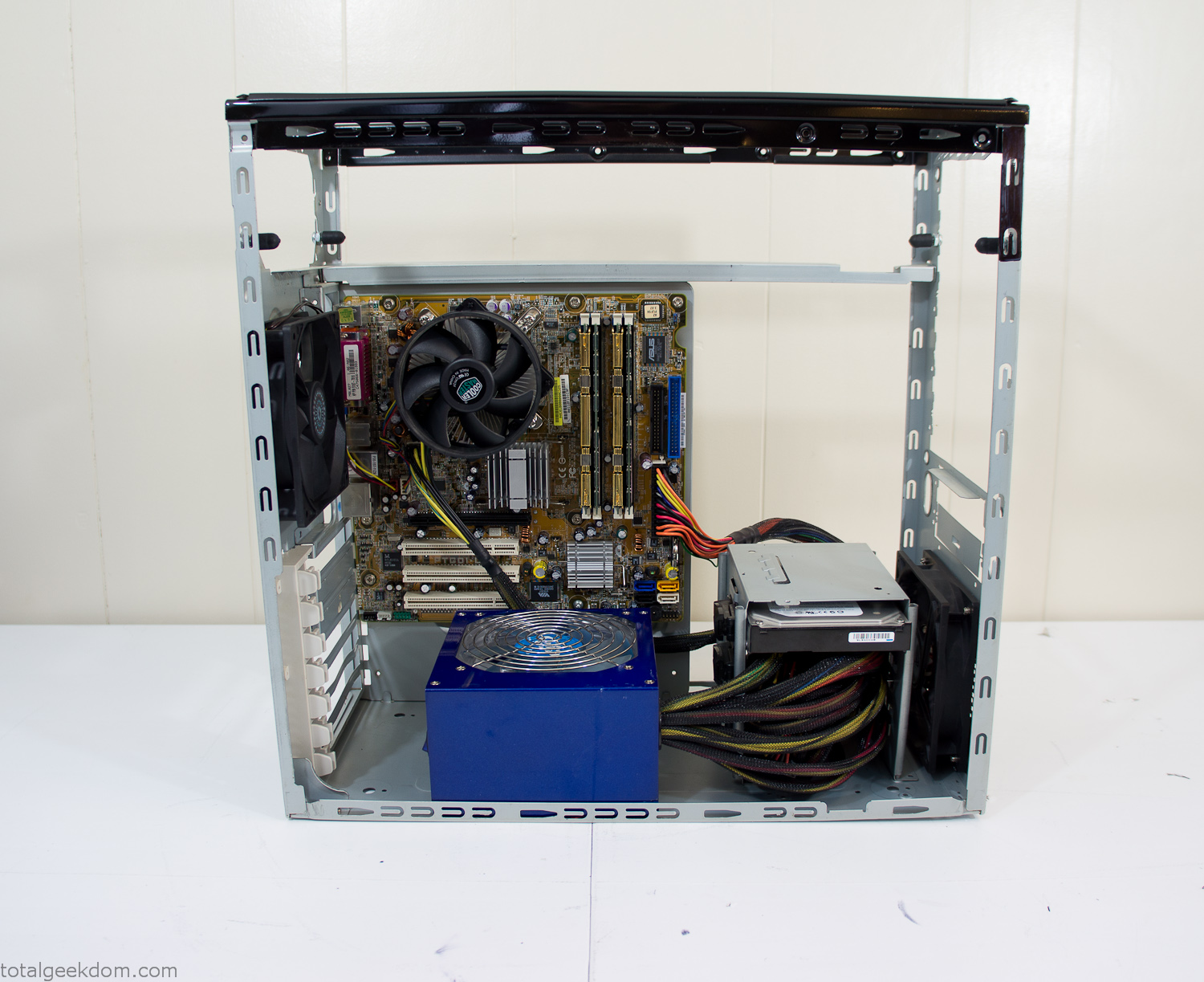
Computer Components Wired
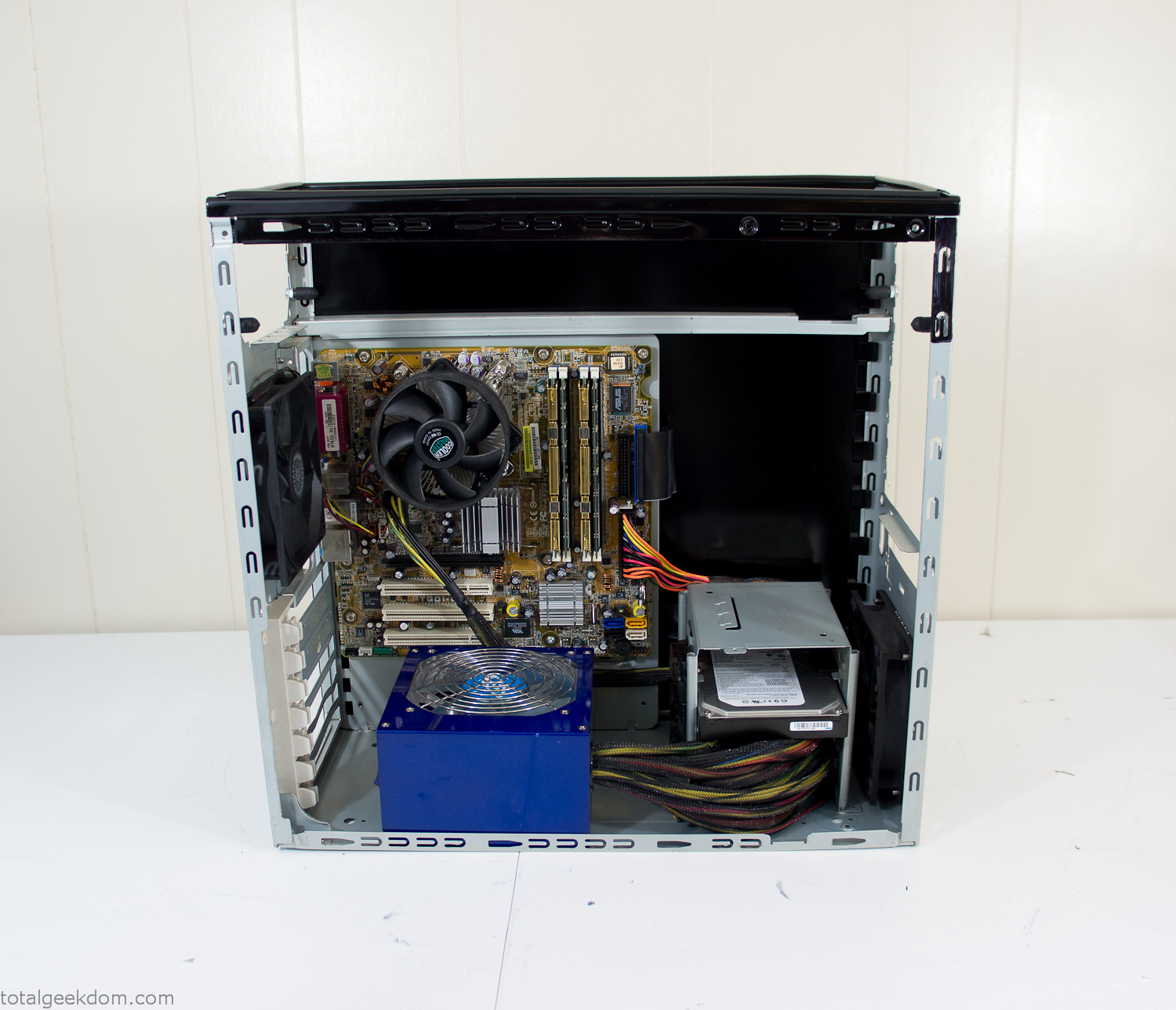
Case Panel Installed
At this point all that was left was to make a clear panel for the side of the case. I had some left over acrylic sheets from a different project that were really close to the right size, after test fitting, marking and cutting I then had a clear side panel to see into the case. (I left this off for the pictures because it caused a reflection)
The final step was filling the case with soil and adding some wheatgrass. I had been test growing other samples of wheatgrass during the build process. So I had already a couple of different patches of grass growing. I tried to keep the soil level just below the top of the acrylic case edge to make it a little more seamless.
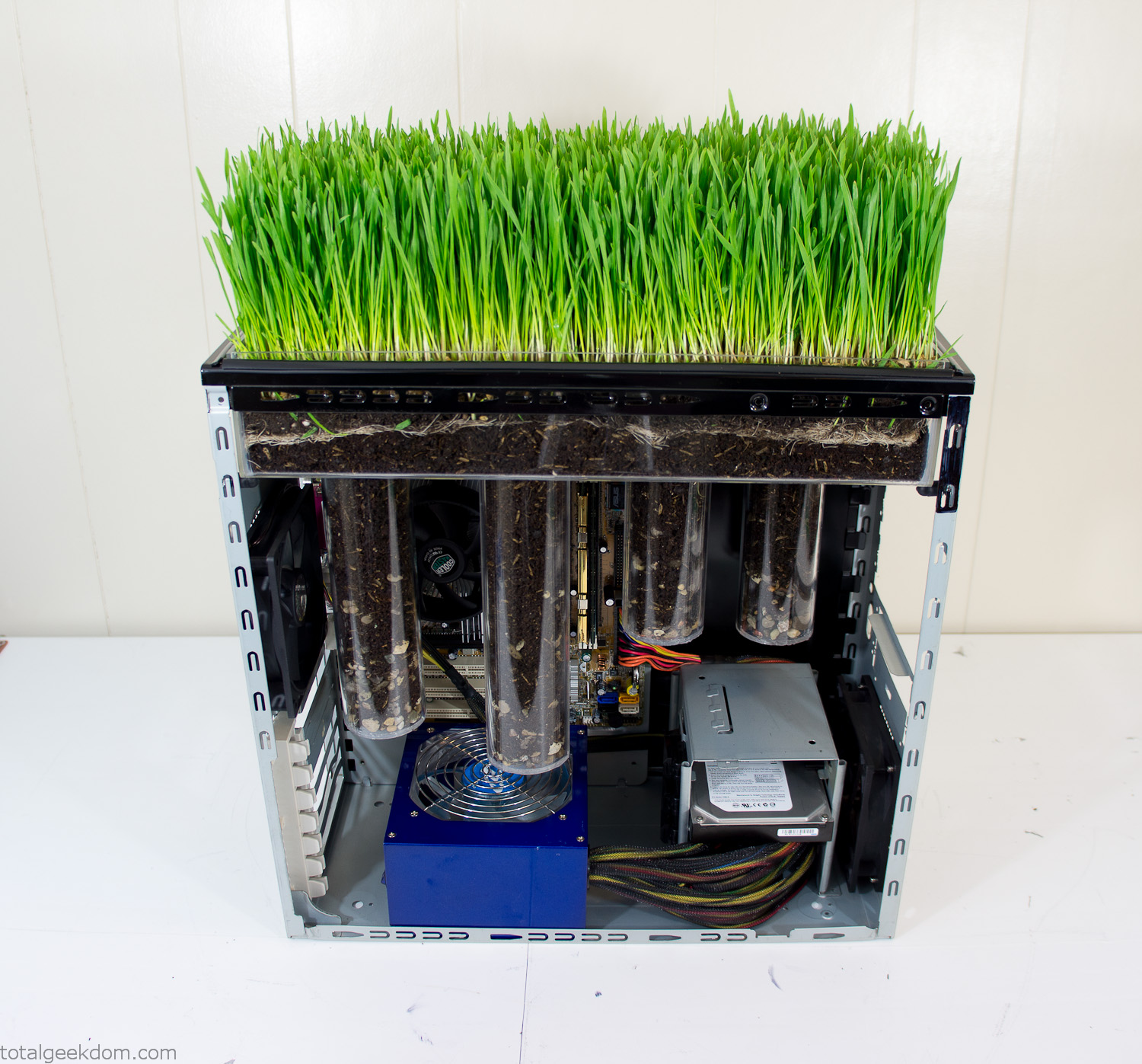
Grass Planted in Computer
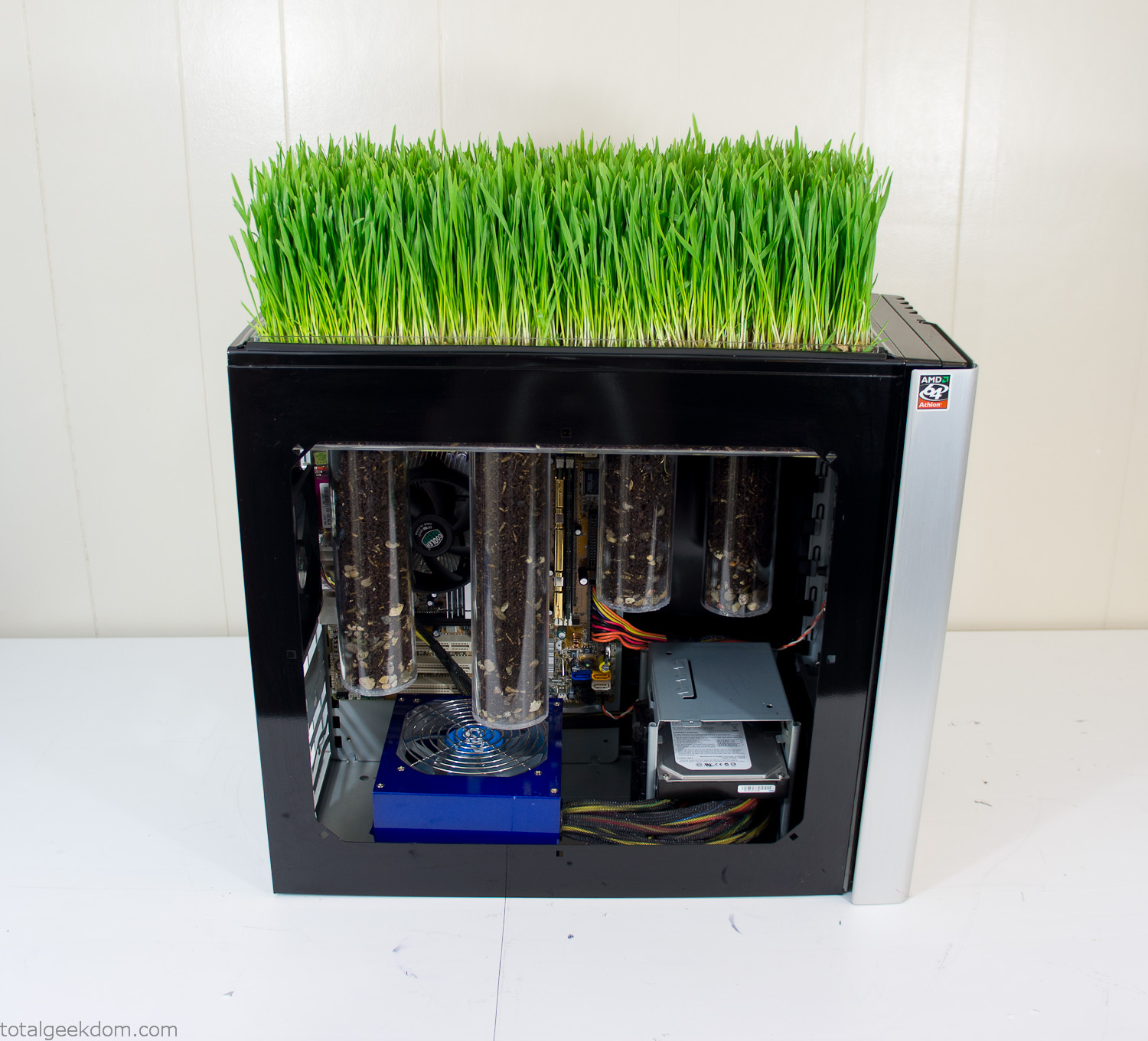
Grass and Case Panel Installed

Grass in Computer
For the computer itself I ended up installing Windows as well as Linux in a dual boot setup. Since the computer was going to be used by my son as something to play with I figured I should put both on there so he can tinker with them and learn as he goes. Besides, for important life decisions like picking an OS (Operating System) I think any good parent should present the options and then let their kid decide for themselves.
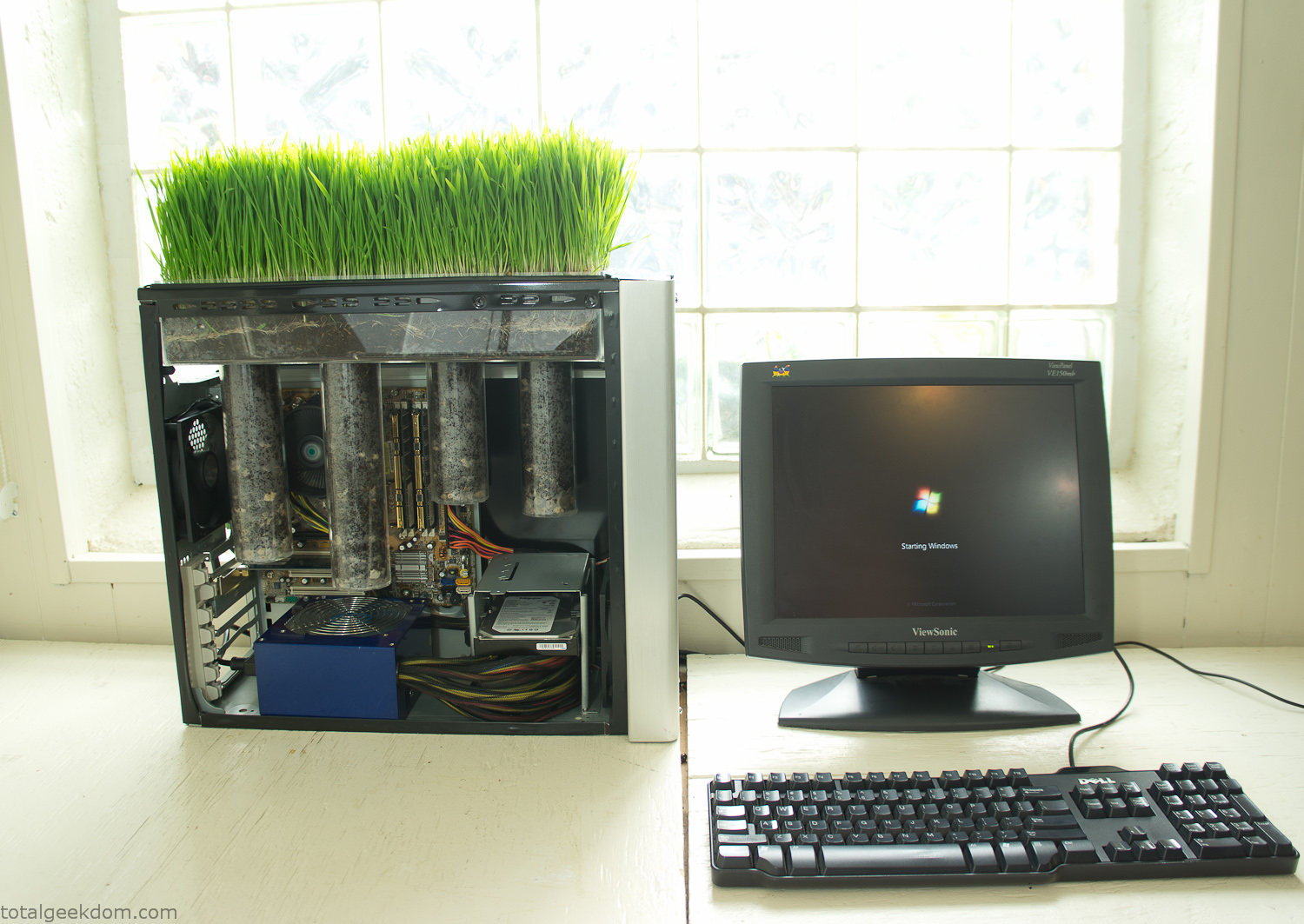
Starting Windows
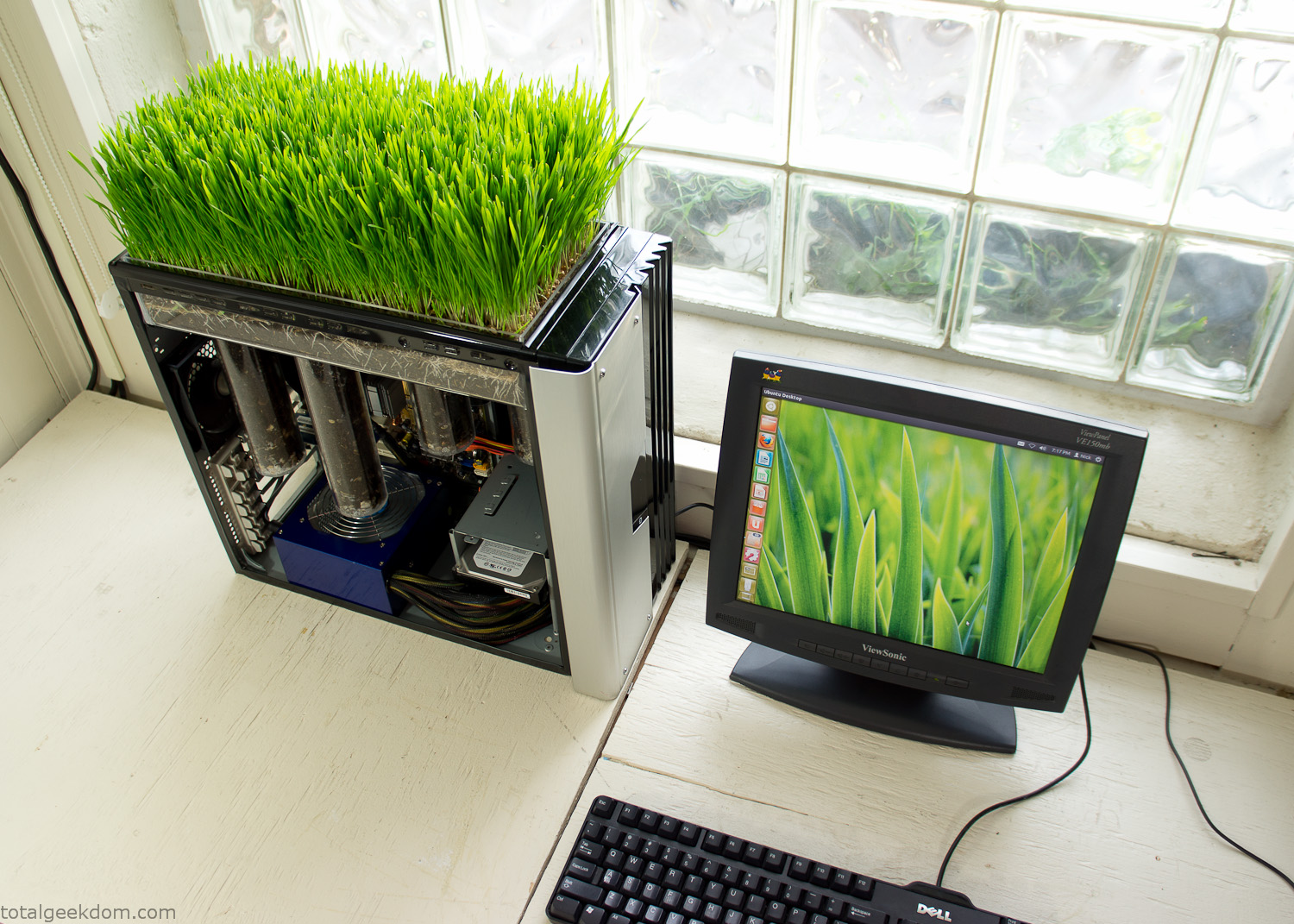
Linux Running
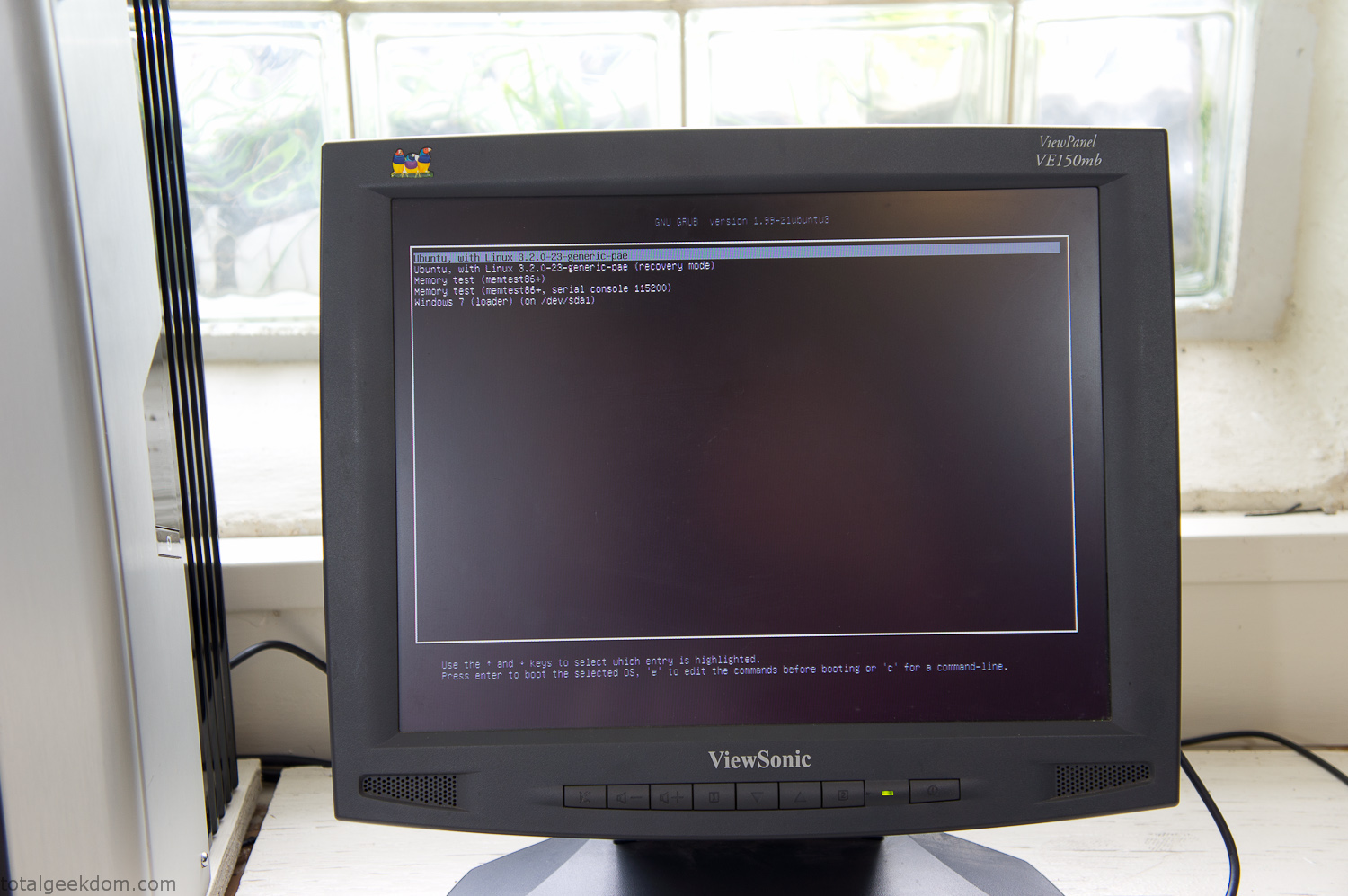
Dual Boot Screen
In the end I’m happy with the result of the project. It’s been fun experimenting with growing wheatgrass and I like how the natural look of grass is blended with the very modern, inorganic case.
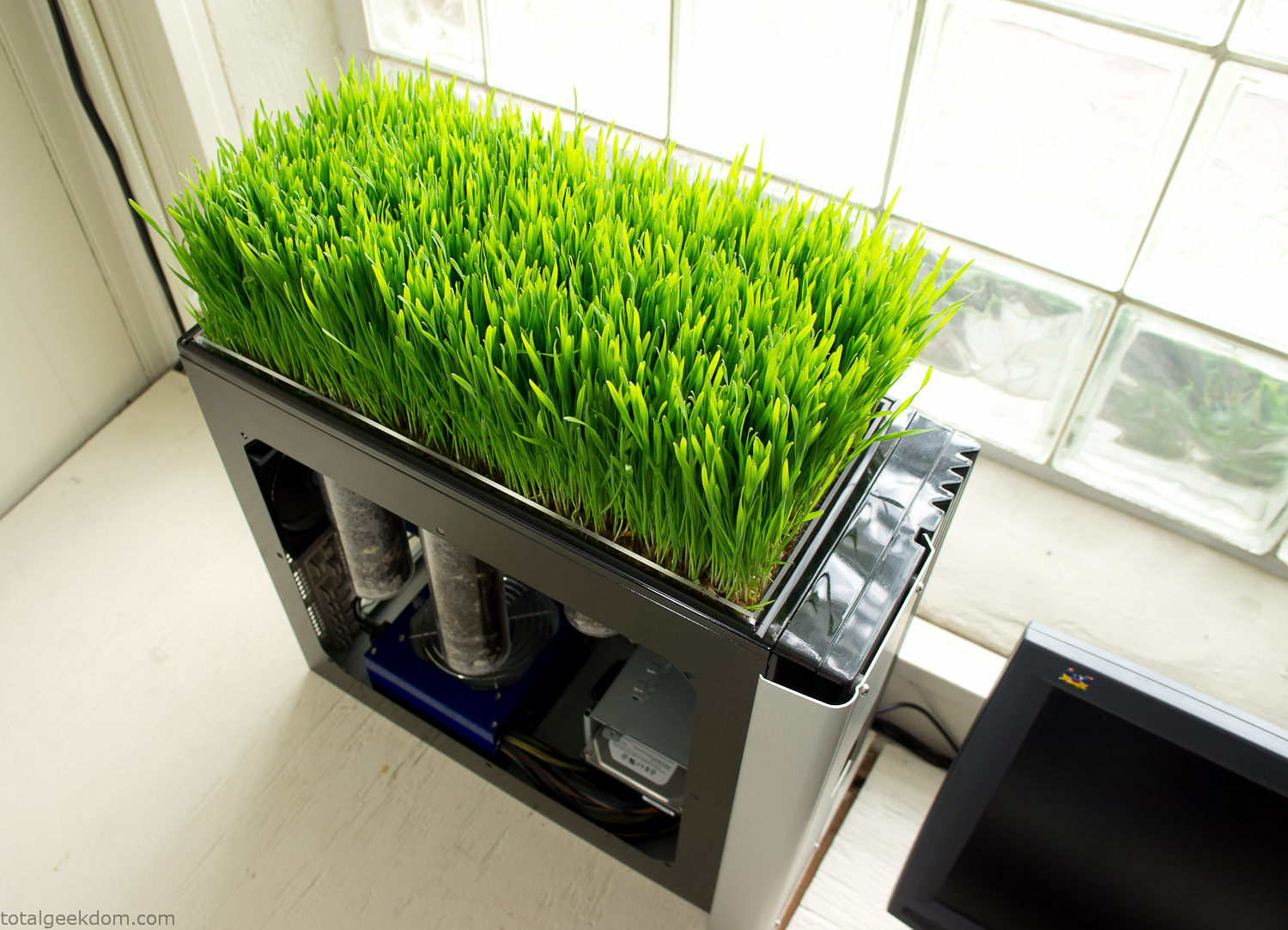
Computer Grass Growing
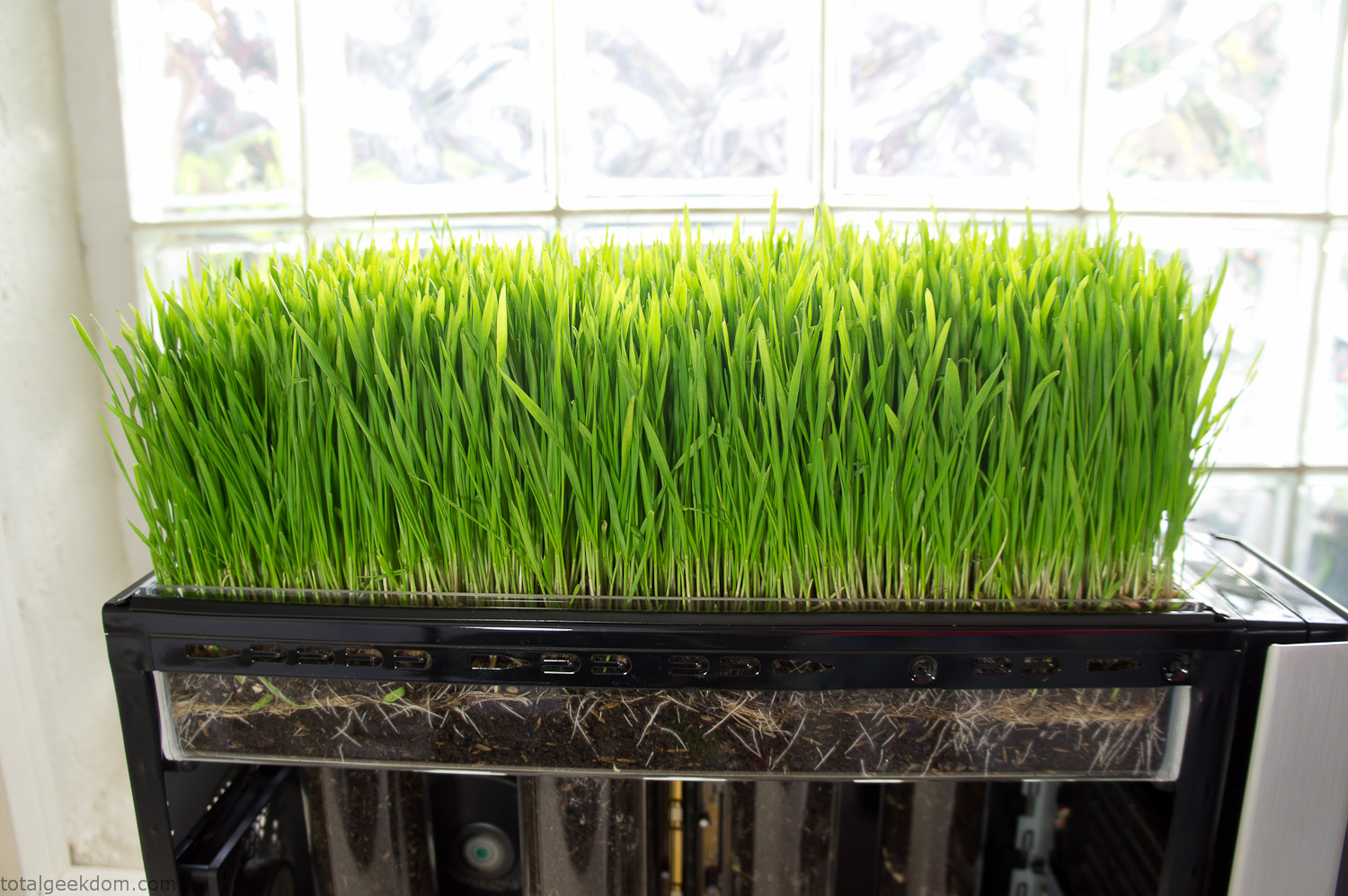
Grass in Computer Section
Notes
Temperature Testing
In testing the case temperature versus the soil temperature I found it was easiest to control the case temperature by using a variable fan speed control on both the inlet and outlet fans. By turning the fan speed down I could increase the temperature inside the case and correspondingly raise the soil temperature.
In order to maximize output of heat during these tests I used Prime95 to run the CPU at 100% load.
Using this method to control the case and soil temperature I played around with adjusting the soil temperature and then tracking the rate of growth of the Wheatgrass. The target temperature for peak growth seemed to fall around 66°F (19°C).
Using the fans to control the case temperature allowed me to vary the temperature inside the case from a low of 75°F (24°C) to a high of 91°F (33°C). In order to achieve the desired increase in soil temperature, I had to run the case temperature toward the higher end of the scale.
When the soil temperature was too high, the growth of the wheatgrass would slow.
Wheatgrass
The wheatgrass I used for my tests was nothing special, it can be found as seeds (berries) in a lot of health food stores and it grows relatively easily.
Caring for the wheatgrass is just a matter of keeping it watered. It’s a pretty easy plant to work with and doesn’t require any special skills.
Wheatgrass is often used as a nutritional supplement; it can be juiced and mixed into smoothies and other beverages. I plan on harvesting some of the grass and making some juices.
Plant Options
While wheatgrass offers a nice, attractive and easily grown option I do plan on trying other plants as well in the future. Since I already have the “planter” built all I have to do is add a different plant and see how it goes. I’m sure there will be some plants that don’t like the lower light environment, but it will be fun experimenting with other plants as well and seeing how they take.
Materials
Donated Computer- Free
Clear Acrylic Display Case- $5
Clear Acrylic Tube- $5
Plexiglass Side Panel- Free
Total- $10
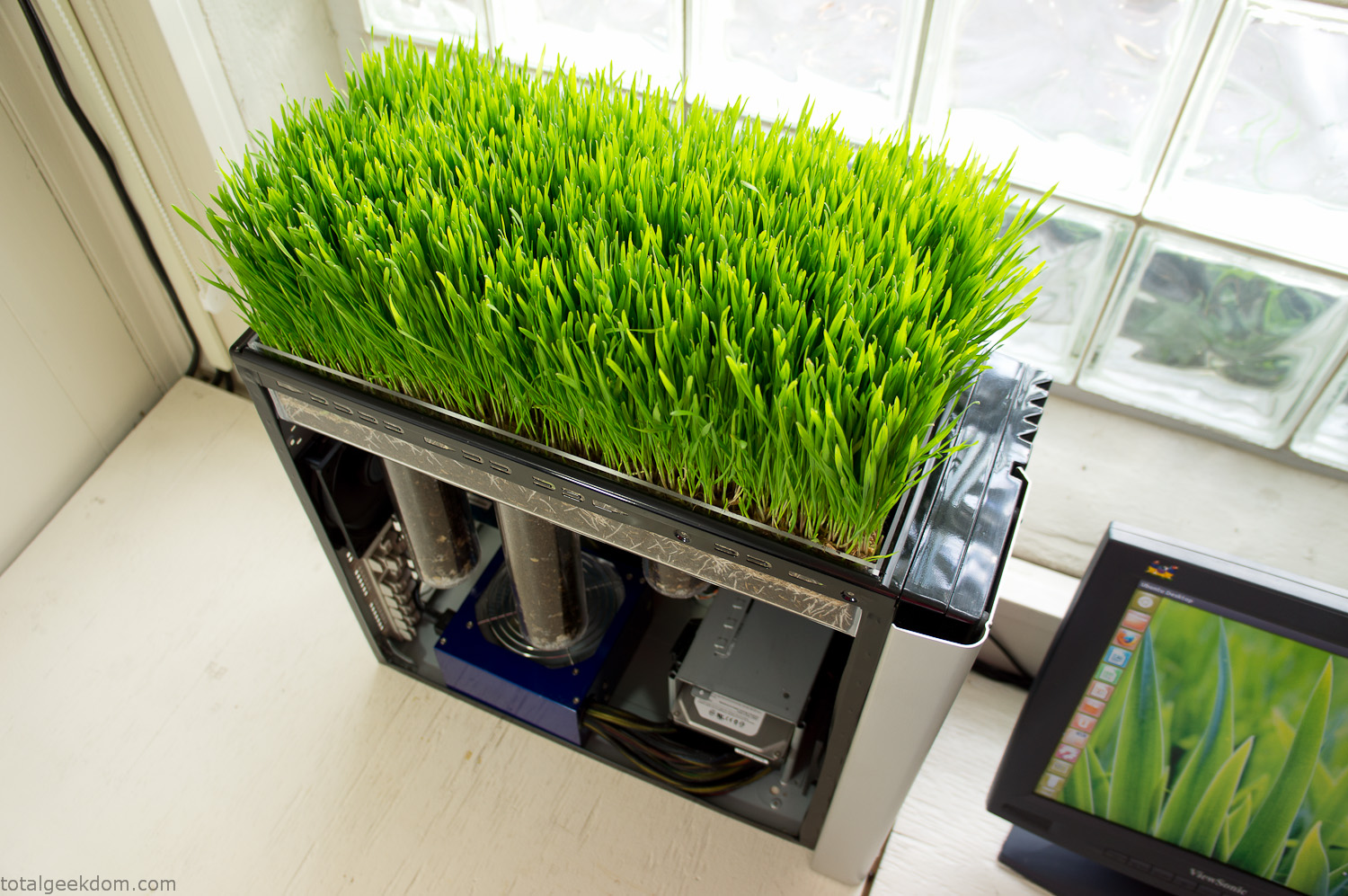
Bio Computer Running
 29.2k
29.2k
 13.2k
13.2k 7.1k
7.1k

 2.1k
2.1k 813
813 2.6k
2.6k
Comments 53,094
Каркасный дом — это современное решение для тех, кто ценит качество, быструю стройку и доступные цены [url=https://karkasnye-doma-spb13.ru]каркасный дом[/url].
Каркасный дом становится всё популярнее, благодаря своим уникальным преимуществам.
Такие дома становятся отличным вариантом для тех, кто хочет быстро и с минимальными затратами построить жильё.
Главным компонентом конструкции в этом типе дома является каркас, сделанный из дерева или металла.
Этот каркас наполняется теплоизоляционными материалами, что обеспечивает хорошую тепло- и звукоизоляцию.
Благодаря своей конструкции такие дома легко монтировать, и их можно возводить даже в сложных условиях.
Эко-френдли свойства делют их особенно привлекательными для современных строителей.
Экологичные материалы делают каркасные дома безопасным и комфортным для проживания.
Экономическая привлекательность также играет важную роль, поскольку стоимость строительства ниже, чем у других типов зданий.
При соблюдении всех правил эксплуатации, эти дома могут служить десятилетиями.
Использование инновационных решений в строительстве помогает повысить устойчивость и качество каркасных зданий.
В целом, каркасные дома — это выгодное решение для тех, кто ищет экономичный и быстрый способ обзавестись собственным жильём.
free casino slot games – Book of Ra igra v spletnem casinoju
party poker free casino online nl
50 euro bonus brez depozita casino – Online automaty o skutocne peniaze
60 free spins no deposit bet 365 blokiran
free casino games lucky lady charm – Najlepsie online kasino
luckydino 20 free spins hit kranjska gora casino
platinum reels no deposit bonus no deposit bonus 2026 site – https://cureforplantarfasciitis.com lucky spin wheel free
casino igre besplatne – Spletna igralnica za igranje s pravim denarjem
casino igre brez pologa bonus What online casinos payout to cash app
VeloraCasino актуальное зеркало
?
После того как пару знакомых словили фейковое казино через поисковик, мы договорились: любая ссылка на Велора идёт только через их офицальный тг, иначе лучше вообще не играть.
bwin poker no deposit bonus book of ra prenos igre site – https://tonipepperoni.com.pl casino 10 gratis
slot igre free yukon gold casino free spins no deposit site – https://vocabs-app.com download free casino slot games for mobile phone
VeloraCasino сайт
?
Когда основной домен Velora Casino перестал открываться через провайдера, помог именно телеграм: в официальном канале публикуют свежие зеркала, предупреждают про фейковые сайты и сразу дают инструкции по входу и восстановлению доступа в личный кабинет.
разработка мобильных приложений разработка ПО на заказ
governor of poker download free full game zodiac casino sign up site – https://atomicgirlsclub.com najboljЕЎe spletne casino igre za pravi denar
book of ra pokerstars – Hell Spin casino v Sloveniji
diamond casino online 20 euro no deposit bonus
free slots no download no registration – Kasyno aplikacja
casino sign up bonus no deposit poker bet 365 slovenija
book of ra game slot – Online casino Slovenija
casino igre za pravi novac book of ra explorer
kako isplatiti casino bonus diamond reels no deposit bonus site – https://bonusbezdepozytunowekasyna.com free spins vid registrering 2026
велора вход
?
Отдельный плюс – в канале есть быстрые ответы от поддержки: иногда проще задать вопрос в комментариях, чем ждать ответа через форму на сайте.
free poker bankroll – Ponudba bonusov v slovenskih casinojih
play book of ra demo online game online real money bonus no deposit europe
VeloraCasino зеркало на сегодня
?
У меня провайдер то даёт, то не даёт зайти на офицальный сайт Велора, но тг работает стабильно; пока не заблокируют сам телеграм, проблем с входом не будет.
https://aldita.net/
https://na-tumbe.kz/
проверка штрафов гибдд по вин проверка по базе фссп и реестру залогов
VeloraCasino вход
?Ищу рабочее зеркало Велора казино, чтобы без проблем зайти на сайт и не ловить блокировки, в итоге остановился на официальном телеграм?канале, где всегда выкладывают актуальные ссылки и объясняют, как безопасно входить, даже если основной домен недоступен.
besplatne kazino igre na aparatima casino igre online lucky lady site – https://heilseminare.com igre365 igre karte kazino
разработка мобильных приложений IT-консалтинг
blackjack pragmatic play What is the 5 spin rule slot strategy site – https://jurom.com.pl casino besplatne igre 24
making money of online casinos – Online casino s Paysafecard
new casino no deposit bonus not on gamstop kako igrati casino igre za denar
casino min deposit 5 euro – Book of Ra
ricardo’s casino no deposit bonus book of ra free spins
admiral casino tГЎbor – Casino bonus, ki ga dobite brez depozita
astral bet online casino 22bet live casino
zodiac casino register bizzo casino bonus site – https://yadaktimche.com play blackjack free
Элитная двухъярусная кровать, представленная на [url=https://www.elitnaya-dvukhyarusnaya-krovat.ru/]дизайнерские двухъярусные кровати[/url], отличается высоким качеством и эксклюзивным дизайном.
Она идеально подходит для тех, кто хочет максимально использовать пространство в комнате.
When some one searches for his vital thing, so he/she wishes to be available that in detail, therefore that thing is maintained over here.
xnxx
best exclusive no deposit bonuses casino game lucky lady site – https://faithinfudge.com live casino demo
book of ra slot online – Kasyna online z niskim depozytem minimalnym
fortuin casino no deposit bonus codes casino x free spins
big data разработка ПО на заказ
napoli casino no deposit bonus codes book of ra magic max win site – https://punitpandey.com casino mond igre
5 min deposit online casinos casino igre besplatne book of ra site – https://masztwolnosci.pl hit casino online
50 free spins no deposit 2026 – Aktualne free spiny od Fortuny
online casino igre besplatno 21 blackjack online
online casino sign up free spins – Avtomati v spletni igralnici
7 euro gratis casino free coyote moon slot game
live 888 casino login – Ovocne automaty zadarmo online
bet365 join up bonus code book of ra free spins
https://prism-wave-823.web.app/?topic=dHNmH20yEzK6QBunDUxq
bet 365 razlaga casino bled prenoДЌiЕЎДЌa site – https://uc-vizia.com blackjack vs roulette odds
I?d have to test with you here. Which is not something I often do! I get pleasure from reading a publish that can make people think. Also, thanks for permitting me to remark!
energy casino no deposit bonus code 2026 casino joker maribor site – https://dreamridersbikingforchildren.com lucky red casino no deposit bonus codes 2026
casino game bombay – Turbo automaty zadarmo
pokernews casino bled book of ra magic demo
สล็อต
TKBNEKO: รู้จัก 15 เกม PG SOFT ผ่านเรื่องราว ตัวละคร และธีมที่แตกต่าง
แต่ละเกมมีเอกลักษณ์ที่สร้างความประทับใจในรูปแบบของตัวเอง บางเกมโดดเด่นด้วยตัวละคร บางเกมสร้างบรรยากาศผ่านภาพและสัญลักษณ์ ขณะที่บางเกมใช้ธีมการผจญภัยเป็นจุดเริ่มต้นของความน่าสนใจ การทำความรู้จักเกมจึงไม่จำเป็นต้องเริ่มจากชื่อเพียงอย่างเดียว แต่สามารถเริ่มจากโลกที่เกมนั้นนำเสนอได้เช่นกัน
TKBNEKO ใช้แนวทางนี้ในการนำเสนอคอลเลกชัน 15 เกมจาก PG SOFT โดยเน้นการทำความรู้จักธีม ตัวละคร และรายละเอียดผ่านข้อมูลที่เข้าถึงได้สะดวก ผู้เข้าชมสามารถดูภาพรวมของคอลเลกชัน ค้นหาชื่อเกม หรือเลือกหมวดที่สนใจ ก่อนเข้าไปทำความรู้จักรายละเอียดของแต่ละเกมเพิ่มเติม
15 เกมในคอลเลกชัน แบ่งตามธีมอย่างชัดเจน
TKBNEKO จัดเกมในคอลเลกชันไว้ในสามหมวดหลัก คือ ไพ่นกกระจอก โชคลาภ และผจญภัย การแยกเกมตามธีมช่วยให้ผู้เข้าชมมองเห็นภาพรวม และค้นหากลุ่มที่สนใจได้โดยไม่จำเป็นต้องเปิดดูทุกเกม
Mahjong Ways และ Mahjong Ways 2 เป็นสองเกมที่อยู่ในหมวดไพ่นกกระจอก ทั้งสองชื่อถูกจัดไว้ในกลุ่มเดียวกันเพื่อให้สำรวจได้ต่อเนื่อง สำหรับ Mahjong Ways เว็บไซต์ยังนำเสนอหัวข้อ “เมื่อประเพณีมีชีวิต” เพื่อพาไปทำความรู้จักโลกของเกมผ่านแนวคิดและภาพที่เกี่ยวข้องกับไพ่นกกระจอก
กลุ่มที่มีจำนวนเกมมากที่สุดคือหมวดโชคลาภ ซึ่งประกอบด้วยเกมทั้งหมดแปดชื่อ ได้แก่ Fortune Tiger, Lucky Neko, Fortune Ox, Fortune Mouse, Fortune Dragon, Double Fortune, Ganesha Fortune และ Caishen Wins แม้จะอยู่ภายใต้หมวดเดียวกัน แต่แต่ละชื่อเปิดพื้นที่ให้สำรวจเอกลักษณ์ของตัวละครและการนำเสนอที่แตกต่างกัน คำว่า “โชคลาภ” ในที่นี้เป็นชื่อหมวดสำหรับจัดกลุ่มธีม ไม่ใช่คำรับรองผลลัพธ์ของเกม
สำหรับหมวดผจญภัย มีเกมอยู่ทั้งหมดห้าชื่อ ได้แก่ Treasures of Aztec, Wild Bandito, Ways of the Qilin, Wild Bounty Showdown และ The Great Icescape หมวดนี้รวบรวมชื่อเกมที่นำเสนอโลกในแนวทางต่างกันไว้ด้วยกัน เพื่อให้ผู้เข้าชมเปรียบเทียบบรรยากาศและค้นหาประเด็นที่อยากทำความรู้จักได้ง่ายขึ้น
ทำความรู้จักเกมผ่านตัวละครและเรื่องราว
นอกจากการแสดงคอลเลกชัน TKBNEKO ยังนำเสนอเนื้อหาที่ช่วยให้ผู้เข้าชมทำความรู้จักเกมมากกว่าการดูชื่อและภาพหน้าปก เนื้อหาเหล่านี้ครอบคลุมทั้งการแนะนำโลกของเกม การนำเสนอตัวละคร และการเปิดประเด็นให้สำรวจเรื่องราวต่อ
Fortune Tiger ได้รับพื้นที่ในส่วนเกมเด่น และปรากฏในเนื้อหาเกี่ยวกับตัวละครภายใต้แนวคิด “ตัวละครเล็ก บุคลิกที่ยิ่งใหญ่” จุดสนใจจึงไม่ได้อยู่ที่ชื่อเกมเท่านั้น แต่รวมถึงบุคลิกและภาพจำที่ทำให้ตัวละครเป็นที่จดจำด้วย
สำหรับ Mahjong Ways เนื้อหาแนวแนะนำโลกของเกมใช้ประเด็นเรื่องประเพณีเป็นจุดเริ่มต้น ส่วน Treasures of Aztec อยู่ในพื้นที่สำรวจเพิ่มเติม โดยใช้ความอยากรู้เป็นแนวคิดในการพาไปทำความรู้จักเกม รูปแบบดังกล่าวช่วยให้แต่ละเกมมีบริบทและเรื่องราวประกอบ แทนที่จะปรากฏเป็นเพียงชื่อกับภาพในคอลเลกชัน
ความแตกต่างของแนวทางเหล่านี้ช่วยให้ผู้เข้าชมเลือกวิธีทำความรู้จักเกมได้ตามความสนใจ บางคนอาจเริ่มจากตัวละคร บางคนสนใจที่มาของธีม ส่วนอีกกลุ่มอาจให้ความสำคัญกับบรรยากาศและการเล่าเรื่องผ่านภาพ
ค้นหาและกรองเกมจากความสนใจ
ส่วนค้นหาเกมของ TKBNEKO รวมรายการไว้ในพื้นที่เดียว พร้อมช่องค้นหาชื่อเกมและตัวกรองตามหมวด ผู้เข้าชมที่รู้ชื่อเกมสามารถค้นหารายการนั้นได้โดยตรง ขณะที่ผู้ต้องการดูภาพรวมสามารถเลือกสำรวจหมวดไพ่นกกระจอก โชคลาภ หรือผจญภัยก่อน
หน้ารวมมีทั้งการแสดงเกมบางส่วนและตัวเลือกสำหรับเปิดดูครบทั้ง 15 เกม ผู้เข้าชมจึงสามารถดูภาพรวมจากรายการที่แสดงก่อน หรือเปิดสำรวจทั้งคอลเลกชันทีละเกมได้
ชื่อเกม ผู้พัฒนา และหมวดหมู่ปรากฏร่วมกันในรายการ ข้อมูลเหล่านี้ช่วยให้ผู้เข้าชมแยกแยะได้ว่าเกมที่กำลังดูคือเกมใด อยู่ในกลุ่มใด และมีความเชื่อมโยงกับรายการอื่นอย่างไร โดยไม่ต้องอาศัยภาพประกอบเพียงอย่างเดียว
สำรวจได้ทั้งบนคอมพิวเตอร์และมือถือ
TKBNEKO ระบุการเข้าถึงผ่านคอมพิวเตอร์และมือถือ พร้อมตัวเลือกภาษา 14 ภาษา การมีตัวเลือกด้านภาษาและอุปกรณ์ช่วยให้ผู้เข้าชมเลือกวิธีอ่านข้อมูลและสำรวจเว็บไซต์ได้ตามความคุ้นเคย
เว็บไซต์วางแนวทางการสำรวจไว้สามส่วน คือค้นหาธีมที่ชอบ รู้จักตัวละครและฟีเจอร์ และอ่านข้อมูลในภาษาของผู้เข้าชม องค์ประกอบเหล่านี้เชื่อมการดูภาพรวมของคอลเลกชันเข้ากับการทำความรู้จักรายละเอียดของเกมแต่ละรายการ
การมีทั้งคอลเลกชัน ตัวกรอง และเนื้อหาประกอบ ทำให้ผู้เข้าชมไม่จำเป็นต้องเริ่มจากจุดเดียวกันทุกครั้ง การทำความรู้จักเกมอาจเริ่มจากการค้นหาชื่อ การเลือกหมวด หรือการอ่านเนื้อหาเกี่ยวกับเรื่องราวและตัวละครของเกม
รู้จักบทบาทของภาพประกอบบนเว็บไซต์
TKBNEKO แจ้งว่าภาพที่ใช้ประกอบเกมสร้างขึ้นด้วย AI ส่วนเครื่องหมายการค้าของเกมเป็นทรัพย์สินของเจ้าของแต่ละราย ข้อมูลนี้เป็นส่วนสำคัญของการทำความเข้าใจสิ่งที่เห็นบนหน้าเว็บไซต์ เพราะภาพประกอบที่ใช้สื่อธีมหรือบรรยากาศไม่ควรถูกตีความโดยอัตโนมัติว่าเป็นภาพหน้าจอจากเกมจริง
โดยภาพรวม TKBNEKO เป็นพื้นที่นำเสนอคอลเลกชันที่เชื่อมข้อมูลของเกมเข้ากับธีม ตัวละคร และภาพประกอบ คุณค่าของการจัดคอลเลกชันไม่ได้จำกัดอยู่ที่การรวบรวมเกม 15 ชื่อ แต่รวมถึงการจัดหมวดและนำเสนอเนื้อหาที่ช่วยให้ผู้เข้าชมทำความรู้จักเอกลักษณ์ของแต่ละโลกได้ชัดเจนขึ้น
Элитная двухъярусная кровать, представленная на [url=https://www.elitnaya-dvukhyarusnaya-krovat.ru/]элитная двухъярусная кровать[/url], отличается высоким качеством и эксклюзивным дизайном.
Роскошная двухъярусная кровать идеально сочетает в себе практичность и современность.
https://rr-game.ru/inc/articles/?1xbet-promokod-pri-registracii__bonus.html
What an insightful and thoroughly-researched article! The author’s meticulousness and capability to present complicated ideas in a understandable manner is truly commendable. I’m thoroughly captivated by the scope of knowledge showcased in this piece. Thank you, author, for offering your expertise with us. This article has been a real game-changer!
สล็อตเว็บตรง
TKBNEKO: สำรวจโลกของ 15 เกม PG SOFT ผ่านธีม ตัวละคร และงานภาพ
เกมแต่ละเกมมีสิ่งที่ทำให้คนจดจำแตกต่างกัน บางเกมโดดเด่นด้วยตัวละคร บางเกมสร้างบรรยากาศผ่านภาพและสัญลักษณ์ ขณะที่บางเกมใช้ธีมการผจญภัยเป็นจุดเริ่มต้นของความน่าสนใจ จุดเริ่มต้นของการสำรวจเกมจึงอาจเป็นธีม งานภาพ หรือเรื่องราว ไม่ใช่เพียงชื่อที่ปรากฏอยู่บนหน้าปก
TKBNEKO ใช้แนวทางนี้ในการนำเสนอคอลเลกชัน 15 เกมจาก PG SOFT โดยเน้นการทำความรู้จักธีม ตัวละคร และรายละเอียดผ่านข้อมูลที่เข้าถึงได้สะดวก ผู้เข้าชมสามารถดูภาพรวมของคอลเลกชัน ค้นหาชื่อเกม หรือเลือกหมวดที่สนใจ ก่อนเข้าไปทำความรู้จักรายละเอียดของแต่ละเกมเพิ่มเติม
สำรวจ 15 เกมตามธีมที่แตกต่างกัน
คอลเลกชันของ TKBNEKO แบ่งออกเป็นสามหมวด ได้แก่ ไพ่นกกระจอก โชคลาภ และผจญภัย การจัดหมวดช่วยให้เห็นความแตกต่างของเกมตั้งแต่แรก โดยไม่ต้องเปิดดูทีละรายการเพื่อค้นหาธีมที่ต้องการ
หมวดไพ่นกกระจอกประกอบด้วย Mahjong Ways และ Mahjong Ways 2 การรวมทั้งสองเกมไว้ในหมวดเดียวช่วยให้ทำความรู้จักแต่ละชื่อได้อย่างเป็นลำดับ นอกจากนี้ Mahjong Ways ยังมีเนื้อหาประกอบในหัวข้อ “เมื่อประเพณีมีชีวิต” ซึ่งเปิดมุมมองเกี่ยวกับโลกของเกมผ่านแนวคิดและภาพที่เชื่อมโยงกับไพ่นกกระจอก
กลุ่มที่มีจำนวนเกมมากที่สุดคือหมวดโชคลาภ ซึ่งประกอบด้วยเกมทั้งหมดแปดชื่อ ได้แก่ Fortune Tiger, Lucky Neko, Fortune Ox, Fortune Mouse, Fortune Dragon, Double Fortune, Ganesha Fortune และ Caishen Wins แม้ทั้งหมดจะถูกจัดอยู่ในกลุ่มเดียวกัน แต่ผู้เข้าชมยังสามารถทำความรู้จักความแตกต่างด้านตัวละครและวิธีนำเสนอของแต่ละเกมได้ คำว่า “โชคลาภ” ในที่นี้เป็นชื่อหมวดสำหรับจัดกลุ่มธีม ไม่ใช่คำรับรองผลลัพธ์ของเกม
สำหรับหมวดผจญภัย มีเกมอยู่ทั้งหมดห้าชื่อ ได้แก่ Treasures of Aztec, Wild Bandito, Ways of the Qilin, Wild Bounty Showdown และ The Great Icescape หมวดนี้รวบรวมชื่อเกมที่นำเสนอโลกในแนวทางต่างกันไว้ด้วยกัน เพื่อให้ผู้เข้าชมเปรียบเทียบบรรยากาศและค้นหาประเด็นที่อยากทำความรู้จักได้ง่ายขึ้น
ทำความรู้จักเกมผ่านตัวละครและเรื่องราว
นอกเหนือจากรายชื่อเกม TKBNEKO ยังมีพื้นที่สำหรับเนื้อหาที่พาผู้เข้าชมมองรายละเอียดเบื้องหลังภาพหน้าปก โดยแบ่งวิธีนำเสนอออกเป็นการทำความรู้จักโลกของเกม การเจาะลึกตัวละคร และการสำรวจเรื่องราวเพิ่มเติม
เว็บไซต์นำเสนอ Fortune Tiger ในส่วนเกมเด่น พร้อมเนื้อหาที่มุ่งทำความรู้จักตัวละครผ่านแนวคิด “ตัวละครเล็ก บุคลิกที่ยิ่งใหญ่” การนำเสนอจึงขยายจากชื่อเกมไปสู่บุคลิกและเอกลักษณ์ทางภาพของตัวละครที่อยู่ในเกม
ในส่วนของ Mahjong Ways เว็บไซต์เริ่มอธิบายโลกของเกมผ่านแนวคิดที่เกี่ยวข้องกับประเพณี ส่วน Treasures of Aztec อยู่ในพื้นที่สำรวจเพิ่มเติม โดยใช้ความอยากรู้เป็นแนวคิดในการพาไปทำความรู้จักเกม รูปแบบดังกล่าวช่วยให้แต่ละเกมมีบริบทและเรื่องราวประกอบ แทนที่จะปรากฏเป็นเพียงชื่อกับภาพในคอลเลกชัน
ความแตกต่างของแนวทางเหล่านี้ช่วยให้ผู้เข้าชมเลือกวิธีทำความรู้จักเกมได้ตามความสนใจ ผู้เข้าชมบางคนอาจจดจำเกมจากตัวละคร ขณะที่บางคนต้องการรู้จักแนวคิดของธีม หรือสำรวจบรรยากาศที่ถ่ายทอดผ่านงานภาพ
ค้นหาเกมตามชื่อและหมวดหมู่
TKBNEKO รวบรวมเกมไว้ในหน้าสำรวจที่มีทั้งช่องค้นหาตามชื่อและตัวเลือกสำหรับกรองหมวดหมู่ ผู้เข้าชมที่รู้ชื่อเกมสามารถค้นหารายการนั้นได้โดยตรง ขณะที่ผู้ต้องการดูภาพรวมสามารถเลือกสำรวจหมวดไพ่นกกระจอก โชคลาภ หรือผจญภัยก่อน
หน้าคอลเลกชันแสดงรายการเกมเบื้องต้น พร้อมตัวเลือกให้เปิดดูเกมทั้งหมด 15 เกม ผู้เข้าชมจึงสามารถดูภาพรวมจากรายการที่แสดงก่อน หรือเปิดสำรวจทั้งคอลเลกชันทีละเกมได้
ชื่อเกม ผู้พัฒนา และหมวดหมู่ปรากฏร่วมกันในรายการ ข้อมูลเหล่านี้ช่วยให้ผู้เข้าชมแยกแยะได้ว่าเกมที่กำลังดูคือเกมใด อยู่ในกลุ่มใด และมีความเชื่อมโยงกับรายการอื่นอย่างไร โดยไม่ต้องอาศัยภาพประกอบเพียงอย่างเดียว
สำรวจได้ทั้งบนคอมพิวเตอร์และมือถือ
TKBNEKO ระบุการเข้าถึงผ่านคอมพิวเตอร์และมือถือ พร้อมตัวเลือกภาษา 14 ภาษา แนวทางนี้ให้ความสำคัญกับการทำความรู้จักข้อมูลในภาษาที่ผู้เข้าชมคุ้นเคย ควบคู่ไปกับการเลือกอุปกรณ์ที่ใช้สำรวจเว็บไซต์
เว็บไซต์วางแนวทางการสำรวจไว้สามส่วน คือค้นหาธีมที่ชอบ รู้จักตัวละครและฟีเจอร์ และอ่านข้อมูลในภาษาของผู้เข้าชม ทั้งสามส่วนเชื่อมโยงกันเป็นลำดับ ตั้งแต่การเห็นภาพรวมไปจนถึงการอ่านข้อมูลที่เฉพาะเจาะจงขึ้น
เมื่อมีทั้งหน้ารวมเกม ระบบกรองหมวด และบทความประกอบ ผู้เข้าชมจึงเลือกจุดเริ่มต้นในการสำรวจได้หลายแบบ การทำความรู้จักเกมอาจเริ่มจากการค้นหาชื่อ การเลือกหมวด หรือการอ่านเนื้อหาเกี่ยวกับเรื่องราวและตัวละครของเกม
รู้จักบทบาทของภาพประกอบบนเว็บไซต์
เว็บไซต์ระบุว่าภาพประกอบเกมสร้างด้วย AI และเครื่องหมายการค้าเกมเป็นของเจ้าของแต่ละราย รายละเอียดนี้ช่วยแยกบทบาทของภาพที่ใช้สื่อแนวคิดและบรรยากาศออกจากภาพหน้าจอจริง จึงไม่ควรถือว่าภาพประกอบทุกภาพแสดงสิ่งที่ปรากฏภายในเกมโดยตรง
TKBNEKO จึงนำเสนอคอลเลกชันในลักษณะพื้นที่ทำความรู้จักเกมผ่านข้อมูล ธีม และภาพประกอบ จุดเด่นของการจัดแสดงไม่ได้อยู่ที่จำนวนเกมเพียงอย่างเดียว แต่อยู่ที่การเชื่อมรายชื่อทั้ง 15 เกมเข้ากับหมวดหมู่ ตัวละคร และเนื้อหาที่ช่วยอธิบายว่าแต่ละโลกมีอะไรให้สำรวจ
crypto mixer crypto mixer
IT-консалтинг big data
Ко Ланта Краби
royal panda online casino bet365 bonus 25 site – https://imtinanebadia.com play amo casino online
zodiac casino register – Casino igre na spletu
biggest online casino in the world free spin no deposit casino cashout mastercard
no deposit bonus 2026 – Spletna igralnica za pravi denar
black diamond casino 25 free spins besplatne casino igre gaminator
casino online free spins – Spletni casino
free spin to cash out black diamond online casino
What casino game is purely luck zodiac casino rewards site – https://kasinasminimalnymvkladom.eu Еѕrebanje jackpot v Еѕivo
casino slovenia confine italia casino koper slovenia site – https://zooactive.si casino igre brezplaДЌno 17000
wixstars casino online – Igralnica s placilom Paysafecard
mongoose casino no deposit bonus codes welcome bonus 100 spins free
perla casino hotel nova gorica slovenia online casino slots site – https://lemoutonroux.com fun casino online
https://www.contractorprosonline.com/asphalt-contractors-1/code-promonew
разработка ПО big data
купить бу иксрос тольятти тг вейп тольятти
aristocrat slot machines free play – Kasino, ktore prijima Paysafecard
jackpot city casino bonus 15 euro no deposit bonus
slovenija online casino reviews – Igralni avtomati v spletni igralnici
casino bled poker book of ra deluxe
poker free bonus registration – Bonus za dobrodoslico ob registraciji
similar casinos like slovenia casino online phoenician casino no deposit bonus
besplatne casino igre bonus tri piramide online casino free site – https://fewo-seerose.com casino no deposit bonus codes
free video slots casino near me site – https://007editing.com bet 365 portoroЕѕ plama pur
https://aldita.net/