
With every passing project I feel like my basement is being converted from a living only area, to a work and project area. Computers being built, gadgets being taken apart, Lego projects all around. I’m not complaining by any means, but I do feel as my basement becomes populated with more and more tech based projects that the environment is missing something organic, something natural to balance things out.
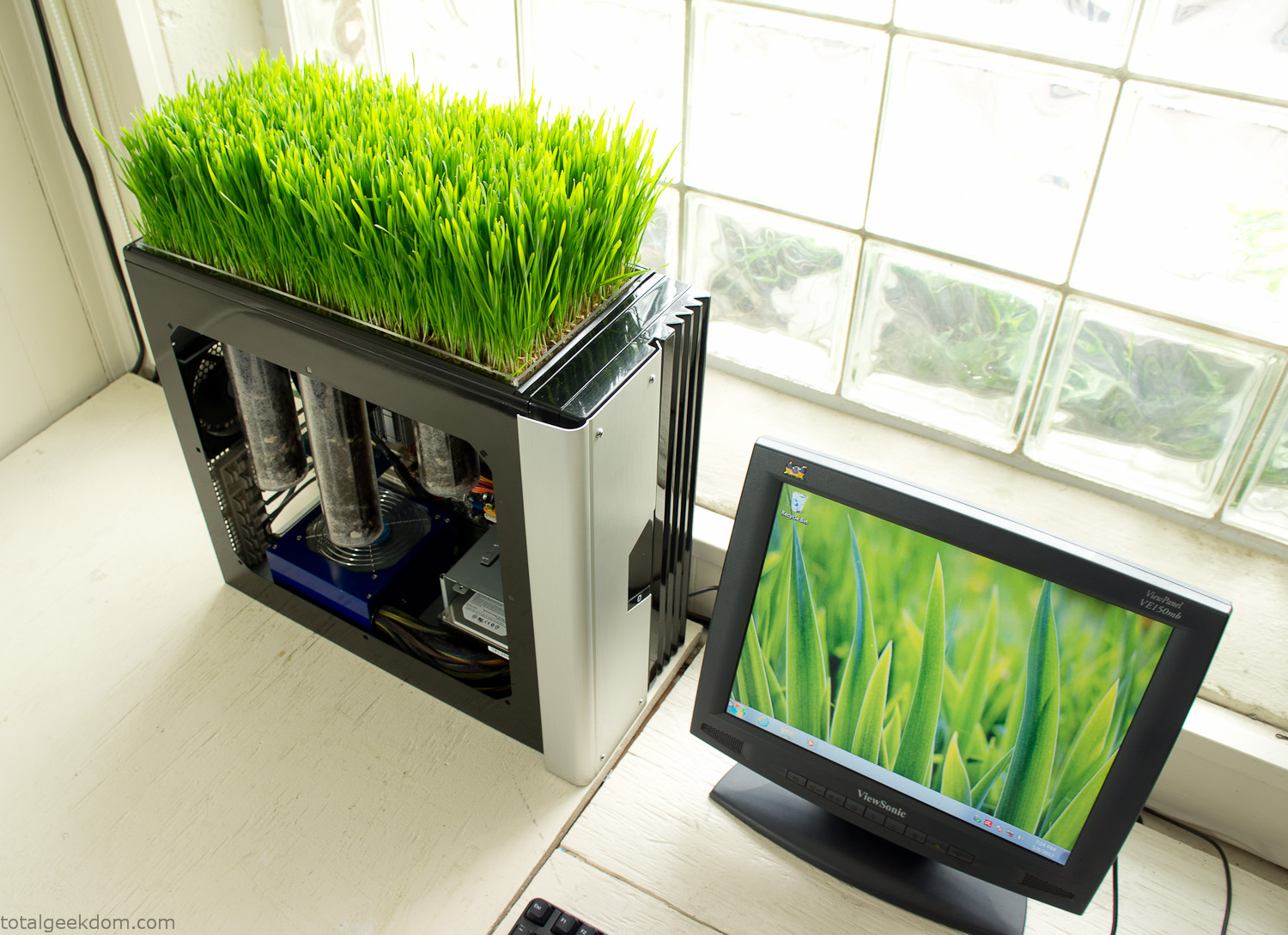
Bio Computer
I’ve been interested in working on a project for while that would combine something tech-based with something organic. Mixing the two elements intrigued me for a while. I’ve wanted to add flowers, or maybe plants of some sort to blend a little bit of nature into the space. I do receive a bit of sunlight through a glass block window, but the temperature in the basement is usually on the colder side. In the winter I don’t really heat the space because the folding farm outputs enough heat to keep the temperature comfortable. I didn’t want to change that aspect so I needed to come up with something that would tolerate slightly cooler temperatures and limited sunlight.
I can’t exactly recall when the idea came to me, but at some point I started wanting to use the heat from a computer as a way to warm the soil and help with germination/growth. I’m about as far from a botanist as it comes, I did some reading online and became pretty interested in the effects of soil temperature on germination/growth. I read different studies and papers from various universities. It was not too long into that process that I became hooked on the idea of using computer heat as a way to control the soil temperature of some sort of living plant life.
As the idea developed further I started looking into wheatgrass as a plant option. There is something clean and natural about the look and idea of a piece of grass growing in my basement. I thought the look would alter the space a little bit and add a bit of color along with something more than just metals and plastics. After reading enough studies and papers on the effects of soil temperature and germination with wheatgrass I felt like I had a good enough handle on the basics to tackle this.
The first step was finding a computer to adapt for the project. Luckily I had a lot of donated computers that people had given me for various project purposes. Most of them didn’t work, but by cobbling together various components from a bunch of different old computers I was able to come up with enough good parts to make a working computer.
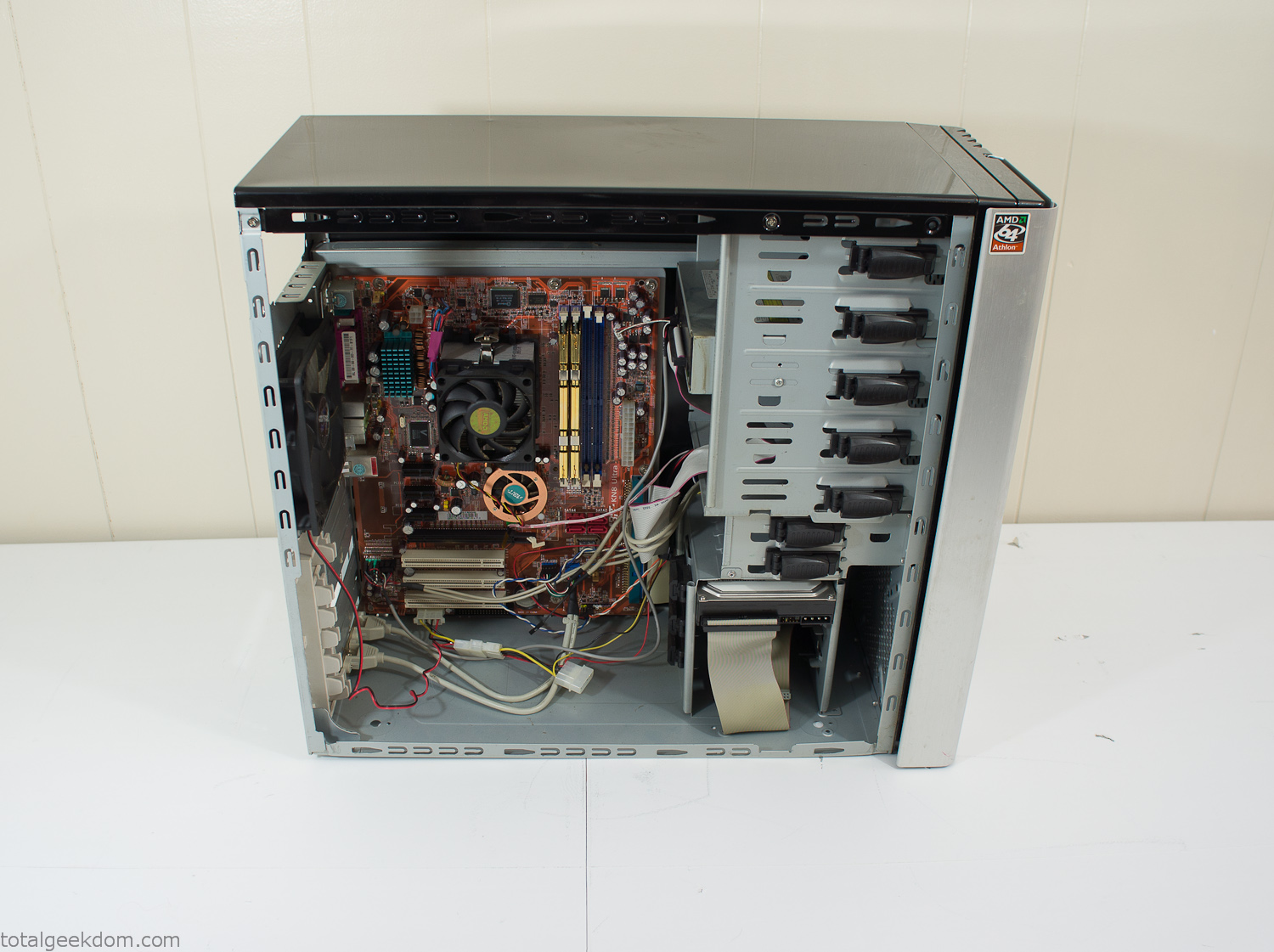
Donor Computer
At the time I was starting to get a formalized plan together for this project, another idea popped into my head. I’ve got a 5 yr. old who is already fairly geeky (just ask him to do his Jabba the Hutt impression for you) but he really does not get that much computer time. He’s getting to an age where he’s more inquisitive about tech stuff and I think he’s ready for his first computer. Since I was already well underway with this project it seemed like a perfect opportunity to orient the computer itself towards a learning tool for him in addition to using it as a way to blend something organic with a piece of technology.
With all of these goals in mind I started tinkering away. The computer hardware itself was nothing fancy, definitely outdated, but perfectly suited towards this project.
CPU- Pentium 4 (3 GHz)
Dell Factory Motherboard
Various Ram Sticks- 2gb
Old Maxtor 120gb IDE Hard Drive
Old FPS Power Supply
Donated Old Computer Case
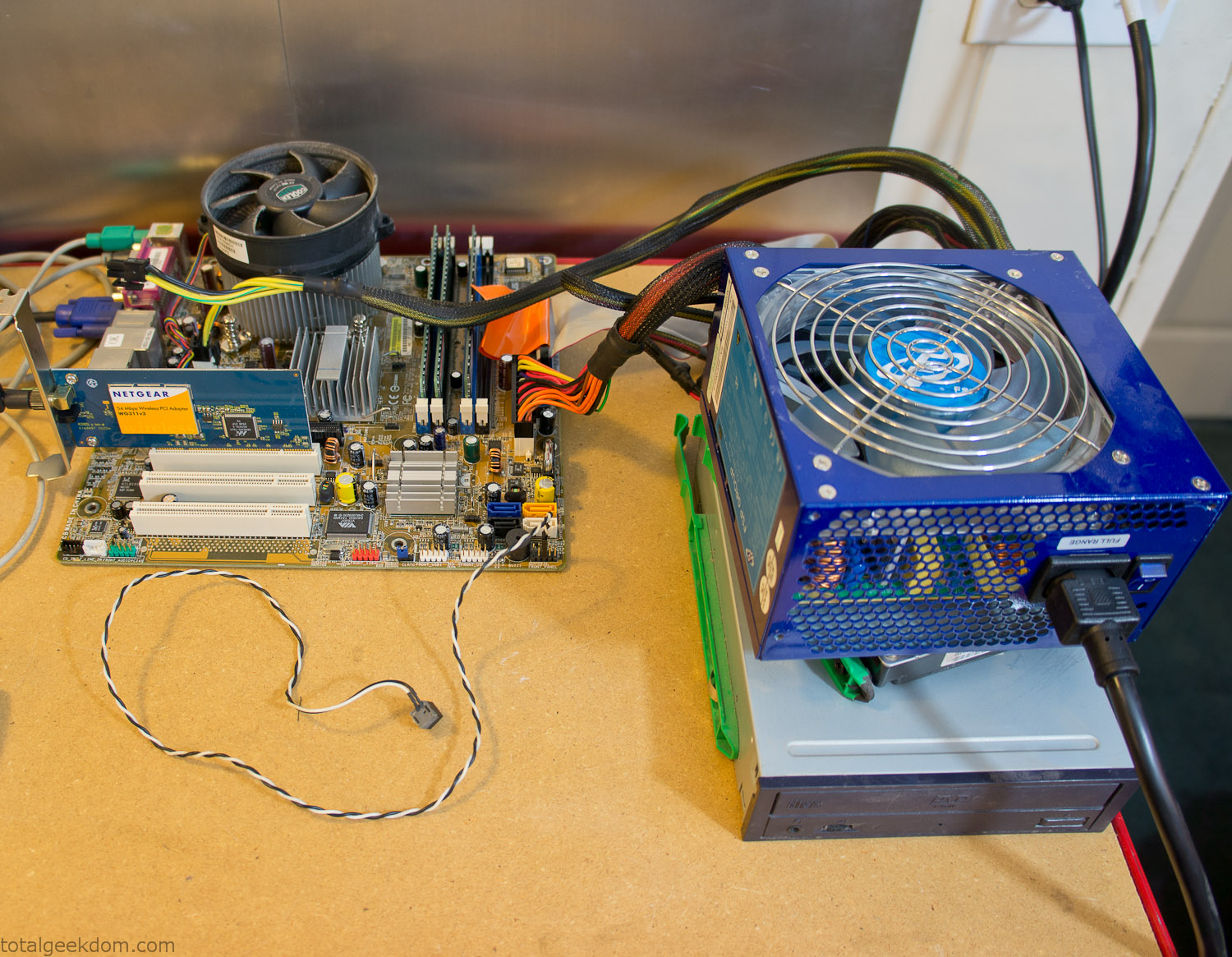
Computer Parts Testing
If you’ve spent any time around computer hardware in the last decade you’re probably well aware that Pentium 4 has a reputation for running hot. The 90nm Pentium 4 was named Prescott and it didn’t take long before the nickname Pres-hot popped up. In this case though that extra heat is going to be put towards good use.
Once the hardware was all in order I started working on the layout and arrangement for the case. I had originally envisioned the grass growing out of the top of the computer case. This seemed like it would provide a good blend between the hard edges of the computer and the soft feel of the grass. This also worked well with putting the soil area in the upper portion of the case, where the most heat should collect. After doing some initial tests with this configuration I found the measured temperature near the top of the case was the hottest. The placement of the CPU near the top of the case and the lack of airflow in that area contributed to these higher recorded temps.
After finishing with some initial tests I decided to completely strip the case down and start removing all the unnecessary brackets and pieces inside of the case. Like most computer cases all the internal brackets and mounts are riveted together, so I drilled all the rivets out of the components I wanted to remove and pulled them out. The gutted case looked pretty barren after being stripped.
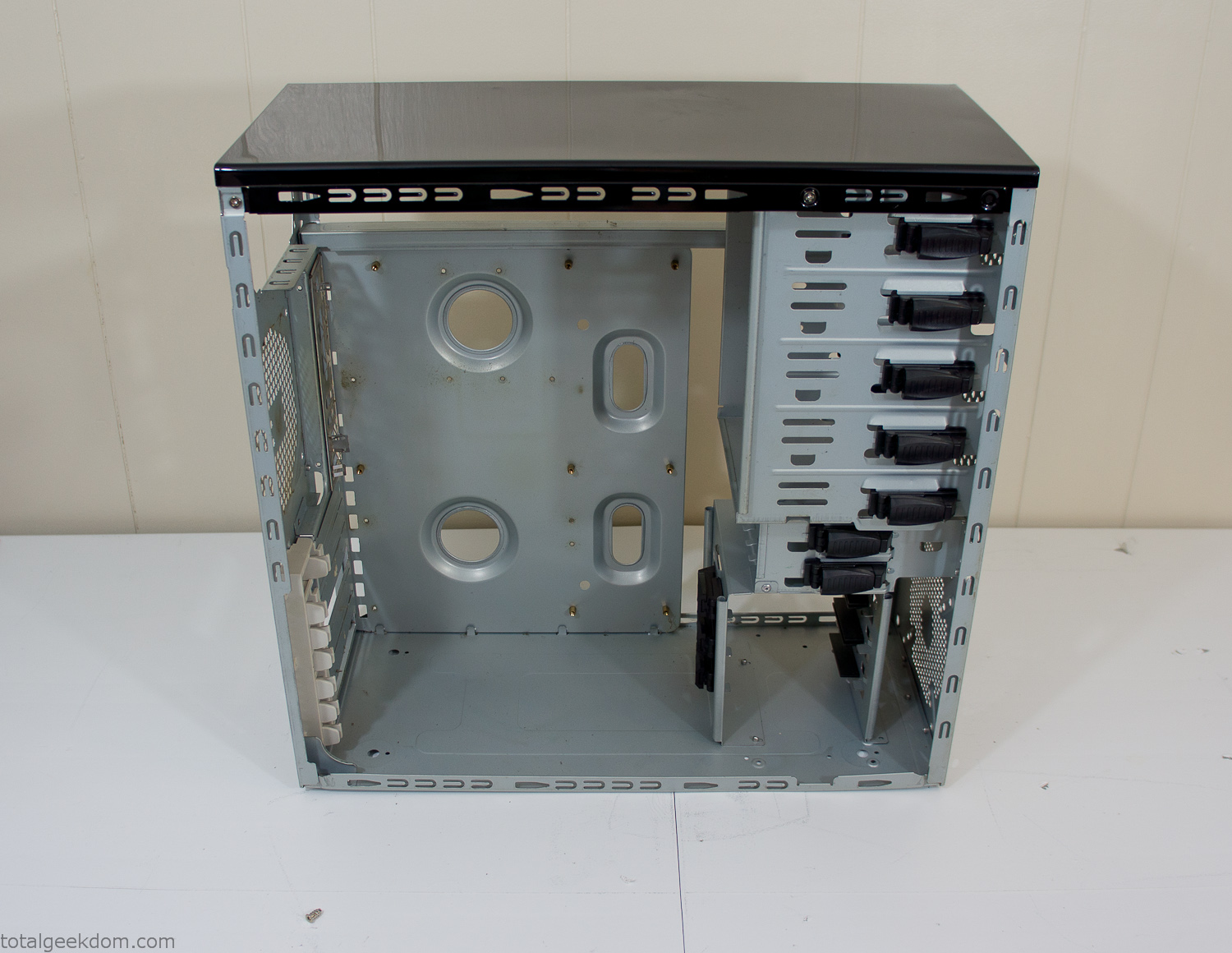
Empty Computer Case
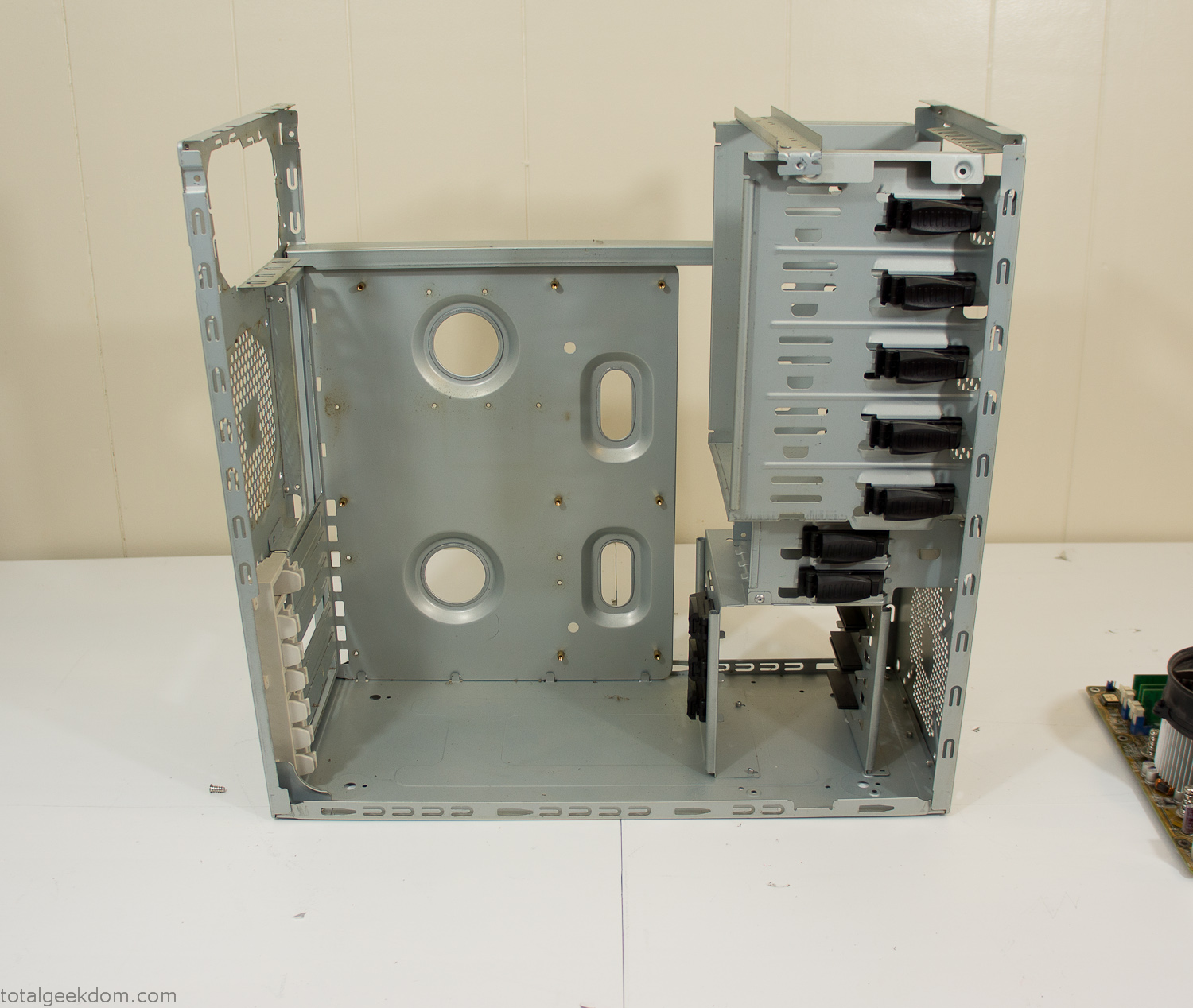
Dismantled Computer Case

Stripped Computer Case
In keeping with my original plan of having the computer blended with the organic grass I wanted it to be easy to see the inner workings of the computer and also the soil from the grass growing above. I needed something that was translucent, which left me with either glass or acrylic/polycarbonate as my options. I ended up choosing acrylic because I was able to find a cheap, used, die-cast model car display case top that was the perfect dimensions for the top of the case. Couldn’t go wrong for 5 bucks.
I test-fit the acrylic over the top of the computer case and marked my layout on the top of the case. My plan was to cut open the top of the computer case and insert the acrylic display case into the section I cut out. To cut open the top of the computer case I drilled a hole as a starting point and then used tin snips to cut through the thin gauge metal.
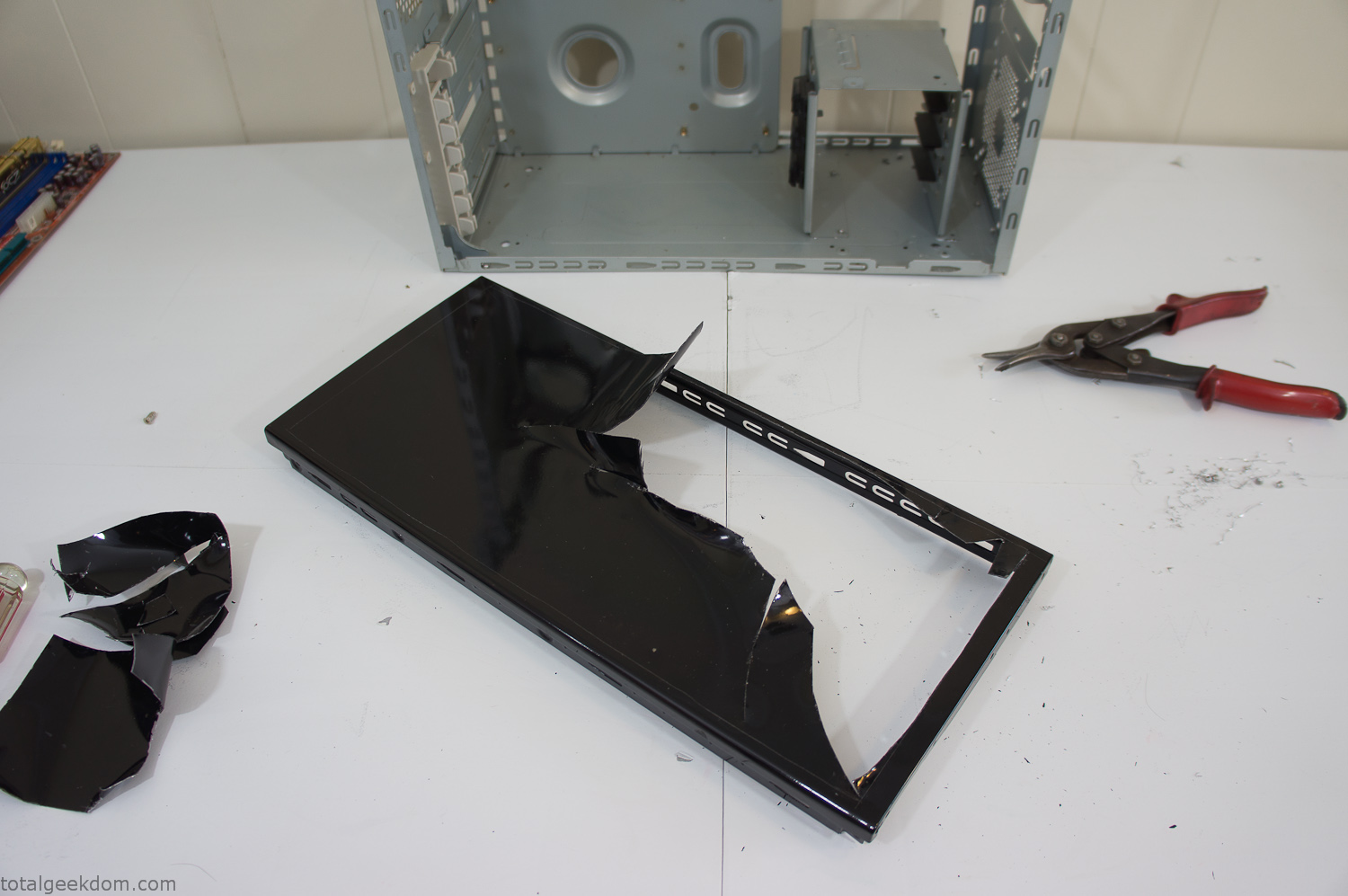
Computer Case Lid Modding
Once I had the metal opening cutout, I needed something to put along the edges of the freshly cut opening to create a clean and finished look. For $2 I was able to find some black, car-door-edge, plastic molding that worked perfectly.
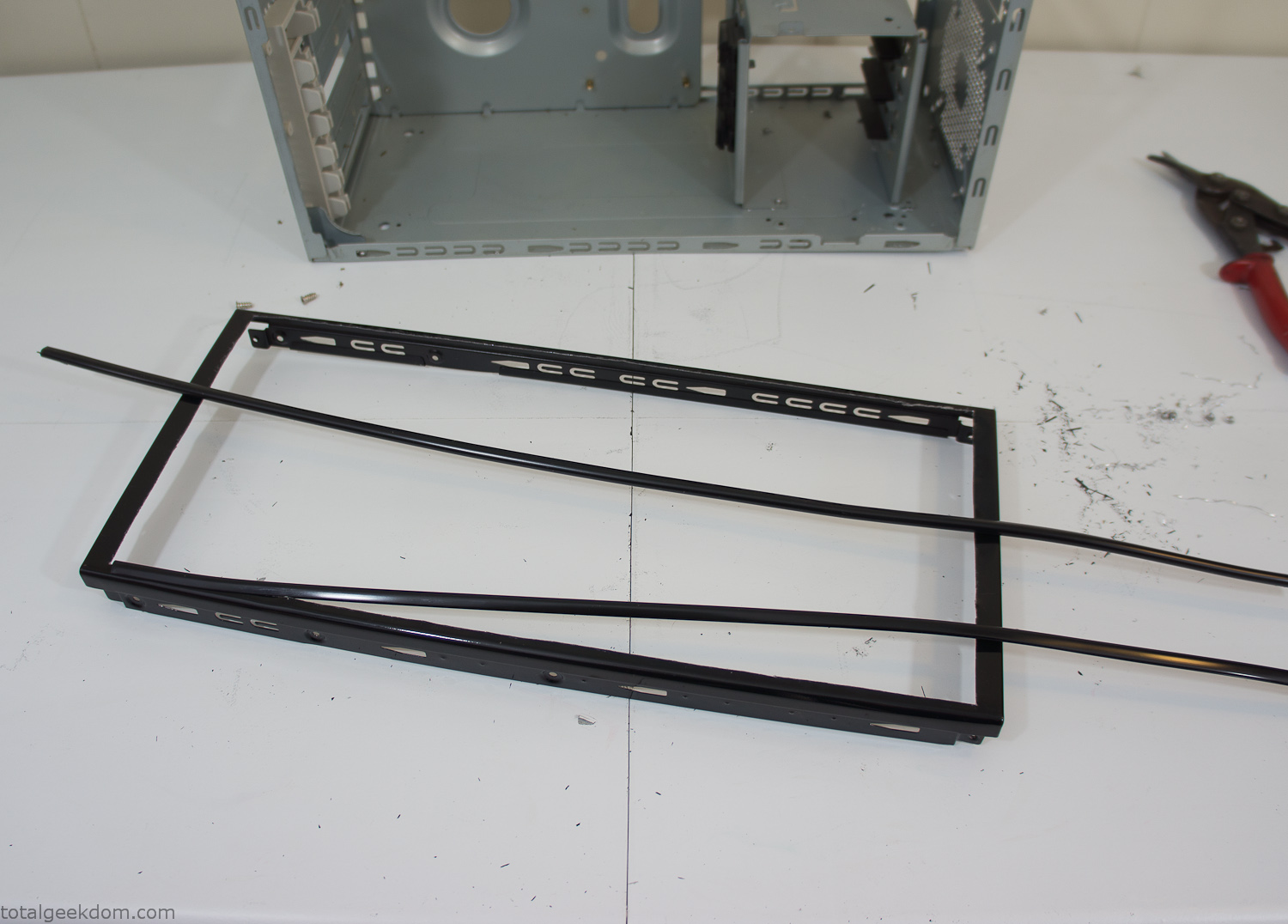
Modified Computer Case Lid
After getting the opening of the top of the computer handled and the acrylic case properly fitted, I moved onto some more testing with soil in the acrylic and the computer running. I wanted to see what kind of heat transfer I would get and how it would affect the soil temperature. I knew that using acrylic over glass would make it a little more difficult to heat the soil as acrylic is not that good at transferring heat. Luckily though I didn’t really need to alter the soil temperature that much, I just needed a little extra heat. Testing showed that heat transfer with just the single acrylic display case as my soil container was slow. So I decided to add some acrylic tubes. This would allow more surface are for soil to acrylic contact and also give me an area where I could add a mixed substrate to allow for soil drainage.
I went online and found a 3ft long section of 2 1/4″ clear acrylic tubing for $8 dollars. I wanted to add a couple of hanging cylinders off the main of the acrylic display case in the top of the computer case. To do this I needed to cut holes into the bottom of the display case. Cutting holes in acrylic is not always easy, it’s likely to chip and craze at the edges. To get around this I used a buildup of masking tape on both sides of the acrylic, to provide a little bit of resistance and strength. I placed the acrylic display case back into the computer and marked my layout for the tubes. I needed to leave clearance for the CPU cooler, power supply and hard drive mount.
After marking the layout, I used an air-powered pencil grinder and carbide tipped bit and cut through the acrylic case along my marked lines. After the initial shape was cutout I used a tube piece as a template and slowly worked on grinding the holes as perfectly round as I could get them so that the tube had a snug fit all the way around. The fit is pretty important as the acrylic cement that I used needs there to be a tight fit so that the acrylic can bond correctly.
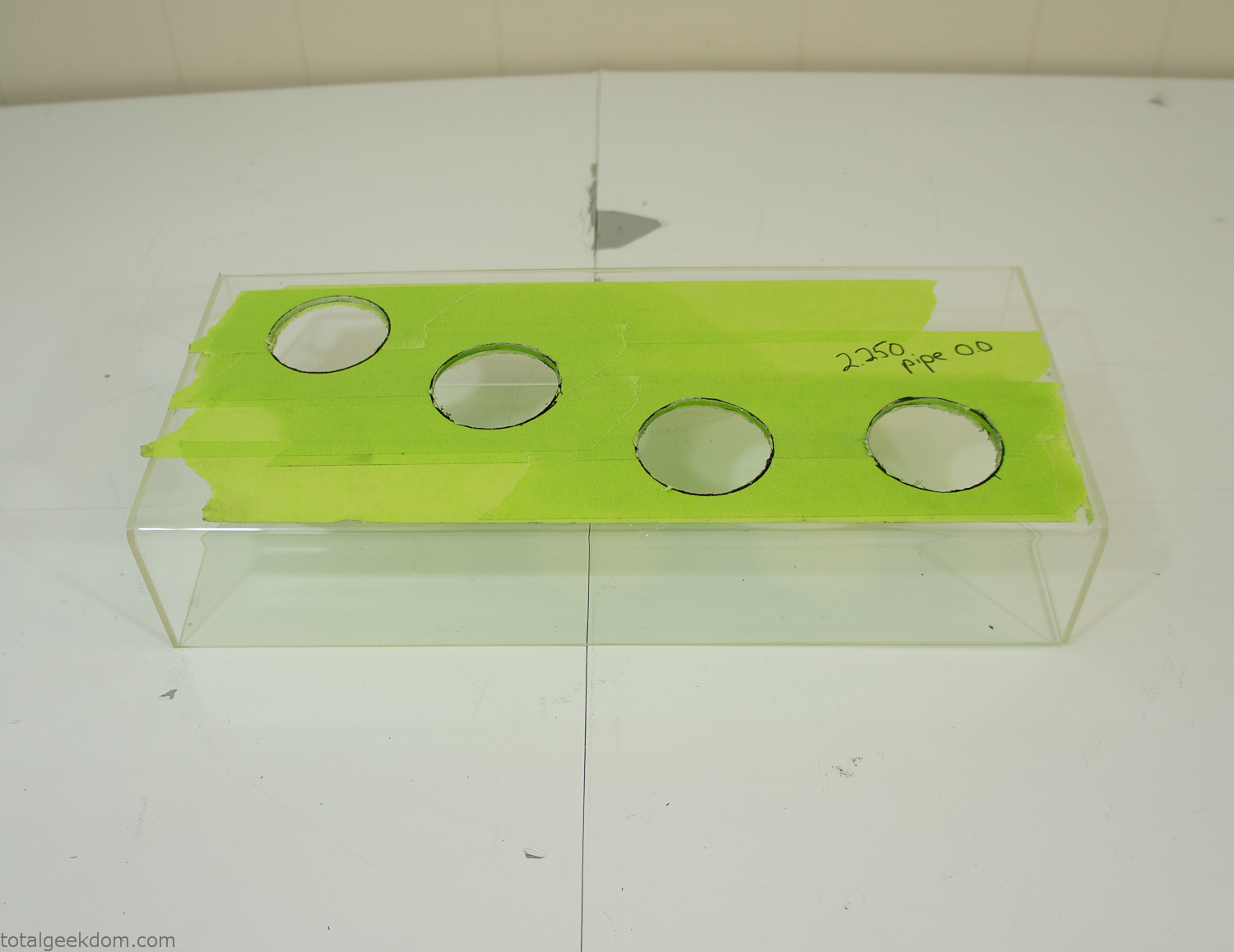
Acrylic Case Modifications
I placed the tubes into the acrylic case and mounted it in the computer and test fit the placement and height of the tubes. After getting everything lined up and oriented correctly I moved towards bonding the acrylic together. Using a needle dropper applicator I applied the cement to all the joints. After letting it set overnight I came back the next night and applied a thin coating of clear silicone caulk around all the joints just to ensure they were completely water tight
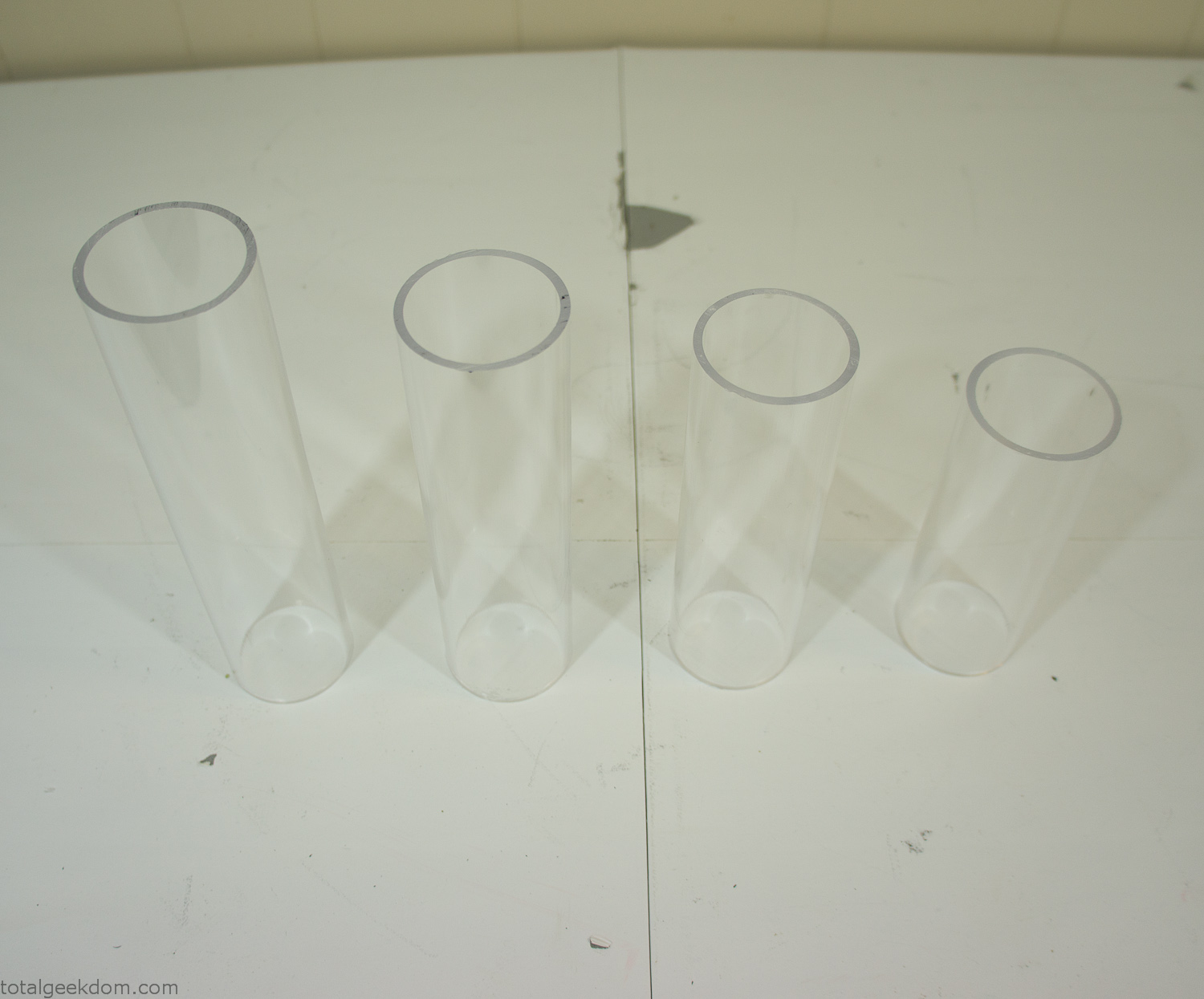
Acrylic Tubes
The next step was sealing up the bottom of the acrylic tubes. I looked at a couple of different options before realizing that the discs I had cut out of the acrylic case to fit the tubes would be almost the perfect size. Using a bench grinder and a test piece of tube I slowly ground each disc to the perfect size for a tight fit all the way around. I placed the clear acrylic discs into the bottom of each tube and repeated the same cementing and silicone caulking procedure to ensure they were water-tight. After a couple of days’ worth of drying I tested the case by filling it with water overnight and checking in the morning to make sure that no leaks had popped up.
In order to hold the weight of the acrylic case after adding soil, I drilled and installed a machine screw with a rubber cap at each corner of the computer case to bear the weight of the acrylic case.
Once all the work was done with the acrylic case section I started reinstalling all the components. The motherboard, hard drive and power supply were added and then wired up.
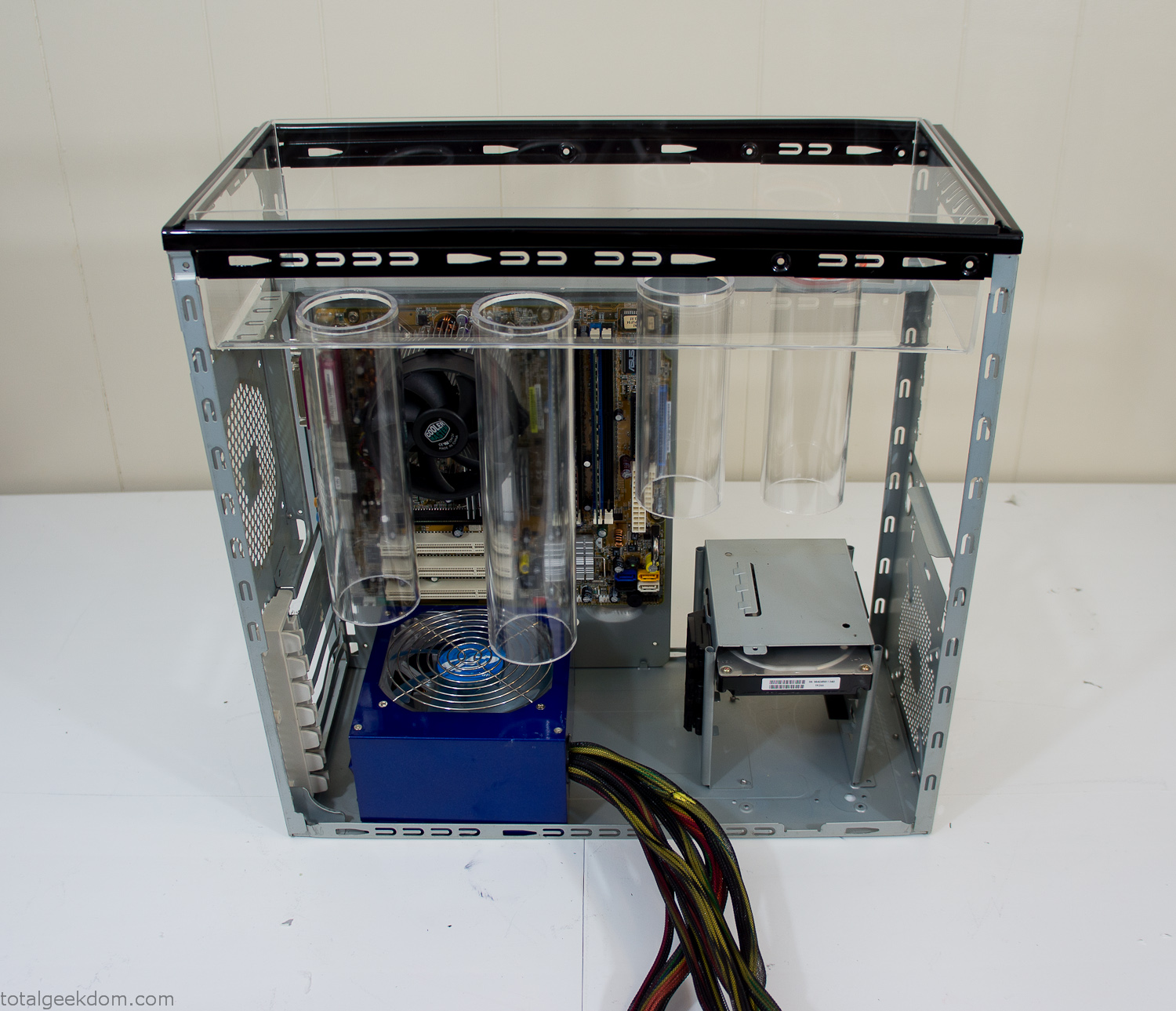
Mocked Up Computer Case
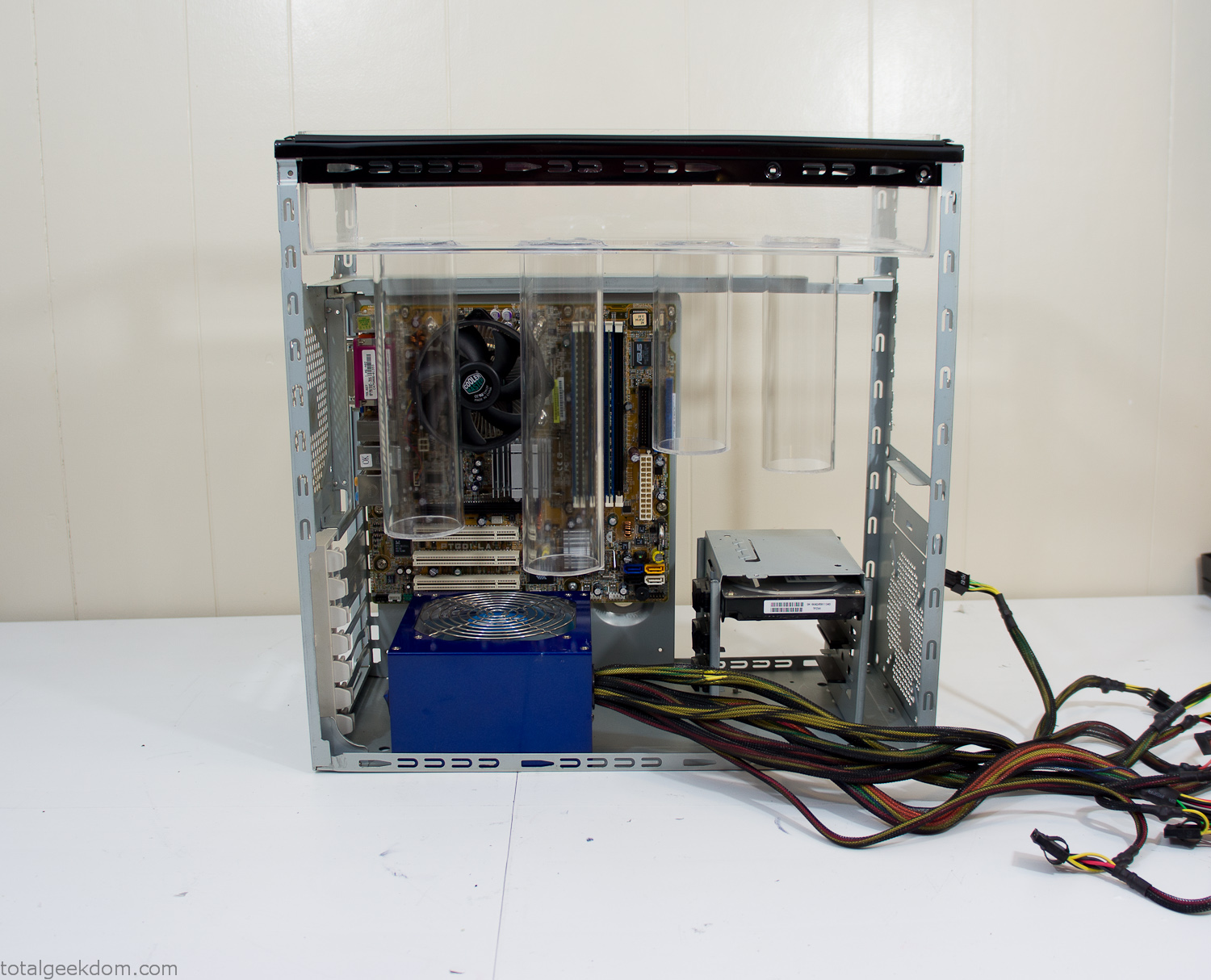
Power Supply Mockup
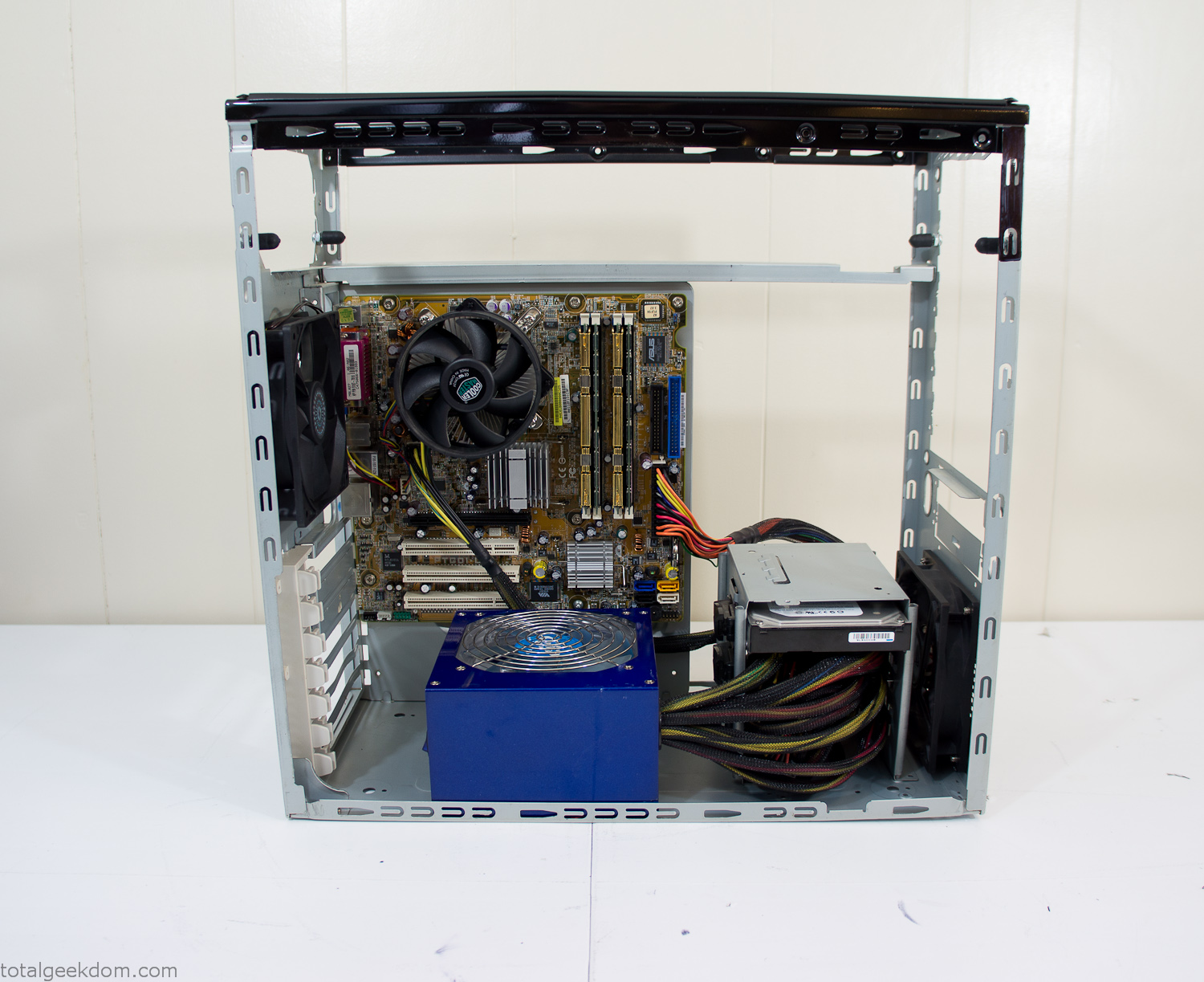
Computer Components Wired
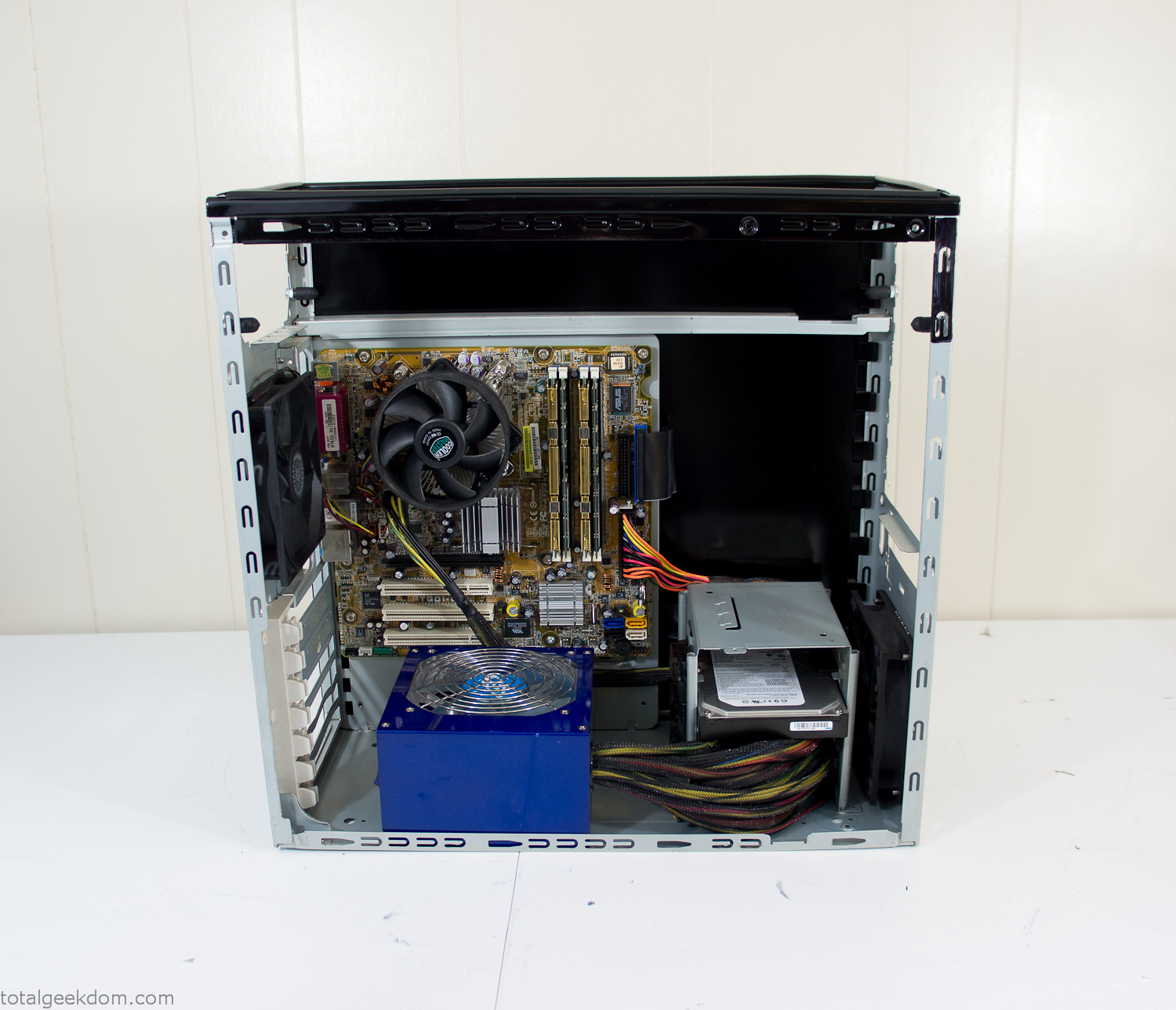
Case Panel Installed
At this point all that was left was to make a clear panel for the side of the case. I had some left over acrylic sheets from a different project that were really close to the right size, after test fitting, marking and cutting I then had a clear side panel to see into the case. (I left this off for the pictures because it caused a reflection)
The final step was filling the case with soil and adding some wheatgrass. I had been test growing other samples of wheatgrass during the build process. So I had already a couple of different patches of grass growing. I tried to keep the soil level just below the top of the acrylic case edge to make it a little more seamless.
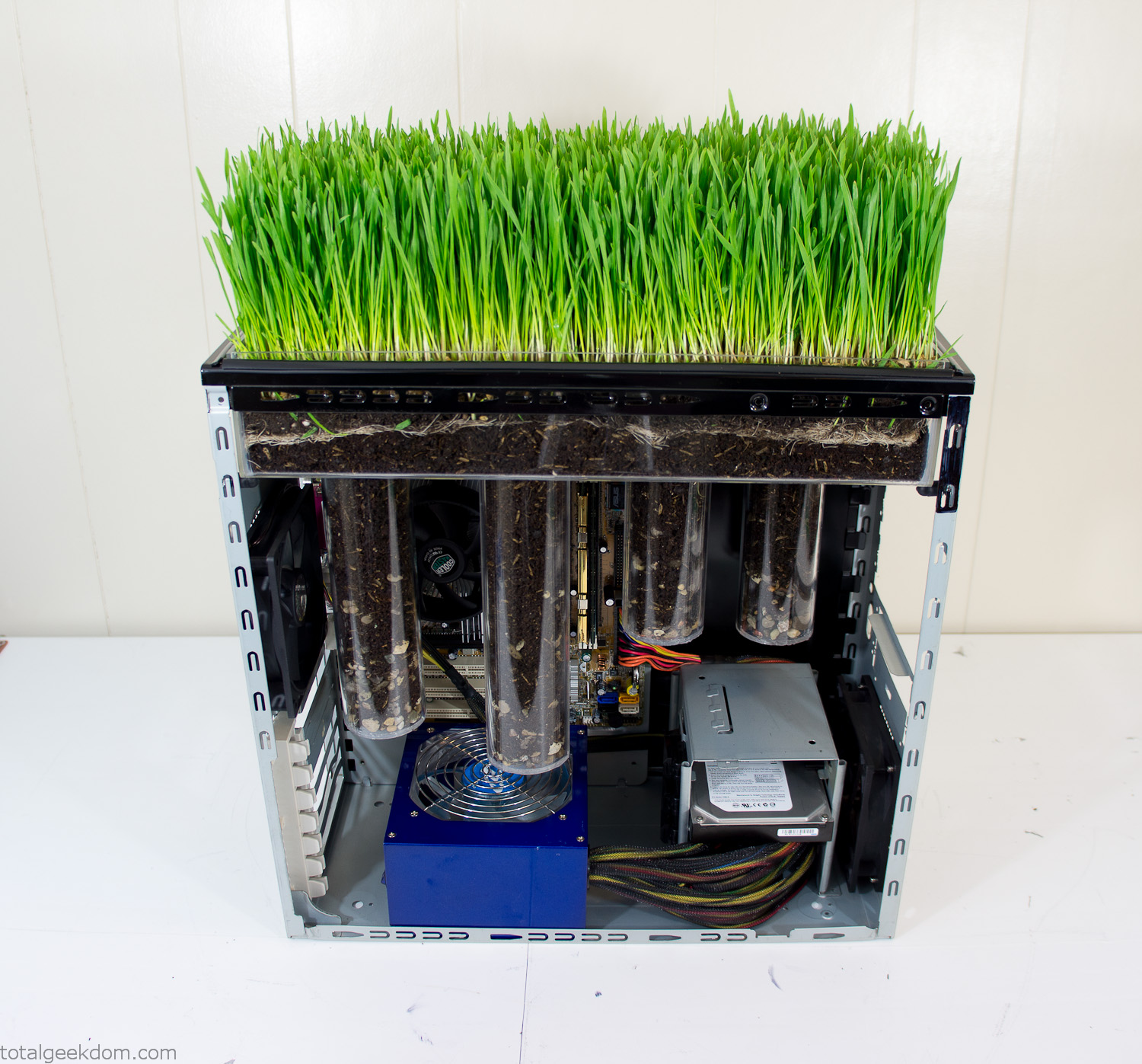
Grass Planted in Computer
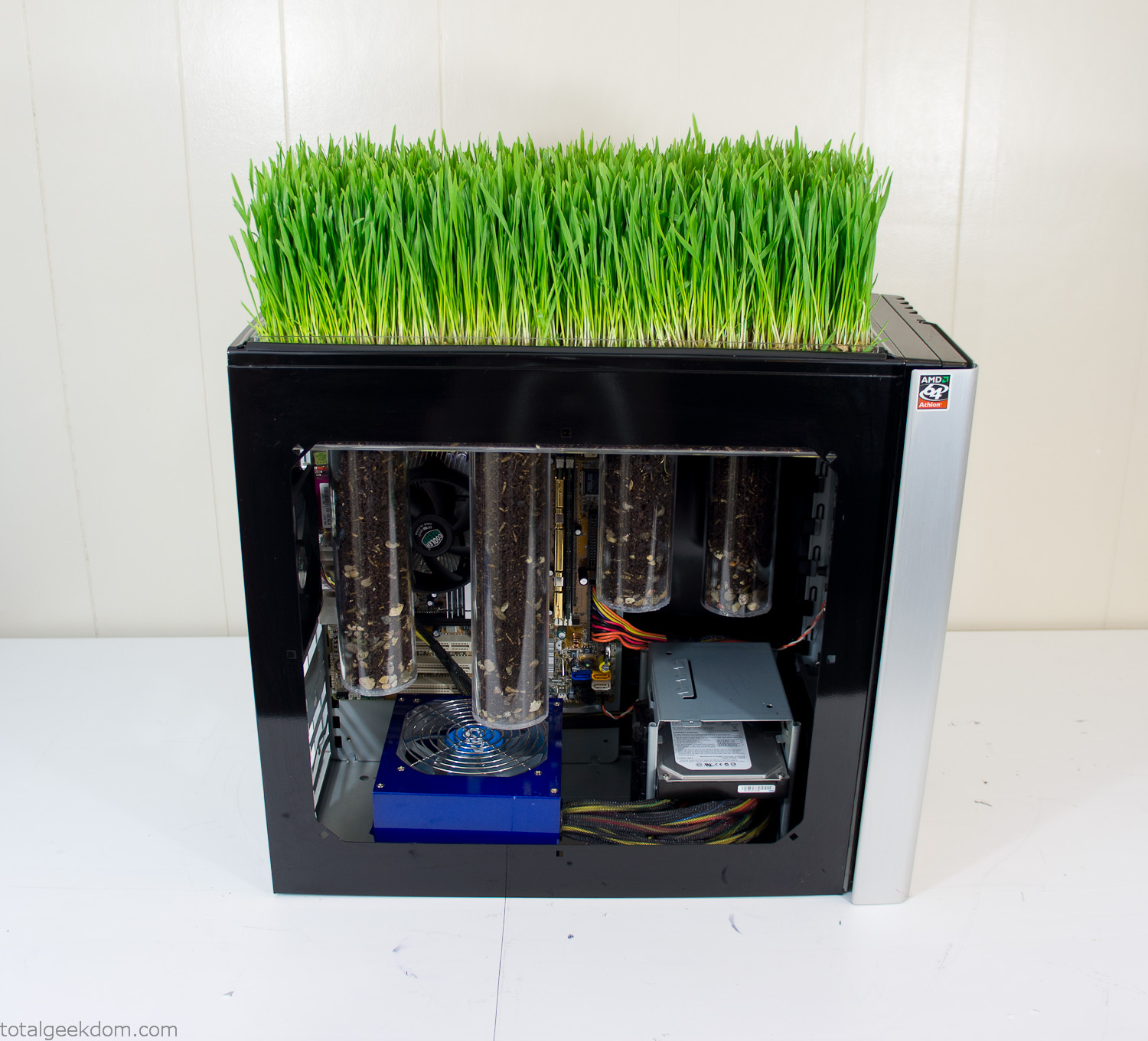
Grass and Case Panel Installed

Grass in Computer
For the computer itself I ended up installing Windows as well as Linux in a dual boot setup. Since the computer was going to be used by my son as something to play with I figured I should put both on there so he can tinker with them and learn as he goes. Besides, for important life decisions like picking an OS (Operating System) I think any good parent should present the options and then let their kid decide for themselves.
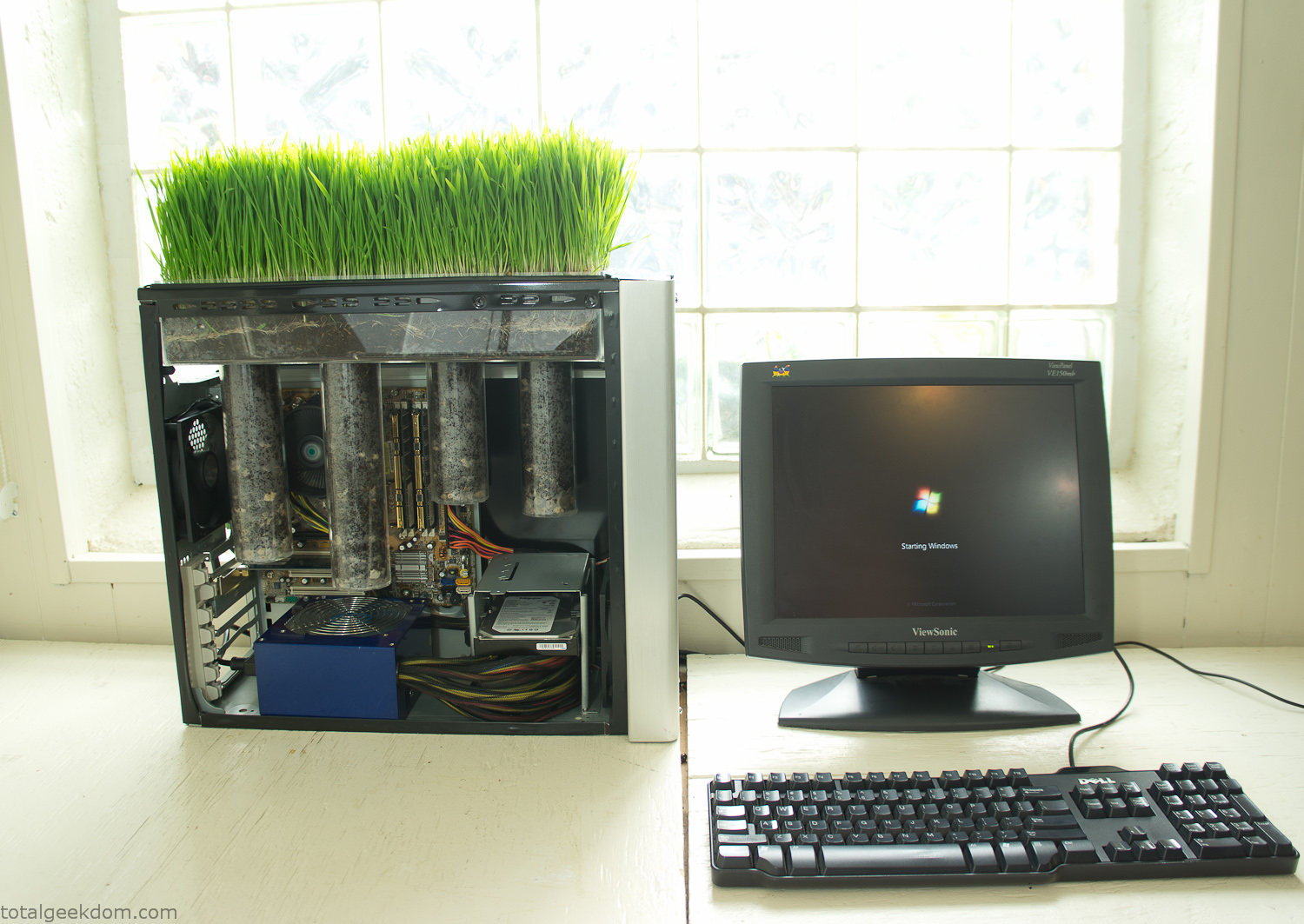
Starting Windows
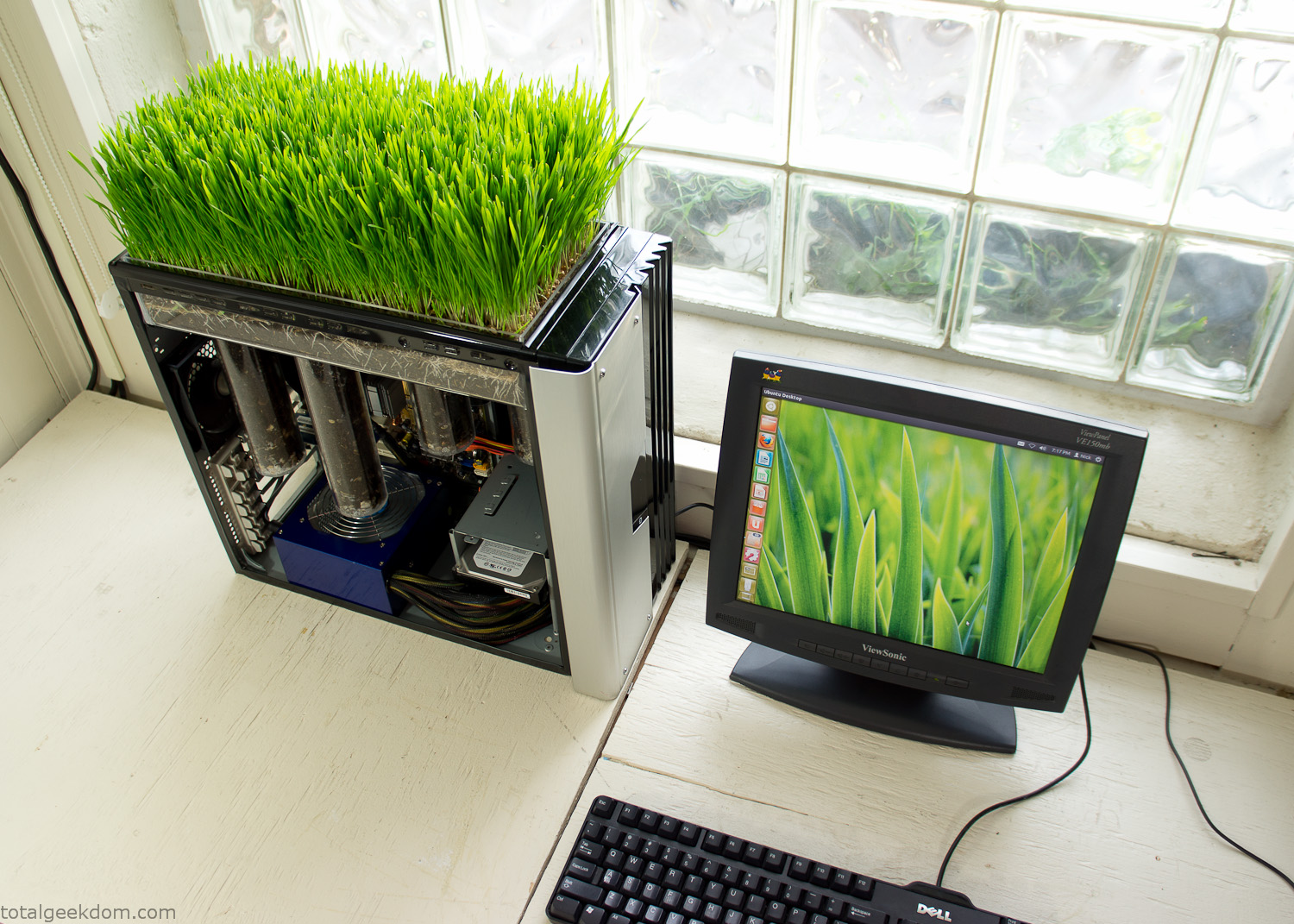
Linux Running
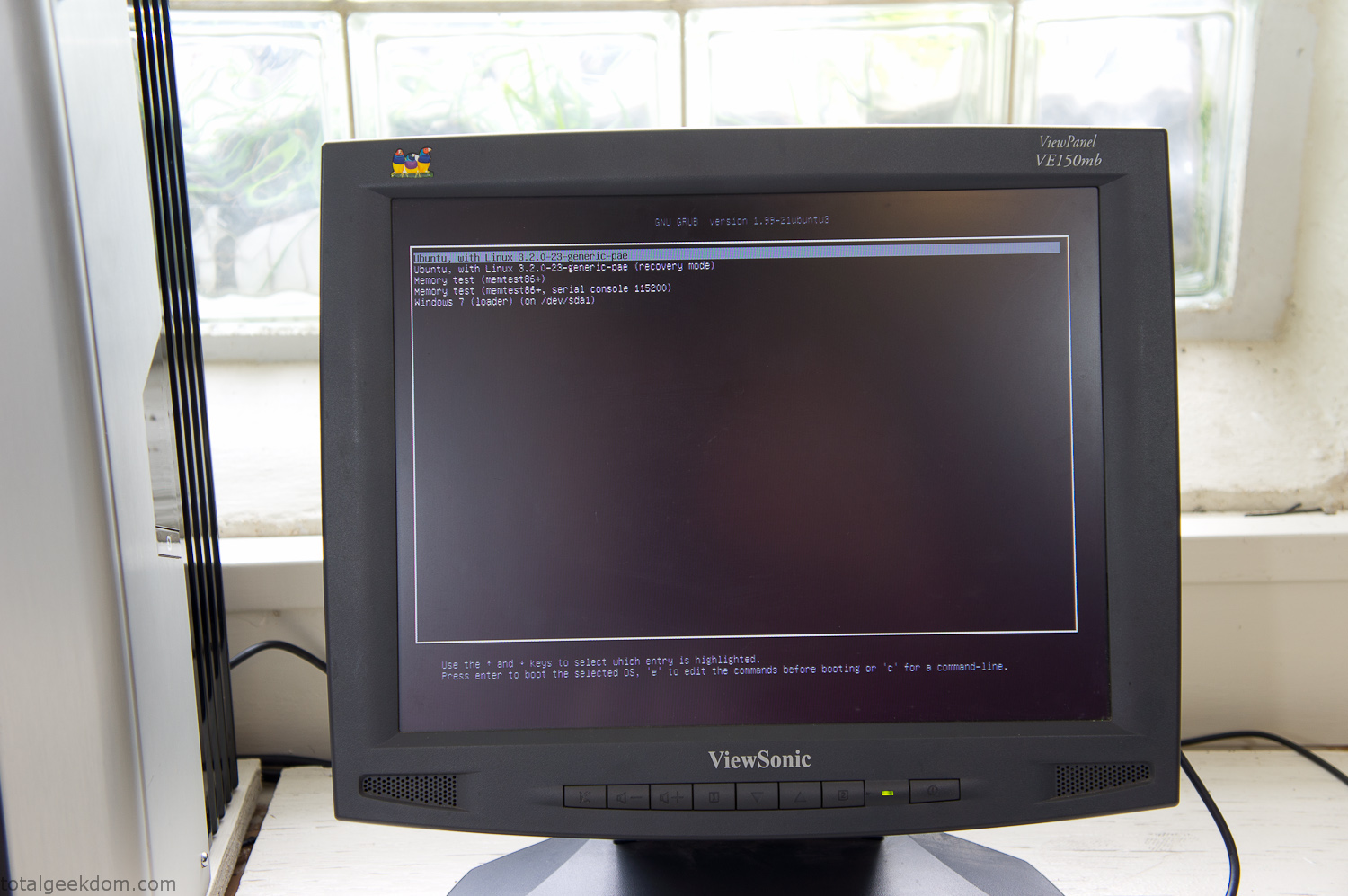
Dual Boot Screen
In the end I’m happy with the result of the project. It’s been fun experimenting with growing wheatgrass and I like how the natural look of grass is blended with the very modern, inorganic case.
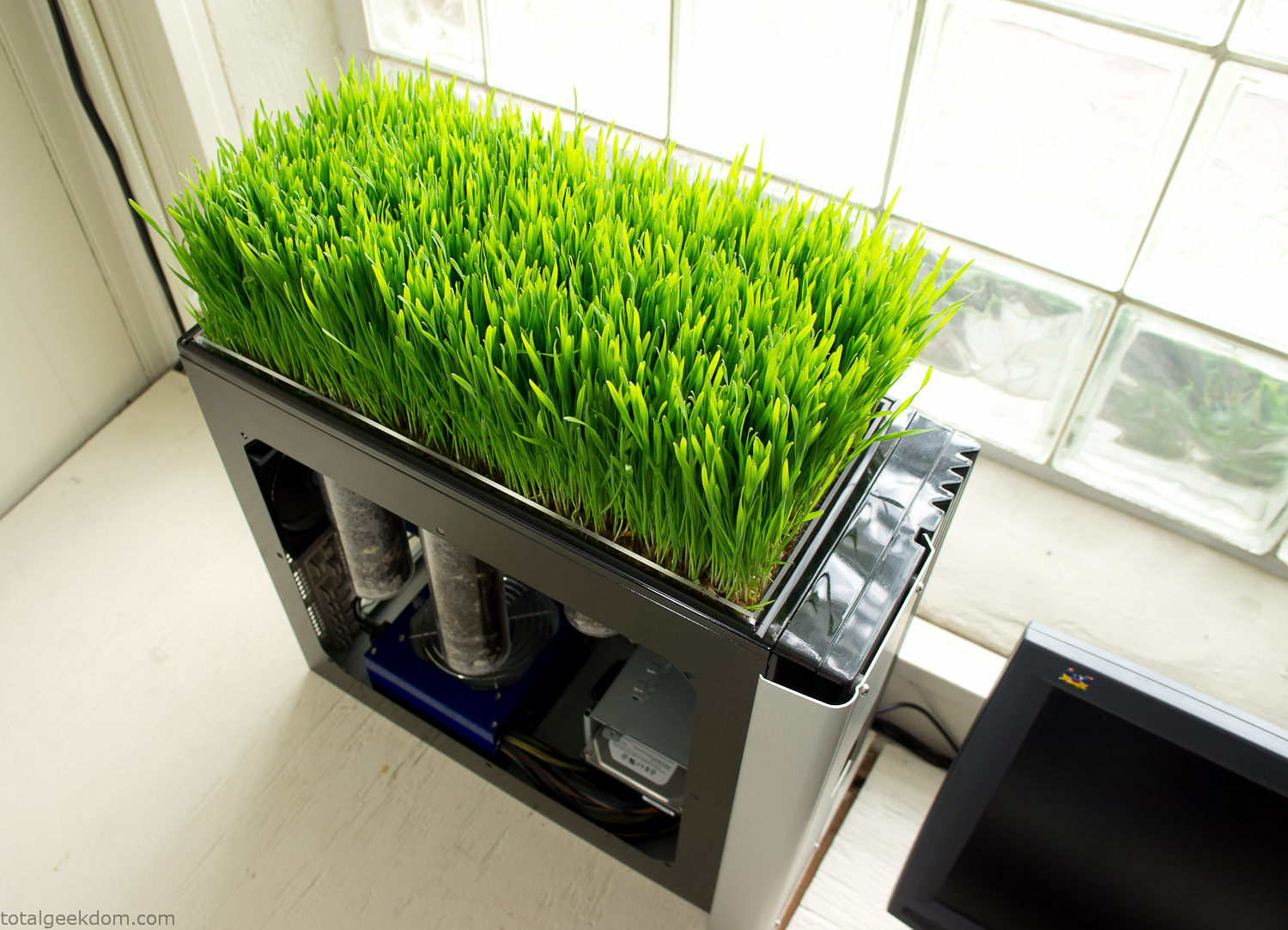
Computer Grass Growing
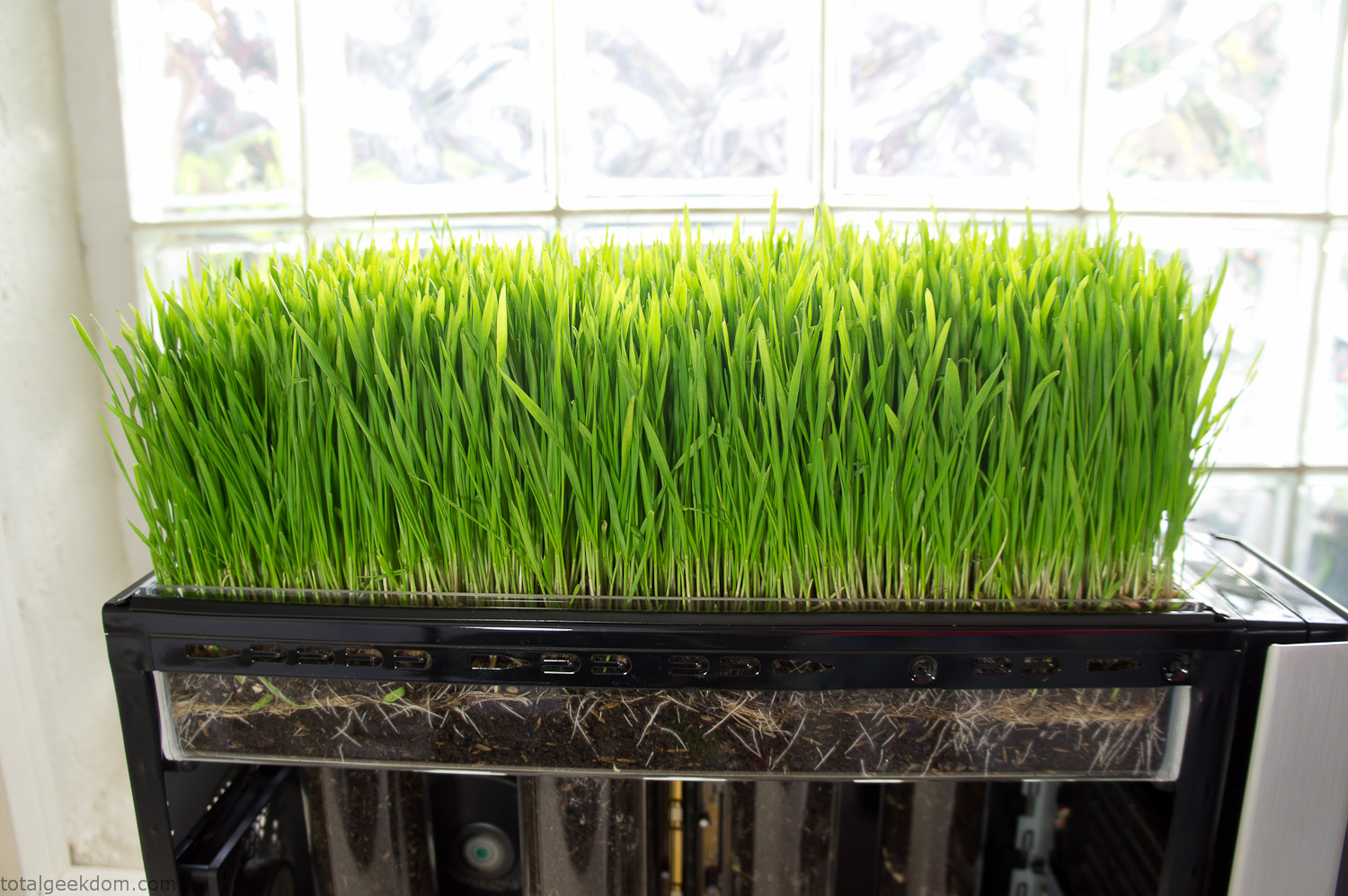
Grass in Computer Section
Notes
Temperature Testing
In testing the case temperature versus the soil temperature I found it was easiest to control the case temperature by using a variable fan speed control on both the inlet and outlet fans. By turning the fan speed down I could increase the temperature inside the case and correspondingly raise the soil temperature.
In order to maximize output of heat during these tests I used Prime95 to run the CPU at 100% load.
Using this method to control the case and soil temperature I played around with adjusting the soil temperature and then tracking the rate of growth of the Wheatgrass. The target temperature for peak growth seemed to fall around 66°F (19°C).
Using the fans to control the case temperature allowed me to vary the temperature inside the case from a low of 75°F (24°C) to a high of 91°F (33°C). In order to achieve the desired increase in soil temperature, I had to run the case temperature toward the higher end of the scale.
When the soil temperature was too high, the growth of the wheatgrass would slow.
Wheatgrass
The wheatgrass I used for my tests was nothing special, it can be found as seeds (berries) in a lot of health food stores and it grows relatively easily.
Caring for the wheatgrass is just a matter of keeping it watered. It’s a pretty easy plant to work with and doesn’t require any special skills.
Wheatgrass is often used as a nutritional supplement; it can be juiced and mixed into smoothies and other beverages. I plan on harvesting some of the grass and making some juices.
Plant Options
While wheatgrass offers a nice, attractive and easily grown option I do plan on trying other plants as well in the future. Since I already have the “planter” built all I have to do is add a different plant and see how it goes. I’m sure there will be some plants that don’t like the lower light environment, but it will be fun experimenting with other plants as well and seeing how they take.
Materials
Donated Computer- Free
Clear Acrylic Display Case- $5
Clear Acrylic Tube- $5
Plexiglass Side Panel- Free
Total- $10
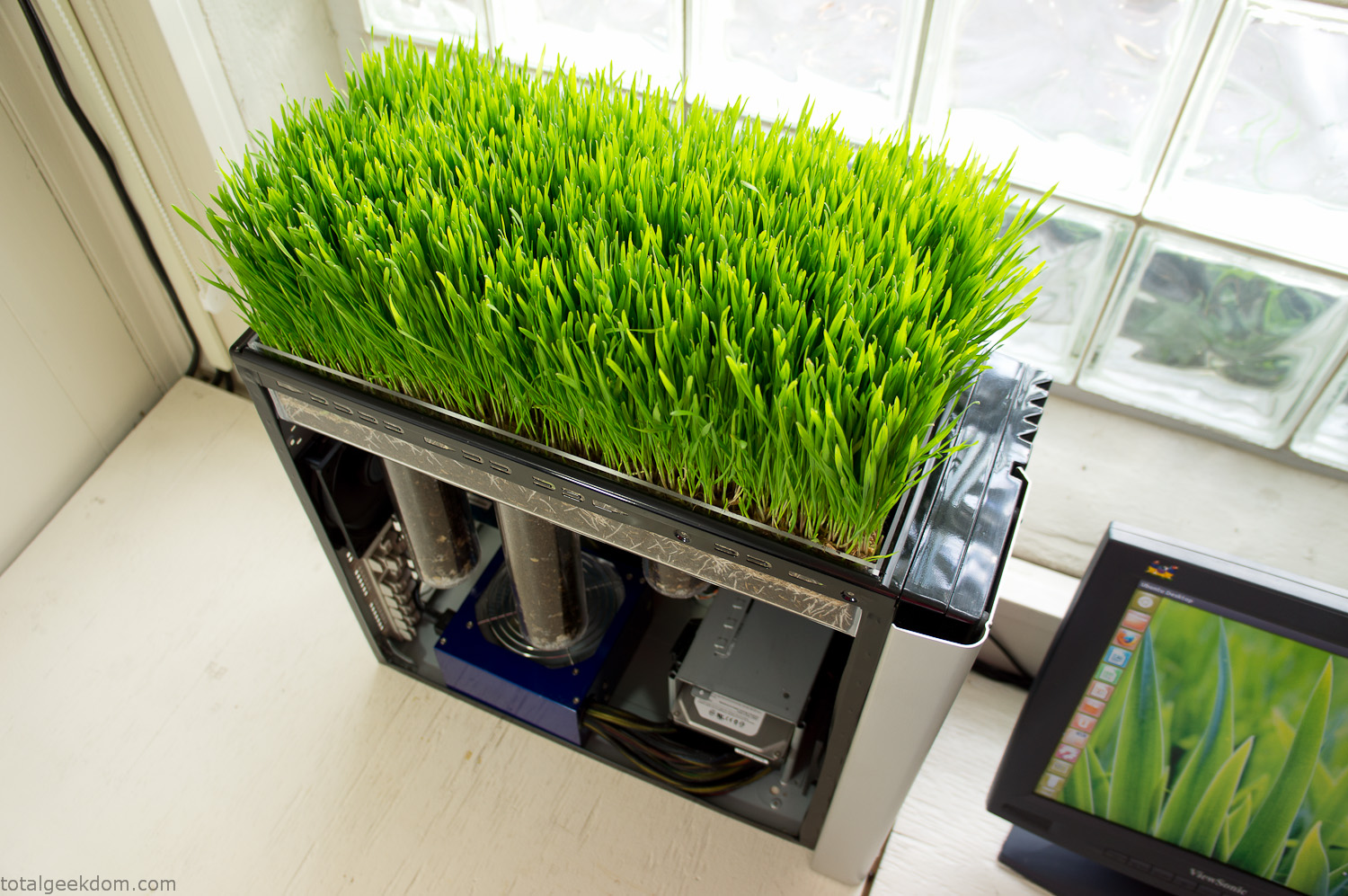
Bio Computer Running
 29.2k
29.2k
 13.2k
13.2k 7.1k
7.1k

 2.1k
2.1k 813
813 2.6k
2.6k
Comments 53,106
https://intercom.help/welcome-bonus/en/articles/17041832-msimbo-wa-bonasi-bila-amana-wa-1xbet-ofa-za-michezo-win88kk
https://ibpstore.ru/
https://kabinetrecords.cz/inc/stati.php?hellcase-promo-code-cz-en.html
главные распределительные щиты
https://www.tripadvisor.com.ar/Profile/bubacodehub
бизнес соляная пещера соляная пещера для детского сада
https://gravatar.com/groovydragon928ac1f658
Furthermore, i believe that mesothelioma cancer is a extraordinary form of melanoma that is often found in these previously exposed to asbestos. Cancerous cells form while in the mesothelium, which is a protective lining that covers the majority of the body’s body organs. These cells typically form inside lining from the lungs, tummy, or the sac that really encircles the heart. Thanks for discussing your ideas.
https://intercom.help/welcome-bonus/en/articles/17616077-winwinbet-casino-code-2026-max200-iyo-130
สล็อต
TKBNEKO: สำรวจโลกของ 15 เกม PG SOFT ผ่านธีม ตัวละคร และงานภาพ
เกมแต่ละเกมมีสิ่งที่ทำให้คนจดจำแตกต่างกัน บางเกมโดดเด่นด้วยตัวละคร บางเกมสร้างบรรยากาศผ่านภาพและสัญลักษณ์ ขณะที่บางเกมใช้ธีมการผจญภัยเป็นจุดเริ่มต้นของความน่าสนใจ จุดเริ่มต้นของการสำรวจเกมจึงอาจเป็นธีม งานภาพ หรือเรื่องราว ไม่ใช่เพียงชื่อที่ปรากฏอยู่บนหน้าปก
TKBNEKO นำแนวคิดนี้มาใช้ในการจัดแสดงคอลเลกชันเกม PG SOFT จำนวน 15 เกม โดยให้ความสำคัญกับธีม ตัวละคร และข้อมูลที่สำรวจได้ง่าย ผู้เข้าชมสามารถดูภาพรวมของคอลเลกชัน ค้นหาชื่อเกม หรือเลือกหมวดที่สนใจ ก่อนเข้าไปทำความรู้จักรายละเอียดของแต่ละเกมเพิ่มเติม
15 เกมในคอลเลกชัน แบ่งตามธีมอย่างชัดเจน
TKBNEKO จัดเกมในคอลเลกชันไว้ในสามหมวดหลัก คือ ไพ่นกกระจอก โชคลาภ และผจญภัย การแยกเกมตามธีมช่วยให้ผู้เข้าชมมองเห็นภาพรวม และค้นหากลุ่มที่สนใจได้โดยไม่จำเป็นต้องเปิดดูทุกเกม
Mahjong Ways และ Mahjong Ways 2 เป็นสองเกมที่อยู่ในหมวดไพ่นกกระจอก การรวมทั้งสองเกมไว้ในหมวดเดียวช่วยให้ทำความรู้จักแต่ละชื่อได้อย่างเป็นลำดับ สำหรับ Mahjong Ways เว็บไซต์ยังนำเสนอหัวข้อ “เมื่อประเพณีมีชีวิต” เพื่อพาไปทำความรู้จักโลกของเกมผ่านแนวคิดและภาพที่เกี่ยวข้องกับไพ่นกกระจอก
หมวดโชคลาภเป็นกลุ่มที่มีจำนวนเกมมากที่สุด รวมทั้งหมดแปดเกม ได้แก่ Fortune Tiger, Lucky Neko, Fortune Ox, Fortune Mouse, Fortune Dragon, Double Fortune, Ganesha Fortune และ Caishen Wins แม้จะอยู่ภายใต้หมวดเดียวกัน แต่แต่ละชื่อเปิดพื้นที่ให้สำรวจเอกลักษณ์ของตัวละครและการนำเสนอที่แตกต่างกัน ทั้งนี้ “โชคลาภ” เป็นชื่อที่ใช้แบ่งหมวดตามธีมเท่านั้น ไม่ได้เป็นการรับรองผลลัพธ์จากเกม
ส่วนหมวดผจญภัยประกอบด้วยห้าเกม ได้แก่ Treasures of Aztec, Wild Bandito, Ways of the Qilin, Wild Bounty Showdown และ The Great Icescape การจัดเกมเหล่านี้ไว้ในหมวดเดียวกันช่วยให้ผู้เข้าชมสำรวจบรรยากาศที่หลากหลาย และเลือกทำความรู้จักโลกของเกมที่ตรงกับความสนใจ
มองโลกของเกมผ่านเรื่องราวและบุคลิกของตัวละคร
นอกจากการแสดงคอลเลกชัน TKBNEKO ยังนำเสนอเนื้อหาที่ช่วยให้ผู้เข้าชมทำความรู้จักเกมมากกว่าการดูชื่อและภาพหน้าปก โดยแบ่งวิธีนำเสนอออกเป็นการทำความรู้จักโลกของเกม การเจาะลึกตัวละคร และการสำรวจเรื่องราวเพิ่มเติม
Fortune Tiger ได้รับพื้นที่ในส่วนเกมเด่น และปรากฏในเนื้อหาเกี่ยวกับตัวละครภายใต้แนวคิด “ตัวละครเล็ก บุคลิกที่ยิ่งใหญ่” การนำเสนอจึงขยายจากชื่อเกมไปสู่บุคลิกและเอกลักษณ์ทางภาพของตัวละครที่อยู่ในเกม
ในส่วนของ Mahjong Ways เว็บไซต์เริ่มอธิบายโลกของเกมผ่านแนวคิดที่เกี่ยวข้องกับประเพณี ส่วน Treasures of Aztec อยู่ในพื้นที่สำรวจเพิ่มเติม โดยใช้ความอยากรู้เป็นแนวคิดในการพาไปทำความรู้จักเกม รูปแบบดังกล่าวช่วยให้แต่ละเกมมีบริบทและเรื่องราวประกอบ แทนที่จะปรากฏเป็นเพียงชื่อกับภาพในคอลเลกชัน
ความแตกต่างของแนวทางเหล่านี้ช่วยให้ผู้เข้าชมเลือกวิธีทำความรู้จักเกมได้ตามความสนใจ ผู้เข้าชมบางคนอาจจดจำเกมจากตัวละคร ขณะที่บางคนต้องการรู้จักแนวคิดของธีม หรือสำรวจบรรยากาศที่ถ่ายทอดผ่านงานภาพ
ค้นหาเกมตามชื่อและหมวดหมู่
ส่วนค้นหาเกมของ TKBNEKO รวมรายการไว้ในพื้นที่เดียว พร้อมช่องค้นหาชื่อเกมและตัวกรองตามหมวด ผู้เข้าชมที่รู้ชื่อเกมสามารถค้นหารายการนั้นได้โดยตรง ขณะที่ผู้ต้องการดูภาพรวมสามารถเลือกสำรวจหมวดไพ่นกกระจอก โชคลาภ หรือผจญภัยก่อน
หน้ารวมมีทั้งการแสดงเกมบางส่วนและตัวเลือกสำหรับเปิดดูครบทั้ง 15 เกม จึงรองรับการสำรวจสองรูปแบบ คือการดูรายการเบื้องต้นอย่างรวดเร็วและการไล่ดูคอลเลกชันทั้งหมดอย่างเป็นลำดับ
แต่ละรายการแสดงชื่อเกมควบคู่กับผู้พัฒนาและหมวดหมู่ ข้อมูลเหล่านี้ช่วยให้ผู้เข้าชมแยกแยะได้ว่าเกมที่กำลังดูคือเกมใด อยู่ในกลุ่มใด และมีความเชื่อมโยงกับรายการอื่นอย่างไร โดยไม่ต้องอาศัยภาพประกอบเพียงอย่างเดียว
ทำความรู้จักเกมผ่านอุปกรณ์และภาษาที่คุ้นเคย
เว็บไซต์ TKBNEKO ระบุว่าสามารถเข้าถึงได้ทั้งจากคอมพิวเตอร์และมือถือ และมีตัวเลือกทั้งหมด 14 ภาษา การมีตัวเลือกด้านภาษาและอุปกรณ์ช่วยให้ผู้เข้าชมเลือกวิธีอ่านข้อมูลและสำรวจเว็บไซต์ได้ตามความคุ้นเคย
แนวคิดหลักของเว็บไซต์ประกอบด้วยการค้นหาธีมที่สนใจ การทำความรู้จักตัวละครและฟีเจอร์ และการสำรวจในภาษาของตนเอง องค์ประกอบเหล่านี้เชื่อมการดูภาพรวมของคอลเลกชันเข้ากับการทำความรู้จักรายละเอียดของเกมแต่ละรายการ
การมีทั้งคอลเลกชัน ตัวกรอง และเนื้อหาประกอบ ทำให้ผู้เข้าชมไม่จำเป็นต้องเริ่มจากจุดเดียวกันทุกครั้ง สามารถเข้าถึงเกมผ่านชื่อ หมวดหมู่ หรือบทความเกี่ยวกับโลกและตัวละครของเกมนั้นได้
แยกภาพประกอบออกจากภาพเกมจริง
เว็บไซต์ระบุว่าภาพประกอบเกมสร้างด้วย AI และเครื่องหมายการค้าเกมเป็นของเจ้าของแต่ละราย รายละเอียดนี้ช่วยแยกบทบาทของภาพที่ใช้สื่อแนวคิดและบรรยากาศออกจากภาพหน้าจอจริง จึงไม่ควรถือว่าภาพประกอบทุกภาพแสดงสิ่งที่ปรากฏภายในเกมโดยตรง
โดยภาพรวม TKBNEKO เป็นพื้นที่นำเสนอคอลเลกชันที่เชื่อมข้อมูลของเกมเข้ากับธีม ตัวละคร และภาพประกอบ จุดเด่นของการจัดแสดงไม่ได้อยู่ที่จำนวนเกมเพียงอย่างเดียว แต่อยู่ที่การเชื่อมรายชื่อทั้ง 15 เกมเข้ากับหมวดหมู่ ตัวละคร และเนื้อหาที่ช่วยอธิบายว่าแต่ละโลกมีอะไรให้สำรวจ
สล็อตเว็บตรง
TKBNEKO: เปิดคอลเลกชัน 15 เกม PG SOFT กับโลกและตัวละครที่น่าจดจำ
แต่ละเกมมีเอกลักษณ์ที่สร้างความประทับใจในรูปแบบของตัวเอง บางเกมโดดเด่นด้วยตัวละคร บางเกมสร้างบรรยากาศผ่านภาพและสัญลักษณ์ ขณะที่บางเกมใช้ธีมการผจญภัยเป็นจุดเริ่มต้นของความน่าสนใจ จุดเริ่มต้นของการสำรวจเกมจึงอาจเป็นธีม งานภาพ หรือเรื่องราว ไม่ใช่เพียงชื่อที่ปรากฏอยู่บนหน้าปก
TKBNEKO ใช้แนวทางนี้ในการนำเสนอคอลเลกชัน 15 เกมจาก PG SOFT โดยเน้นการทำความรู้จักธีม ตัวละคร และรายละเอียดผ่านข้อมูลที่เข้าถึงได้สะดวก ผู้เข้าชมสามารถเริ่มจากภาพรวม ค้นหาเกมตามชื่อ หรือเปิดหมวดที่ต้องการ แล้วจึงสำรวจข้อมูลของแต่ละเกมอย่างละเอียดขึ้น
15 เกมในคอลเลกชัน แบ่งตามธีมอย่างชัดเจน
คอลเลกชันของ TKBNEKO แบ่งออกเป็นสามหมวด ได้แก่ ไพ่นกกระจอก โชคลาภ และผจญภัย การจัดหมวดช่วยให้เห็นความแตกต่างของเกมตั้งแต่แรก โดยไม่ต้องเปิดดูทีละรายการเพื่อค้นหาธีมที่ต้องการ
หมวดไพ่นกกระจอกประกอบด้วย Mahjong Ways และ Mahjong Ways 2 ทั้งสองชื่อถูกจัดไว้ในกลุ่มเดียวกันเพื่อให้สำรวจได้ต่อเนื่อง สำหรับ Mahjong Ways เว็บไซต์ยังนำเสนอหัวข้อ “เมื่อประเพณีมีชีวิต” เพื่อพาไปทำความรู้จักโลกของเกมผ่านแนวคิดและภาพที่เกี่ยวข้องกับไพ่นกกระจอก
หมวดโชคลาภเป็นกลุ่มที่มีจำนวนเกมมากที่สุด รวมทั้งหมดแปดเกม ได้แก่ Fortune Tiger, Lucky Neko, Fortune Ox, Fortune Mouse, Fortune Dragon, Double Fortune, Ganesha Fortune และ Caishen Wins แม้จะอยู่ภายใต้หมวดเดียวกัน แต่แต่ละชื่อเปิดพื้นที่ให้สำรวจเอกลักษณ์ของตัวละครและการนำเสนอที่แตกต่างกัน คำว่า “โชคลาภ” ในที่นี้เป็นชื่อหมวดสำหรับจัดกลุ่มธีม ไม่ใช่คำรับรองผลลัพธ์ของเกม
ส่วนหมวดผจญภัยประกอบด้วยห้าเกม ได้แก่ Treasures of Aztec, Wild Bandito, Ways of the Qilin, Wild Bounty Showdown และ The Great Icescape การจัดเกมเหล่านี้ไว้ในหมวดเดียวกันช่วยให้ผู้เข้าชมสำรวจบรรยากาศที่หลากหลาย และเลือกทำความรู้จักโลกของเกมที่ตรงกับความสนใจ
สำรวจตัวละครและเรื่องราวเบื้องหลังเกม
นอกเหนือจากรายชื่อเกม TKBNEKO ยังมีพื้นที่สำหรับเนื้อหาที่พาผู้เข้าชมมองรายละเอียดเบื้องหลังภาพหน้าปก เนื้อหาเหล่านี้ครอบคลุมทั้งการแนะนำโลกของเกม การนำเสนอตัวละคร และการเปิดประเด็นให้สำรวจเรื่องราวต่อ
Fortune Tiger ได้รับพื้นที่ในส่วนเกมเด่น และปรากฏในเนื้อหาเกี่ยวกับตัวละครภายใต้แนวคิด “ตัวละครเล็ก บุคลิกที่ยิ่งใหญ่” การนำเสนอจึงขยายจากชื่อเกมไปสู่บุคลิกและเอกลักษณ์ทางภาพของตัวละครที่อยู่ในเกม
ในส่วนของ Mahjong Ways เว็บไซต์เริ่มอธิบายโลกของเกมผ่านแนวคิดที่เกี่ยวข้องกับประเพณี ขณะที่ Treasures of Aztec ปรากฏในส่วนสำรวจเพิ่มเติมภายใต้แนวคิดการปล่อยให้ความอยากรู้นำทาง การจัดเนื้อหาเช่นนี้ทำให้เกมแต่ละเกมมีพื้นที่อธิบายตัวตน มากกว่าการเป็นเพียงภาพหนึ่งภาพในรายการ
ความแตกต่างของแนวทางเหล่านี้ช่วยให้ผู้เข้าชมเลือกวิธีทำความรู้จักเกมได้ตามความสนใจ บางคนอาจเริ่มจากตัวละคร บางคนสนใจที่มาของธีม ส่วนอีกกลุ่มอาจให้ความสำคัญกับบรรยากาศและการเล่าเรื่องผ่านภาพ
ค้นหาและกรองเกมจากความสนใจ
TKBNEKO รวบรวมเกมไว้ในหน้าสำรวจที่มีทั้งช่องค้นหาตามชื่อและตัวเลือกสำหรับกรองหมวดหมู่ ผู้เข้าชมที่รู้ชื่อเกมสามารถค้นหารายการนั้นได้โดยตรง ขณะที่ผู้ต้องการดูภาพรวมสามารถเลือกสำรวจหมวดไพ่นกกระจอก โชคลาภ หรือผจญภัยก่อน
หน้ารวมมีทั้งการแสดงเกมบางส่วนและตัวเลือกสำหรับเปิดดูครบทั้ง 15 เกม ผู้เข้าชมจึงสามารถดูภาพรวมจากรายการที่แสดงก่อน หรือเปิดสำรวจทั้งคอลเลกชันทีละเกมได้
แต่ละรายการแสดงชื่อเกมควบคู่กับผู้พัฒนาและหมวดหมู่ ข้อมูลเหล่านี้ช่วยให้ผู้เข้าชมแยกแยะได้ว่าเกมที่กำลังดูคือเกมใด อยู่ในกลุ่มใด และมีความเชื่อมโยงกับรายการอื่นอย่างไร โดยไม่ต้องอาศัยภาพประกอบเพียงอย่างเดียว
เข้าถึงคอลเลกชันผ่านคอมพิวเตอร์และมือถือ
เว็บไซต์ TKBNEKO ระบุว่าสามารถเข้าถึงได้ทั้งจากคอมพิวเตอร์และมือถือ และมีตัวเลือกทั้งหมด 14 ภาษา แนวทางนี้ให้ความสำคัญกับการทำความรู้จักข้อมูลในภาษาที่ผู้เข้าชมคุ้นเคย ควบคู่ไปกับการเลือกอุปกรณ์ที่ใช้สำรวจเว็บไซต์
แนวคิดหลักของเว็บไซต์ประกอบด้วยการค้นหาธีมที่สนใจ การทำความรู้จักตัวละครและฟีเจอร์ และการสำรวจในภาษาของตนเอง องค์ประกอบเหล่านี้เชื่อมการดูภาพรวมของคอลเลกชันเข้ากับการทำความรู้จักรายละเอียดของเกมแต่ละรายการ
เมื่อมีทั้งหน้ารวมเกม ระบบกรองหมวด และบทความประกอบ ผู้เข้าชมจึงเลือกจุดเริ่มต้นในการสำรวจได้หลายแบบ การทำความรู้จักเกมอาจเริ่มจากการค้นหาชื่อ การเลือกหมวด หรือการอ่านเนื้อหาเกี่ยวกับเรื่องราวและตัวละครของเกม
ทำความเข้าใจภาพประกอบและเครื่องหมายการค้า
TKBNEKO แจ้งว่าภาพที่ใช้ประกอบเกมสร้างขึ้นด้วย AI ส่วนเครื่องหมายการค้าของเกมเป็นทรัพย์สินของเจ้าของแต่ละราย ข้อมูลนี้เป็นส่วนสำคัญของการทำความเข้าใจสิ่งที่เห็นบนหน้าเว็บไซต์ เพราะภาพประกอบที่ใช้สื่อธีมหรือบรรยากาศไม่ควรถูกตีความโดยอัตโนมัติว่าเป็นภาพหน้าจอจากเกมจริง
โดยภาพรวม TKBNEKO เป็นพื้นที่นำเสนอคอลเลกชันที่เชื่อมข้อมูลของเกมเข้ากับธีม ตัวละคร และภาพประกอบ คุณค่าของการจัดคอลเลกชันไม่ได้จำกัดอยู่ที่การรวบรวมเกม 15 ชื่อ แต่รวมถึงการจัดหมวดและนำเสนอเนื้อหาที่ช่วยให้ผู้เข้าชมทำความรู้จักเอกลักษณ์ของแต่ละโลกได้ชัดเจนขึ้น
I don?t even know how I stopped up here, but I believed this post was once good. I don’t realize who you are however certainly you’re going to a well-known blogger in the event you aren’t already 😉 Cheers!
что такое соляная пещера как открыть соляную пещеру
https://intercom.help/welcome-bonus/en/articles/17084605-1xbet-promotional-code-activation-2026-win88kk-bonus-130-eur
сколько стоит имплант зуба в волгограде отбеливание зубов волгоград цена
https://ibpstore.ru/
Луза купить закладку Марки LSD 170мкг пентхаус экстази в колготках в контактах
Петухово купить закладку LSD 220 mkg Купить Кокаин, Марихуану, Бошки, Мефедрон Египет купить закладку План (АФГАНКА)
Кораблино купить закладку Метамфетамин Купить Хэш Приморск
Героин в Камызяке Камешково купить закладку Чистейший кокаин 98%
Кингисепп купить закладку Психоделики Купить Кокаин, Марихуану, Бошки, Мефедрон Апатиты купить Мефедрон [Кристаллы]
сколько весит плитка гашиша Выкса купить закладку Марки LSD
Черкесск купить закладку Мефедрон в мелких камнях/муке Ярославская область купить Ecstasy: Yellow Stars 350 mg
Как лучше всего курить гашиш Купить Кокаин, Марихуану, Бошки, Мефедрон Новочебоксарск купить закладку Кристаллы соль
Уварово купить закладку Лирика 300мг (Прегабалин) Сибирский трип: охота за одной штучкой
окситоцин установки
электрощитовое оборудование
марихуана lsd Опочка купить Ecstasy – UPS
Зерноград купить Гашиш [Soft Hash] Купить Кокаин, Марихуану, Бошки, Мефедрон Рыбное купить Триптамины
Чусовой купить MDPV Краснодар соли для ванн
https://www.rueanmaihom.net/forum/topic/189092/1xbet-code-promo-bonus-gratuit-2027-:-1xvip1x-%E2%80%93-130-%E2%82%AC
This discussion feels easy to follow and relatable because the points are explained in a straightforward and well-considered way.
在线购买无处方安定片 xxx Pornhub
https://intercom.help/welcome-bonus/en/articles/17607990-1xbet-kasinokoodi-2026-130-ja-ilmaiskierrokset
https://intercom.help/welcome-bonus/en/articles/17052163-1xbet-norge-bonuskode-app-2026-win88kk-400
услуги по аренде спецтехники в Новосибирск услуги спецтехники Новосибирск
https://zekond.com/forums/thread/4300/
Аварийный комиссар Хабаровск Аварийный комиссар Хабаровск телефон
мужчинаиженщина самооценка
https://intercom.help/bonuscode/zh-TW/articles/16572078-what-actually-makes-an-online-casino-the-best-for-real-money
I appreciate how this post stays clear and pleasant to read without trying to overcomplicate the subject, because that kind of well-rounded and easygoing style usually creates much more engaging and respectful discussions between different readers online.
在线购买无处方安定片 xxx Pornhub
https://intercom.help/bonuscode/pt-BR/articles/16571632-strategies-players-actually-use-on-aviator
На платформе [url=https://znakomstva-store.ru]познакомиться для секса[/url] можно найти людей со схожими интересами.
Иногда участники, которых иначе бы не нашли.
Велора казино ссылка
?
Несколько раз замечал, что после блокировки очередного домена в поиске появляется куча мусорных зеркал, а официальный телеграм уже предлагает новый чистый адрес.
https://intercom.help/bonuscode/th/articles/16572126-best-non-gamstop-casino-sites-compared
Велора казино актуальное зеркало
?
Когда основной сайт Велора казино снова лег, я уже не парился – просто открыл их телеграм и взял зеркало на сегодня, там в закрепе всегда свежая ссылка и не надо заново гуглить ерунду.
Your ability to summarize such a broad topic into a single, cohesive post is truly impressive. The formatting is clean, the tone is perfectly neutral, and the overall reading experience was extremely positive. Thank you for sharing your work here.
Watch sexual porno video xxx sex adults site
https://intercom.help/bonuscode/fr-BE/articles/16572118-crypto-casinos-a-practical-comparison-guide
https://avariya27.ru/
Велора казино ссылка
?
Кто-то жаловался, что ему не приходят письма для восстановления пароля, а я спокойно зашел в телеграм, нашёл инструкцию по ресету, сделал всё по шагам и снова зашёл через рабочий домен.
Росгвардия охрана объектов — это надежное решение для обеспечения безопасности вашей собственности, [url=https://uvo-bezopasnost.ru/]росгвардия охрана объектов[/url].
Все мероприятия по обеспечению безопасности проводятся по строгим стандартам и инструкциям Росгвардии.
ии раздевалка раздеватор бот
https://intercom.help/bonuscode/zh-TW/articles/17024110-1xbet-registrierungscode-premium-marktfuhrer-1-luxemburg-2026-joinbet55
горшок на заказ керамические напольные кашпо
массаж матки для женщин Москва йони терапия Москва
Велора казино вход
?
Впервые увидел там раздел с отзывами – люди прямо в комментариях пишут, как быстро пришёл вывод, у кого зависла касса, и модераторы реально отвечают, а не молчат неделями.
робот помощник
velora kazino
?
Необязательно держать в голове все рабочие домены Велора казино: достаточно один раз подписаться на официальный телеграм, и дальше вход всегда начинается с закреплённого сообщения, где указаны свежая ссылка на сайт и краткая инструкция по обходу блокировок.
курс галлер отзывы курс галлера результаты учеников
https://intercom.help/bonuscode/en-au/articles/16572079-best-real-money-casino-games-online-site-by-site
velora casino Вход
?
Отдельный плюс – в канале есть быстрые ответы от поддержки: иногда проще задать вопрос в комментариях, чем ждать ответа через форму на сайте.
https://intercom.help/bestpromo/hu/collections/19728195-bonuszfeltetelek
I really like how this post manages to keep the content thoughtful while still maintaining a relaxed and approachable tone, because that combination helps make the discussion more pleasant and accessible for a wider audience.
real money casino canada
робот курьер
https://raz-devator.com/ нейросеть для раздевания
https://intercom.help/bonuscode/sw/articles/16571980-top-crypto-casinos-compared-side-by-side
удаление зуба мудрости волгоград имплант зуба цена волгоград
https://intercom.help/bestpromo/en-au/articles/17339365-wowbet-kodigo-ng-alok-2026-vip200-bonus-30-libreng-ikot
градирня закрытого типа
https://intercom.help/bonuscode/en-ca/articles/16571997-top-casino-sites-not-on-gamstop
научные роботы
https://raz-devator.com/ раздеть фото
Аварийный комиссар Хабаровск Вызвать аварийного комиссара в Хабаровске
The tone of this post feels balanced and friendly, which helps create a comfortable reading experience for many readers.
online casinos canada
https://intercom.help/bonuscode/th/articles/16571671-a-mobile-player-s-notes-on-spaceman
https://intercom.help/bestpromo/es-US/articles/17088838-codigo-promocional-linebet-2026-bnb77-bono-130-eur
аренда спецтехники Новосибирск аренда спецтехники Новосибирск
https://intercom.help/bonuscode/zh-CN/collections/19727700-top-casino-rankings
роботы в сельском хозяйстве