
With every passing project I feel like my basement is being converted from a living only area, to a work and project area. Computers being built, gadgets being taken apart, Lego projects all around. I’m not complaining by any means, but I do feel as my basement becomes populated with more and more tech based projects that the environment is missing something organic, something natural to balance things out.
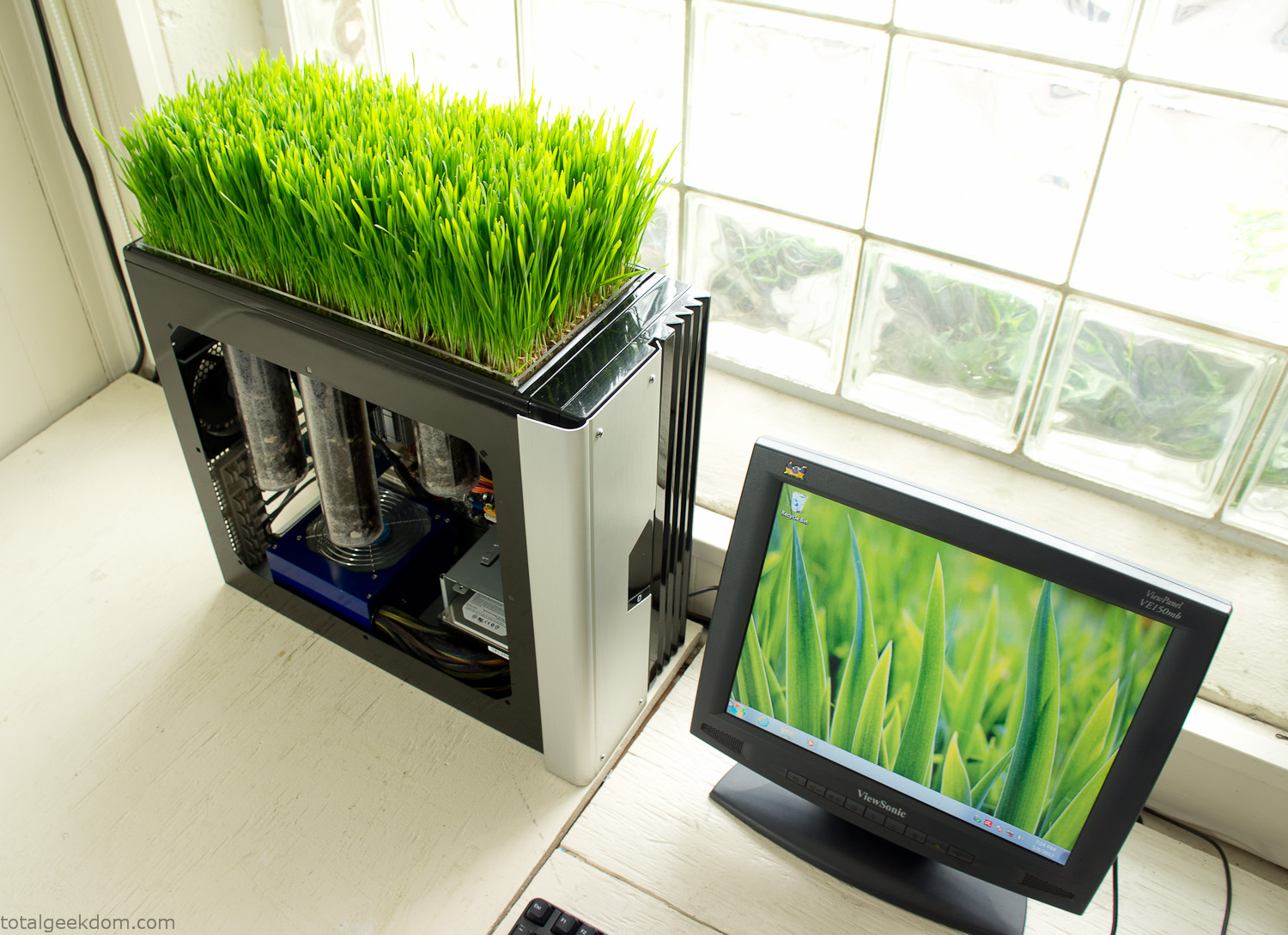
Bio Computer
I’ve been interested in working on a project for while that would combine something tech-based with something organic. Mixing the two elements intrigued me for a while. I’ve wanted to add flowers, or maybe plants of some sort to blend a little bit of nature into the space. I do receive a bit of sunlight through a glass block window, but the temperature in the basement is usually on the colder side. In the winter I don’t really heat the space because the folding farm outputs enough heat to keep the temperature comfortable. I didn’t want to change that aspect so I needed to come up with something that would tolerate slightly cooler temperatures and limited sunlight.
I can’t exactly recall when the idea came to me, but at some point I started wanting to use the heat from a computer as a way to warm the soil and help with germination/growth. I’m about as far from a botanist as it comes, I did some reading online and became pretty interested in the effects of soil temperature on germination/growth. I read different studies and papers from various universities. It was not too long into that process that I became hooked on the idea of using computer heat as a way to control the soil temperature of some sort of living plant life.
As the idea developed further I started looking into wheatgrass as a plant option. There is something clean and natural about the look and idea of a piece of grass growing in my basement. I thought the look would alter the space a little bit and add a bit of color along with something more than just metals and plastics. After reading enough studies and papers on the effects of soil temperature and germination with wheatgrass I felt like I had a good enough handle on the basics to tackle this.
The first step was finding a computer to adapt for the project. Luckily I had a lot of donated computers that people had given me for various project purposes. Most of them didn’t work, but by cobbling together various components from a bunch of different old computers I was able to come up with enough good parts to make a working computer.
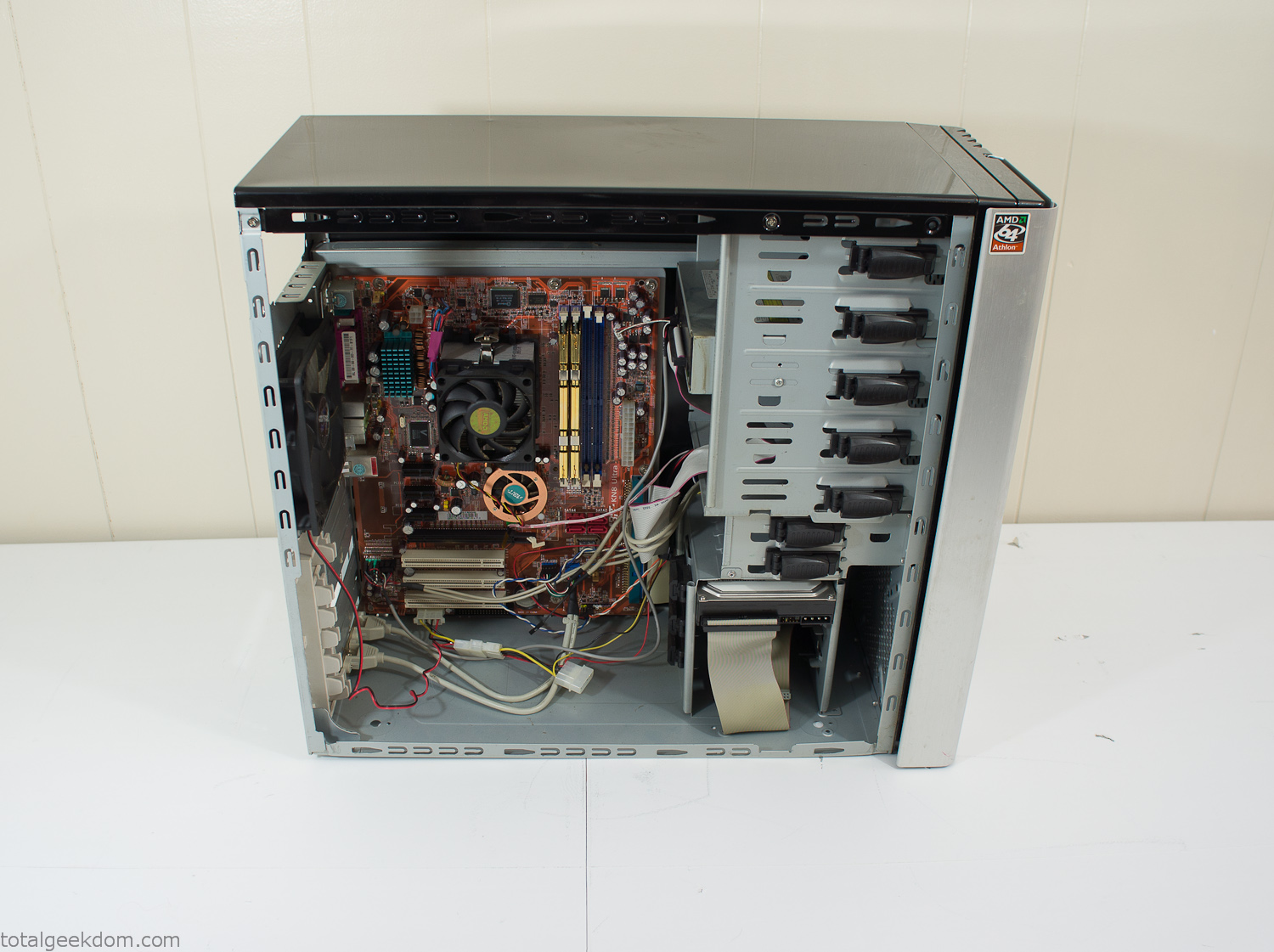
Donor Computer
At the time I was starting to get a formalized plan together for this project, another idea popped into my head. I’ve got a 5 yr. old who is already fairly geeky (just ask him to do his Jabba the Hutt impression for you) but he really does not get that much computer time. He’s getting to an age where he’s more inquisitive about tech stuff and I think he’s ready for his first computer. Since I was already well underway with this project it seemed like a perfect opportunity to orient the computer itself towards a learning tool for him in addition to using it as a way to blend something organic with a piece of technology.
With all of these goals in mind I started tinkering away. The computer hardware itself was nothing fancy, definitely outdated, but perfectly suited towards this project.
CPU- Pentium 4 (3 GHz)
Dell Factory Motherboard
Various Ram Sticks- 2gb
Old Maxtor 120gb IDE Hard Drive
Old FPS Power Supply
Donated Old Computer Case
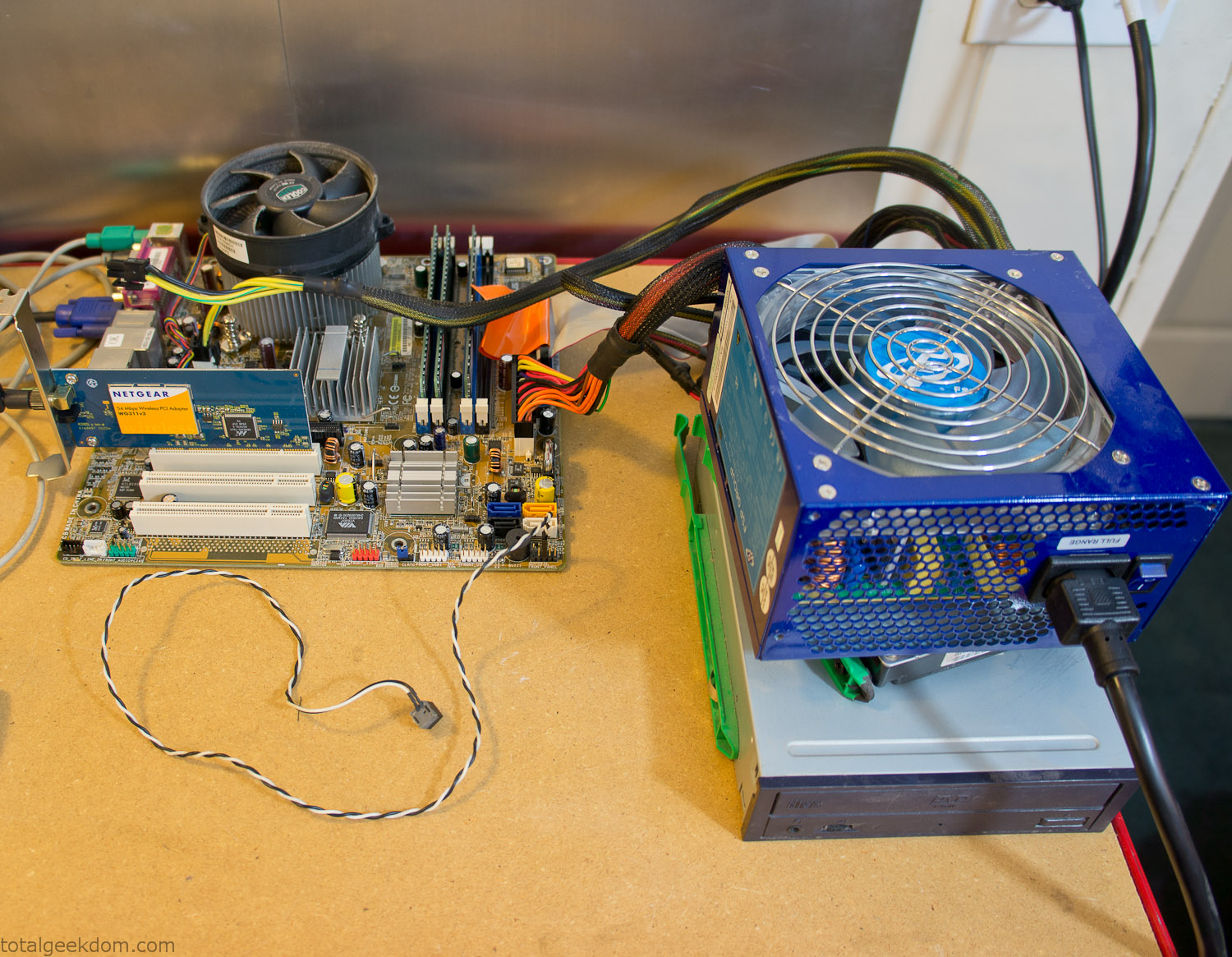
Computer Parts Testing
If you’ve spent any time around computer hardware in the last decade you’re probably well aware that Pentium 4 has a reputation for running hot. The 90nm Pentium 4 was named Prescott and it didn’t take long before the nickname Pres-hot popped up. In this case though that extra heat is going to be put towards good use.
Once the hardware was all in order I started working on the layout and arrangement for the case. I had originally envisioned the grass growing out of the top of the computer case. This seemed like it would provide a good blend between the hard edges of the computer and the soft feel of the grass. This also worked well with putting the soil area in the upper portion of the case, where the most heat should collect. After doing some initial tests with this configuration I found the measured temperature near the top of the case was the hottest. The placement of the CPU near the top of the case and the lack of airflow in that area contributed to these higher recorded temps.
After finishing with some initial tests I decided to completely strip the case down and start removing all the unnecessary brackets and pieces inside of the case. Like most computer cases all the internal brackets and mounts are riveted together, so I drilled all the rivets out of the components I wanted to remove and pulled them out. The gutted case looked pretty barren after being stripped.
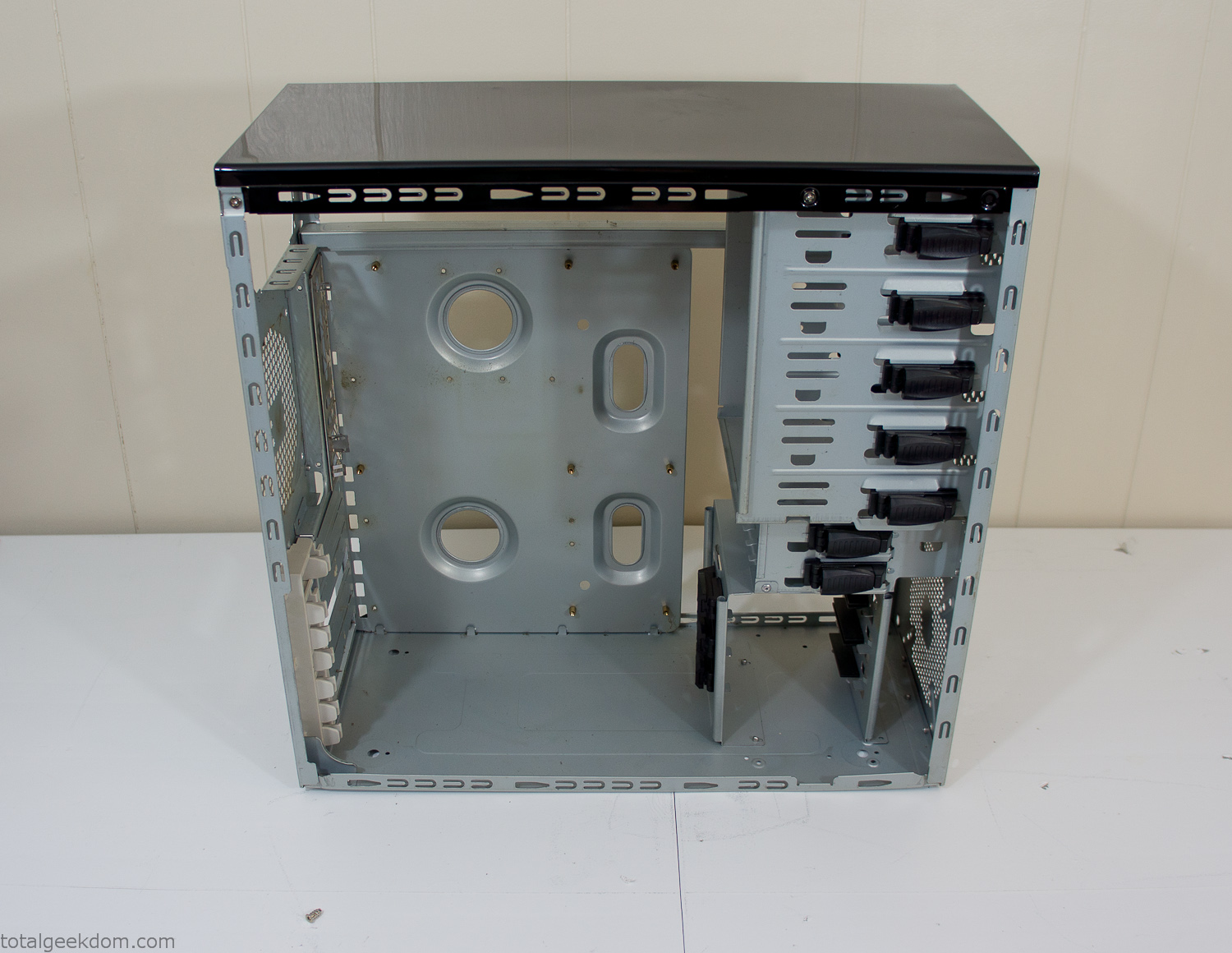
Empty Computer Case
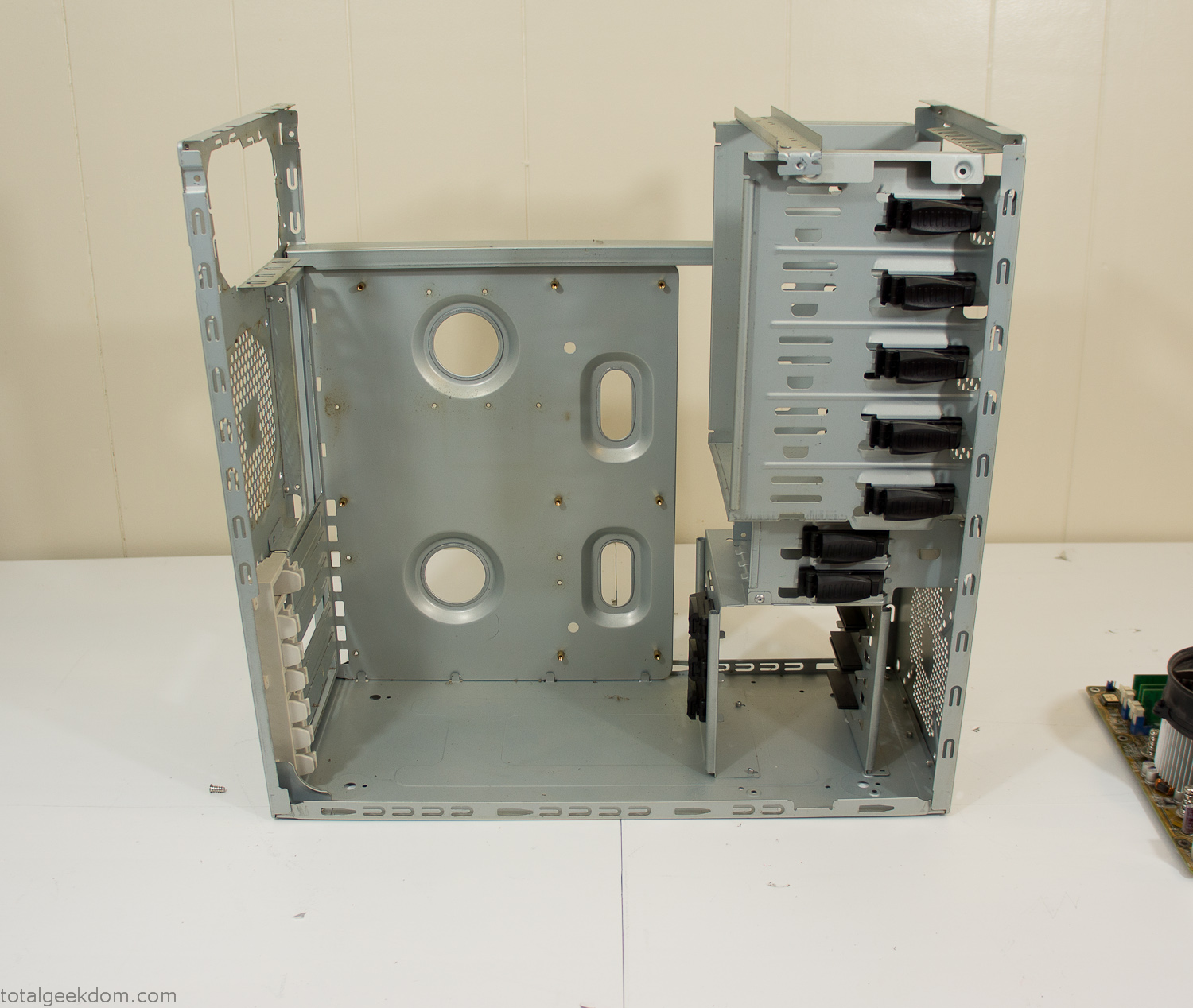
Dismantled Computer Case

Stripped Computer Case
In keeping with my original plan of having the computer blended with the organic grass I wanted it to be easy to see the inner workings of the computer and also the soil from the grass growing above. I needed something that was translucent, which left me with either glass or acrylic/polycarbonate as my options. I ended up choosing acrylic because I was able to find a cheap, used, die-cast model car display case top that was the perfect dimensions for the top of the case. Couldn’t go wrong for 5 bucks.
I test-fit the acrylic over the top of the computer case and marked my layout on the top of the case. My plan was to cut open the top of the computer case and insert the acrylic display case into the section I cut out. To cut open the top of the computer case I drilled a hole as a starting point and then used tin snips to cut through the thin gauge metal.
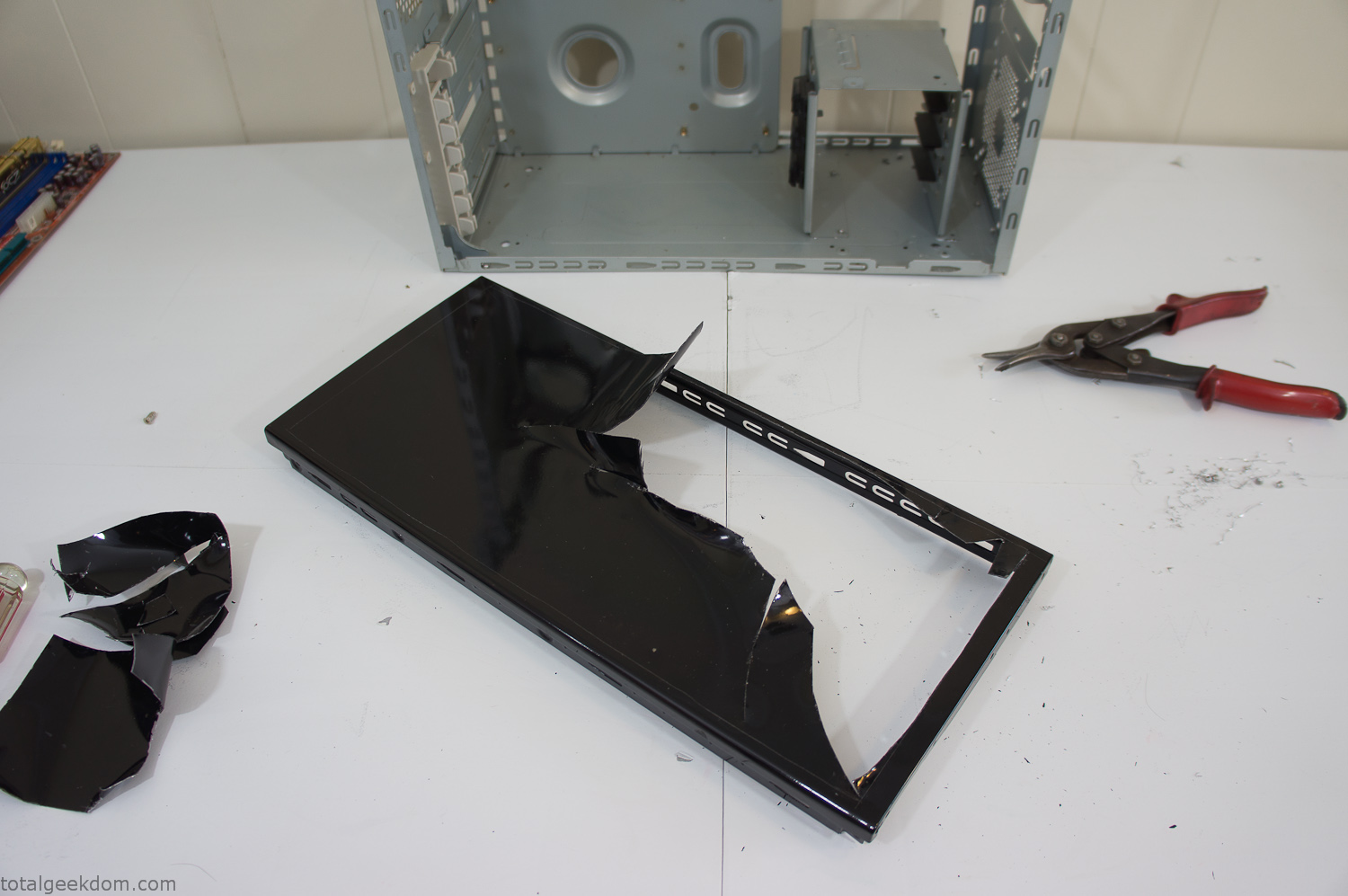
Computer Case Lid Modding
Once I had the metal opening cutout, I needed something to put along the edges of the freshly cut opening to create a clean and finished look. For $2 I was able to find some black, car-door-edge, plastic molding that worked perfectly.
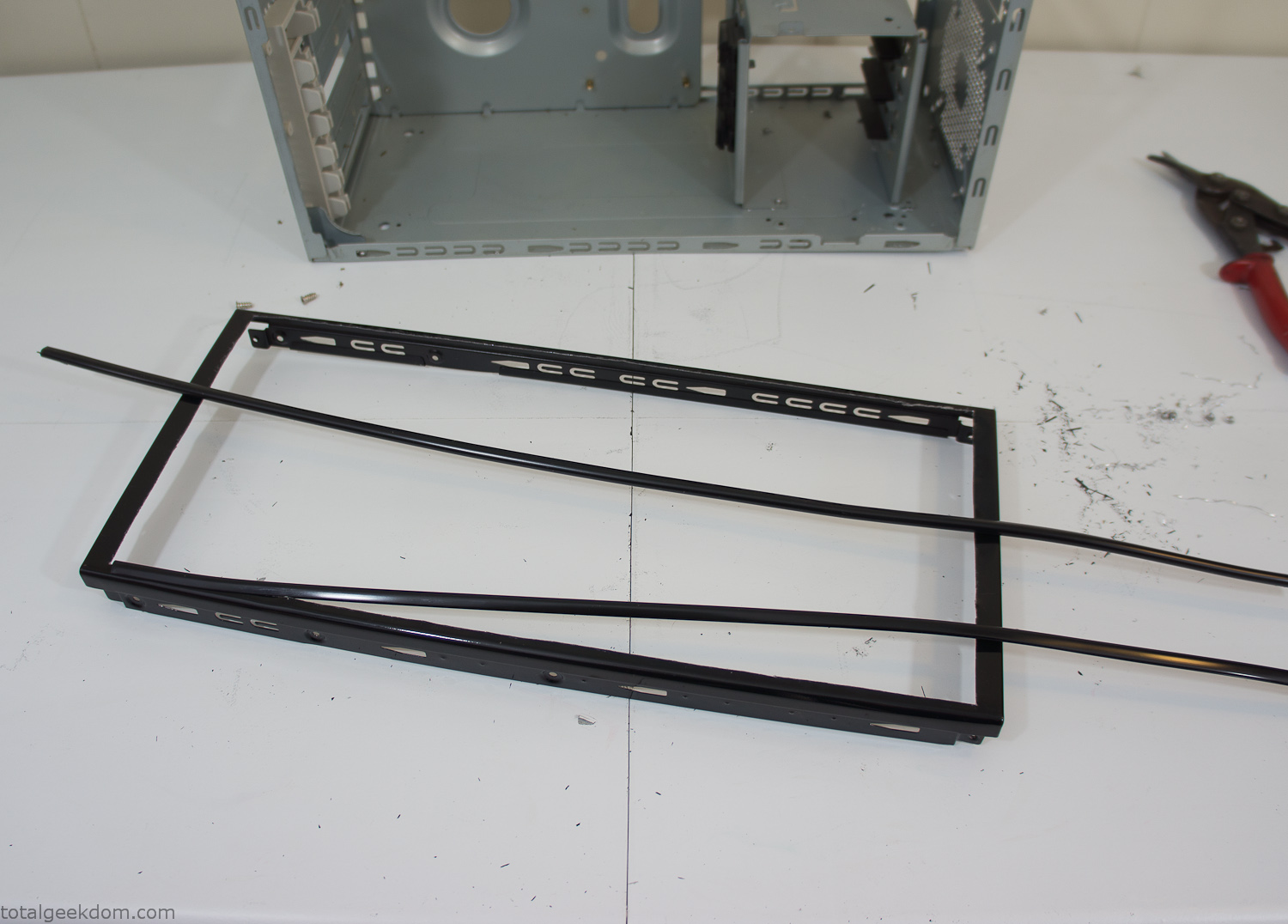
Modified Computer Case Lid
After getting the opening of the top of the computer handled and the acrylic case properly fitted, I moved onto some more testing with soil in the acrylic and the computer running. I wanted to see what kind of heat transfer I would get and how it would affect the soil temperature. I knew that using acrylic over glass would make it a little more difficult to heat the soil as acrylic is not that good at transferring heat. Luckily though I didn’t really need to alter the soil temperature that much, I just needed a little extra heat. Testing showed that heat transfer with just the single acrylic display case as my soil container was slow. So I decided to add some acrylic tubes. This would allow more surface are for soil to acrylic contact and also give me an area where I could add a mixed substrate to allow for soil drainage.
I went online and found a 3ft long section of 2 1/4″ clear acrylic tubing for $8 dollars. I wanted to add a couple of hanging cylinders off the main of the acrylic display case in the top of the computer case. To do this I needed to cut holes into the bottom of the display case. Cutting holes in acrylic is not always easy, it’s likely to chip and craze at the edges. To get around this I used a buildup of masking tape on both sides of the acrylic, to provide a little bit of resistance and strength. I placed the acrylic display case back into the computer and marked my layout for the tubes. I needed to leave clearance for the CPU cooler, power supply and hard drive mount.
After marking the layout, I used an air-powered pencil grinder and carbide tipped bit and cut through the acrylic case along my marked lines. After the initial shape was cutout I used a tube piece as a template and slowly worked on grinding the holes as perfectly round as I could get them so that the tube had a snug fit all the way around. The fit is pretty important as the acrylic cement that I used needs there to be a tight fit so that the acrylic can bond correctly.
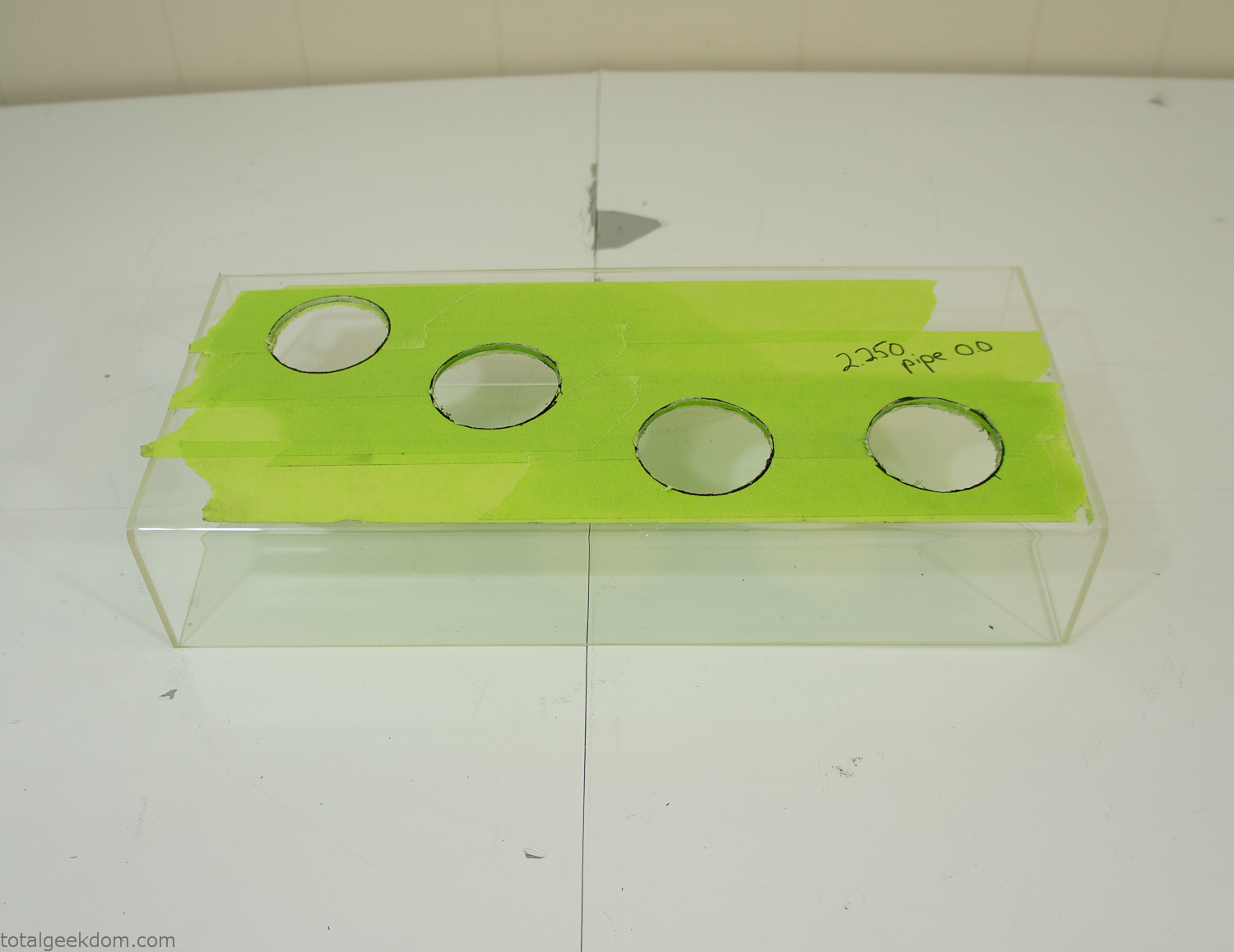
Acrylic Case Modifications
I placed the tubes into the acrylic case and mounted it in the computer and test fit the placement and height of the tubes. After getting everything lined up and oriented correctly I moved towards bonding the acrylic together. Using a needle dropper applicator I applied the cement to all the joints. After letting it set overnight I came back the next night and applied a thin coating of clear silicone caulk around all the joints just to ensure they were completely water tight
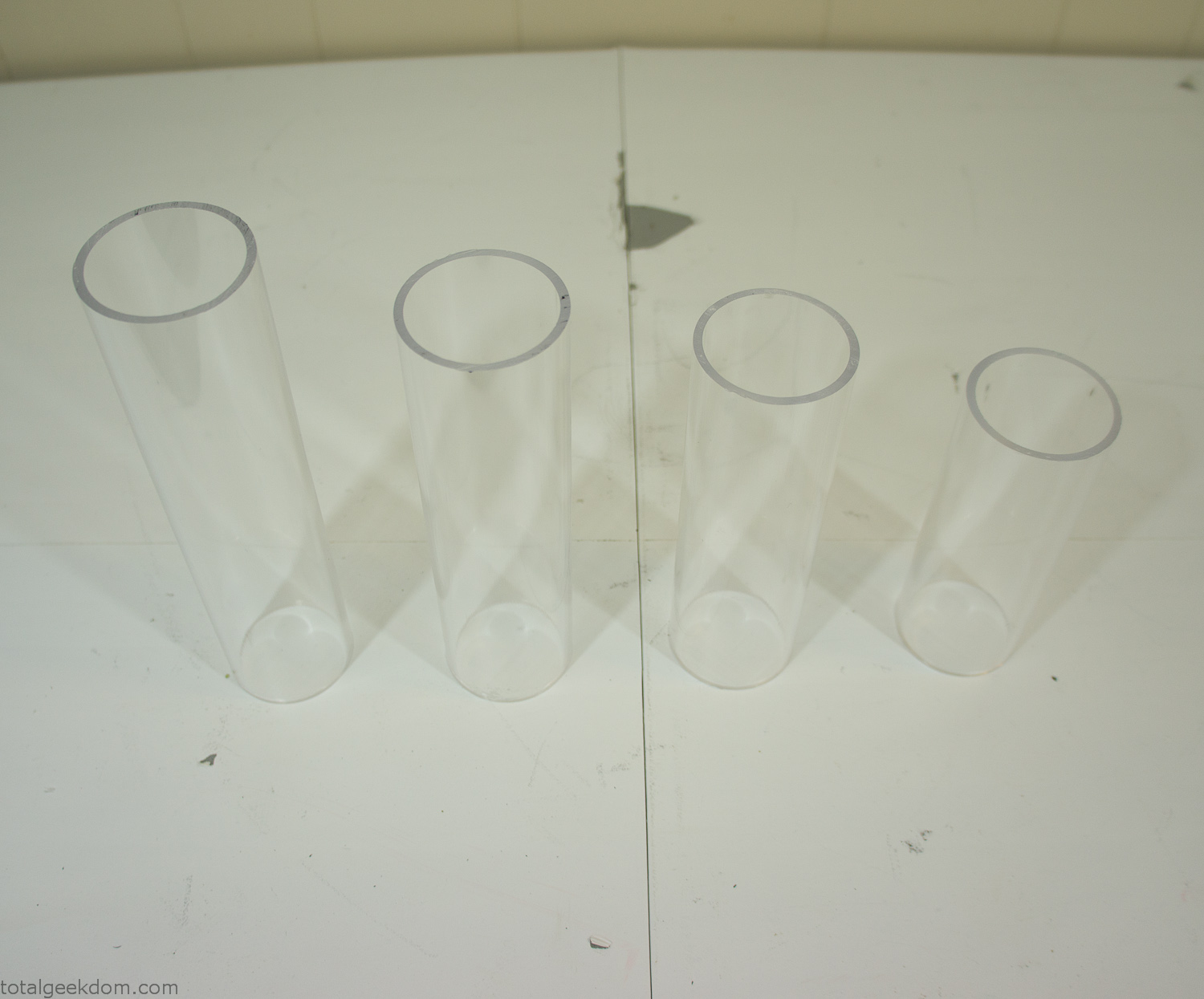
Acrylic Tubes
The next step was sealing up the bottom of the acrylic tubes. I looked at a couple of different options before realizing that the discs I had cut out of the acrylic case to fit the tubes would be almost the perfect size. Using a bench grinder and a test piece of tube I slowly ground each disc to the perfect size for a tight fit all the way around. I placed the clear acrylic discs into the bottom of each tube and repeated the same cementing and silicone caulking procedure to ensure they were water-tight. After a couple of days’ worth of drying I tested the case by filling it with water overnight and checking in the morning to make sure that no leaks had popped up.
In order to hold the weight of the acrylic case after adding soil, I drilled and installed a machine screw with a rubber cap at each corner of the computer case to bear the weight of the acrylic case.
Once all the work was done with the acrylic case section I started reinstalling all the components. The motherboard, hard drive and power supply were added and then wired up.
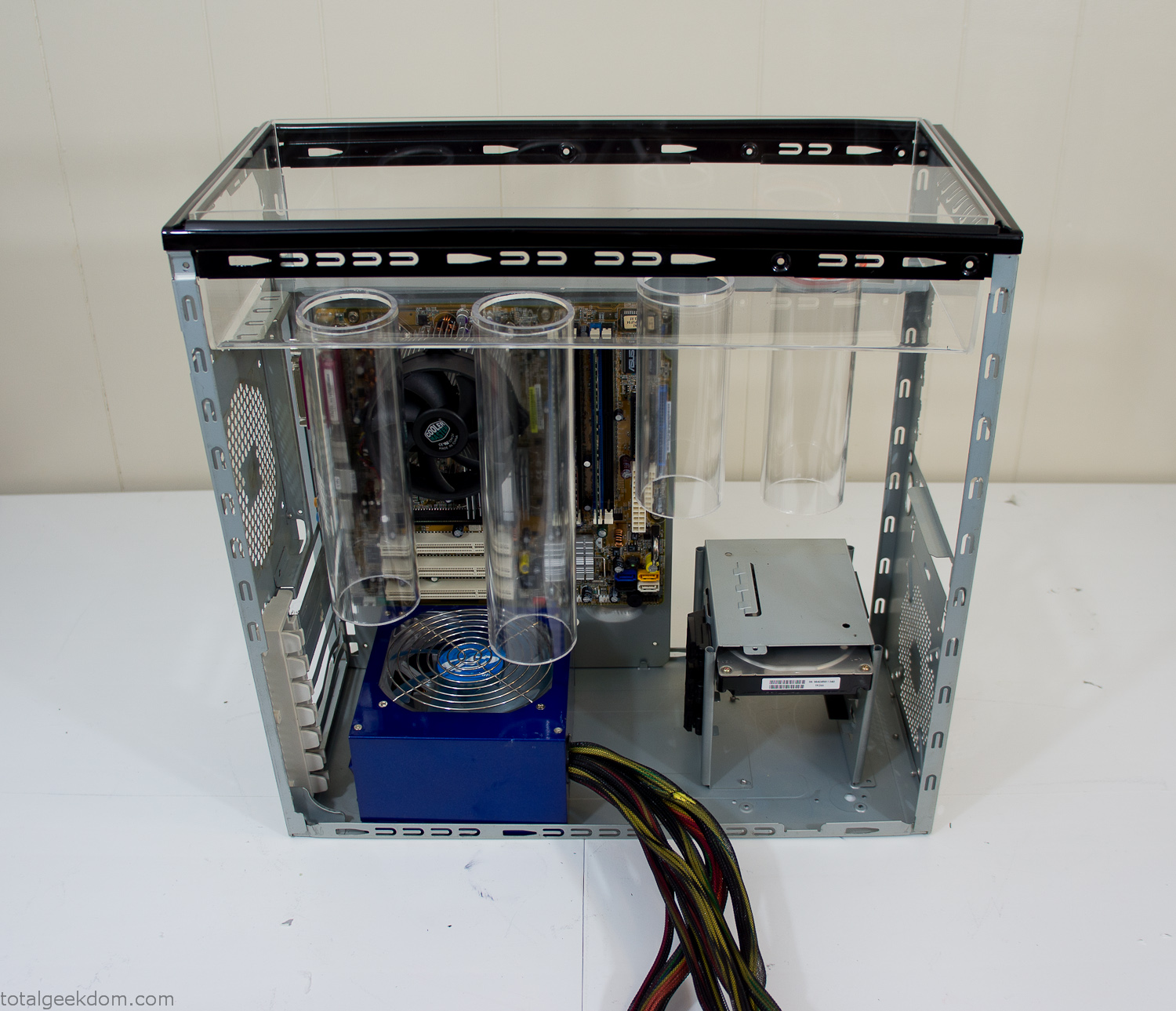
Mocked Up Computer Case
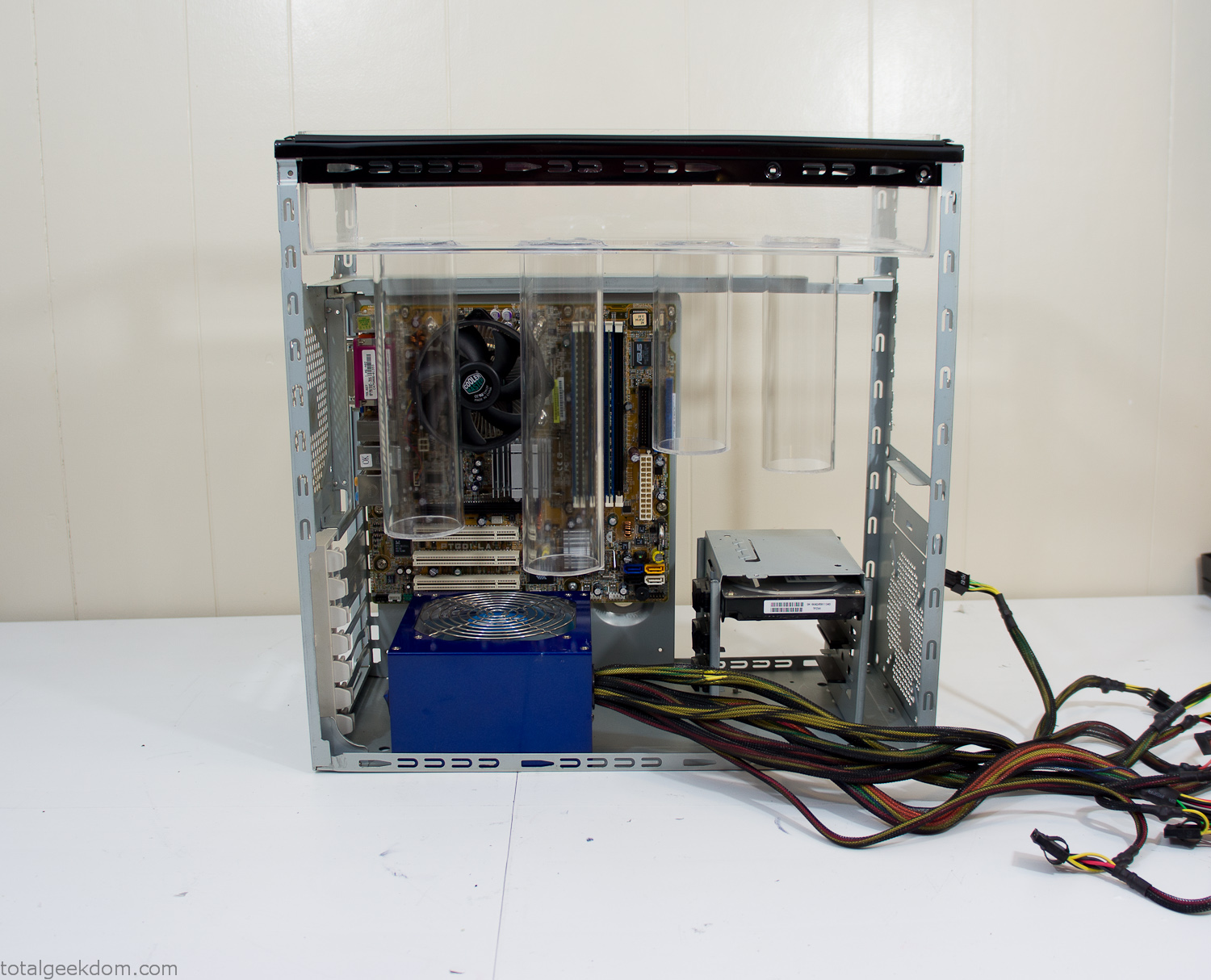
Power Supply Mockup
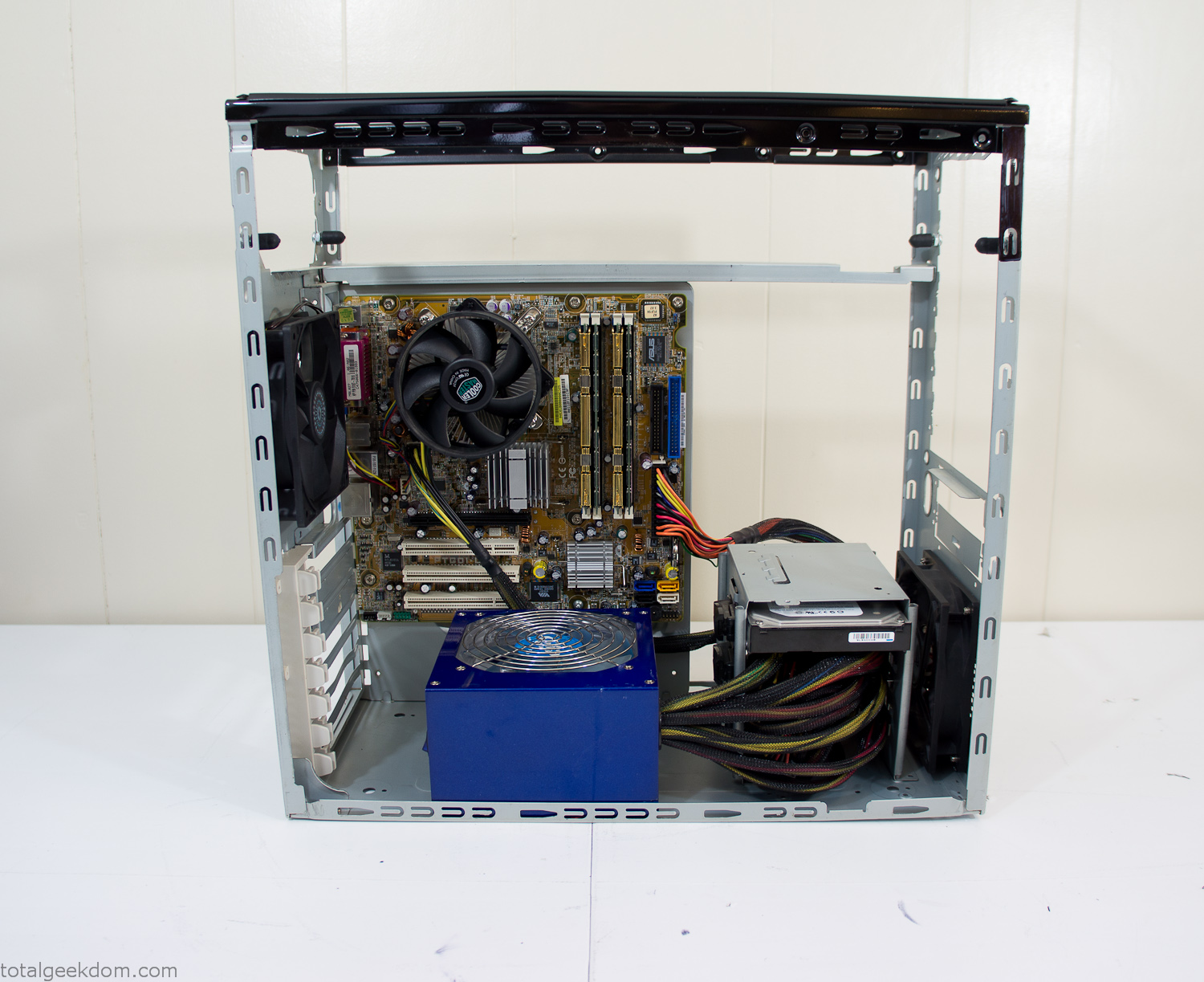
Computer Components Wired
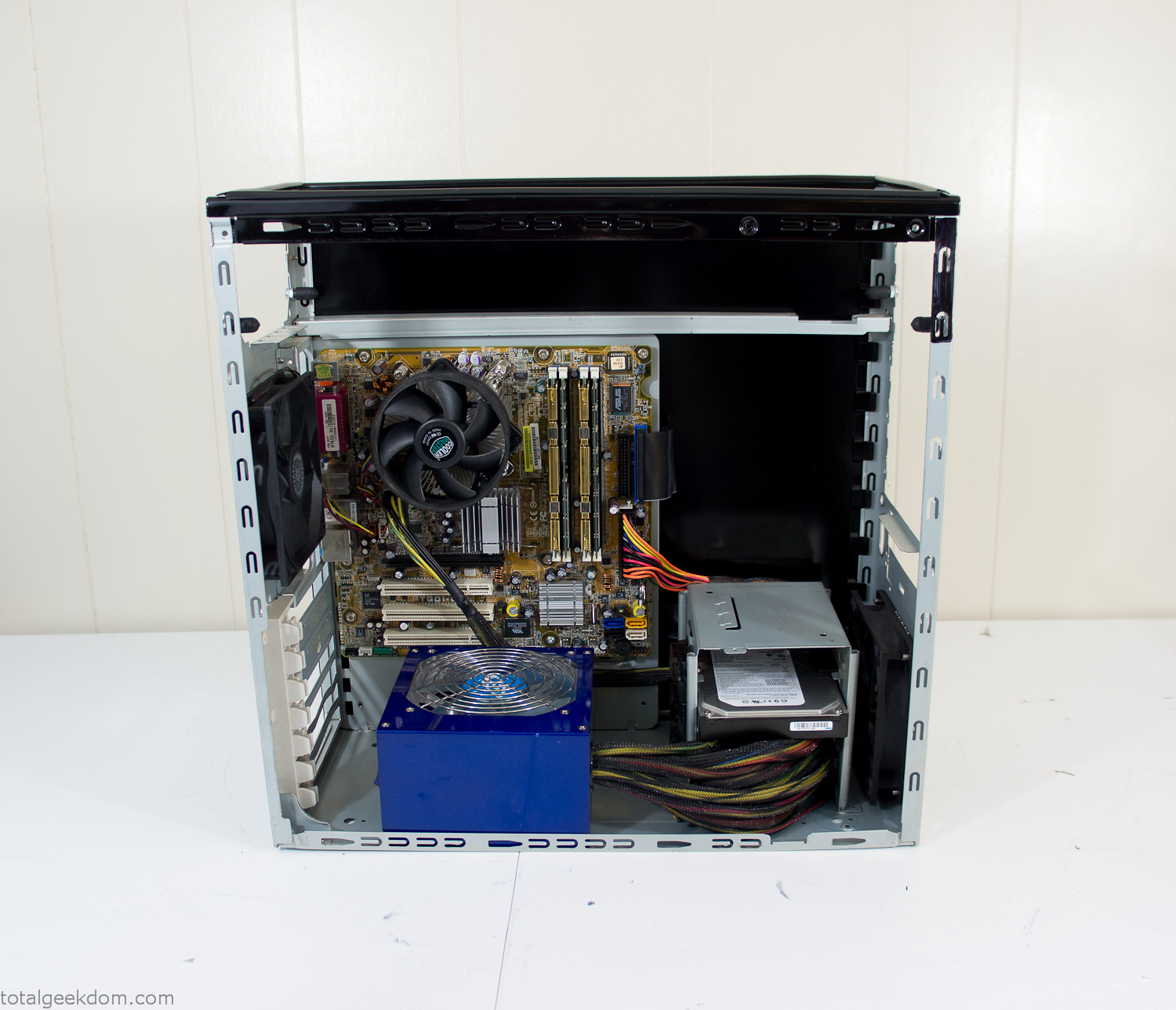
Case Panel Installed
At this point all that was left was to make a clear panel for the side of the case. I had some left over acrylic sheets from a different project that were really close to the right size, after test fitting, marking and cutting I then had a clear side panel to see into the case. (I left this off for the pictures because it caused a reflection)
The final step was filling the case with soil and adding some wheatgrass. I had been test growing other samples of wheatgrass during the build process. So I had already a couple of different patches of grass growing. I tried to keep the soil level just below the top of the acrylic case edge to make it a little more seamless.
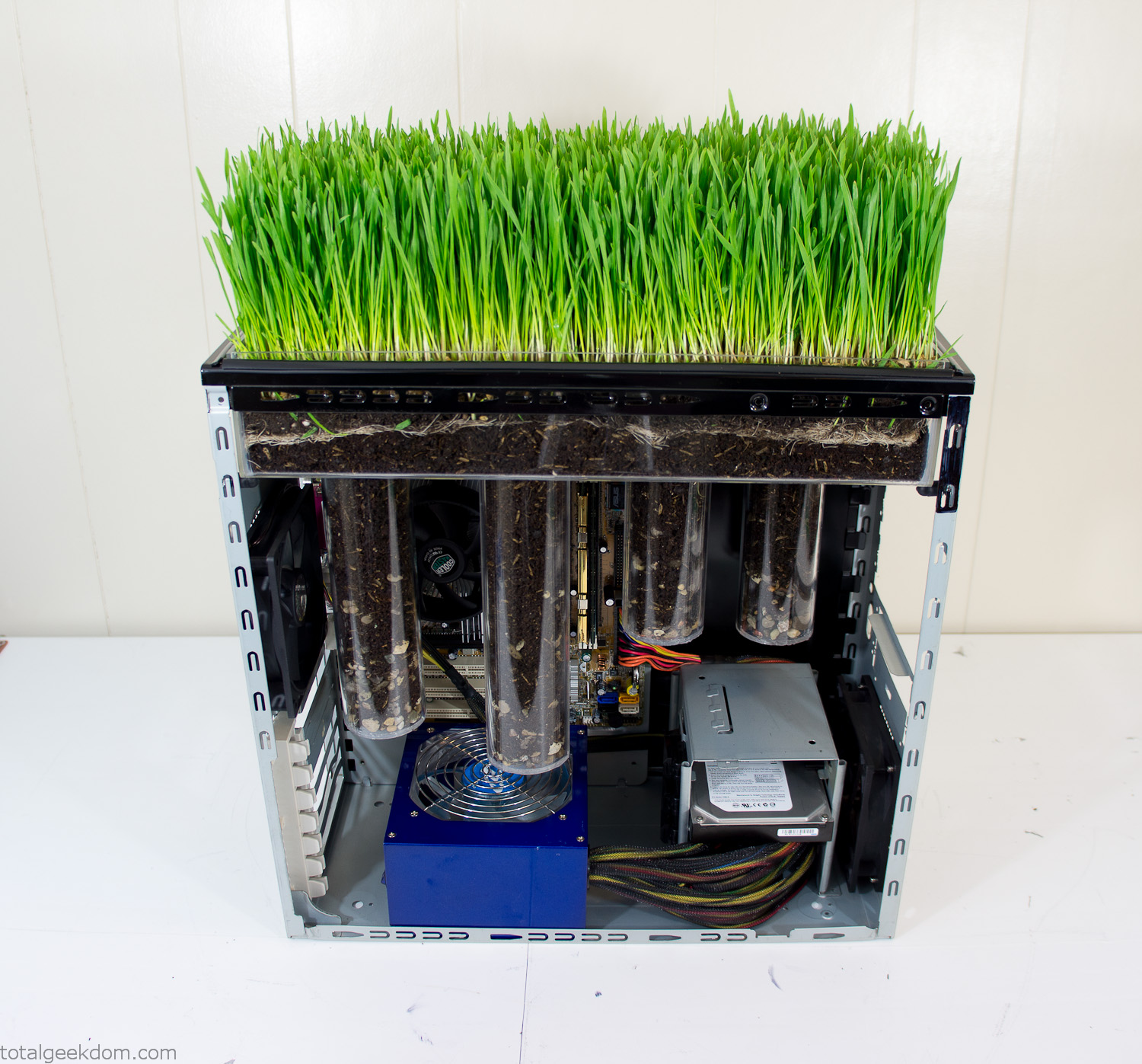
Grass Planted in Computer
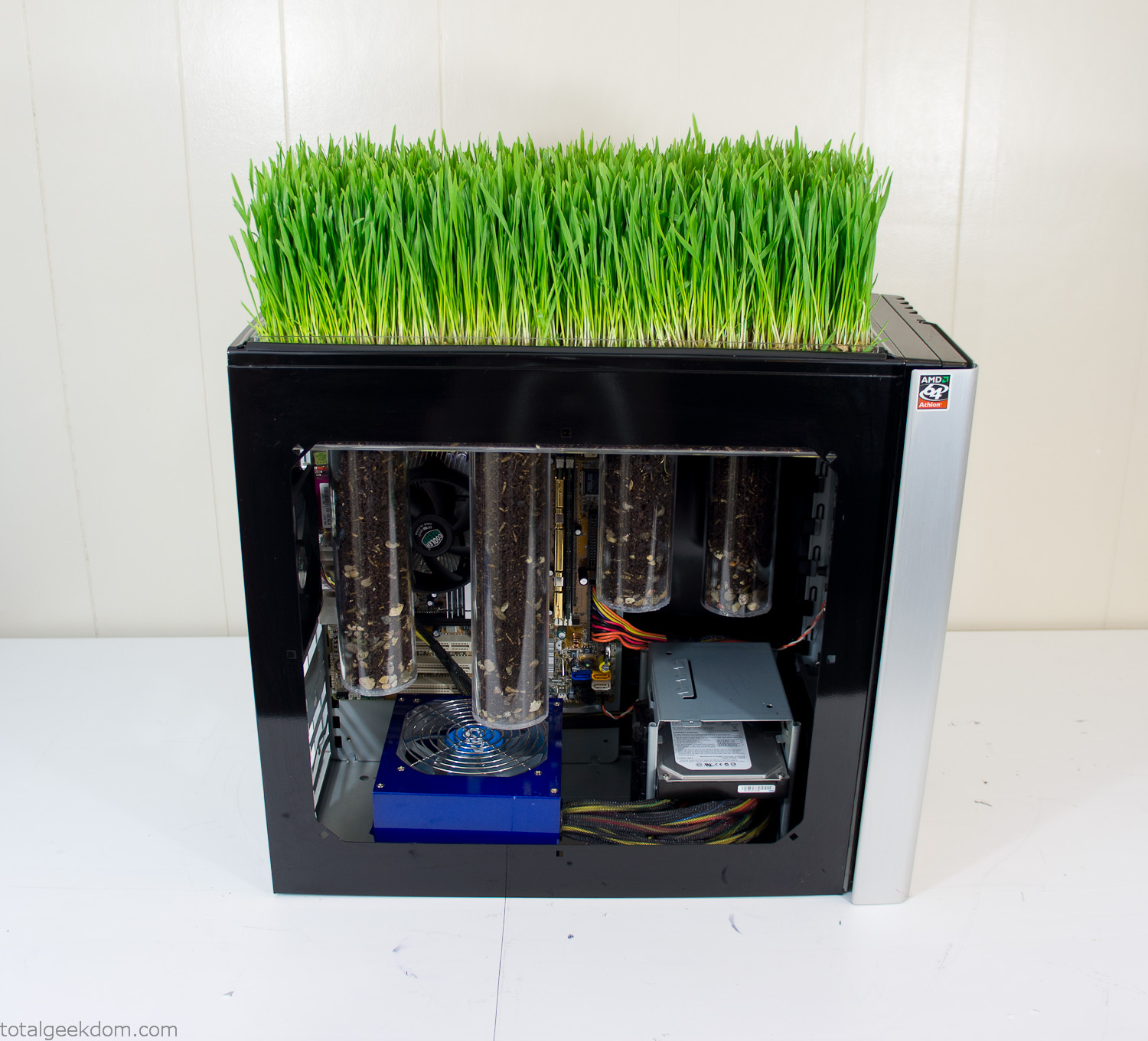
Grass and Case Panel Installed

Grass in Computer
For the computer itself I ended up installing Windows as well as Linux in a dual boot setup. Since the computer was going to be used by my son as something to play with I figured I should put both on there so he can tinker with them and learn as he goes. Besides, for important life decisions like picking an OS (Operating System) I think any good parent should present the options and then let their kid decide for themselves.
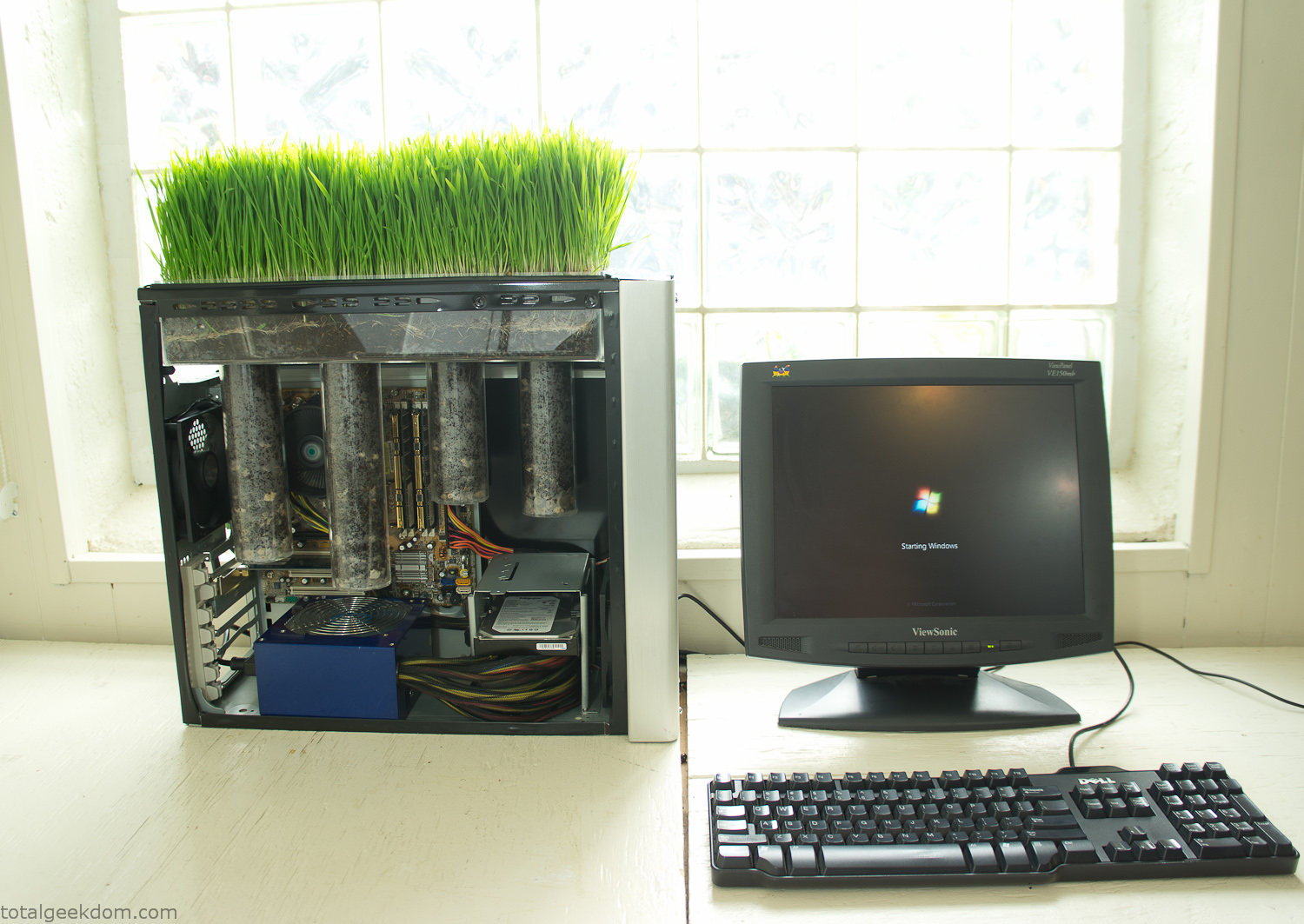
Starting Windows
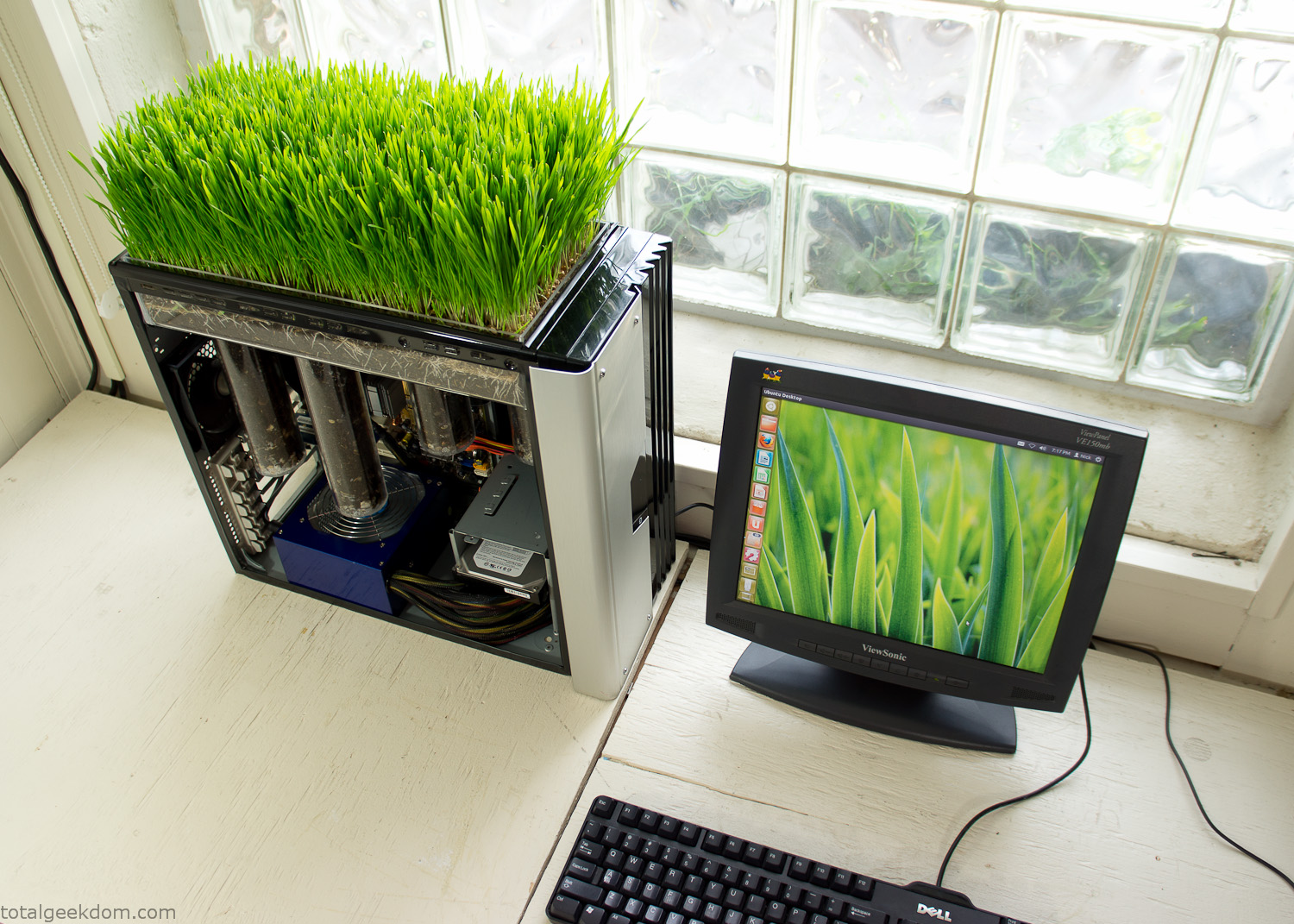
Linux Running
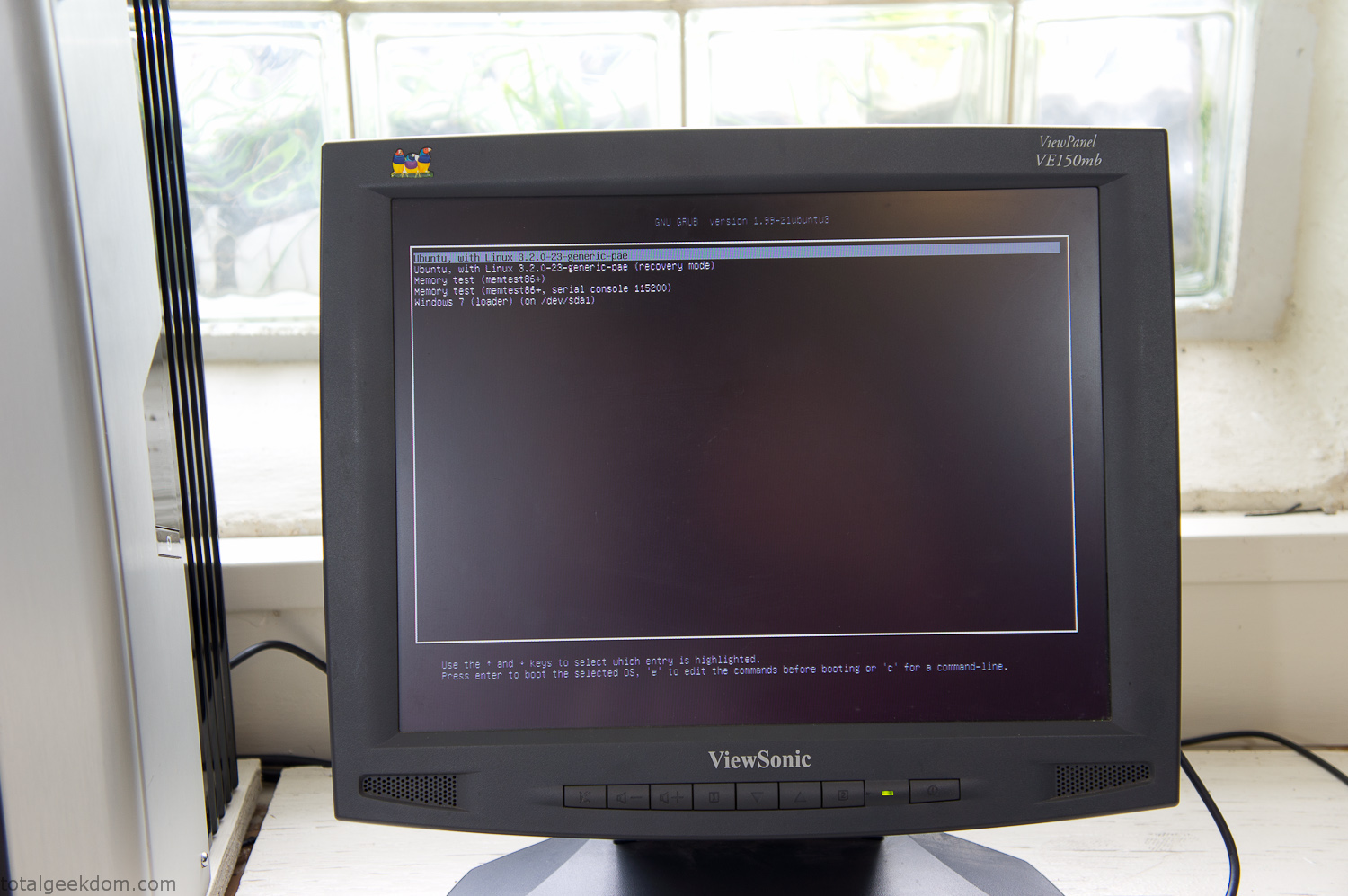
Dual Boot Screen
In the end I’m happy with the result of the project. It’s been fun experimenting with growing wheatgrass and I like how the natural look of grass is blended with the very modern, inorganic case.
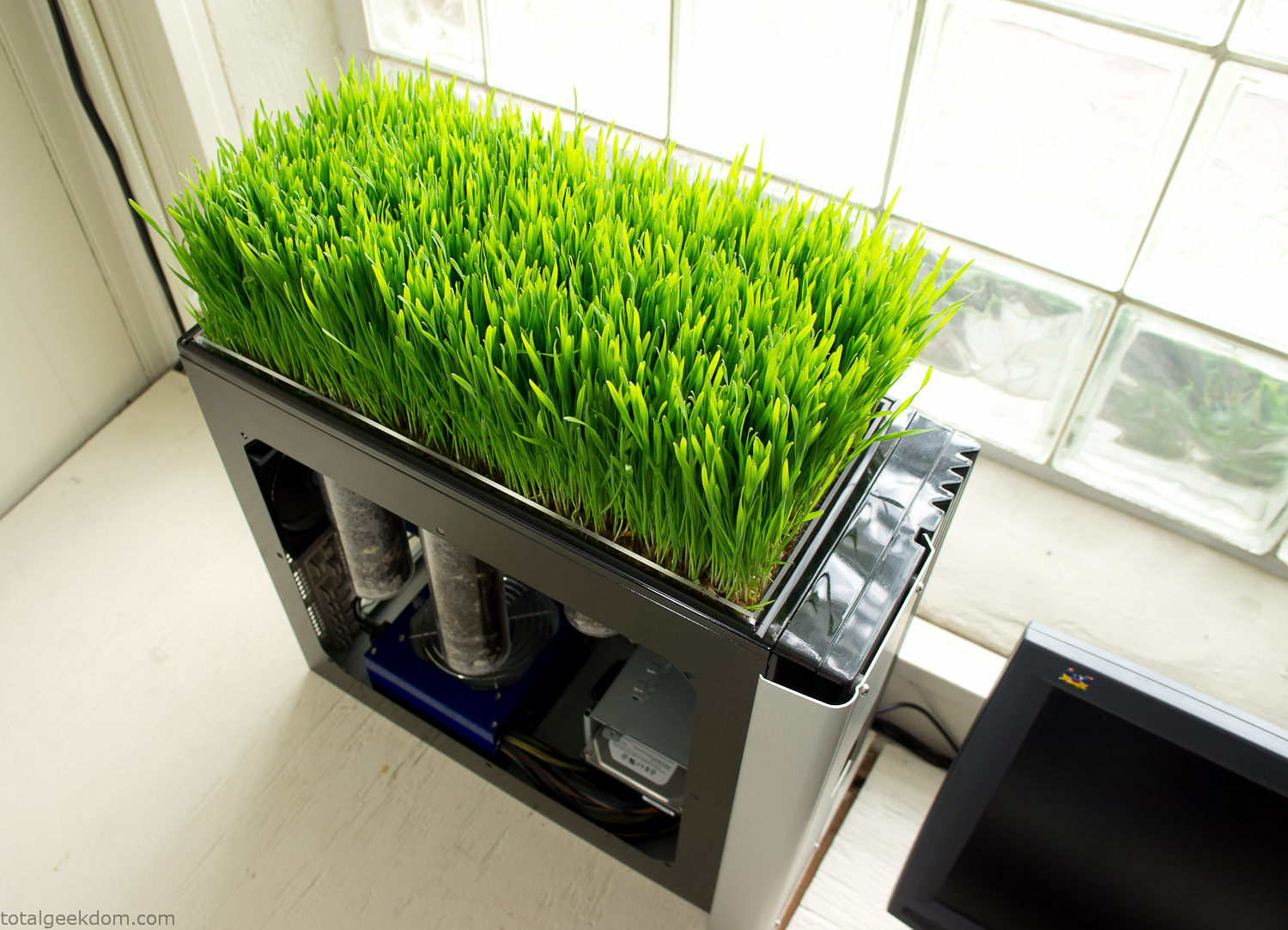
Computer Grass Growing
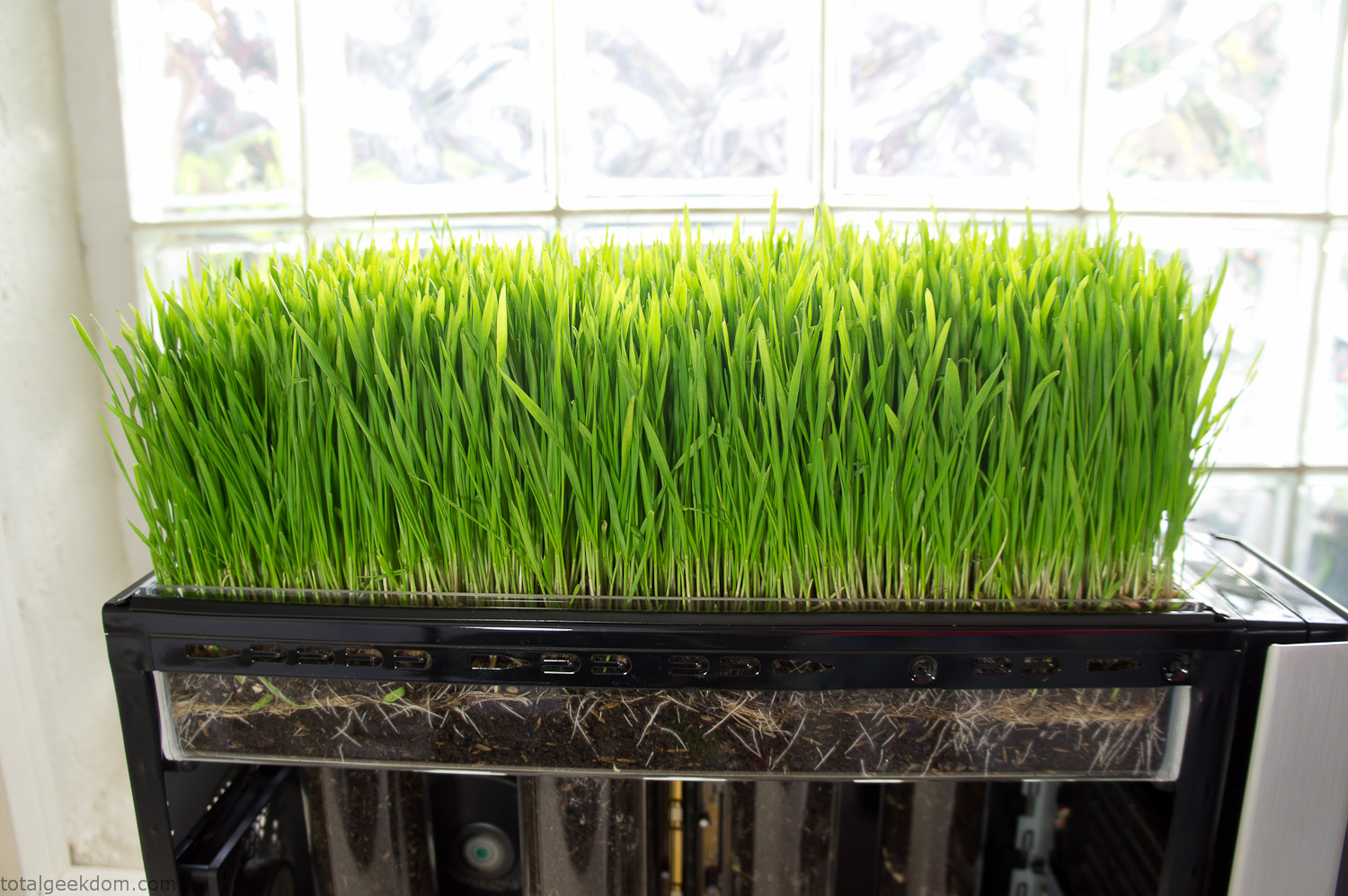
Grass in Computer Section
Notes
Temperature Testing
In testing the case temperature versus the soil temperature I found it was easiest to control the case temperature by using a variable fan speed control on both the inlet and outlet fans. By turning the fan speed down I could increase the temperature inside the case and correspondingly raise the soil temperature.
In order to maximize output of heat during these tests I used Prime95 to run the CPU at 100% load.
Using this method to control the case and soil temperature I played around with adjusting the soil temperature and then tracking the rate of growth of the Wheatgrass. The target temperature for peak growth seemed to fall around 66°F (19°C).
Using the fans to control the case temperature allowed me to vary the temperature inside the case from a low of 75°F (24°C) to a high of 91°F (33°C). In order to achieve the desired increase in soil temperature, I had to run the case temperature toward the higher end of the scale.
When the soil temperature was too high, the growth of the wheatgrass would slow.
Wheatgrass
The wheatgrass I used for my tests was nothing special, it can be found as seeds (berries) in a lot of health food stores and it grows relatively easily.
Caring for the wheatgrass is just a matter of keeping it watered. It’s a pretty easy plant to work with and doesn’t require any special skills.
Wheatgrass is often used as a nutritional supplement; it can be juiced and mixed into smoothies and other beverages. I plan on harvesting some of the grass and making some juices.
Plant Options
While wheatgrass offers a nice, attractive and easily grown option I do plan on trying other plants as well in the future. Since I already have the “planter” built all I have to do is add a different plant and see how it goes. I’m sure there will be some plants that don’t like the lower light environment, but it will be fun experimenting with other plants as well and seeing how they take.
Materials
Donated Computer- Free
Clear Acrylic Display Case- $5
Clear Acrylic Tube- $5
Plexiglass Side Panel- Free
Total- $10
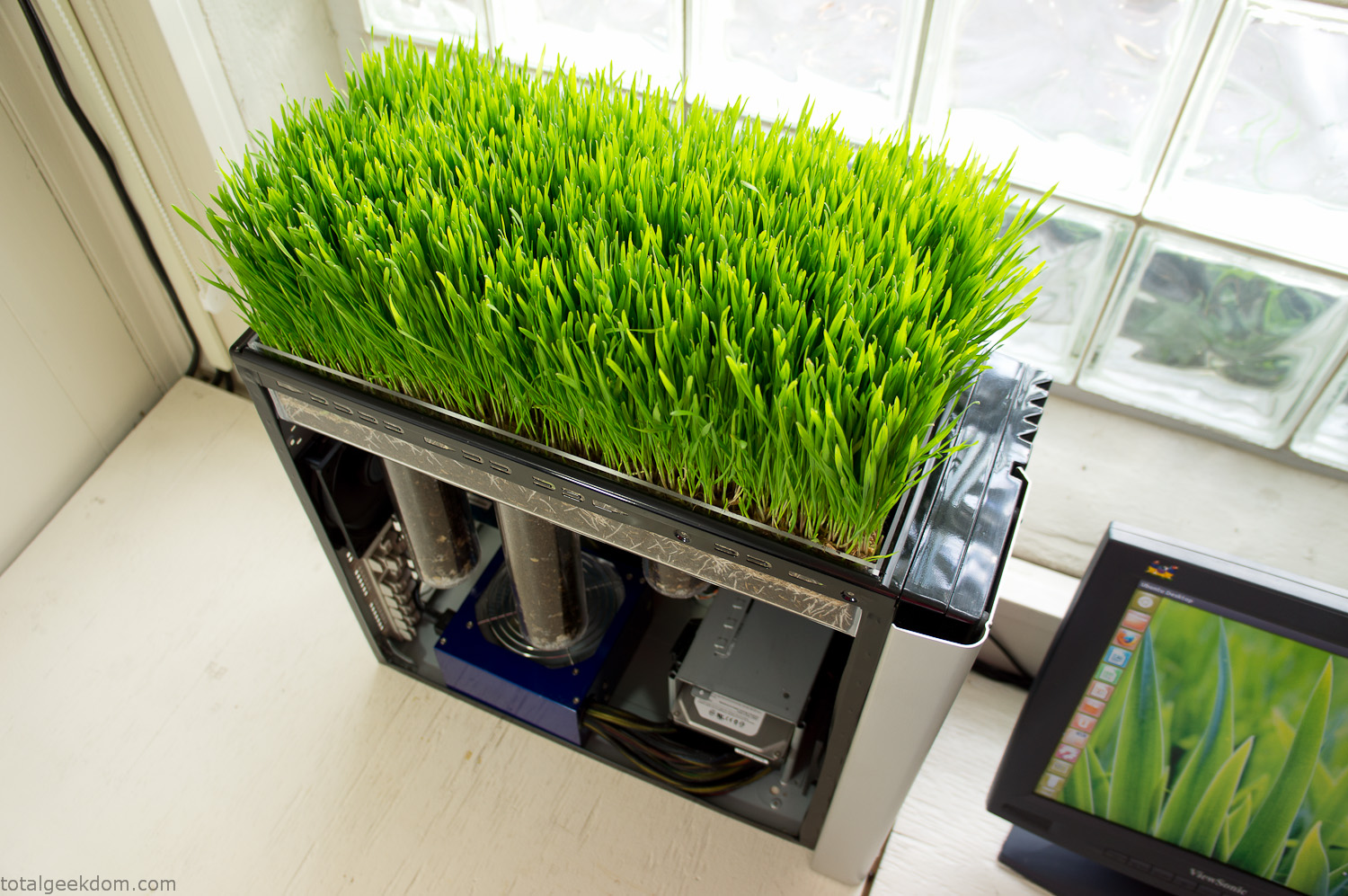
Bio Computer Running
 29.2k
29.2k
 13.2k
13.2k 7.1k
7.1k

 2.1k
2.1k 813
813 2.6k
2.6k
Comments 49,039
1xbet cameroun apk paris sportif foot
Joined $MTAUR rush—prizes await. ICO’s tokenomics sound. Mazes challenging.
mtaur token
Сеть стоматологических клиник Dinstom https://dinstom.ru предлагает эффективное и безопасное лечение с использованием инновационных технологий в максимально комфортной атмосфере. Ознакомьтесь на сайте с нашими услугами – от гигиены, лечения и исправления прикуса до имплантации и комплексного протезирования винирами и коронками. У нас выгодные цены и профессиональные врачи стоматологи.
melbet telecharger 1xbet cameroun apk
The $MTAUR ICO raffle adds thrill to investing. Token unlocks mini-games for depth. Minotaurus is poised for growth.
minotaurus coin
шины на экскаватор погрузчик
Всё цифровое становится естественным кракен onion сайт кракен onion сайт kra ссылка kraken сайт
Почувствуйте вкус победы с Драгон Мани!
Регистрируйтесь и получите стартовый бонус!
У нас только честные игры и мгновенные выплаты драгон мани
https://telegra.ph/Kupit-mavik-3-pro-bez-pulta-10-12-5
Minotaurus ICO is targeting $6.4M, and with current traction, it’ll smash it. $MTAUR’s DeFi access empowers users without complexity. Referral rewards have me spreading the word.
minotaurus presale
продажа спецтехники
как действует промокод в 1хбет: – это специальный бонусный код, который предоставляет увеличенный бонус при регистрации в букмекерской конторе 1хБет. Актуальная информация о всех привилегиях промокода тут – https://veber-geo.ru/wp-content/pgs/1xbet_promokod_besplatno_2.html.
Почувствуйте вкус победы с Драгон Мани!
Регистрируйтесь и получите стартовый бонус!
У нас только честные игры и мгновенные выплаты
dragon money
Profitez du code promo 1xbet 2026 : obtenez un bonus de bienvenue de 100% sur votre premier depot avec un bonus allant jusqu’a 130 €. Jouez et placez vos paris facilement grace aux fonds bonus. Apres l’inscription, il est important de recharger votre compte. Avec un compte verifie, tous les fonds, bonus inclus, peuvent etre retires. Le code promo 1xbet est disponible via ce lien — http://www.tiroavolobologna.it/media/pgs/le-code-promo-1xbet_bonus.html.
продажа спецтехники
Почувствуйте вкус победы с Драгон Мани!
Регистрируйтесь и получите стартовый бонус!
У нас только честные игры и мгновенные выплаты
драгон казино
$MTAUR ICO is gaining traction over SHIB/XRP rallies. Token’s in-game convertibility ensures demand. Presale’s 1.4M USDT milestone proves it.
minotaurus token
https://telegra.ph/Kupit-pricel-teplovizionnyj-b-u-v-reutove-10-12-4
Just swapped BNB for $MTAUR—smooth on BSC. Referral rewards motivate sharing. Game’s power-ups via tokens strategic.
minotaurus presale
indie rock
$MTAUR coin stands out with its audited security focus. Extending vesting for bonuses is a no-brainer. Maze battles against creatures? Count me in.
mtaur token
Bullish on Minotaurus ICO’s raffle prizes. $MTAUR utility in zones deepens play. Growth trajectory strong.
minotaurus ico
Новости спорта онлайн http://sportsat.ru футбол, хоккей, бокс, теннис, баскетбол и другие виды спорта. Результаты матчей, обзоры, интервью, аналитика и главные события дня в мире спорта.
The buzz on Minotaurus presale is real, surpassing milestones fast. $MTAUR’s tokenomics prioritize sustainability over quick flips. Game’s whimsical elements shine.
minotaurus ico
Новости спорта онлайн http://sportsat.ru футбол, хоккей, бокс, теннис, баскетбол и другие виды спорта. Результаты матчей, обзоры, интервью, аналитика и главные события дня в мире спорта.
Ukrainian President Volodymyr Zelensky condemned Russian attacks on the Ukrainian regions of Kharkiv, Zaporizhzhia and Sumy on Monday, saying that the Kremlin intends to “humiliate diplomatic efforts” just hours before European leaders visit the White House.
[url=https://kra42at.com]kra35 cc[/url]
“The Russian war machine continues to destroy lives despite everything,” Zelensky said in a statement, hours before he’s due to meet US President Donald Trump in the Oval Office. “That is precisely why we are seeking assistance to put an end to the killings. That is why reliable security guarantees are required. That is why Russia should not be rewarded for its participation in this war.”
[url=https://kra-42.ru]kra42 сс[/url]
“Everyone seeks dignified peace and true security,” the Ukrainian president said. “And at this very moment, the Russians are attacking Kharkiv, Zaporizhzhia, the Sumy region, and Odesa, destroying residential buildings and our civilian infrastructure.”
At least seven people were killed in Russia’s attack? on Kharkiv and a further three killed in the ballistic missile strike on the city of Zaporizhzhia, with scores more injured, according to Ukrainian authorities.
“This was a demonstrative and cynical Russian strike,” Zelensky added.
kra41 сс
https://kra-41—at.ru
Ukrainian President Volodymyr Zelensky condemned Russian attacks on the Ukrainian regions of Kharkiv, Zaporizhzhia and Sumy on Monday, saying that the Kremlin intends to “humiliate diplomatic efforts” just hours before European leaders visit the White House.
[url=https://kra-42.com]kra37 сс[/url]
“The Russian war machine continues to destroy lives despite everything,” Zelensky said in a statement, hours before he’s due to meet US President Donald Trump in the Oval Office. “That is precisely why we are seeking assistance to put an end to the killings. That is why reliable security guarantees are required. That is why Russia should not be rewarded for its participation in this war.”
[url=https://kra—41–at.ru]kra35 cc[/url]
“Everyone seeks dignified peace and true security,” the Ukrainian president said. “And at this very moment, the Russians are attacking Kharkiv, Zaporizhzhia, the Sumy region, and Odesa, destroying residential buildings and our civilian infrastructure.”
At least seven people were killed in Russia’s attack? on Kharkiv and a further three killed in the ballistic missile strike on the city of Zaporizhzhia, with scores more injured, according to Ukrainian authorities.
“This was a demonstrative and cynical Russian strike,” Zelensky added.
kra38 at
https://kra—41–cc.ru
https://telegra.ph/Kupit-benzogenerator-7-kvt-10-11
Новости спорта онлайн http://sportsat.ru футбол, хоккей, бокс, теннис, баскетбол и другие виды спорта. Результаты матчей, обзоры, интервью, аналитика и главные события дня в мире спорта.
Новости спорта онлайн http://sportsat.ru футбол, хоккей, бокс, теннис, баскетбол и другие виды спорта. Результаты матчей, обзоры, интервью, аналитика и главные события дня в мире спорта.
Thankѕ fоr sharing your thoᥙghts. Ι trᥙly apprеciate your efforts and
Ι will Ьe waiting for үоur furtһer write ᥙps thank you once
again.
Here is my webpage; PG SLOT
Новости спорта онлайн http://sportsat.ru футбол, хоккей, бокс, теннис, баскетбол и другие виды спорта. Результаты матчей, обзоры, интервью, аналитика и главные события дня в мире спорта.
Bullish on $MTAUR coin’s 9% sector growth tie-in. Token conversions boost in-game edge. Early perks unbeatable.
mtaur coin
Ukrainian President Volodymyr Zelensky condemned Russian attacks on the Ukrainian regions of Kharkiv, Zaporizhzhia and Sumy on Monday, saying that the Kremlin intends to “humiliate diplomatic efforts” just hours before European leaders visit the White House.
[url=https://kra—41–at.ru]kra41[/url]
“The Russian war machine continues to destroy lives despite everything,” Zelensky said in a statement, hours before he’s due to meet US President Donald Trump in the Oval Office. “That is precisely why we are seeking assistance to put an end to the killings. That is why reliable security guarantees are required. That is why Russia should not be rewarded for its participation in this war.”
[url=https://kra–41-at.ru]kra40 at[/url]
“Everyone seeks dignified peace and true security,” the Ukrainian president said. “And at this very moment, the Russians are attacking Kharkiv, Zaporizhzhia, the Sumy region, and Odesa, destroying residential buildings and our civilian infrastructure.”
[url=https://kra-41–cc.ru]kra36 at[/url]
At least seven people were killed in Russia’s attack? on Kharkiv and a further three killed in the ballistic missile strike on the city of Zaporizhzhia, with scores more injured, according to Ukrainian authorities.
[url=https://kra—41-cc.ru]kra41 сс[/url]
“This was a demonstrative and cynical Russian strike,” Zelensky added.
kra36 сс
https://kra-41at.net
Ukrainian President Volodymyr Zelensky condemned Russian attacks on the Ukrainian regions of Kharkiv, Zaporizhzhia and Sumy on Monday, saying that the Kremlin intends to “humiliate diplomatic efforts” just hours before European leaders visit the White House.
[url=https://kra-41-cc.com]kra42 cc[/url]
“The Russian war machine continues to destroy lives despite everything,” Zelensky said in a statement, hours before he’s due to meet US President Donald Trump in the Oval Office. “That is precisely why we are seeking assistance to put an end to the killings. That is why reliable security guarantees are required. That is why Russia should not be rewarded for its participation in this war.”
[url=https://kra—41at.ru]kra40 сс[/url]
“Everyone seeks dignified peace and true security,” the Ukrainian president said. “And at this very moment, the Russians are attacking Kharkiv, Zaporizhzhia, the Sumy region, and Odesa, destroying residential buildings and our civilian infrastructure.”
At least seven people were killed in Russia’s attack? on Kharkiv and a further three killed in the ballistic missile strike on the city of Zaporizhzhia, with scores more injured, according to Ukrainian authorities.
“This was a demonstrative and cynical Russian strike,” Zelensky added.
kra41 at
https://kra42-cc.net
Picked up $MTAUR tokens early; the potential appreciation to 0.0002 USDT listing is mouthwatering. Maze navigation with hidden treasures feels rewarding. Team’s marketing savvy is on point.
mtaur coin
Сказать «люблю» можно красивее. В «Флорион» собрали коллекцию для нее: от хрупких пастельных миксов до эффектных моно-роз и благородных орхидей, каждый букет продуман по тону и фактуре. Фото, цены и доставка по Москве — в один клик. Выбирайте настроение и повод, а флористы доведут образ до совершенства. Посмотрите подбор на https://www.florion.ru/catalog/buket-lyubimoy — внимание к деталям здесь возведено в искусство, впечатление гарантировано.
Hi there, i read your blog from time to time and i own a similar one and i was just wondering
if you get a lot of spam feedback? If so how do you stop it, any plugin or anything you can advise?
I get so much lately it’s driving me crazy so any help is
very much appreciated.
https://telegra.ph/Cfmoto-800mt-touring-kupit-10-14
Новости спорта онлайн http://sportsat.ru футбол, хоккей, бокс, теннис, баскетбол и другие виды спорта. Результаты матчей, обзоры, интервью, аналитика и главные события дня в мире спорта.
Банкнота — это не только номинал, но и язык символов страны. На официальной странице Банка России собраны утвержденные изображения, шрифты и знаки, которые обеспечивают единый стиль и защищают эмиссию. Здесь вы найдёте актуальные файлы и регламенты применения, что важно для дизайнеров, типографий и СМИ. Ознакомьтесь с требованиями на https://cbr.ru/cash_circulation/simvoly-dlya-banknot/ — корректное использование символики поддерживает доверие к наличному обращению и помогает избегать ошибок в макетах и публикациях.
Excited for $MTAUR coin’s role in personalizing characters—fancy outfits via tokens? Yes please. Presale’s low barrier ($10 min) opens it to everyone. Community events sound epic. minotaurus token
Временный СМС номер
Онлайн номера
https://telegra.ph/Kupit-bronezhilet-ballisticheskij-10-12-5
Временный номер для регистрации
Minotaurus coin’s audits by top firms reassure. Presale stage savings massive. Customizations await.
minotaurus ico
Временный номер для регистрации
торрент https://softprogram-free.ru/
Excited for Minotaurus presale’s 80% off deal. $MTAUR’s in-game boosts edge-giving. Community vibrant.
mtaur coin
Купить виртуальный номер
Прием СМС онлайн
торрент https://softprogram-free.ru/
Minotaurus coin’s utility in boosts and customizations is practical. ICO’s community building events foster loyalty. Early stage feels opportunistic.
minotaurus token
Анонимные номера
Онлайн СМС сервис
https://telegra.ph/Detektor-bulat-gde-kupit-10-14
Just extended my $MTAUR vesting for that 10% bonus—smart play. The audited contracts and cliff mechanisms build trust. Can’t wait to battle crypto monsters in full release.
minotaurus coin
Snagged $MTAUR early; price jumps motivate. Presale’s ecosystem cohesive. Minotaur hero cool.
mtaur token
Мебельная фабрика «Подольск» более 20 лет создаёт кухни на заказ — от лаконичной классики до современного МДФ с краской, пластиком и патиной. Точные замеры, собственное производство, проверенная фурнитура и доставка со сборкой превращают проект в комфортный опыт. В середине планирования интерьера просто откройте https://mf-podolsk.ru — выберите стиль, материалы и фасады, а конструкторы подготовят эскиз под ваши размеры. Эргономично, доступно и честно по срокам.
программы https://softprogram-free.ru/
Временные номера
Прием СМС
В динамичном мире автобизнеса, где конкуренция требует постоянного роста, библиотека “Короче, дилер” становится настоящим сокровищем для дилерских центров и производителей. Будучи официальной библиотекой Ассоциации “РОАД”, она собрала эксклюзивные издания и практические тетради от топ-экспертов вроде Тима Кинца и Макса Занана, затрагивая аспекты F&I, продаж, цифровизации и искусственного интеллекта. В каталоге представлены свежие релизы, такие как “Преимущество ИИ” для индивидуального подхода к клиентам или “Полное руководство по F&I” для роста доходности. Ищете авторынок индии? koroche-dealer.ru — это ваш портал к бесценным знаниям, с удобным заказом, доставкой до трех недель и партнерством с Авито Авто, что подтверждает высокий статус проекта. Каталог постоянно обновляется прикладными руководствами, позволяя командам выходить на новый уровень производительности и обслуживания, превращая автобизнес в настоящее мастерство достижений.
linebet login
приложения https://softprogram-free.ru/
Виртуальные номера
Прием СМС
Minotaurus token’s audits top-tier. Presale accessible. Power-ups game-changing.
minotaurus presale
https://telegra.ph/Kupit-binokl-sig-sauer-10-13