
With every passing project I feel like my basement is being converted from a living only area, to a work and project area. Computers being built, gadgets being taken apart, Lego projects all around. I’m not complaining by any means, but I do feel as my basement becomes populated with more and more tech based projects that the environment is missing something organic, something natural to balance things out.
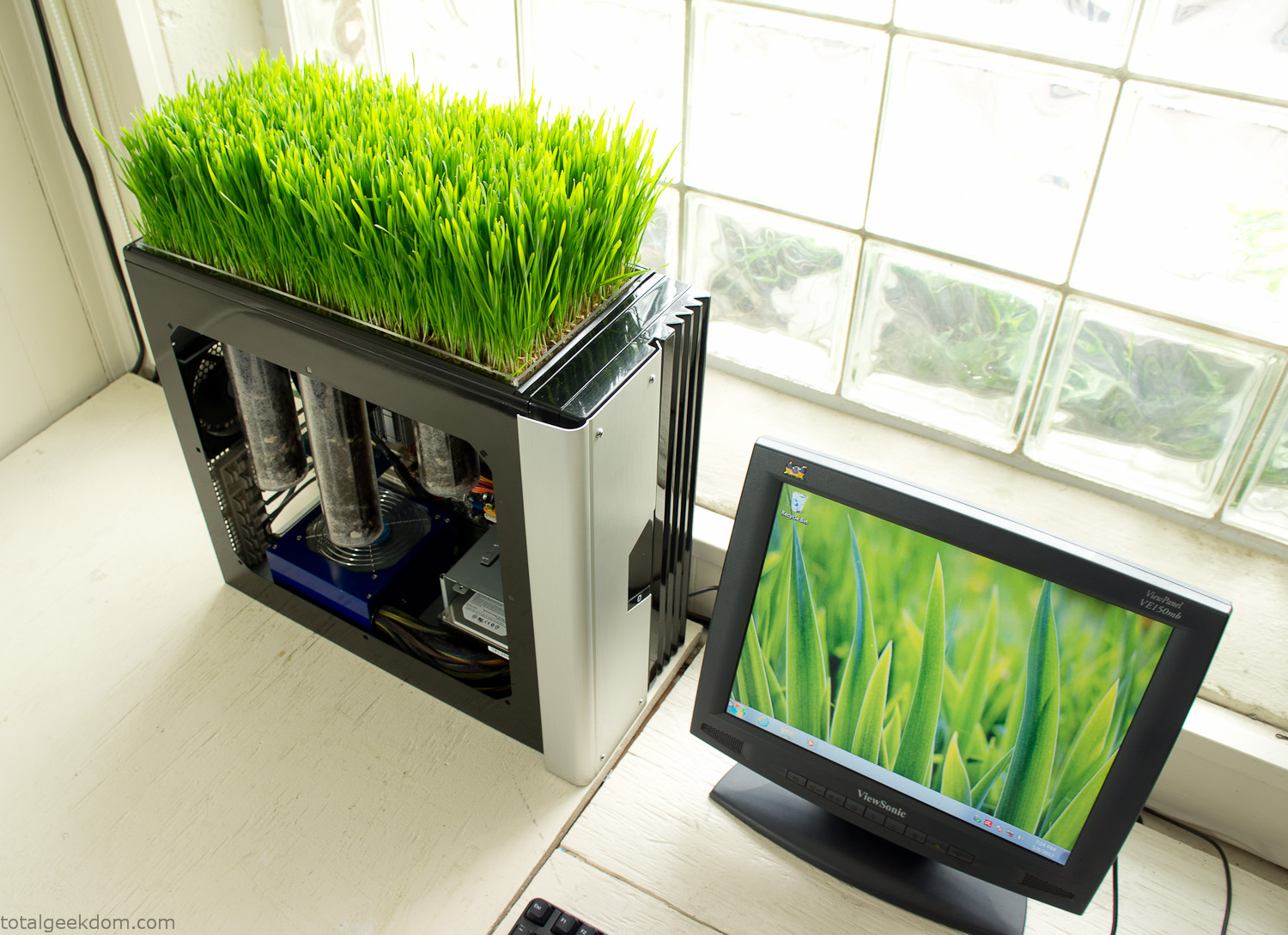
Bio Computer
I’ve been interested in working on a project for while that would combine something tech-based with something organic. Mixing the two elements intrigued me for a while. I’ve wanted to add flowers, or maybe plants of some sort to blend a little bit of nature into the space. I do receive a bit of sunlight through a glass block window, but the temperature in the basement is usually on the colder side. In the winter I don’t really heat the space because the folding farm outputs enough heat to keep the temperature comfortable. I didn’t want to change that aspect so I needed to come up with something that would tolerate slightly cooler temperatures and limited sunlight.
I can’t exactly recall when the idea came to me, but at some point I started wanting to use the heat from a computer as a way to warm the soil and help with germination/growth. I’m about as far from a botanist as it comes, I did some reading online and became pretty interested in the effects of soil temperature on germination/growth. I read different studies and papers from various universities. It was not too long into that process that I became hooked on the idea of using computer heat as a way to control the soil temperature of some sort of living plant life.
As the idea developed further I started looking into wheatgrass as a plant option. There is something clean and natural about the look and idea of a piece of grass growing in my basement. I thought the look would alter the space a little bit and add a bit of color along with something more than just metals and plastics. After reading enough studies and papers on the effects of soil temperature and germination with wheatgrass I felt like I had a good enough handle on the basics to tackle this.
The first step was finding a computer to adapt for the project. Luckily I had a lot of donated computers that people had given me for various project purposes. Most of them didn’t work, but by cobbling together various components from a bunch of different old computers I was able to come up with enough good parts to make a working computer.
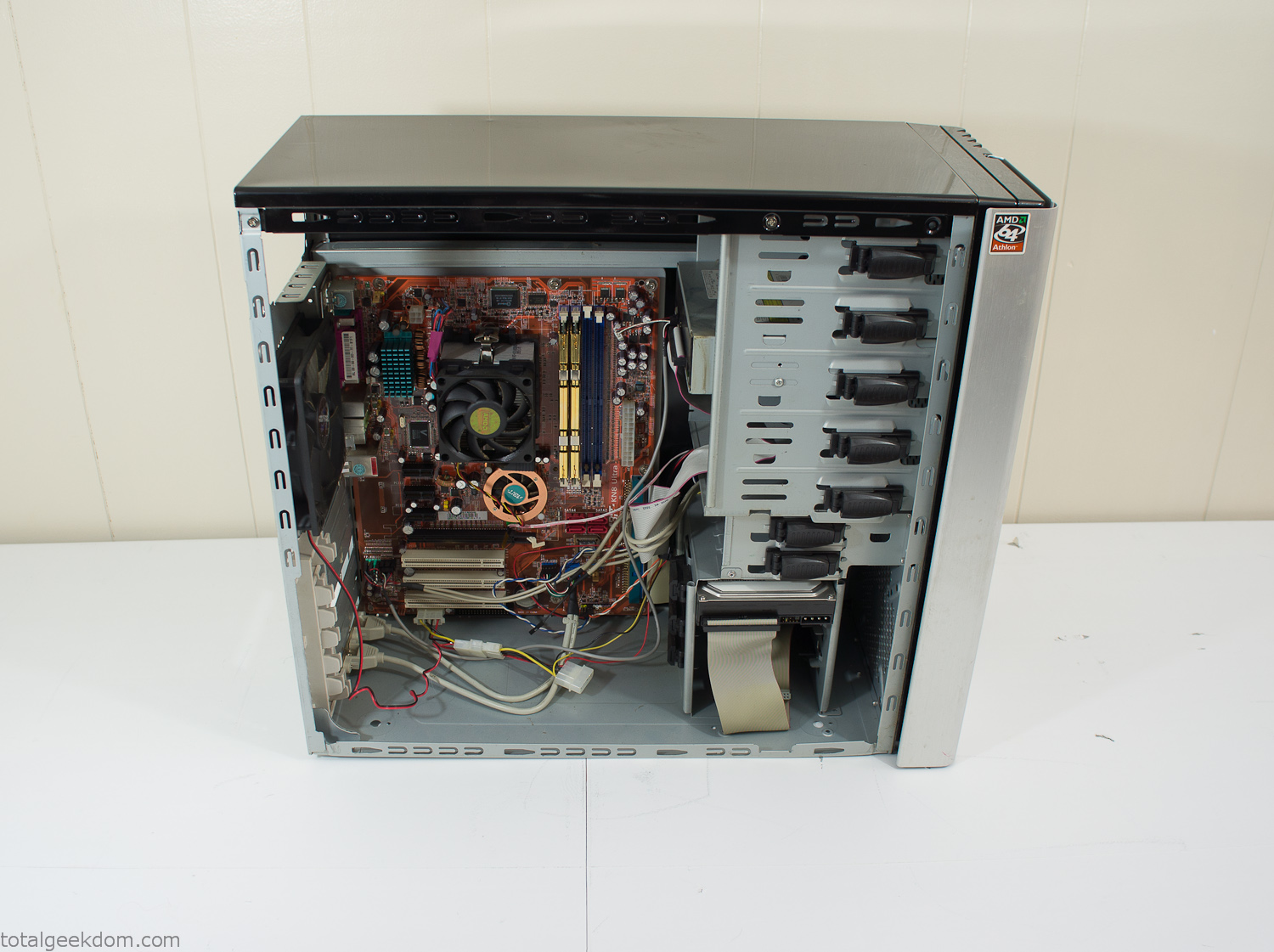
Donor Computer
At the time I was starting to get a formalized plan together for this project, another idea popped into my head. I’ve got a 5 yr. old who is already fairly geeky (just ask him to do his Jabba the Hutt impression for you) but he really does not get that much computer time. He’s getting to an age where he’s more inquisitive about tech stuff and I think he’s ready for his first computer. Since I was already well underway with this project it seemed like a perfect opportunity to orient the computer itself towards a learning tool for him in addition to using it as a way to blend something organic with a piece of technology.
With all of these goals in mind I started tinkering away. The computer hardware itself was nothing fancy, definitely outdated, but perfectly suited towards this project.
CPU- Pentium 4 (3 GHz)
Dell Factory Motherboard
Various Ram Sticks- 2gb
Old Maxtor 120gb IDE Hard Drive
Old FPS Power Supply
Donated Old Computer Case
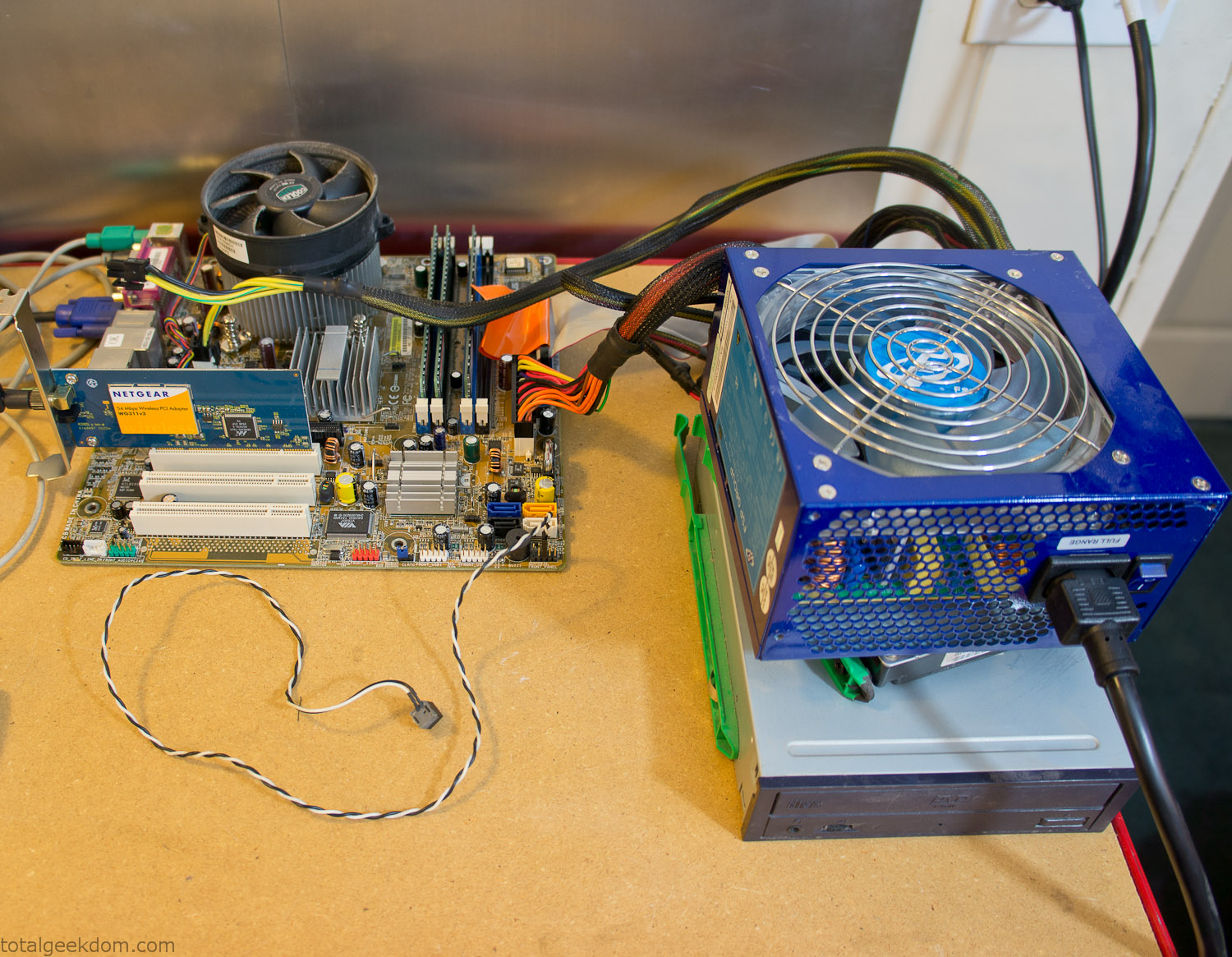
Computer Parts Testing
If you’ve spent any time around computer hardware in the last decade you’re probably well aware that Pentium 4 has a reputation for running hot. The 90nm Pentium 4 was named Prescott and it didn’t take long before the nickname Pres-hot popped up. In this case though that extra heat is going to be put towards good use.
Once the hardware was all in order I started working on the layout and arrangement for the case. I had originally envisioned the grass growing out of the top of the computer case. This seemed like it would provide a good blend between the hard edges of the computer and the soft feel of the grass. This also worked well with putting the soil area in the upper portion of the case, where the most heat should collect. After doing some initial tests with this configuration I found the measured temperature near the top of the case was the hottest. The placement of the CPU near the top of the case and the lack of airflow in that area contributed to these higher recorded temps.
After finishing with some initial tests I decided to completely strip the case down and start removing all the unnecessary brackets and pieces inside of the case. Like most computer cases all the internal brackets and mounts are riveted together, so I drilled all the rivets out of the components I wanted to remove and pulled them out. The gutted case looked pretty barren after being stripped.
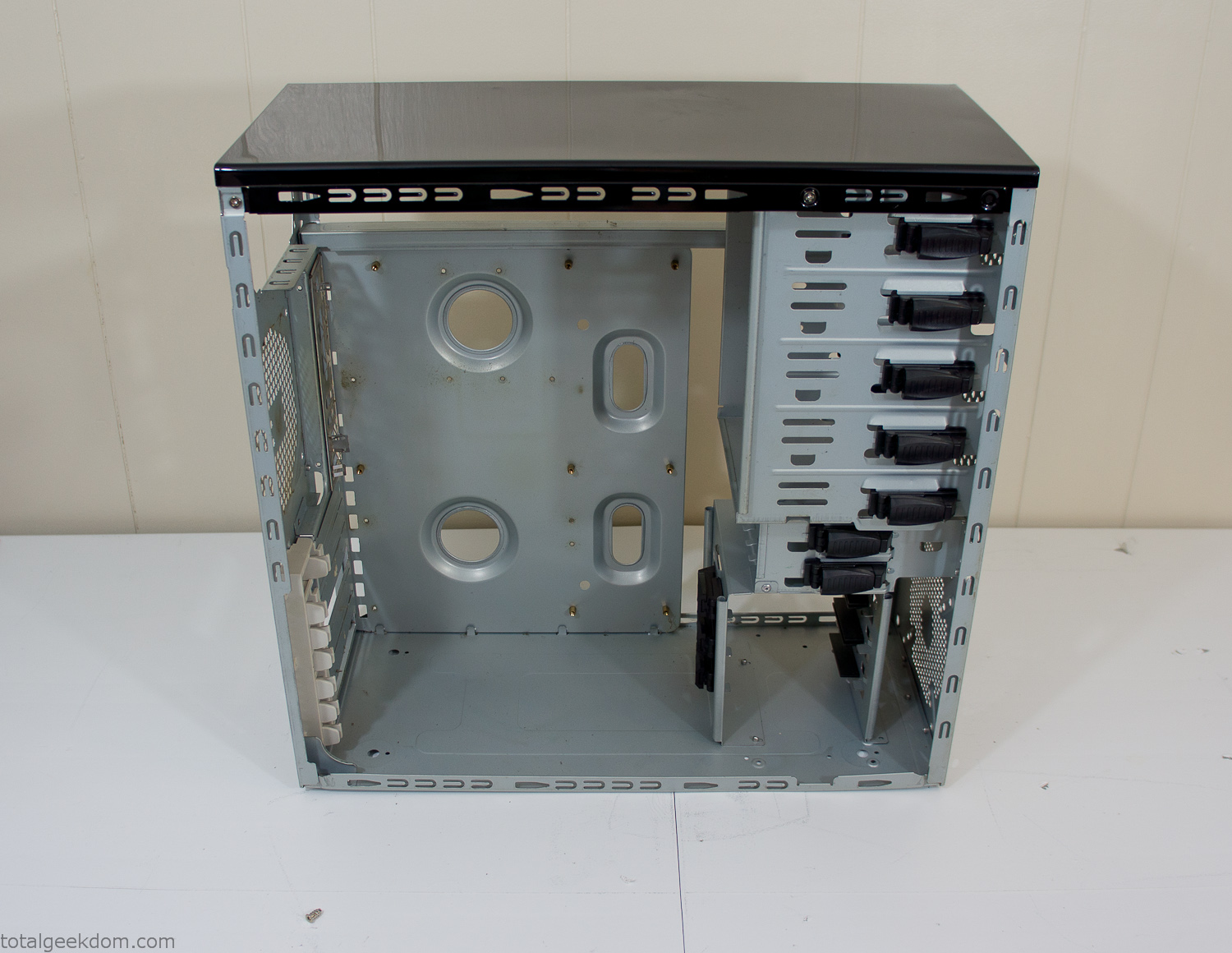
Empty Computer Case
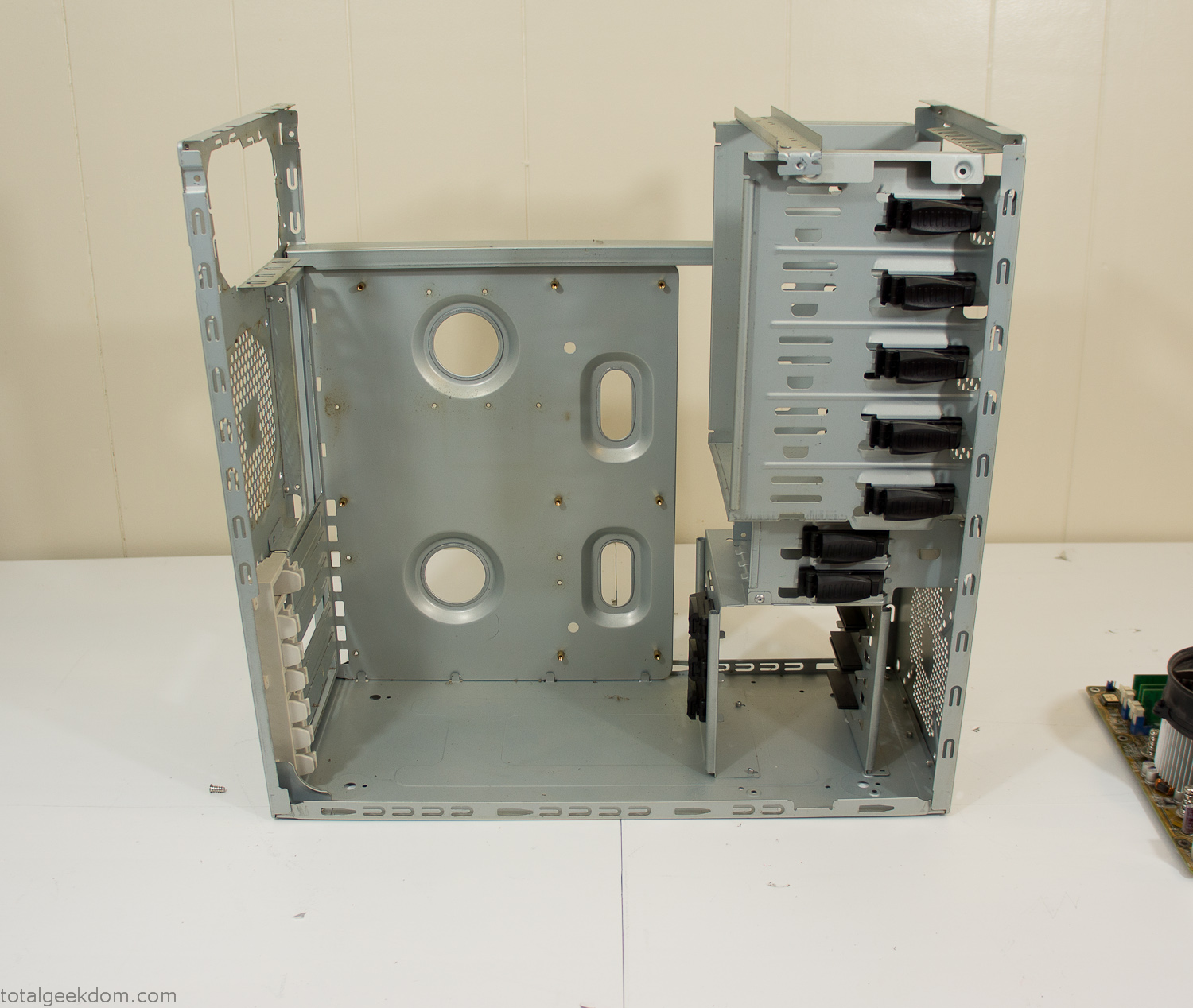
Dismantled Computer Case

Stripped Computer Case
In keeping with my original plan of having the computer blended with the organic grass I wanted it to be easy to see the inner workings of the computer and also the soil from the grass growing above. I needed something that was translucent, which left me with either glass or acrylic/polycarbonate as my options. I ended up choosing acrylic because I was able to find a cheap, used, die-cast model car display case top that was the perfect dimensions for the top of the case. Couldn’t go wrong for 5 bucks.
I test-fit the acrylic over the top of the computer case and marked my layout on the top of the case. My plan was to cut open the top of the computer case and insert the acrylic display case into the section I cut out. To cut open the top of the computer case I drilled a hole as a starting point and then used tin snips to cut through the thin gauge metal.
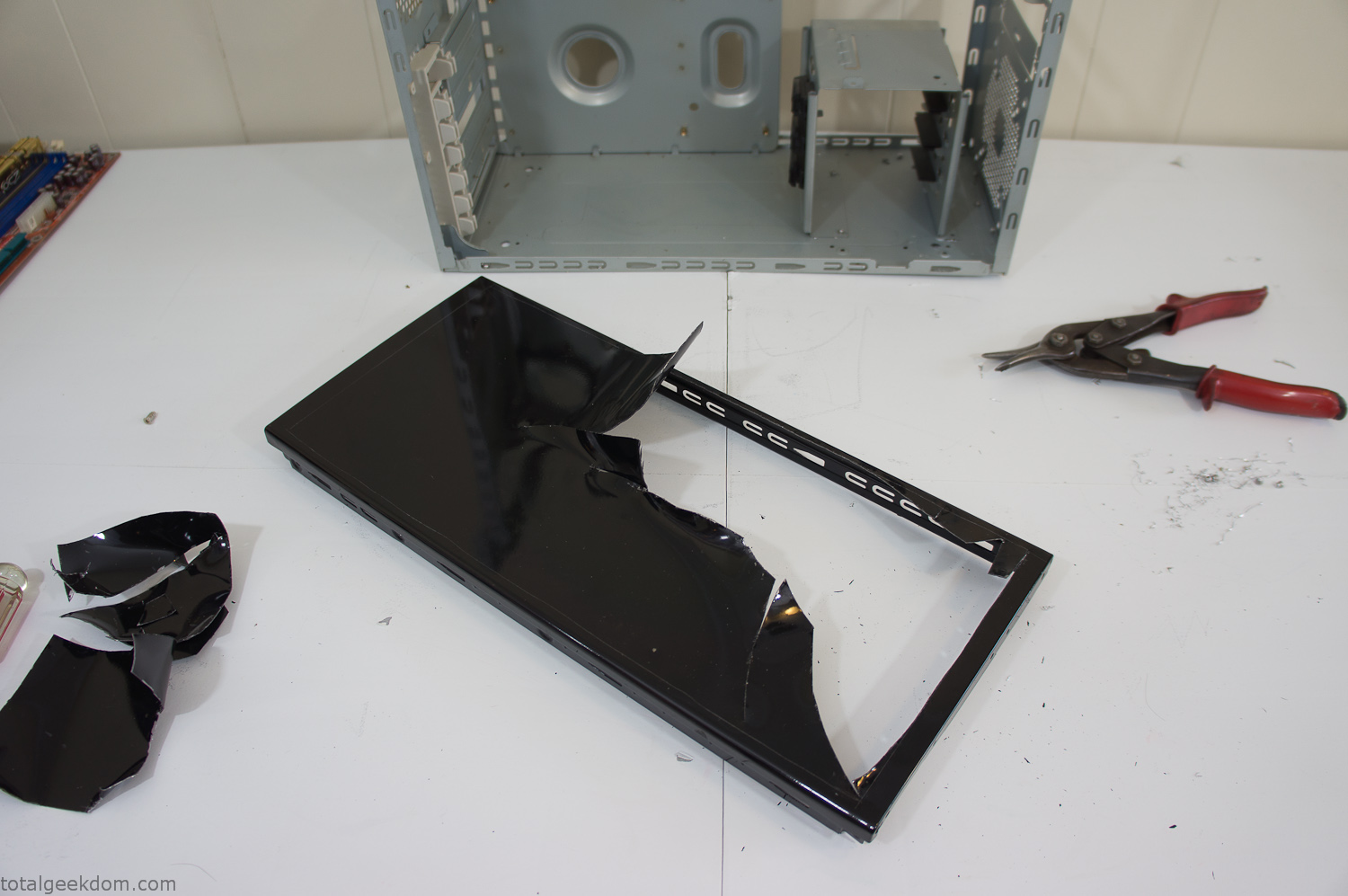
Computer Case Lid Modding
Once I had the metal opening cutout, I needed something to put along the edges of the freshly cut opening to create a clean and finished look. For $2 I was able to find some black, car-door-edge, plastic molding that worked perfectly.
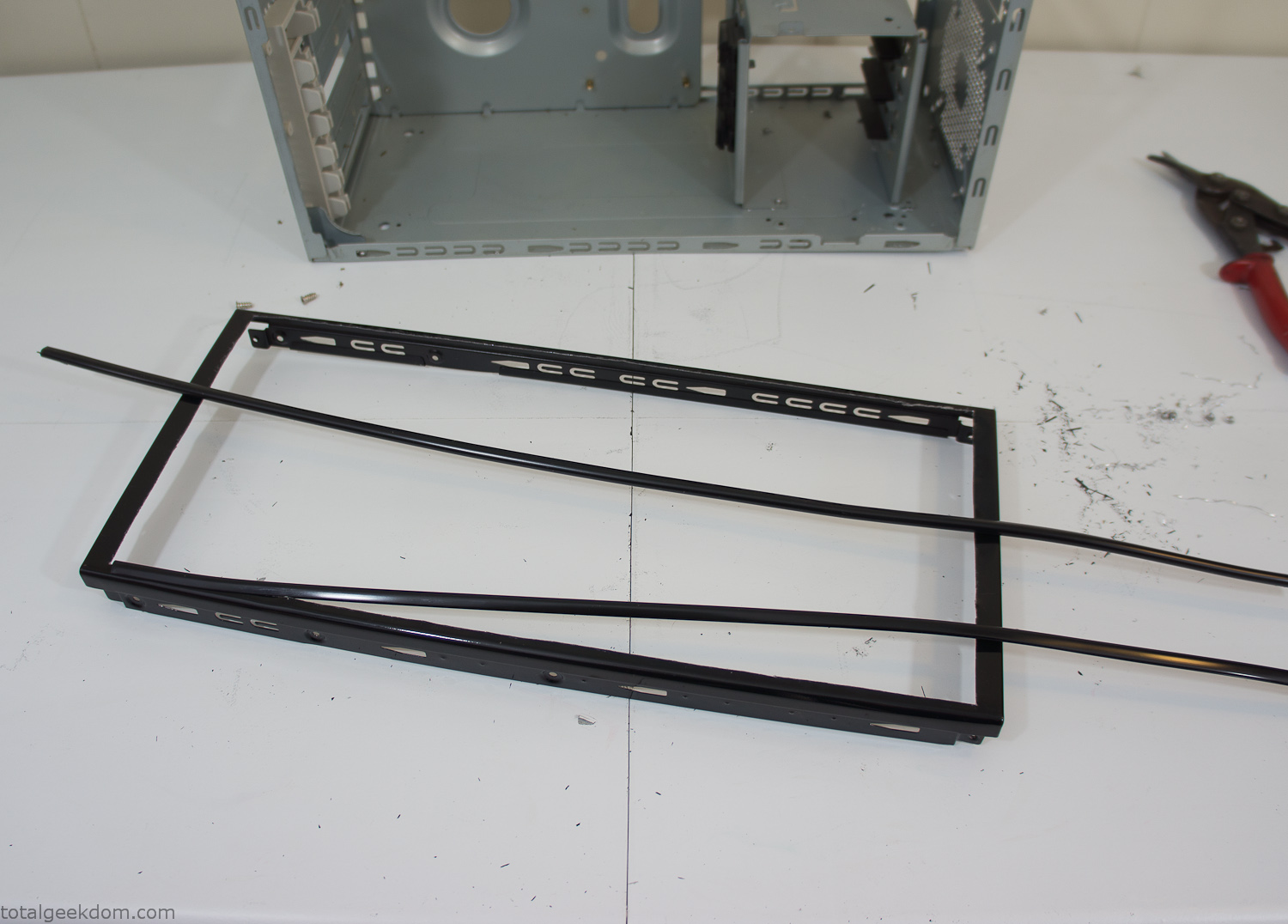
Modified Computer Case Lid
After getting the opening of the top of the computer handled and the acrylic case properly fitted, I moved onto some more testing with soil in the acrylic and the computer running. I wanted to see what kind of heat transfer I would get and how it would affect the soil temperature. I knew that using acrylic over glass would make it a little more difficult to heat the soil as acrylic is not that good at transferring heat. Luckily though I didn’t really need to alter the soil temperature that much, I just needed a little extra heat. Testing showed that heat transfer with just the single acrylic display case as my soil container was slow. So I decided to add some acrylic tubes. This would allow more surface are for soil to acrylic contact and also give me an area where I could add a mixed substrate to allow for soil drainage.
I went online and found a 3ft long section of 2 1/4″ clear acrylic tubing for $8 dollars. I wanted to add a couple of hanging cylinders off the main of the acrylic display case in the top of the computer case. To do this I needed to cut holes into the bottom of the display case. Cutting holes in acrylic is not always easy, it’s likely to chip and craze at the edges. To get around this I used a buildup of masking tape on both sides of the acrylic, to provide a little bit of resistance and strength. I placed the acrylic display case back into the computer and marked my layout for the tubes. I needed to leave clearance for the CPU cooler, power supply and hard drive mount.
After marking the layout, I used an air-powered pencil grinder and carbide tipped bit and cut through the acrylic case along my marked lines. After the initial shape was cutout I used a tube piece as a template and slowly worked on grinding the holes as perfectly round as I could get them so that the tube had a snug fit all the way around. The fit is pretty important as the acrylic cement that I used needs there to be a tight fit so that the acrylic can bond correctly.
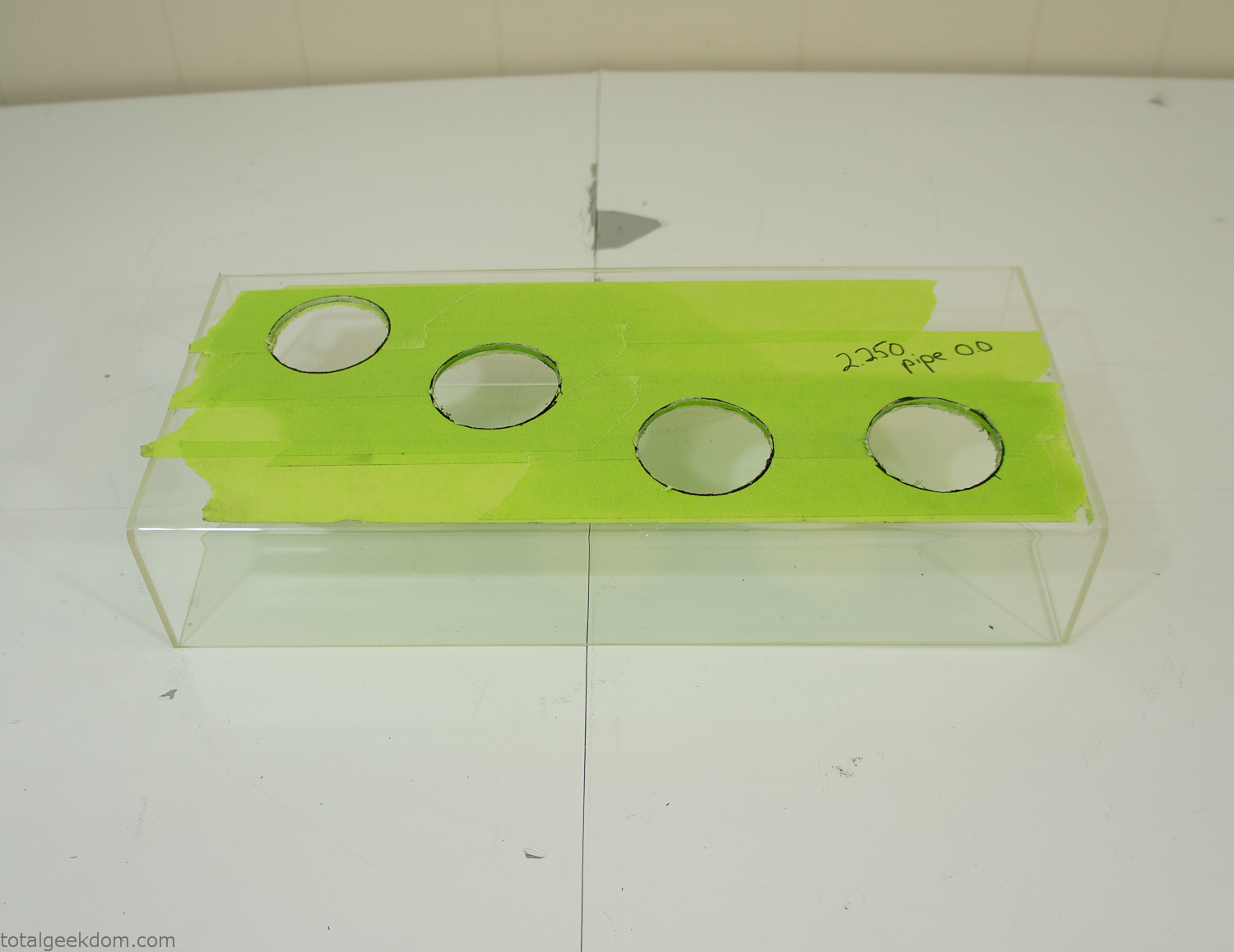
Acrylic Case Modifications
I placed the tubes into the acrylic case and mounted it in the computer and test fit the placement and height of the tubes. After getting everything lined up and oriented correctly I moved towards bonding the acrylic together. Using a needle dropper applicator I applied the cement to all the joints. After letting it set overnight I came back the next night and applied a thin coating of clear silicone caulk around all the joints just to ensure they were completely water tight
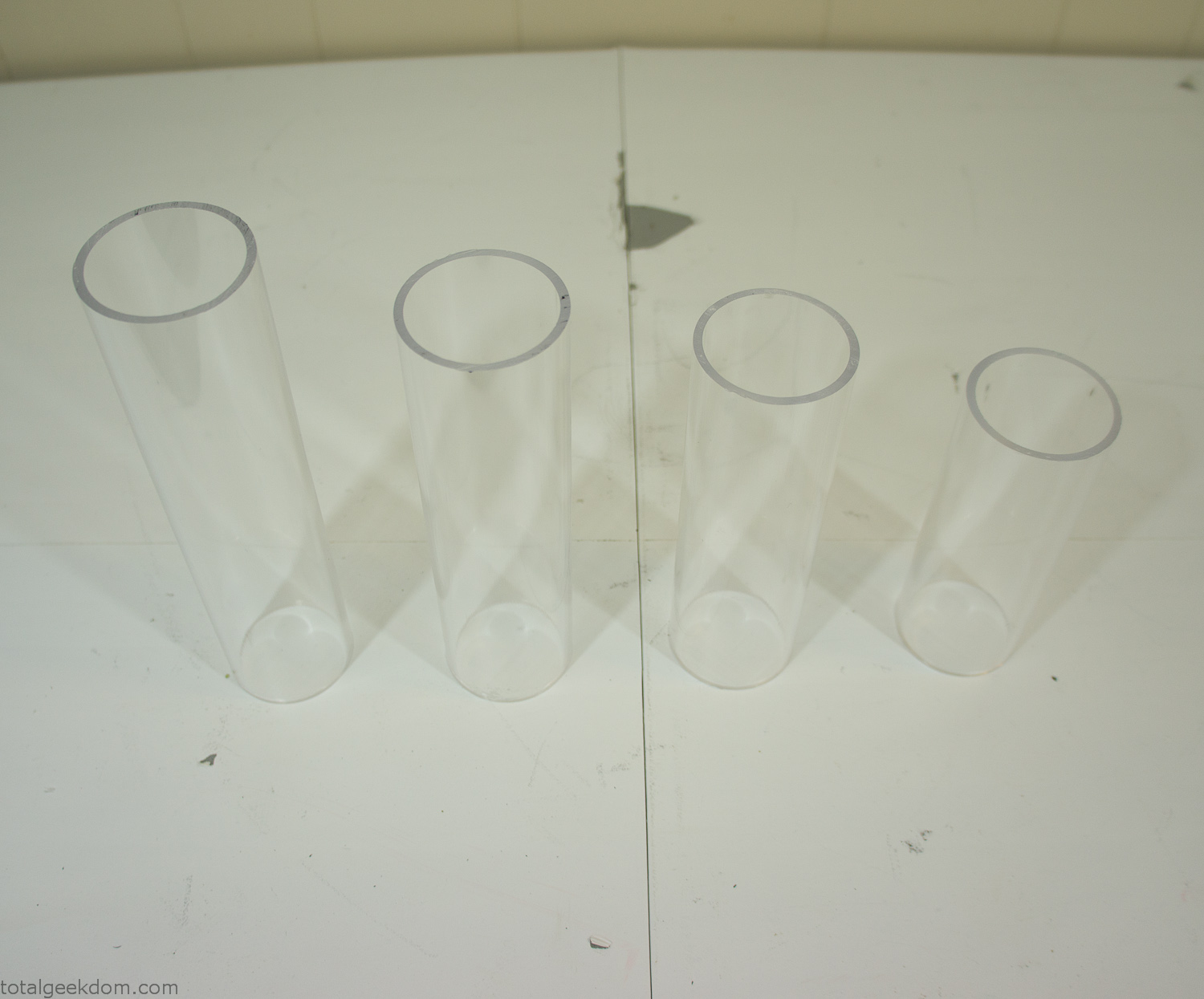
Acrylic Tubes
The next step was sealing up the bottom of the acrylic tubes. I looked at a couple of different options before realizing that the discs I had cut out of the acrylic case to fit the tubes would be almost the perfect size. Using a bench grinder and a test piece of tube I slowly ground each disc to the perfect size for a tight fit all the way around. I placed the clear acrylic discs into the bottom of each tube and repeated the same cementing and silicone caulking procedure to ensure they were water-tight. After a couple of days’ worth of drying I tested the case by filling it with water overnight and checking in the morning to make sure that no leaks had popped up.
In order to hold the weight of the acrylic case after adding soil, I drilled and installed a machine screw with a rubber cap at each corner of the computer case to bear the weight of the acrylic case.
Once all the work was done with the acrylic case section I started reinstalling all the components. The motherboard, hard drive and power supply were added and then wired up.
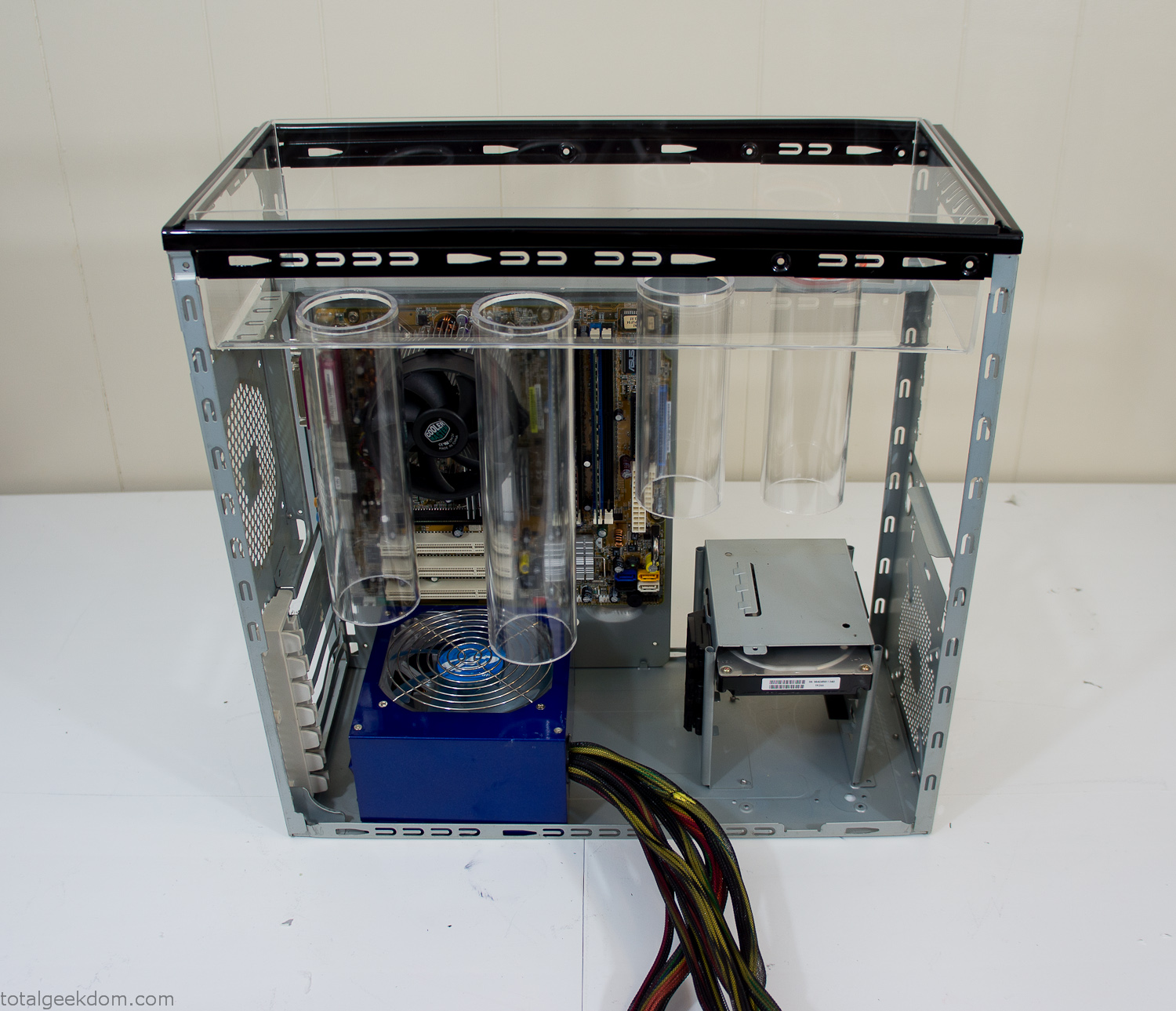
Mocked Up Computer Case
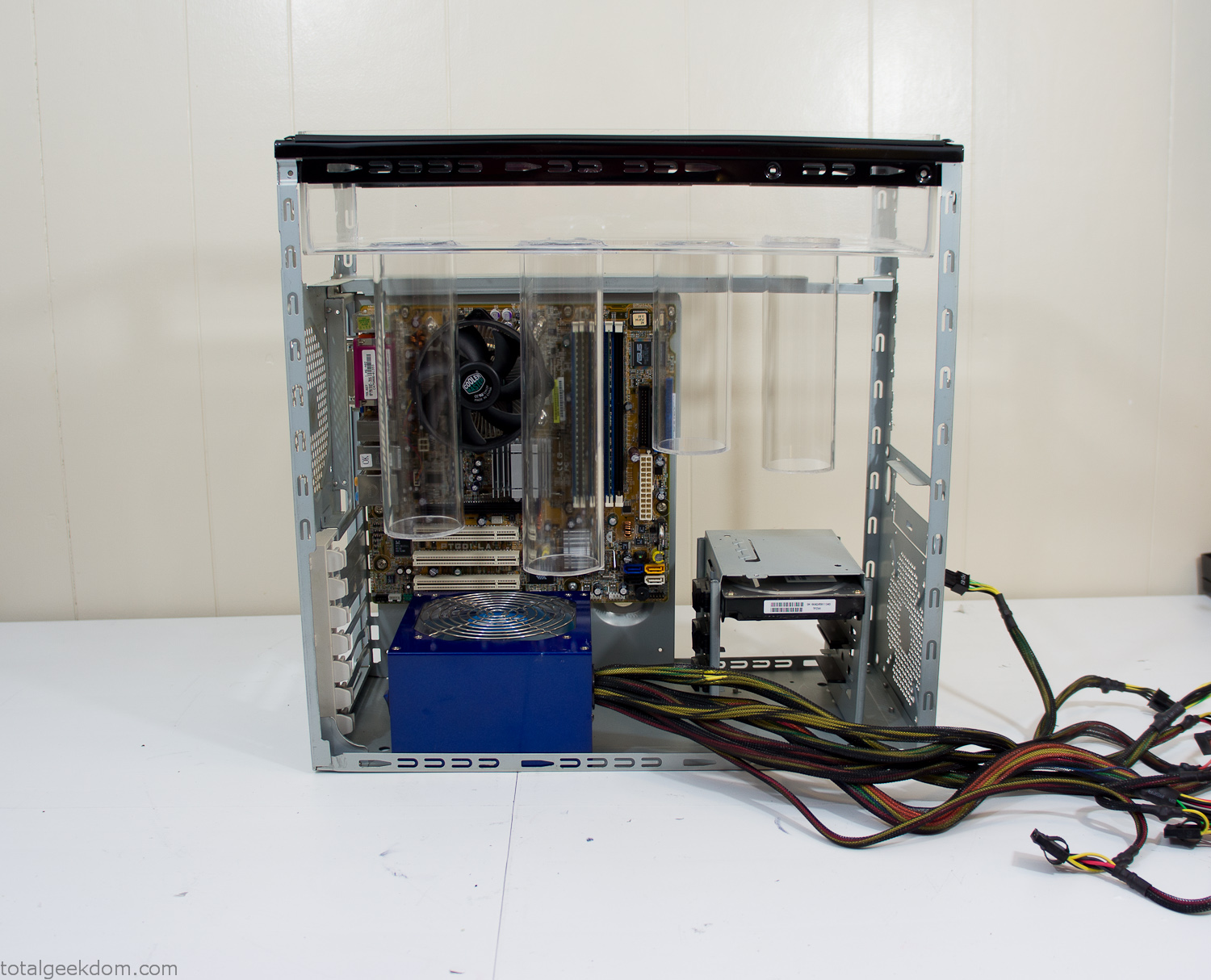
Power Supply Mockup
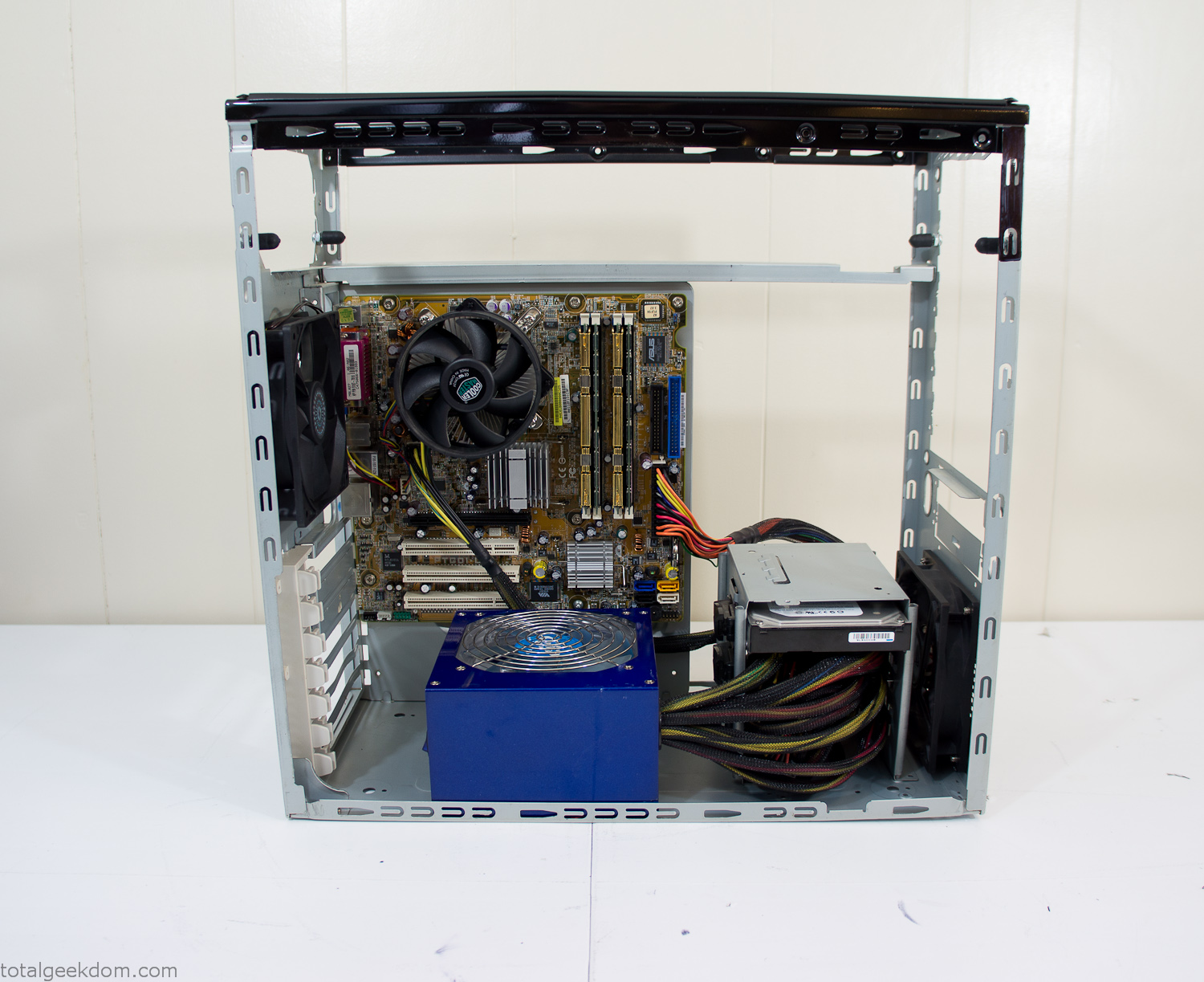
Computer Components Wired
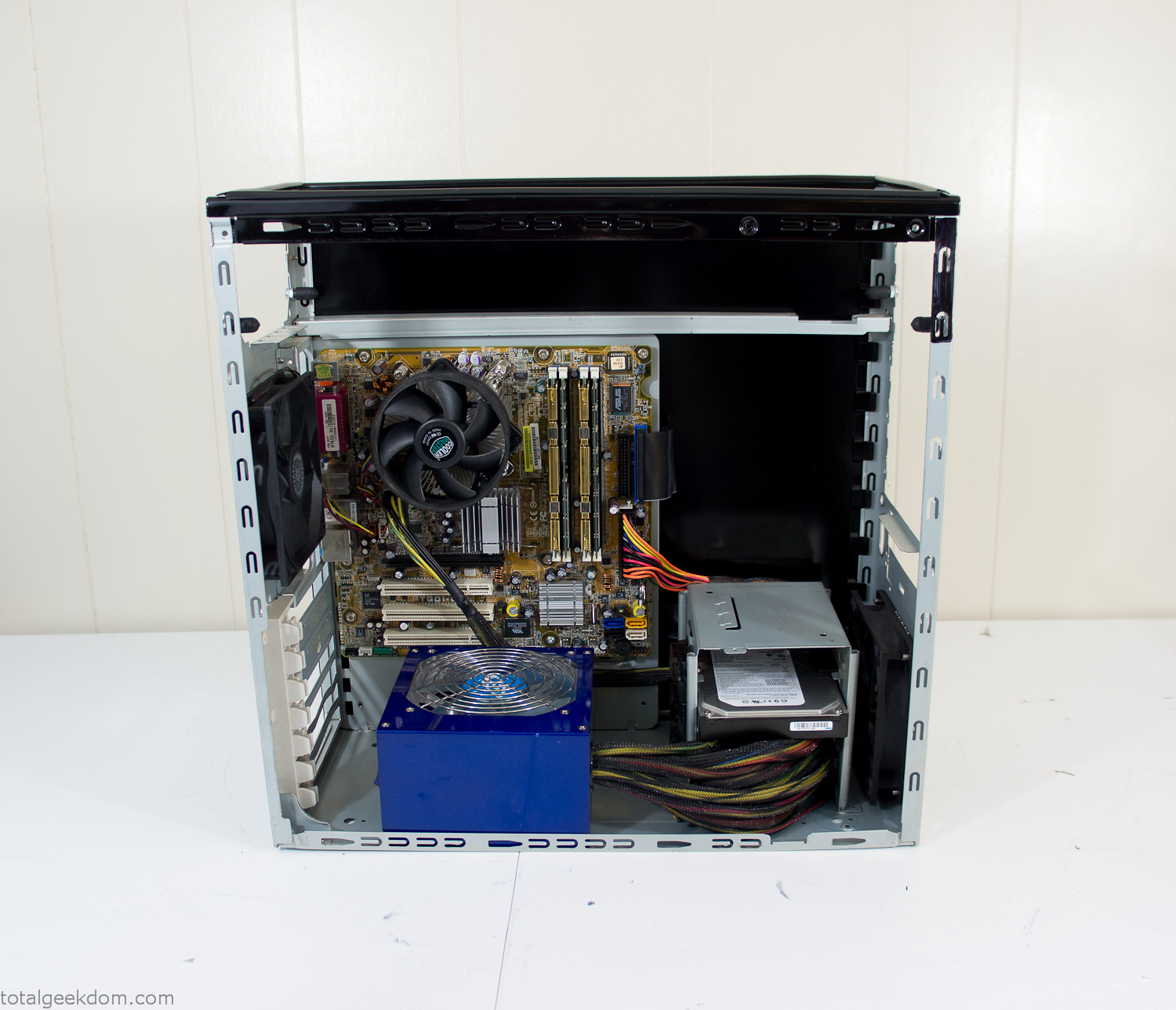
Case Panel Installed
At this point all that was left was to make a clear panel for the side of the case. I had some left over acrylic sheets from a different project that were really close to the right size, after test fitting, marking and cutting I then had a clear side panel to see into the case. (I left this off for the pictures because it caused a reflection)
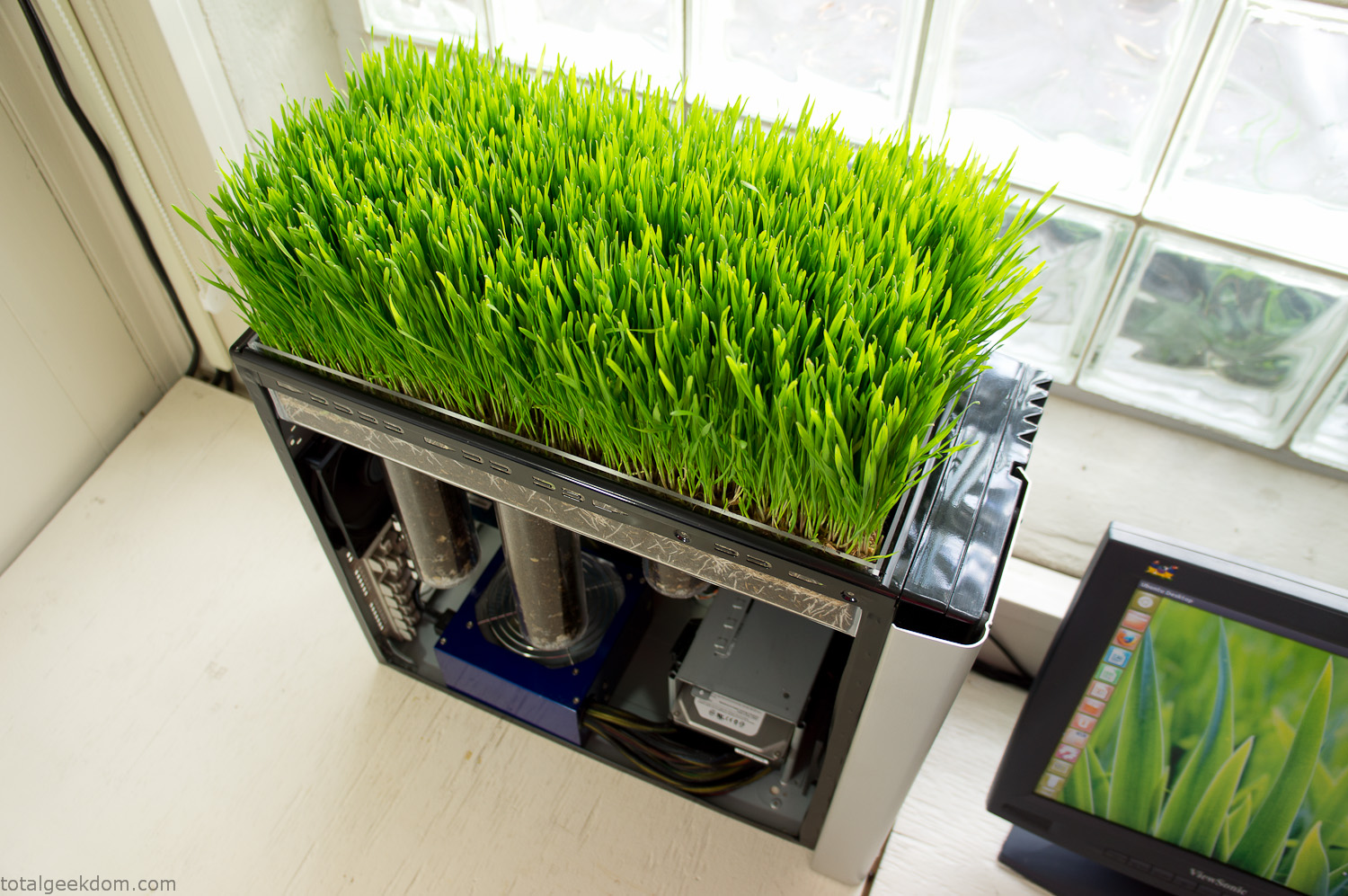
The final step was filling the case with soil and adding some wheatgrass. I had been test growing other samples of wheatgrass during the build process. So I had already a couple of different patches of grass growing. I tried to keep the soil level just below the top of the acrylic case edge to make it a little more seamless.
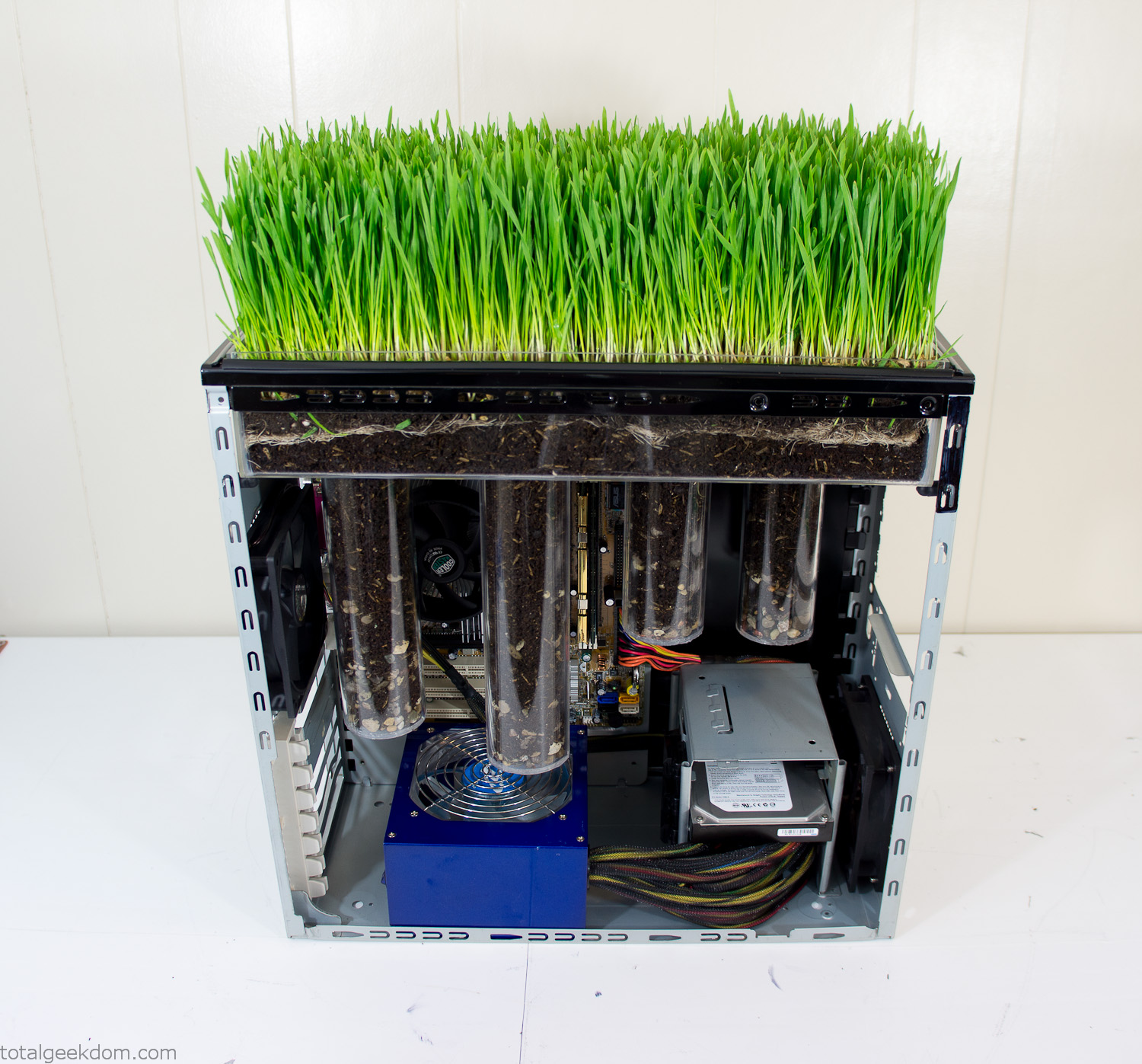
Grass Planted in Computer
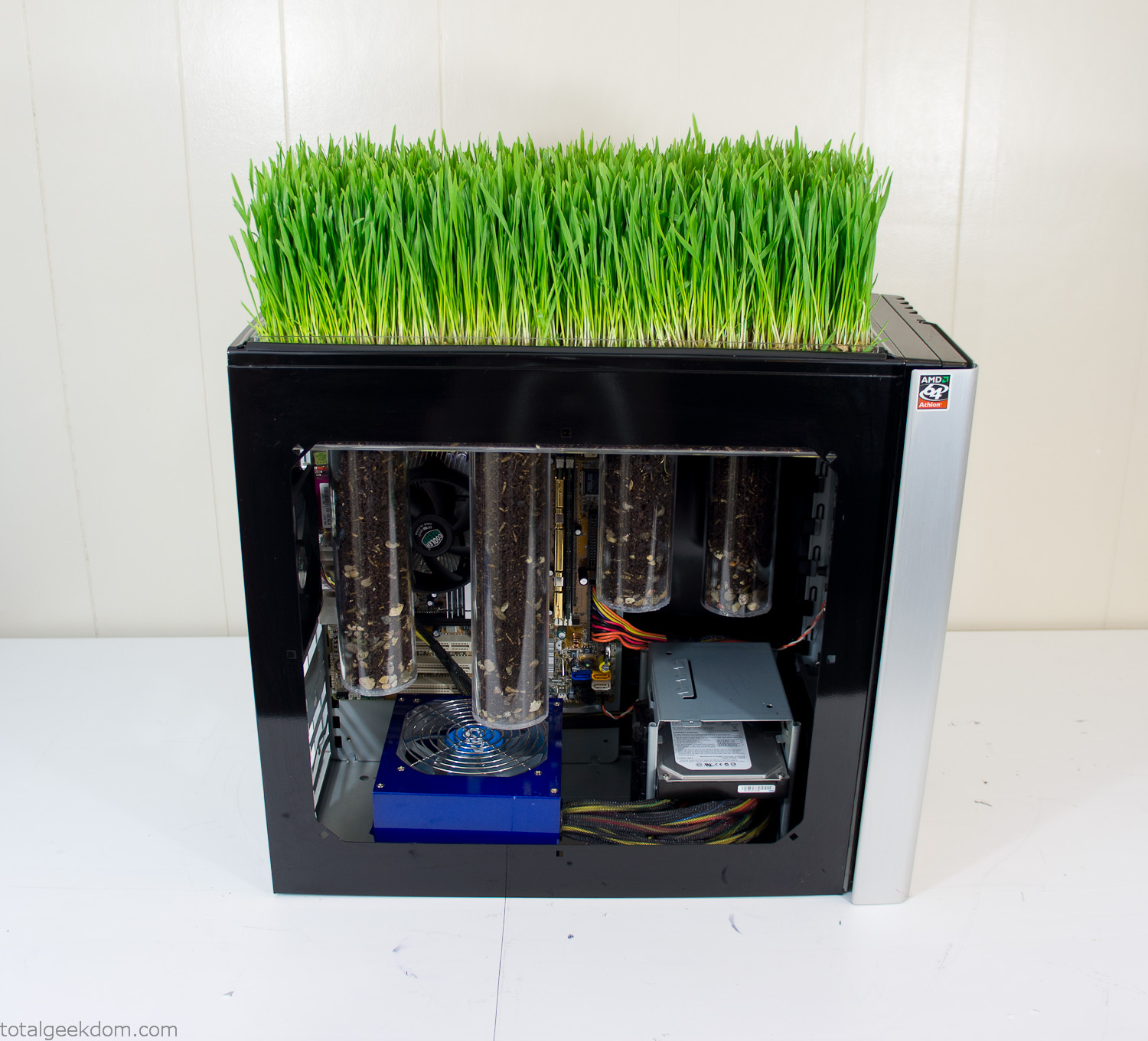
Grass and Case Panel Installed

Grass in Computer
For the computer itself I ended up installing Windows as well as Linux in a dual boot setup. Since the computer was going to be used by my son as something to play with I figured I should put both on there so he can tinker with them and learn as he goes. Besides, for important life decisions like picking an OS (Operating System) I think any good parent should present the options and then let their kid decide for themselves.
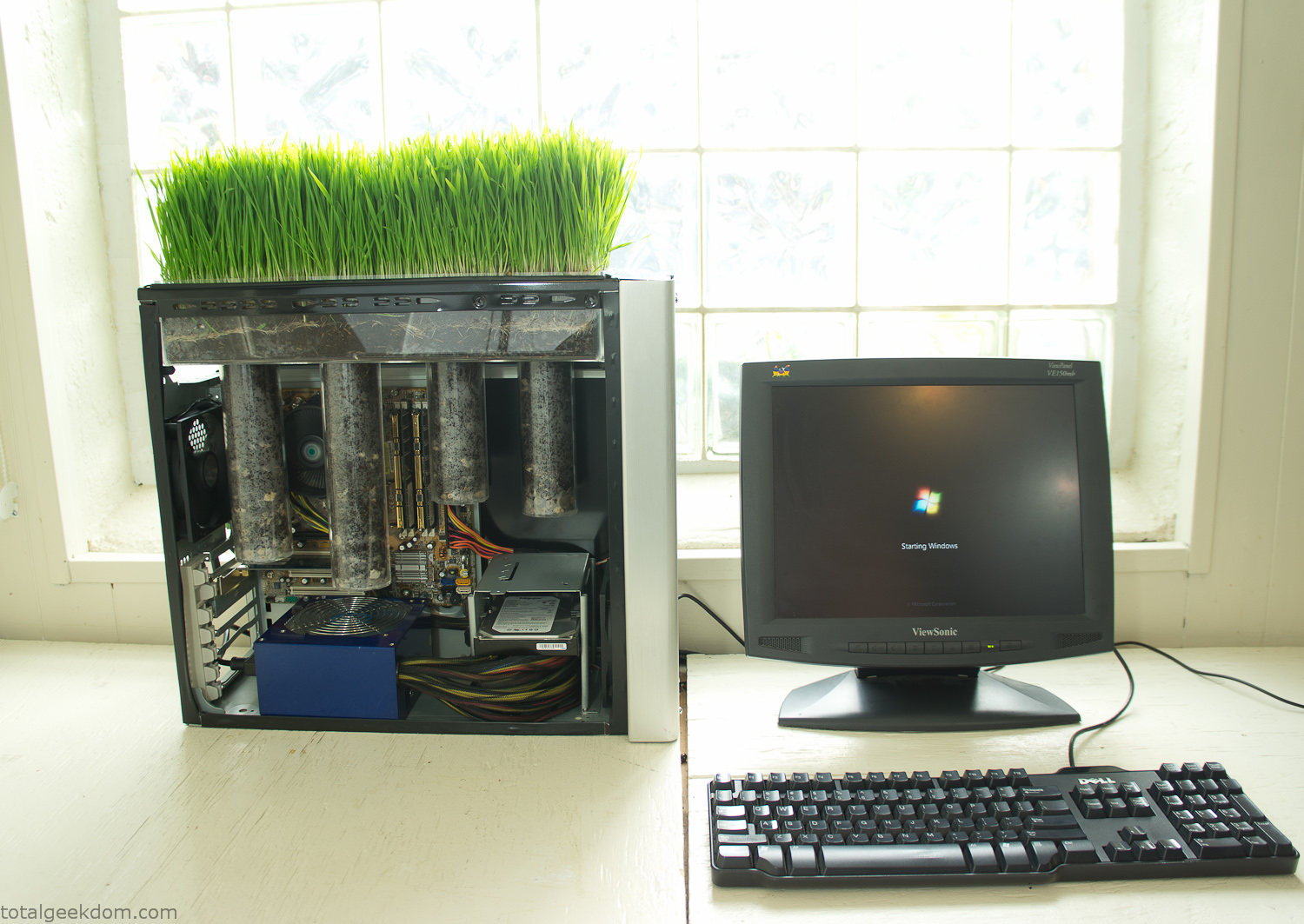
Starting Windows
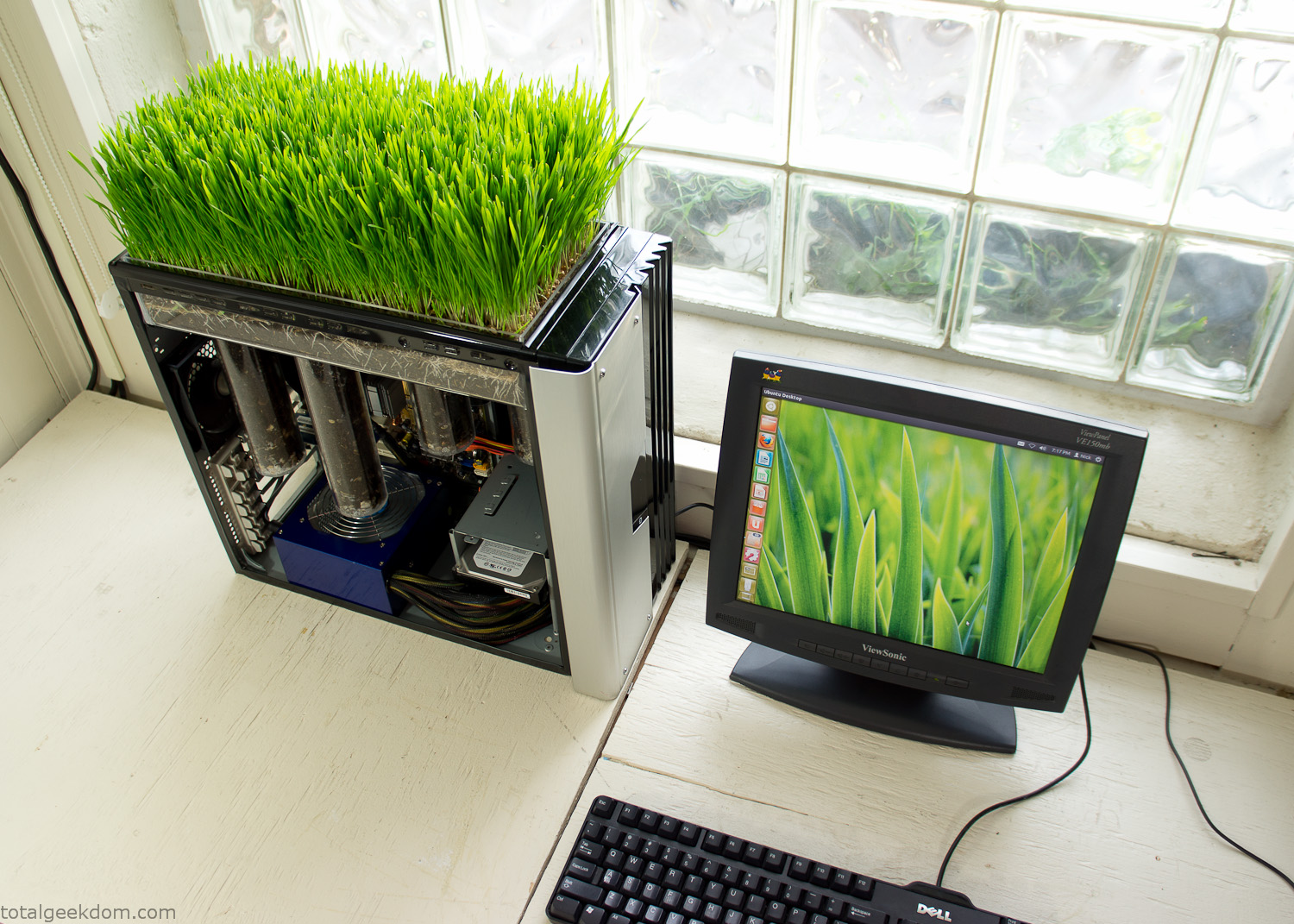
Linux Running
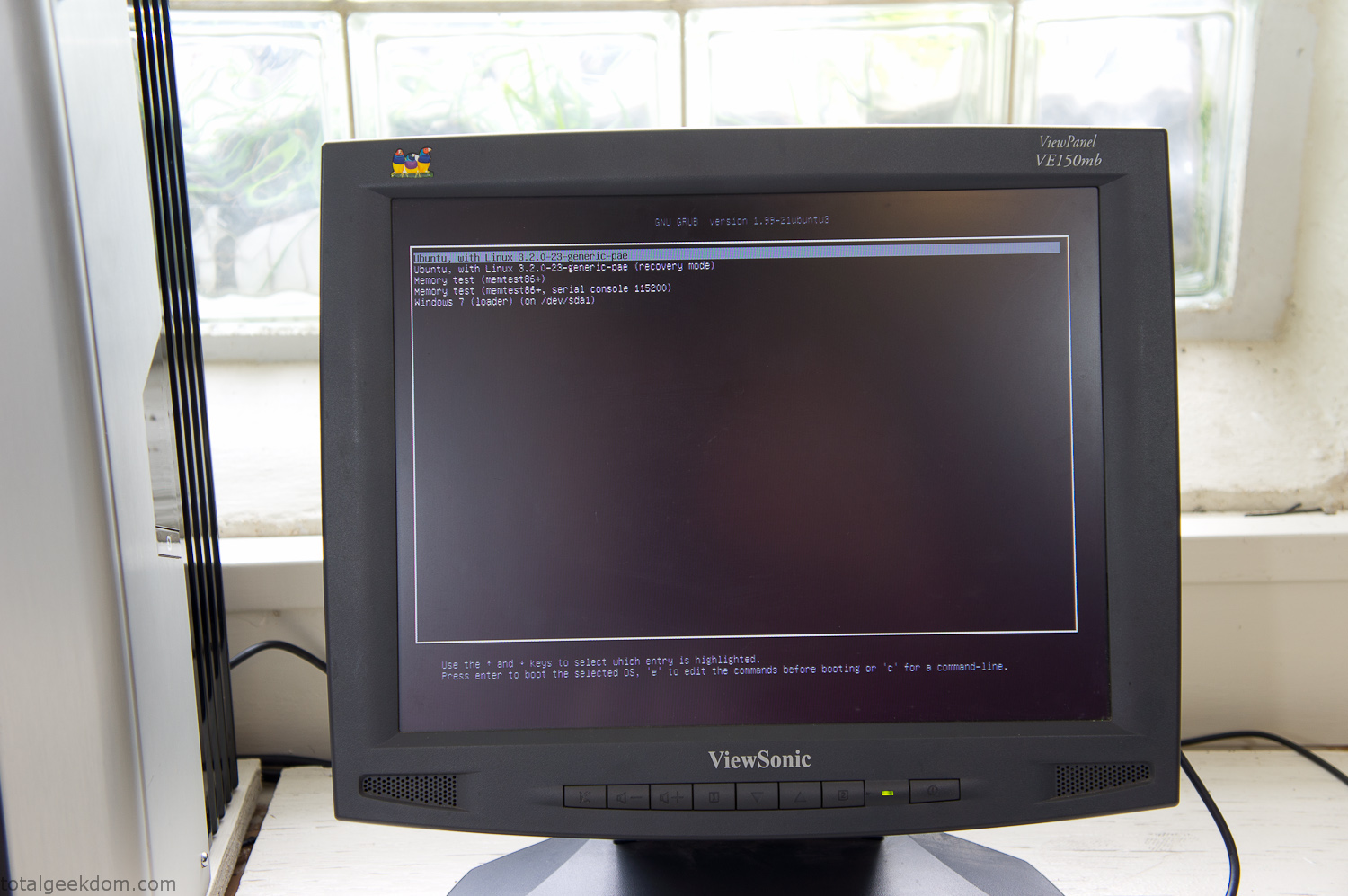
Dual Boot Screen
In the end I’m happy with the result of the project. It’s been fun experimenting with growing wheatgrass and I like how the natural look of grass is blended with the very modern, inorganic case.
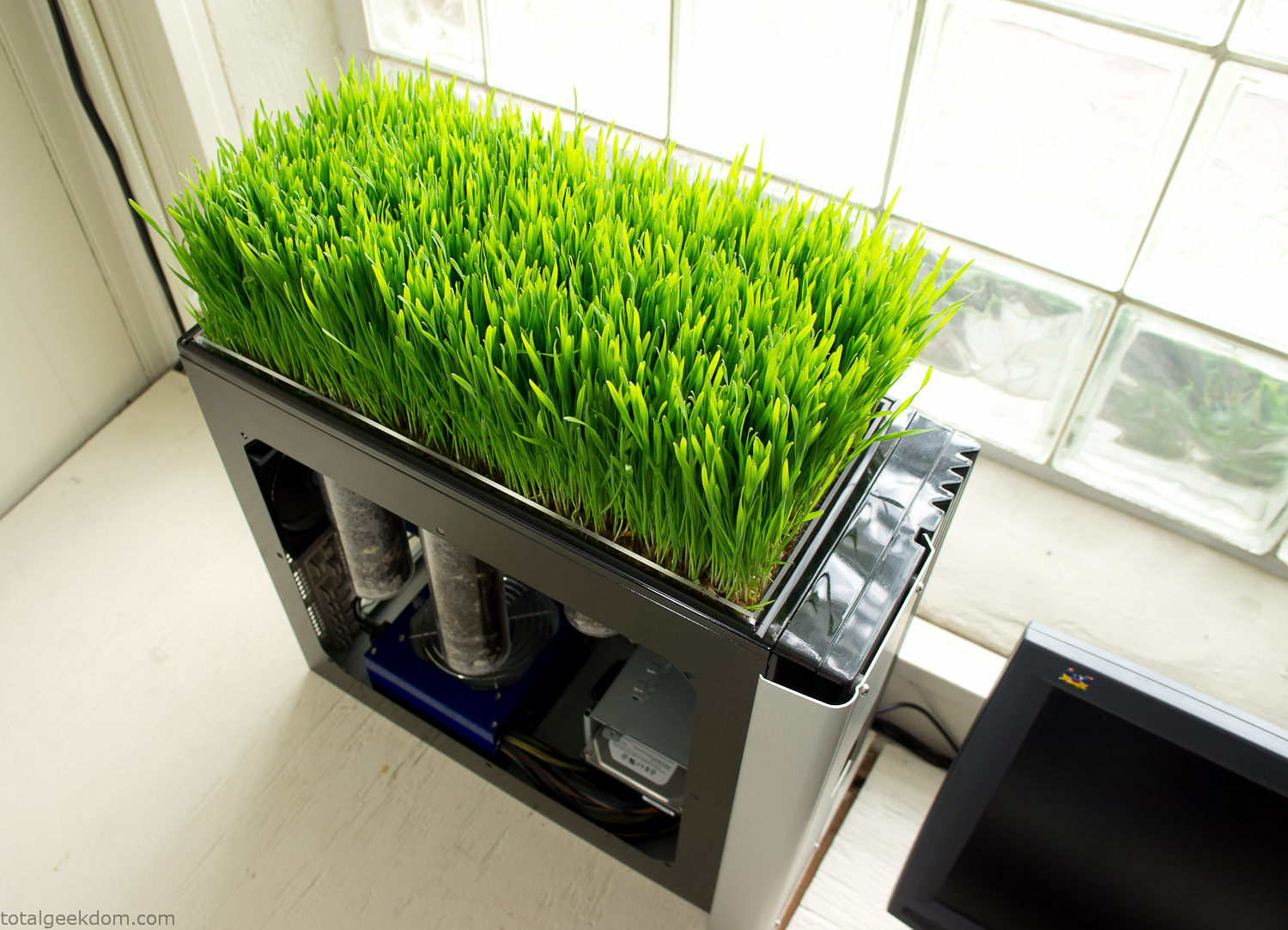
Computer Grass Growing
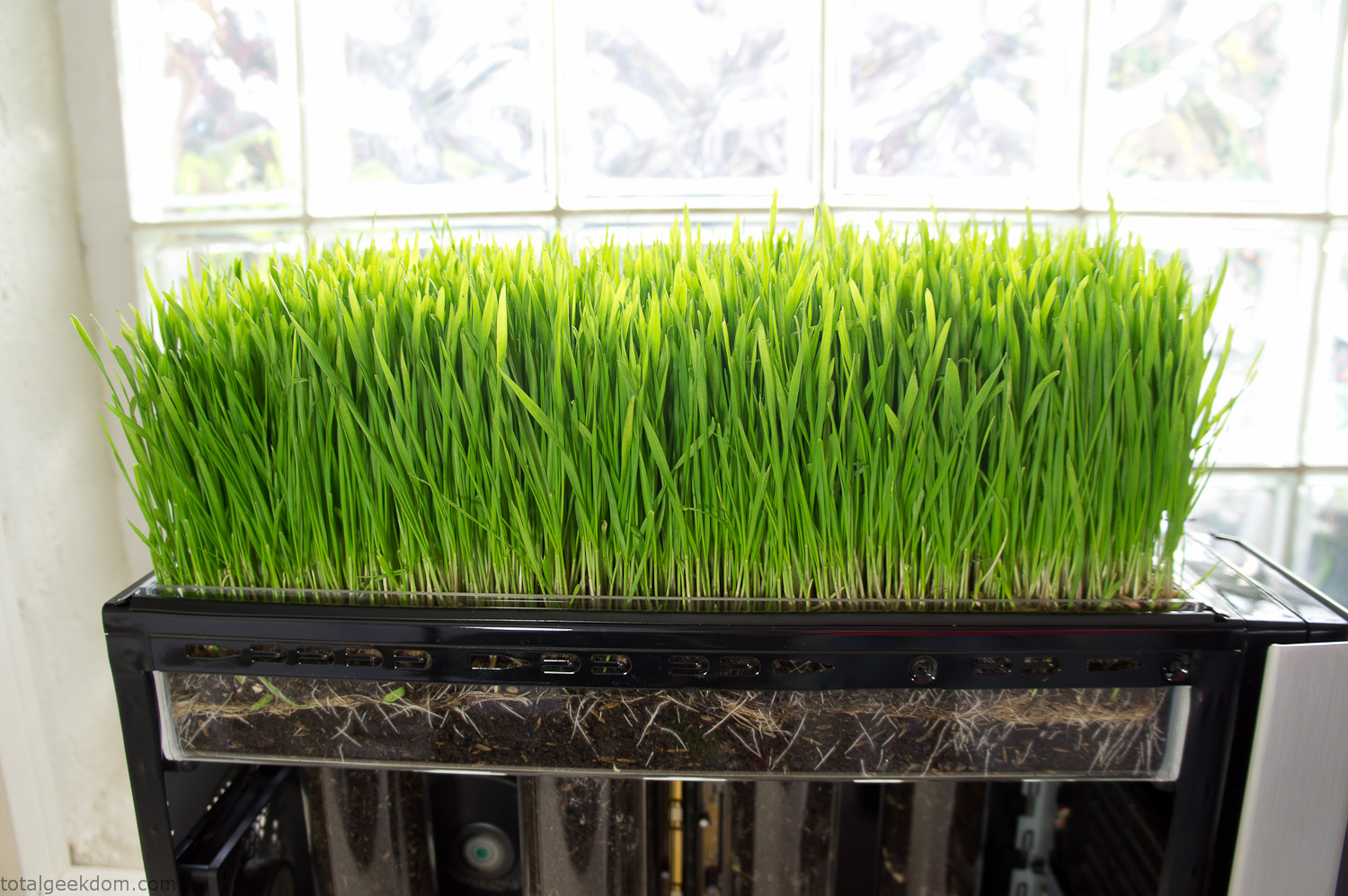
Grass in Computer Section
Notes
Temperature Testing
In testing the case temperature versus the soil temperature I found it was easiest to control the case temperature by using a variable fan speed control on both the inlet and outlet fans. By turning the fan speed down I could increase the temperature inside the case and correspondingly raise the soil temperature.
In order to maximize output of heat during these tests I used Prime95 to run the CPU at 100% load.
Using this method to control the case and soil temperature I played around with adjusting the soil temperature and then tracking the rate of growth of the Wheatgrass. The target temperature for peak growth seemed to fall around 66°F (19°C).
Using the fans to control the case temperature allowed me to vary the temperature inside the case from a low of 75°F (24°C) to a high of 91°F (33°C). In order to achieve the desired increase in soil temperature, I had to run the case temperature toward the higher end of the scale.
When the soil temperature was too high, the growth of the wheatgrass would slow.
Wheatgrass
The wheatgrass I used for my tests was nothing special, it can be found as seeds (berries) in a lot of health food stores and it grows relatively easily.
Caring for the wheatgrass is just a matter of keeping it watered. It’s a pretty easy plant to work with and doesn’t require any special skills.
Wheatgrass is often used as a nutritional supplement; it can be juiced and mixed into smoothies and other beverages. I plan on harvesting some of the grass and making some juices.
Plant Options
While wheatgrass offers a nice, attractive and easily grown option I do plan on trying other plants as well in the future. Since I already have the “planter” built all I have to do is add a different plant and see how it goes. I’m sure there will be some plants that don’t like the lower light environment, but it will be fun experimenting with other plants as well and seeing how they take.
Materials
Donated Computer- Free
Clear Acrylic Display Case- $5
Clear Acrylic Tube- $5
Plexiglass Side Panel- Free
Total- $10
Bio Computer Running
 29.2k
29.2k
 13.2k
13.2k 7.1k
7.1k

 2.1k
2.1k 813
813 2.6k
2.6k
Comments 45,990
Новостной портал https://kiev-online.com.ua с проверенной информацией. Свежие события, аналитика, репортажи и интервью. Узнавайте новости первыми — достоверно, быстро и без лишнего шума.
Экскурсии по Казани — обзор маршрутов и лучших туров по Казани
Казань — жемчужина Поволжья с богатой историей и неповторимой культурой. Если вы ищете интересные экскурсии по Казани, на нашем сайте представлены лучшие маршруты — от обзорных программ до авторских прогулок.
[url=https://to-kazan.ru/tours/sviyajsk]свияжск экскурсии из казани[/url]
Экскурсии Казань — автобусные, пешеходные и тематические туры
Мы предлагаем разнообразные экскурсии Казань: обзорные автобусные маршруты (включают Кремль, Баумана, Кабан и Старо-Татарскую Слободу), пешеходные прогулки, гастрономические экскурсии, квесты и семейные форматы.
Что такое обзорная экскурсия по Казани
Отзывы туристов подтверждают: «Казань за 4 часа — экскурсия Казань за 4 часа + Кремль… экскурсовод Елена увлекла рассказом».
Программа включает:
посещение Казанского Кремля и мечети Кул-Шариф;
знакомство с озером Кабан, ул. Баумана и памятниками города .
https://to-kazan.ru/tours/ekskursii-kazan/obzornaya-avtobus
экскурсии в казани заказать с гидом
Экскурсии в Казани — вечерние и ночные маршруты
Если вы хотите увидеть город в другом свете, выбирайте экскурсии в Казани вечером. Самый популярный формат — ночная экскурсия Казань, когда подсветка архитектурных объектов — Кремль, ЗАГС, мост Миллениум — создаёт невероятные впечатления.
Обзорные экскурсии Казань по ночному городу
Тур длится около 2–3 часов и включает: заезд к ключевым смотровым точкам, прогулку по набережной Казанки с иллюминацией, катание на колесе обозрения «Вокруг света».
Почему выбрать именно экскурсию Казань от нас?
Лицензированные гиды с живым, эмоциональным стилем (отзывы: «гид Марсель — просто супер-гид!»)
Малые группы для комфортного восприятия и безопасных остановок
Современный и удобный транспорт, радиогиды, подогрев зимний-зимний сезон
Возможность онлайн бронирования и подтверждение через сайт
Казань экскурсия — что входит и сколько длится
Автобус от центра Казани (чаще всего — район метро «Кремлёвская»)
Гид ведет экскурсию как в автобусе, так и при остановках
Основные объекты: Кремль, мечеть Кул-Шариф, улица Баумана, озеро Кабан, Старо-Татарская слобода, теcатр Камала
В вечерних версиях: мост Миллениум, дворец земледельцев, стадион «Казань Арена» ночью; плюс колесо обозрения
Сколько стоят экскурсии в Казани.
Главные новости дня https://sevsovet.com.ua эксклюзивные материалы, горячие темы и аналитика. Мы рассказываем то, что действительно важно. Будь в курсе вместе с нашим новостным порталом!
Пошаговые советы https://tsentralnyi.volyn.ua по строительству и ремонту. Узнай, как выбрать материалы, рассчитать бюджет и избежать ошибок. Простые решения для сложных задач — строим и ремонтируем с уверенностью!
Новостной портал https://kiev-online.com.ua с проверенной информацией. Свежие события, аналитика, репортажи и интервью. Узнавайте новости первыми — достоверно, быстро и без лишнего шума.
The Minotaurus presale vesting program is a game-changer for early birds. Extend for bonuses and avoid FOMO on post-TGE pumps. $MTAUR could be the dark horse in blockchain games.
minotaurus presale
Строим и ремонтируем https://buildingtips.kyiv.ua своими руками! Инструкции, советы, видеоуроки и лайфхаки для дома и дачи. Узнай, как сделать ремонт качественно и сэкономить бюджет.
Энциклопедия строительства https://kero.com.ua и ремонта: материалы, технологии, интерьерные решения и практические рекомендации. От фундамента до декора — всё, что нужно знать домовладельцу.
Строим и ремонтируем https://buildingtips.kyiv.ua своими руками! Инструкции, советы, видеоуроки и лайфхаки для дома и дачи. Узнай, как сделать ремонт качественно и сэкономить бюджет.
Энциклопедия строительства https://kero.com.ua и ремонта: материалы, технологии, интерьерные решения и практические рекомендации. От фундамента до декора — всё, что нужно знать домовладельцу.
Строим и ремонтируем https://buildingtips.kyiv.ua своими руками! Инструкции, советы, видеоуроки и лайфхаки для дома и дачи. Узнай, как сделать ремонт качественно и сэкономить бюджет.
Энциклопедия строительства https://kero.com.ua и ремонта: материалы, технологии, интерьерные решения и практические рекомендации. От фундамента до декора — всё, что нужно знать домовладельцу.
Гермоизол — завод-производитель огнезащиты и строительной химии, который берет на себя весь цикл работ: разработку, сертификацию, нанесение и сопровождение. Продукция и услуги соответствуют требованиям ФЗ 123, ТР ЕАЭС и ГОСТ, а собственные лаборатории обеспечивают точность расчетов и проверку совместимости систем. https://germoizol.ru предлагает каталог «Огнетитан», герметики, антикоррозионные составы и калькулятор огнезащиты для металлоконструкций. Более 2000 объектов под защитой и гарантия до 5 лет подтверждают надежность бренда.
The $MTAUR ICO is community-focused with events. Token’s in-game role vital. Presale value clear.
minotaurus token
Главные новости дня https://sevsovet.com.ua эксклюзивные материалы, горячие темы и аналитика. Мы рассказываем то, что действительно важно. Будь в курсе вместе с нашим новостным порталом!
Новостной портал https://kiev-online.com.ua с проверенной информацией. Свежие события, аналитика, репортажи и интервью. Узнавайте новости первыми — достоверно, быстро и без лишнего шума.
Пошаговые советы https://tsentralnyi.volyn.ua по строительству и ремонту. Узнай, как выбрать материалы, рассчитать бюджет и избежать ошибок. Простые решения для сложных задач — строим и ремонтируем с уверенностью!
Энциклопедия строительства https://kero.com.ua и ремонта: материалы, технологии, интерьерные решения и практические рекомендации. От фундамента до декора — всё, что нужно знать домовладельцу.
Строим и ремонтируем https://buildingtips.kyiv.ua своими руками! Инструкции, советы, видеоуроки и лайфхаки для дома и дачи. Узнай, как сделать ремонт качественно и сэкономить бюджет.
The hype around $MTAUR presale is justified—over 1M USDT in days. Unlocking boosts and outfits with tokens adds depth to gameplay. This is crypto meeting casual gaming perfectly.
mtaur token
topamax no prescription
The Minotaurus coin vesting extension is holder gold. ICO’s partnerships brewing success. Casual gaming with crypto? Revolutionary.
mtaur token
Информационный портал https://smallbusiness.dp.ua про строительство, ремонт и интерьер. Свежие новости отрасли, обзоры технологий и полезные лайфхаки. Всё, что нужно знать о стройке и благоустройстве жилья в одном месте!
Информационный портал https://smallbusiness.dp.ua про строительство, ремонт и интерьер. Свежие новости отрасли, обзоры технологий и полезные лайфхаки. Всё, что нужно знать о стройке и благоустройстве жилья в одном месте!
Полезный сайт https://stroy-portal.kyiv.ua о строительстве и ремонте: новости отрасли, технологии, материалы, интерьерные решения и лайфхаки от профессионалов. Всё для тех, кто строит, ремонтирует и создаёт уют.
Строительный сайт https://teplo.zt.ua для тех, кто создаёт дом своей мечты. Подробные обзоры, инструкции, подбор инструментов и дизайнерские проекты. Всё о ремонте и строительстве в одном месте.
Полезный сайт https://stroy-portal.kyiv.ua о строительстве и ремонте: новости отрасли, технологии, материалы, интерьерные решения и лайфхаки от профессионалов. Всё для тех, кто строит, ремонтирует и создаёт уют.
kemadrin tablets
Строительный сайт https://teplo.zt.ua для тех, кто создаёт дом своей мечты. Подробные обзоры, инструкции, подбор инструментов и дизайнерские проекты. Всё о ремонте и строительстве в одном месте.
Ищете онлайн-курсы в России, цены, рейтинги и настоящие отзывы? Посетите https://kedu.ru/ – это самый большой каталог образования в России. Вы найдете все учебные заведения, рейтинги, стоимость, а также скидки и акции. Сравнивайте ВУЗы, колледжи, учебные центры, репетиторов и вы обязательно найдете для себя лучших специалистов!
EasyNewsCity — компактная медиаплощадка для тех, кто ценит ясную подачу и проверенные источники: от технологий и науки до общества и спорта, без инфо-шума и кликбейта. Здесь удобно искать по рубрикам, возвращаться к сохранённым материалам и быстро понимать контекст дня. Свежие публикации и архивы доступны в один клик на https://easynewscity.ru/ — заходите за полезным чтением, которое экономит время и помогает ориентироваться в событиях без лишних эмоций.
The $MTAUR ICO raffle tempts big. Token’s role in mini-games deep. Momentum unstoppable.
minotaurus token
временный номер телефона Казахстан
Сайт о строительстве https://valkbolos.com и ремонте домов, квартир и дач. Полезные советы мастеров, подбор материалов, дизайн-идеи, инструкции и обзоры инструментов. Всё, что нужно для качественного ремонта и современного строительства!
Информационный портал https://smallbusiness.dp.ua про строительство, ремонт и интерьер. Свежие новости отрасли, обзоры технологий и полезные лайфхаки. Всё, что нужно знать о стройке и благоустройстве жилья в одном месте!
Сайт о строительстве https://valkbolos.com и ремонте домов, квартир и дач. Полезные советы мастеров, подбор материалов, дизайн-идеи, инструкции и обзоры инструментов. Всё, что нужно для качественного ремонта и современного строительства!
Информационный портал https://smallbusiness.dp.ua про строительство, ремонт и интерьер. Свежие новости отрасли, обзоры технологий и полезные лайфхаки. Всё, что нужно знать о стройке и благоустройстве жилья в одном месте!
Информационный портал https://smallbusiness.dp.ua про строительство, ремонт и интерьер. Свежие новости отрасли, обзоры технологий и полезные лайфхаки. Всё, что нужно знать о стройке и благоустройстве жилья в одном месте!
Советы по строительству https://vodocar.com.ua и ремонту своими руками. Пошаговые инструкции, современные технологии, идеи для дома и участка. Мы поможем сделать ремонт проще, а строительство — надёжнее!
Полезный сайт https://stroy-portal.kyiv.ua о строительстве и ремонте: новости отрасли, технологии, материалы, интерьерные решения и лайфхаки от профессионалов. Всё для тех, кто строит, ремонтирует и создаёт уют.
Строительный сайт https://teplo.zt.ua для тех, кто создаёт дом своей мечты. Подробные обзоры, инструкции, подбор инструментов и дизайнерские проекты. Всё о ремонте и строительстве в одном месте.
Полезный сайт https://stroy-portal.kyiv.ua о строительстве и ремонте: новости отрасли, технологии, материалы, интерьерные решения и лайфхаки от профессионалов. Всё для тех, кто строит, ремонтирует и создаёт уют.
Советы по строительству https://vodocar.com.ua и ремонту своими руками. Пошаговые инструкции, современные технологии, идеи для дома и участка. Мы поможем сделать ремонт проще, а строительство — надёжнее!
Строительный сайт https://teplo.zt.ua для тех, кто создаёт дом своей мечты. Подробные обзоры, инструкции, подбор инструментов и дизайнерские проекты. Всё о ремонте и строительстве в одном месте.
Полезный сайт https://stroy-portal.kyiv.ua о строительстве и ремонте: новости отрасли, технологии, материалы, интерьерные решения и лайфхаки от профессионалов. Всё для тех, кто строит, ремонтирует и создаёт уют.
Строительный сайт https://teplo.zt.ua для тех, кто создаёт дом своей мечты. Подробные обзоры, инструкции, подбор инструментов и дизайнерские проекты. Всё о ремонте и строительстве в одном месте.
Joined $MTAUR coin presale—easy entry. ICO’s marketing sharp. Creatures whimsical.
mtaur token
Сайт о строительстве https://valkbolos.com и ремонте домов, квартир и дач. Полезные советы мастеров, подбор материалов, дизайн-идеи, инструкции и обзоры инструментов. Всё, что нужно для качественного ремонта и современного строительства!
Сайт о строительстве https://valkbolos.com и ремонте домов, квартир и дач. Полезные советы мастеров, подбор материалов, дизайн-идеи, инструкции и обзоры инструментов. Всё, что нужно для качественного ремонта и современного строительства!
Сайт о строительстве https://valkbolos.com и ремонте домов, квартир и дач. Полезные советы мастеров, подбор материалов, дизайн-идеи, инструкции и обзоры инструментов. Всё, что нужно для качественного ремонта и современного строительства!
Советы по строительству https://vodocar.com.ua и ремонту своими руками. Пошаговые инструкции, современные технологии, идеи для дома и участка. Мы поможем сделать ремонт проще, а строительство — надёжнее!
Just swapped USDC for $MTAUR. Vesting worth extending. Project’s potential vast.
minotaurus coin
Дизайнерский ремонт: искусство преображения пространства
Дизайн интерьера играет важную роль в создании комфортной и уютной атмосферы в доме. Сегодня мы поговорим о таком понятии, как дизайнерский ремонт, который позволяет превратить обычное жилье в уникальное пространство, отражающее индивидуальность владельца.
[url=https://designapartment.ru ]дизайнерский ремонт пентхауса москва[/url]
Что такое дизайнерский ремонт?
Дизайнерский ремонт — это комплекс работ, направленных на создание оригинального дизайна помещения. Это не просто обновление отделки, а полноценный творческий процесс, включающий разработку концепции, подбор материалов и мебели, а также реализацию проекта.
Ключевые особенности дизайнерского ремонта:
[url=https://designapartment.ru ]дизайнерский ремонт апартаментов[/url]
– Индивидуальный подход к каждому проекту.
– Использование качественных материалов и современных технологий.
– Создание уникального стиля, соответствующего вкусам заказчика.
– Оптимизация пространства для максимального комфорта и функциональности.
Виды дизайнерских ремонтов
[url=https://designapartment.ru]дизайнерский ключ ремонт[/url]
Существует несколько видов дизайнерских ремонтов, каждый из которых имеет свои особенности и преимущества.
#1 Дизайнерский ремонт квартиры
Это наиболее распространенный вид ремонта, подходящий для тех, кто хочет обновить интерьер своей городской квартиры. Специалисты разрабатывают проект, учитывая размеры помещений, пожелания клиента и бюджет. Такой ремонт включает перепланировку, замену коммуникаций, отделочные работы и декорирование.
Пример дизайна: светлая гостиная с панорамными окнами, минималистичный дизайн кухни и спальни в стиле лофт.
#2 Дизайнерский ремонт дома
Такой ремонт предполагает полное преобразование жилого дома, начиная от фундамента и заканчивая крышей. Здесь важно учитывать архитектурные особенности здания, климатические условия региона и предпочтения владельцев. Часто используется экодизайн, натуральные материалы и энергосберегающие технологии.
Пример дизайна: просторный холл с камином, стеклянная веранда с видом на сад, спальня в пастельных тонах.
#3 Дизайнерский ремонт виллы
Ремонт вилл требует особого подхода, поскольку такие объекты часто расположены в живописных местах и имеют большую площадь. Важно сохранить гармонию с окружающей средой, используя природные материалы и цвета. Особое внимание уделяется созданию зон отдыха, бассейнов и садов.
Пример дизайна: роскошная вилла с бассейном, открытая терраса с видами на море, спальная зона в тропическом стиле.
#4 Дизайнерский ремонт коттеджа
Коттедж отличается от обычного дома наличием придомового участка и возможностью организации дополнительных функциональных зон. Ремонт коттеджей включает работу над фасадом, ландшафтом и внутренним пространством. Стили могут варьироваться от классики до хай-тека.
Пример дизайна: двухэтажный коттедж с мансардой, гостиная-столовая в скандинавском стиле, детская комната с игровой зоной.
#5 Дизайнерский ремонт пентхауса
Пентхаус — это элитное жилье, расположенное на верхних этажах зданий с панорамными видами. Для такого типа недвижимости характерны высокие потолки, большие окна и эксклюзивные элементы декора. Проектирование пентхауса требует учета особенностей конструкции здания и пожеланий клиентов относительно приватности и удобства.
Пример дизайна: современный пентхаус с открытой планировкой, кабинет с видом на город, зона отдыха с джакузи.
Заключение
Дизайнерский ремонт — это возможность создать идеальное пространство для жизни и отдыха. Независимо от того, хотите ли вы обновить квартиру, дом, виллу, коттедж или пентхаус, профессиональный подход гарантирует вам комфорт и эстетическое удовольствие на долгие годы.
дизайнерский ремонт однокомнатной квартиры
https://designapartment.ru
eskalith for sale
Советы по строительству https://vodocar.com.ua и ремонту своими руками. Пошаговые инструкции, современные технологии, идеи для дома и участка. Мы поможем сделать ремонт проще, а строительство — надёжнее!
Советы по строительству https://vodocar.com.ua и ремонту своими руками. Пошаговые инструкции, современные технологии, идеи для дома и участка. Мы поможем сделать ремонт проще, а строительство — надёжнее!
Minotaurus token’s multi-chain support key. Presale raise impressive. Unlocks thrilling.
minotaurus token
Minotaurus token’s audits top-tier. Presale accessible. Power-ups game-changing.
minotaurus token
With $MTAUR coin, collecting in-game currency while running mazes is addictive. Presale bonuses for vesting make holding appealing. Team’s track record impresses me.
minotaurus coin
Информационный портал https://smallbusiness.dp.ua про строительство, ремонт и интерьер. Свежие новости отрасли, обзоры технологий и полезные лайфхаки. Всё, что нужно знать о стройке и благоустройстве жилья в одном месте!
Строительный сайт https://teplo.zt.ua для тех, кто создаёт дом своей мечты. Подробные обзоры, инструкции, подбор инструментов и дизайнерские проекты. Всё о ремонте и строительстве в одном месте.
Полезный сайт https://stroy-portal.kyiv.ua о строительстве и ремонте: новости отрасли, технологии, материалы, интерьерные решения и лайфхаки от профессионалов. Всё для тех, кто строит, ремонтирует и создаёт уют.
Сайт о строительстве https://valkbolos.com и ремонте домов, квартир и дач. Полезные советы мастеров, подбор материалов, дизайн-идеи, инструкции и обзоры инструментов. Всё, что нужно для качественного ремонта и современного строительства!
Watch out, Orlando, a new world theme park capital is rising in the Arabian desert
[url=https://tripscan44.cc]трипскан вход[/url]
For decades, Orlando has reigned as the global capital of theme parks — a place where Disney, Universal, SeaWorld and countless other attractions have drawn millions of visitors.
But a challenger for the crown has emerged from an unlikely place: the deserts of the Arabian Gulf. In a destination once known more for oil wealth and camel racing than roller coasters, Abu Dhabi is building an adrenaline-charged playground that could give Orlando a run for its money.
And it just landed the ultimate weapon: Disney.
https://tripscan44.cc
трипскан
In May 2025, when Disney announced its first new theme park in 15 years, it chose Abu Dhabi over other key theme park destinations in California, Japan and even Orlando.
There was “no question,” says Josh D’Amaro, chairman of Disney Experiences. The UAE capital, already home to Ferrari World, with the world’s fastest roller coaster; Warner Bros. World (built under license by CNN’s parent company, Warner Brothers Discovery); Yas Waterworld, an epic network of slides and pools; and more recently, SeaWorld Yas Island Abu Dhabi. It’s clear the emirate is emerging as the most serious challenger Orlando has ever faced.
Ferrari World Abu Dhabi is home to the world’s fastest rollercoaster and the highest loop ride.
Ferrari World Abu Dhabi is home to the world’s fastest rollercoaster and the highest loop ride. Leisa Tyler/LightRocket/Getty Images
Disneyland Abu Dhabi, expected to open on Yas Island in the early 2030s, will be the company’s most technologically advanced park ever. Renderings show a shimmering, futuristic tower at its center — more closely resembling Abu Dhabi’s gleaming skyline than a traditional European castle. It will be the first Disney resort set on an accessible shoreline, located just 20 minutes from downtown Abu Dhabi.
Related video
What began as a shared passion between two friends has grown into the “Abu Dhabi House Movement” — a fast-growing community redefining the city’s music scene. Co-founder Tom Worton takes us inside this grassroots world, where music lovers, DJs, and cultural spaces collide.
video
House beats and hidden venues: A new sound is emerging in Abu Dhabi
The theme park will be developed, built and operated by Miral, the Abu Dhabi company behind Yas Island’s roster of other attractions. Disney Imagineers will handle creative design and operational oversight, making sure the new park is in keeping with Disney’s brand.
Miral’s CEO, Mohamed Abdalla Al Zaabi, says demand already exists: 2024 saw a 20% rise in theme park attendance on Yas Island. And expansion is already in the works — a Harry Potter–themed land at Warner Bros. World, more record-breaking rides at Ferrari World, new themed hotels, and even two beaches along Yas Bay Waterfront.
‘This isn’t about building another theme park’
disney 3.jpg
Why Disney chose Abu Dhabi for their next theme park location
7:02
Abu Dhabi’s location, a medium-haul flight away from both Europe and Asia, and relatively short hop away from India, means millions of potential visitors are within relatively easy reach.
“This isn’t about building another theme park,” Saleh Mohamed Al Geziry, Abu Dhabi’s director general of tourism, told CNN. “It’s about defining Abu Dhabi as a global destination where culture, entertainment and luxury intersect.”
Советы по строительству https://vodocar.com.ua и ремонту своими руками. Пошаговые инструкции, современные технологии, идеи для дома и участка. Мы поможем сделать ремонт проще, а строительство — надёжнее!
казахский номер
Minotaurus presale docs detail fair distribution. $MTAUR’s play-to-earn model sustainable. Endless mazes promise hours of play.
minotaurus presale
cefixime online
Excited about Minotaurus presale bonuses. $MTAUR’s appreciation eyed. Runner mechanics solid.
minotaurus presale
avapro without prescription