
With every passing project I feel like my basement is being converted from a living only area, to a work and project area. Computers being built, gadgets being taken apart, Lego projects all around. I’m not complaining by any means, but I do feel as my basement becomes populated with more and more tech based projects that the environment is missing something organic, something natural to balance things out.
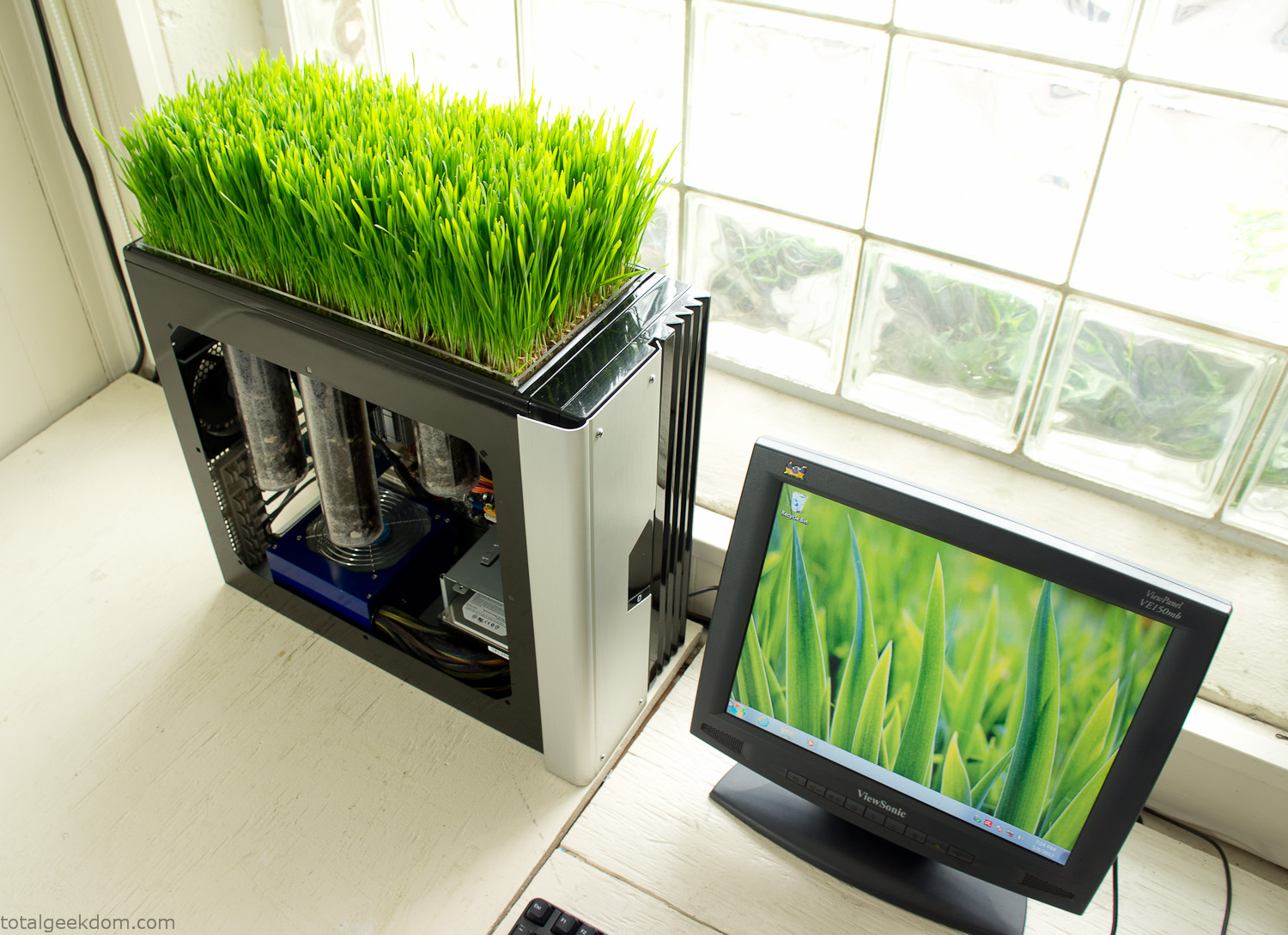
Bio Computer
I’ve been interested in working on a project for while that would combine something tech-based with something organic. Mixing the two elements intrigued me for a while. I’ve wanted to add flowers, or maybe plants of some sort to blend a little bit of nature into the space. I do receive a bit of sunlight through a glass block window, but the temperature in the basement is usually on the colder side. In the winter I don’t really heat the space because the folding farm outputs enough heat to keep the temperature comfortable. I didn’t want to change that aspect so I needed to come up with something that would tolerate slightly cooler temperatures and limited sunlight.
I can’t exactly recall when the idea came to me, but at some point I started wanting to use the heat from a computer as a way to warm the soil and help with germination/growth. I’m about as far from a botanist as it comes, I did some reading online and became pretty interested in the effects of soil temperature on germination/growth. I read different studies and papers from various universities. It was not too long into that process that I became hooked on the idea of using computer heat as a way to control the soil temperature of some sort of living plant life.
As the idea developed further I started looking into wheatgrass as a plant option. There is something clean and natural about the look and idea of a piece of grass growing in my basement. I thought the look would alter the space a little bit and add a bit of color along with something more than just metals and plastics. After reading enough studies and papers on the effects of soil temperature and germination with wheatgrass I felt like I had a good enough handle on the basics to tackle this.
The first step was finding a computer to adapt for the project. Luckily I had a lot of donated computers that people had given me for various project purposes. Most of them didn’t work, but by cobbling together various components from a bunch of different old computers I was able to come up with enough good parts to make a working computer.
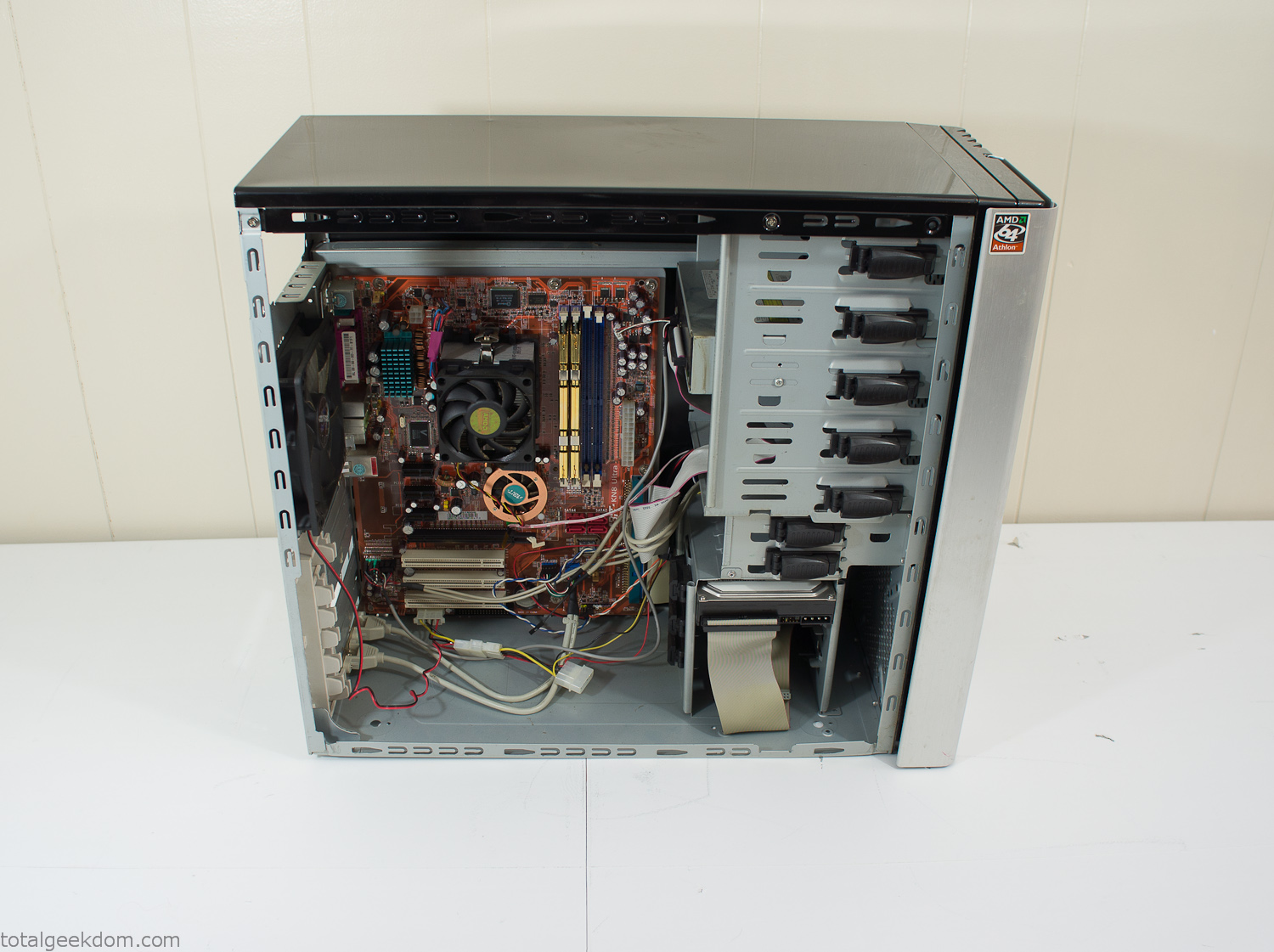
Donor Computer
At the time I was starting to get a formalized plan together for this project, another idea popped into my head. I’ve got a 5 yr. old who is already fairly geeky (just ask him to do his Jabba the Hutt impression for you) but he really does not get that much computer time. He’s getting to an age where he’s more inquisitive about tech stuff and I think he’s ready for his first computer. Since I was already well underway with this project it seemed like a perfect opportunity to orient the computer itself towards a learning tool for him in addition to using it as a way to blend something organic with a piece of technology.
With all of these goals in mind I started tinkering away. The computer hardware itself was nothing fancy, definitely outdated, but perfectly suited towards this project.
CPU- Pentium 4 (3 GHz)
Dell Factory Motherboard
Various Ram Sticks- 2gb
Old Maxtor 120gb IDE Hard Drive
Old FPS Power Supply
Donated Old Computer Case
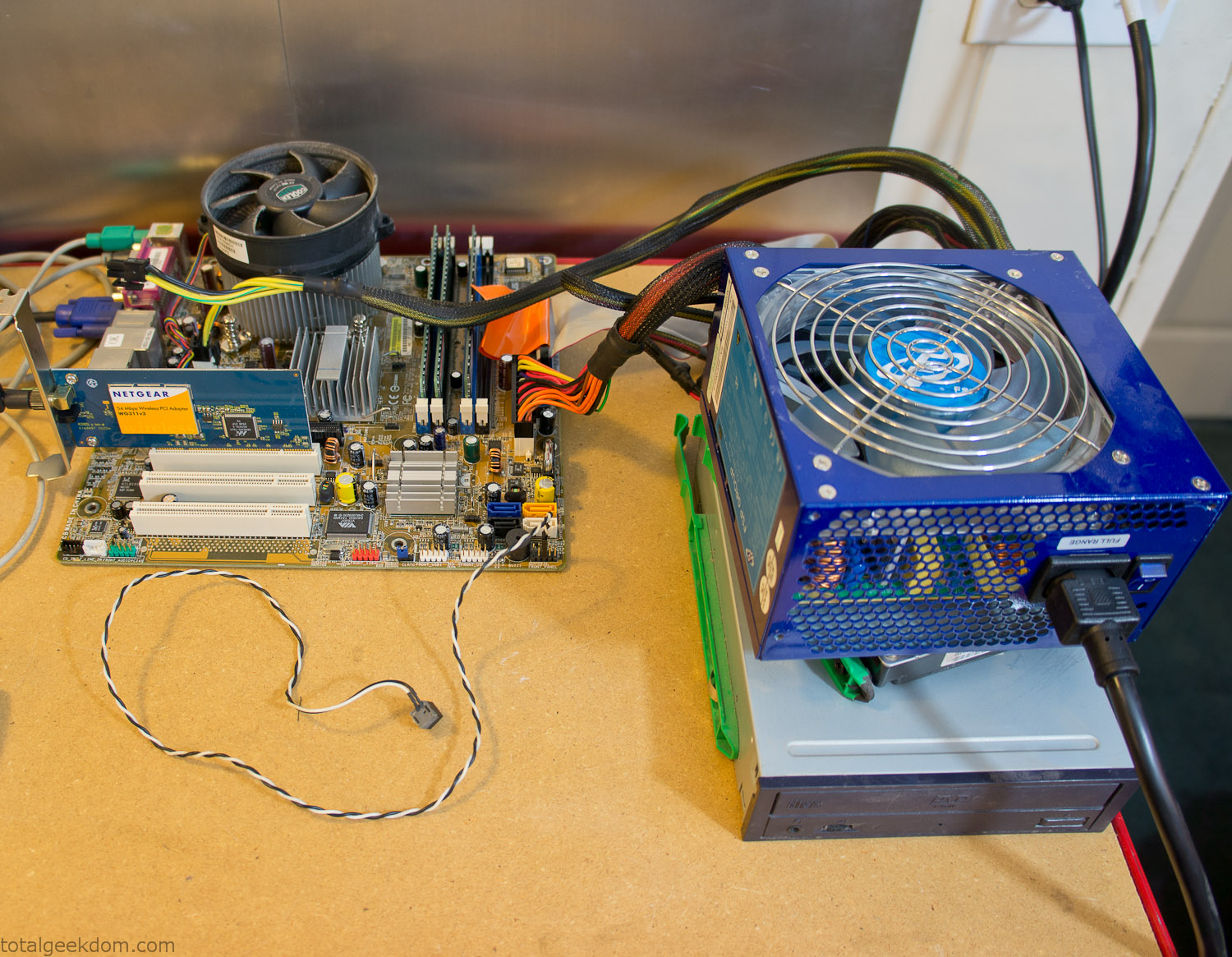
Computer Parts Testing
If you’ve spent any time around computer hardware in the last decade you’re probably well aware that Pentium 4 has a reputation for running hot. The 90nm Pentium 4 was named Prescott and it didn’t take long before the nickname Pres-hot popped up. In this case though that extra heat is going to be put towards good use.
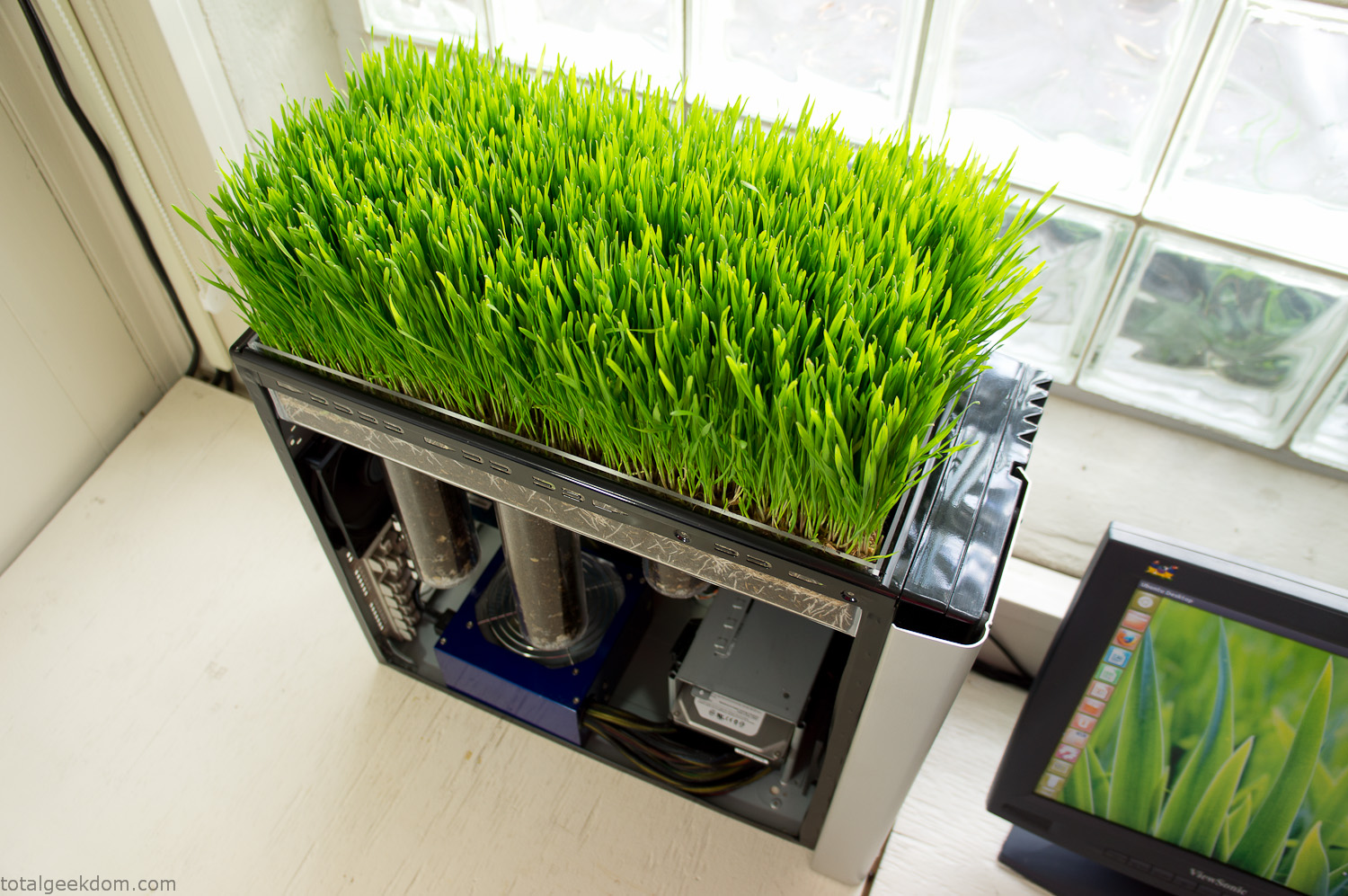
Once the hardware was all in order I started working on the layout and arrangement for the case. I had originally envisioned the grass growing out of the top of the computer case. This seemed like it would provide a good blend between the hard edges of the computer and the soft feel of the grass. This also worked well with putting the soil area in the upper portion of the case, where the most heat should collect. After doing some initial tests with this configuration I found the measured temperature near the top of the case was the hottest. The placement of the CPU near the top of the case and the lack of airflow in that area contributed to these higher recorded temps.
After finishing with some initial tests I decided to completely strip the case down and start removing all the unnecessary brackets and pieces inside of the case. Like most computer cases all the internal brackets and mounts are riveted together, so I drilled all the rivets out of the components I wanted to remove and pulled them out. The gutted case looked pretty barren after being stripped.
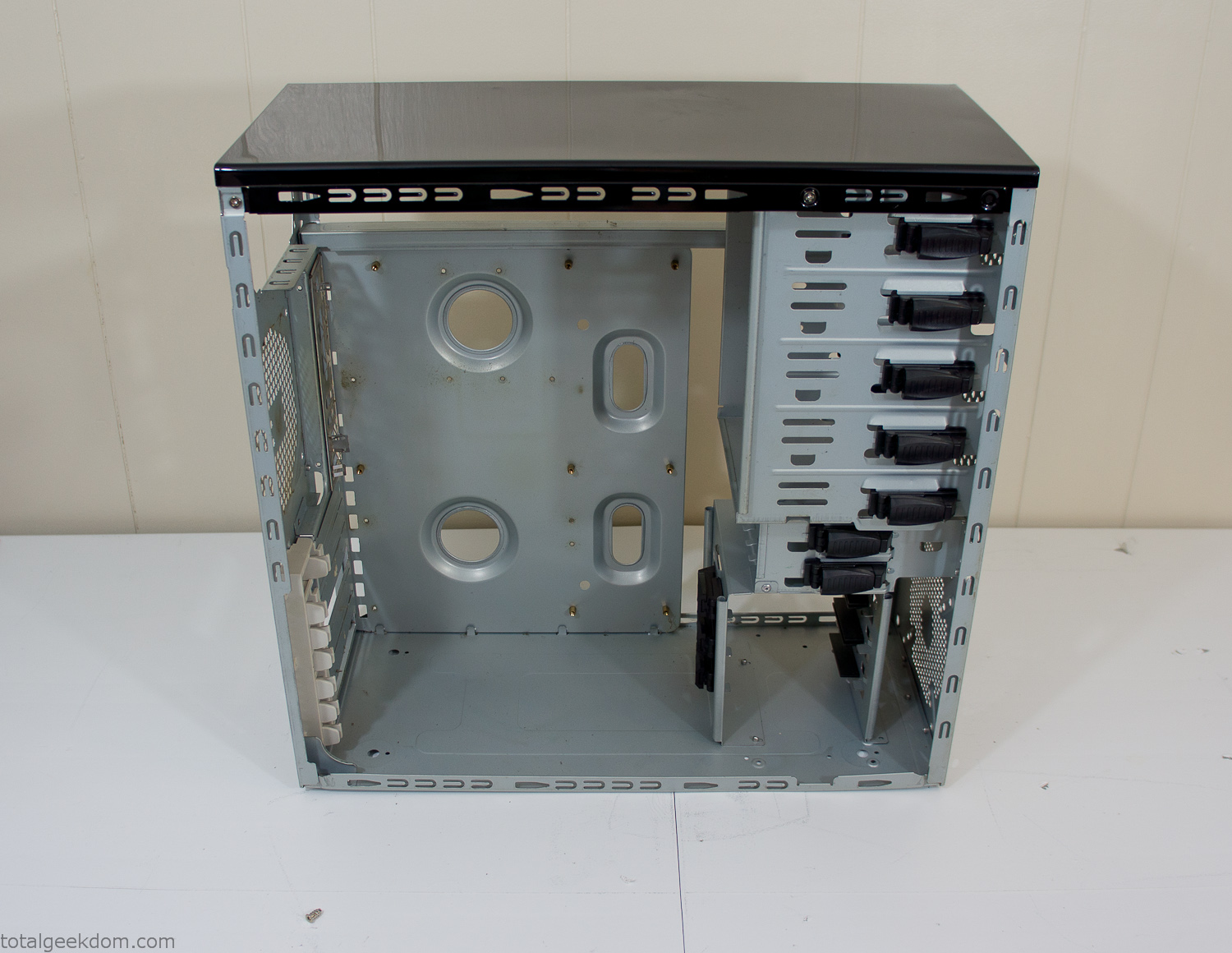
Empty Computer Case
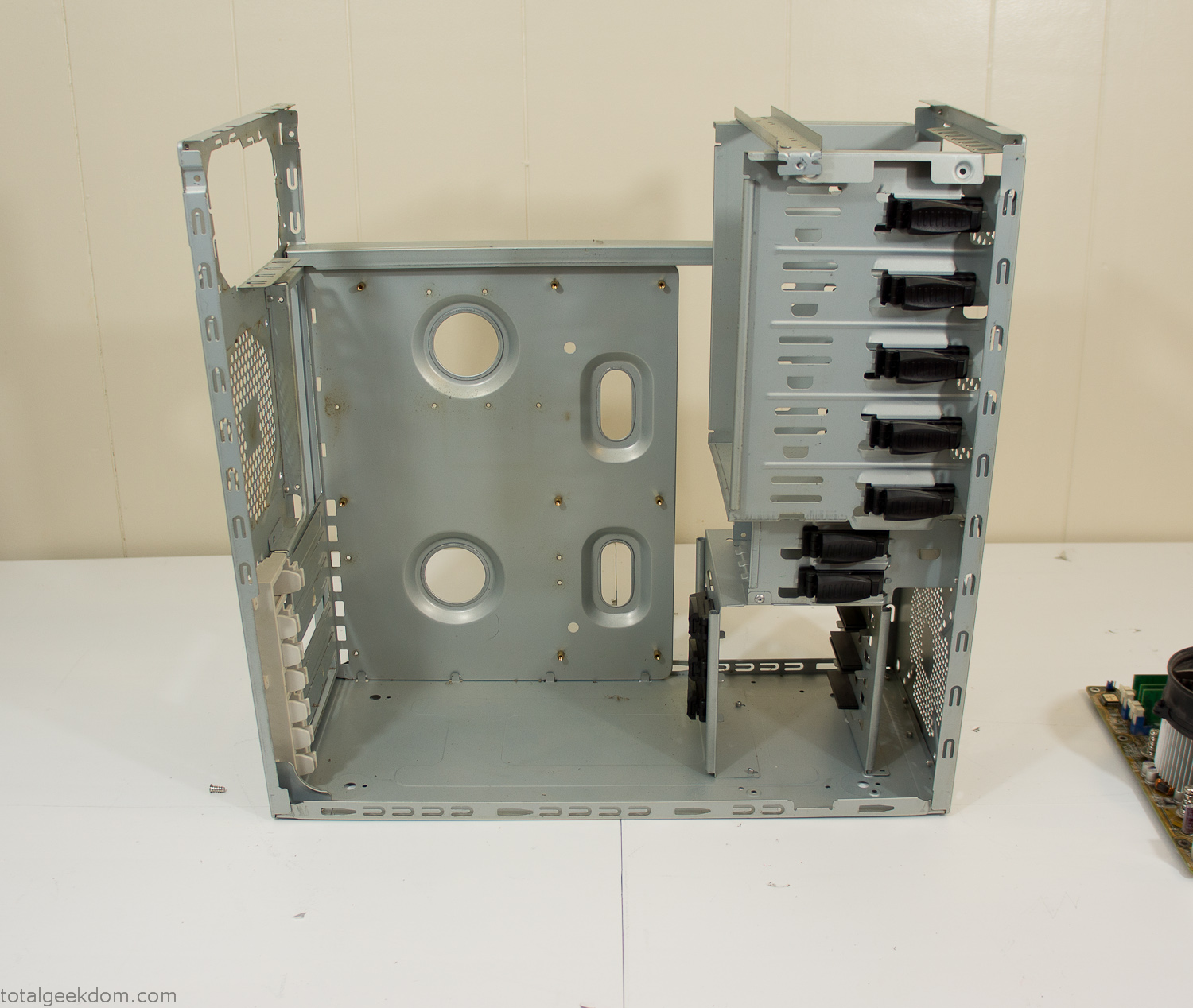
Dismantled Computer Case

Stripped Computer Case
In keeping with my original plan of having the computer blended with the organic grass I wanted it to be easy to see the inner workings of the computer and also the soil from the grass growing above. I needed something that was translucent, which left me with either glass or acrylic/polycarbonate as my options. I ended up choosing acrylic because I was able to find a cheap, used, die-cast model car display case top that was the perfect dimensions for the top of the case. Couldn’t go wrong for 5 bucks.
I test-fit the acrylic over the top of the computer case and marked my layout on the top of the case. My plan was to cut open the top of the computer case and insert the acrylic display case into the section I cut out. To cut open the top of the computer case I drilled a hole as a starting point and then used tin snips to cut through the thin gauge metal.
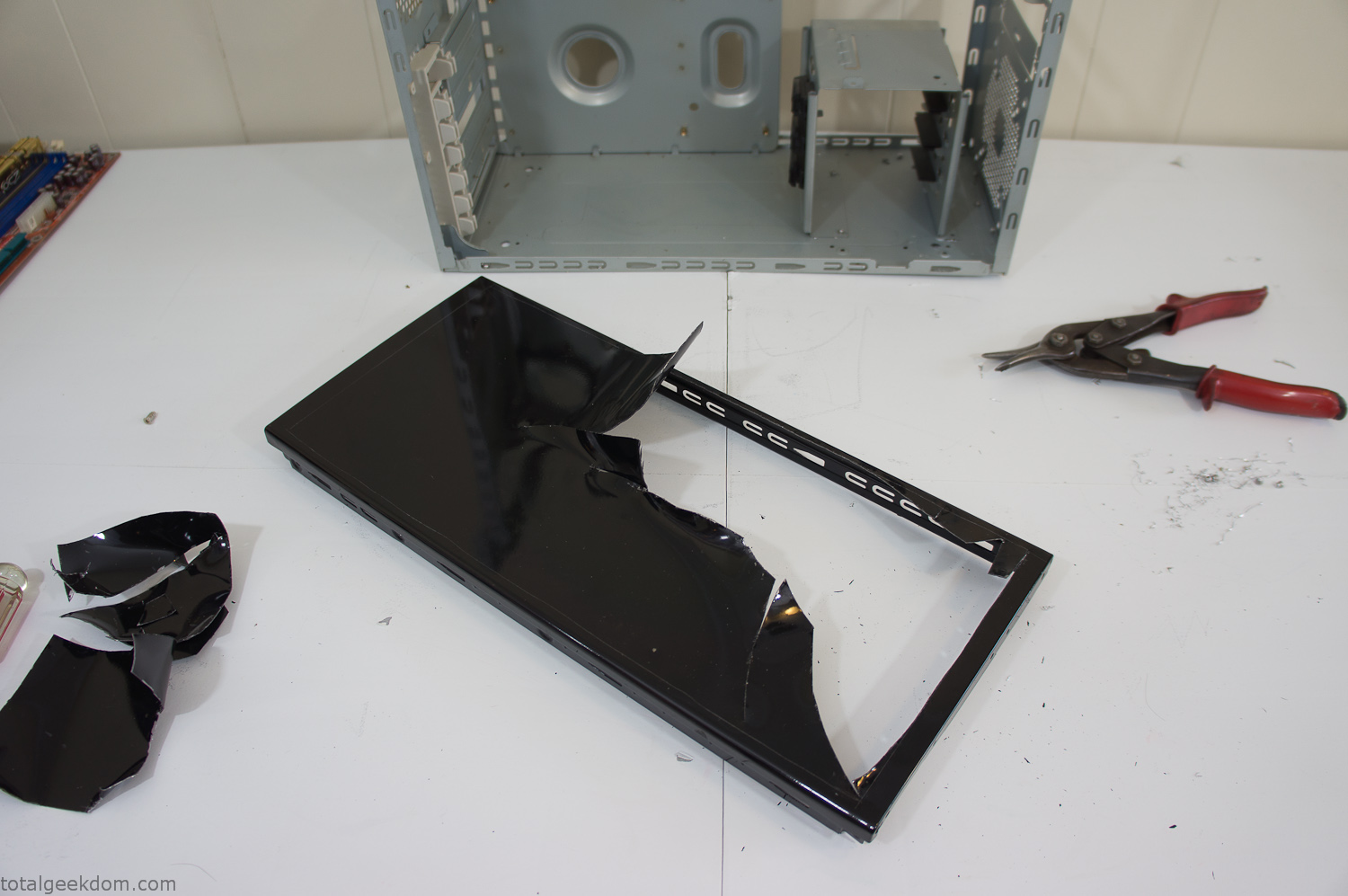
Computer Case Lid Modding
Once I had the metal opening cutout, I needed something to put along the edges of the freshly cut opening to create a clean and finished look. For $2 I was able to find some black, car-door-edge, plastic molding that worked perfectly.
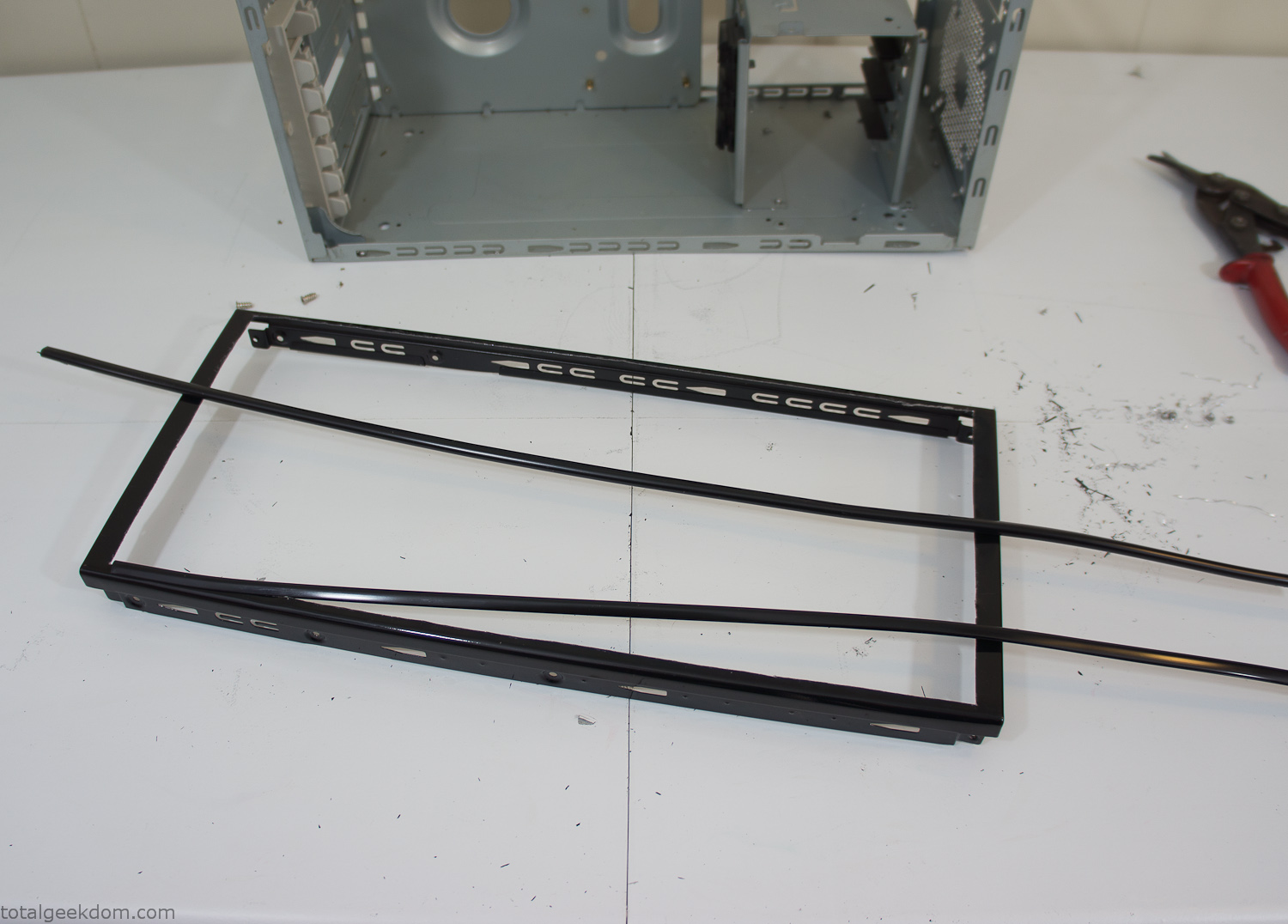
Modified Computer Case Lid
After getting the opening of the top of the computer handled and the acrylic case properly fitted, I moved onto some more testing with soil in the acrylic and the computer running. I wanted to see what kind of heat transfer I would get and how it would affect the soil temperature. I knew that using acrylic over glass would make it a little more difficult to heat the soil as acrylic is not that good at transferring heat. Luckily though I didn’t really need to alter the soil temperature that much, I just needed a little extra heat. Testing showed that heat transfer with just the single acrylic display case as my soil container was slow. So I decided to add some acrylic tubes. This would allow more surface are for soil to acrylic contact and also give me an area where I could add a mixed substrate to allow for soil drainage.
I went online and found a 3ft long section of 2 1/4″ clear acrylic tubing for $8 dollars. I wanted to add a couple of hanging cylinders off the main of the acrylic display case in the top of the computer case. To do this I needed to cut holes into the bottom of the display case. Cutting holes in acrylic is not always easy, it’s likely to chip and craze at the edges. To get around this I used a buildup of masking tape on both sides of the acrylic, to provide a little bit of resistance and strength. I placed the acrylic display case back into the computer and marked my layout for the tubes. I needed to leave clearance for the CPU cooler, power supply and hard drive mount.
After marking the layout, I used an air-powered pencil grinder and carbide tipped bit and cut through the acrylic case along my marked lines. After the initial shape was cutout I used a tube piece as a template and slowly worked on grinding the holes as perfectly round as I could get them so that the tube had a snug fit all the way around. The fit is pretty important as the acrylic cement that I used needs there to be a tight fit so that the acrylic can bond correctly.
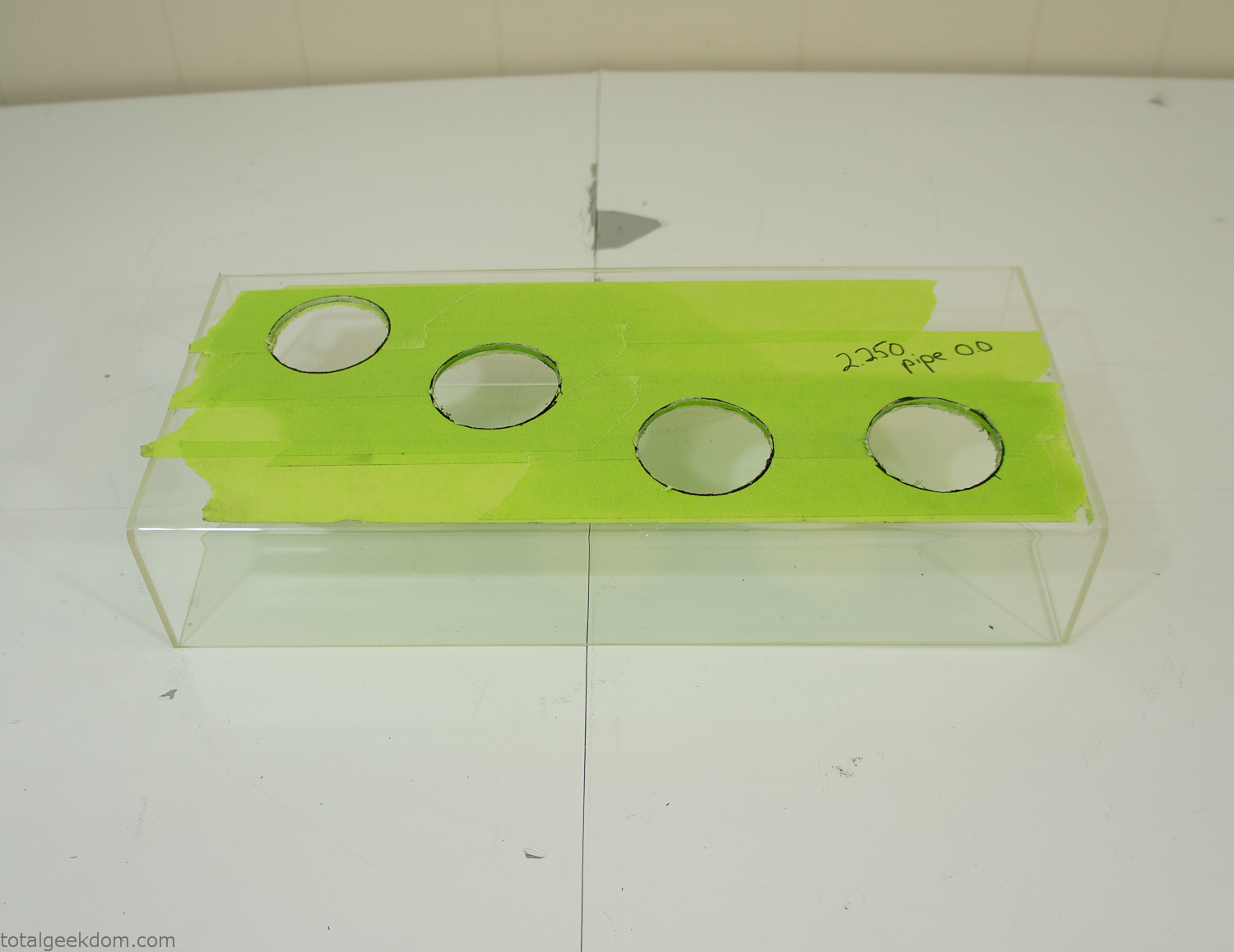
Acrylic Case Modifications
I placed the tubes into the acrylic case and mounted it in the computer and test fit the placement and height of the tubes. After getting everything lined up and oriented correctly I moved towards bonding the acrylic together. Using a needle dropper applicator I applied the cement to all the joints. After letting it set overnight I came back the next night and applied a thin coating of clear silicone caulk around all the joints just to ensure they were completely water tight
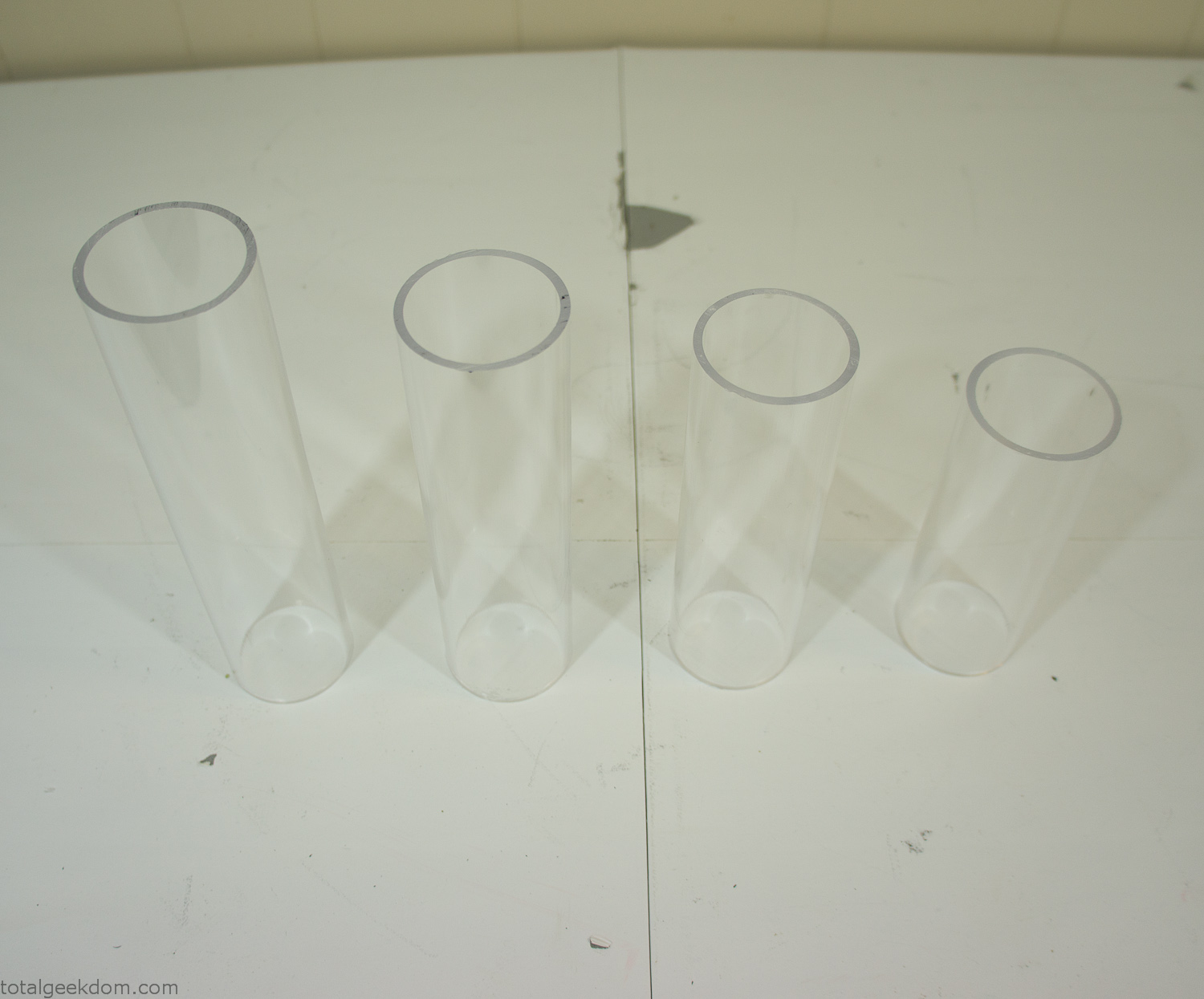
Acrylic Tubes
The next step was sealing up the bottom of the acrylic tubes. I looked at a couple of different options before realizing that the discs I had cut out of the acrylic case to fit the tubes would be almost the perfect size. Using a bench grinder and a test piece of tube I slowly ground each disc to the perfect size for a tight fit all the way around. I placed the clear acrylic discs into the bottom of each tube and repeated the same cementing and silicone caulking procedure to ensure they were water-tight. After a couple of days’ worth of drying I tested the case by filling it with water overnight and checking in the morning to make sure that no leaks had popped up.
In order to hold the weight of the acrylic case after adding soil, I drilled and installed a machine screw with a rubber cap at each corner of the computer case to bear the weight of the acrylic case.
Once all the work was done with the acrylic case section I started reinstalling all the components. The motherboard, hard drive and power supply were added and then wired up.
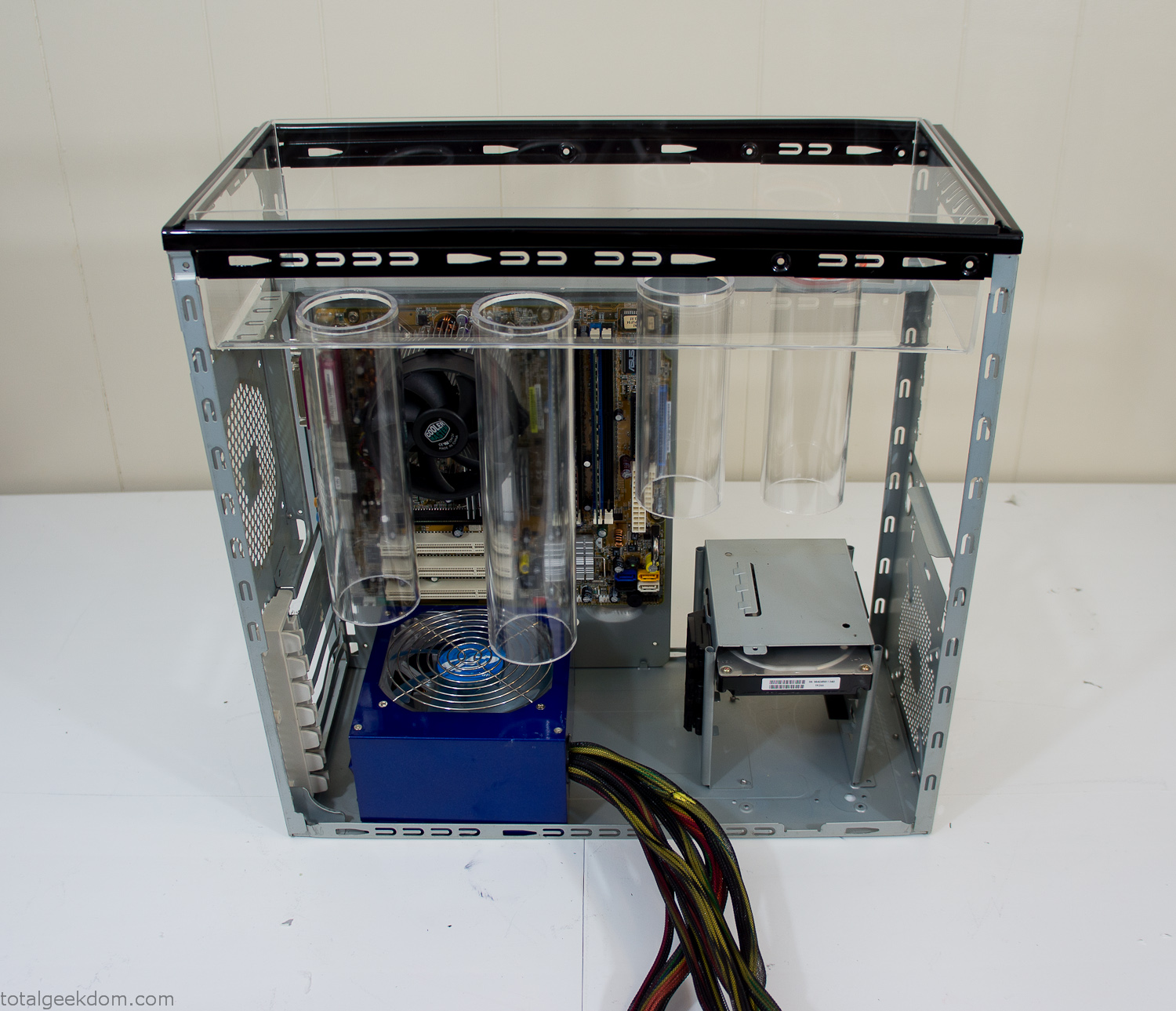
Mocked Up Computer Case
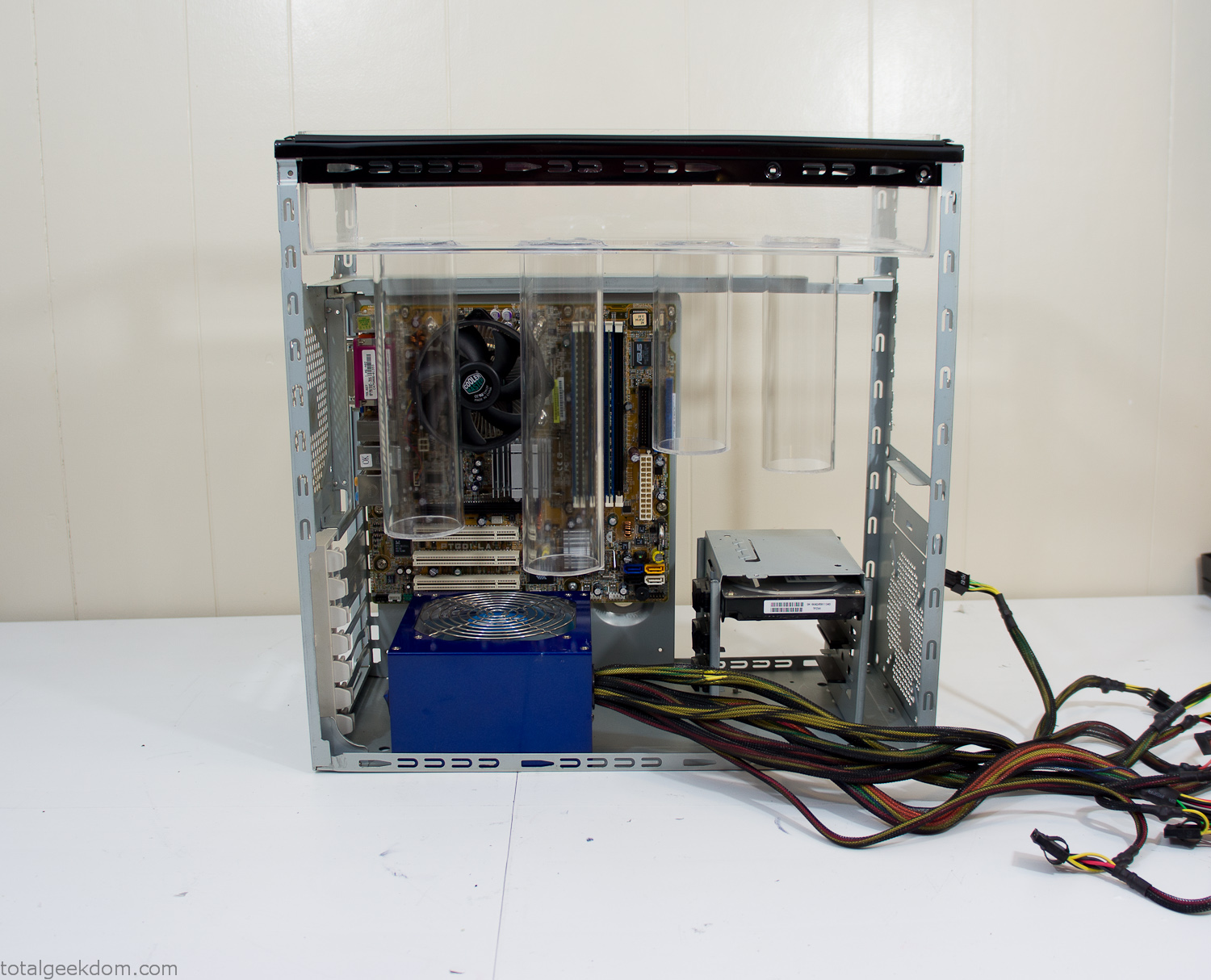
Power Supply Mockup
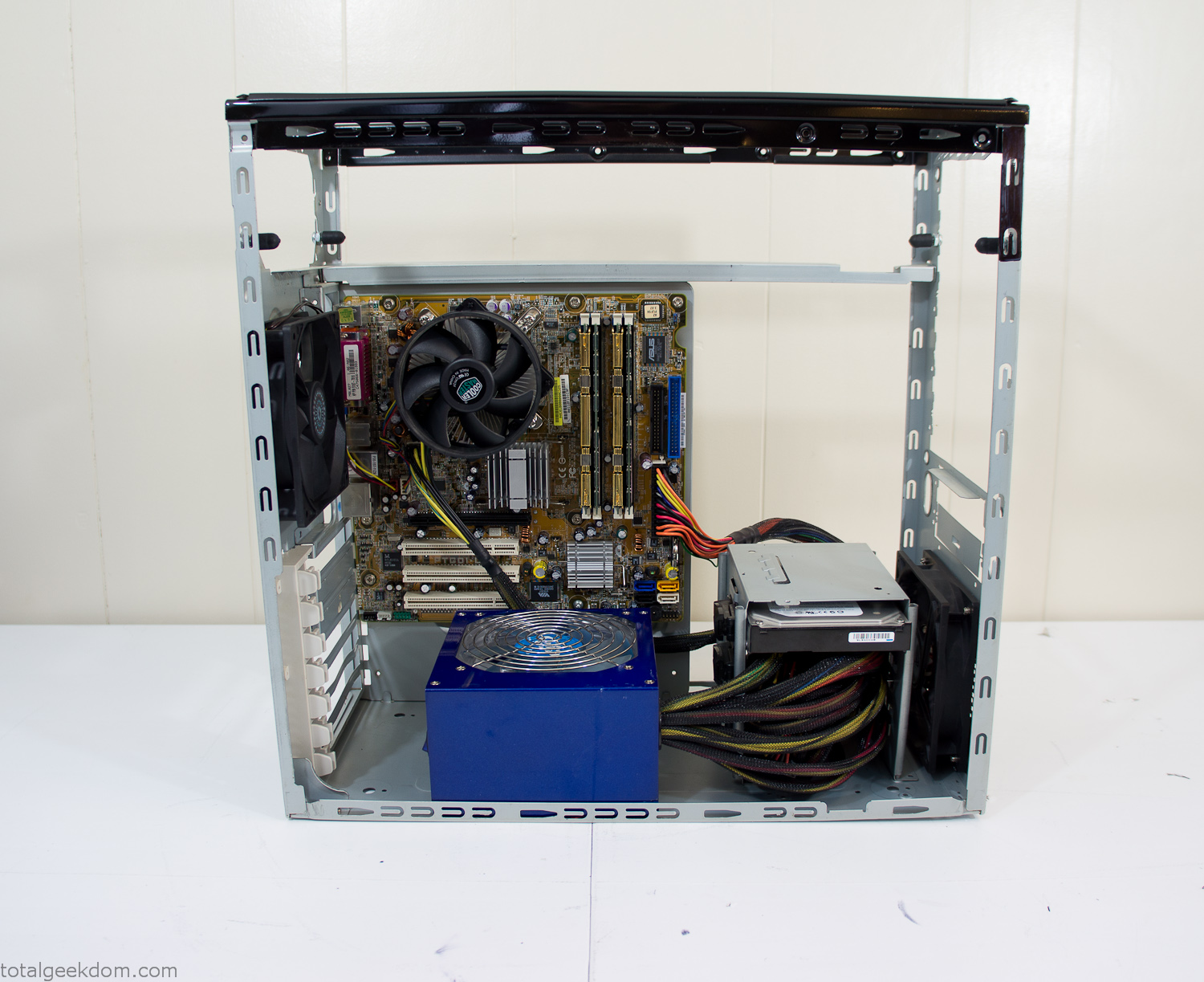
Computer Components Wired
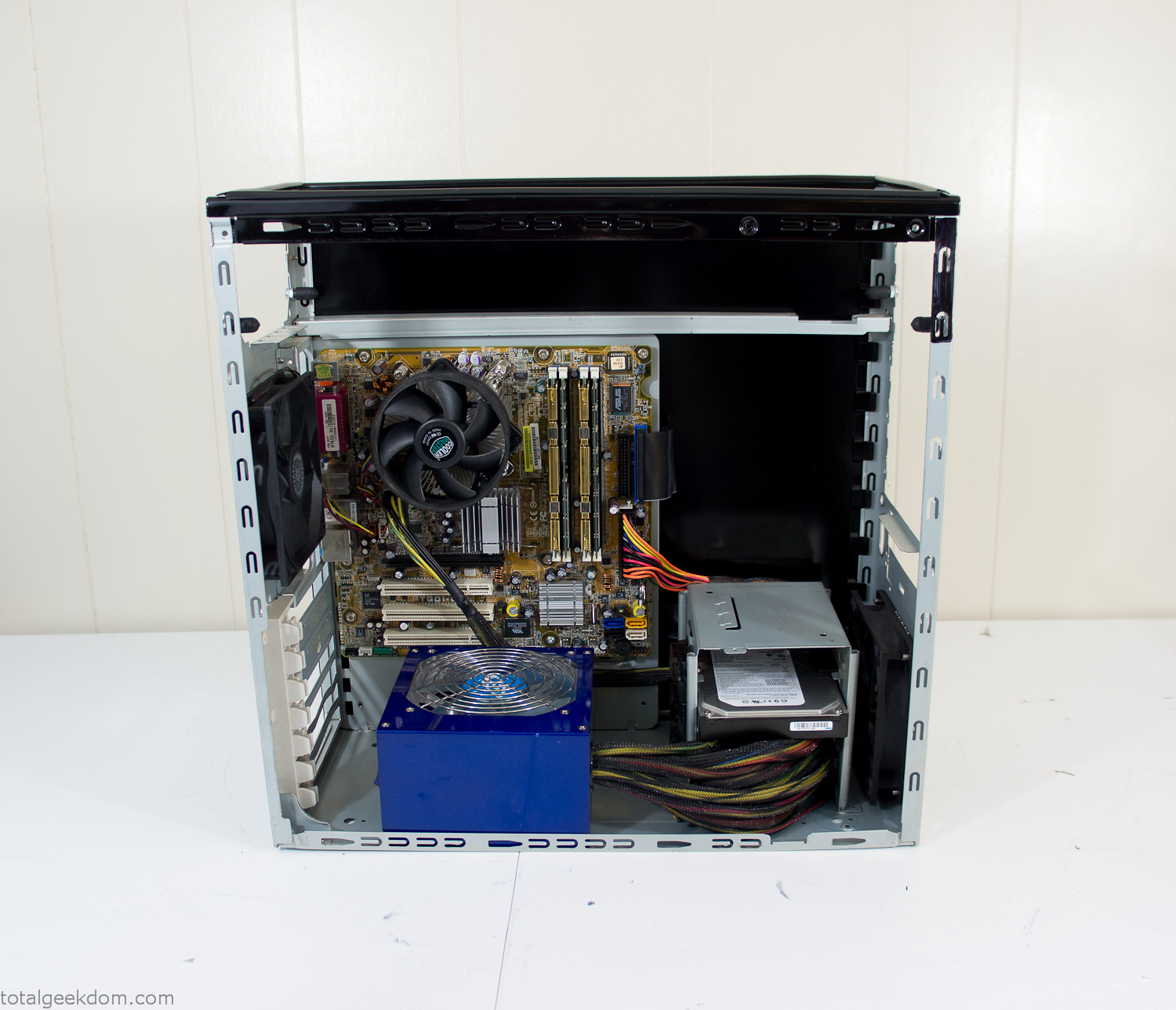
Case Panel Installed
At this point all that was left was to make a clear panel for the side of the case. I had some left over acrylic sheets from a different project that were really close to the right size, after test fitting, marking and cutting I then had a clear side panel to see into the case. (I left this off for the pictures because it caused a reflection)
The final step was filling the case with soil and adding some wheatgrass. I had been test growing other samples of wheatgrass during the build process. So I had already a couple of different patches of grass growing. I tried to keep the soil level just below the top of the acrylic case edge to make it a little more seamless.
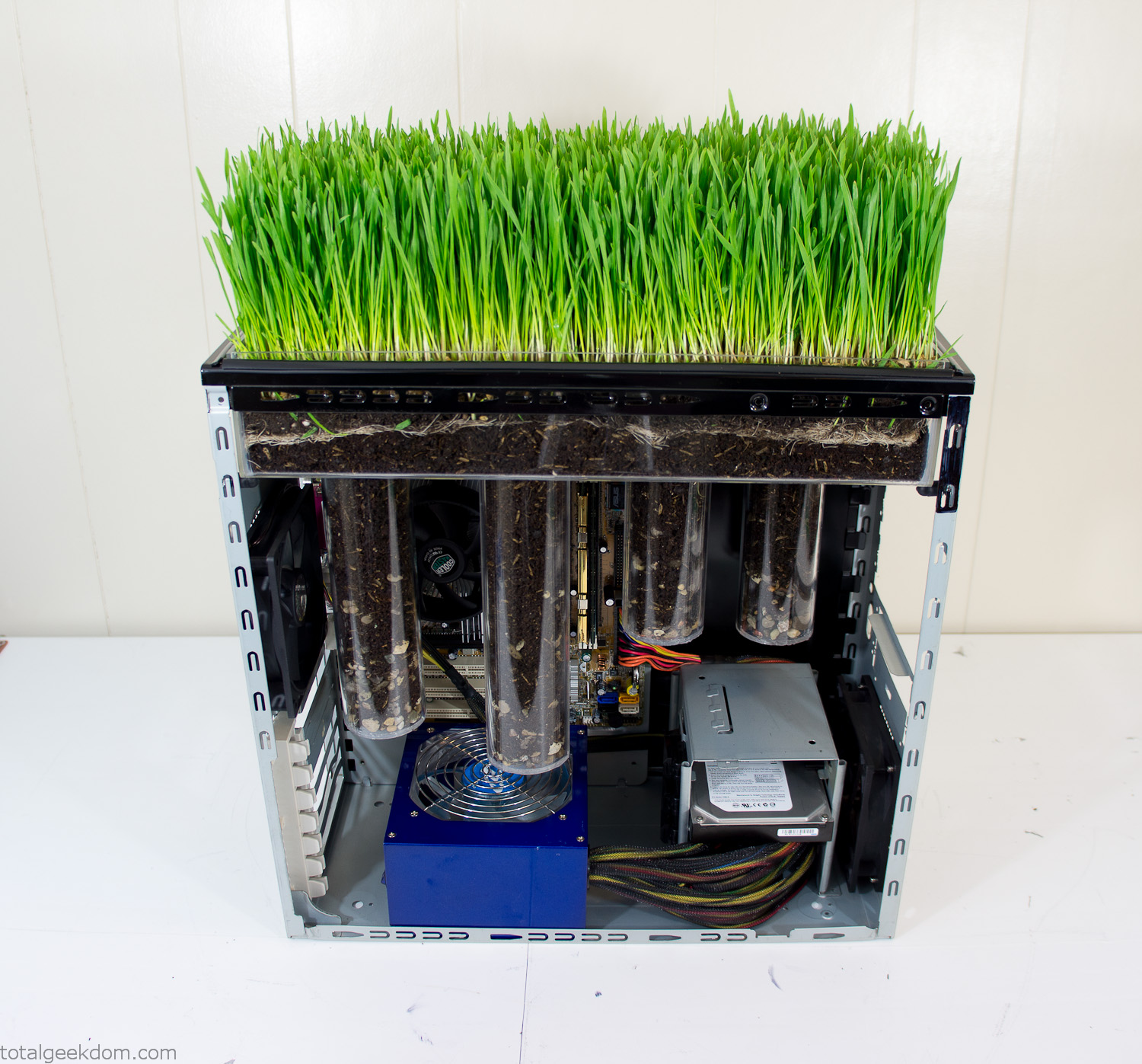
Grass Planted in Computer
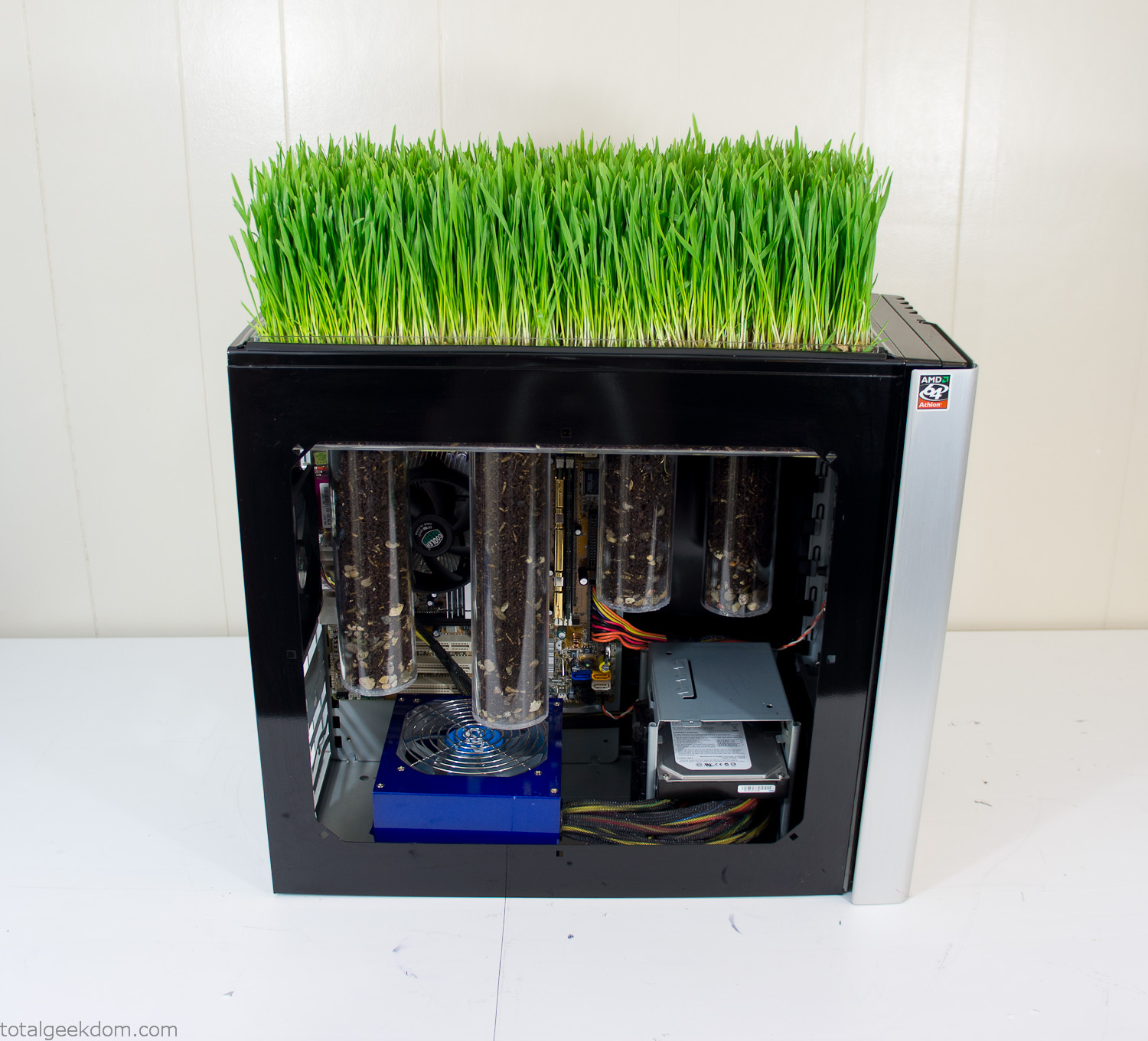
Grass and Case Panel Installed

Grass in Computer
For the computer itself I ended up installing Windows as well as Linux in a dual boot setup. Since the computer was going to be used by my son as something to play with I figured I should put both on there so he can tinker with them and learn as he goes. Besides, for important life decisions like picking an OS (Operating System) I think any good parent should present the options and then let their kid decide for themselves.
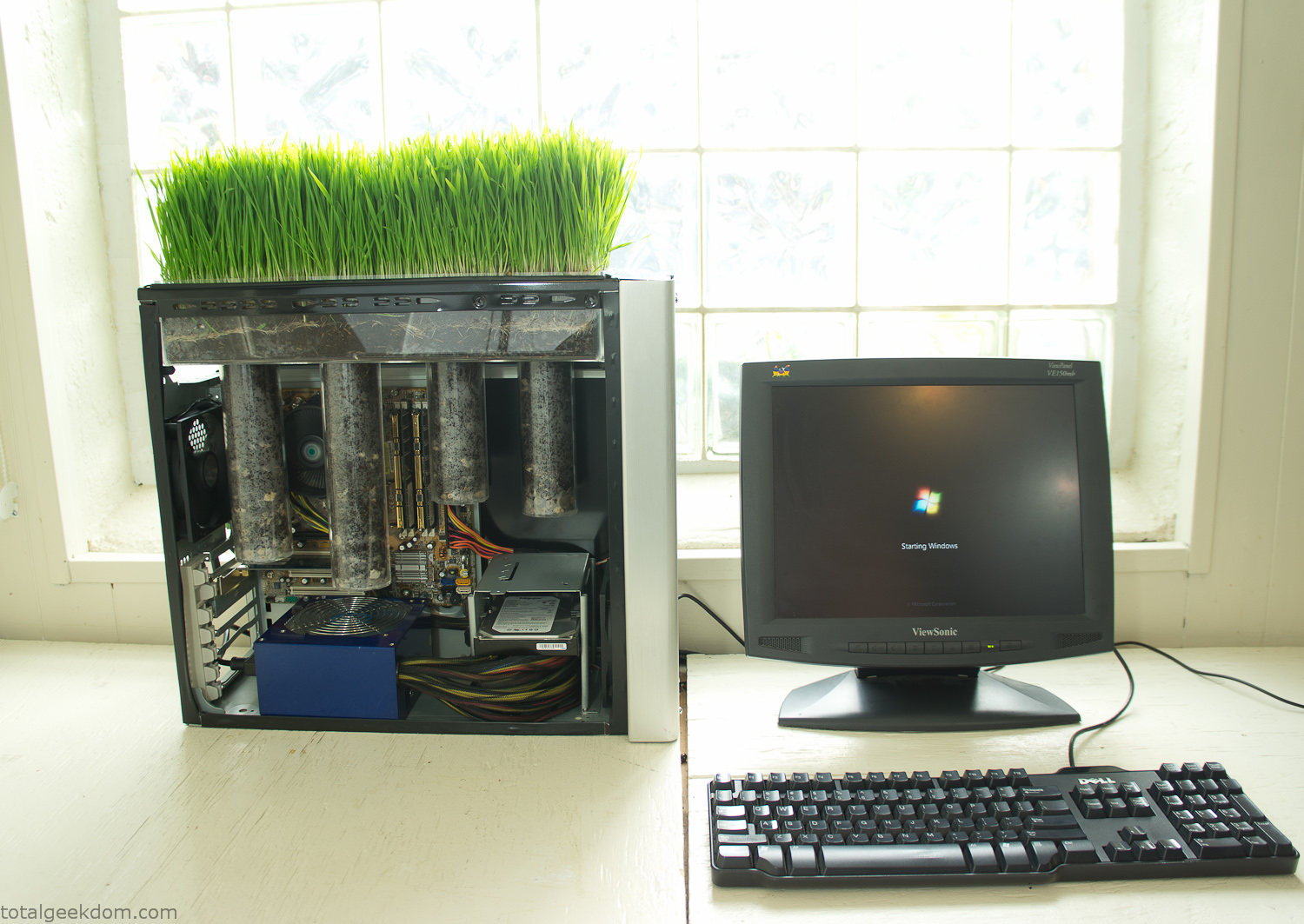
Starting Windows
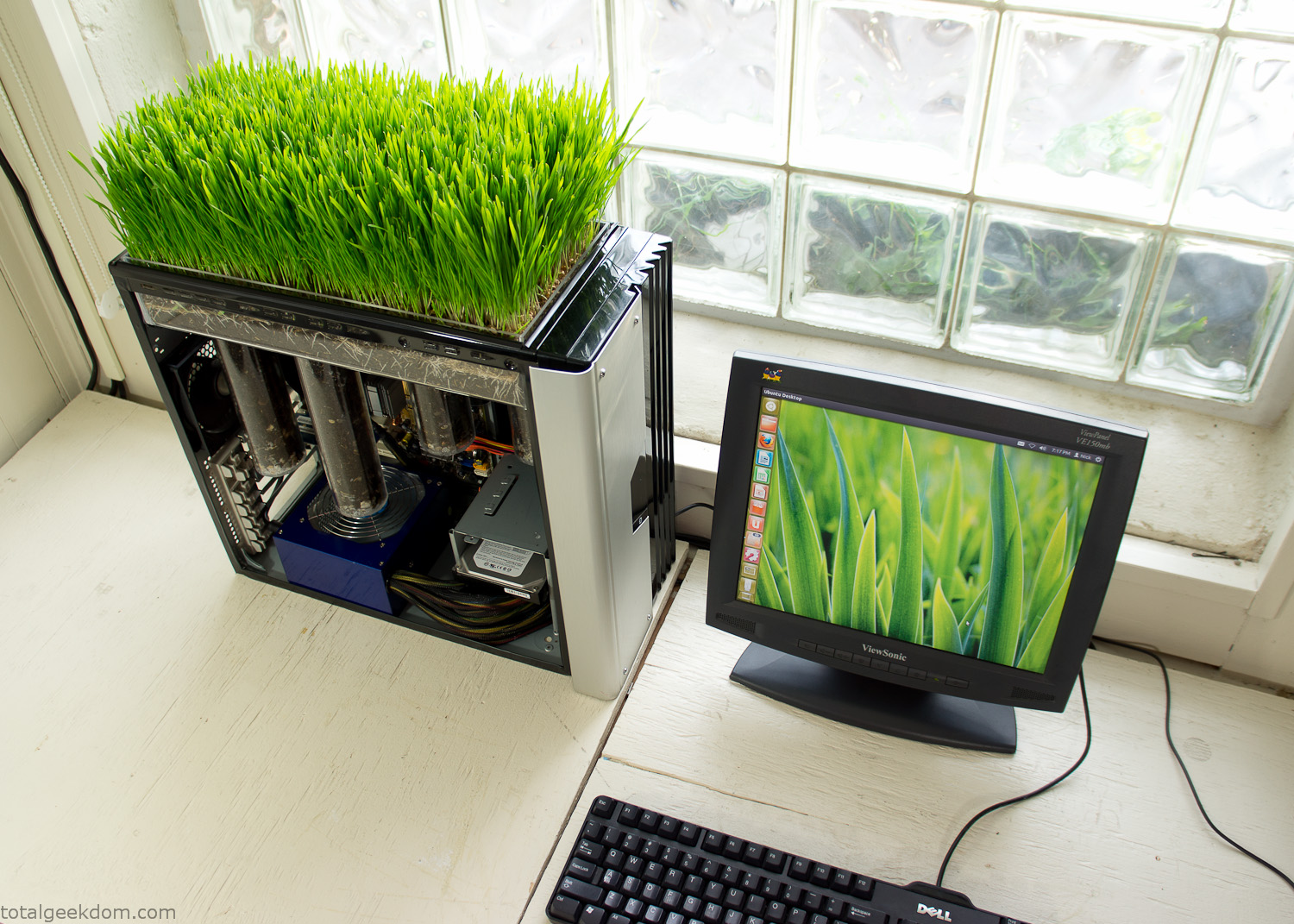
Linux Running
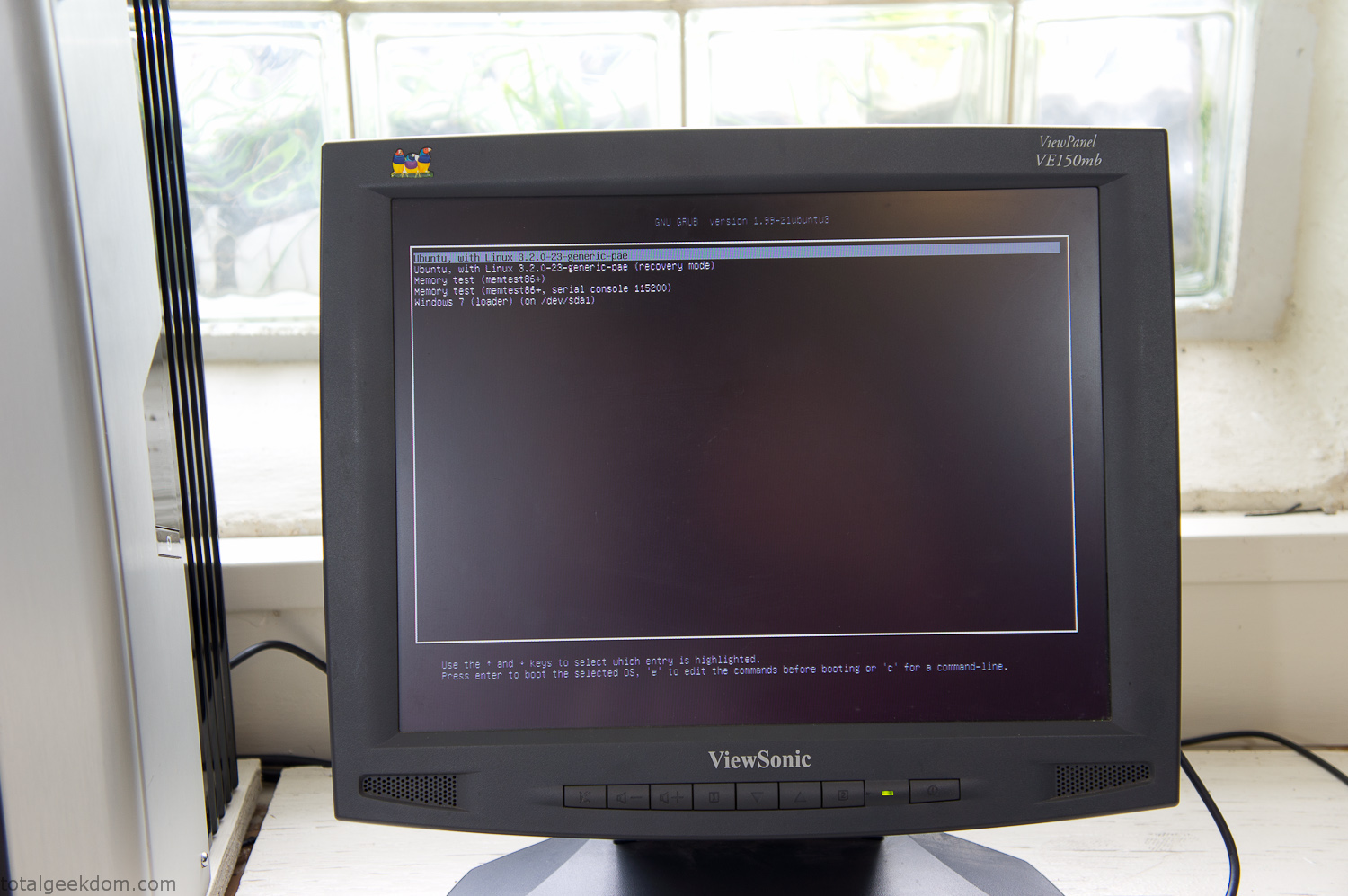
Dual Boot Screen
In the end I’m happy with the result of the project. It’s been fun experimenting with growing wheatgrass and I like how the natural look of grass is blended with the very modern, inorganic case.
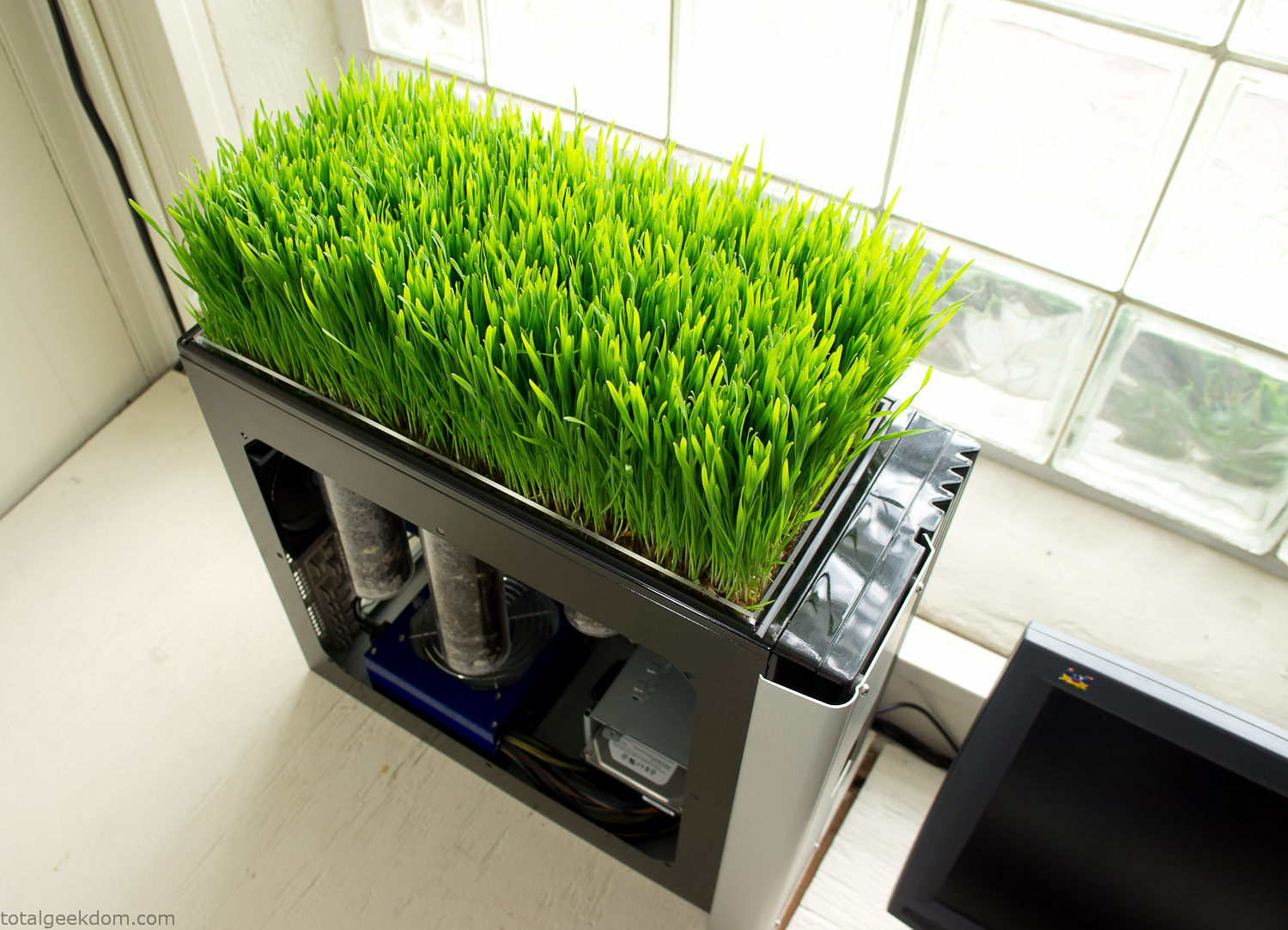
Computer Grass Growing
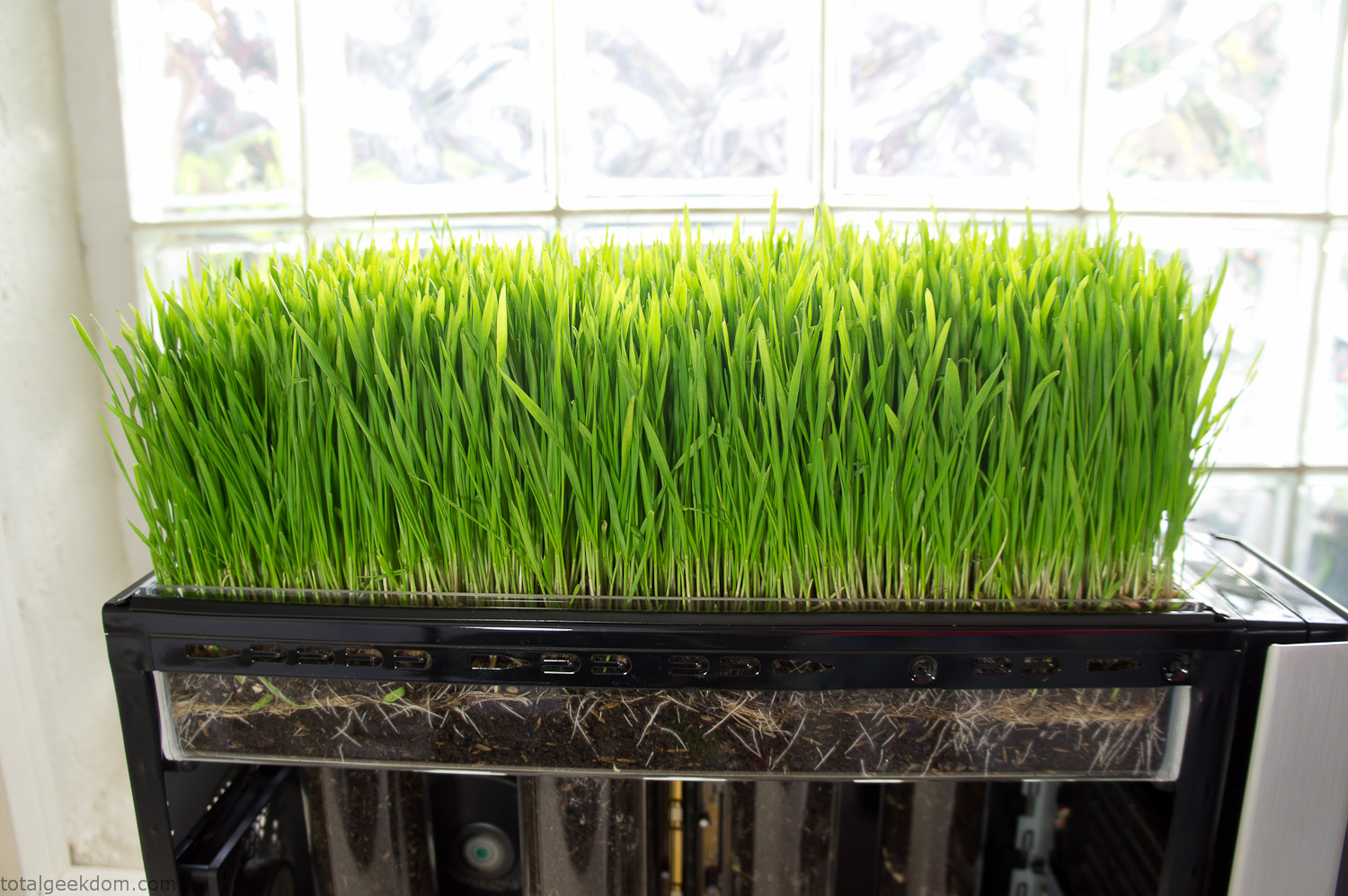
Grass in Computer Section
Notes
Temperature Testing
In testing the case temperature versus the soil temperature I found it was easiest to control the case temperature by using a variable fan speed control on both the inlet and outlet fans. By turning the fan speed down I could increase the temperature inside the case and correspondingly raise the soil temperature.
In order to maximize output of heat during these tests I used Prime95 to run the CPU at 100% load.
Using this method to control the case and soil temperature I played around with adjusting the soil temperature and then tracking the rate of growth of the Wheatgrass. The target temperature for peak growth seemed to fall around 66°F (19°C).
Using the fans to control the case temperature allowed me to vary the temperature inside the case from a low of 75°F (24°C) to a high of 91°F (33°C). In order to achieve the desired increase in soil temperature, I had to run the case temperature toward the higher end of the scale.
When the soil temperature was too high, the growth of the wheatgrass would slow.
Wheatgrass
The wheatgrass I used for my tests was nothing special, it can be found as seeds (berries) in a lot of health food stores and it grows relatively easily.
Caring for the wheatgrass is just a matter of keeping it watered. It’s a pretty easy plant to work with and doesn’t require any special skills.
Wheatgrass is often used as a nutritional supplement; it can be juiced and mixed into smoothies and other beverages. I plan on harvesting some of the grass and making some juices.
Plant Options
While wheatgrass offers a nice, attractive and easily grown option I do plan on trying other plants as well in the future. Since I already have the “planter” built all I have to do is add a different plant and see how it goes. I’m sure there will be some plants that don’t like the lower light environment, but it will be fun experimenting with other plants as well and seeing how they take.
Materials
Donated Computer- Free
Clear Acrylic Display Case- $5
Clear Acrylic Tube- $5
Plexiglass Side Panel- Free
Total- $10
Bio Computer Running
 29.2k
29.2k
 13.2k
13.2k 7.1k
7.1k

 2.1k
2.1k 813
813 2.6k
2.6k
Comments 54,505
В сфере предпринимательства ключ к успеху лежит в детальном планировании. Готовые бизнес-планы и анализ рынка становятся настоящим спасением для начинающих предпринимателей. Вообразите: вы планируете запустить кафе или автомойку, но не имеете представления, как подступиться. Здесь на помощь приходят профессиональные материалы, которые учитывают текущие тенденции, риски и возможности. По информации от экспертов вроде EMARKETER, сектор финансовых услуг увеличивается на 5-7% в год, что подчеркивает необходимость точного анализа. Сайт https://financial-project.ru/ предлагает обширный каталог готовых бизнес-планов по доступной цене 550 рублей. Здесь вы найдете варианты для туризма, строительства, медицины и других сфер. Эти документы включают финансовые расчеты, маркетинговые стратегии и прогнозы. Они способствуют привлечению инвесторов или получению кредита. Данные подтверждают: фирмы с ясным планом на 30% чаще добиваются успеха. Используйте такие ресурсы, чтобы ваш проект процветал, и помните – правильный старт ключ к долгосрочному успеху.
It’s remarkable to pay a visit this website and reading
the views of all colleagues regarding this piece of writing,
while I am also eager of getting knowledge.
Bullish on Minotaurus ICO’s community. $MTAUR’s boosts strategic. Market growth aligns.
mtaur coin
The Minotaurus presale is a gateway to fun DeFi gaming. $MTAUR’s low presale price sets up for gains. Referral program’s virality is key.
minotaurus ico
Приобрести онлайн кокаин, мефедрон, гашиш, бошки
Онлайн магазин – купить мефедрон, кокаин, бошки
кайт школа в хургаде Кайт школа: Кайт школа – это место, где новички делают первые шаги в увлекательный мир кайтсерфинга, а опытные кайтеры совершенствуют свои навыки. Квалифицированные инструкторы, прошедшие специальную подготовку, обеспечивают безопасное и эффективное обучение, используя современное оборудование и проверенные методики. В кайт школах преподают основы теории, включая аэродинамику, метеорологию и безопасность. Обучение включает в себя практические занятия на суше, где ученики учатся управлять кайтом, а затем переходят к занятиям на воде под присмотром инструктора. Кайт школа предоставляет все необходимое оборудование, включая кайты, доски, гидрокостюмы и страховочные жилеты. Многие кайт школы предлагают различные курсы, от начального уровня до продвинутого, а также индивидуальные занятия и групповые тренировки. После успешного окончания курса ученики получают сертификат, подтверждающий их уровень подготовки. Кайт школа – это надежный проводник в мир кайтсерфинга, позволяющий безопасно и уверенно освоить этот захватывающий вид спорта.
Exploring the Minotaurus whitepaper, and the roadmap is tight—from presale to exchange listing. The DAO voting for holders is a fresh take on governance. Bullish on $MTAUR for the long haul.
minotaurus token
Приобрести MEF GASH SHIHSKI ALFA – ОТЗЫВЫ, ГАРАНТРР, КАЧЕСТВО
В наше динамичное время, насыщенное напряжением и беспокойством, анксиолитики и транквилизаторы оказались надежным средством для огромного количества людей, позволяя преодолевать панические приступы, генерализованную тревогу и прочие нарушения, мешающие нормальной жизни. Эти препараты, такие как бензодиазепины (диазепам, алпразолам) или небензодиазепиновые варианты вроде буспирона, действуют через усиление эффекта ГАМК в мозге, снижая нейрональную активность и принося облегчение уже через короткое время. Они особенно ценны в начале курса антидепрессантов, поскольку смягчают стартовые нежелательные реакции, вроде усиленной раздражительности или проблем со сном, повышая удобство и результативность терапии. Однако важно помнить о рисках: от сонливости и снижения концентрации до потенциальной зависимости, поэтому их назначают короткими курсами под строгим контролем врача. В клинике “Эмпатия” квалифицированные эксперты, среди которых психиатры и психотерапевты, разрабатывают персонализированные планы, сводя к минимуму противопоказания, такие как нарушения дыхания или беременность. Подробнее о механизмах, применении и безопасном использовании читайте на https://empathycenter.ru/articles/anksiolitiki-i-trankvilizatory/, где собрана вся актуальная информация для вашего спокойствия.
bestchangeru.com — Надежный Обменник Валют Онлайн
¦ Что такое BestChange?
[url=https://bestchangeru.com/]bestchange обменник официальный[/url]
bestchangeru.com является одним из наиболее популярных сервисов мониторинга обменников электронных валют в русскоязычном сегменте сети Интернет. Платформа была создана для упрощения процесса выбора надежного онлайн-обмена валюты среди множества предложений.
¦ Основные преимущества BestChange:
https://bestchangeru.com/
сайт bestchange
– Мониторинг лучших курсов: Лучшие курсы покупки и продажи криптовалют и электронных денег автоматически обновляются в режиме реального времени.
– Автоматическое сравнение: Удобный интерфейс позволяет мгновенно сравнить десятки предложений и выбрать оптимальное.
– Обзор отзывов пользователей: Пользователи оставляют отзывы и оценки, помогающие другим пользователям принять решение.
– Отсутствие скрытых комиссий: Информация о комиссиях отображается прозрачно и открыто.
¦ Как работает BestChange?
Пользователь вводит необходимые данные: валюту, которую хочет обменять, и желаемую сумму. После этого сервис генерирует список надежных обменных пунктов с лучшими условиями обмена.
Пример: Вы хотите обменять Bitcoin на рубли. Заходите на сайт bestchangeru.com, выбираете направление обмена («Bitcoin > Рубли»), вводите сумму и получаете таблицу проверенных обменных пунктов с наилучшими курсами.
¦ Почему выбирают BestChange?
1. Безопасность. Все обменники проходят строгую проверку перед добавлением в базу сервиса.
2. Удобство пользования. Простота интерфейса позволяет быстро находить нужную информацию даже новичкам.
3. Постоянное обновление базы данных. Курсы и условия регулярно проверяются и обновляются, обеспечивая актуальность информации.
4. Многоязычность. Помимо русского, доступна версия сайта на английском и украинском языках.
Таким образом, bestchangeru.com становится незаменимым помощником в мире цифровых финансов, позволяя легко и безопасно совершать операции обмена валют. Если вам нужен надежный и удобный способ обмена криптовалюты и электронных денег, обязательно обратите внимание на этот ресурс.
Приобрести MEF GASH SHIHSKI ALFA – ОТЗЫВЫ, ГАРАНТРР, КАЧЕСТВО
The Minotaurus token presale is heating up, with over 1.4M USDT raised already. Love how it integrates DeFi tools for both newbies and vets, making entry easy. $MTAUR might just outpace meme coins in utility.
mtaur token
Приобрести онлайн кокаин, мефедрон, гашиш, бошки
Приобрести MEF GASH SHIHSKI ALFA – ОТЗЫВЫ, ГАРАНТРР, КАЧЕСТВО
«Комфорт-Сервис» в Орле специализируется на уничтожении насекомых холодным туманом по авторской запатентованной технологии, заявляя отсутствие необходимости повторной обработки через две недели. На http://www.xn—57-fddotkqrbwclei3a.xn--p1ai/ подробно описано оборудование итальянского класса, перечень вредителей, регламент работ и требования безопасности; используются препараты Bayer, BASF, FMC с нейтральным запахом. Понравилась прозрачность: время экспозиции и проветривания, конфиденциальный выезд без маркировки, сервисное обслуживание и разъяснения по гарантиям.
Магазин 24/7 – купить закладку MEF GASH SHIHSKI
Excited for Minotaurus presale’s deals. $MTAUR’s zones special. Engagement high.
minotaurus presale
Онлайн магазин – купить мефедрон, кокаин, бошки
Приобрести онлайн кокаин, мефедрон, гашиш, бошки
Hello colleagues, pleasant article and good arguments commented at this place, I am really enjoying by these.
Vgolos — независимое информагентство, где оперативность сочетается с редакционными стандартами: новости экономики, технологий, здоровья и расследования подаются ясно и проверенно. Публикации отмечены датами, есть рубрикатор и поиск, удобная пагинация архивов. В середине дня удобно заглянуть на https://vgolos.org/ и быстро наверстать ключевую повестку, не теряясь в шуме соцсетей: фактаж, мнения экспертов, ссылки на источники и понятная навигация создают ощущение опоры в информационном потоке.
Закладки тут – купить гашиш, мефедрон, альфа-РїРІРї
This article will help the internet users for building
up new webpage or even a blog from start to end.
my site … خرید بک لینک
https://www.imdb.com/list/ls4150132662/
лекарства от тревожности Лекарства от тревоги — это широкий спектр медикаментозных препаратов, используемых для уменьшения симптомов тревоги, таких как беспокойство, страх, напряжение и паника. Основные классы лекарств, применяемых для лечения тревоги, включают антидепрессанты, анксиолитики и бета-блокаторы. Антидепрессанты, такие как селективные ингибиторы обратного захвата серотонина (СИОЗС) и селективные ингибиторы обратного захвата серотонина и норадреналина (СИОЗСН), часто являются препаратами первой линии для лечения тревожных расстройств. Они помогают регулировать уровень серотонина и норадреналина в мозге, что способствует уменьшению тревоги и улучшению настроения. Анксиолитики, такие как бензодиазепины, обладают быстрым успокаивающим эффектом и могут использоваться для краткосрочного облегчения острых симптомов тревоги. Однако они имеют потенциал для развития зависимости и побочных эффектов, поэтому их применение должно быть ограничено и контролироваться врачом. Бета-блокаторы, такие как пропранолол, могут использоваться для уменьшения физических симптомов тревоги, таких как учащенное сердцебиение, дрожь и потливость. Важно отметить, что выбор лекарства и его дозировка должны определяться врачом на основе индивидуальных особенностей пациента и типа тревожного расстройства. Не следует самостоятельно начинать или прекращать прием лекарств от тревоги, так как это может привести к нежелательным последствиям. Кроме того, медикаментозное лечение тревоги часто дополняется психотерапией и другими методами, такими как релаксационные техники и изменение образа жизни.
Сломалась машина? грузовая техпомощь на дороге мы создали профессиональную службу автопомощи, которая неустанно следит за безопасностью автомобилистов в Санкт-Петербурге и Ленинградской области. Наши специалисты всегда на страже вашего спокойствия. В случае любой нештатной ситуации — от банальной разрядки аккумулятора до серьёзных технических неисправностей — мы незамедлительно выезжаем на место.
В поисках надежного ремонта квартиры во Владивостоке многие жители города обращают внимание на услуги корейских мастеров, известных своей тщательностью и профессионализмом. Фирма, предлагающая полный комплекс услуг от простого косметического ремонта до всестороннего капитального под ключ, устанавливает выгодные расценки от 2499 рублей за метр квадратный, с материалами и двухлетней гарантией. Специалисты компании берутся за все стадии: начиная от демонтажа и монтажа электрики, заканчивая плиточными работами и покраской, гарантируя отличное качество, timely выполнение и подтверждение отзывами довольных заказчиков. Подробнее о услугах и примерах работ можно узнать на сайте https://remontkorea.ru/ где представлены каталоги, расценки и фото реализованных проектов. Такой подход не только экономит время и деньги, но и превращает обычное жилье в комфортное пространство, радующее годами, делая выбор в пользу этих специалистов по-настоящему обоснованным и выгодным.
Закладки тут – купить гашиш, мефедрон, альфа-РїРІРї
Bullish on Minotaurus ICO’s viral referrals. $MTAUR utility strong. Sector expansion aids.
mtaur coin
https://anise-rest.ru/
Онлайн казино Dragon Money предлагает щедрые бонусы: кэшбек, промокоды, бесплатные спины и удвоение депозита. Игры от топовых провайдеров: слоты, рулетка, живые дилеры. Быстрые выплаты, удобные платежи
The live betting feature of the 1win app allows users to engage with ongoing events instantly.
1win app store [url=https://1win-app.bet/fr/]1win app store[/url]
Магазин 24/7 – купить закладку MEF GASH SHIHSKI
Minotaurus token’s audits top-tier. Presale accessible. Power-ups game-changing.
minotaurus presale
Закладки тут – купить гашиш, мефедрон, альфа-РїРІРї
Сломалась машина? грузовая техпомощь на дороге мы создали профессиональную службу автопомощи, которая неустанно следит за безопасностью автомобилистов в Санкт-Петербурге и Ленинградской области. Наши специалисты всегда на страже вашего спокойствия. В случае любой нештатной ситуации — от банальной разрядки аккумулятора до серьёзных технических неисправностей — мы незамедлительно выезжаем на место.
Сломалась машина? служба автопомощи на дорогах мы создали профессиональную службу автопомощи, которая неустанно следит за безопасностью автомобилистов в Санкт-Петербурге и Ленинградской области. Наши специалисты всегда на страже вашего спокойствия. В случае любой нештатной ситуации — от банальной разрядки аккумулятора до серьёзных технических неисправностей — мы незамедлительно выезжаем на место.
Сломалась машина? помощь на дороге мы создали профессиональную службу автопомощи, которая неустанно следит за безопасностью автомобилистов в Санкт-Петербурге и Ленинградской области. Наши специалисты всегда на страже вашего спокойствия. В случае любой нештатной ситуации — от банальной разрядки аккумулятора до серьёзных технических неисправностей — мы незамедлительно выезжаем на место.
The $MTAUR ICO partnerships boost visibility. Token conversions practical. Hype building.
minotaurus ico
Приобрести онлайн кокаин, мефедрон, гашиш, бошки
Came across an interesting article highly recommend you check it out https://www.1stroitelny.kz/faq/show/id/68de314f21005e27066cf28e.html
The buzz on Minotaurus presale is real, surpassing milestones fast. $MTAUR’s tokenomics prioritize sustainability over quick flips. Game’s whimsical elements shine.
minotaurus token
Приобрести MEF GASH SHIHSKI ALFA – ОТЗЫВЫ, ГАРАНТРР, КАЧЕСТВО
Minotaurus coin’s ecosystem fun-focused. ICO’s legal green light. DAO votes exciting. minotaurus token
https://www.sarbc.ru/link_articles/pochemu-vygodno-pokupat-promyshlennoe-oborudovanie-pod-klyuch-a-ne-po-otdelnosti.html
The most worthwhile are here: https://possible11.com
What’s important and relevant: https://akivaschool.com
New releases in one click: https://vodazone.ru/
Приобрести MEF GASH SHIHSKI ALFA – ОТЗЫВЫ, ГАРАНТРР, КАЧЕСТВО
Velakast.com.ru сочетает ясную навигацию и продуманную подачу контента: фильтры экономят время, а разделы выстроены логично. На этапе выбора стоит перейти на https://velakast.com.ru/ — страницы загружаются быстро, формы понятны, ничего лишнего. Сервис корректно адаптирован под мобильные устройства, а структура помогает уверенно двигаться к цели: от первого клика до подтверждения заявки, с ощущением контроля и внимания к деталям на каждом шаге.
Приобрести онлайн кокаин, мефедрон, гашиш, бошки
The $MTAUR ICO raffle adds thrill to investing. Token unlocks mini-games for depth. Minotaurus is poised for growth.
mtaur token
Онлайн магазин – купить мефедрон, кокаин, бошки
Our top topics of the day: https://healthyteennetworkblog.org
Trends and insights are here: https://sernexuss.com
Невероятно свежие цветы!Как будто только с клумбы!
купить цветы томск
The best of what’s new is here: https://daitangkinh.org
Идеальный осенний букет!Теплые тона!
розы томск
Hot topics are on this page: https://deogiricollege.org
[url=https://madcasino.top]mad casino[/url]
Закладки тут – купить гашиш, мефедрон, альфа-РїРІРї
The $MTAUR token seems like a solid pick for anyone into casual gaming with crypto twists. Navigating mazes as a minotaur while earning in-game currency sounds addictive and rewarding. With the presale offering 80% off, it’s hard not to jump in early.
minotaurus coin
Магазин 24/7 – купить закладку MEF GASH SHIHSKI
Приобрести MEF GASH SHIHSKI ALFA – ОТЗЫВЫ, ГАРАНТРР, КАЧЕСТВО
The best materials are here: https://theeldorado.in
Лучше только у нас: https://www.yojoe.com
Current collections are here: https://anthese.fr
Все самое интересное тут: https://exodontia.info
Прекрасные тюльпаны!Яркие и свежие!
букеты томск
Идеальный выбор для мамы!Она растрогалась до слез!
розы купить в томске