
With every passing project I feel like my basement is being converted from a living only area, to a work and project area. Computers being built, gadgets being taken apart, Lego projects all around. I’m not complaining by any means, but I do feel as my basement becomes populated with more and more tech based projects that the environment is missing something organic, something natural to balance things out.
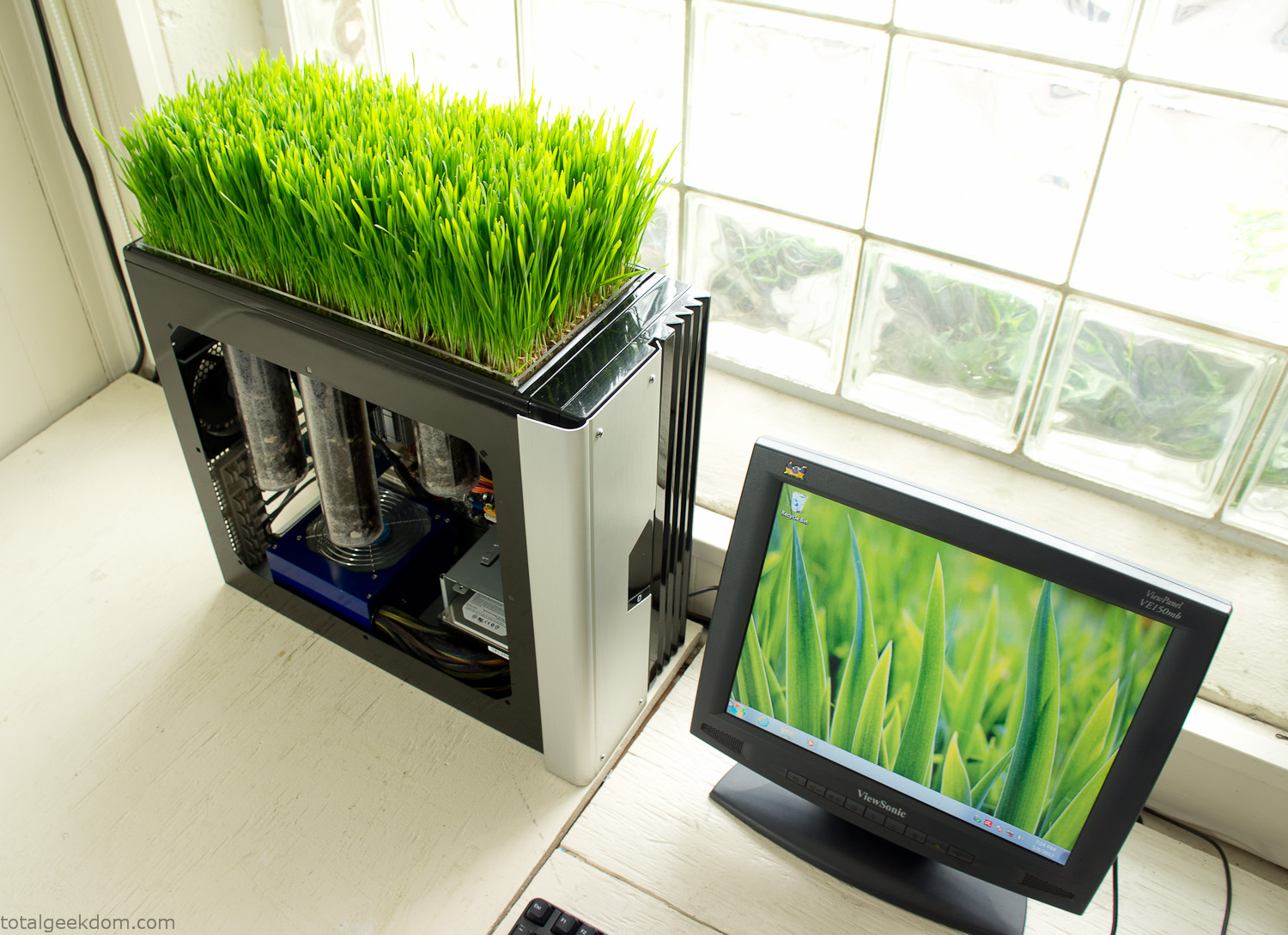
Bio Computer
I’ve been interested in working on a project for while that would combine something tech-based with something organic. Mixing the two elements intrigued me for a while. I’ve wanted to add flowers, or maybe plants of some sort to blend a little bit of nature into the space. I do receive a bit of sunlight through a glass block window, but the temperature in the basement is usually on the colder side. In the winter I don’t really heat the space because the folding farm outputs enough heat to keep the temperature comfortable. I didn’t want to change that aspect so I needed to come up with something that would tolerate slightly cooler temperatures and limited sunlight.
I can’t exactly recall when the idea came to me, but at some point I started wanting to use the heat from a computer as a way to warm the soil and help with germination/growth. I’m about as far from a botanist as it comes, I did some reading online and became pretty interested in the effects of soil temperature on germination/growth. I read different studies and papers from various universities. It was not too long into that process that I became hooked on the idea of using computer heat as a way to control the soil temperature of some sort of living plant life.
As the idea developed further I started looking into wheatgrass as a plant option. There is something clean and natural about the look and idea of a piece of grass growing in my basement. I thought the look would alter the space a little bit and add a bit of color along with something more than just metals and plastics. After reading enough studies and papers on the effects of soil temperature and germination with wheatgrass I felt like I had a good enough handle on the basics to tackle this.
The first step was finding a computer to adapt for the project. Luckily I had a lot of donated computers that people had given me for various project purposes. Most of them didn’t work, but by cobbling together various components from a bunch of different old computers I was able to come up with enough good parts to make a working computer.
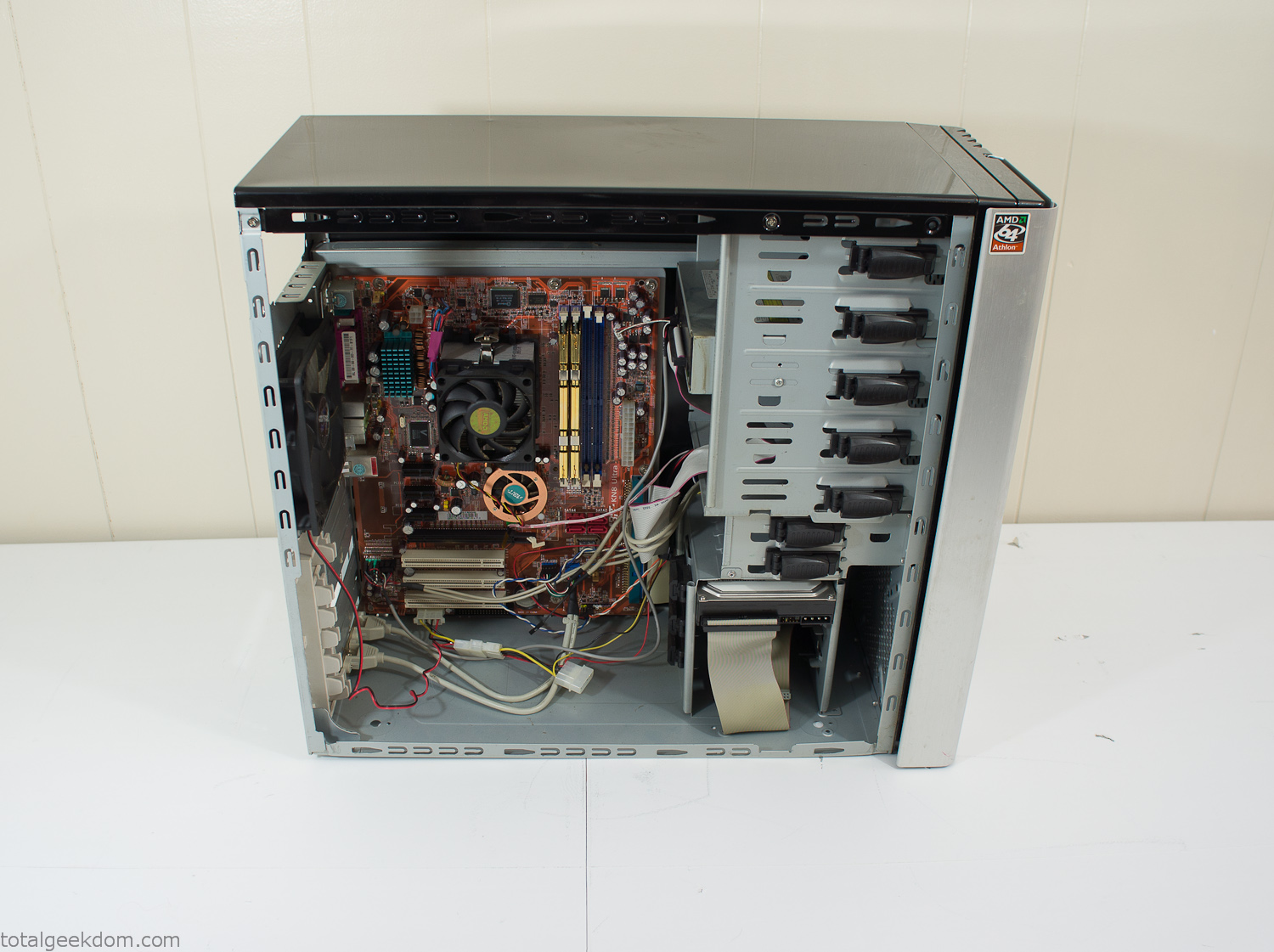
Donor Computer
At the time I was starting to get a formalized plan together for this project, another idea popped into my head. I’ve got a 5 yr. old who is already fairly geeky (just ask him to do his Jabba the Hutt impression for you) but he really does not get that much computer time. He’s getting to an age where he’s more inquisitive about tech stuff and I think he’s ready for his first computer. Since I was already well underway with this project it seemed like a perfect opportunity to orient the computer itself towards a learning tool for him in addition to using it as a way to blend something organic with a piece of technology.
With all of these goals in mind I started tinkering away. The computer hardware itself was nothing fancy, definitely outdated, but perfectly suited towards this project.
CPU- Pentium 4 (3 GHz)
Dell Factory Motherboard
Various Ram Sticks- 2gb
Old Maxtor 120gb IDE Hard Drive
Old FPS Power Supply
Donated Old Computer Case
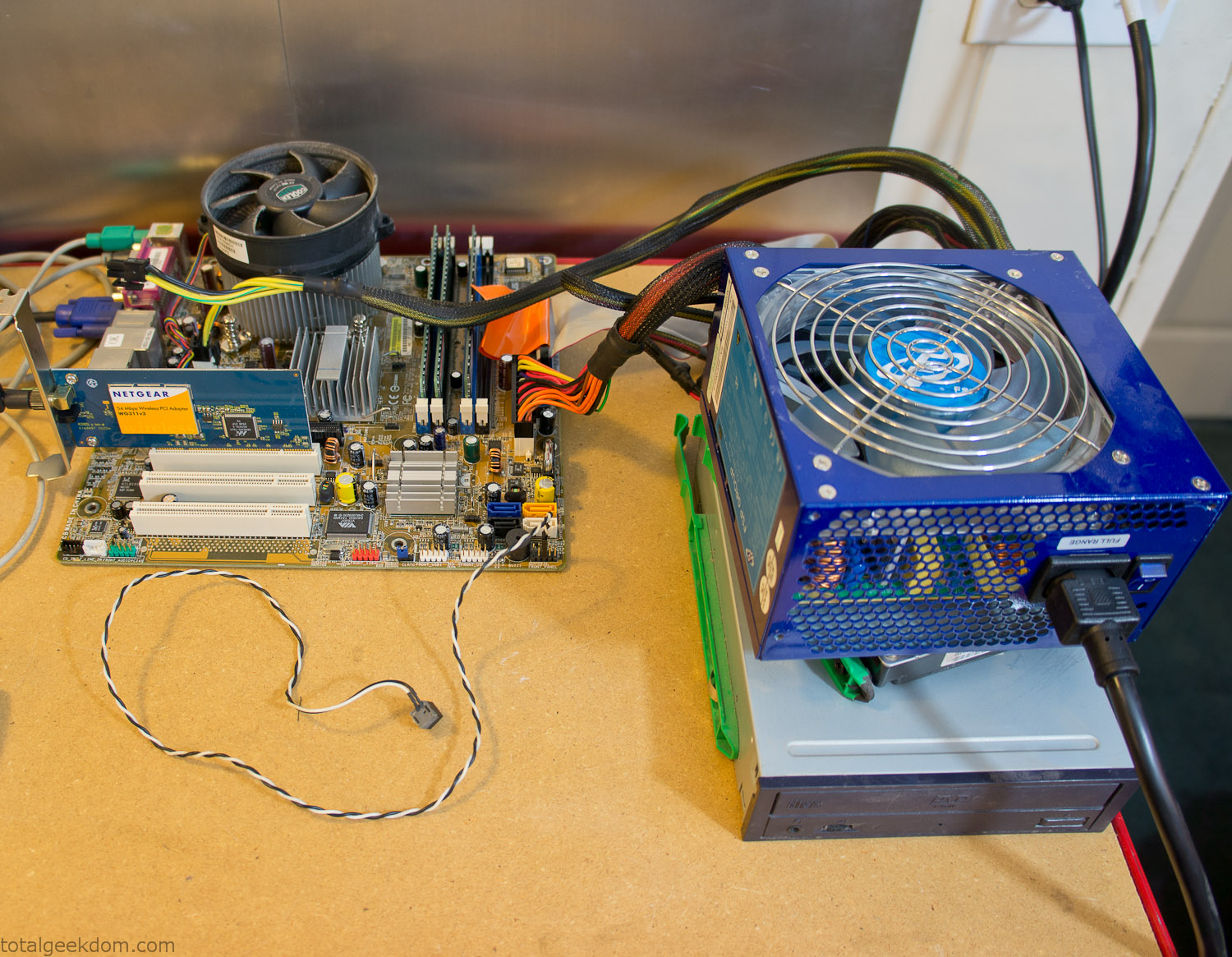
Computer Parts Testing
If you’ve spent any time around computer hardware in the last decade you’re probably well aware that Pentium 4 has a reputation for running hot. The 90nm Pentium 4 was named Prescott and it didn’t take long before the nickname Pres-hot popped up. In this case though that extra heat is going to be put towards good use.
Once the hardware was all in order I started working on the layout and arrangement for the case. I had originally envisioned the grass growing out of the top of the computer case. This seemed like it would provide a good blend between the hard edges of the computer and the soft feel of the grass. This also worked well with putting the soil area in the upper portion of the case, where the most heat should collect. After doing some initial tests with this configuration I found the measured temperature near the top of the case was the hottest. The placement of the CPU near the top of the case and the lack of airflow in that area contributed to these higher recorded temps.
After finishing with some initial tests I decided to completely strip the case down and start removing all the unnecessary brackets and pieces inside of the case. Like most computer cases all the internal brackets and mounts are riveted together, so I drilled all the rivets out of the components I wanted to remove and pulled them out. The gutted case looked pretty barren after being stripped.
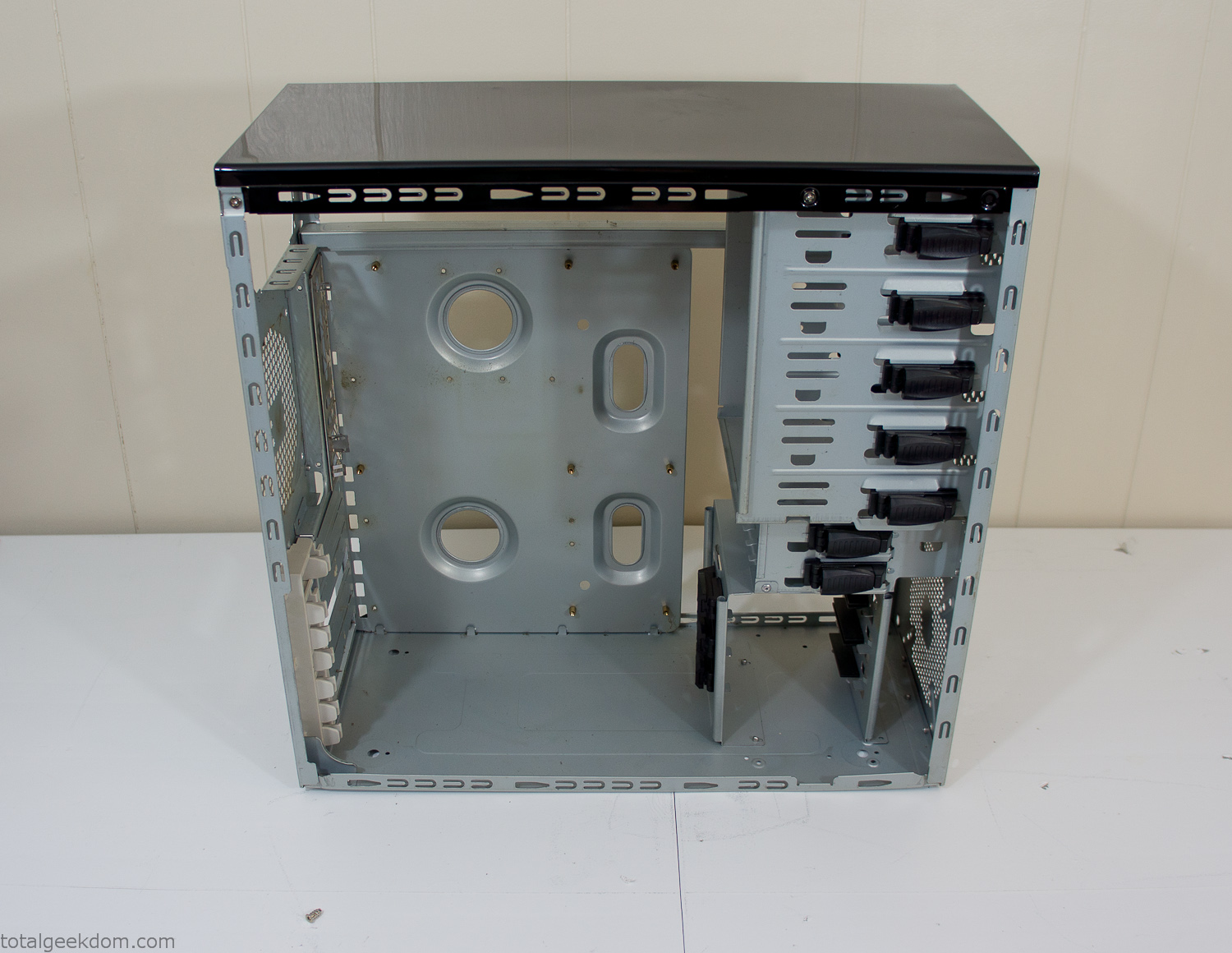
Empty Computer Case
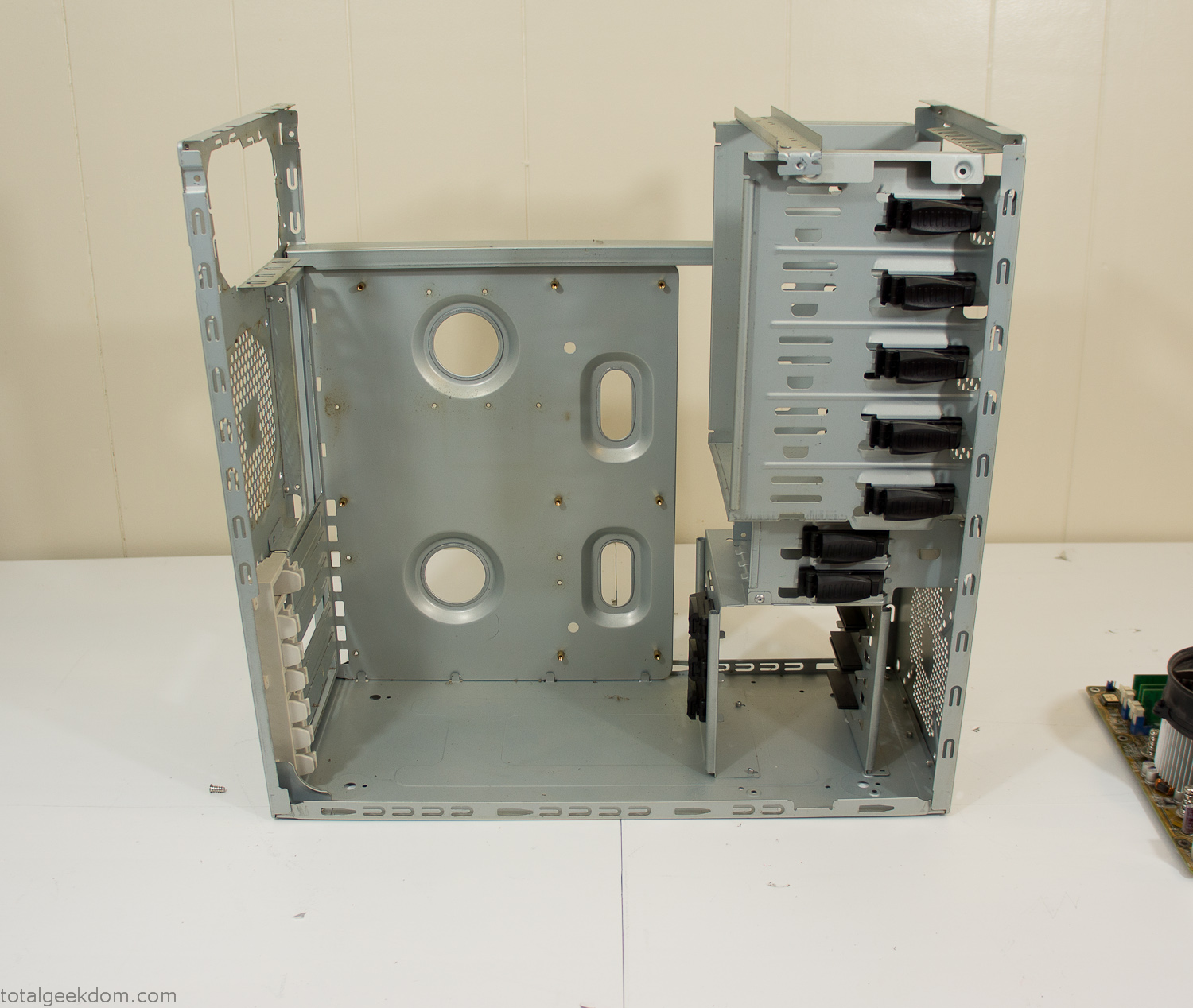
Dismantled Computer Case

Stripped Computer Case
In keeping with my original plan of having the computer blended with the organic grass I wanted it to be easy to see the inner workings of the computer and also the soil from the grass growing above. I needed something that was translucent, which left me with either glass or acrylic/polycarbonate as my options. I ended up choosing acrylic because I was able to find a cheap, used, die-cast model car display case top that was the perfect dimensions for the top of the case. Couldn’t go wrong for 5 bucks.
I test-fit the acrylic over the top of the computer case and marked my layout on the top of the case. My plan was to cut open the top of the computer case and insert the acrylic display case into the section I cut out. To cut open the top of the computer case I drilled a hole as a starting point and then used tin snips to cut through the thin gauge metal.
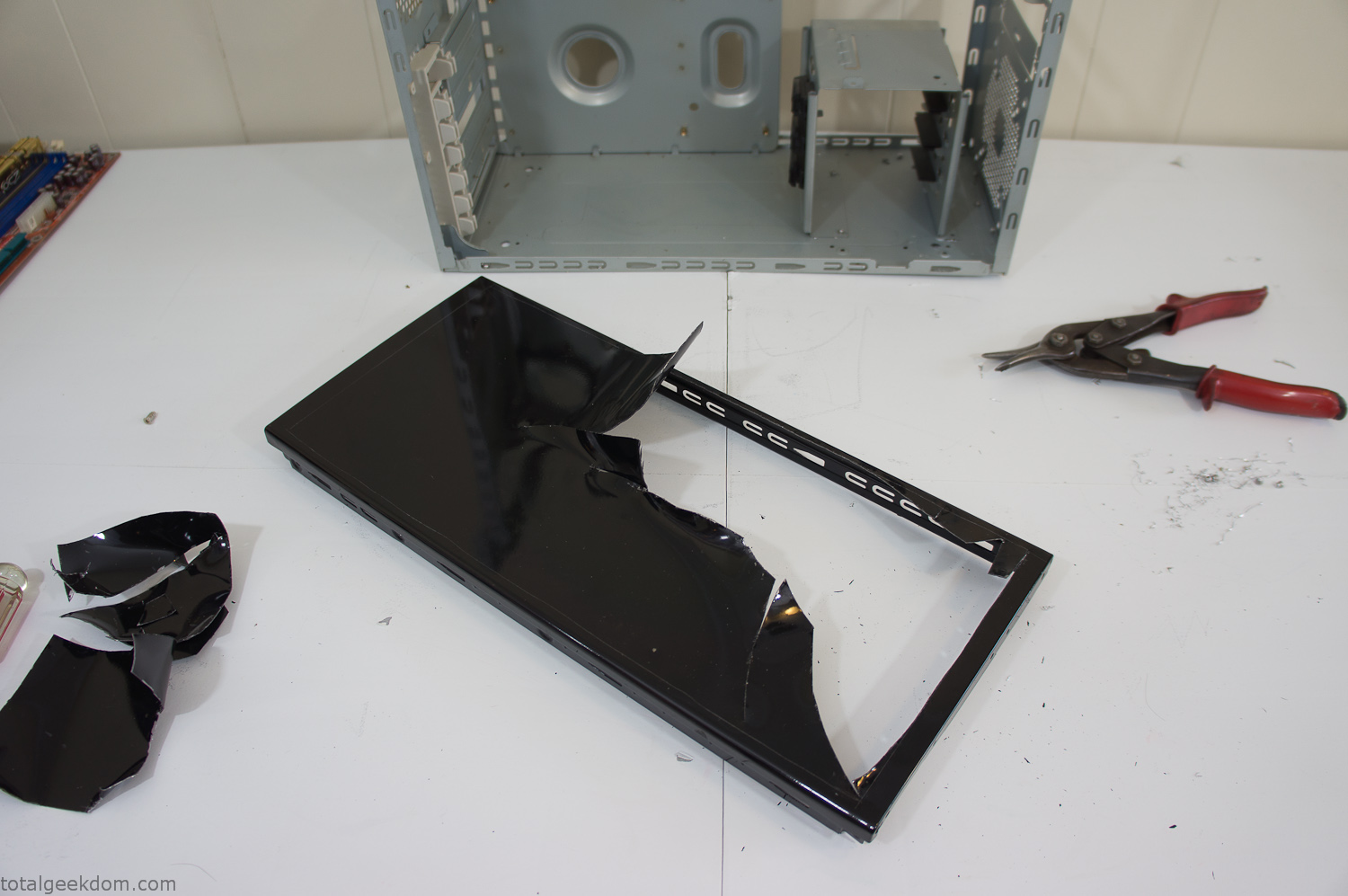
Computer Case Lid Modding
Once I had the metal opening cutout, I needed something to put along the edges of the freshly cut opening to create a clean and finished look. For $2 I was able to find some black, car-door-edge, plastic molding that worked perfectly.
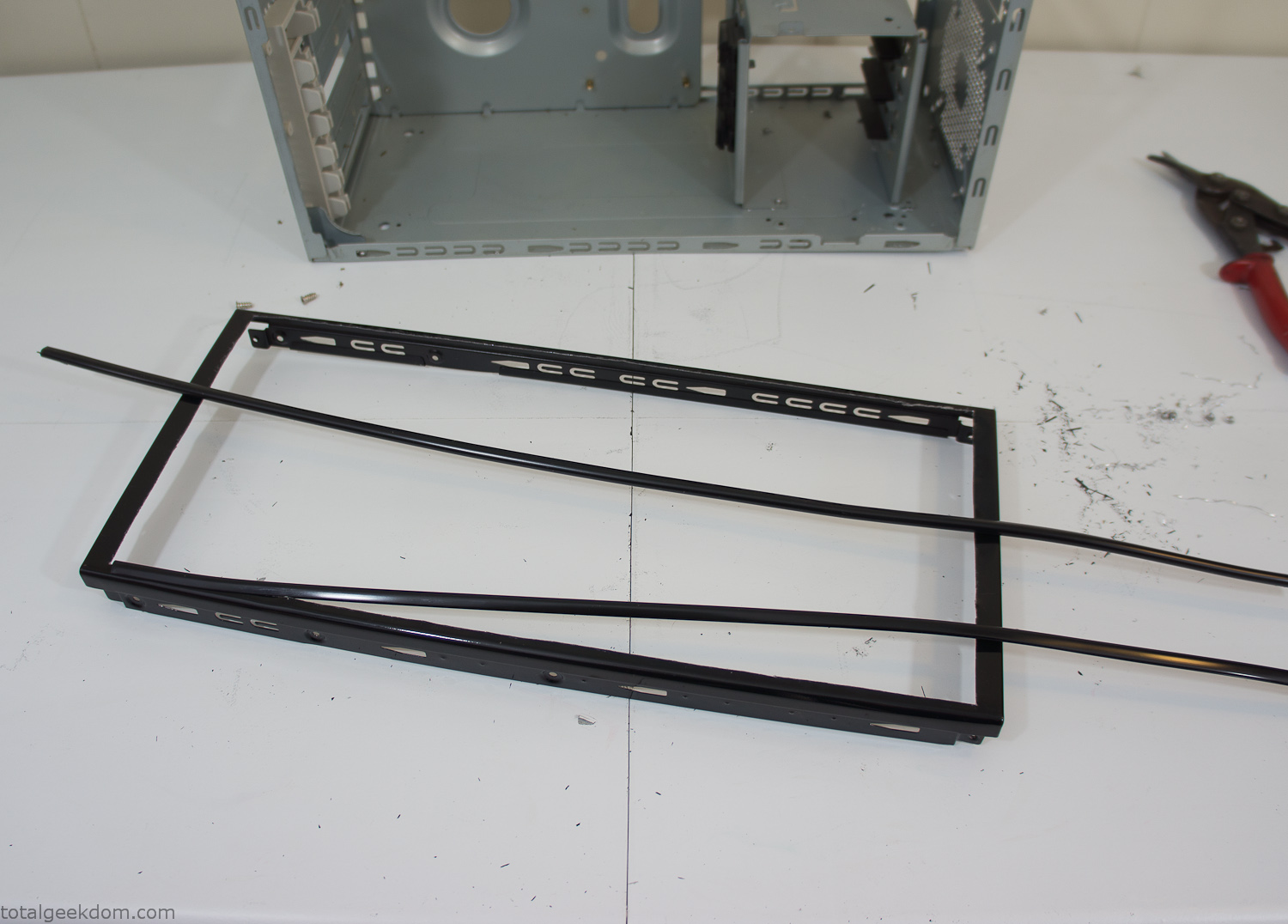
Modified Computer Case Lid
After getting the opening of the top of the computer handled and the acrylic case properly fitted, I moved onto some more testing with soil in the acrylic and the computer running. I wanted to see what kind of heat transfer I would get and how it would affect the soil temperature. I knew that using acrylic over glass would make it a little more difficult to heat the soil as acrylic is not that good at transferring heat. Luckily though I didn’t really need to alter the soil temperature that much, I just needed a little extra heat. Testing showed that heat transfer with just the single acrylic display case as my soil container was slow. So I decided to add some acrylic tubes. This would allow more surface are for soil to acrylic contact and also give me an area where I could add a mixed substrate to allow for soil drainage.
I went online and found a 3ft long section of 2 1/4″ clear acrylic tubing for $8 dollars. I wanted to add a couple of hanging cylinders off the main of the acrylic display case in the top of the computer case. To do this I needed to cut holes into the bottom of the display case. Cutting holes in acrylic is not always easy, it’s likely to chip and craze at the edges. To get around this I used a buildup of masking tape on both sides of the acrylic, to provide a little bit of resistance and strength. I placed the acrylic display case back into the computer and marked my layout for the tubes. I needed to leave clearance for the CPU cooler, power supply and hard drive mount.
After marking the layout, I used an air-powered pencil grinder and carbide tipped bit and cut through the acrylic case along my marked lines. After the initial shape was cutout I used a tube piece as a template and slowly worked on grinding the holes as perfectly round as I could get them so that the tube had a snug fit all the way around. The fit is pretty important as the acrylic cement that I used needs there to be a tight fit so that the acrylic can bond correctly.
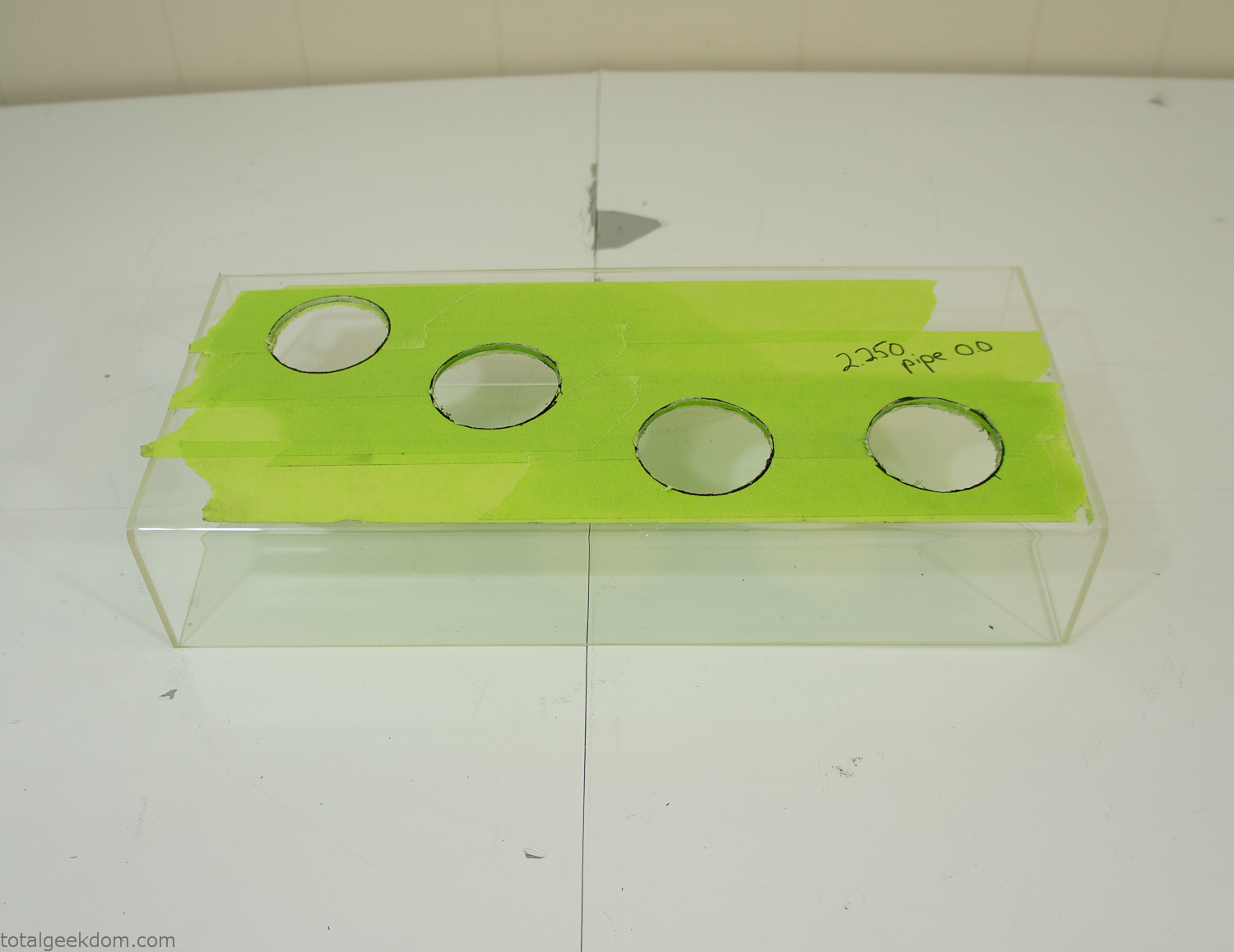
Acrylic Case Modifications
I placed the tubes into the acrylic case and mounted it in the computer and test fit the placement and height of the tubes. After getting everything lined up and oriented correctly I moved towards bonding the acrylic together. Using a needle dropper applicator I applied the cement to all the joints. After letting it set overnight I came back the next night and applied a thin coating of clear silicone caulk around all the joints just to ensure they were completely water tight
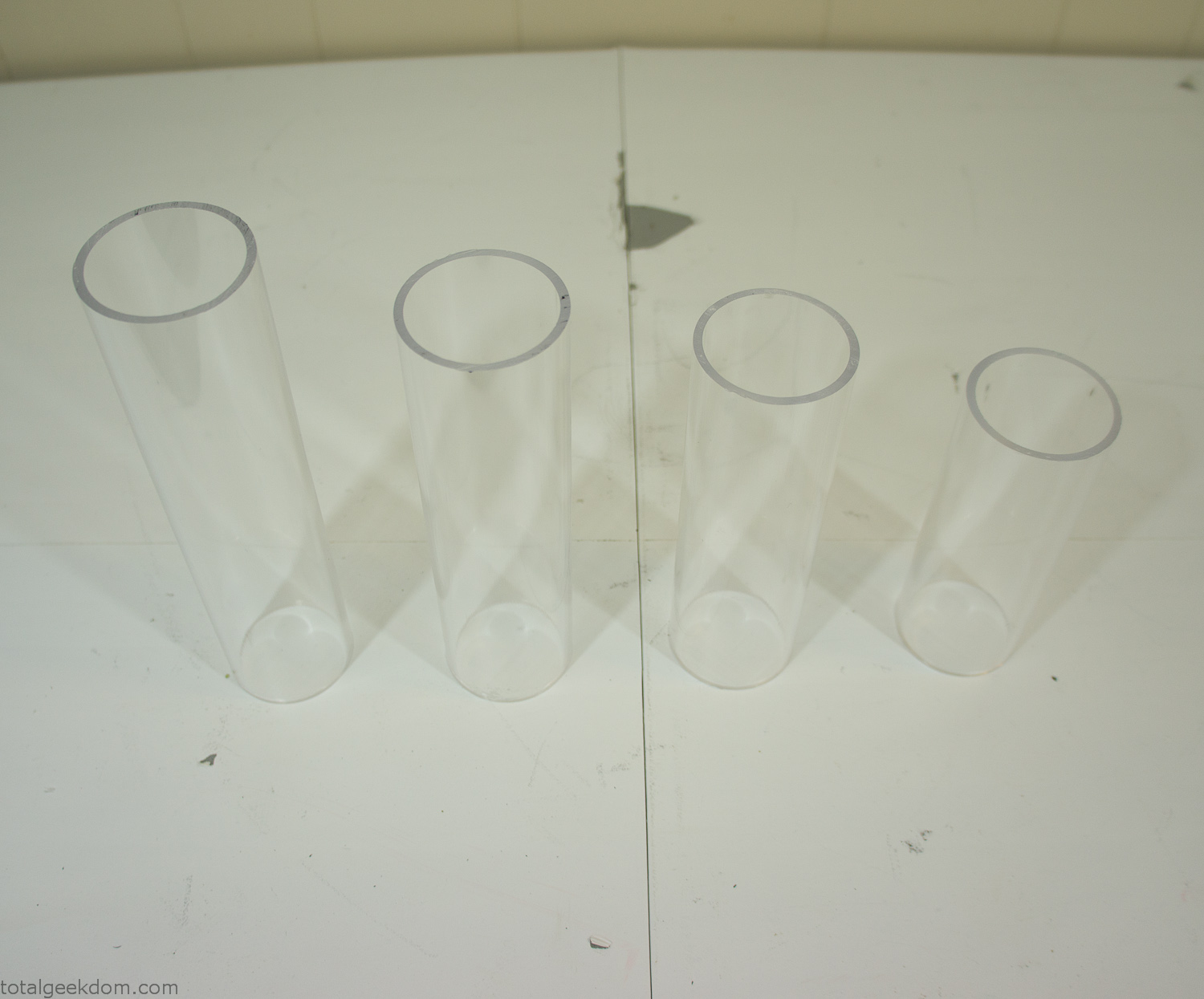
Acrylic Tubes
The next step was sealing up the bottom of the acrylic tubes. I looked at a couple of different options before realizing that the discs I had cut out of the acrylic case to fit the tubes would be almost the perfect size. Using a bench grinder and a test piece of tube I slowly ground each disc to the perfect size for a tight fit all the way around. I placed the clear acrylic discs into the bottom of each tube and repeated the same cementing and silicone caulking procedure to ensure they were water-tight. After a couple of days’ worth of drying I tested the case by filling it with water overnight and checking in the morning to make sure that no leaks had popped up.
In order to hold the weight of the acrylic case after adding soil, I drilled and installed a machine screw with a rubber cap at each corner of the computer case to bear the weight of the acrylic case.
Once all the work was done with the acrylic case section I started reinstalling all the components. The motherboard, hard drive and power supply were added and then wired up.
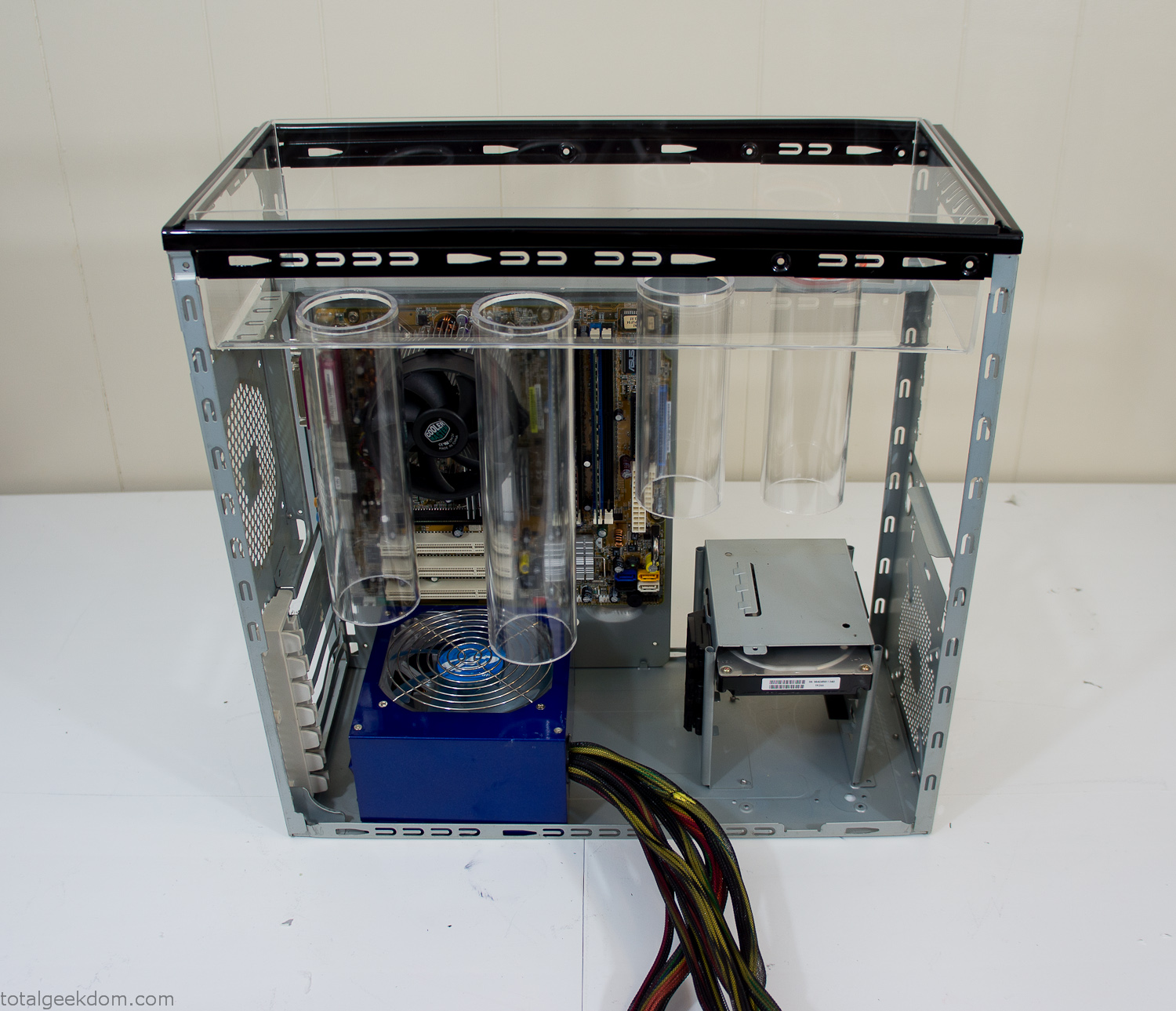
Mocked Up Computer Case
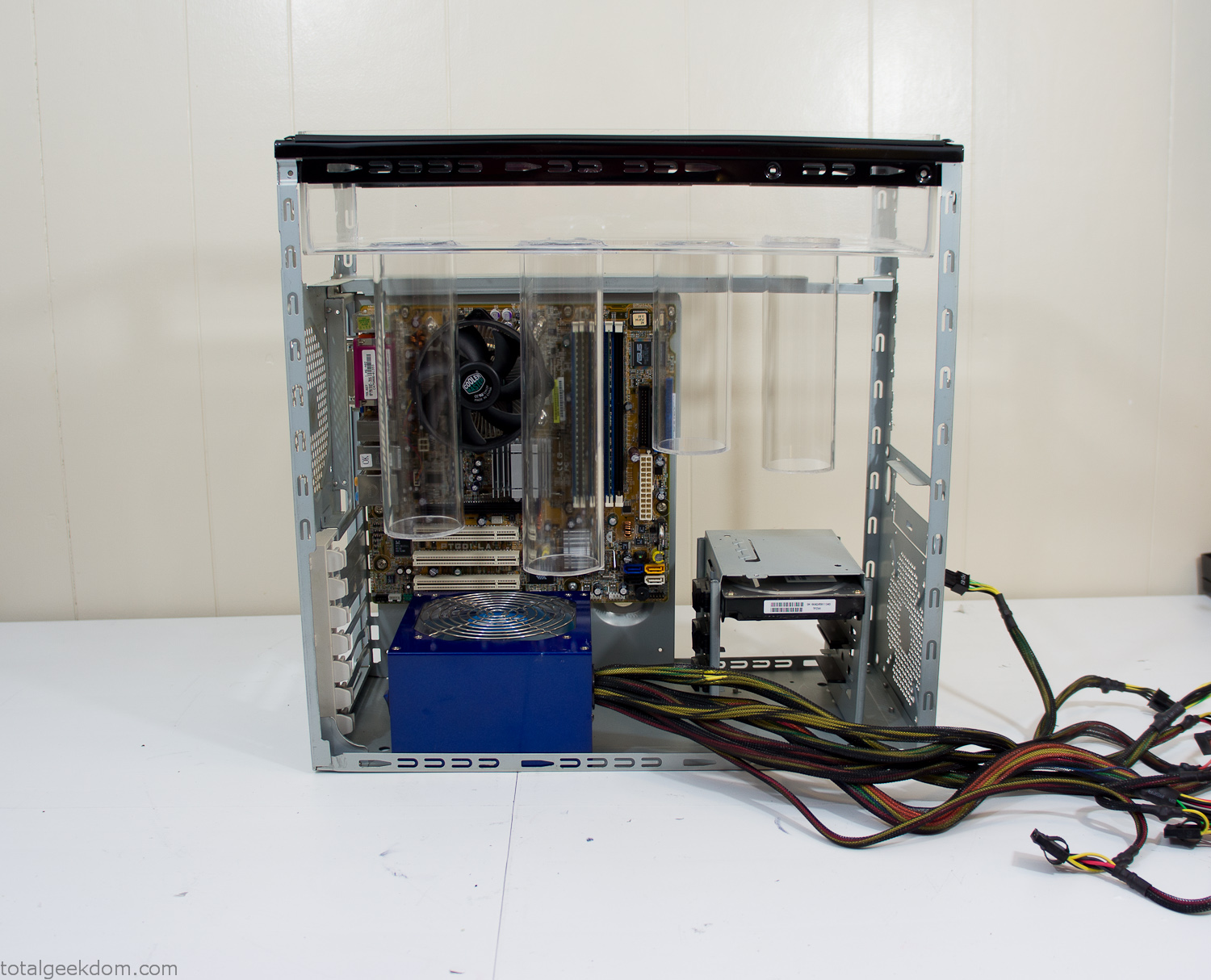
Power Supply Mockup
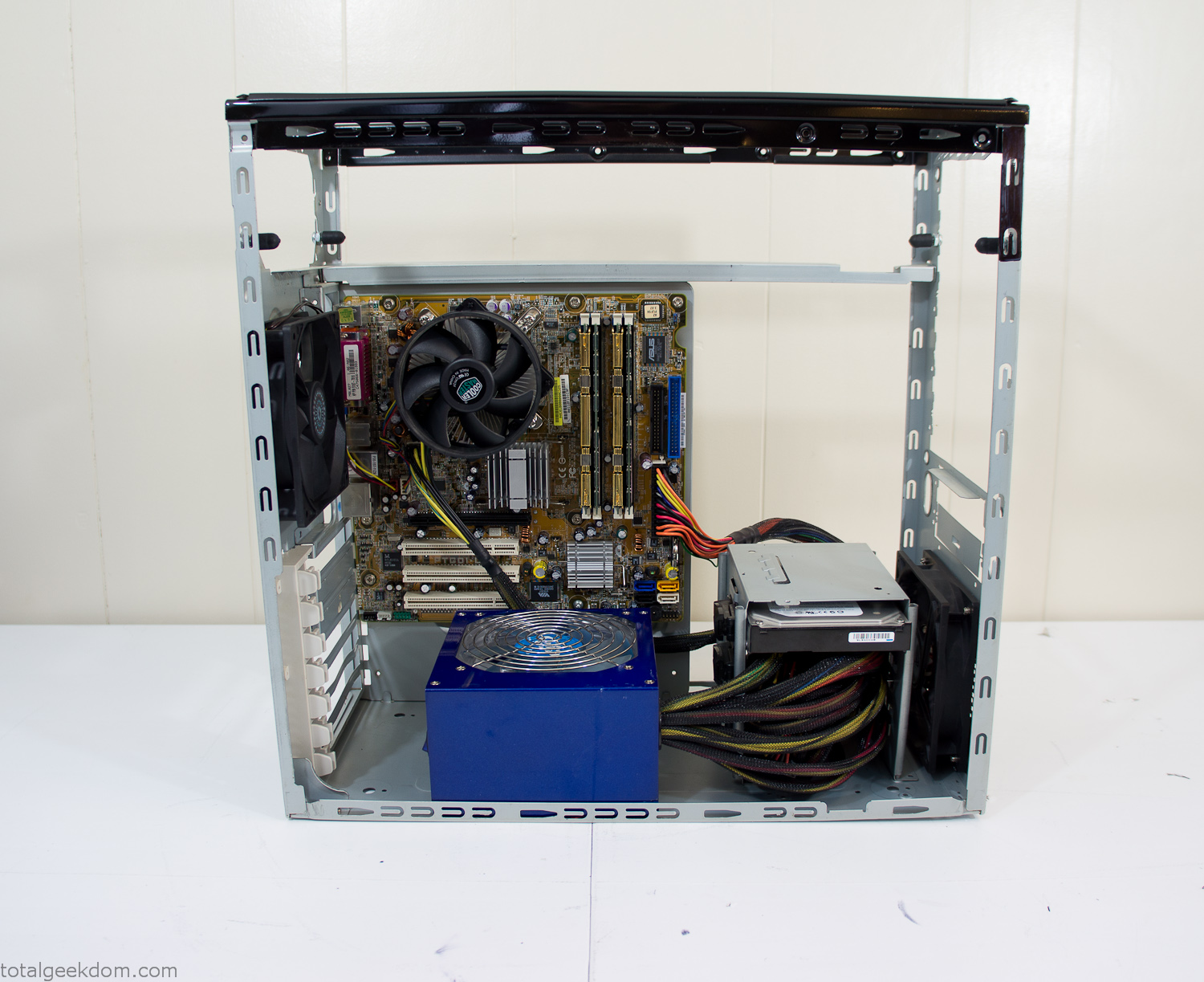
Computer Components Wired
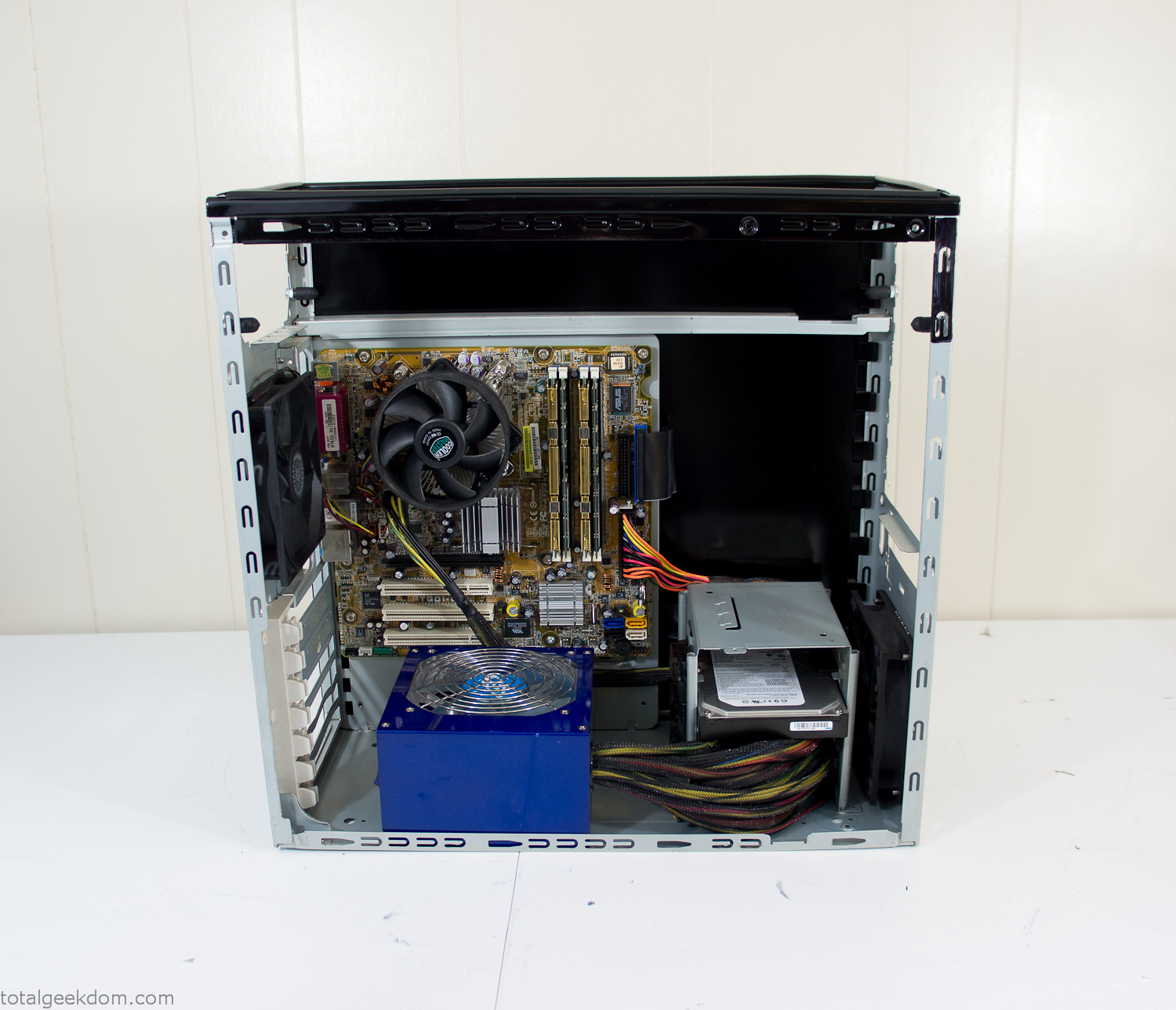
Case Panel Installed
At this point all that was left was to make a clear panel for the side of the case. I had some left over acrylic sheets from a different project that were really close to the right size, after test fitting, marking and cutting I then had a clear side panel to see into the case. (I left this off for the pictures because it caused a reflection)
The final step was filling the case with soil and adding some wheatgrass. I had been test growing other samples of wheatgrass during the build process. So I had already a couple of different patches of grass growing. I tried to keep the soil level just below the top of the acrylic case edge to make it a little more seamless.
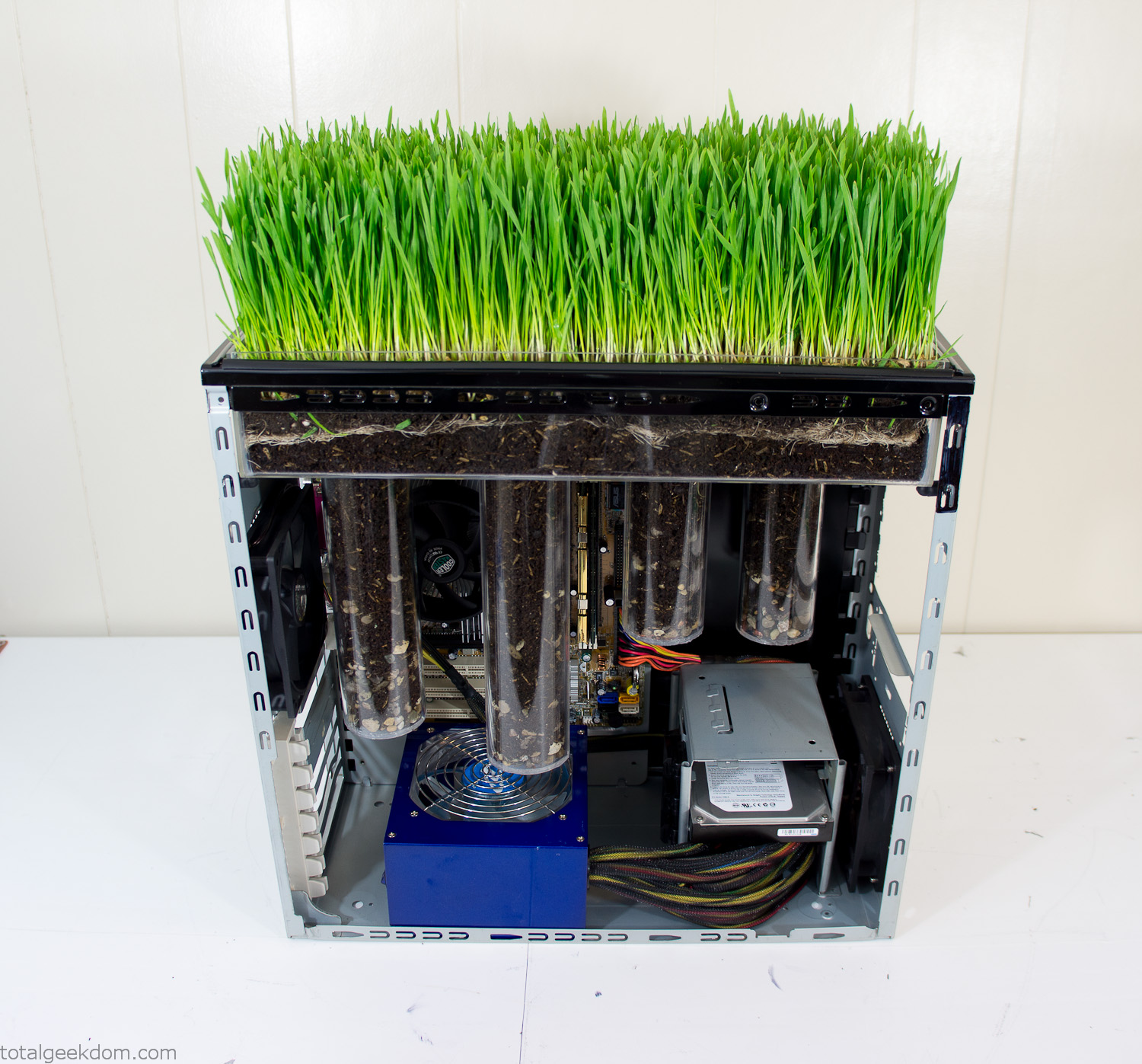
Grass Planted in Computer
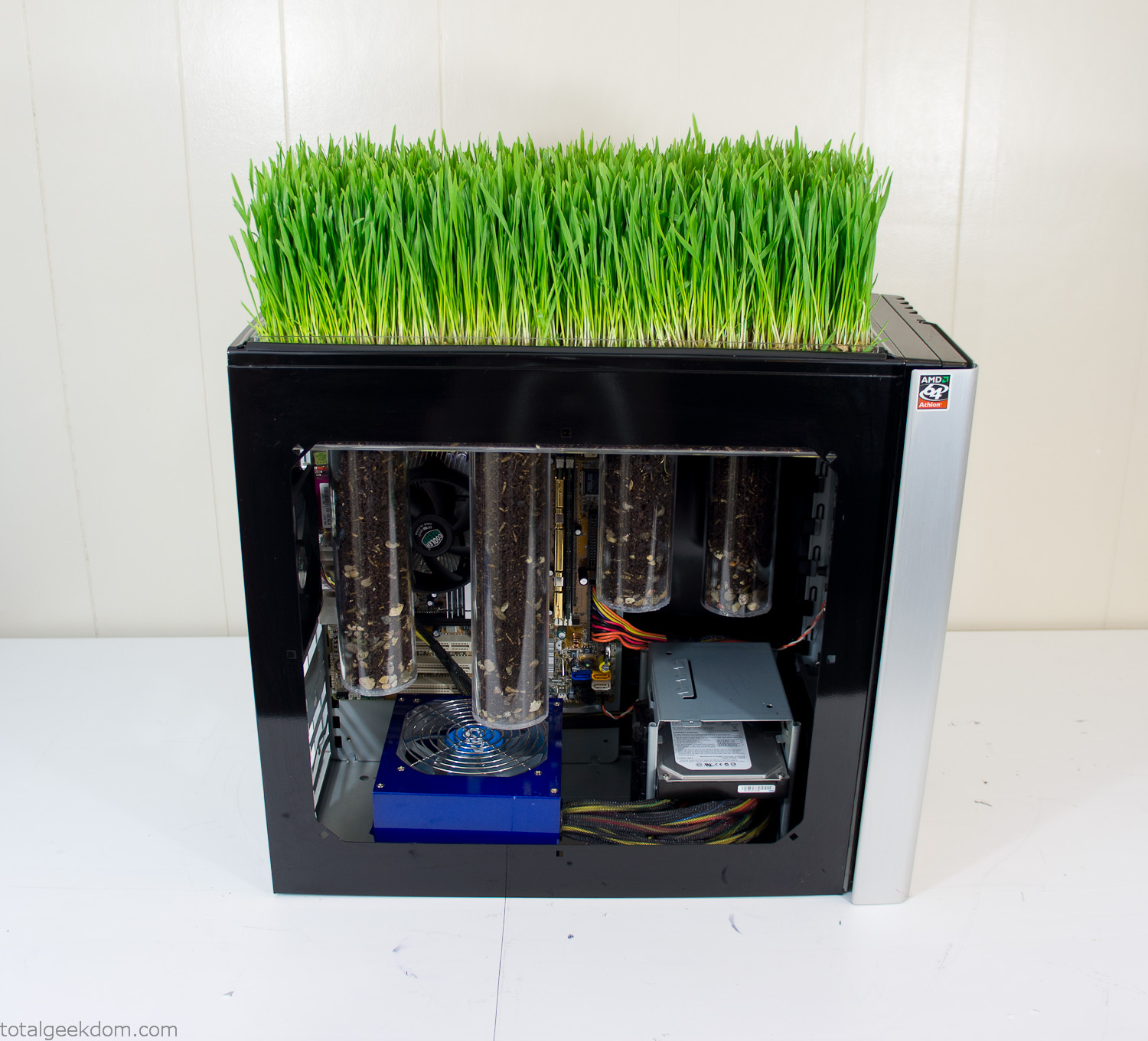
Grass and Case Panel Installed

Grass in Computer
For the computer itself I ended up installing Windows as well as Linux in a dual boot setup. Since the computer was going to be used by my son as something to play with I figured I should put both on there so he can tinker with them and learn as he goes. Besides, for important life decisions like picking an OS (Operating System) I think any good parent should present the options and then let their kid decide for themselves.
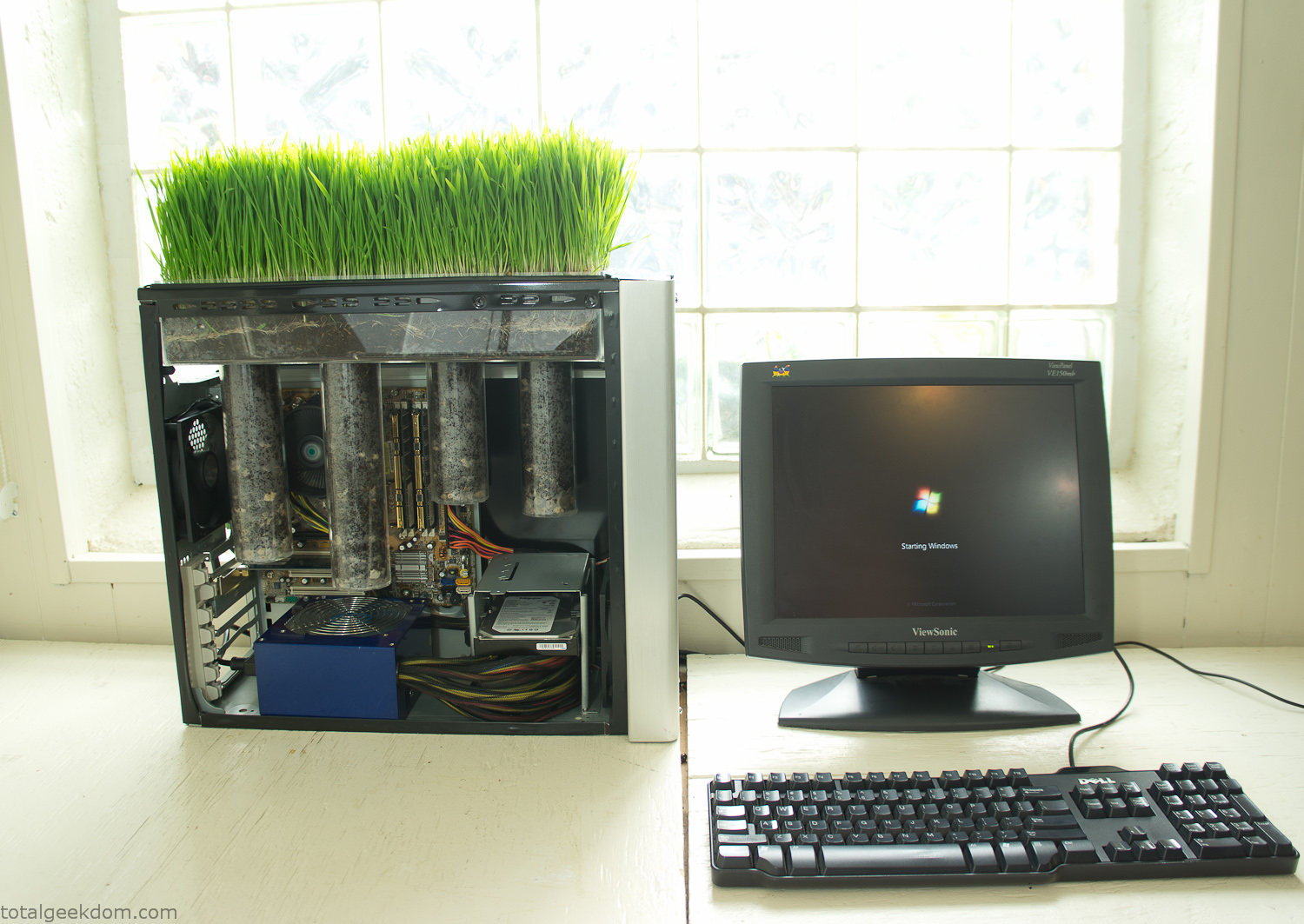
Starting Windows
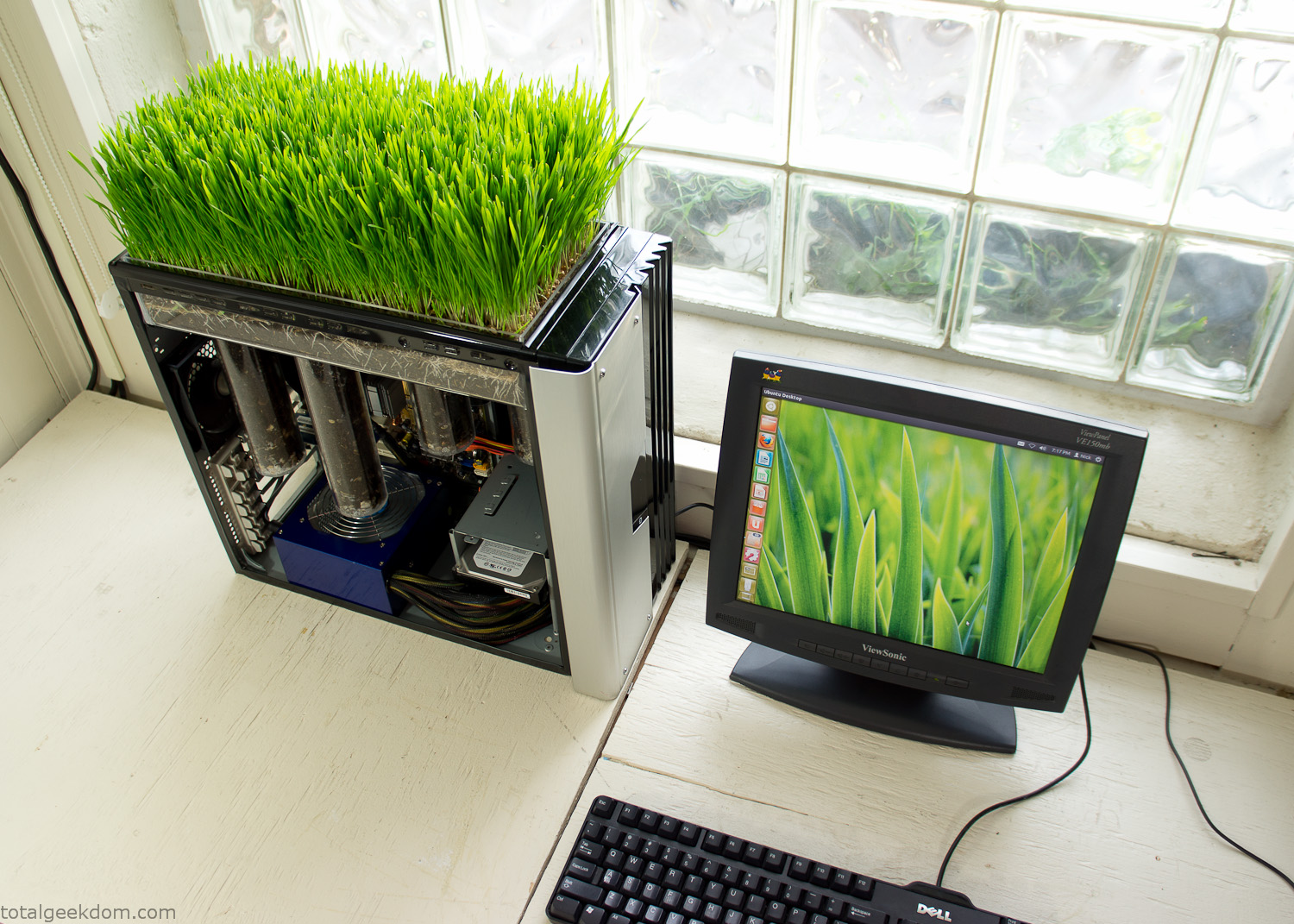
Linux Running
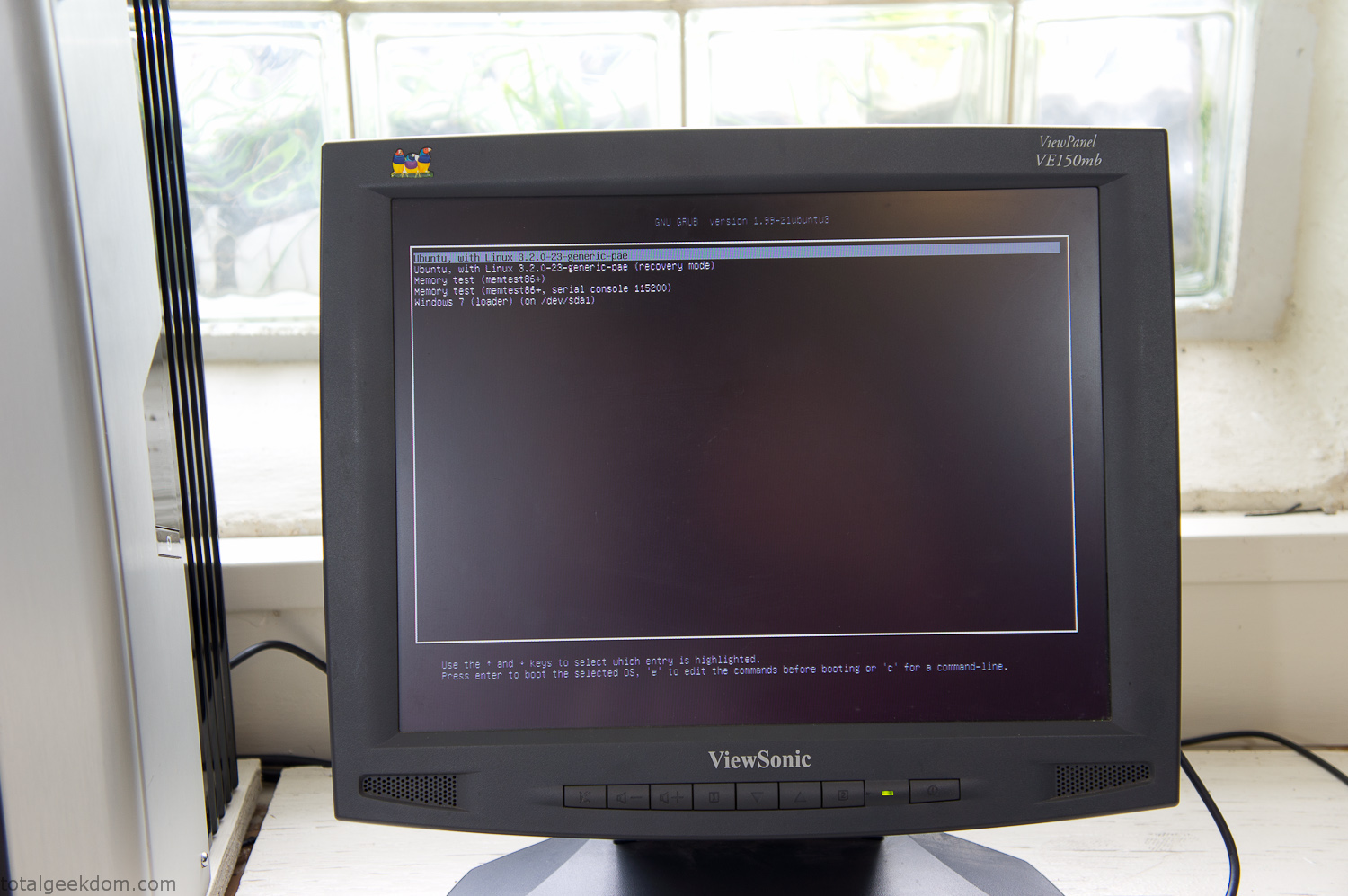
Dual Boot Screen
In the end I’m happy with the result of the project. It’s been fun experimenting with growing wheatgrass and I like how the natural look of grass is blended with the very modern, inorganic case.
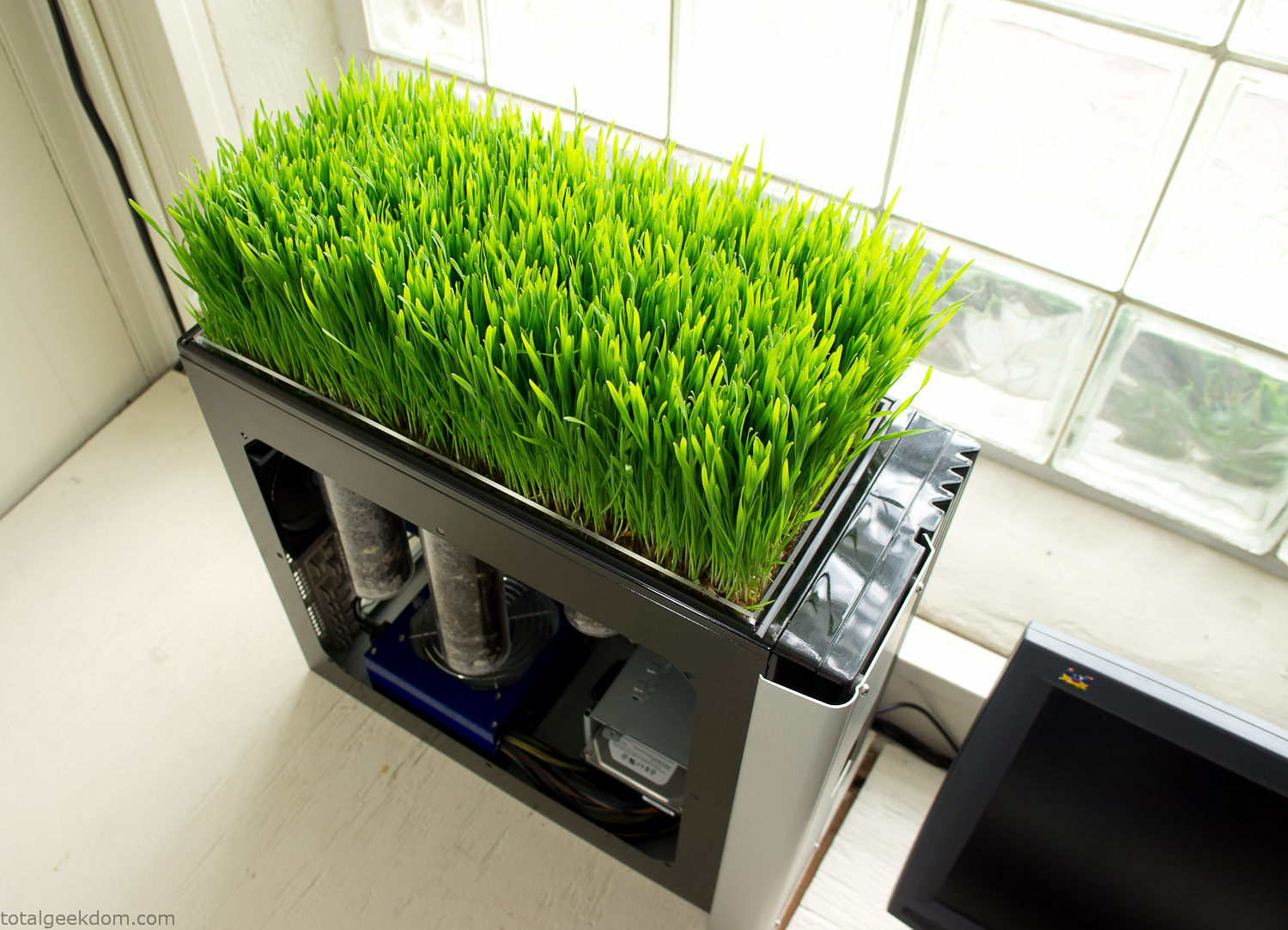
Computer Grass Growing
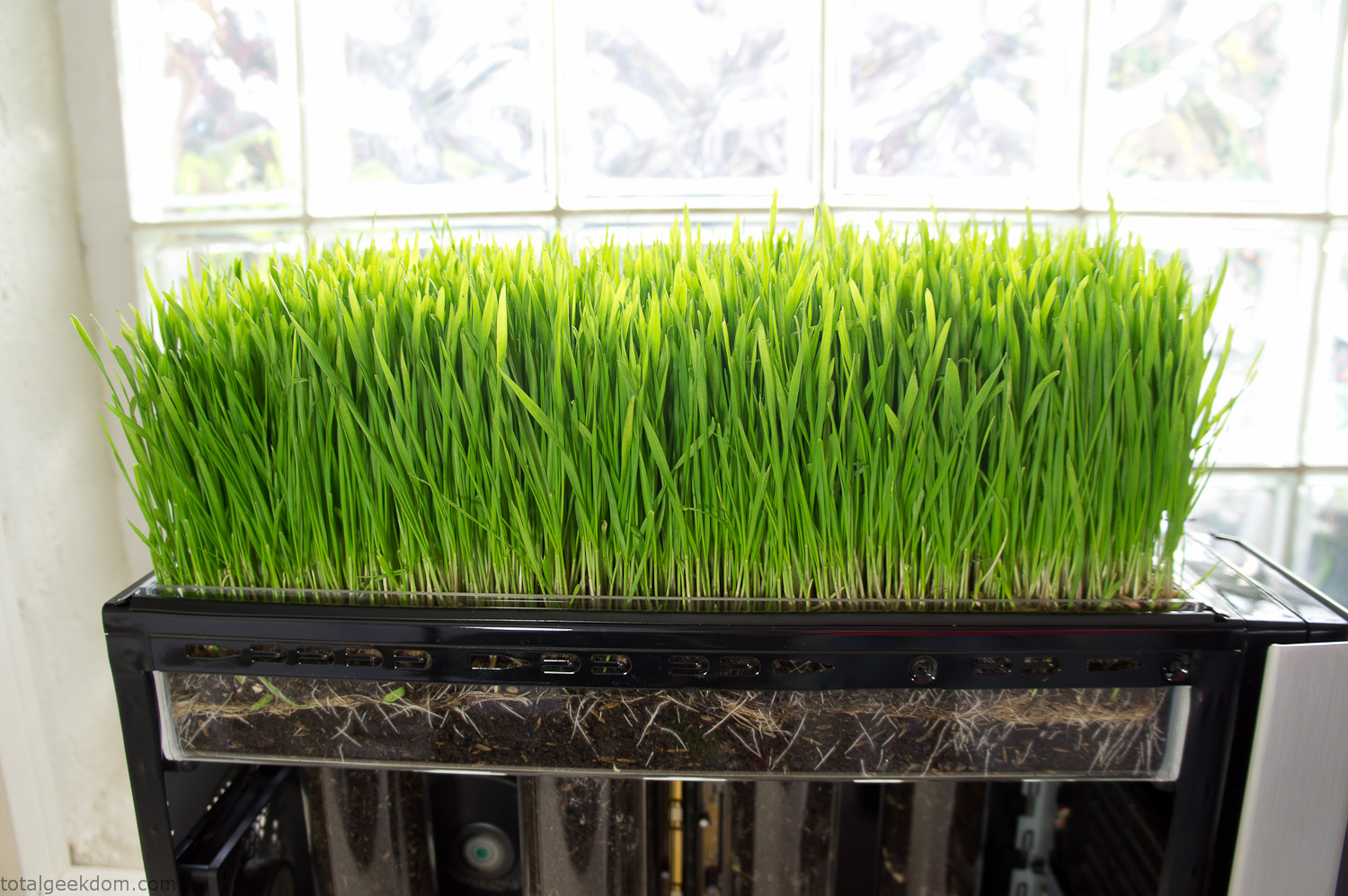
Grass in Computer Section
Notes
Temperature Testing
In testing the case temperature versus the soil temperature I found it was easiest to control the case temperature by using a variable fan speed control on both the inlet and outlet fans. By turning the fan speed down I could increase the temperature inside the case and correspondingly raise the soil temperature.
In order to maximize output of heat during these tests I used Prime95 to run the CPU at 100% load.
Using this method to control the case and soil temperature I played around with adjusting the soil temperature and then tracking the rate of growth of the Wheatgrass. The target temperature for peak growth seemed to fall around 66°F (19°C).
Using the fans to control the case temperature allowed me to vary the temperature inside the case from a low of 75°F (24°C) to a high of 91°F (33°C). In order to achieve the desired increase in soil temperature, I had to run the case temperature toward the higher end of the scale.
When the soil temperature was too high, the growth of the wheatgrass would slow.
Wheatgrass
The wheatgrass I used for my tests was nothing special, it can be found as seeds (berries) in a lot of health food stores and it grows relatively easily.
Caring for the wheatgrass is just a matter of keeping it watered. It’s a pretty easy plant to work with and doesn’t require any special skills.
Wheatgrass is often used as a nutritional supplement; it can be juiced and mixed into smoothies and other beverages. I plan on harvesting some of the grass and making some juices.
Plant Options
While wheatgrass offers a nice, attractive and easily grown option I do plan on trying other plants as well in the future. Since I already have the “planter” built all I have to do is add a different plant and see how it goes. I’m sure there will be some plants that don’t like the lower light environment, but it will be fun experimenting with other plants as well and seeing how they take.
Materials
Donated Computer- Free
Clear Acrylic Display Case- $5
Clear Acrylic Tube- $5
Plexiglass Side Panel- Free
Total- $10
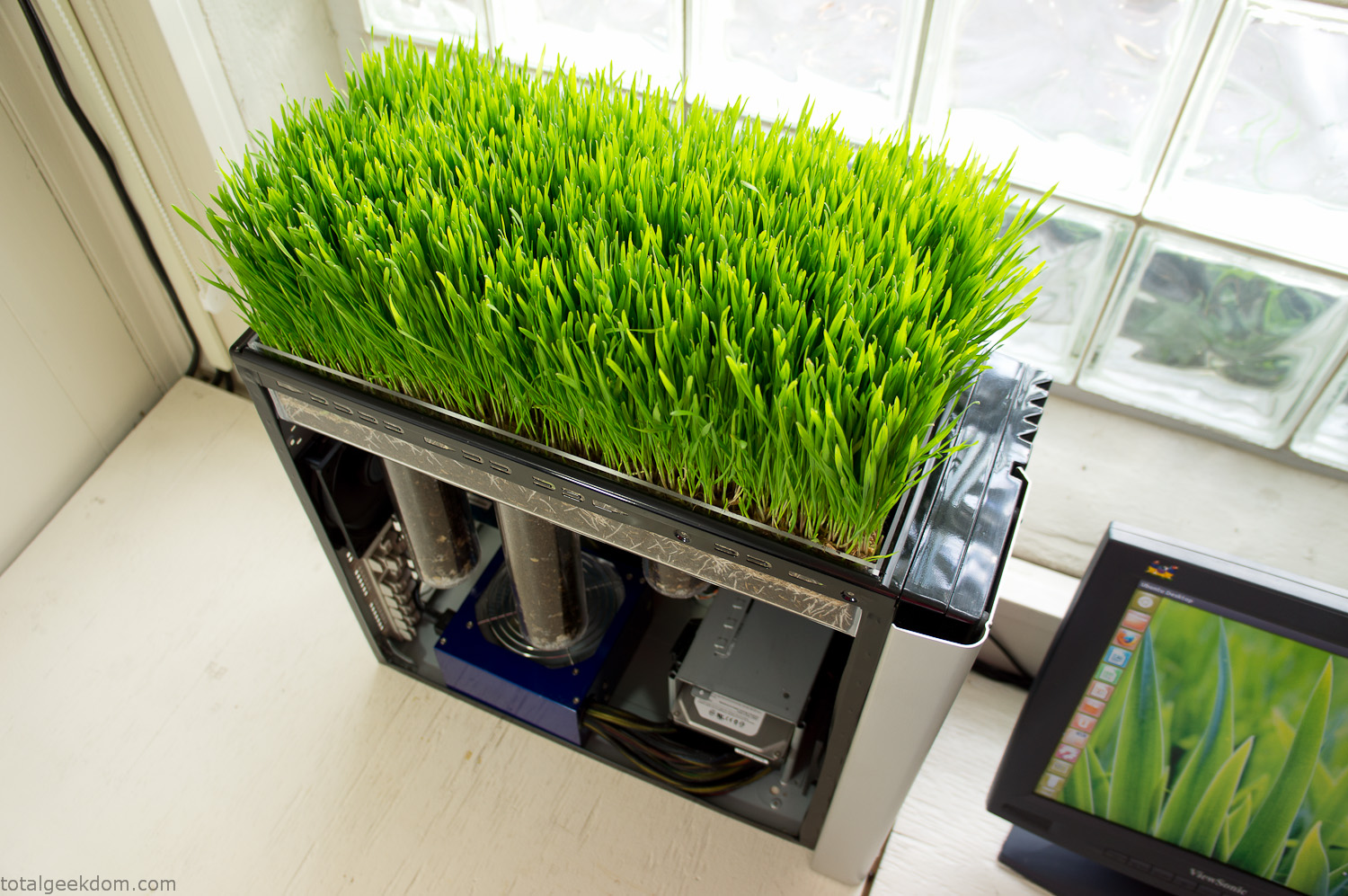
Bio Computer Running
 29.2k
29.2k
 13.2k
13.2k 7.1k
7.1k

 2.1k
2.1k 813
813 2.6k
2.6k
Comments 53,179
https://information73838.blogminds.com/una-revisiГіn-de-selecciГіn-de-personal-33398846
La contratación de talento es clave para el desempeño de cualquier organización.
Contar con las personas adecuadas en los roles estratégicos define el rumbo en desarrollo.
1. Crear la descripción de cargo
Antes de empezar el proceso de reclutamiento, es necesario definir con claridad el perfil del candidato que la empresa busca. Esto incluye competencias, trayectoria y actitudes que se alineen con la visión de la organización.
2. Fuentes de talento
Hoy en día, las empresas tienen la posibilidad de usar bolsas de empleo como Indeed, además de programas de recomendación para atraer al mejor talento.
Combinar fuentes aumenta la probabilidad de encontrar candidatos altamente capacitados.
3. Evaluación de candidatos
Una vez recibidas las solicitudes, se debe preseleccionar a los perfiles que más se acercan a los requisitos.
Después, las reuniones sirven para evaluar no solo la formación del candidato, sino también su actitud con la empresa.
4. Métodos de validación
Para asegurar que el candidato ideal cumple con lo esperado, se pueden implementar tests de competencias, análisis de personalidad o ejercicios prácticos.
Esto minimiza el riesgo de error al contratar.
5. Toma de decisión y contratación
Tras el proceso de evaluación, llega el momento de seleccionar al candidato que mejor se adapta.
La comunicación clara y un plan de integración son cruciales para asegurar que el nuevo empleado se integre fácilmente.
6. Seguimiento y mejora continua
Un sistema de selección nunca es estático.
Analizar indicadores como calidad de la contratación hace posible optimizar la estrategia y perfeccionar los resultados.
En definitiva, el reclutamiento y selección de personal es mucho más que llenar vacantes.
Es una apuesta en el futuro de la empresa, donde atraer al equipo adecuado determina su éxito.
https://www.band.us/page/99597060/
Hi there! Parenting just got easier with https://theamke.com/ thoughtfully designed baby products. From adjustable bassinets to ergonomic bouncers, AMKE focuses on safety, comfort, and practicality. Their products, made with premium materials, are perfect for creating a cozy space for your little one. With AMKE, you get reliable solutions that make those early parenting moments a bit smoother.
https://www.band.us/page/99612514/
Кракен ссылка остаётся ключом к доступу в даркнет. Кракен актуальная ссылка обновляется для безопасности. В 2025 году кракен ссылка 2025 обеспечивает анонимность и надёжность соединения для пользователей.
Вход: Кракен ссылка
http://webanketa.com/forms/6mrk4chg6mqk4rsg6cw32dk5/
сайт военнослужащих
https://say.la/read-blog/125058
На сайте https://t.me/feovpn_ru ознакомьтесь с уникальной и высокотехнологичной разработкой – FeoVPN, которая позволит пользоваться Интернетом без ограничений, в любом месте, заходить на самые разные сайты, которые только хочется. VPN очень быстрый, отлично работает и не выдает ошибок. Обеспечивает анонимный доступ ко всем ресурсам. Вся ваша личная информация защищена от третьих лиц. Активируйте разработку в любое время, чтобы пользоваться Интернетом без ограничений. Обеспечена полная безопасность, приватность.
https://bio.site/ifofkyhy
https://muckrack.com/person-27439643
Meds prescribing information. Cautions.
lisinopril 20 mg preisvergleich
Everything trends of medicines. Read information now.
https://beteiligung.stadtlindau.de/profile/%D0%9A%D1%83%D0%BF%D0%B8%D1%82%D1%8C%20%D0%9A%D0%BE%D0%BA%D0%B0%D0%B8%D0%BD%20%D0%9C%D0%B5%D1%84%D0%B5%D0%B4%D1%80%D0%BE%D0%BD%20%D0%9C%D0%B0%D1%80%D0%B8%D1%85%D1%83%D0%B0%D0%BD%D1%83%20%D0%9F%D0%B5%D1%80%D1%83%D0%B4%D0%B6%D0%B0/
https://git.project-hobbit.eu/mfidribbif
РусВертолет – компания, которая занимает лидирующие позиции среди конкурентов по качеству услуг и доступной ценовой политики. В неделю мы 7 дней работаем. Ваша безопасность – наш главный приоритет. Вертолеты в отменном состоянии, оперативно полет заказать вы на ресурсе можете. Обеспечим вам море ярких и положительных эмоций! Ищете заказать полет? Rusvertolet.ru – тут есть видео и фото полетов, а также отзывы радостных клиентов. Вы узнаете, где мы находимся и как добраться. Подготовили ответы на самые частые вопросы о полетах на вертолете. Рады вам всегда!
https://ucgp.jujuy.edu.ar/profile/qofnmuhnubyd/
здоровье красота Косметолог ЖК Самолет Люберцы: эксперт, которому можно доверять. Многолетний опыт, постоянное повышение квалификации и любовь к своему делу – залог безупречного результата и довольных клиентов.
https://pixelfed.tokyo/morocheleria
https://bio.site/udycafbib
ипотека участникам ‘‚Ћ
Hey there! https://thelightning-x-products.com/ specializes in high-quality tactical bags, medical kits, and PPE designed for EMTs, firefighters, and medical personnel. Their Jumbo Medic First Bag, for example, combines durability with smart organization, making it a go-to for professionals. With Lightning X, you’re equipped for the toughest situations.
cyclobenzaprine
https://pxlmo.com/prixyelminekill648
https://power50504.onesmablog.com/todo-acerca-de-selecciГіn-de-personal-77227706
El proceso de atraer y elegir candidatos es esencial para el desempeño de cualquier empresa.
Contar con las personas adecuadas en los puestos correctos potencia los resultados en productividad.
1. Crear la descripción de cargo
Antes de empezar el proceso de reclutamiento, es necesario definir con claridad el perfil profesional que la empresa requiere. Esto incluye habilidades técnicas, trayectoria y valores que se alineen con la cultura de la organización.
2. Dónde buscar candidatos
Hoy en día, las organizaciones pueden aprovechar plataformas digitales como LinkedIn, además de referencias internas para atraer al mejor talento.
Diversificar fuentes aumenta la posibilidad de encontrar candidatos altamente capacitados.
3. Evaluación de candidatos
Una vez recibidas las candidaturas, es importante filtrar a los perfiles que mejor se ajustan a los criterios.
Después, las entrevistas sirven para conocer no solo la experiencia del candidato, sino también su encaje cultural con la empresa.
4. Métodos de validación
Para asegurar que el candidato ideal cumple con lo esperado, se pueden implementar tests de competencias, análisis de personalidad o dinámicas de grupo.
Esto minimiza el riesgo de error al contratar.
5. Toma de decisión y contratación
Tras el proceso de evaluación, se procede de decidir al candidato que mejor se adapta.
La presentación de la oferta y un buen onboarding son fundamentales para garantizar que el nuevo empleado se integre fácilmente.
6. Optimización del proceso
Un proceso de reclutamiento nunca es estático.
Medir indicadores como tiempo de contratación permite ajustar la estrategia y perfeccionar los resultados.
En definitiva, el proceso de contratación es mucho más que llenar vacantes.
Es una inversión en el futuro de la empresa, donde atraer al equipo adecuado determina su crecimiento sostenible.
https://vzloman3.online/vzlom_whatsapp.html По возможности восстанавливаем утерянные данные и архивы. Верните доступ к важной информации, которую вы потеряли. Восстановите утраченные воспоминания.
https://www.themeqx.com/forums/users/aguiauyeug/
https://kemono.im/acrpudacyd/kon-ia-kupit-kokain-mefedron-marikhuanu
https://www.band.us/page/99582323/
https://hub.docker.com/u/Vrtuleetearphm
Nice post. I used to be checking constantly this blog and
I am impressed! Extremely helpful info particularly
the remaining section 🙂 I handle such info a lot.
I was seeking this particular info for a long time. Thanks and good luck.
https://www.band.us/page/99573062/
https://pixelfed.tokyo/heidaroqutlaptor90
great post, very informative. I wonder why the opposite experts of this sector
do not understand this. You must proceed your writing.
I’m sure, you’ve a great readers’ base already!
https://www.brownbook.net/business/54156417/джидда-марихуана-гашиш-канабис/
https://ucgp.jujuy.edu.ar/profile/cofqicofu/
https://www.metooo.io/u/689904652ef0eb7343ca3a1f
https://bio.site/ebiugibafu
Adcirca
https://t.me/betzula_giris
https://rylanlfugs.blogolize.com/un-imparcial-vista-de-selecciГіn-de-personal-75427291
La contratación de talento es clave para el crecimiento de cualquier negocio.
Contar con el equipo correcto en los puestos correctos define el rumbo en desarrollo.
1. Definir el perfil
Antes de iniciar el proceso de reclutamiento, es necesario definir con claridad el perfil profesional que la empresa requiere. Esto implica competencias, trayectoria y actitudes que se alineen con la visión de la organización.
2. Fuentes de talento
Hoy en día, las organizaciones tienen la posibilidad de aprovechar bolsas de empleo como portales especializados, además de programas de recomendación para conseguir al mejor talento.
Combinar fuentes incrementa la posibilidad de reclutar candidatos altamente capacitados.
3. Filtrado inicial
Una vez recibidas las candidaturas, es importante filtrar a los perfiles que más se acercan a los requisitos.
Después, las reuniones sirven para conocer no solo la experiencia del candidato, sino también su actitud con la empresa.
4. Exámenes de selección
Para garantizar que el candidato ideal cumple con lo esperado, se pueden implementar tests de competencias, análisis de personalidad o ejercicios prácticos.
Esto minimiza el riesgo de error al contratar.
5. Selección definitiva
Tras el proceso de evaluación, llega el momento de elegir al candidato que mejor se adapta.
La presentación de la oferta y un buen onboarding son fundamentales para garantizar que el nuevo empleado se adapte rápido.
6. Seguimiento y mejora continua
Un proceso de reclutamiento nunca es estático.
Medir indicadores como rotación de personal permite optimizar la estrategia y mejorar los resultados.
En definitiva, el proceso de contratación es mucho más que cubrir puestos.
Es una apuesta en el futuro de la empresa, donde elegir al equipo adecuado define su éxito.
https://wanderlog.com/view/bsbqokqnuf/
https://git.project-hobbit.eu/efjyaececaa
Русское домашнее порно смотри бесплатное порно Сводная сестра трахается в попу с братом: горячий анальный эксперимент!
What’s up colleagues, pleasant article and pleasant arguments commented here, I am actually
enjoying by these.
Also visit my site :: A片
https://community.wongcw.com/blogs/1129124/%D0%91%D0%BE%D1%80%D0%BD%D0%BC%D1%83%D1%82-%D0%9C%D0%B0%D1%80%D0%B8%D1%85%D1%83%D0%B0%D0%BD%D0%B0-%D0%93%D0%B0%D1%88%D0%B8%D1%88-%D0%9A%D0%B0%D0%BD%D0%B0%D0%B1%D0%B8%D1%81
компенсации военнослужащим
Hey everyone,
I’ve been checking out the world of virtual casinos lately, and I’ve gotta say — it’s surprisingly fun. At first, I was totally unsure. I mean, how do you even trust an online platform with your hard-earned money, right? But after spending hours researching (and trying out a few questionable sites so you can avoid that mess), I figured out a few things that set apart a trustworthy casino from a complete fraud. First off, if you’re new to all this, here’s the golden rule: **regulation is key**. If a casino doesn’t have a proper regulatory certificate (like from the Malta Gaming Authority or the UK Gambling Commission), just close that tab. No bonus is worth the risk of never seeing your money again. Also — and I know no one wants to — go through the small print. That’s the only way to know what kind of hidden traps they’ve slapped onto those so-called “amazing” bonuses.
Now, let me share a site I’ve been playing on these last few weeks. It’s been a game-changer. The interface? Super smooth. Payouts? Fast as hell. And the game selection? *Massive*. Slots, live dealers, blackjack, even some unique stuff I hadn’t tried before. Check it out here: plinko slot What really won me over was the customer service. I had a tiny issue with a bonus not working, and they got back to me in like no time. Compare that to other sites where you’re just ghosted by support — yeah, no thanks.
Also, if you’re into bonuses (and who isn’t?), this place offers some juicy ones. But here’s the trick: don’t just go crazy over promos. It’s smarter to go for clear terms than a huge bonus you’ll never be able to withdraw. I’m not saying you should go and bet the farm — please don’t. But if you’ve got a little extra cash and you’re looking for a fun way to unwind, online casinos can totally deliver. Just play smart, know your limits, and don’t treat it like a side hustle. It’s for fun, not for a paycheck. Anyway, just wanted to drop my experience here in case anyone’s looking for solid info or trying to find a trustworthy place to play. If you’ve got your own go-to sites or even some horror tales, I’m all ears — love talking shop about this stuff.
Good luck out there, and don’t let the house win too much ??
https://saaviburryxv.bandcamp.com/album/-
https://www.band.us/page/99597429/
https://bio.site/iufviubad
Your posts always manage to inspire reflection while offering practical wisdom. I’d love to see you delve into how these ideas might influence the future of innovation, such as AI-driven creativity or sustainable design. Your ability to simplify complexity is unmatched. Thank you for consistently sharing such engaging content. can’t wait to see what’s next!
Resource – https://talkchatgpt.com/
нейросеть чат gpt
Thanks for finally writing about > Bio Computer Living Grass Computer | Total Geekdom can i buy prednisone pill
https://allmynursejobs.com/author/panjage0/
https://kemono.im/cagoguebo/estoniia-kupit-gashish-boshki-marikhuanu
For hottest news you have to pay a quick visit web and on internet I found this web page as a
finest website for newest updates.
https://bio.site/egegicybryd
Купить флешки https://usb-flashki-optom-24.ru оптом На 16 гб и подарочные флешки купить Санкт Петербург в Стерлитамаке. Флешка купить в Москве и шнурок для флешки в Орле. Белые слэп браслеты с флешкой оптом и флешка под Нанесение
That insight is part of the value of having kids play with dolls that have disabilities, said Dr. Sian Jones, co-founder of the Toy Box Diversity Lab at Queen Margaret University in Edinburgh, Scotland.
[url=https://kra35att.cc]кракен даркнет[/url]
Jones and her colleague Dr. Clare Uytman study how playing with dolls and toys with a range of physical challenges can reduce systemic inequality for disabled people.
https://kra35att.cc
kra at
It’s based on a theory of mirrors and windows by Rudine Sims Bishop, a professor emerita of education at Ohio State University. Bishop realized that having diverse characters in books was good for all kids: It helps children from minority groups see themselves mirrored in the lives of book characters, and it gives kids a window into the lives of others, helping them build empathy.
Jones says that when kids play with dolls that have mobility challenges, for example, it helps them identify and understand the struggles of people with disabilities whom they meet in real life.
“Barbie in a wheelchair cannot use the doll’s house in their kindergarten classroom, so they have to build a ramp in order for her to be able to access the door to their doll’s house, for example,” said Jones, who lives with cerebral palsy.
When she started her work incorporating disabled dolls into school curricula, Jones said, there were few available for purchase. She mostly had to make them herself. Now, she can buy them from big companies like Lego and Mattel, “which is wonderful.”
Mazreku says the work to design the doll was well worth it. She recently got to bring one home to give to her 3-year-old daughter.
“I brought Barbie home to her and gave her a chance to interact with her and see her things,” Mazreku said. “And she looked at me and she said, ‘She looks like Mommy.’ And that was so special for me.”
Her daughter doesn’t have type 1 diabetes, she said. “But she sees me every day, living with it, representing and understanding and showing the world and wearing my devices confidently, and for her to see Barbie doing that was really special.”
Hi there! Adding greenery to your space doesn’t have to mean constant upkeep. The https://thebellacat.com/ faux olive tree brings natural beauty without the hassle. Its lifelike leaves and elegant branches create a relaxed, stylish vibe in any room. Perfect for modern or classic decor, it’s an effortless way to refresh your space.
https://www.brownbook.net/business/54155465/лимассол-амфетамин-кокаин-экстази/
https://reydagoetthh.bandcamp.com/album/apply
Lipitor
https://community.wongcw.com/blogs/1130472/%D0%A5%D0%BE%D1%88%D0%B8%D0%BC%D0%B8%D0%BD-%D0%BA%D1%83%D0%BF%D0%B8%D1%82%D1%8C-%D0%BA%D0%BE%D0%BA%D0%B0%D0%B8%D0%BD-%D0%BC%D0%B5%D1%84%D0%B5%D0%B4%D1%80%D0%BE%D0%BD-%D0%BC%D0%B0%D1%80%D0%B8%D1%85%D1%83%D0%B0%D0%BD%D1%83
https://nature75185.full-design.com/selecci%C3%B3n-de-personal-para-tontos-78786806
La contratación de talento es clave para el éxito de cualquier empresa.
Contar con el equipo correcto en los roles estratégicos define el rumbo en rentabilidad.
1. Definir el perfil
Antes de comenzar el proceso de reclutamiento, se requiere definir con claridad el perfil del candidato que la empresa requiere. Esto incluye competencias, trayectoria y valores que se alineen con la misión de la organización.
2. Canales de reclutamiento
Hoy en día, las empresas pueden usar redes profesionales como Indeed, además de programas de recomendación para conseguir al mejor talento.
Combinar fuentes aumenta la probabilidad de reclutar candidatos de calidad.
3. Evaluación de candidatos
Una vez recibidas las aplicaciones, es importante filtrar a los perfiles que más se acercan a los criterios.
Después, las entrevistas sirven para conocer no solo la experiencia del candidato, sino también su actitud con la empresa.
4. Pruebas y evaluaciones
Para garantizar que el profesional seleccionado cumple con lo esperado, se pueden implementar tests de competencias, evaluaciones psicométricas o ejercicios prácticos.
Esto minimiza el margen de equivocación al contratar.
5. Toma de decisión y contratación
Tras el proceso de evaluación, llega el momento de seleccionar al candidato que mejor se adapta.
La comunicación clara y un buen onboarding son fundamentales para garantizar que el nuevo empleado se integre fácilmente.
6. Seguimiento y mejora continua
Un sistema de selección nunca es estático.
Analizar indicadores como calidad de la contratación permite ajustar la estrategia y mejorar los resultados.
En resumen, el reclutamiento y selección de personal es mucho más que llenar vacantes.
Es una inversión en el futuro de la empresa, donde elegir al talento correcto define su crecimiento sostenible.
Dove posso acquistare il prezzo di atarax
https://muckrack.com/person-27451999
перманент бровей симферополь Коррекция бровей Севастополь: Искусство придания формы. Доверьте свои брови профессионалам, чтобы создать идеальный контур, подчеркивающий вашу красоту.
Мега сайт
voenschet
Случается так, что в один момент необходимо содействие опытного хакера, который оперативно, действенным способом решит задачу независимо от сложности. Хакеры легко вскроют почту, добудут пароли, обеспечат защиту. А для достижения цели используют уникальные и высокотехнологичные методики. У каждого специалиста огромный опыт работы. https://hackerlive.biz – портал, где работают только проверенные, знающие хакеры. За оказание услуги плата небольшая. Но при этом оказывают услуги на высоком уровне. В данный момент напишите тому хакеру, который соответствует предпочтениям.