
With every passing project I feel like my basement is being converted from a living only area, to a work and project area. Computers being built, gadgets being taken apart, Lego projects all around. I’m not complaining by any means, but I do feel as my basement becomes populated with more and more tech based projects that the environment is missing something organic, something natural to balance things out.
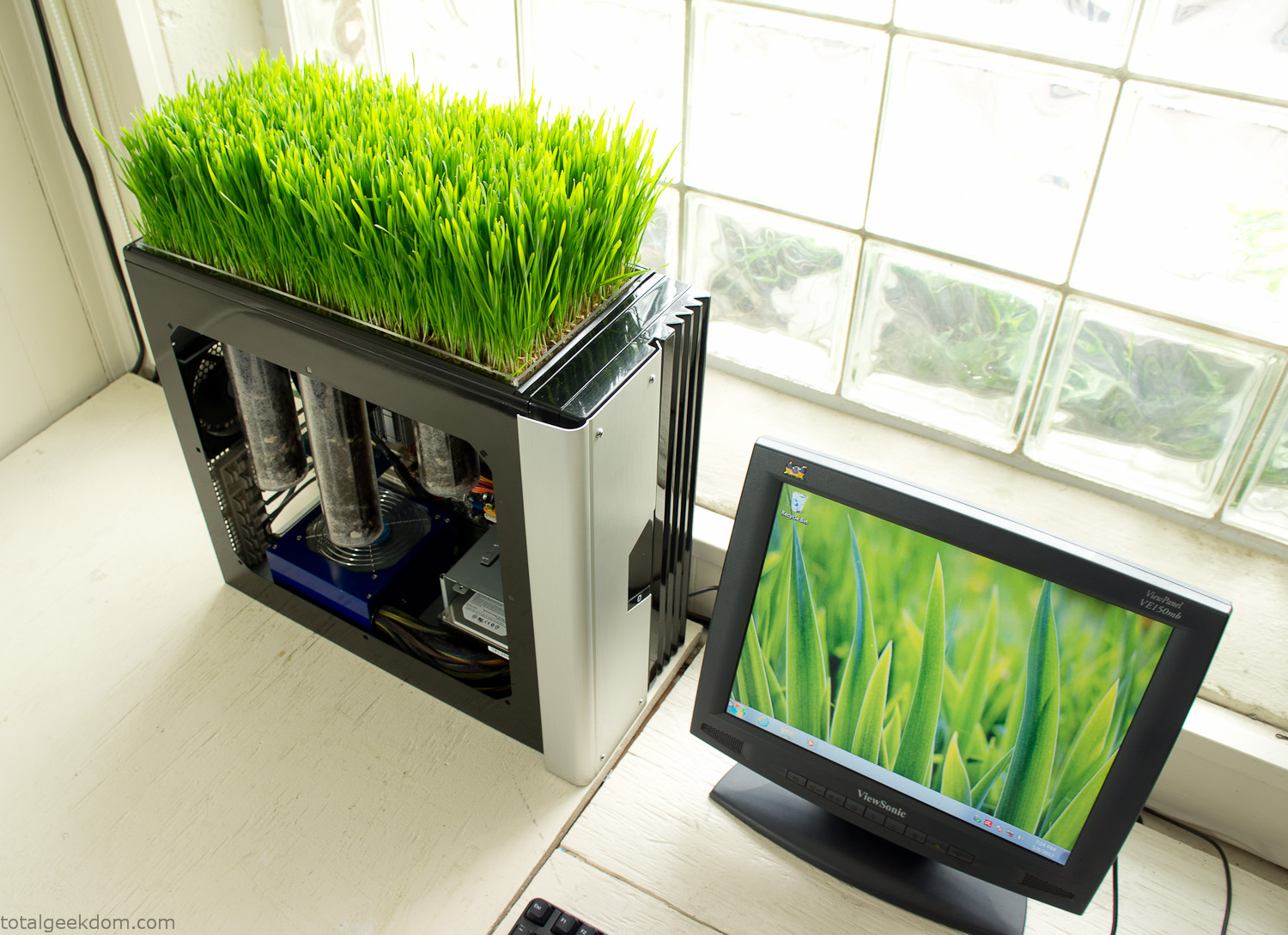
Bio Computer
I’ve been interested in working on a project for while that would combine something tech-based with something organic. Mixing the two elements intrigued me for a while. I’ve wanted to add flowers, or maybe plants of some sort to blend a little bit of nature into the space. I do receive a bit of sunlight through a glass block window, but the temperature in the basement is usually on the colder side. In the winter I don’t really heat the space because the folding farm outputs enough heat to keep the temperature comfortable. I didn’t want to change that aspect so I needed to come up with something that would tolerate slightly cooler temperatures and limited sunlight.
I can’t exactly recall when the idea came to me, but at some point I started wanting to use the heat from a computer as a way to warm the soil and help with germination/growth. I’m about as far from a botanist as it comes, I did some reading online and became pretty interested in the effects of soil temperature on germination/growth. I read different studies and papers from various universities. It was not too long into that process that I became hooked on the idea of using computer heat as a way to control the soil temperature of some sort of living plant life.
As the idea developed further I started looking into wheatgrass as a plant option. There is something clean and natural about the look and idea of a piece of grass growing in my basement. I thought the look would alter the space a little bit and add a bit of color along with something more than just metals and plastics. After reading enough studies and papers on the effects of soil temperature and germination with wheatgrass I felt like I had a good enough handle on the basics to tackle this.
The first step was finding a computer to adapt for the project. Luckily I had a lot of donated computers that people had given me for various project purposes. Most of them didn’t work, but by cobbling together various components from a bunch of different old computers I was able to come up with enough good parts to make a working computer.
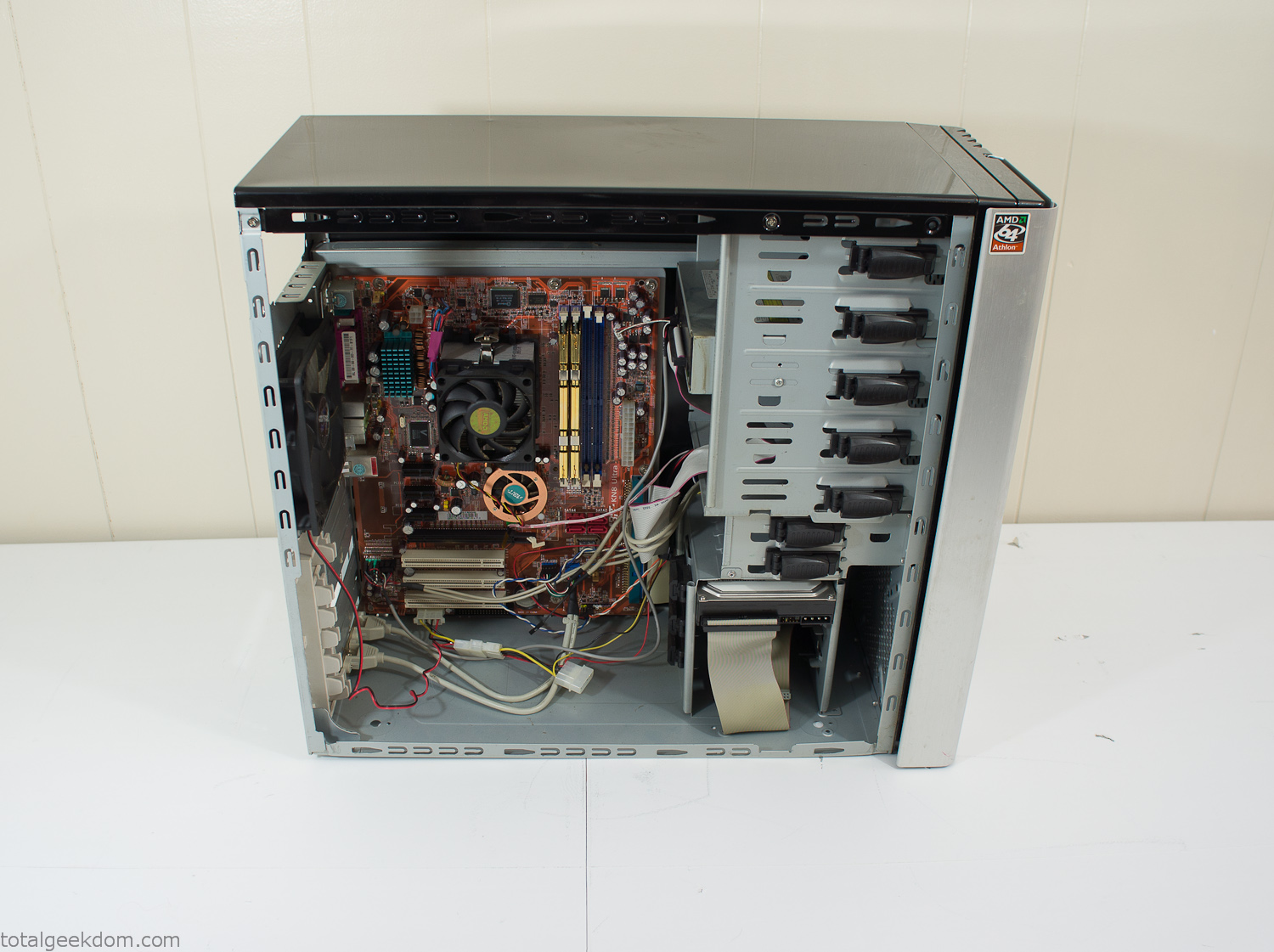
Donor Computer
At the time I was starting to get a formalized plan together for this project, another idea popped into my head. I’ve got a 5 yr. old who is already fairly geeky (just ask him to do his Jabba the Hutt impression for you) but he really does not get that much computer time. He’s getting to an age where he’s more inquisitive about tech stuff and I think he’s ready for his first computer. Since I was already well underway with this project it seemed like a perfect opportunity to orient the computer itself towards a learning tool for him in addition to using it as a way to blend something organic with a piece of technology.
With all of these goals in mind I started tinkering away. The computer hardware itself was nothing fancy, definitely outdated, but perfectly suited towards this project.
CPU- Pentium 4 (3 GHz)
Dell Factory Motherboard
Various Ram Sticks- 2gb
Old Maxtor 120gb IDE Hard Drive
Old FPS Power Supply
Donated Old Computer Case
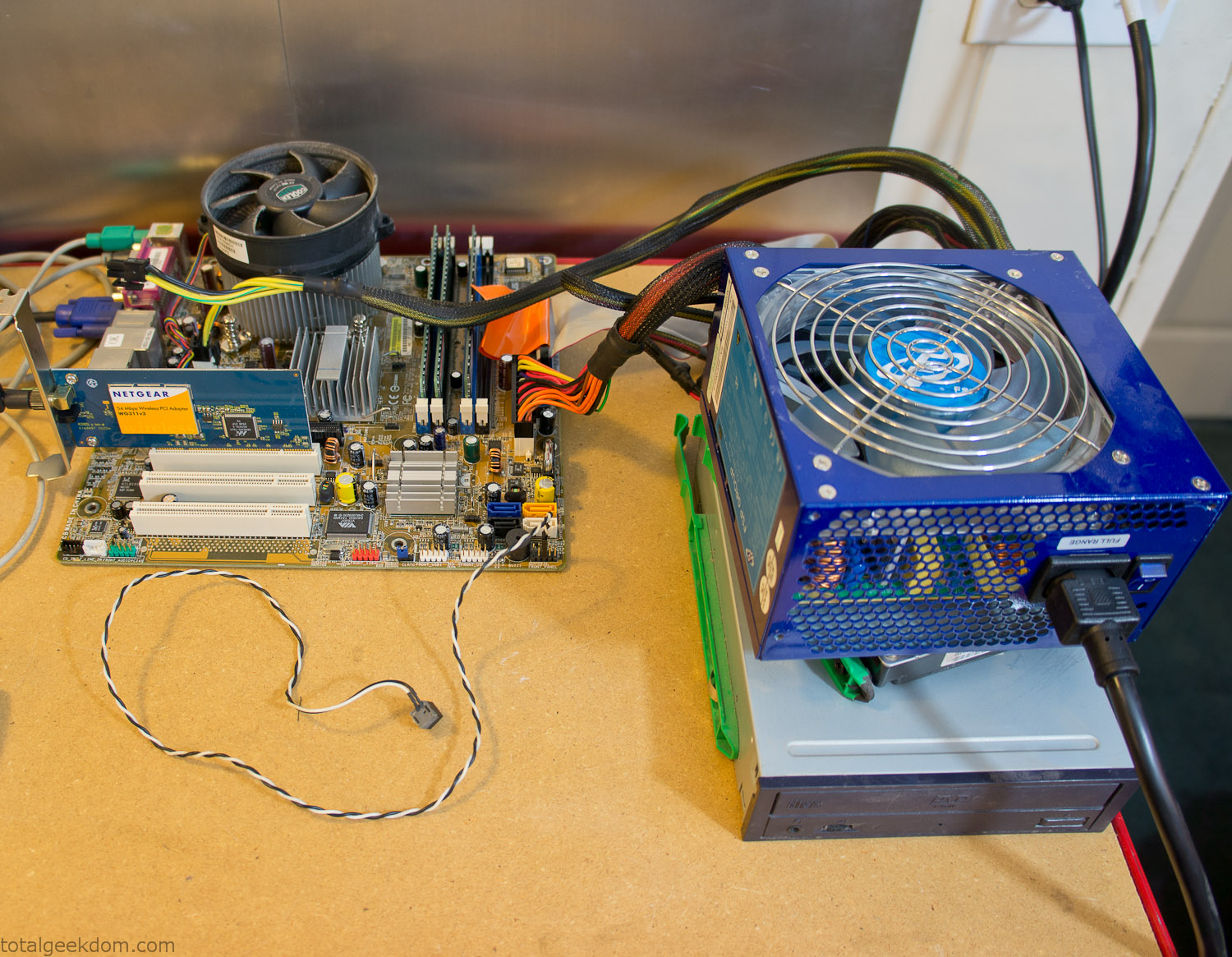
Computer Parts Testing
If you’ve spent any time around computer hardware in the last decade you’re probably well aware that Pentium 4 has a reputation for running hot. The 90nm Pentium 4 was named Prescott and it didn’t take long before the nickname Pres-hot popped up. In this case though that extra heat is going to be put towards good use.
Once the hardware was all in order I started working on the layout and arrangement for the case. I had originally envisioned the grass growing out of the top of the computer case. This seemed like it would provide a good blend between the hard edges of the computer and the soft feel of the grass. This also worked well with putting the soil area in the upper portion of the case, where the most heat should collect. After doing some initial tests with this configuration I found the measured temperature near the top of the case was the hottest. The placement of the CPU near the top of the case and the lack of airflow in that area contributed to these higher recorded temps.
After finishing with some initial tests I decided to completely strip the case down and start removing all the unnecessary brackets and pieces inside of the case. Like most computer cases all the internal brackets and mounts are riveted together, so I drilled all the rivets out of the components I wanted to remove and pulled them out. The gutted case looked pretty barren after being stripped.
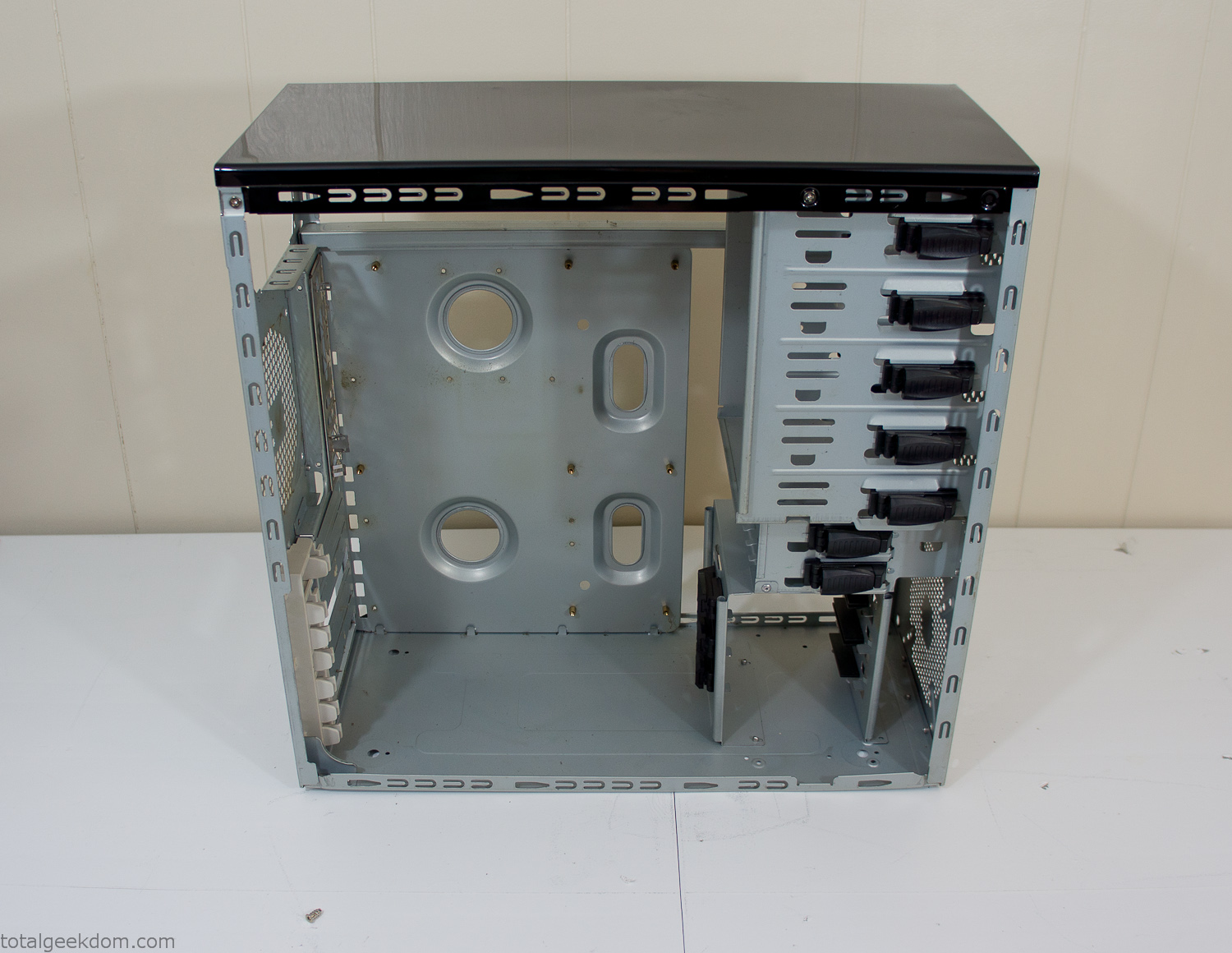
Empty Computer Case
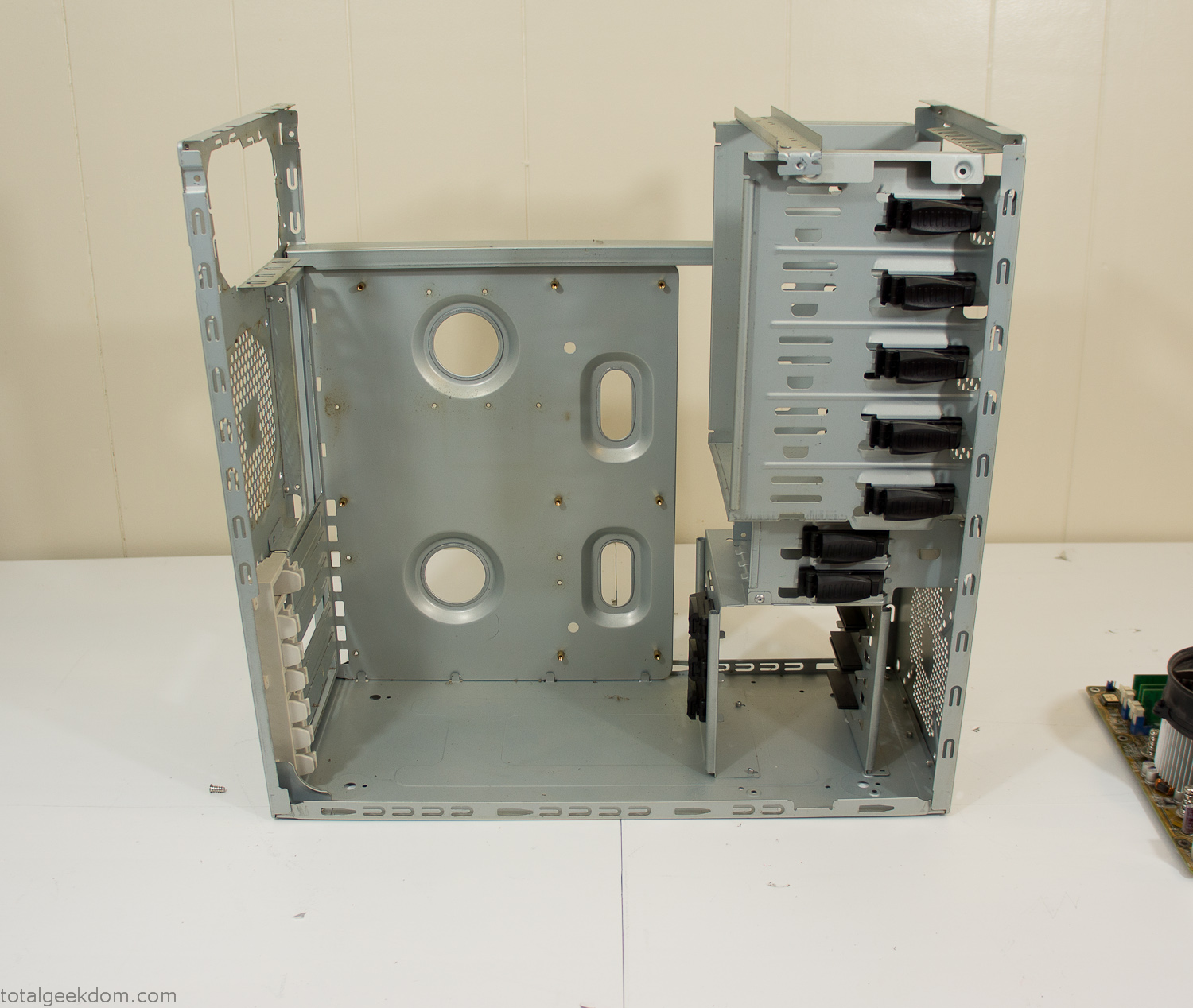
Dismantled Computer Case

Stripped Computer Case
In keeping with my original plan of having the computer blended with the organic grass I wanted it to be easy to see the inner workings of the computer and also the soil from the grass growing above. I needed something that was translucent, which left me with either glass or acrylic/polycarbonate as my options. I ended up choosing acrylic because I was able to find a cheap, used, die-cast model car display case top that was the perfect dimensions for the top of the case. Couldn’t go wrong for 5 bucks.
I test-fit the acrylic over the top of the computer case and marked my layout on the top of the case. My plan was to cut open the top of the computer case and insert the acrylic display case into the section I cut out. To cut open the top of the computer case I drilled a hole as a starting point and then used tin snips to cut through the thin gauge metal.
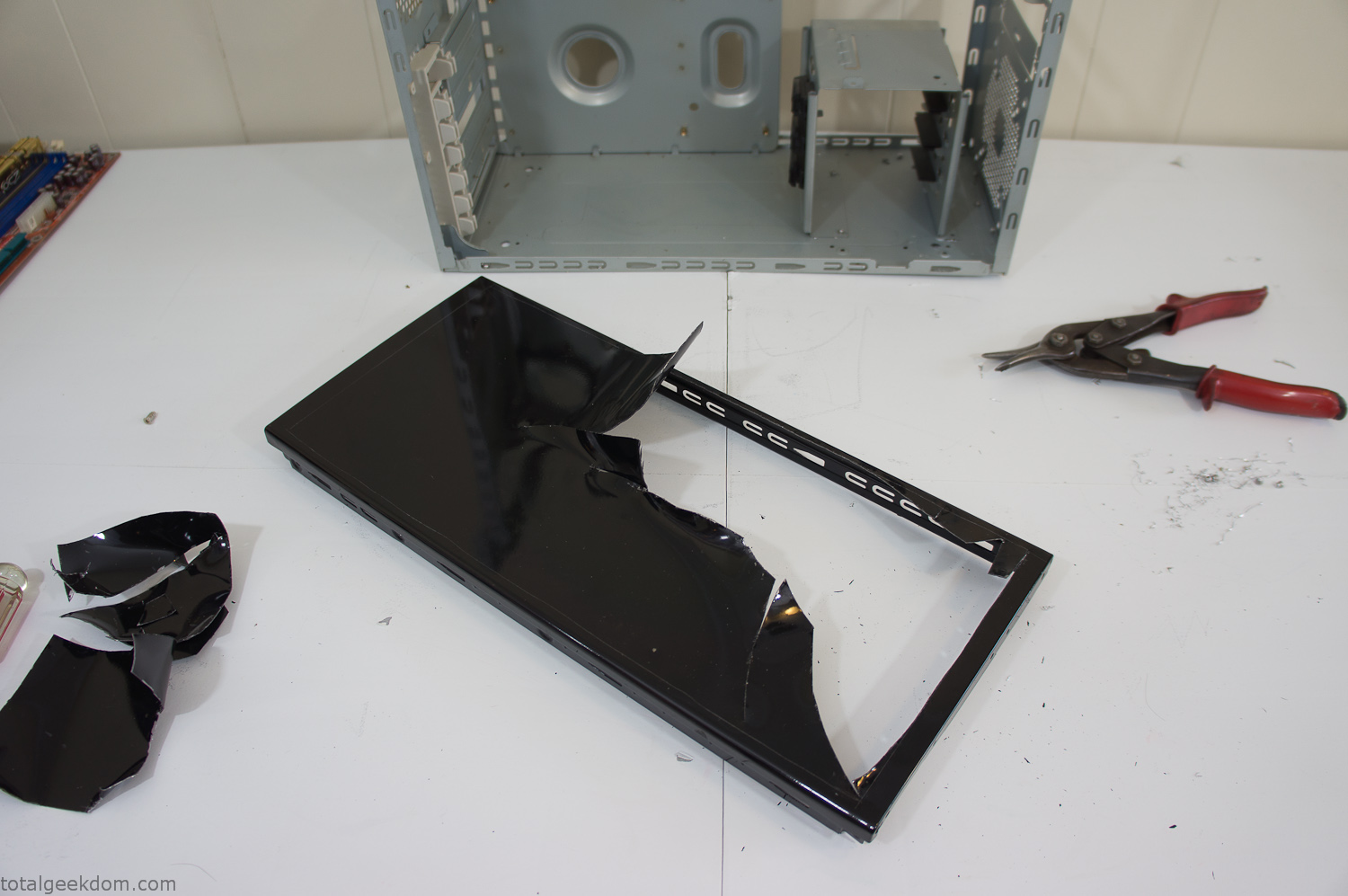
Computer Case Lid Modding
Once I had the metal opening cutout, I needed something to put along the edges of the freshly cut opening to create a clean and finished look. For $2 I was able to find some black, car-door-edge, plastic molding that worked perfectly.
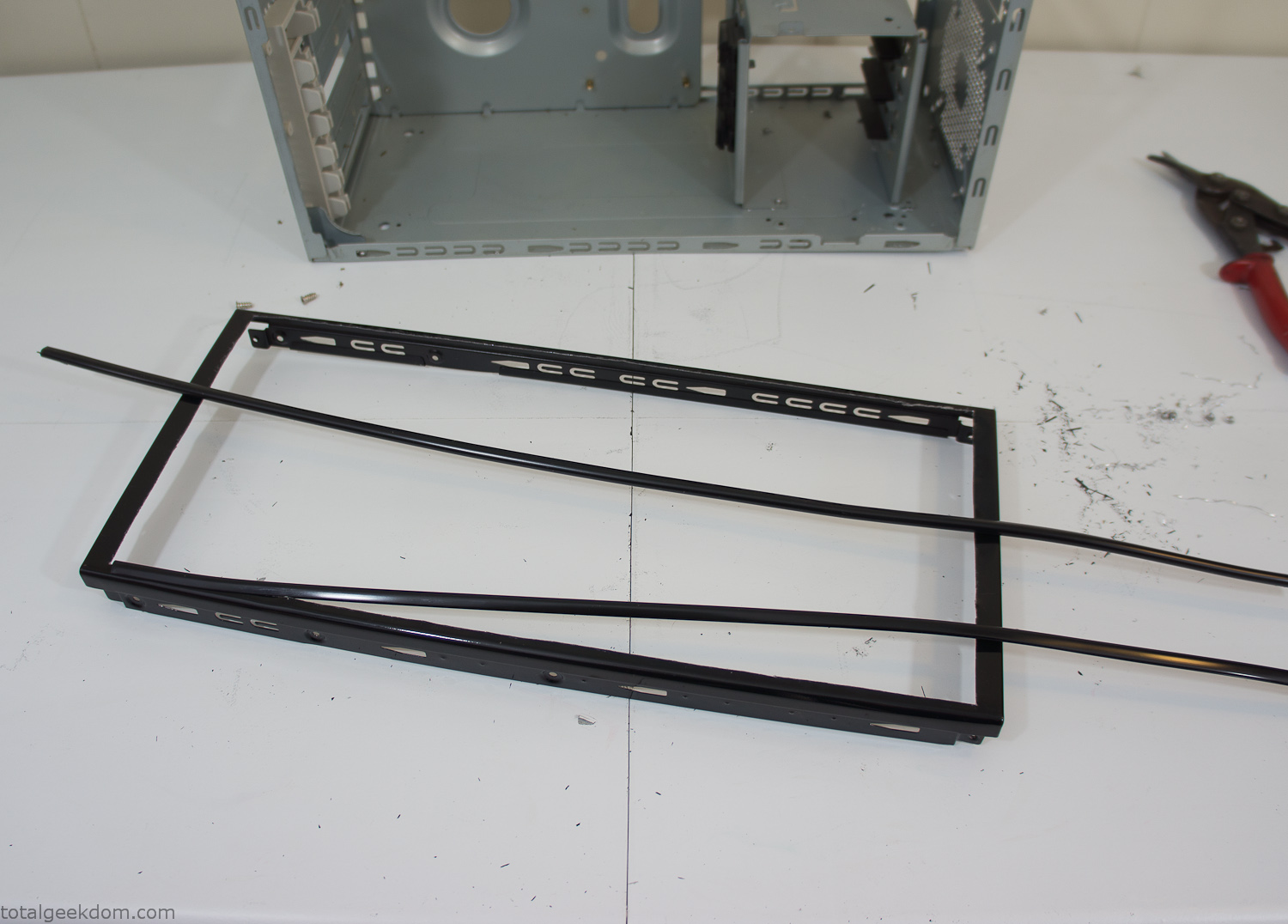
Modified Computer Case Lid
After getting the opening of the top of the computer handled and the acrylic case properly fitted, I moved onto some more testing with soil in the acrylic and the computer running. I wanted to see what kind of heat transfer I would get and how it would affect the soil temperature. I knew that using acrylic over glass would make it a little more difficult to heat the soil as acrylic is not that good at transferring heat. Luckily though I didn’t really need to alter the soil temperature that much, I just needed a little extra heat. Testing showed that heat transfer with just the single acrylic display case as my soil container was slow. So I decided to add some acrylic tubes. This would allow more surface are for soil to acrylic contact and also give me an area where I could add a mixed substrate to allow for soil drainage.
I went online and found a 3ft long section of 2 1/4″ clear acrylic tubing for $8 dollars. I wanted to add a couple of hanging cylinders off the main of the acrylic display case in the top of the computer case. To do this I needed to cut holes into the bottom of the display case. Cutting holes in acrylic is not always easy, it’s likely to chip and craze at the edges. To get around this I used a buildup of masking tape on both sides of the acrylic, to provide a little bit of resistance and strength. I placed the acrylic display case back into the computer and marked my layout for the tubes. I needed to leave clearance for the CPU cooler, power supply and hard drive mount.
After marking the layout, I used an air-powered pencil grinder and carbide tipped bit and cut through the acrylic case along my marked lines. After the initial shape was cutout I used a tube piece as a template and slowly worked on grinding the holes as perfectly round as I could get them so that the tube had a snug fit all the way around. The fit is pretty important as the acrylic cement that I used needs there to be a tight fit so that the acrylic can bond correctly.
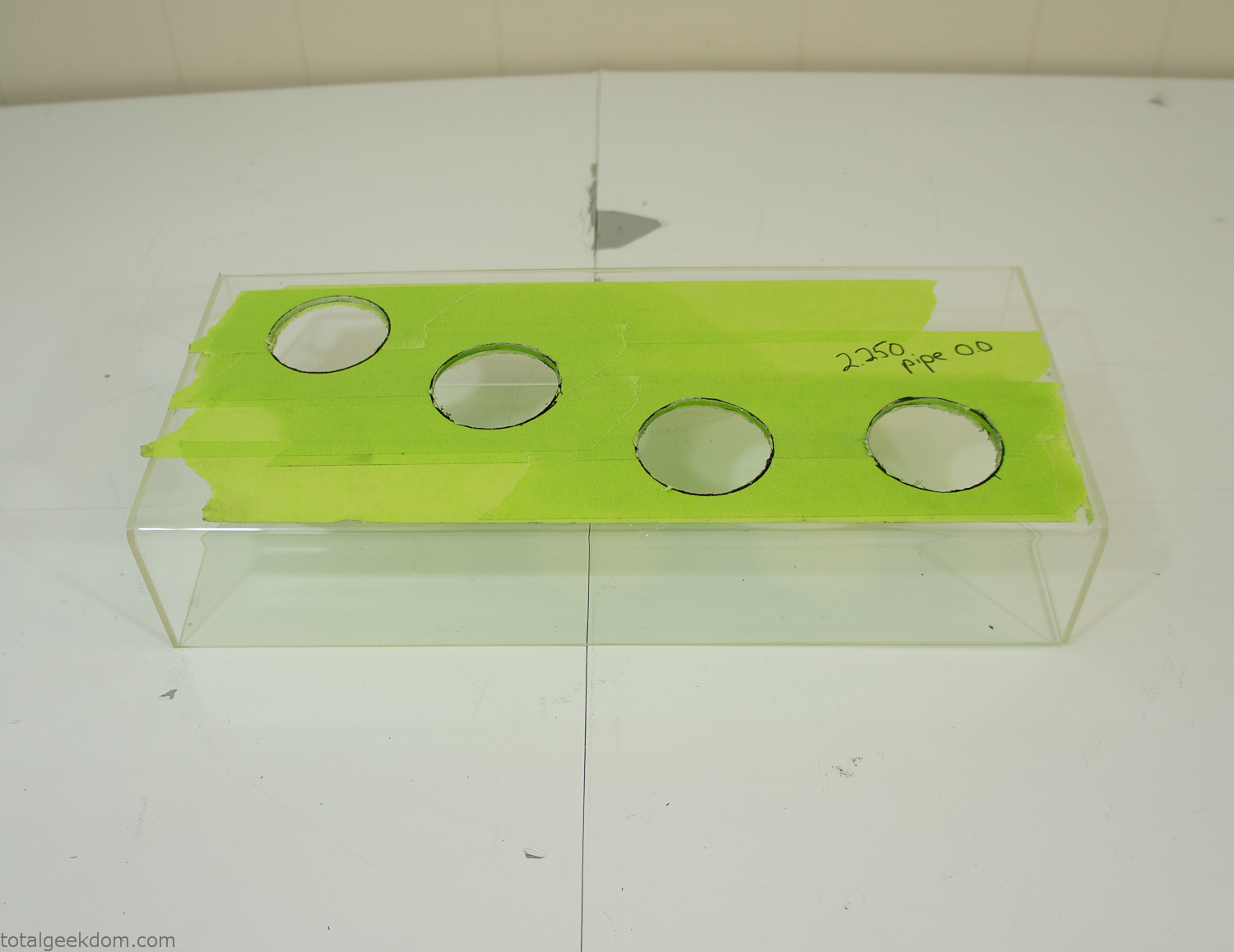
Acrylic Case Modifications
I placed the tubes into the acrylic case and mounted it in the computer and test fit the placement and height of the tubes. After getting everything lined up and oriented correctly I moved towards bonding the acrylic together. Using a needle dropper applicator I applied the cement to all the joints. After letting it set overnight I came back the next night and applied a thin coating of clear silicone caulk around all the joints just to ensure they were completely water tight
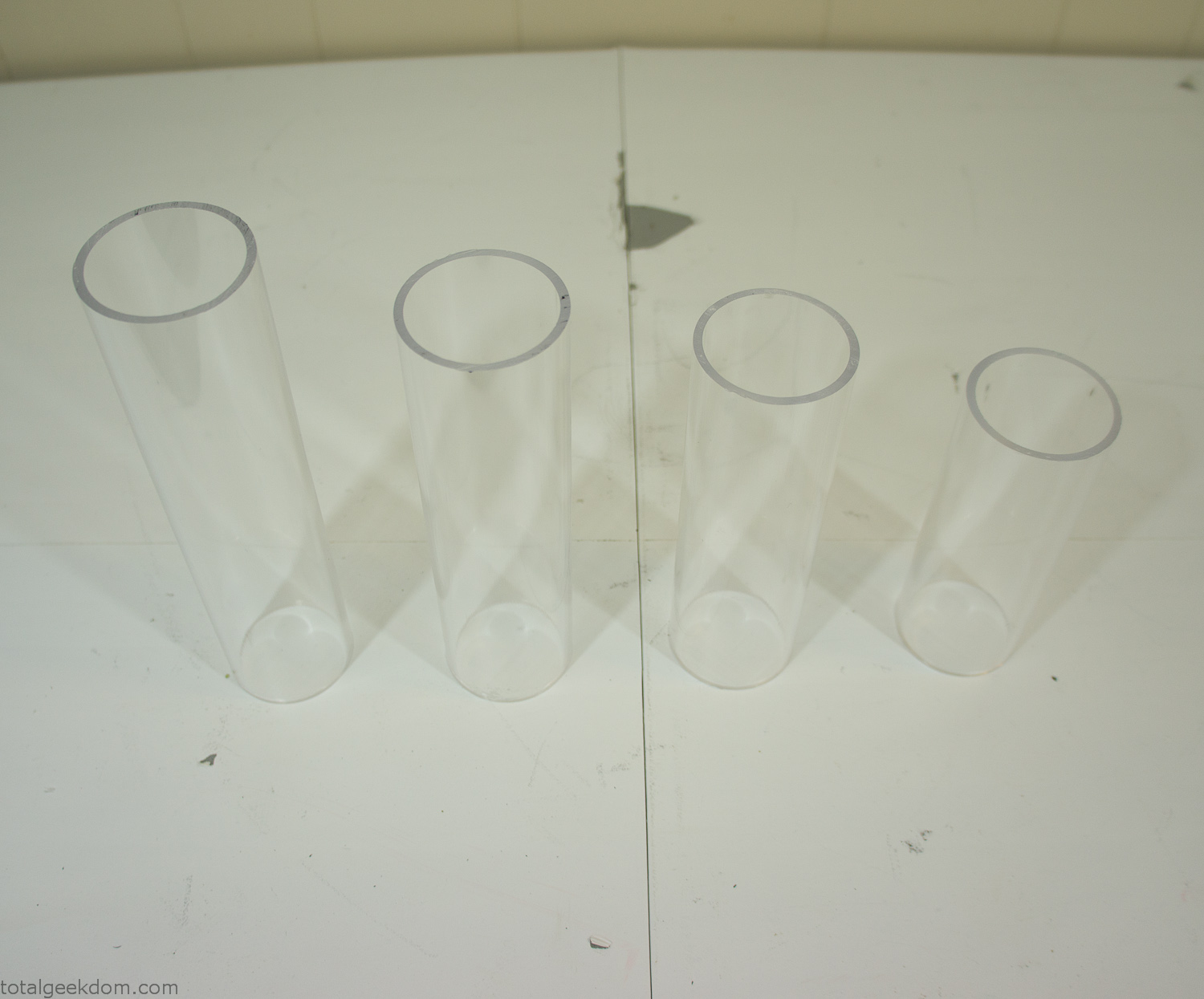
Acrylic Tubes
The next step was sealing up the bottom of the acrylic tubes. I looked at a couple of different options before realizing that the discs I had cut out of the acrylic case to fit the tubes would be almost the perfect size. Using a bench grinder and a test piece of tube I slowly ground each disc to the perfect size for a tight fit all the way around. I placed the clear acrylic discs into the bottom of each tube and repeated the same cementing and silicone caulking procedure to ensure they were water-tight. After a couple of days’ worth of drying I tested the case by filling it with water overnight and checking in the morning to make sure that no leaks had popped up.
In order to hold the weight of the acrylic case after adding soil, I drilled and installed a machine screw with a rubber cap at each corner of the computer case to bear the weight of the acrylic case.
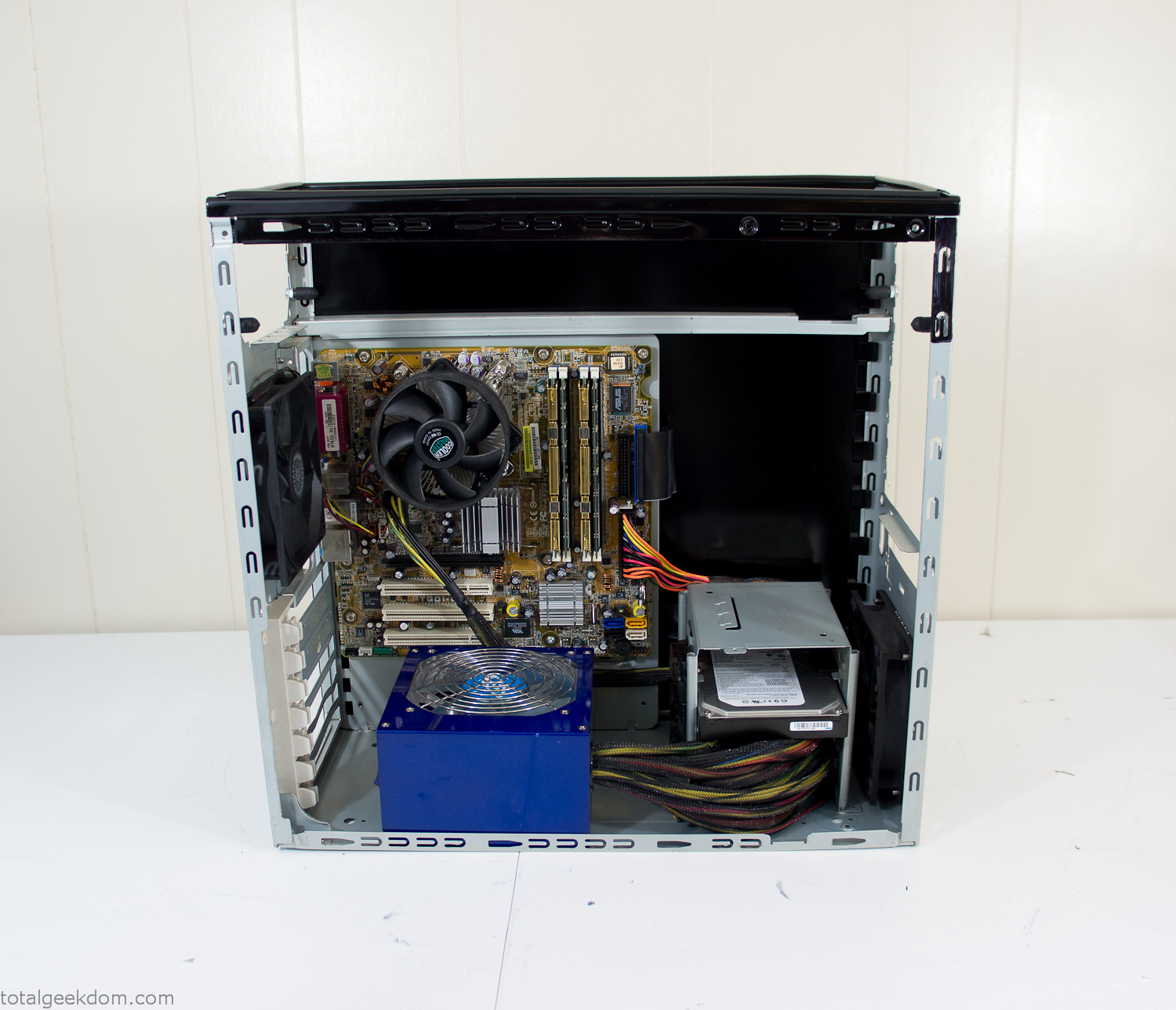
Once all the work was done with the acrylic case section I started reinstalling all the components. The motherboard, hard drive and power supply were added and then wired up.
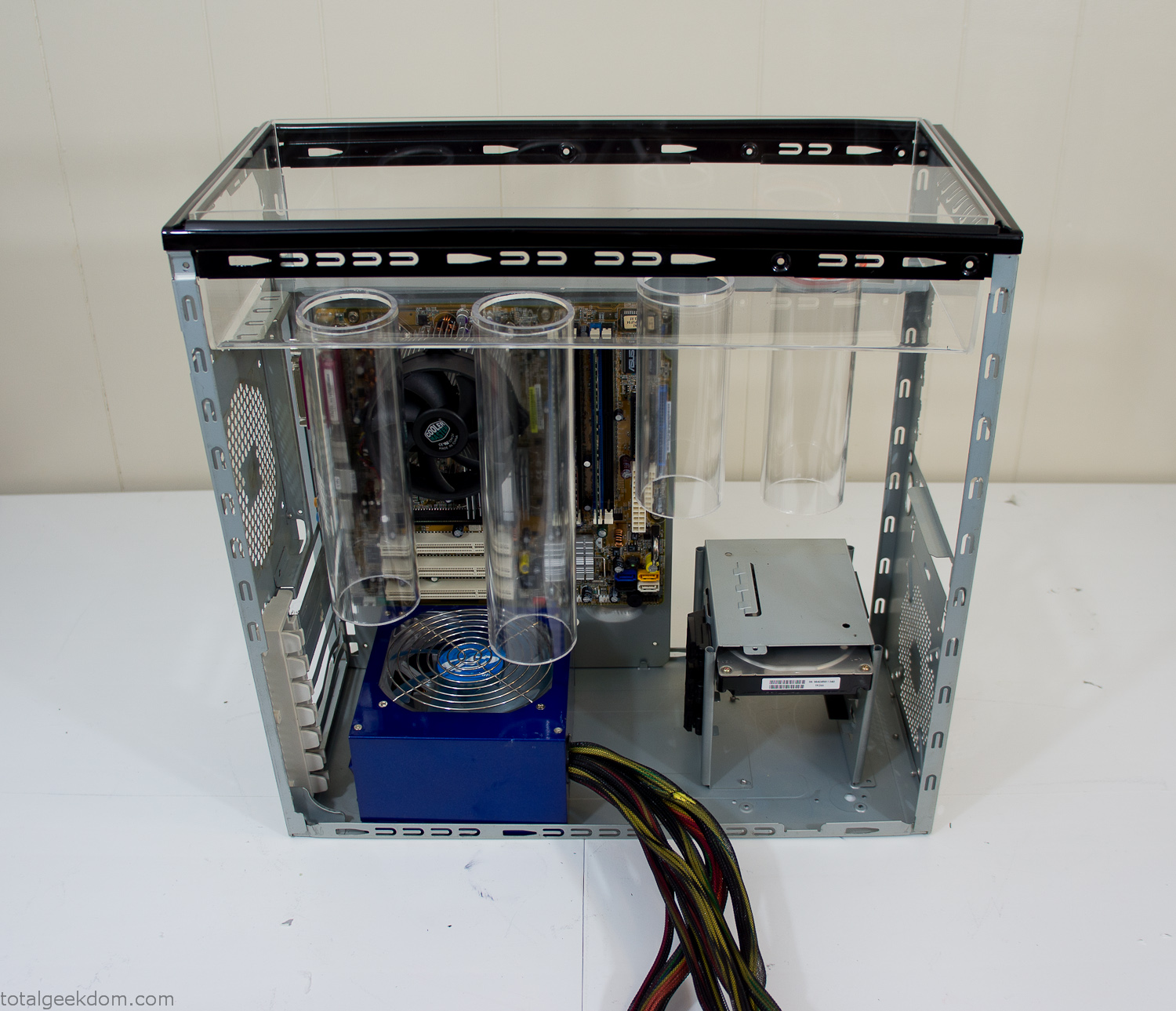
Mocked Up Computer Case
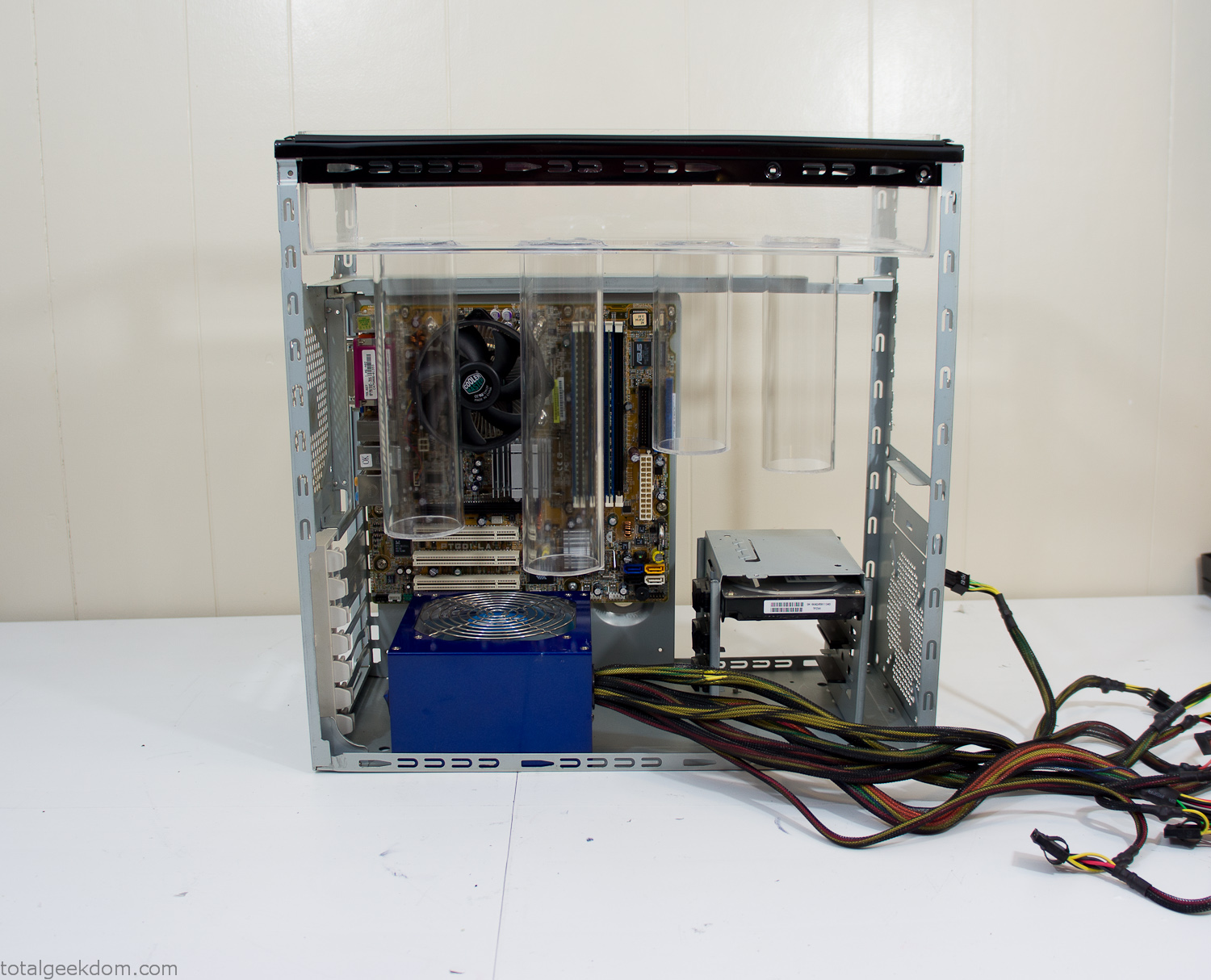
Power Supply Mockup
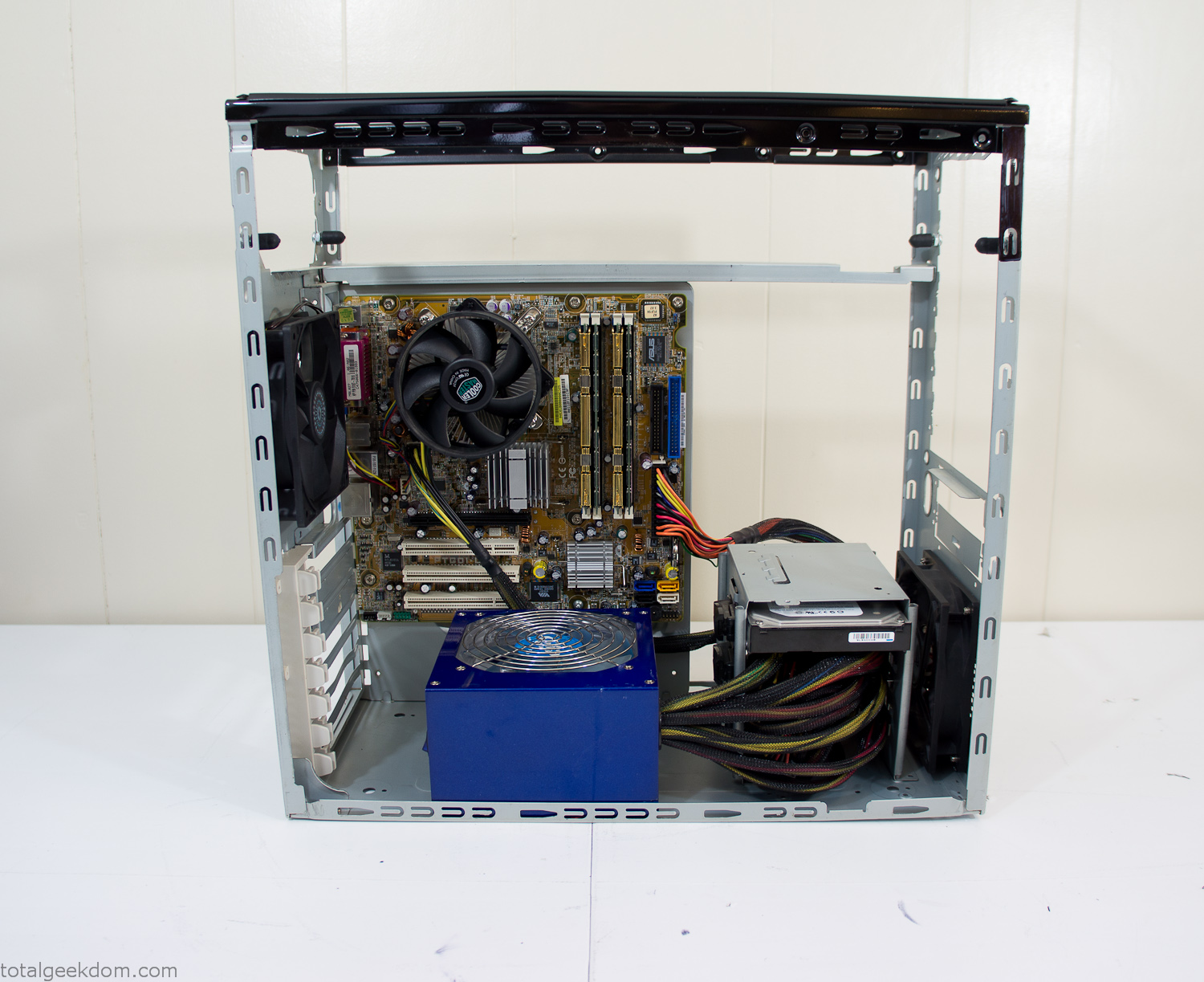
Computer Components Wired
Case Panel Installed
At this point all that was left was to make a clear panel for the side of the case. I had some left over acrylic sheets from a different project that were really close to the right size, after test fitting, marking and cutting I then had a clear side panel to see into the case. (I left this off for the pictures because it caused a reflection)
The final step was filling the case with soil and adding some wheatgrass. I had been test growing other samples of wheatgrass during the build process. So I had already a couple of different patches of grass growing. I tried to keep the soil level just below the top of the acrylic case edge to make it a little more seamless.
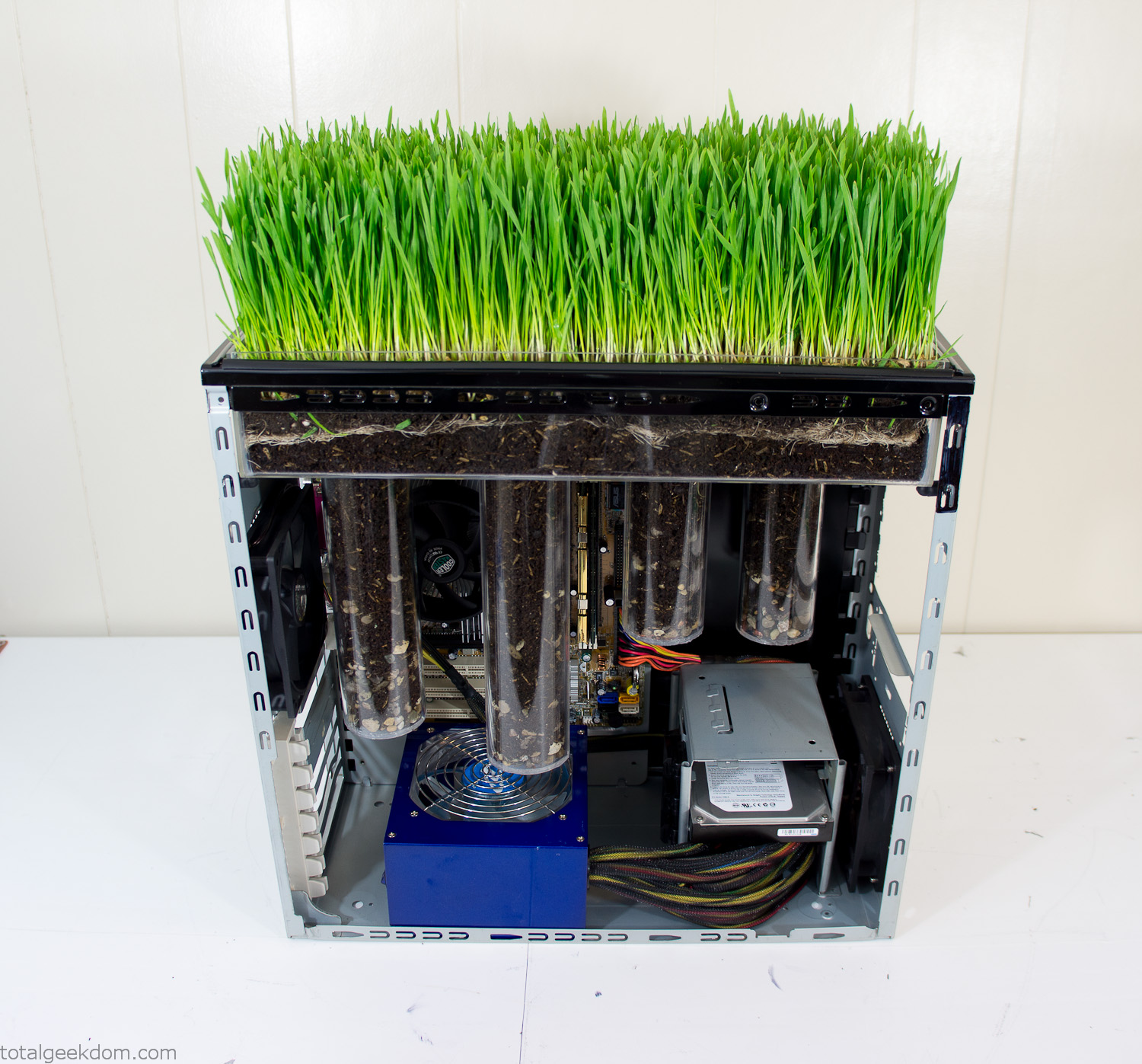
Grass Planted in Computer
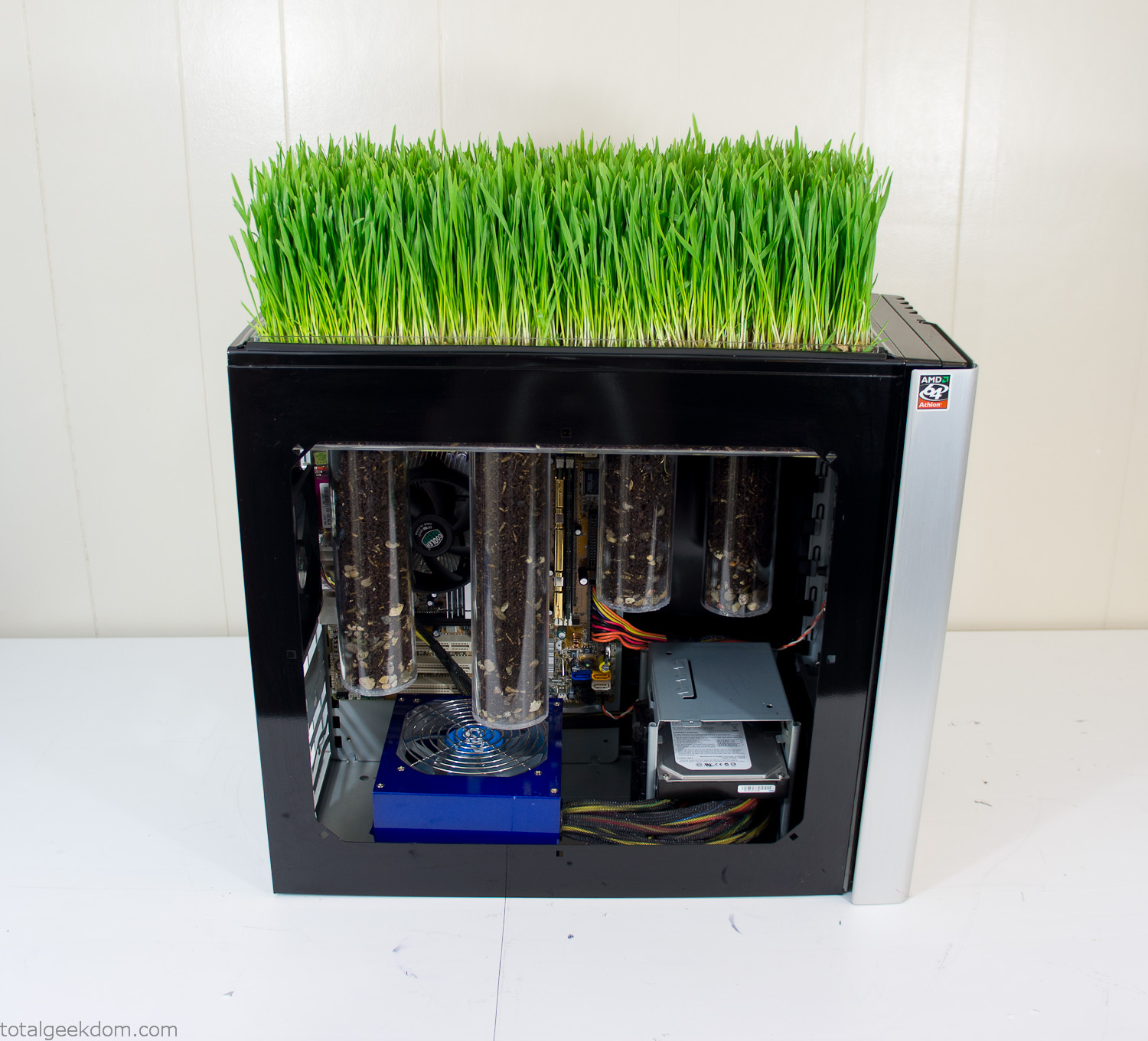
Grass and Case Panel Installed

Grass in Computer
For the computer itself I ended up installing Windows as well as Linux in a dual boot setup. Since the computer was going to be used by my son as something to play with I figured I should put both on there so he can tinker with them and learn as he goes. Besides, for important life decisions like picking an OS (Operating System) I think any good parent should present the options and then let their kid decide for themselves.
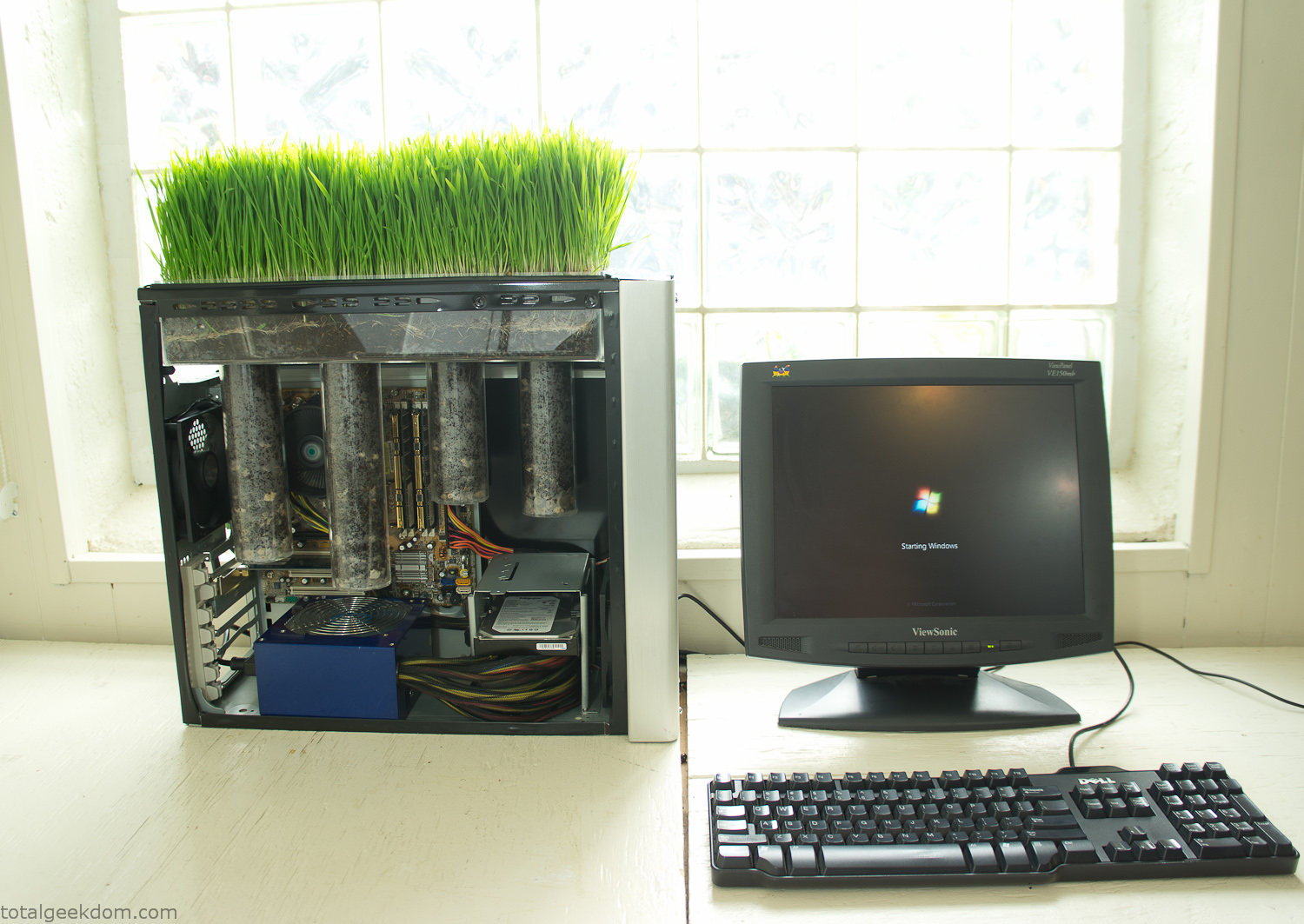
Starting Windows
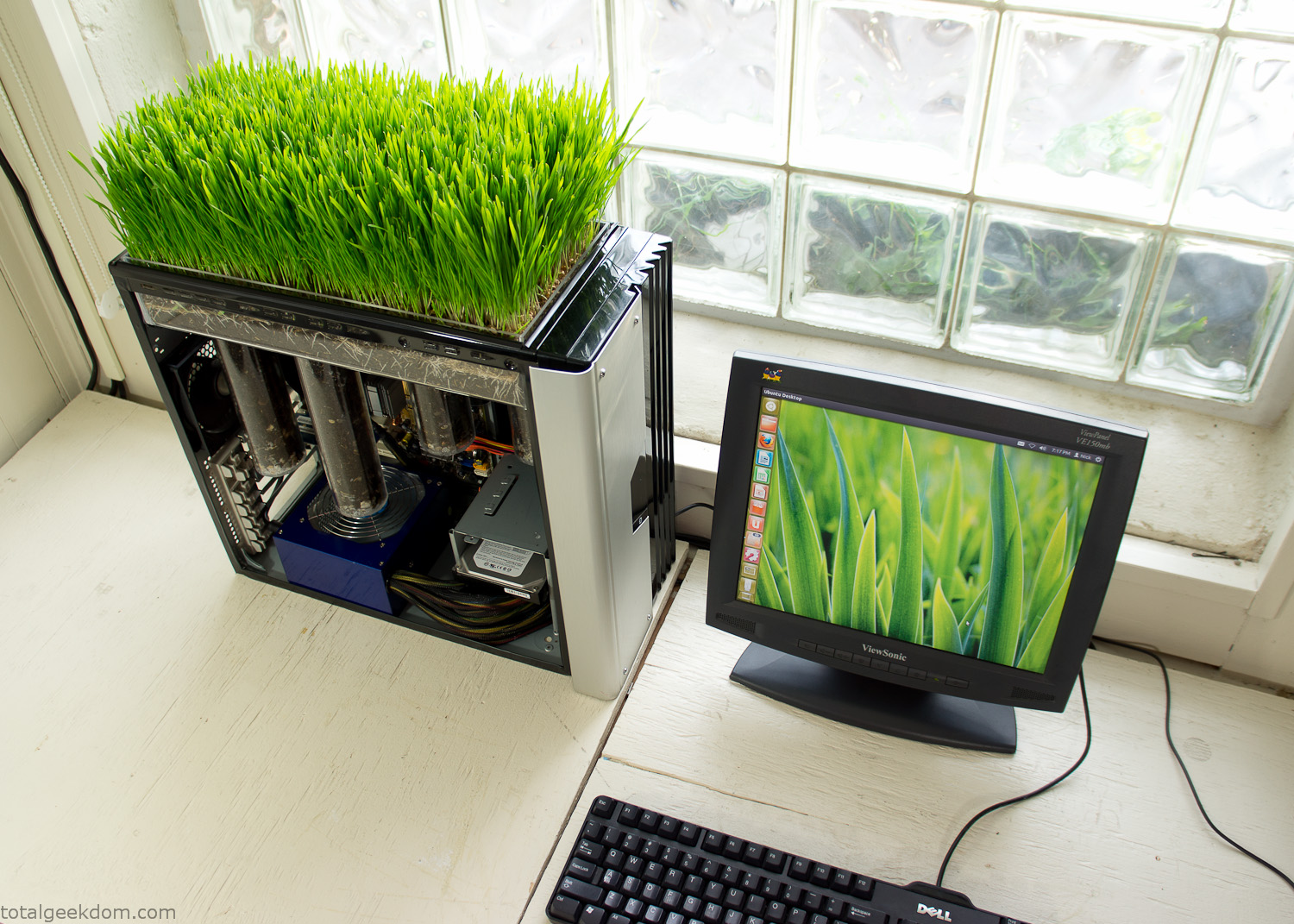
Linux Running
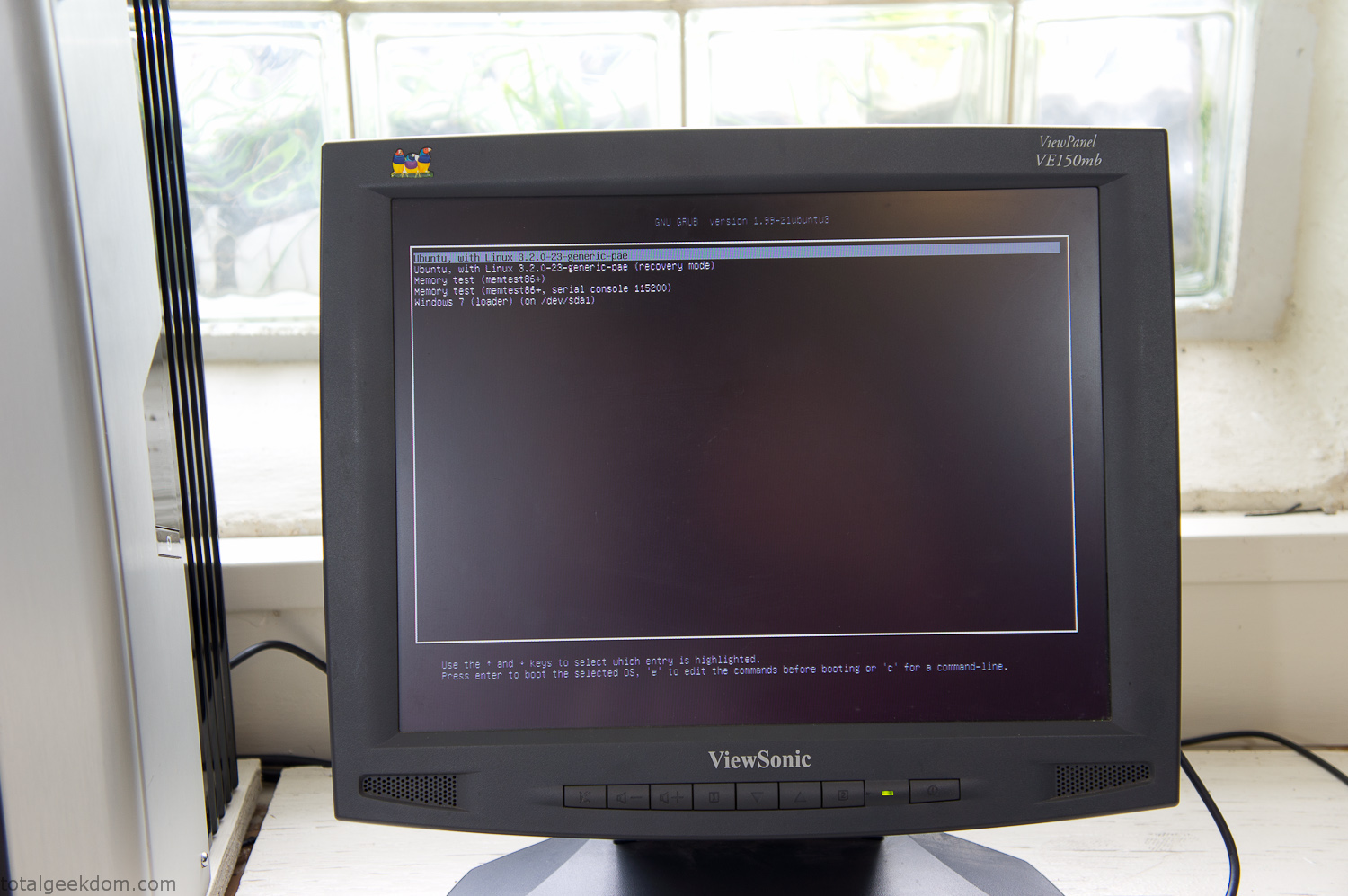
Dual Boot Screen
In the end I’m happy with the result of the project. It’s been fun experimenting with growing wheatgrass and I like how the natural look of grass is blended with the very modern, inorganic case.
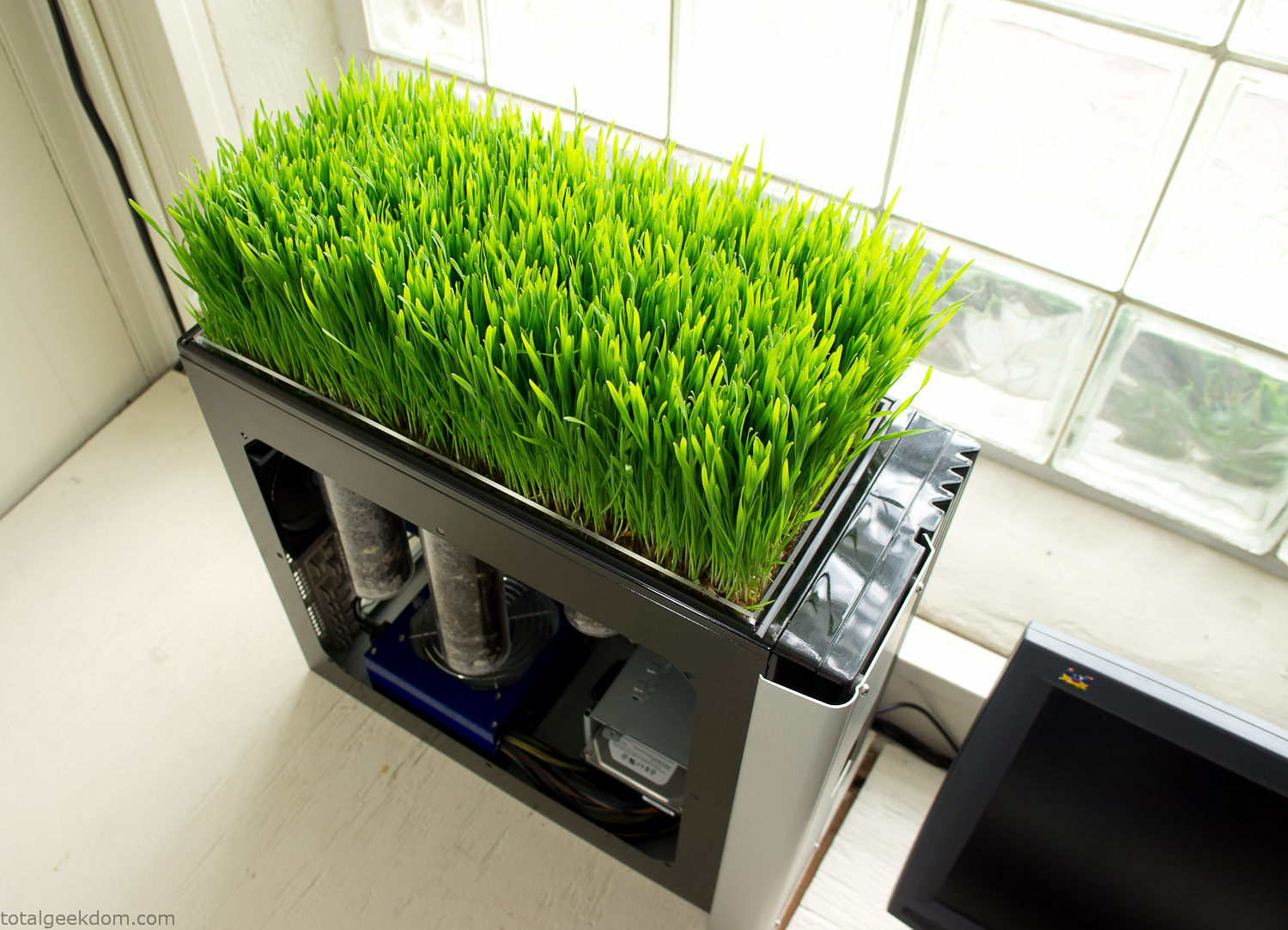
Computer Grass Growing
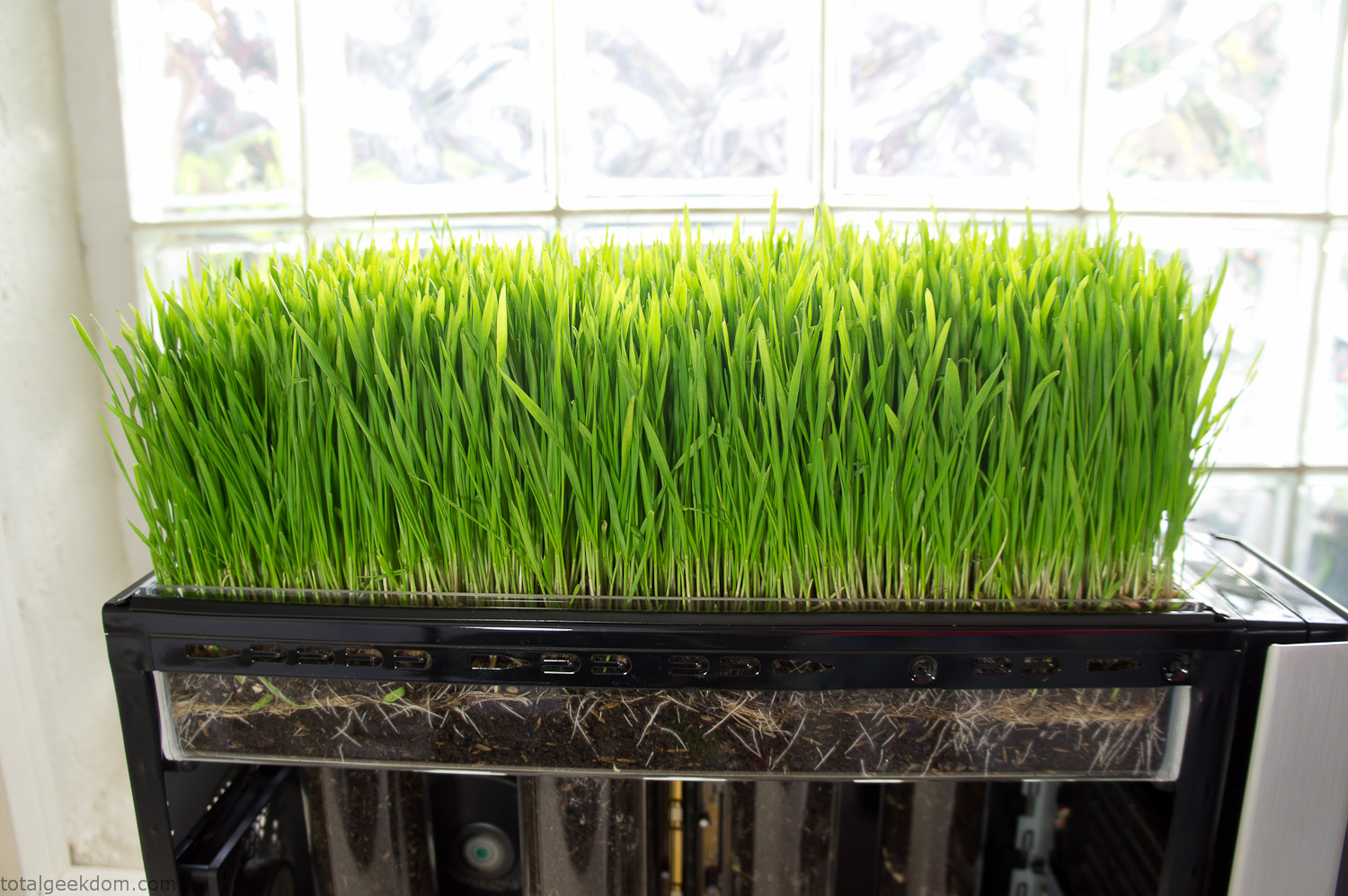
Grass in Computer Section
Notes
Temperature Testing
In testing the case temperature versus the soil temperature I found it was easiest to control the case temperature by using a variable fan speed control on both the inlet and outlet fans. By turning the fan speed down I could increase the temperature inside the case and correspondingly raise the soil temperature.
In order to maximize output of heat during these tests I used Prime95 to run the CPU at 100% load.
Using this method to control the case and soil temperature I played around with adjusting the soil temperature and then tracking the rate of growth of the Wheatgrass. The target temperature for peak growth seemed to fall around 66°F (19°C).
Using the fans to control the case temperature allowed me to vary the temperature inside the case from a low of 75°F (24°C) to a high of 91°F (33°C). In order to achieve the desired increase in soil temperature, I had to run the case temperature toward the higher end of the scale.
When the soil temperature was too high, the growth of the wheatgrass would slow.
Wheatgrass
The wheatgrass I used for my tests was nothing special, it can be found as seeds (berries) in a lot of health food stores and it grows relatively easily.
Caring for the wheatgrass is just a matter of keeping it watered. It’s a pretty easy plant to work with and doesn’t require any special skills.
Wheatgrass is often used as a nutritional supplement; it can be juiced and mixed into smoothies and other beverages. I plan on harvesting some of the grass and making some juices.
Plant Options
While wheatgrass offers a nice, attractive and easily grown option I do plan on trying other plants as well in the future. Since I already have the “planter” built all I have to do is add a different plant and see how it goes. I’m sure there will be some plants that don’t like the lower light environment, but it will be fun experimenting with other plants as well and seeing how they take.
Materials
Donated Computer- Free
Clear Acrylic Display Case- $5
Clear Acrylic Tube- $5
Plexiglass Side Panel- Free
Total- $10
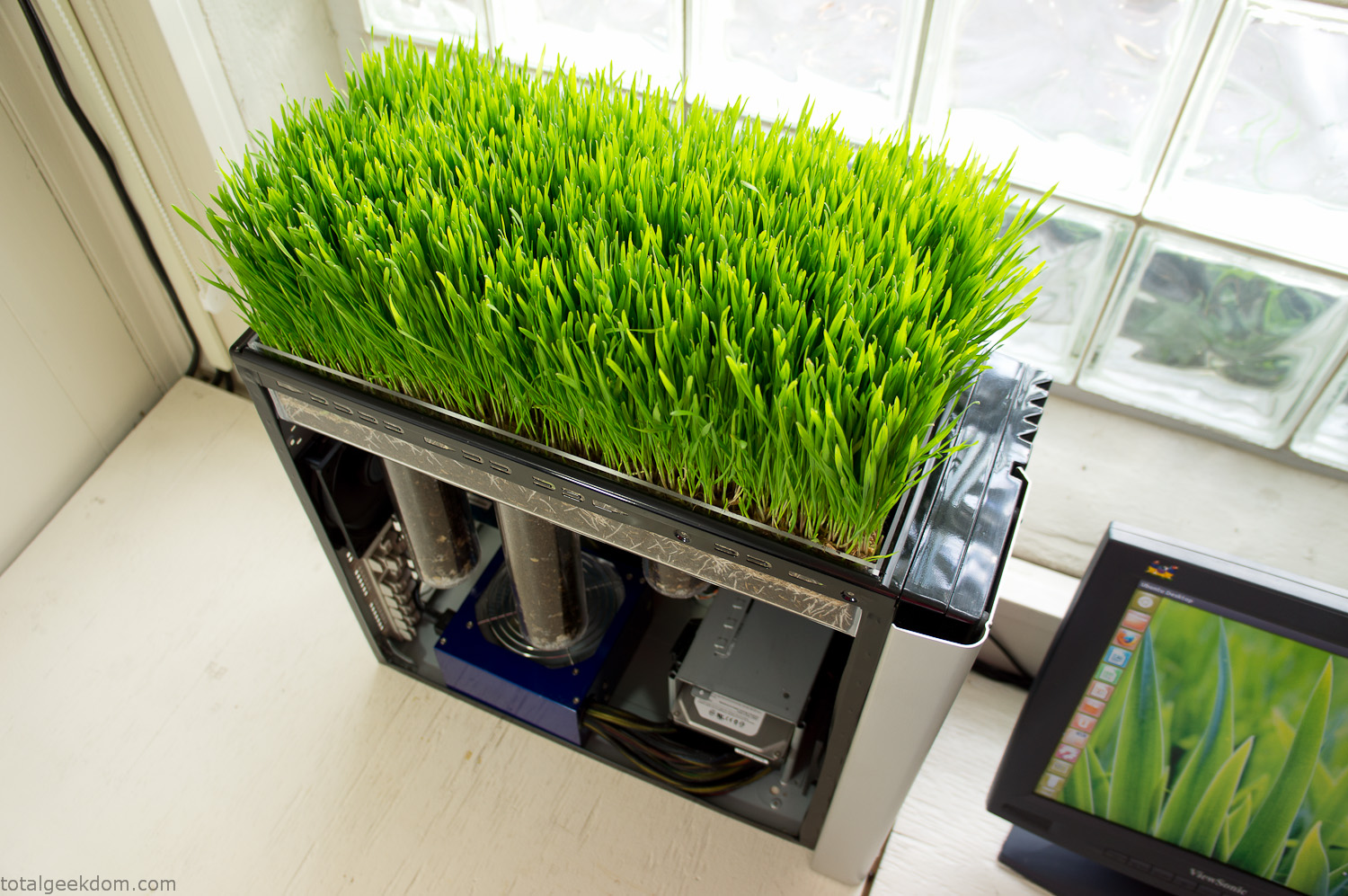
Bio Computer Running
 29.2k
29.2k
 13.2k
13.2k 7.1k
7.1k

 2.1k
2.1k 813
813 2.6k
2.6k
Comments 53,166
Нужен сантехник: сантехник на дом недорого
Нужен сантехник: https://santehnik-v-almaty.kz
furosemide
sex
Нужен сантехник: сантехник алматы недорого
BetView – блог про ставки от профессионального беттора Алексея Полякова.
прогнозы курс валют
Hey people,
I’ve been diving into the world of online gaming lately, and I’ve gotta say — it’s pretty damn addictive. At first, I was totally unsure. I mean, how do you even trust an online platform with your money, right? But after spending hours researching (and trying out a few dodgy sites so you can avoid that mess), I figured out a few things that set apart a trustworthy casino from a total scam. First off, if you’re new to all this, here’s the golden rule: **check the license**. If a casino doesn’t have a proper legal status (like from the Malta Gaming Authority or the UKGC), just run. No bonus is worth the risk of never seeing your funds again. Also — and I know no one wants to — read the T&Cs. That’s the only way to know what kind of wagering requirements they’ve slapped onto those so-called “generous” bonuses.
Now, let me share a site I’ve been hooked on these last few weeks. It’s been a total win. The interface? Super easy to navigate. Payouts? No waiting around. And the game selection? *Wild*. Slots, live dealers, blackjack, even some oddball options I hadn’t tried before. Check it out here: file_links[“C:\Users\Administrator\Desktop\Project\allcroud\Links2.txt”,1,N] What really stood out was the support team. I had a tiny issue with a bonus not working, and they got back to me in like 10 minutes. Compare that to other sites where you’re just ghosted by support — yeah, no thanks.
Also, if you’re into bonuses (and who isn’t?), this place offers some juicy ones. But here’s the trick: don’t just grab every shiny offer. It’s smarter to get clear terms than a huge bonus you’ll never be able to withdraw. I’m not saying you should go and bet the farm — please don’t. But if you’ve got a little extra cash and you’re looking for a fun way to unwind, online casinos can totally deliver. Just keep your head on, control your bankroll, and don’t treat it like a side hustle. It’s for fun, not for a paycheck. Anyway, just wanted to drop my experience here in case anyone’s interested or trying to find a trustworthy place to play. If you’ve got your own recommendations or even some horror tales, I’m all ears — love talking shop about this stuff.
Good luck out there, and spin smart, win big ??
актуальные зеркала kraken
https://git.project-hobbit.eu/gihofygh
https://hoo.be/vueabifk
C Blacksprut marketplace – bs2best at, вы точно сможете попасть на маркетплейс.
Актульнаяя ссылка bs2best at
GhПрисоединяйтесь к числу успешных покупателей , которые уже доверяют bs2best at.
С нами безопасней!
https://decidem.primariatm.ro/profiles/dubaicarrental9/
https://wanderlog.com/view/riqgkadmig/
bs2best at – это лучший сервис своего дела.
Мы поможем вам найти все ответы, которые Вы спрашивали у нас.
Актульнаяя ссылка bs2best
Your comprehensive posts captivate, seamlessly balancing intricacy and simplicity. It’d be captivating to see you analyse how these insights intertwine with emerging fields, such as artificial intelligence or quantum computing. Your knack for unveiling intriguing perspectives is remarkable. Thank you for continually providing such enlightening content. I’m eagerly anticipating your next contribution!
Site: https://talkchatgpt.com
чат джи пи ти на русском
https://www.rwaq.org/users/fiteristogu6-20250810152018
https://hub.docker.com/u/Uramotofourlily
BetView – блог про ставки от профессионального беттора Алексея Полякова.
беттинг
https://ucgp.jujuy.edu.ar/profile/ucafyduhj/
https://igrozavod.ru/ Альтернативные источники загрузки игр: Исследуйте новые возможности Не ограничивайтесь торрентами – откройте для себя мир альтернативных способов загрузки игр, предлагающих безопасность, удобство и высокое качество контента.
C Blacksprut marketplace – bs2best at, вы точно сможете попасть на маркетплейс.
Актульнаяя ссылка bs2best at
GhПрисоединяйтесь к числу успешных покупателей , которые уже доверяют bs2best at.
С нами безопасней!
https://source.coderefinery.org/dubaicarrental9
https://rant.li/dadafygagah/pafos-kupit-gashish-boshki-marikhuanu
https://odysee.com/@unzTomarulove
bs2best at – это лучший сервис своего дела.
Мы поможем вам найти все ответы, которые Вы спрашивали у нас.
Актульнаяя ссылка bs2best at
https://community.wongcw.com/blogs/1130828/%D0%9F%D0%B5%D0%BA%D0%B8%D0%BD-%D0%BA%D1%83%D0%BF%D0%B8%D1%82%D1%8C-%D0%BA%D0%BE%D0%BA%D0%B0%D0%B8%D0%BD-%D0%BC%D0%B5%D1%84%D0%B5%D0%B4%D1%80%D0%BE%D0%BD-%D0%BC%D0%B0%D1%80%D0%B8%D1%85%D1%83%D0%B0%D0%BD%D1%83
C Blacksprut marketplace – bs2best at, вы точно сможете попасть на маркетплейс.
Актульнаяя ссылка bs2best
GhПрисоединяйтесь к числу успешных покупателей , которые уже доверяют bs2best at.
С нами безопасней!
Платформа пропонує https://61000.com.ua різноманітний контент: порадник, новини, публікації на тему здоров’я, цікавих історій, місць Харкова, культурні події, архів статей та корисні матеріали для жителів міста
Платформа пропонує https://61000.com.ua різноманітний контент: порадник, новини, публікації на тему здоров’я, цікавих історій, місць Харкова, культурні події, архів статей та корисні матеріали для жителів міста
Платформа пропонує https://61000.com.ua різноманітний контент: порадник, новини, публікації на тему здоров’я, цікавих історій, місць Харкова, культурні події, архів статей та корисні матеріали для жителів міста
Платформа пропонує https://61000.com.ua різноманітний контент: порадник, новини, публікації на тему здоров’я, цікавих історій, місць Харкова, культурні події, архів статей та корисні матеріали для жителів міста
https://rant.li/xqcigacygi/trinkomali-kupit-ekstazi-mdma-lsd-kokain
https://pixelfed.tokyo/rinder57fatlo
bs2best at – это лучший сервис своего дела.
Мы поможем вам найти все ответы, которые Вы спрашивали у нас.
Актульнаяя ссылка bs2best
Hello! Someone in my Facebook group shared this website with us so
I came to give it a look. I’m definitely loving the information. I’m bookmarking and will be tweeting this to my followers!
Superb blog and outstanding style and design.
https://girlfriendvideos.com/members/d/dubaicarrental9/
https://pixelfed.tokyo/lubbewantlux519
Быстрый заказ такси https://taxi-v-sverdlovske.ru онлайн и по телефону. Подача от 5 минут, комфортные автомобили, безопасные поездки. Удобная оплата и выгодные тарифы на любые направления.
Закажите такси https://vezem-sverdlovsk.ru круглосуточно. Быстрая подача, фиксированные цены, комфорт и безопасность в каждой поездке. Подходит для деловых, туристических и семейных поездок.
Быстрый заказ такси https://taxi-v-sverdlovske.ru онлайн и по телефону. Подача от 5 минут, комфортные автомобили, безопасные поездки. Удобная оплата и выгодные тарифы на любые направления.
Закажите такси https://vezem-sverdlovsk.ru круглосуточно. Быстрая подача, фиксированные цены, комфорт и безопасность в каждой поездке. Подходит для деловых, туристических и семейных поездок.
Быстрый заказ такси https://taxi-v-sverdlovske.ru онлайн и по телефону. Подача от 5 минут, комфортные автомобили, безопасные поездки. Удобная оплата и выгодные тарифы на любые направления.
Закажите такси https://vezem-sverdlovsk.ru круглосуточно. Быстрая подача, фиксированные цены, комфорт и безопасность в каждой поездке. Подходит для деловых, туристических и семейных поездок.
Быстрый заказ такси https://taxi-v-sverdlovske.ru онлайн и по телефону. Подача от 5 минут, комфортные автомобили, безопасные поездки. Удобная оплата и выгодные тарифы на любые направления.
Закажите такси https://vezem-sverdlovsk.ru круглосуточно. Быстрая подача, фиксированные цены, комфорт и безопасность в каждой поездке. Подходит для деловых, туристических и семейных поездок.
Онлайн-заказ такси https://sverdlovsk-taxi.ru за пару кликов. Быстро, удобно, безопасно. Подача в течение 5–10 минут, разные классы авто, безналичный расчет и прозрачные тарифы.
Онлайн-заказ такси https://sverdlovsk-taxi.ru за пару кликов. Быстро, удобно, безопасно. Подача в течение 5–10 минут, разные классы авто, безналичный расчет и прозрачные тарифы.
C Blacksprut marketplace – bs2best at, вы точно сможете попасть на маркетплейс.
Актульнаяя ссылка bs2best at
GhПрисоединяйтесь к числу успешных покупателей , которые уже доверяют bs2best at.
С нами безопасней!
Онлайн-заказ такси https://sverdlovsk-taxi.ru за пару кликов. Быстро, удобно, безопасно. Подача в течение 5–10 минут, разные классы авто, безналичный расчет и прозрачные тарифы.
Заказать такси https://taxi-sverdlovsk.ru онлайн быстро и удобно. Круглосуточная подача, комфортные автомобили, вежливые водители. Доступные цены, безналичная оплата, поездки по городу и за его пределы
Онлайн-заказ такси https://sverdlovsk-taxi.ru за пару кликов. Быстро, удобно, безопасно. Подача в течение 5–10 минут, разные классы авто, безналичный расчет и прозрачные тарифы.
Заказать такси https://taxi-sverdlovsk.ru онлайн быстро и удобно. Круглосуточная подача, комфортные автомобили, вежливые водители. Доступные цены, безналичная оплата, поездки по городу и за его пределы
Заказать такси https://taxi-sverdlovsk.ru онлайн быстро и удобно. Круглосуточная подача, комфортные автомобили, вежливые водители. Доступные цены, безналичная оплата, поездки по городу и за его пределы
https://community.wongcw.com/blogs/1129756/%D0%A0%D0%B5%D1%82%D0%B8%D0%BC%D0%BD%D0%BE-%D0%BA%D1%83%D0%BF%D0%B8%D1%82%D1%8C-%D0%B0%D0%BC%D1%84%D0%B5%D1%82%D0%B0%D0%BC%D0%B8%D0%BD-%D0%BA%D0%BE%D0%BA%D0%B0%D0%B8%D0%BD-%D1%8D%D0%BA%D1%81%D1%82%D0%B0%D0%B7%D0%B8
Заказать такси https://taxi-sverdlovsk.ru онлайн быстро и удобно. Круглосуточная подача, комфортные автомобили, вежливые водители. Доступные цены, безналичная оплата, поездки по городу и за его пределы
https://hoo.be/agcecoeucy
My brother suggested I might like this website. He was entirely right.
This submit truly made my day. You cann’t consider
simply how so much time I had spent for this information! Thanks!
bs2best at – это лучший сервис своего дела.
Мы поможем вам найти все ответы, которые Вы спрашивали у нас.
Актульнаяя ссылка bs2best at
https://www.metooo.io/u/689babff664afa7f672307ef
C Blacksprut marketplace – bs2best at, вы точно сможете попасть на маркетплейс.
Актульнаяя ссылка bs2best
GhПрисоединяйтесь к числу успешных покупателей , которые уже доверяют bs2best at.
С нами безопасней!
https://rant.li/868ud5yp47
https://wanderlog.com/view/rzovekgrgd/
bs2best at – это лучший сервис своего дела.
Мы поможем вам найти все ответы, которые Вы спрашивали у нас.
Актульнаяя ссылка bs2best at
Apixaban
https://bio.site/mofaboybib
https://muckrack.com/person-27442468
cgminer download
CGMiner Application: Effective Mining Solution for Cryptocurrency Enthusiasts
What Exactly is CGMiner?
CGMiner stands as one of the leading miners that enables mining Bitcoin, Litecoin, Dogecoin, and numerous other cryptocurrencies. The application is compatible with ASIC, FPGA, and GPU (up to version 3.7.2). CGMiner is adaptable in configuration and provides multi-threaded processing, working with multiple pools, as well as remote control and surveillance of equipment operational parameters.
Key Features
Support for Multiple Cryptocurrencies
CGMiner specializes in mining various cryptocurrencies including Bitcoin (BTC), Litecoin (LTC), Dogecoin (DOGE), and multiple alternative coins with different algorithms.
Hardware Compatibility
The software is compatible with several types of mining hardware:
– ASIC – Dedicated processors for optimal performance
– Field-Programmable Gate Arrays – Reprogrammable chips for custom mining tasks
– Graphics Cards – Graphics cards (supported up to version 3.7.2)
Advanced Capabilities
– Configurable parameters – Comprehensive options for equipment tuning
– Multi-threaded operations – Optimal exploitation of processor and graphics resources
– Multiple pool compatibility – Seamless transition between mining platforms
– Distant control – Operate and track mining rigs from remote locations
Why Choose CGMiner?
CGMiner stands out for its reliability, exceptional speed, and economic efficiency. It’s entirely free, open-source, and delivers detailed logs for efficiency evaluation. The application’s extensive capabilities makes it ideal for both domestic and industrial-scale mining activities.
Installation Guide
Setup is simple on both Linux and Windows systems. Configuration can be done through configuration files or CLI parameters, providing accessibility for users of all experience levels.
Conclusion
CGMiner continues to be a leading solution for professional crypto mining, delivering the stability and efficiency needed for successful mining operations.
https://nguyen73louise.bandcamp.com/album/blend
онлайн музыкальный редактор обрезка аудио онлайн
audio online bearbeiten mp3 zuschneiden