
With every passing project I feel like my basement is being converted from a living only area, to a work and project area. Computers being built, gadgets being taken apart, Lego projects all around. I’m not complaining by any means, but I do feel as my basement becomes populated with more and more tech based projects that the environment is missing something organic, something natural to balance things out.
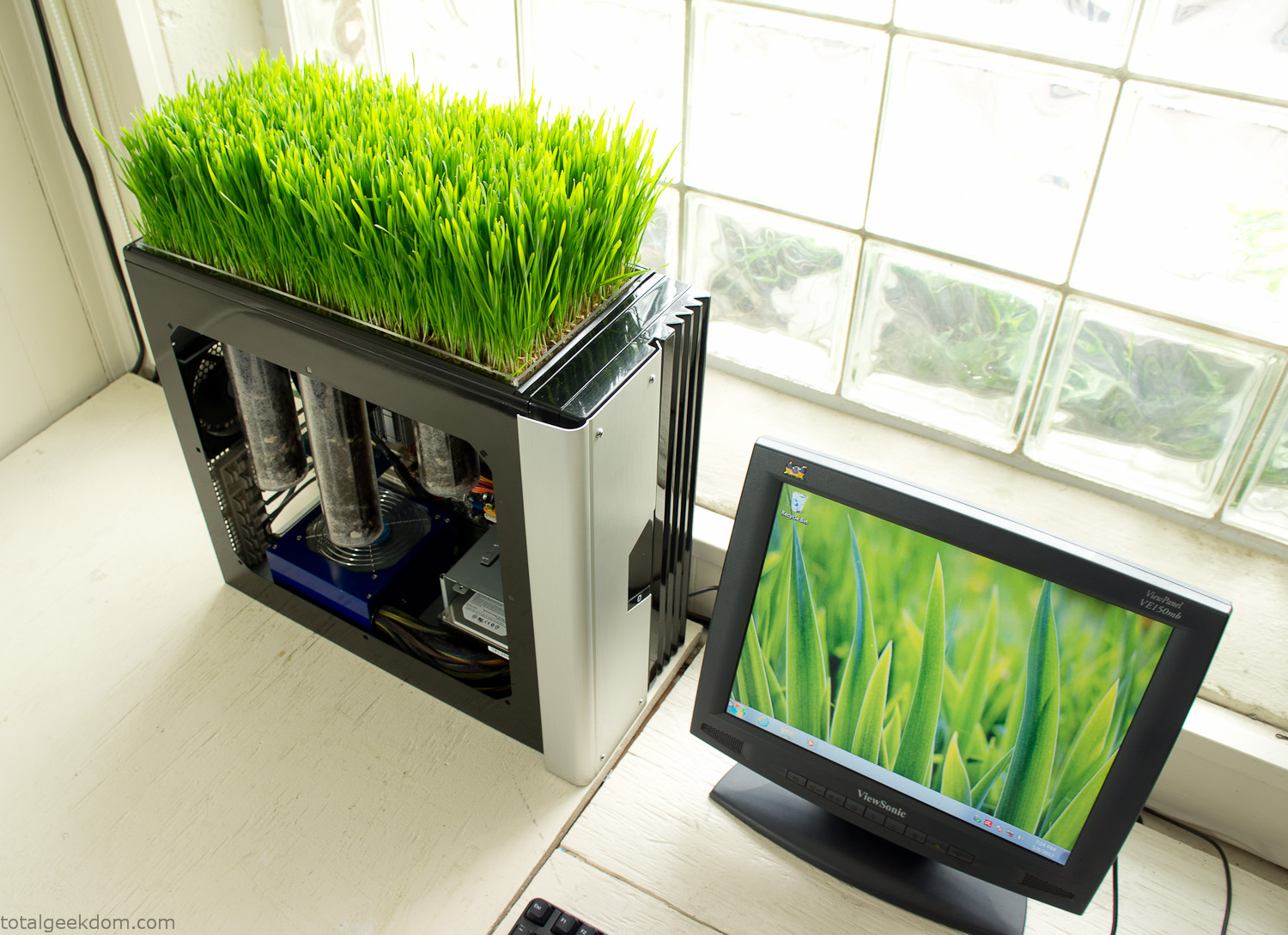
Bio Computer
I’ve been interested in working on a project for while that would combine something tech-based with something organic. Mixing the two elements intrigued me for a while. I’ve wanted to add flowers, or maybe plants of some sort to blend a little bit of nature into the space. I do receive a bit of sunlight through a glass block window, but the temperature in the basement is usually on the colder side. In the winter I don’t really heat the space because the folding farm outputs enough heat to keep the temperature comfortable. I didn’t want to change that aspect so I needed to come up with something that would tolerate slightly cooler temperatures and limited sunlight.
I can’t exactly recall when the idea came to me, but at some point I started wanting to use the heat from a computer as a way to warm the soil and help with germination/growth. I’m about as far from a botanist as it comes, I did some reading online and became pretty interested in the effects of soil temperature on germination/growth. I read different studies and papers from various universities. It was not too long into that process that I became hooked on the idea of using computer heat as a way to control the soil temperature of some sort of living plant life.
As the idea developed further I started looking into wheatgrass as a plant option. There is something clean and natural about the look and idea of a piece of grass growing in my basement. I thought the look would alter the space a little bit and add a bit of color along with something more than just metals and plastics. After reading enough studies and papers on the effects of soil temperature and germination with wheatgrass I felt like I had a good enough handle on the basics to tackle this.
The first step was finding a computer to adapt for the project. Luckily I had a lot of donated computers that people had given me for various project purposes. Most of them didn’t work, but by cobbling together various components from a bunch of different old computers I was able to come up with enough good parts to make a working computer.
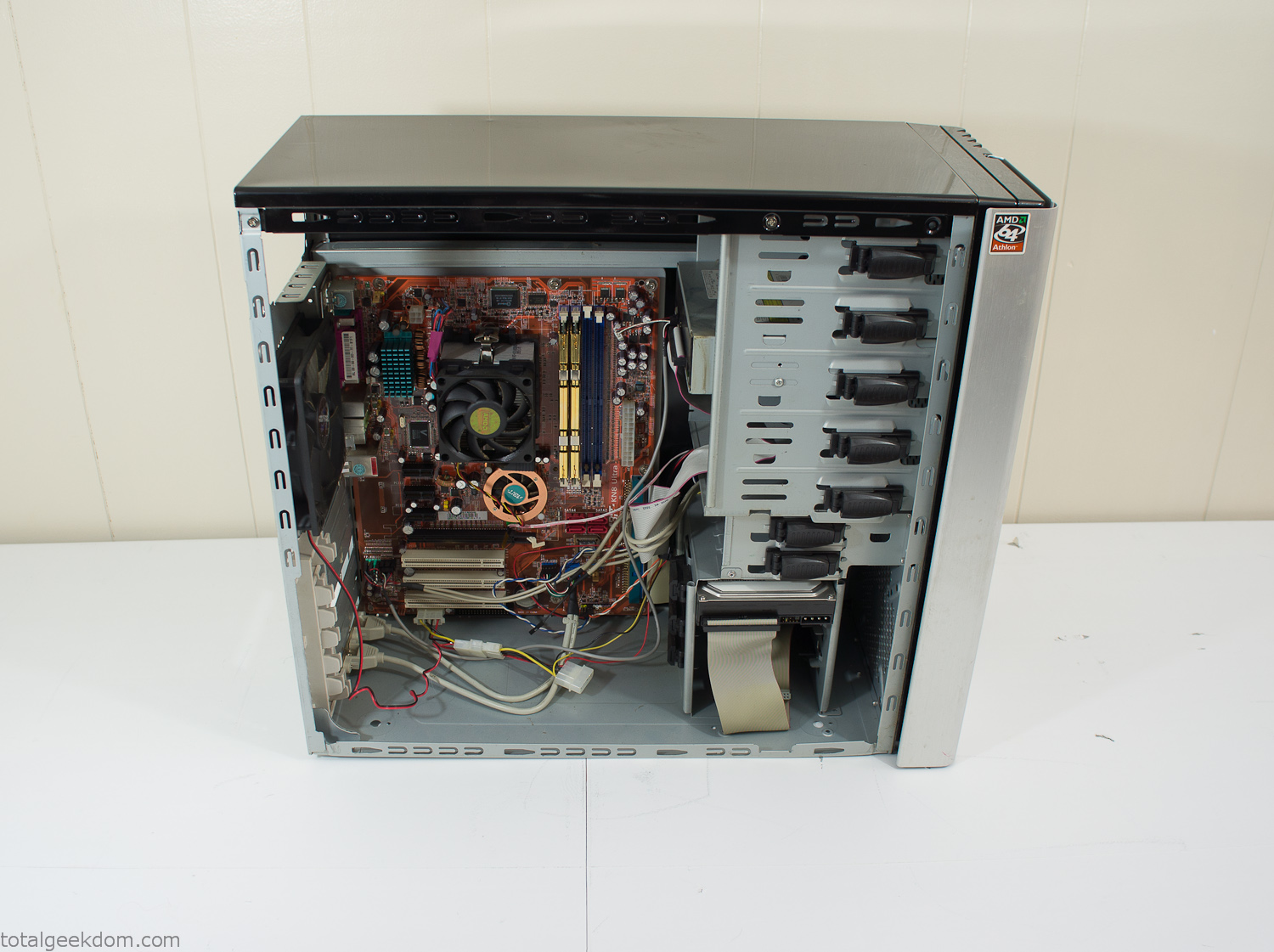
Donor Computer
At the time I was starting to get a formalized plan together for this project, another idea popped into my head. I’ve got a 5 yr. old who is already fairly geeky (just ask him to do his Jabba the Hutt impression for you) but he really does not get that much computer time. He’s getting to an age where he’s more inquisitive about tech stuff and I think he’s ready for his first computer. Since I was already well underway with this project it seemed like a perfect opportunity to orient the computer itself towards a learning tool for him in addition to using it as a way to blend something organic with a piece of technology.
With all of these goals in mind I started tinkering away. The computer hardware itself was nothing fancy, definitely outdated, but perfectly suited towards this project.
CPU- Pentium 4 (3 GHz)
Dell Factory Motherboard
Various Ram Sticks- 2gb
Old Maxtor 120gb IDE Hard Drive
Old FPS Power Supply
Donated Old Computer Case
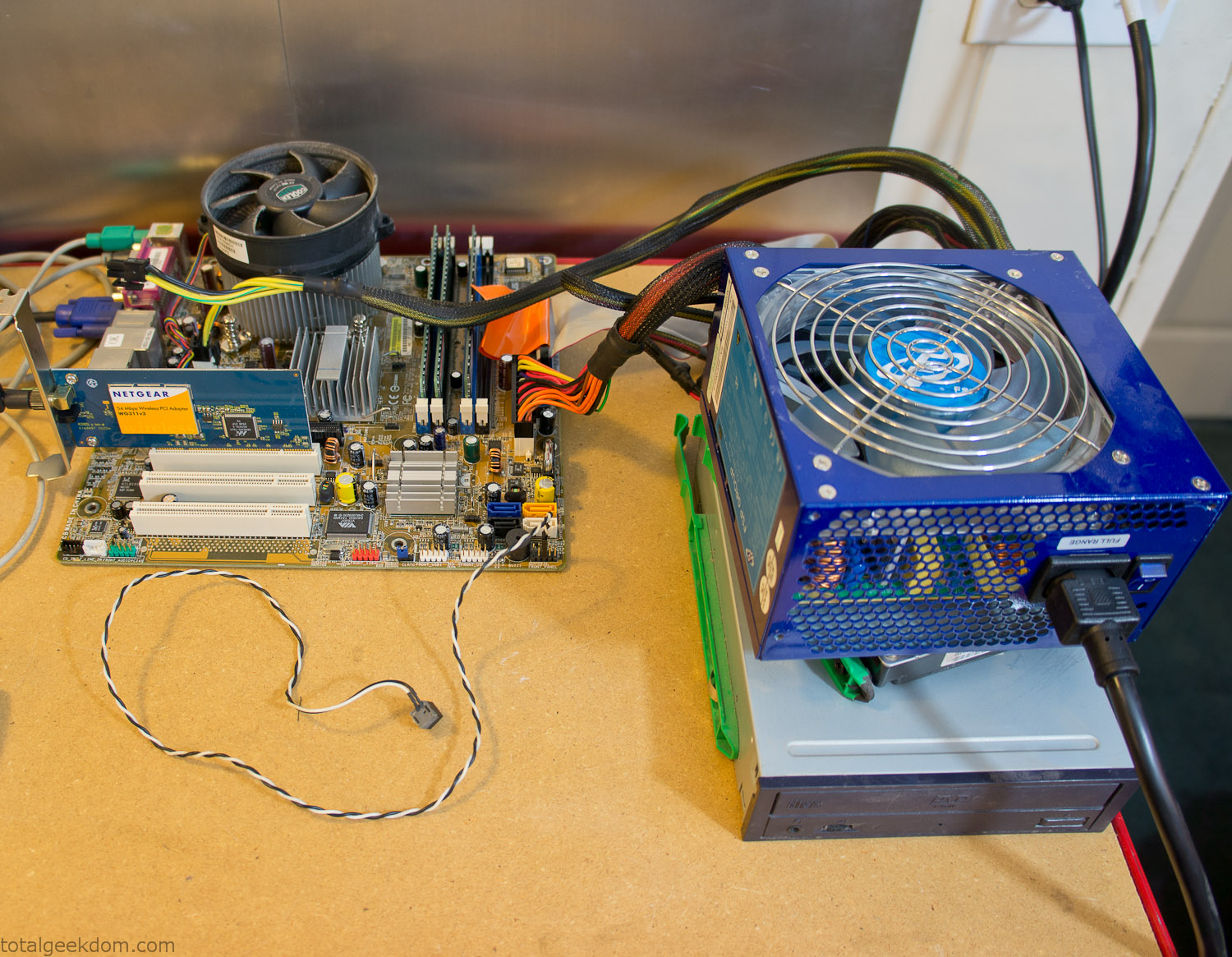
Computer Parts Testing
If you’ve spent any time around computer hardware in the last decade you’re probably well aware that Pentium 4 has a reputation for running hot. The 90nm Pentium 4 was named Prescott and it didn’t take long before the nickname Pres-hot popped up. In this case though that extra heat is going to be put towards good use.
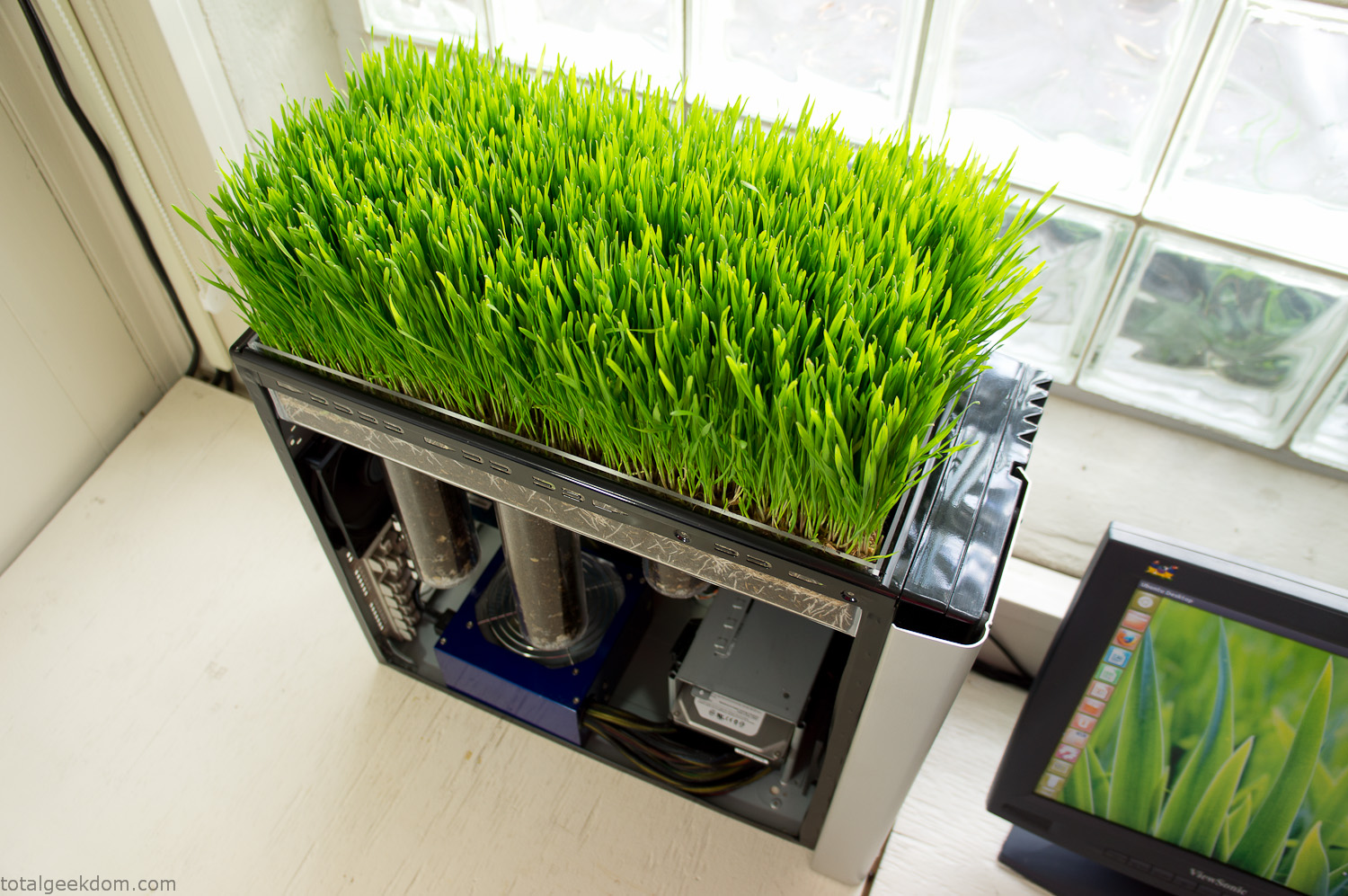
Once the hardware was all in order I started working on the layout and arrangement for the case. I had originally envisioned the grass growing out of the top of the computer case. This seemed like it would provide a good blend between the hard edges of the computer and the soft feel of the grass. This also worked well with putting the soil area in the upper portion of the case, where the most heat should collect. After doing some initial tests with this configuration I found the measured temperature near the top of the case was the hottest. The placement of the CPU near the top of the case and the lack of airflow in that area contributed to these higher recorded temps.
After finishing with some initial tests I decided to completely strip the case down and start removing all the unnecessary brackets and pieces inside of the case. Like most computer cases all the internal brackets and mounts are riveted together, so I drilled all the rivets out of the components I wanted to remove and pulled them out. The gutted case looked pretty barren after being stripped.
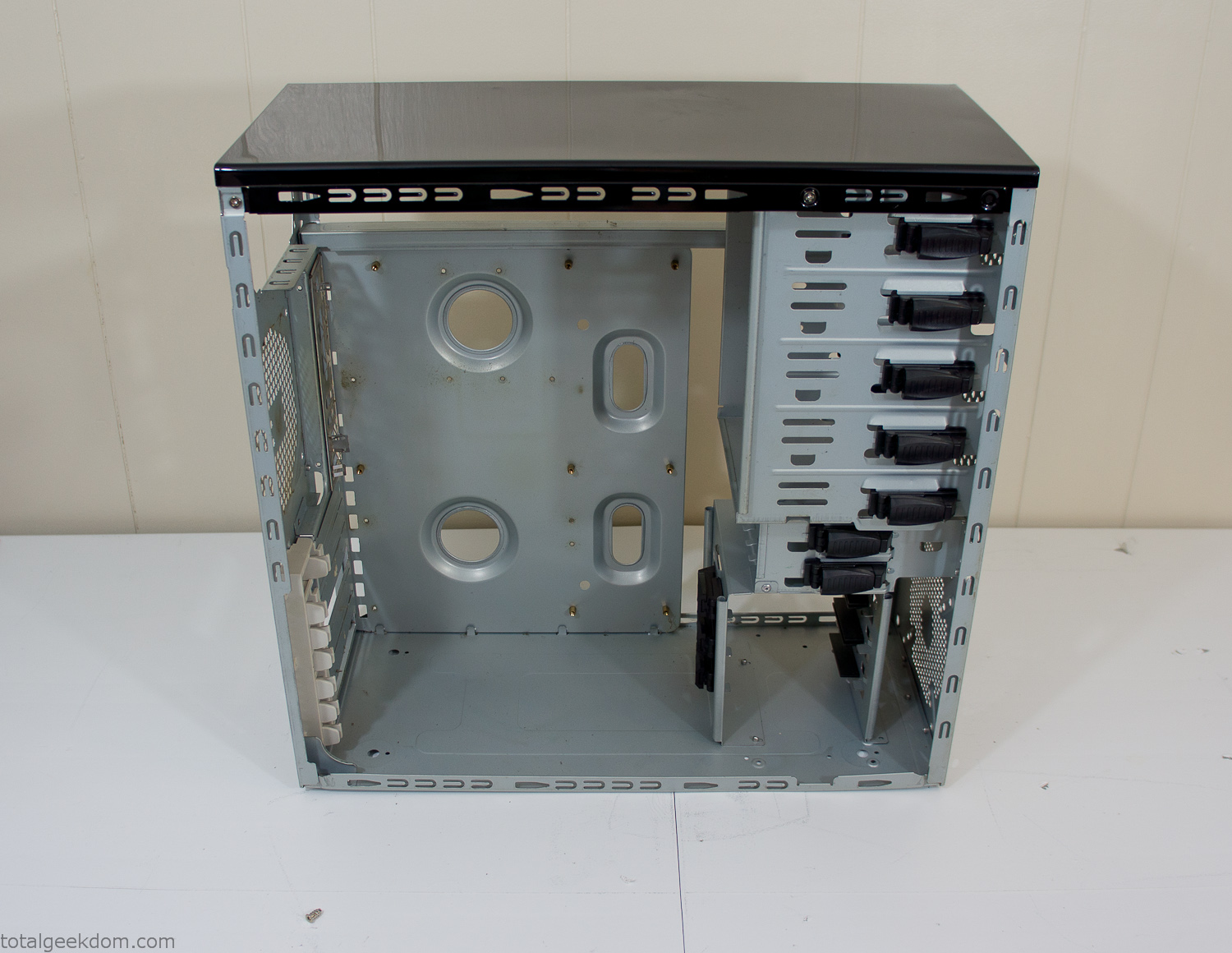
Empty Computer Case
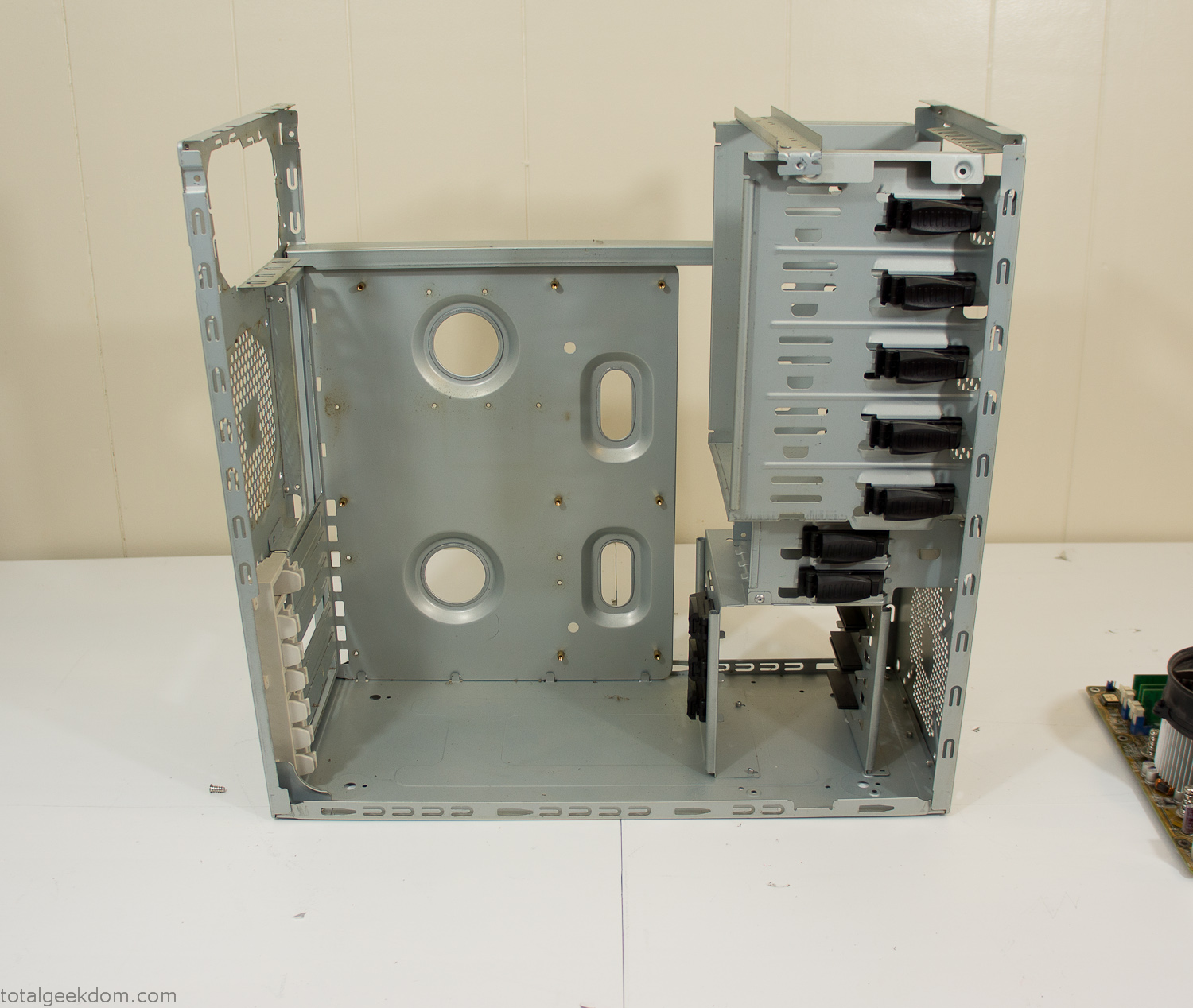
Dismantled Computer Case

Stripped Computer Case
In keeping with my original plan of having the computer blended with the organic grass I wanted it to be easy to see the inner workings of the computer and also the soil from the grass growing above. I needed something that was translucent, which left me with either glass or acrylic/polycarbonate as my options. I ended up choosing acrylic because I was able to find a cheap, used, die-cast model car display case top that was the perfect dimensions for the top of the case. Couldn’t go wrong for 5 bucks.
I test-fit the acrylic over the top of the computer case and marked my layout on the top of the case. My plan was to cut open the top of the computer case and insert the acrylic display case into the section I cut out. To cut open the top of the computer case I drilled a hole as a starting point and then used tin snips to cut through the thin gauge metal.
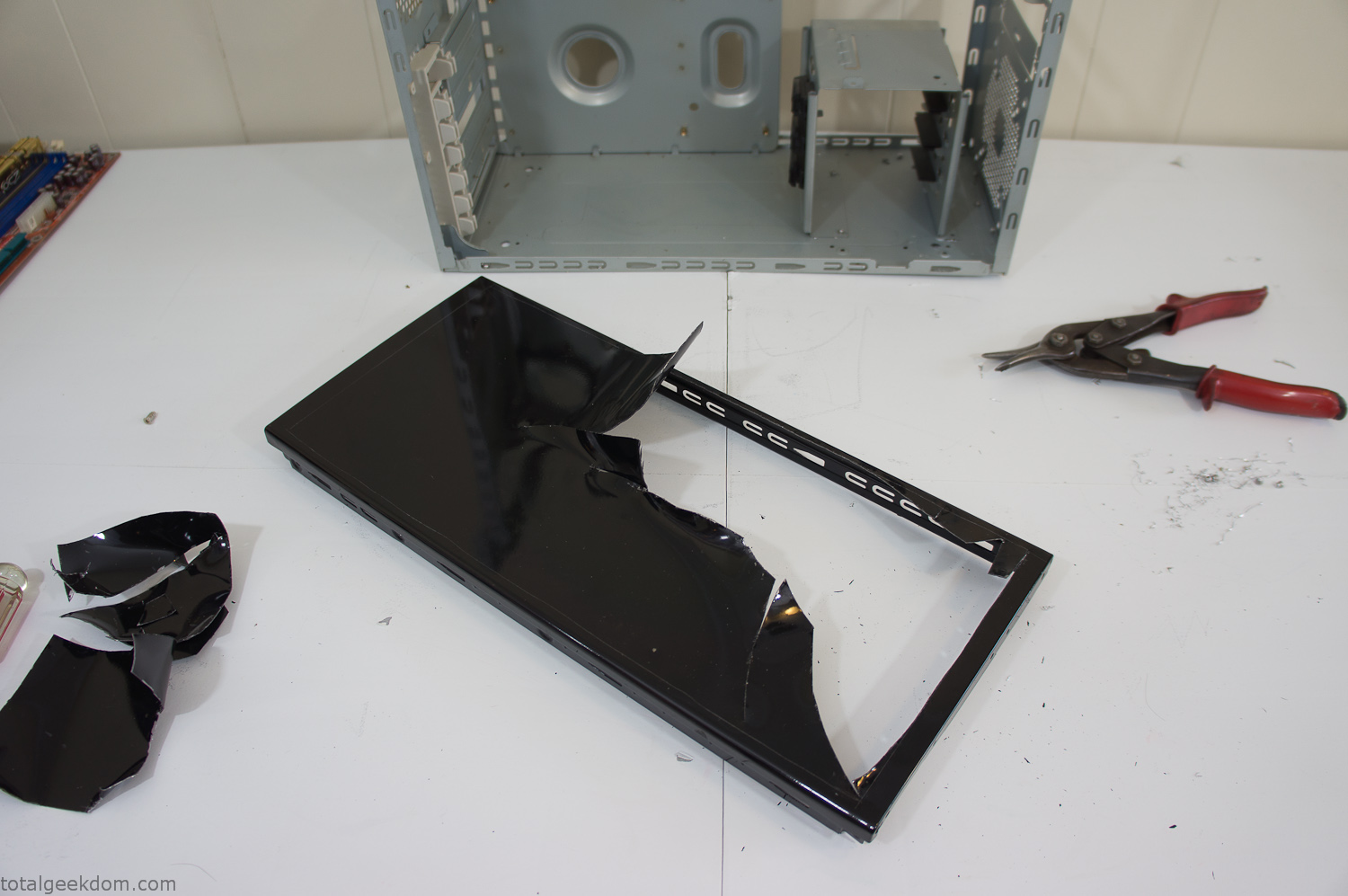
Computer Case Lid Modding
Once I had the metal opening cutout, I needed something to put along the edges of the freshly cut opening to create a clean and finished look. For $2 I was able to find some black, car-door-edge, plastic molding that worked perfectly.
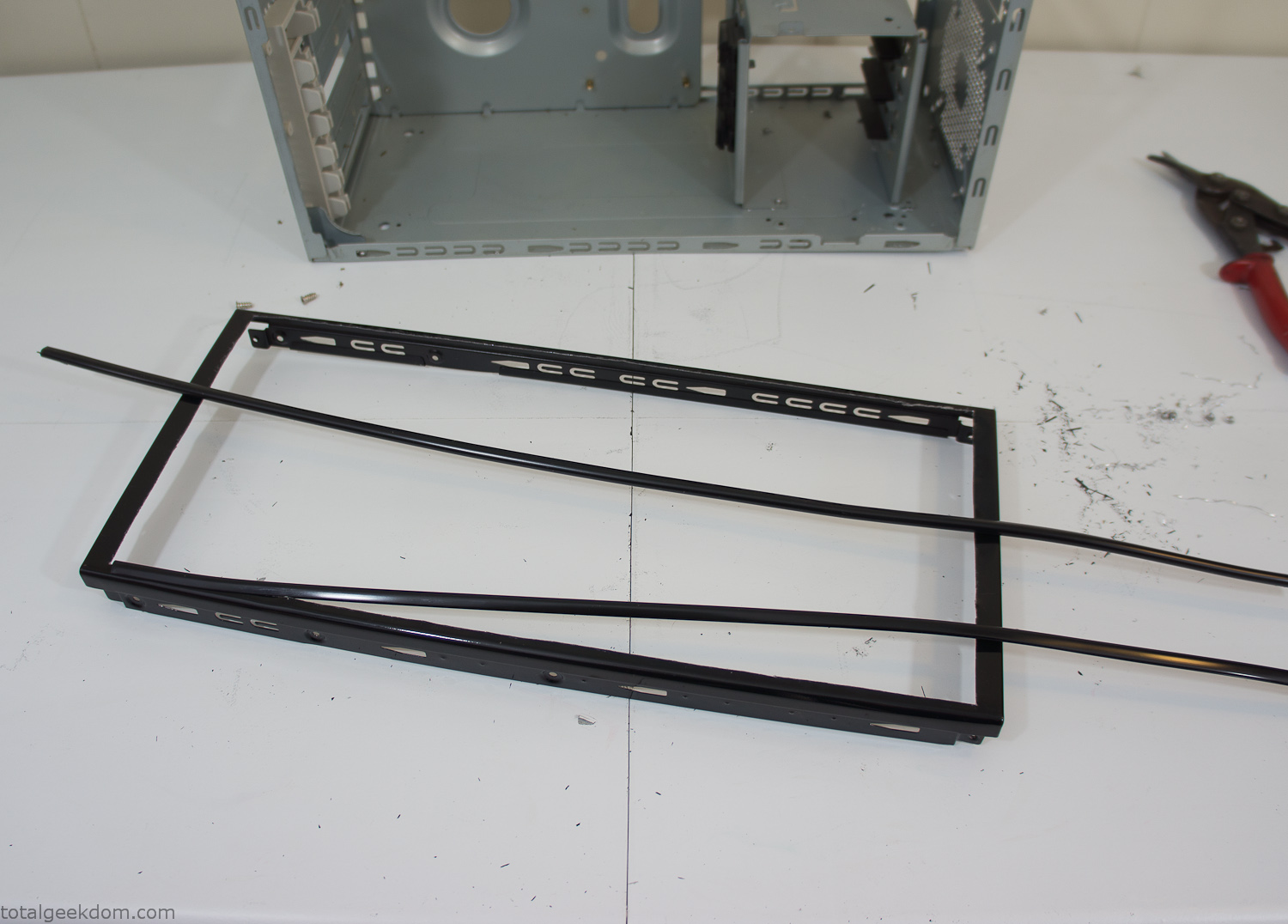
Modified Computer Case Lid
After getting the opening of the top of the computer handled and the acrylic case properly fitted, I moved onto some more testing with soil in the acrylic and the computer running. I wanted to see what kind of heat transfer I would get and how it would affect the soil temperature. I knew that using acrylic over glass would make it a little more difficult to heat the soil as acrylic is not that good at transferring heat. Luckily though I didn’t really need to alter the soil temperature that much, I just needed a little extra heat. Testing showed that heat transfer with just the single acrylic display case as my soil container was slow. So I decided to add some acrylic tubes. This would allow more surface are for soil to acrylic contact and also give me an area where I could add a mixed substrate to allow for soil drainage.
I went online and found a 3ft long section of 2 1/4″ clear acrylic tubing for $8 dollars. I wanted to add a couple of hanging cylinders off the main of the acrylic display case in the top of the computer case. To do this I needed to cut holes into the bottom of the display case. Cutting holes in acrylic is not always easy, it’s likely to chip and craze at the edges. To get around this I used a buildup of masking tape on both sides of the acrylic, to provide a little bit of resistance and strength. I placed the acrylic display case back into the computer and marked my layout for the tubes. I needed to leave clearance for the CPU cooler, power supply and hard drive mount.
After marking the layout, I used an air-powered pencil grinder and carbide tipped bit and cut through the acrylic case along my marked lines. After the initial shape was cutout I used a tube piece as a template and slowly worked on grinding the holes as perfectly round as I could get them so that the tube had a snug fit all the way around. The fit is pretty important as the acrylic cement that I used needs there to be a tight fit so that the acrylic can bond correctly.
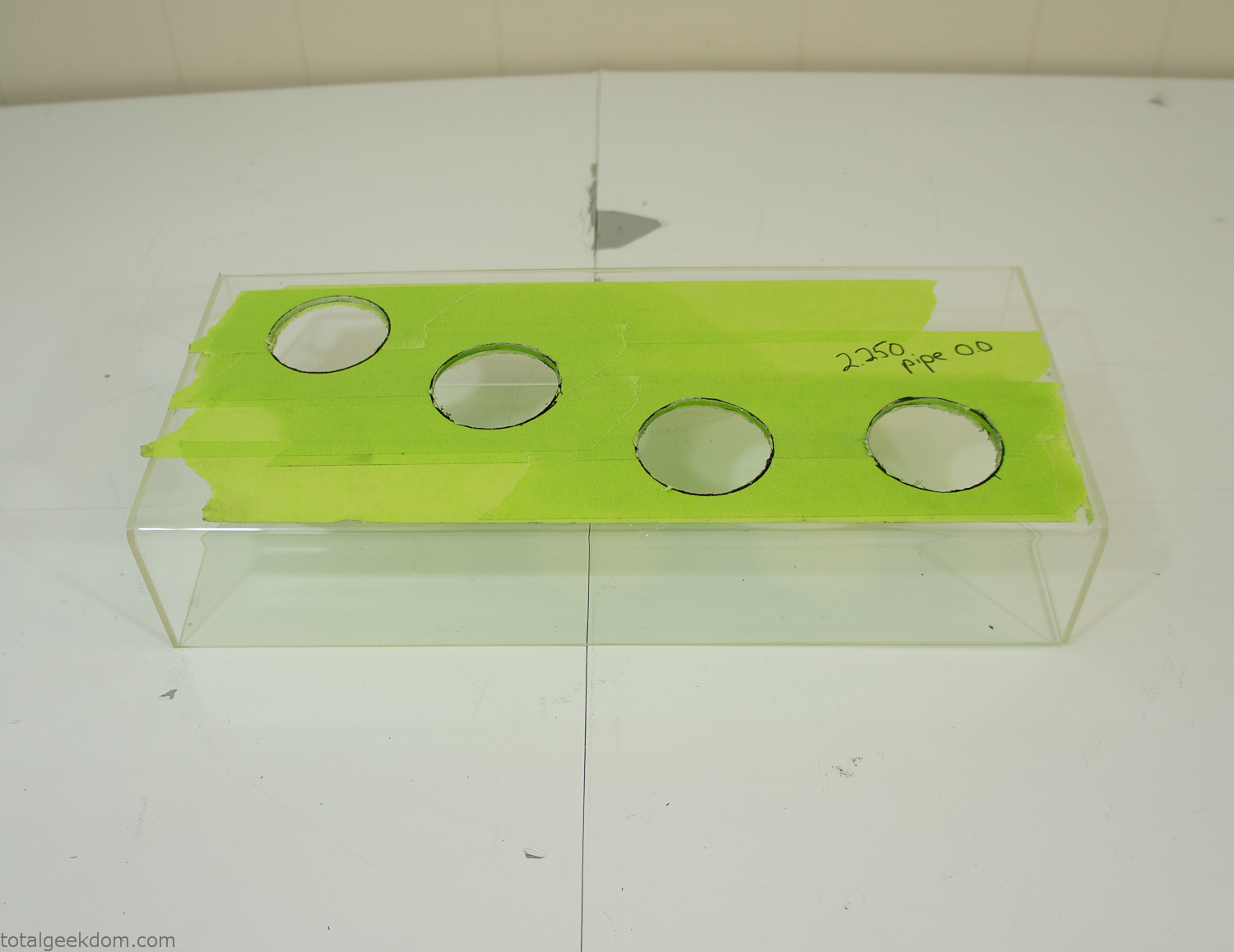
Acrylic Case Modifications
I placed the tubes into the acrylic case and mounted it in the computer and test fit the placement and height of the tubes. After getting everything lined up and oriented correctly I moved towards bonding the acrylic together. Using a needle dropper applicator I applied the cement to all the joints. After letting it set overnight I came back the next night and applied a thin coating of clear silicone caulk around all the joints just to ensure they were completely water tight
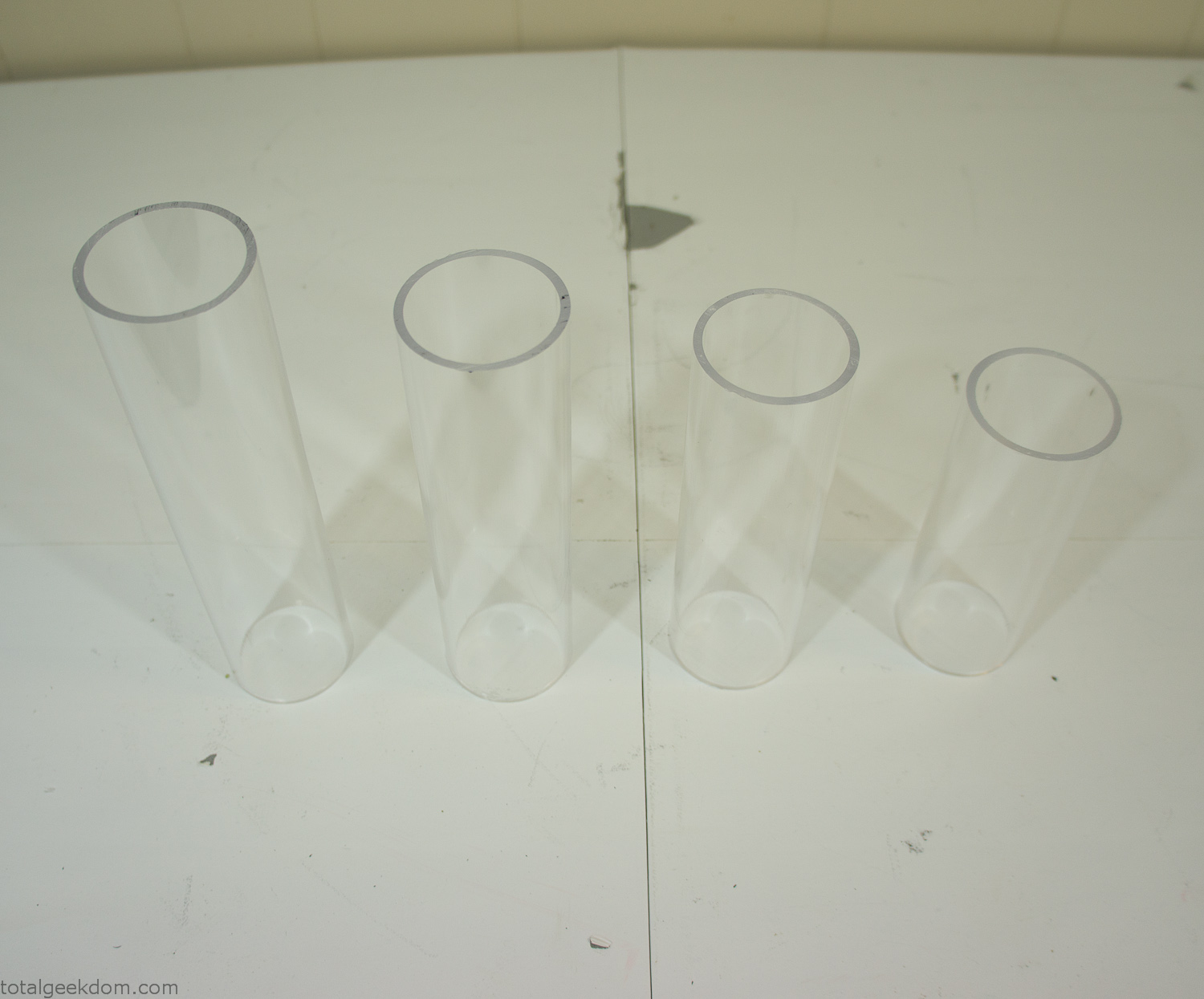
Acrylic Tubes
The next step was sealing up the bottom of the acrylic tubes. I looked at a couple of different options before realizing that the discs I had cut out of the acrylic case to fit the tubes would be almost the perfect size. Using a bench grinder and a test piece of tube I slowly ground each disc to the perfect size for a tight fit all the way around. I placed the clear acrylic discs into the bottom of each tube and repeated the same cementing and silicone caulking procedure to ensure they were water-tight. After a couple of days’ worth of drying I tested the case by filling it with water overnight and checking in the morning to make sure that no leaks had popped up.
In order to hold the weight of the acrylic case after adding soil, I drilled and installed a machine screw with a rubber cap at each corner of the computer case to bear the weight of the acrylic case.
Once all the work was done with the acrylic case section I started reinstalling all the components. The motherboard, hard drive and power supply were added and then wired up.
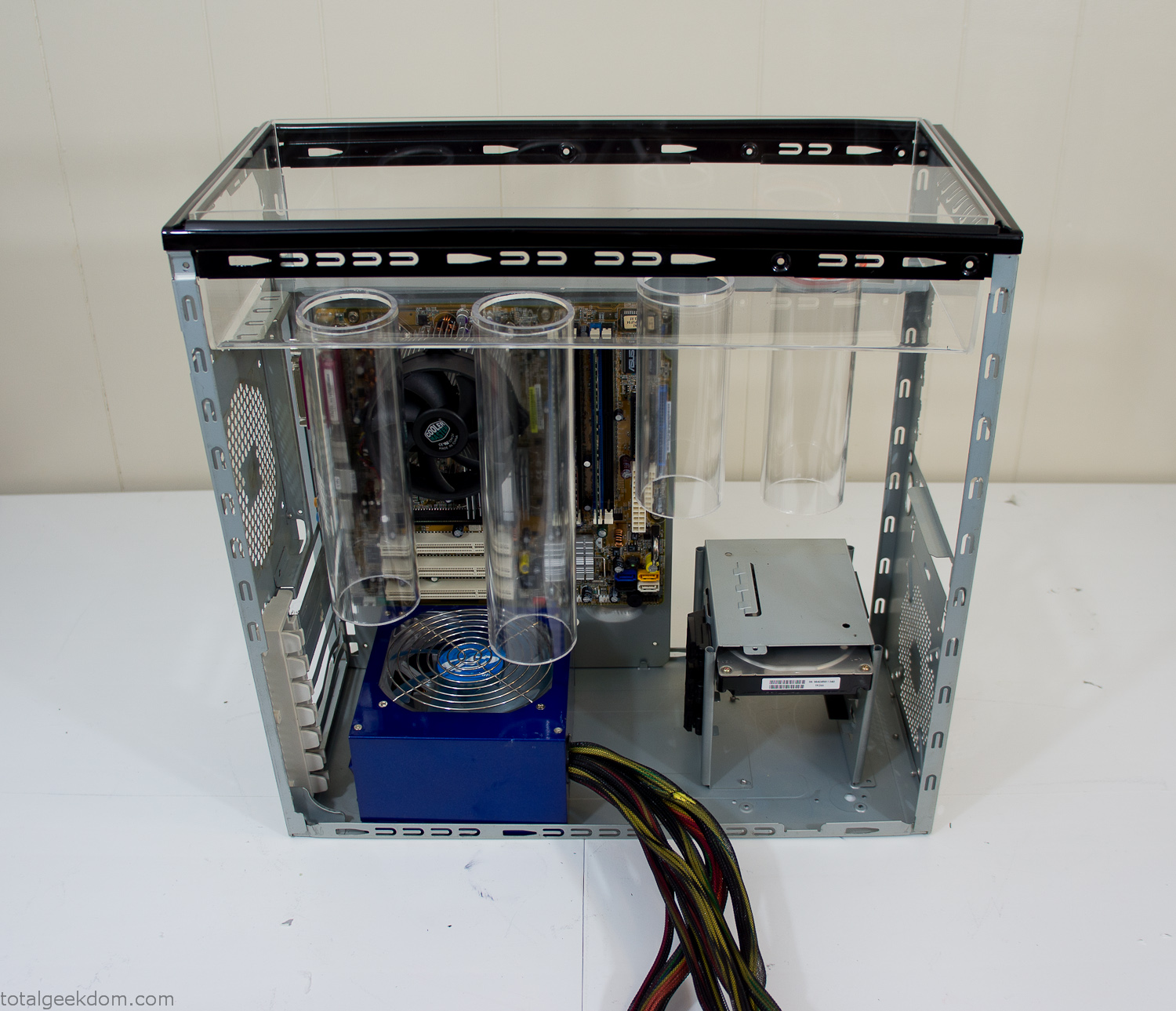
Mocked Up Computer Case
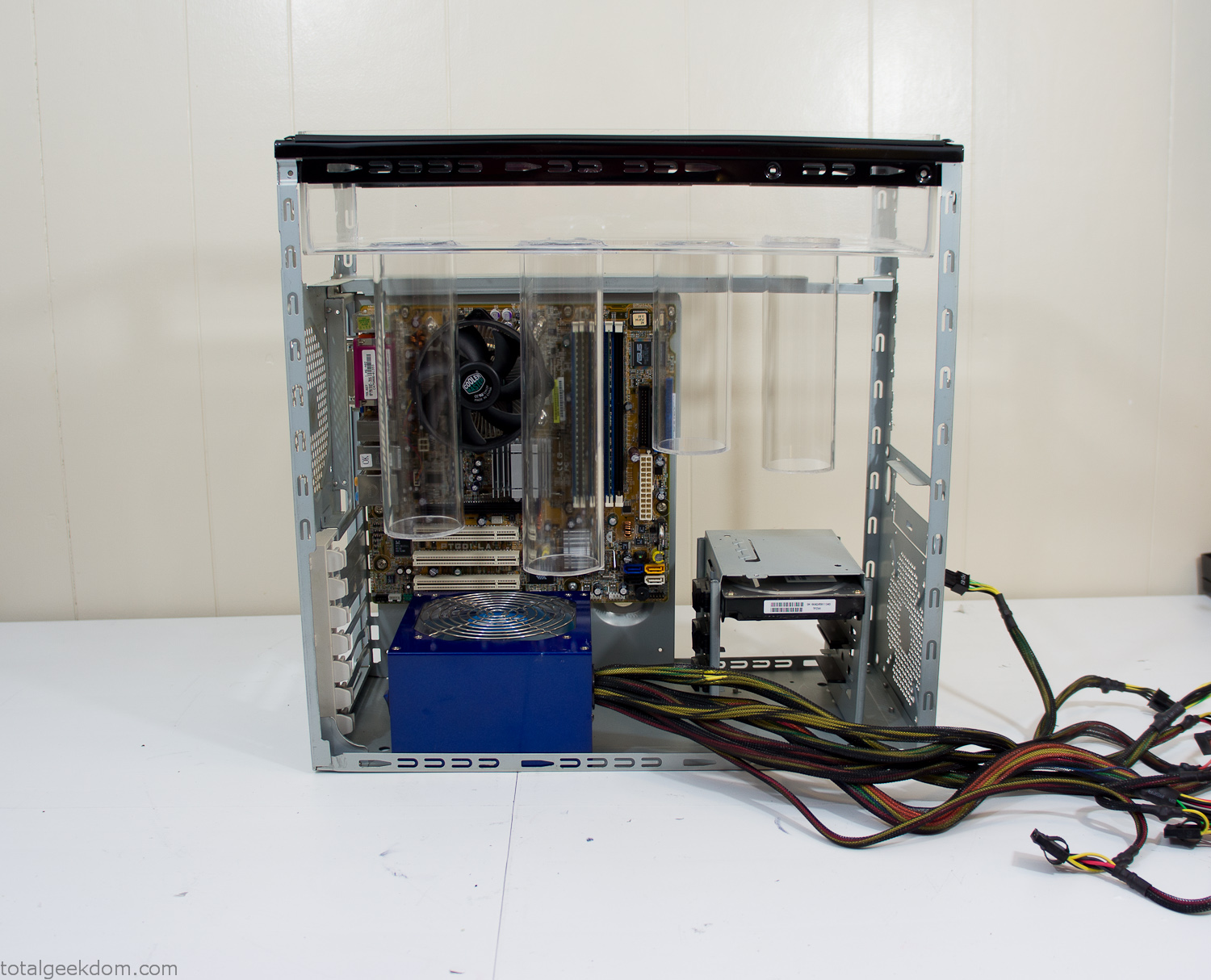
Power Supply Mockup
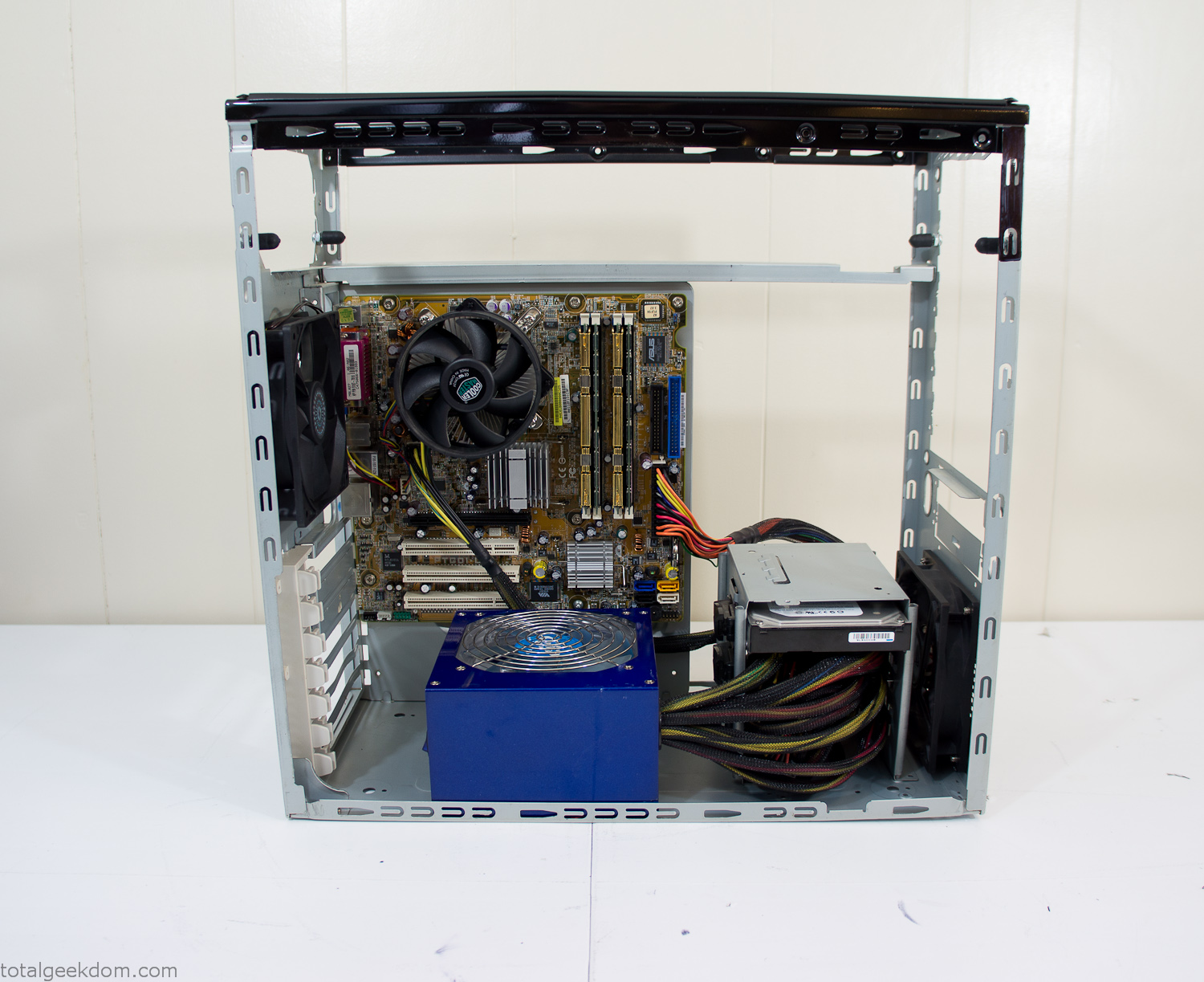
Computer Components Wired
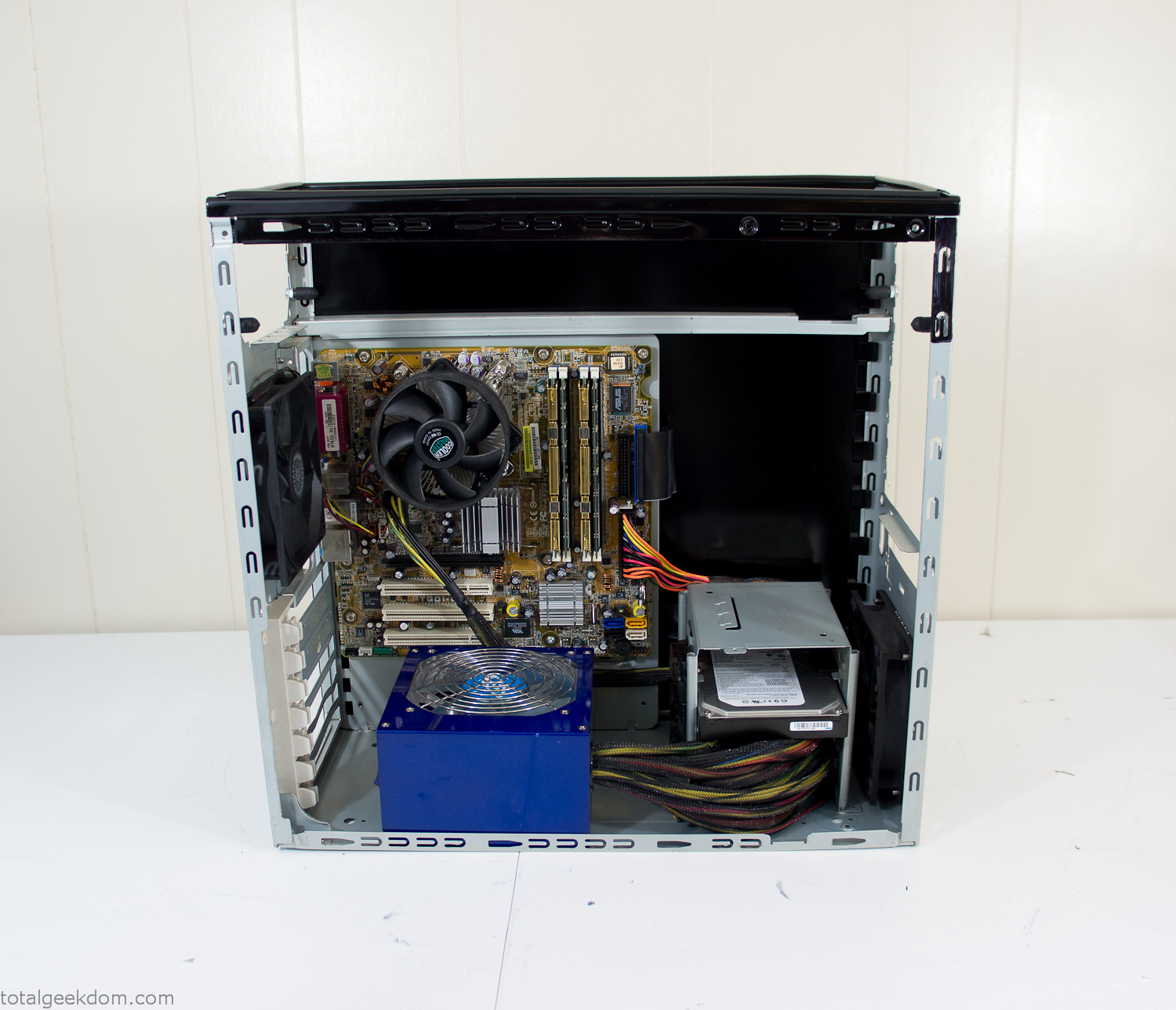
Case Panel Installed
At this point all that was left was to make a clear panel for the side of the case. I had some left over acrylic sheets from a different project that were really close to the right size, after test fitting, marking and cutting I then had a clear side panel to see into the case. (I left this off for the pictures because it caused a reflection)
The final step was filling the case with soil and adding some wheatgrass. I had been test growing other samples of wheatgrass during the build process. So I had already a couple of different patches of grass growing. I tried to keep the soil level just below the top of the acrylic case edge to make it a little more seamless.
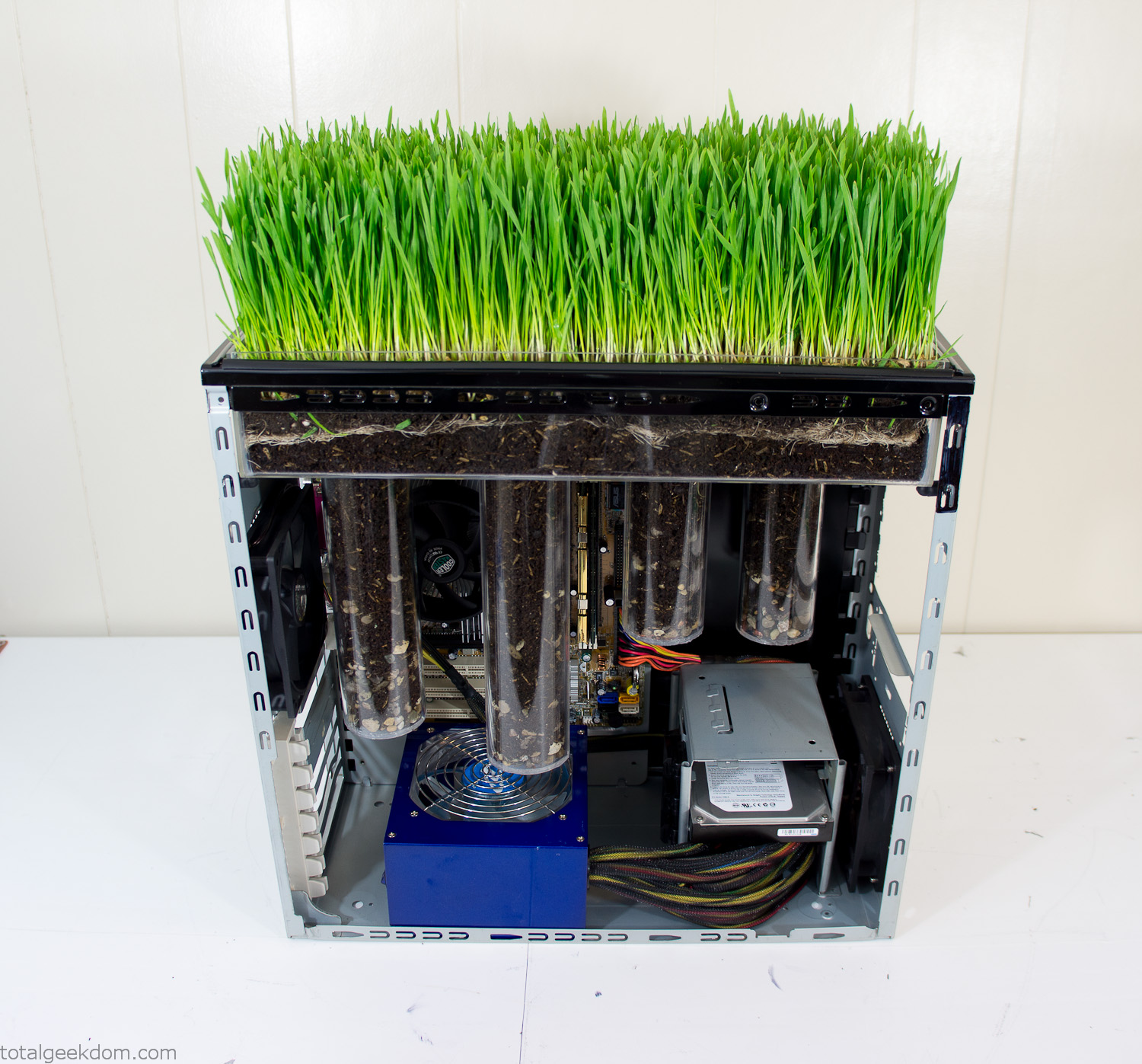
Grass Planted in Computer
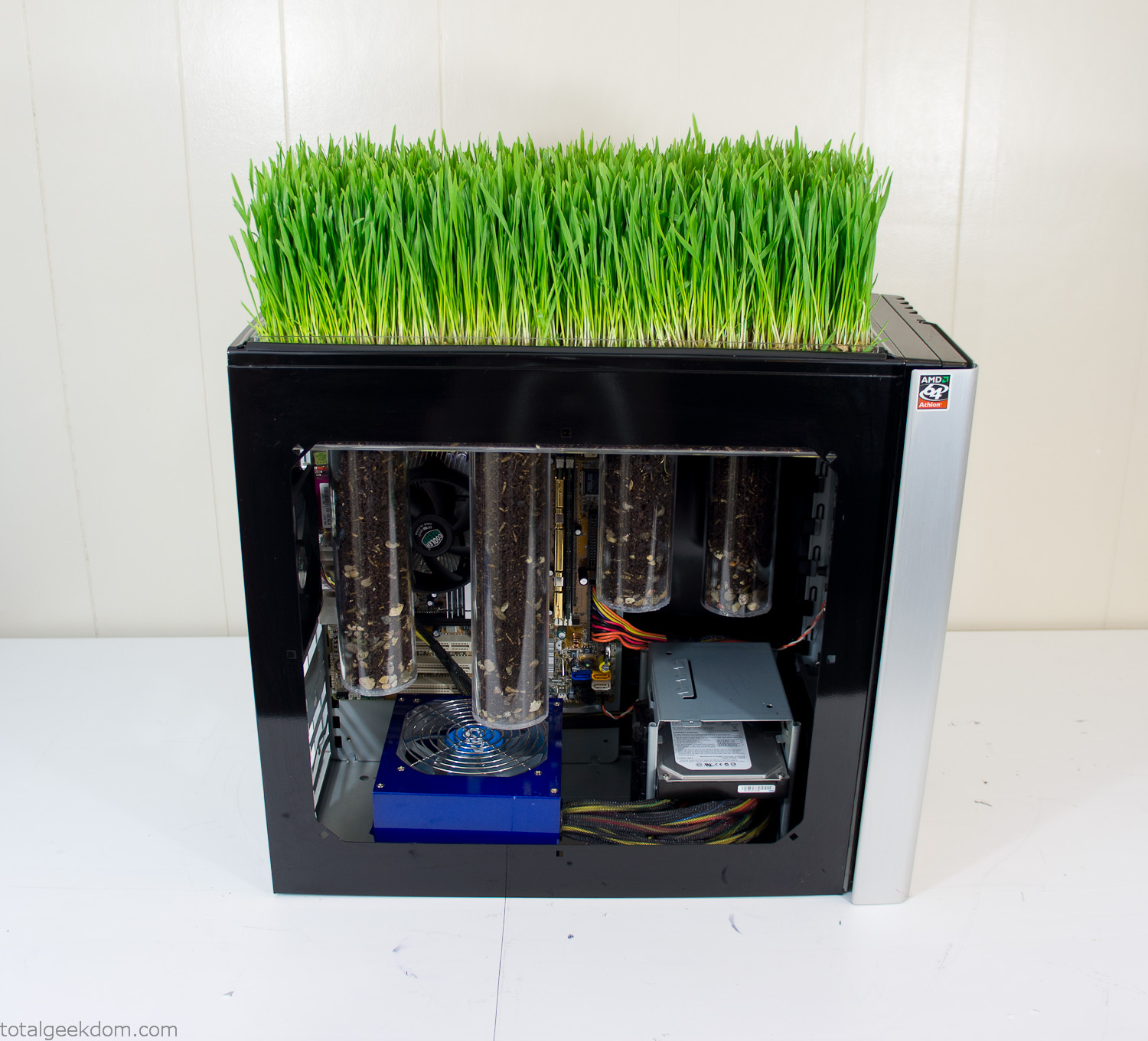
Grass and Case Panel Installed

Grass in Computer
For the computer itself I ended up installing Windows as well as Linux in a dual boot setup. Since the computer was going to be used by my son as something to play with I figured I should put both on there so he can tinker with them and learn as he goes. Besides, for important life decisions like picking an OS (Operating System) I think any good parent should present the options and then let their kid decide for themselves.
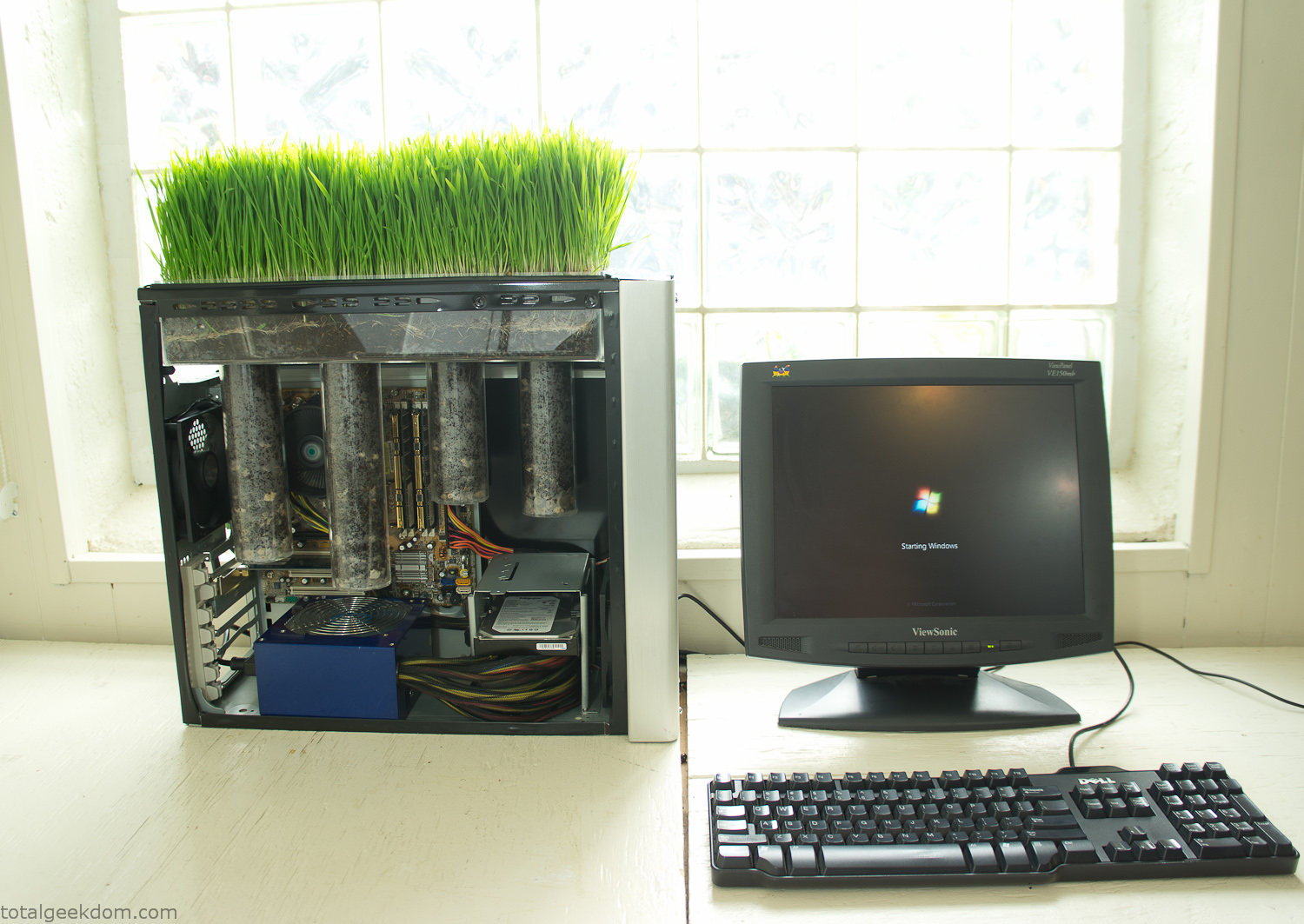
Starting Windows
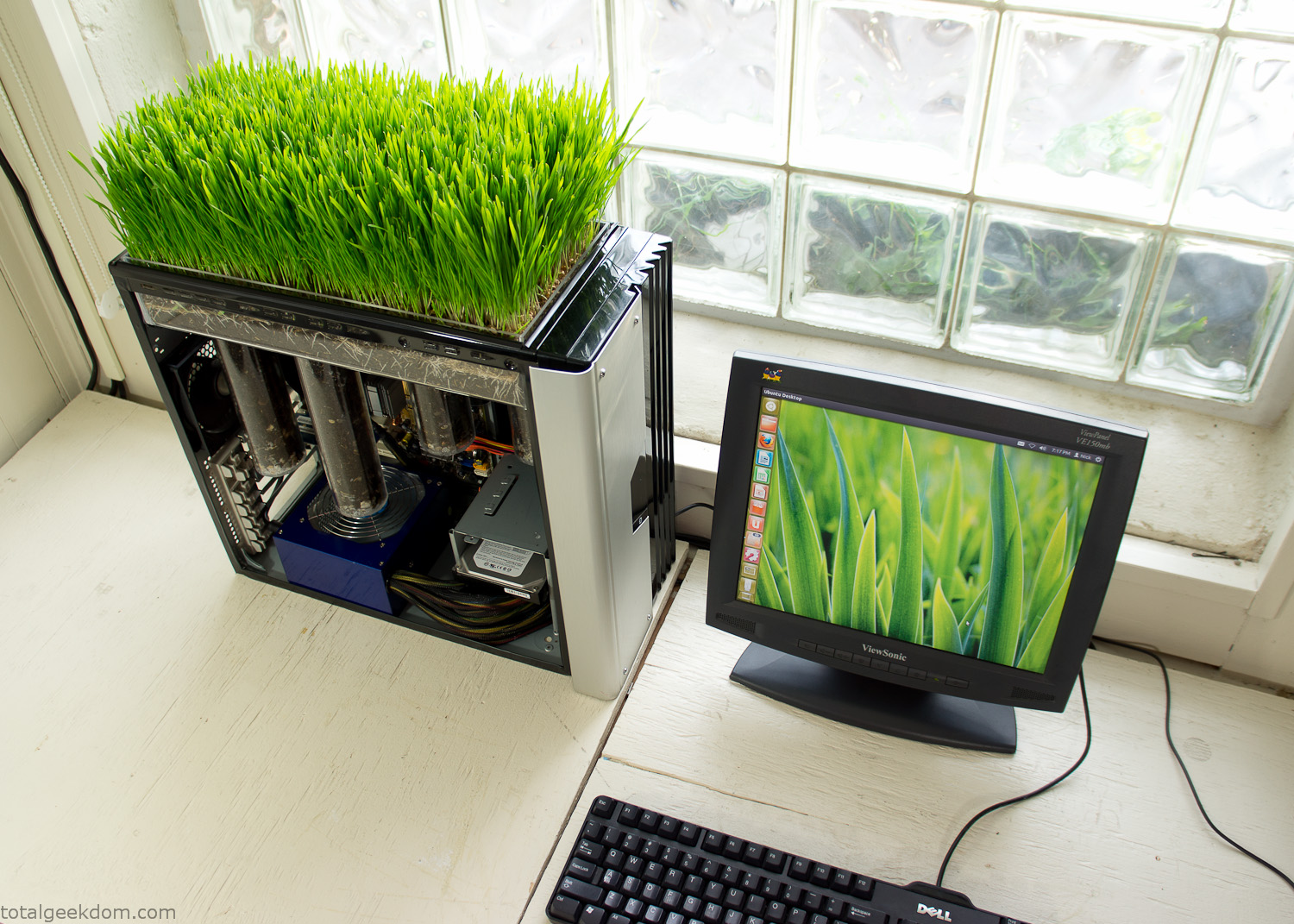
Linux Running
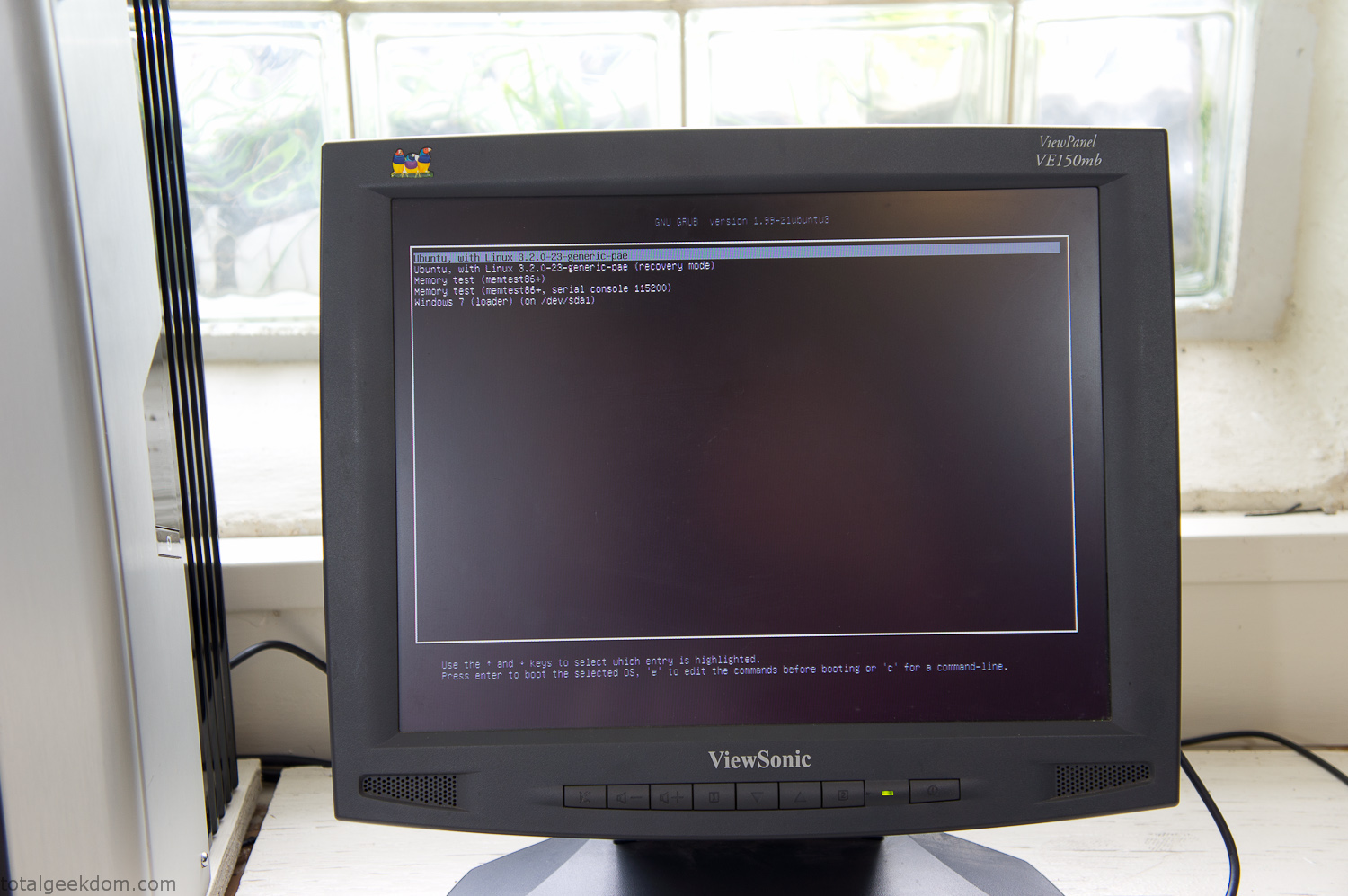
Dual Boot Screen
In the end I’m happy with the result of the project. It’s been fun experimenting with growing wheatgrass and I like how the natural look of grass is blended with the very modern, inorganic case.
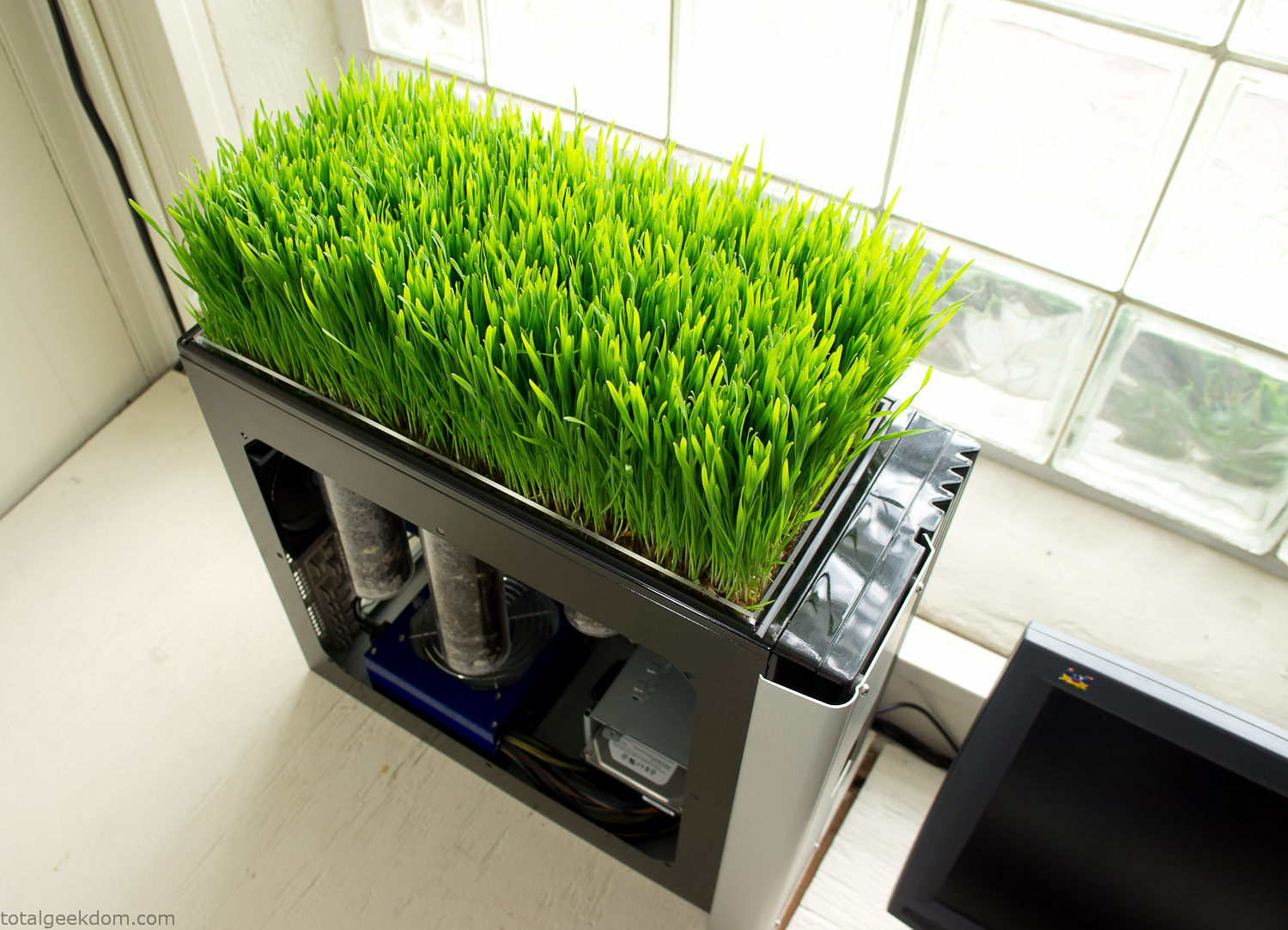
Computer Grass Growing
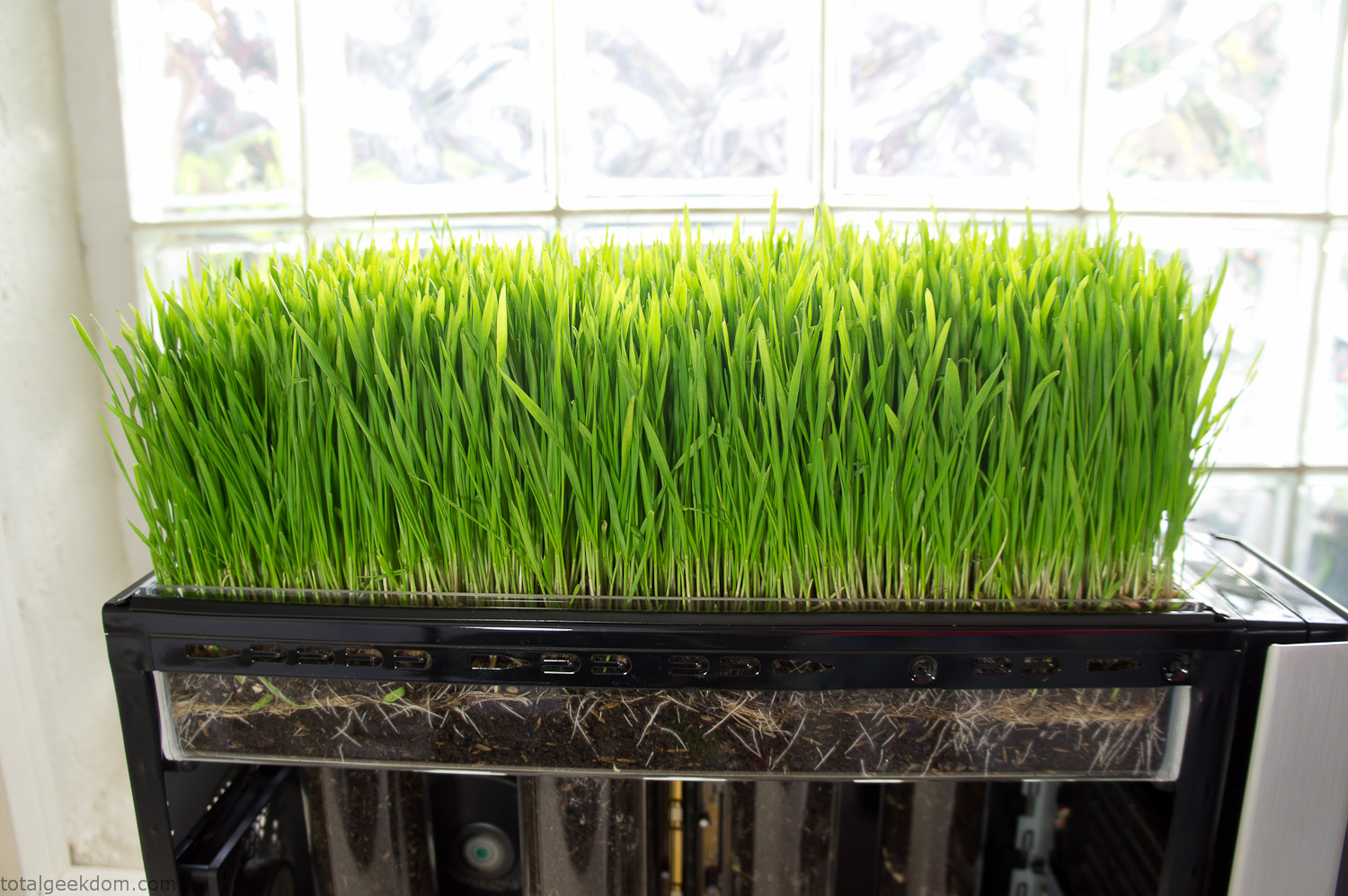
Grass in Computer Section
Notes
Temperature Testing
In testing the case temperature versus the soil temperature I found it was easiest to control the case temperature by using a variable fan speed control on both the inlet and outlet fans. By turning the fan speed down I could increase the temperature inside the case and correspondingly raise the soil temperature.
In order to maximize output of heat during these tests I used Prime95 to run the CPU at 100% load.
Using this method to control the case and soil temperature I played around with adjusting the soil temperature and then tracking the rate of growth of the Wheatgrass. The target temperature for peak growth seemed to fall around 66°F (19°C).
Using the fans to control the case temperature allowed me to vary the temperature inside the case from a low of 75°F (24°C) to a high of 91°F (33°C). In order to achieve the desired increase in soil temperature, I had to run the case temperature toward the higher end of the scale.
When the soil temperature was too high, the growth of the wheatgrass would slow.
Wheatgrass
The wheatgrass I used for my tests was nothing special, it can be found as seeds (berries) in a lot of health food stores and it grows relatively easily.
Caring for the wheatgrass is just a matter of keeping it watered. It’s a pretty easy plant to work with and doesn’t require any special skills.
Wheatgrass is often used as a nutritional supplement; it can be juiced and mixed into smoothies and other beverages. I plan on harvesting some of the grass and making some juices.
Plant Options
While wheatgrass offers a nice, attractive and easily grown option I do plan on trying other plants as well in the future. Since I already have the “planter” built all I have to do is add a different plant and see how it goes. I’m sure there will be some plants that don’t like the lower light environment, but it will be fun experimenting with other plants as well and seeing how they take.
Materials
Donated Computer- Free
Clear Acrylic Display Case- $5
Clear Acrylic Tube- $5
Plexiglass Side Panel- Free
Total- $10
Bio Computer Running
 29.2k
29.2k
 13.2k
13.2k 7.1k
7.1k

 2.1k
2.1k 813
813 2.6k
2.6k
Comments 53,152
https://hub.docker.com/u/mmegigidei
https://odysee.com/@jlallidgjd
Good day! This is kind of off topic but I need some help from an established
blog. Is it very difficult to set up your
own blog? I’m not very techincal but I can figure things out pretty quick.
I’m thinking about creating my own but I’m not sure where to
begin. Do you have any tips or suggestions? Thank you
https://heatherkinghea.bandcamp.com/album/beloved
https://wanderlog.com/view/cfdhvsxgmt/
C Blacksprut marketplace – bs2best at, вы точно сможете попасть на маркетплейс.
Актульнаяя ссылка bs2best at
GhПрисоединяйтесь к числу успешных покупателей , которые уже доверяют bs2best at.
С нами безопасней!
https://git.project-hobbit.eu/edyedubxef
https://community.wongcw.com/blogs/1128769/%D0%9B%D0%B0%D1%85%D1%82%D0%B8-%D0%90%D0%BC%D1%84%D0%B5%D1%82%D0%B0%D0%BC%D0%B8%D0%BD-%D0%9A%D0%BE%D0%BA%D0%B0%D0%B8%D0%BD-%D0%AD%D0%BA%D1%81%D1%82%D0%B0%D0%B7%D0%B8
Эпоха простого освоения земель уходит в прошлое. «Зем-Комфорт» формирует будущее загородного девелопмента, создавая пространства, где современная инфраструктура гармонично сочетается с природной средой.
[url=https://fruitportal.ru/news/id/751127-zem-komfort-novye-standarty-zagorodnoj-zhizni-v-moskovskoj-oblasti]ООО земкомфорт[/url]
C Blacksprut marketplace – bs2best at, вы точно сможете попасть на маркетплейс.
Актульнаяя ссылка bs2best at
GhПрисоединяйтесь к числу успешных покупателей , которые уже доверяют bs2best at.
С нами безопасней!
http://webanketa.com/forms/6mrk4chk6wqpark2c9j30dhk/
bs2best at – это лучший сервис своего дела.
Мы поможем вам найти все ответы, которые Вы спрашивали у нас.
Актульнаяя ссылка bs2best at
C Blacksprut marketplace – bs2best at, вы точно сможете попасть на маркетплейс.
Актульнаяя ссылка bs2best at
GhПрисоединяйтесь к числу успешных покупателей , которые уже доверяют bs2best at.
С нами безопасней!
https://community.wongcw.com/blogs/1130823/%D0%9C%D0%B0%D1%80%D0%B8%D1%8F%D0%BC%D0%BF%D0%BE%D0%BB%D0%B5-%D0%BA%D1%83%D0%BF%D0%B8%D1%82%D1%8C-%D0%BA%D0%BE%D0%BA%D0%B0%D0%B8%D0%BD-%D0%BC%D0%B5%D1%84%D0%B5%D0%B4%D1%80%D0%BE%D0%BD-%D0%BC%D0%B0%D1%80%D0%B8%D1%85%D1%83%D0%B0%D0%BD%D1%83
https://ucgp.jujuy.edu.ar/profile/iieibifnouc/
can you buy generic zebeta tablets
https://ucgp.jujuy.edu.ar/profile/ofeibgob/
https://www.rwaq.org/users/hysenismilelovemayhyseni103-20250810235655
C Blacksprut marketplace – bs2best at, вы точно сможете попасть на маркетплейс.
Актульнаяя ссылка bs2best at
GhПрисоединяйтесь к числу успешных покупателей , которые уже доверяют bs2best at.
С нами безопасней!
ИИ презентация
https://bio.site/ybyboboc
экскурсии казани Экскурсии Казани: Откройте для Себя Жемчужину Татарстана Казань – город с богатой историей, уникальной культурой и захватывающей архитектурой. Экскурсии по Казани – это прекрасная возможность погрузиться в атмосферу этого удивительного места, узнать его тайны и легенды. Наши экскурсии охватывают самые интересные достопримечательности города, от Казанского Кремля, внесенного в список всемирного наследия ЮНЕСКО, до живописных улочек Старо-Татарской слободы. Вы сможете увидеть мечеть Кул-Шариф, Благовещенский собор, башню Сююмбике и многие другие исторические и культурные памятники. Мы предлагаем различные виды экскурсий, чтобы каждый мог выбрать для себя наиболее подходящий вариант. Это могут быть пешеходные прогулки по центру города, автобусные туры по окрестностям Казани, а также тематические экскурсии, посвященные определенным аспектам истории и культуры. Наши профессиональные гиды – опытные и увлеченные своим делом люди, которые с удовольствием поделятся с вами своими знаниями и ответят на все ваши вопросы. Они расскажут вам об истории Казани, ее культуре, традициях и обычаях, а также покажут вам самые интересные места и уголки города. Экскурсии по Казани – это не просто осмотр достопримечательностей, это настоящее путешествие во времени и пространстве, которое позволит вам почувствовать дух этого удивительного города и навсегда полюбить его. Присоединяйтесь к нашим экскурсиям и откройте для себя Казань во всей ее красе!
На сайте https://vc.ru/crypto/2132042-obmen-usdt-v-kaliningrade-kak-bezopasno-i-vygodno-obnalichit-kriptovalyutu ознакомьтесь с полезной и важной информацией относительно обмена USDT. На этой странице вы узнаете о том, как абсолютно безопасно, максимально оперативно произвести обналичивание криптовалюты. Сейчас она используется как для вложений, так и международных расчетов. Ее выдают в качестве заработной платы, используется для того, чтобы сохранить сбережения. Из статьи вы узнаете и то, почему USDT является наиболее востребованной валютой.
Ibrutinib
C Blacksprut marketplace – bs2best at, вы точно сможете попасть на маркетплейс.
Актульнаяя ссылка bs2best
GhПрисоединяйтесь к числу успешных покупателей , которые уже доверяют bs2best at.
С нами безопасней!
https://www.brownbook.net/business/54165143/жерона-купить-амфетамин-кокаин-экстази/
https://www.rwaq.org/users/thomashollowaytho-20250812005910
Нужен вентилируемый фасад: https://podsistema-dlya-ventfasada.ru
https://time-forex.com/en is a practical guide for traders and investors. The website features broker reviews, commission comparisons, deposit and withdrawal conditions, licensing details, and client protection information. It offers trading strategies for Forex, stocks, and cryptocurrencies, as well as indicators and expert advisors for MetaTrader. Educational materials cover tax analysis, portfolio approaches, and risk management. You’ll also find market analytics on stocks, bonds, ETFs, and gold, along with an economic calendar and checklists for choosing reliable tools.
Нужны пластиковые окна: https://plastikovye-okna162.kz
спросить адвоката бесплатно помощь юриста бесплатно онлайн по телефону
Спасибо за то, что делаете мир прекраснее!
заказ цветов томск с доставкой
https://shootinfo.com/author/omunhufeza/?pt=ads
https://say.la/read-blog/125122
Как приятно работать с настоящими профессионалами своего дела!
доставка цветов в томске
https://muckrack.com/person-27440779
Discover Your Perfect Non GamStop Casinos Experience – https://vaishakbelle.com/ ! Tired of GamStop restrictions? Non GamStop Casinos offer a thrilling alternative for UK players seeking uninterrupted gaming fun. Enjoy a vast selection of top-quality games, generous bonuses, and seamless deposits & withdrawals. Why choose us? No GamStop limitations, Safe & secure environment, Exciting game variety, Fast payouts, 24/7 support. Unlock your gaming potential now! Join trusted Non GamStop Casinos and experience the ultimate online casino adventure. Sign up today and claim your welcome bonus!
https://peellegrinilifeoe.bandcamp.com/album/-
https://www.rwaq.org/users/deathinred20mouth-20250810195909
Посетите сайт https://rostbk.com/ – где РостБизнесКонсалт приглашает пройти дистанционное обучение без отрыва от производства по всей России: индивидуальный график, доступные цены, короткие сроки обучения. Узнайте на сайте все программы по которым мы проводим обучение, они разнообразны – от строительства и IT, до медицины и промышленной безопасности – всего более 2000 программ. Подробнее на сайте.
https://hub.docker.com/u/yugaellex
https://hoo.be/ibedahadugig
C Blacksprut marketplace – bs2best at, вы точно сможете попасть на маркетплейс.
Актульнаяя ссылка bs2best at
GhПрисоединяйтесь к числу успешных покупателей , которые уже доверяют bs2best at.
С нами безопасней!
Оконные профили https://proizvodstvo-okonnych.ru для застройщиков и подрядчиков по выгодным ценам. Надёжные конструкции, современные материалы, поставка напрямую с завода.
Оконные профили https://proizvodstvo-okonnych.ru для застройщиков и подрядчиков по выгодным ценам. Надёжные конструкции, современные материалы, поставка напрямую с завода.
Оконные профили https://proizvodstvo-okonnych.ru для застройщиков и подрядчиков по выгодным ценам. Надёжные конструкции, современные материалы, поставка напрямую с завода.
Оконные профили https://proizvodstvo-okonnych.ru для застройщиков и подрядчиков по выгодным ценам. Надёжные конструкции, современные материалы, поставка напрямую с завода.
Why Choose rate-x.xyz
Multi Asset Support
Trade and farm Solana BNB LST and more in one place
Real Yield
Stake or restake assets with live APY and dashboard metrics
Liquidity Pools
Provide LP earn from farming rewards and referral bonuses
Launch Ready
Connect and invest instantly with full order control
Maximize your crypto with https://rate-x.xyz
Предлагаем оконные профили https://proizvodstvo-okonnych-profiley.ru для застройщиков и подрядчиков. Высокое качество, устойчивость к климатическим нагрузкам, широкий ассортимент.
I’ve found is rockbros a good brand for riders who prefer simple, sturdy kit over logo-loud extras; the parts play well together and get out of your way.
Предлагаем оконные профили https://proizvodstvo-okonnych-profiley.ru для застройщиков и подрядчиков. Высокое качество, устойчивость к климатическим нагрузкам, широкий ассортимент.
Car-to-trail days get simpler with a practical rockbros bike rack; fewer straps, less drama, and your frame arrives without mystery scuffs—exactly how weekends should start.
Предлагаем оконные профили https://proizvodstvo-okonnych-profiley.ru для застройщиков и подрядчиков. Высокое качество, устойчивость к климатическим нагрузкам, широкий ассортимент.
Derailleur tweaks and brake alignment are calmer with a stable rockbros bike stand; you’ll actually do the maintenance you keep promising yourself.
Предлагаем оконные профили https://proizvodstvo-okonnych-profiley.ru для застройщиков и подрядчиков. Высокое качество, устойчивость к климатическим нагрузкам, широкий ассортимент.
If snacks, keys, and a tiny light need a home, a slim rockbros bike bag swallows the essentials without turning your cockpit into a sail.
https://www.montessorijobsuk.co.uk/author/obobohobigyg/
https://allmynursejobs.com/author/keehrbaitgf4/
https://beteiligung.stadtlindau.de/profile/%D0%9A%D1%83%D0%BF%D0%B8%D1%82%D1%8C%20%D0%AD%D0%BA%D1%81%D1%82%D0%B0%D0%B7%D0%B8%20%D0%9C%D0%94%D0%9C%D0%90%20%D0%9A%D0%BE%D0%BA%D0%B0%D0%B8%D0%BD%20%D0%9A%D1%80%D0%B0%D0%BA%D0%BE%D0%B2/
https://allmynursejobs.com/author/mrboomtypokyctuk56/
Touche. Great arguments. Keep up the good work.
https://community.wongcw.com/blogs/1129205/%D0%9B%D0%B5%D0%B9%D0%BF%D1%86%D0%B8%D0%B3-%D0%9A%D0%BE%D0%BA%D0%B0%D0%B8%D0%BD-%D0%9C%D0%B5%D1%84%D0%B5%D0%B4%D1%80%D0%BE%D0%BD-%D0%9C%D0%B0%D1%80%D0%B8%D1%85%D1%83%D0%B0%D0%BD%D0%B0
Hello, i think that i saw you visited my web
site so i came to “return the favor”.I am trying to find things to improve my website!I suppose its
ok to use a few of your ideas!!
essay writer helper Affordable Essay Assistance: Quality Without Compromise Access high-quality essay writing services without breaking the bank. We believe in making academic support accessible to all students.
https://rant.li/ocofobpea/muine-kupit-gashish-boshki-marikhuanu
https://www.themeqx.com/forums/users/odkugckidg/
Why allstake.cc
Restaking Protocol
Earn more through structured restake loops and APY optimization
Community Enabled
Track blogs dogs campaigns and points from one interface
Bridge and Exchange
Move assets through secure chain bridges and DEX connections
All Assets All Chains
Stake BTC ETH SOL and more in a single economy
Expand your staking potential at https://allstake.cc
What Makes avantprotocol.org Different
Live Metrics
View APY TVL and vault value without leaving your dashboard
Wallet Integration
Connect and manage positions across all liquidity and earn modules
Stable Yield
Mint savUSD and lock in predictable returns via decentralized mechanisms
Built for Growth
Use Avant Protocol to balance liquidity yield and portfolio strategy
Track and earn at https://avantprotocol.org
https://www.themeqx.com/forums/users/qeofaicagi/
https://hub.docker.com/u/elasrivahidi