
With every passing project I feel like my basement is being converted from a living only area, to a work and project area. Computers being built, gadgets being taken apart, Lego projects all around. I’m not complaining by any means, but I do feel as my basement becomes populated with more and more tech based projects that the environment is missing something organic, something natural to balance things out.
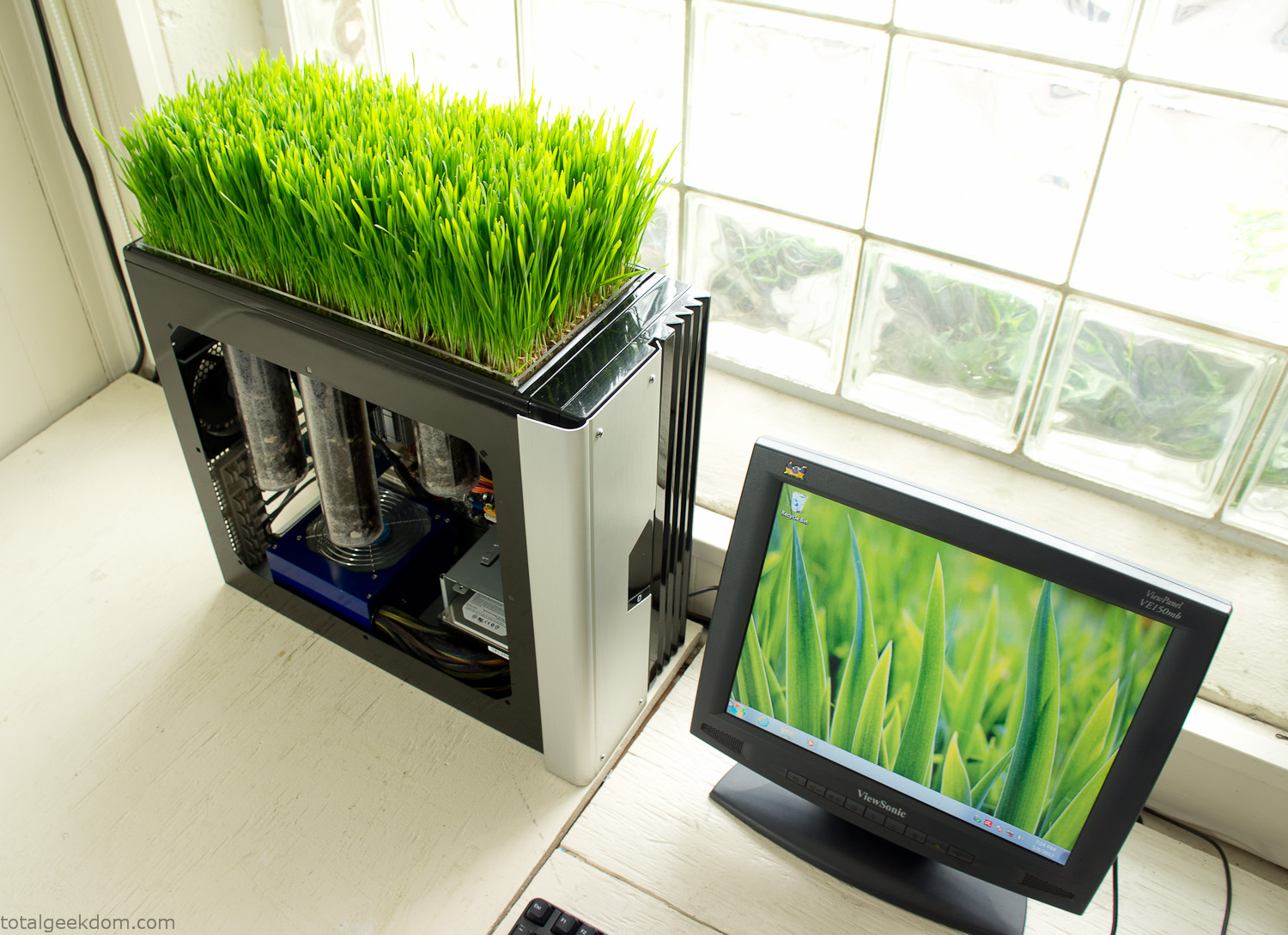
Bio Computer
I’ve been interested in working on a project for while that would combine something tech-based with something organic. Mixing the two elements intrigued me for a while. I’ve wanted to add flowers, or maybe plants of some sort to blend a little bit of nature into the space. I do receive a bit of sunlight through a glass block window, but the temperature in the basement is usually on the colder side. In the winter I don’t really heat the space because the folding farm outputs enough heat to keep the temperature comfortable. I didn’t want to change that aspect so I needed to come up with something that would tolerate slightly cooler temperatures and limited sunlight.
I can’t exactly recall when the idea came to me, but at some point I started wanting to use the heat from a computer as a way to warm the soil and help with germination/growth. I’m about as far from a botanist as it comes, I did some reading online and became pretty interested in the effects of soil temperature on germination/growth. I read different studies and papers from various universities. It was not too long into that process that I became hooked on the idea of using computer heat as a way to control the soil temperature of some sort of living plant life.
As the idea developed further I started looking into wheatgrass as a plant option. There is something clean and natural about the look and idea of a piece of grass growing in my basement. I thought the look would alter the space a little bit and add a bit of color along with something more than just metals and plastics. After reading enough studies and papers on the effects of soil temperature and germination with wheatgrass I felt like I had a good enough handle on the basics to tackle this.
The first step was finding a computer to adapt for the project. Luckily I had a lot of donated computers that people had given me for various project purposes. Most of them didn’t work, but by cobbling together various components from a bunch of different old computers I was able to come up with enough good parts to make a working computer.
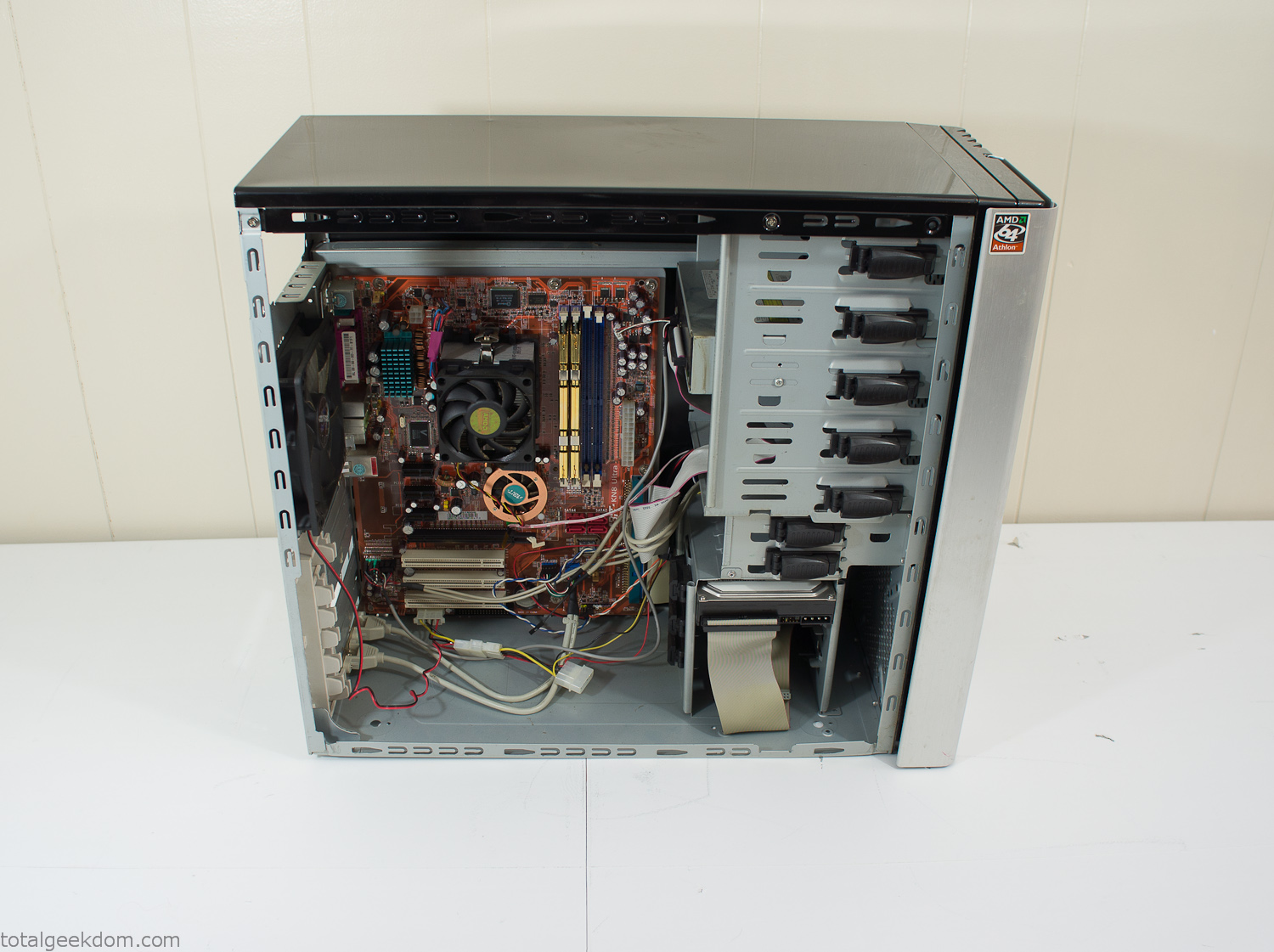
Donor Computer
At the time I was starting to get a formalized plan together for this project, another idea popped into my head. I’ve got a 5 yr. old who is already fairly geeky (just ask him to do his Jabba the Hutt impression for you) but he really does not get that much computer time. He’s getting to an age where he’s more inquisitive about tech stuff and I think he’s ready for his first computer. Since I was already well underway with this project it seemed like a perfect opportunity to orient the computer itself towards a learning tool for him in addition to using it as a way to blend something organic with a piece of technology.
With all of these goals in mind I started tinkering away. The computer hardware itself was nothing fancy, definitely outdated, but perfectly suited towards this project.
CPU- Pentium 4 (3 GHz)
Dell Factory Motherboard
Various Ram Sticks- 2gb
Old Maxtor 120gb IDE Hard Drive
Old FPS Power Supply
Donated Old Computer Case
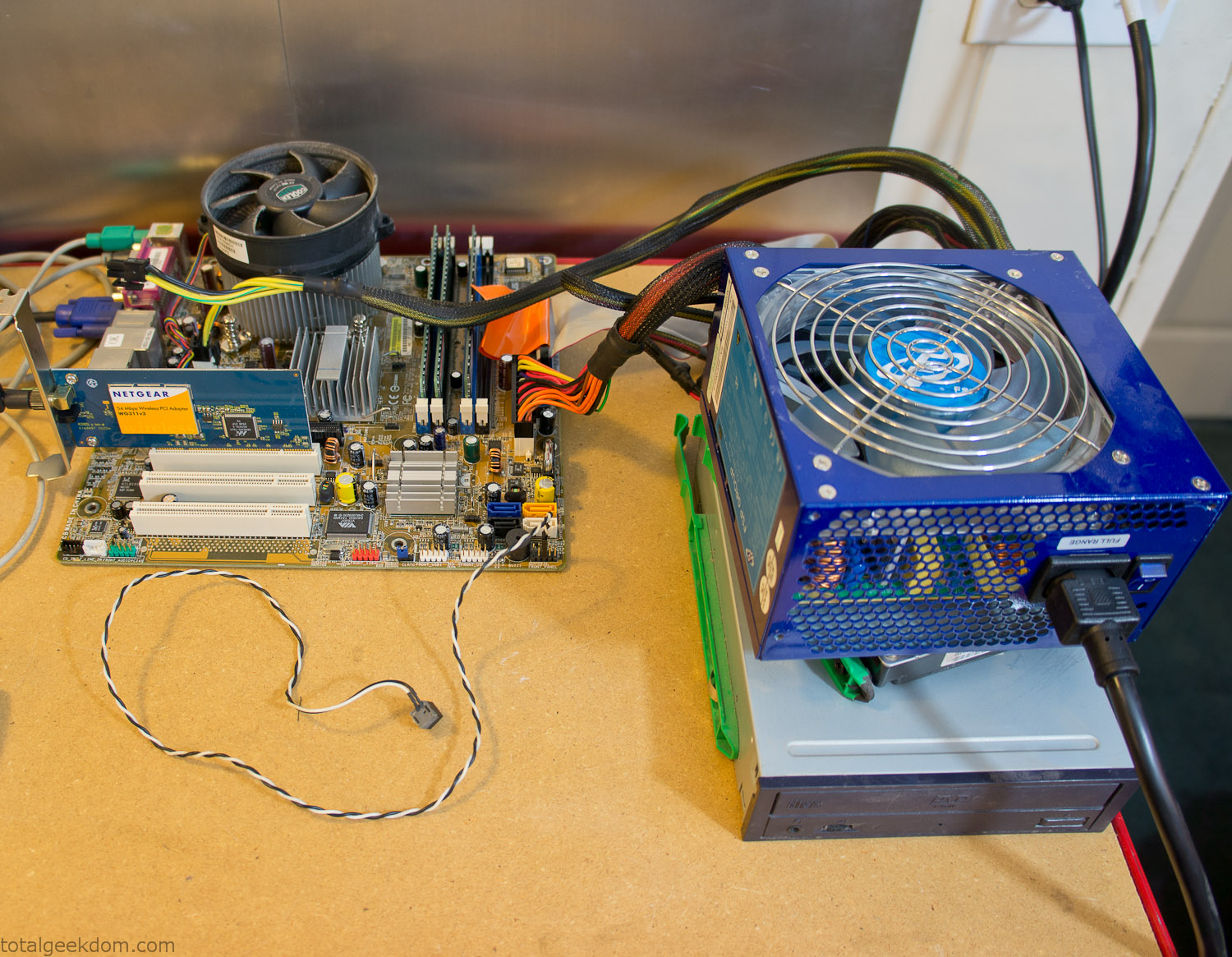
Computer Parts Testing
If you’ve spent any time around computer hardware in the last decade you’re probably well aware that Pentium 4 has a reputation for running hot. The 90nm Pentium 4 was named Prescott and it didn’t take long before the nickname Pres-hot popped up. In this case though that extra heat is going to be put towards good use.
Once the hardware was all in order I started working on the layout and arrangement for the case. I had originally envisioned the grass growing out of the top of the computer case. This seemed like it would provide a good blend between the hard edges of the computer and the soft feel of the grass. This also worked well with putting the soil area in the upper portion of the case, where the most heat should collect. After doing some initial tests with this configuration I found the measured temperature near the top of the case was the hottest. The placement of the CPU near the top of the case and the lack of airflow in that area contributed to these higher recorded temps.
After finishing with some initial tests I decided to completely strip the case down and start removing all the unnecessary brackets and pieces inside of the case. Like most computer cases all the internal brackets and mounts are riveted together, so I drilled all the rivets out of the components I wanted to remove and pulled them out. The gutted case looked pretty barren after being stripped.
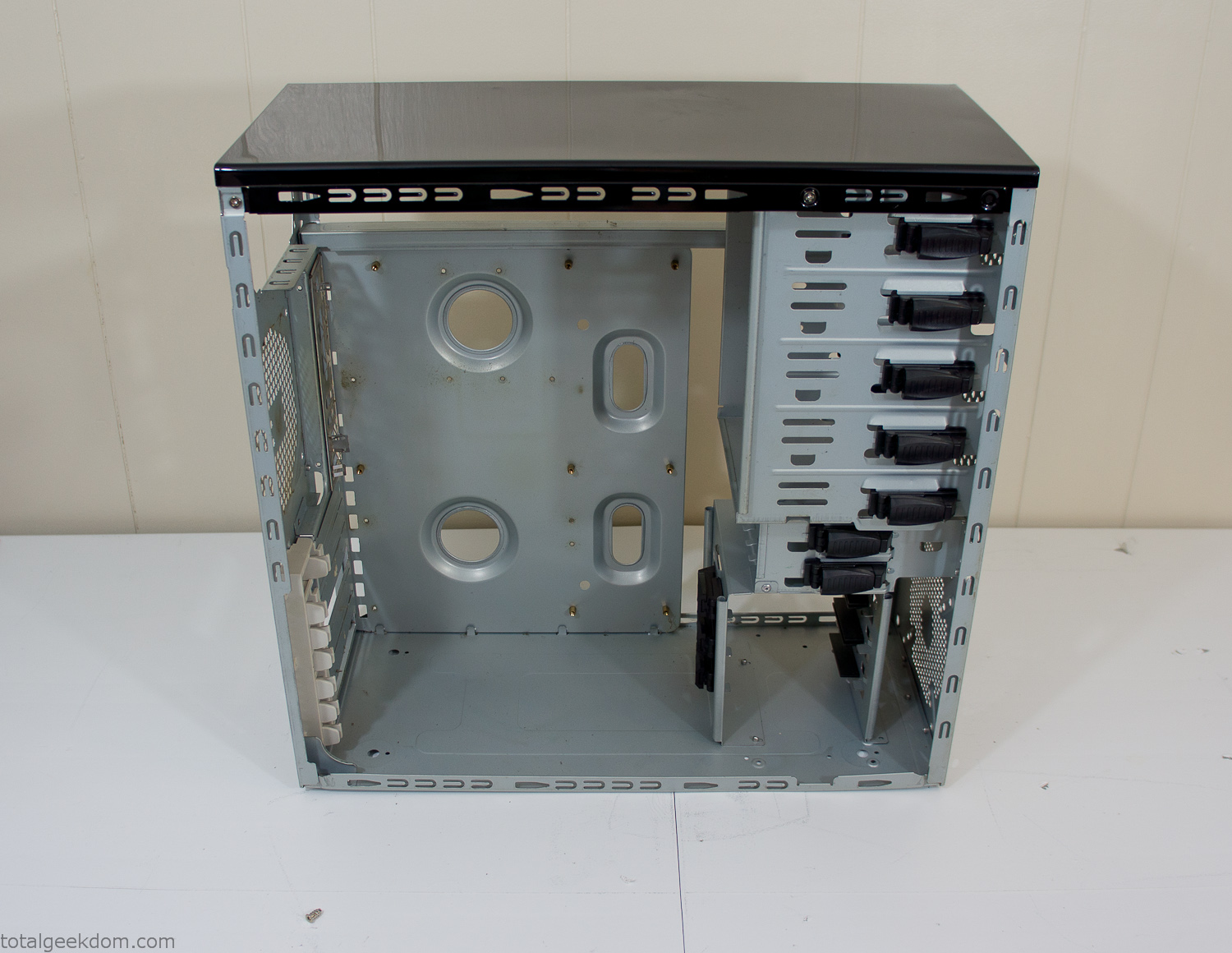
Empty Computer Case
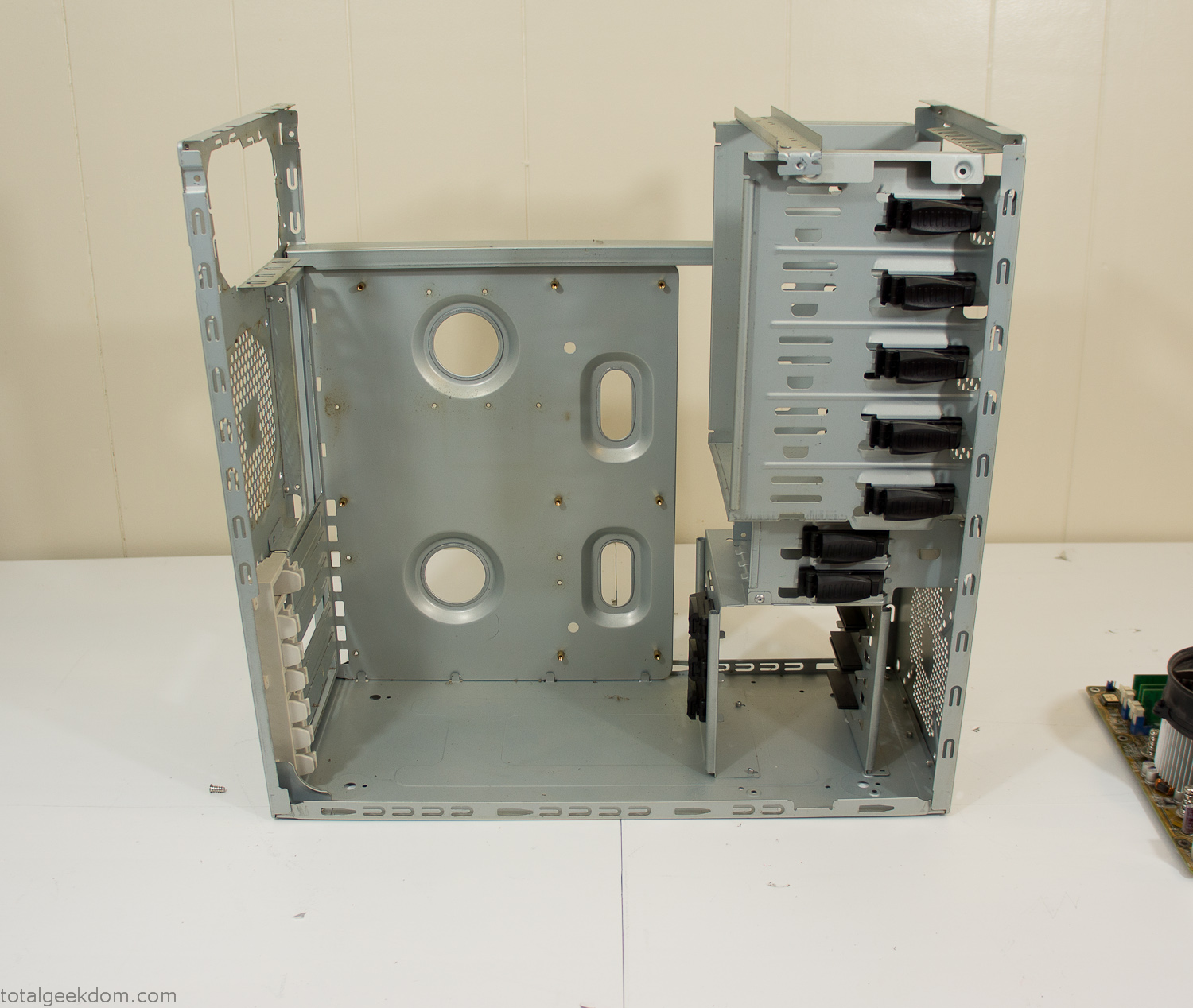
Dismantled Computer Case

Stripped Computer Case
In keeping with my original plan of having the computer blended with the organic grass I wanted it to be easy to see the inner workings of the computer and also the soil from the grass growing above. I needed something that was translucent, which left me with either glass or acrylic/polycarbonate as my options. I ended up choosing acrylic because I was able to find a cheap, used, die-cast model car display case top that was the perfect dimensions for the top of the case. Couldn’t go wrong for 5 bucks.
I test-fit the acrylic over the top of the computer case and marked my layout on the top of the case. My plan was to cut open the top of the computer case and insert the acrylic display case into the section I cut out. To cut open the top of the computer case I drilled a hole as a starting point and then used tin snips to cut through the thin gauge metal.
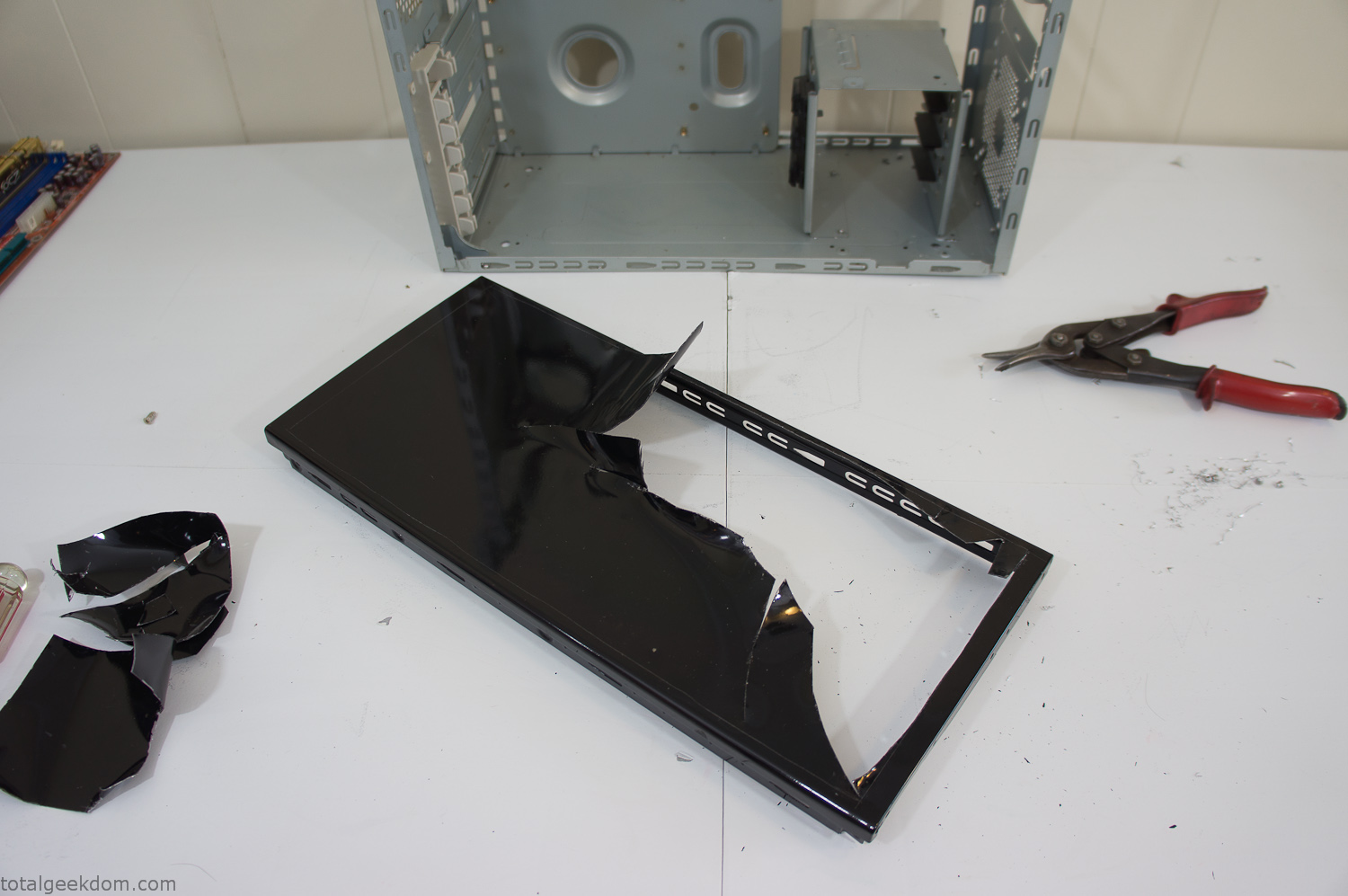
Computer Case Lid Modding
Once I had the metal opening cutout, I needed something to put along the edges of the freshly cut opening to create a clean and finished look. For $2 I was able to find some black, car-door-edge, plastic molding that worked perfectly.
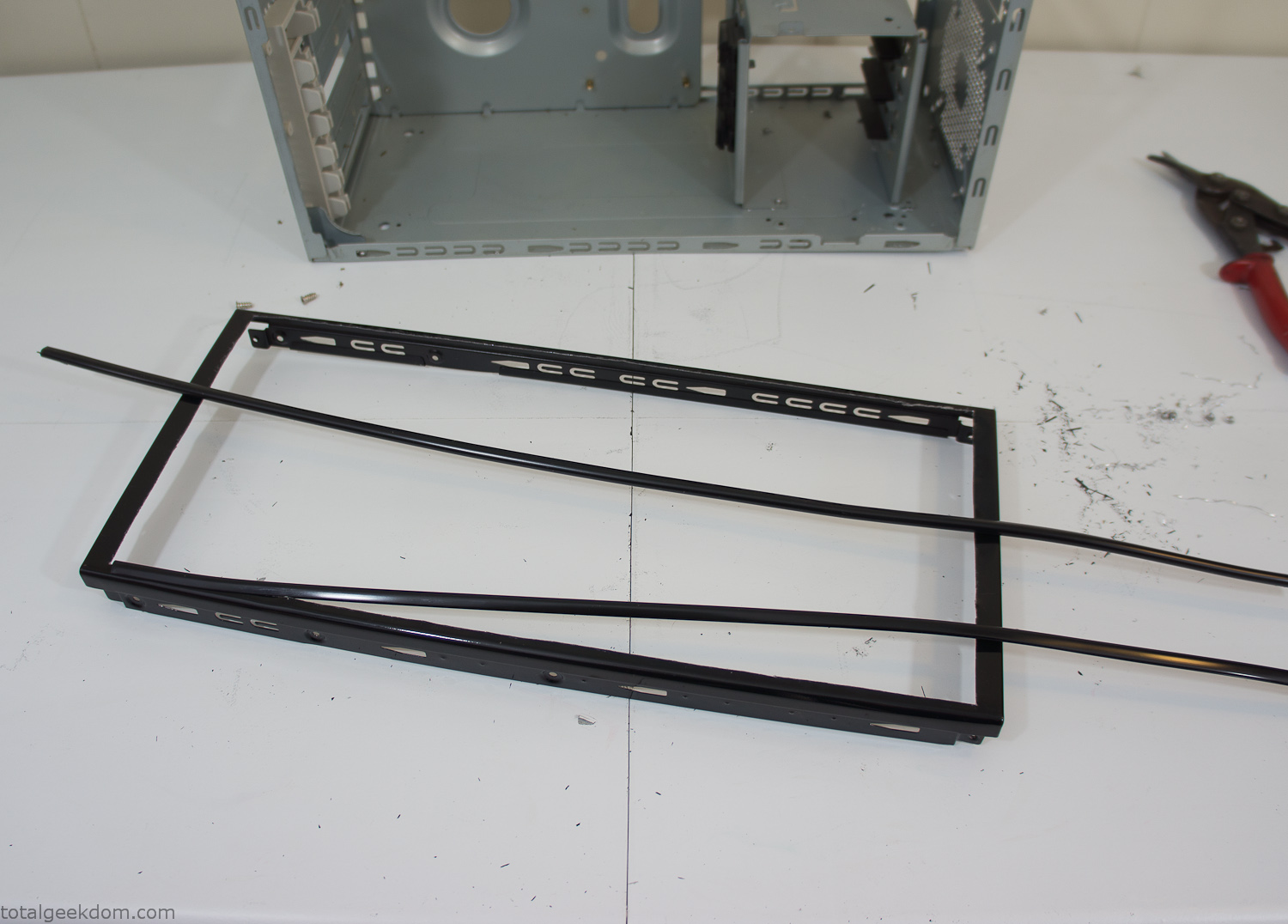
Modified Computer Case Lid
After getting the opening of the top of the computer handled and the acrylic case properly fitted, I moved onto some more testing with soil in the acrylic and the computer running. I wanted to see what kind of heat transfer I would get and how it would affect the soil temperature. I knew that using acrylic over glass would make it a little more difficult to heat the soil as acrylic is not that good at transferring heat. Luckily though I didn’t really need to alter the soil temperature that much, I just needed a little extra heat. Testing showed that heat transfer with just the single acrylic display case as my soil container was slow. So I decided to add some acrylic tubes. This would allow more surface are for soil to acrylic contact and also give me an area where I could add a mixed substrate to allow for soil drainage.
I went online and found a 3ft long section of 2 1/4″ clear acrylic tubing for $8 dollars. I wanted to add a couple of hanging cylinders off the main of the acrylic display case in the top of the computer case. To do this I needed to cut holes into the bottom of the display case. Cutting holes in acrylic is not always easy, it’s likely to chip and craze at the edges. To get around this I used a buildup of masking tape on both sides of the acrylic, to provide a little bit of resistance and strength. I placed the acrylic display case back into the computer and marked my layout for the tubes. I needed to leave clearance for the CPU cooler, power supply and hard drive mount.
After marking the layout, I used an air-powered pencil grinder and carbide tipped bit and cut through the acrylic case along my marked lines. After the initial shape was cutout I used a tube piece as a template and slowly worked on grinding the holes as perfectly round as I could get them so that the tube had a snug fit all the way around. The fit is pretty important as the acrylic cement that I used needs there to be a tight fit so that the acrylic can bond correctly.
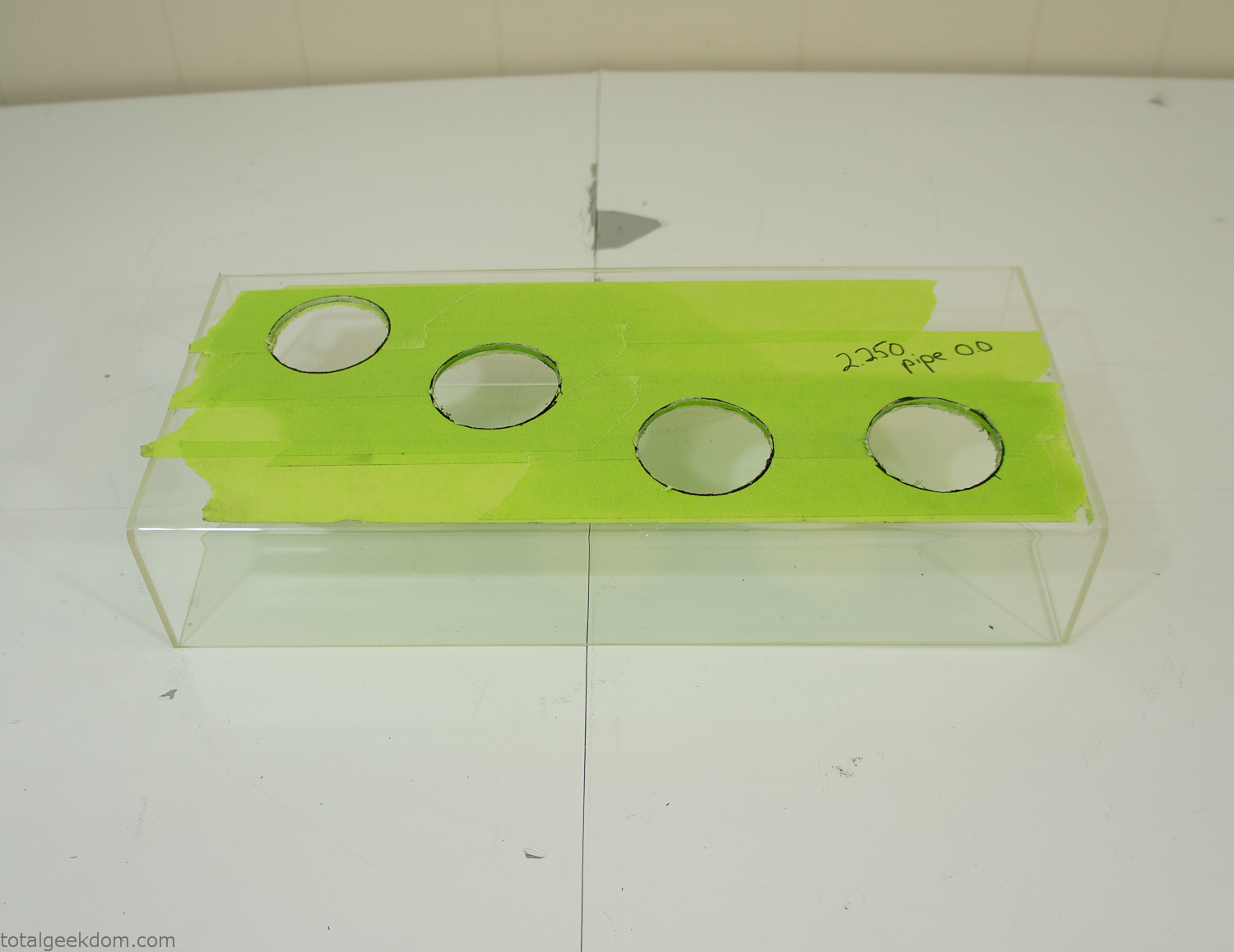
Acrylic Case Modifications
I placed the tubes into the acrylic case and mounted it in the computer and test fit the placement and height of the tubes. After getting everything lined up and oriented correctly I moved towards bonding the acrylic together. Using a needle dropper applicator I applied the cement to all the joints. After letting it set overnight I came back the next night and applied a thin coating of clear silicone caulk around all the joints just to ensure they were completely water tight
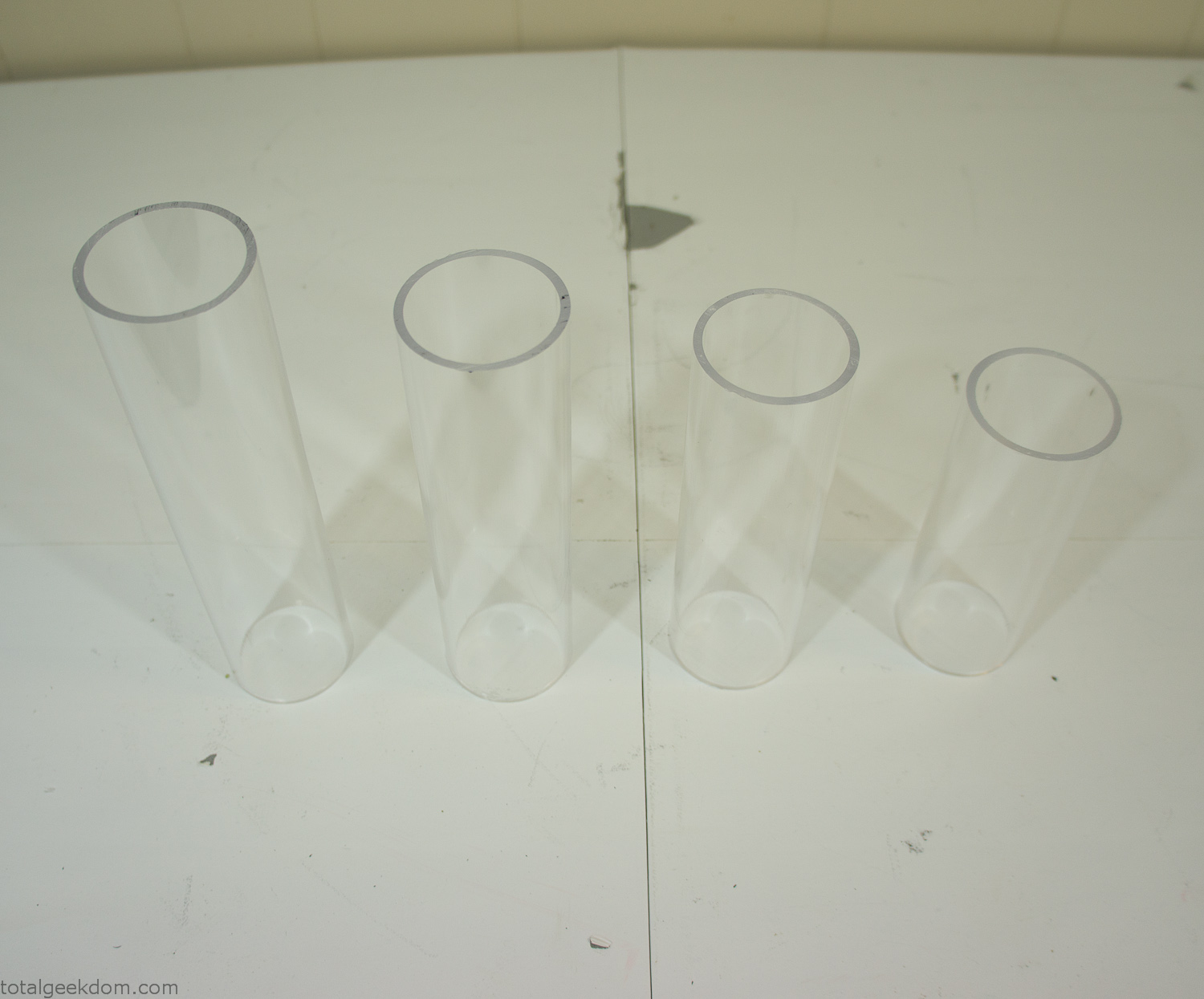
Acrylic Tubes
The next step was sealing up the bottom of the acrylic tubes. I looked at a couple of different options before realizing that the discs I had cut out of the acrylic case to fit the tubes would be almost the perfect size. Using a bench grinder and a test piece of tube I slowly ground each disc to the perfect size for a tight fit all the way around. I placed the clear acrylic discs into the bottom of each tube and repeated the same cementing and silicone caulking procedure to ensure they were water-tight. After a couple of days’ worth of drying I tested the case by filling it with water overnight and checking in the morning to make sure that no leaks had popped up.
In order to hold the weight of the acrylic case after adding soil, I drilled and installed a machine screw with a rubber cap at each corner of the computer case to bear the weight of the acrylic case.
Once all the work was done with the acrylic case section I started reinstalling all the components. The motherboard, hard drive and power supply were added and then wired up.
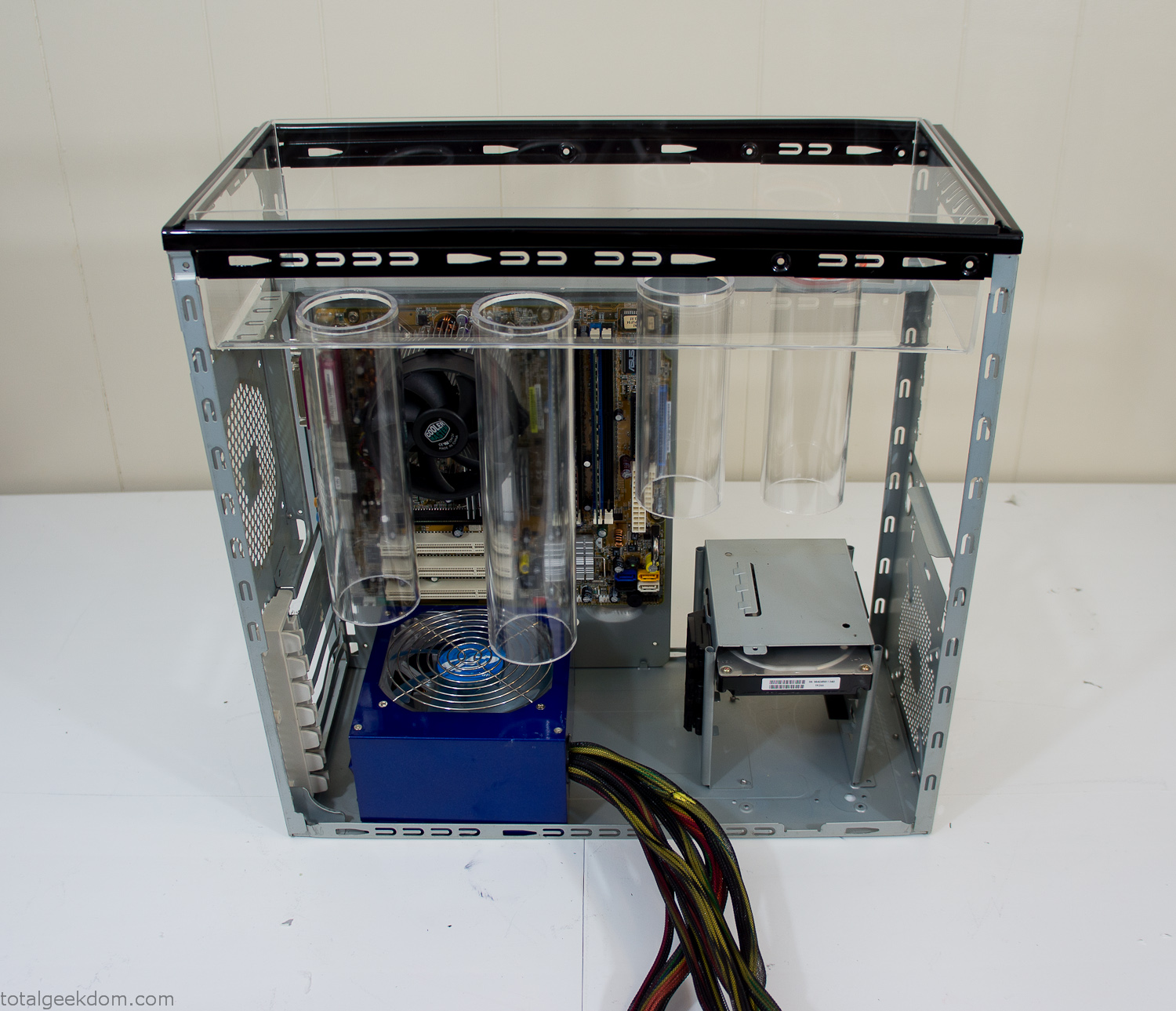
Mocked Up Computer Case
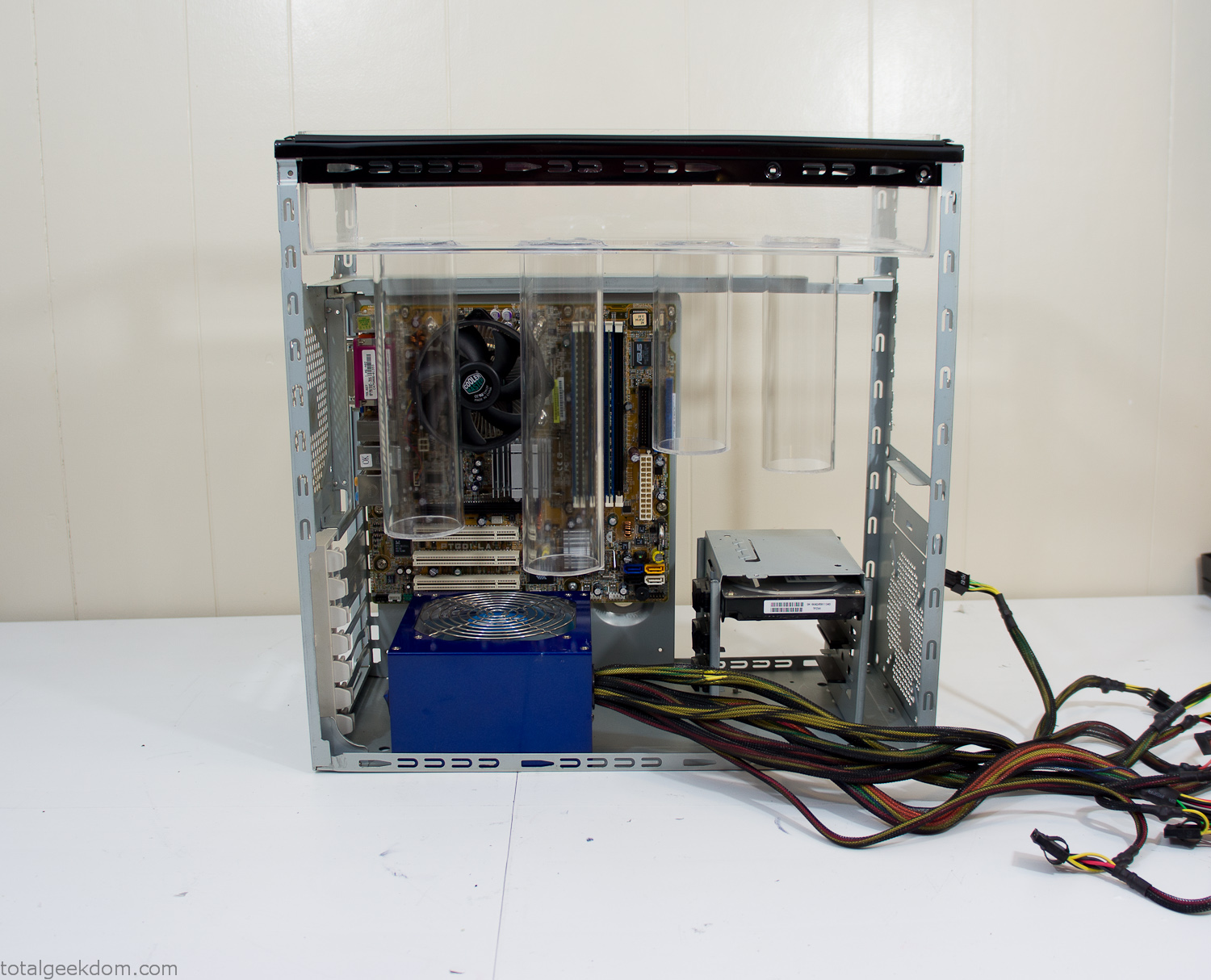
Power Supply Mockup
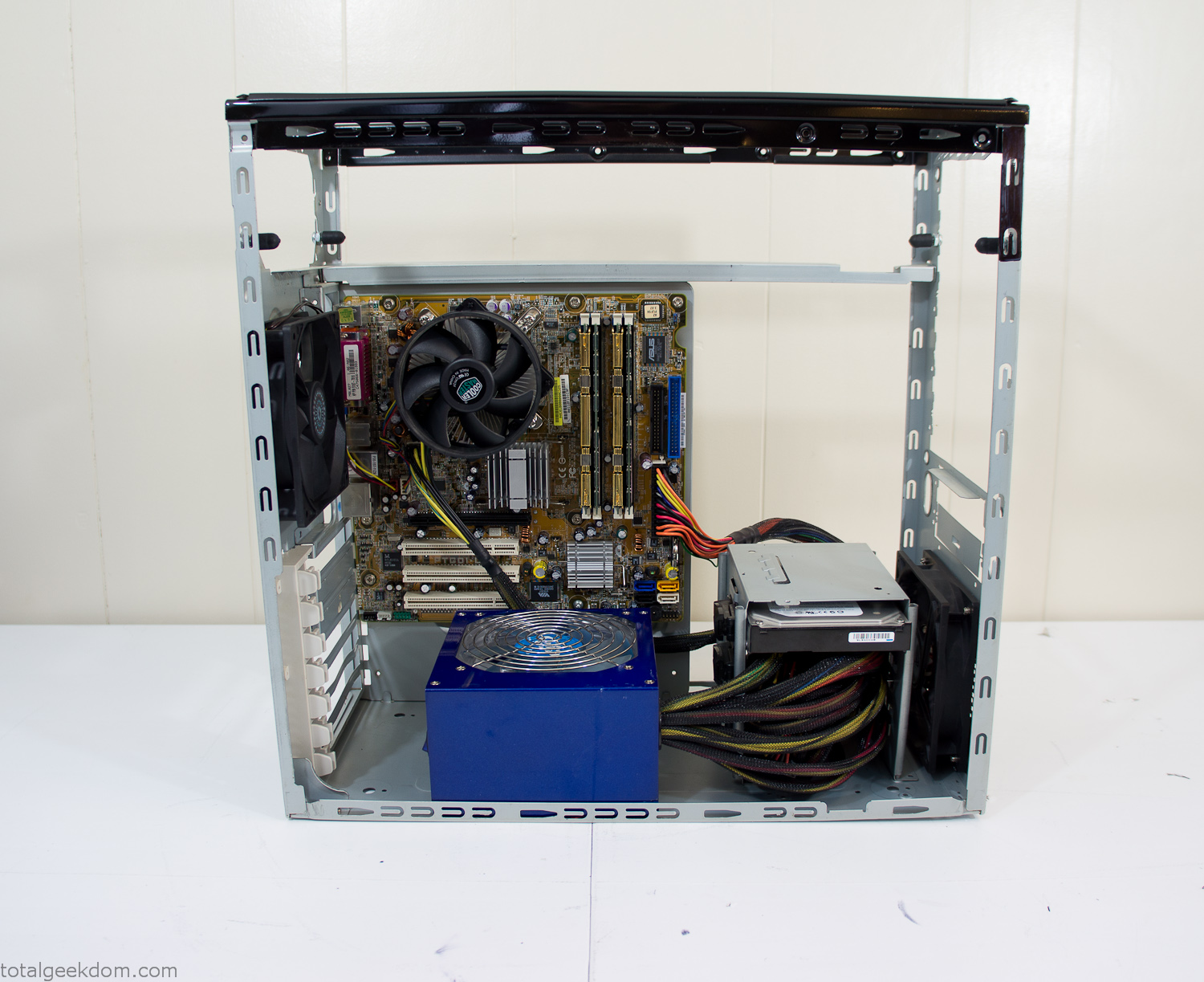
Computer Components Wired
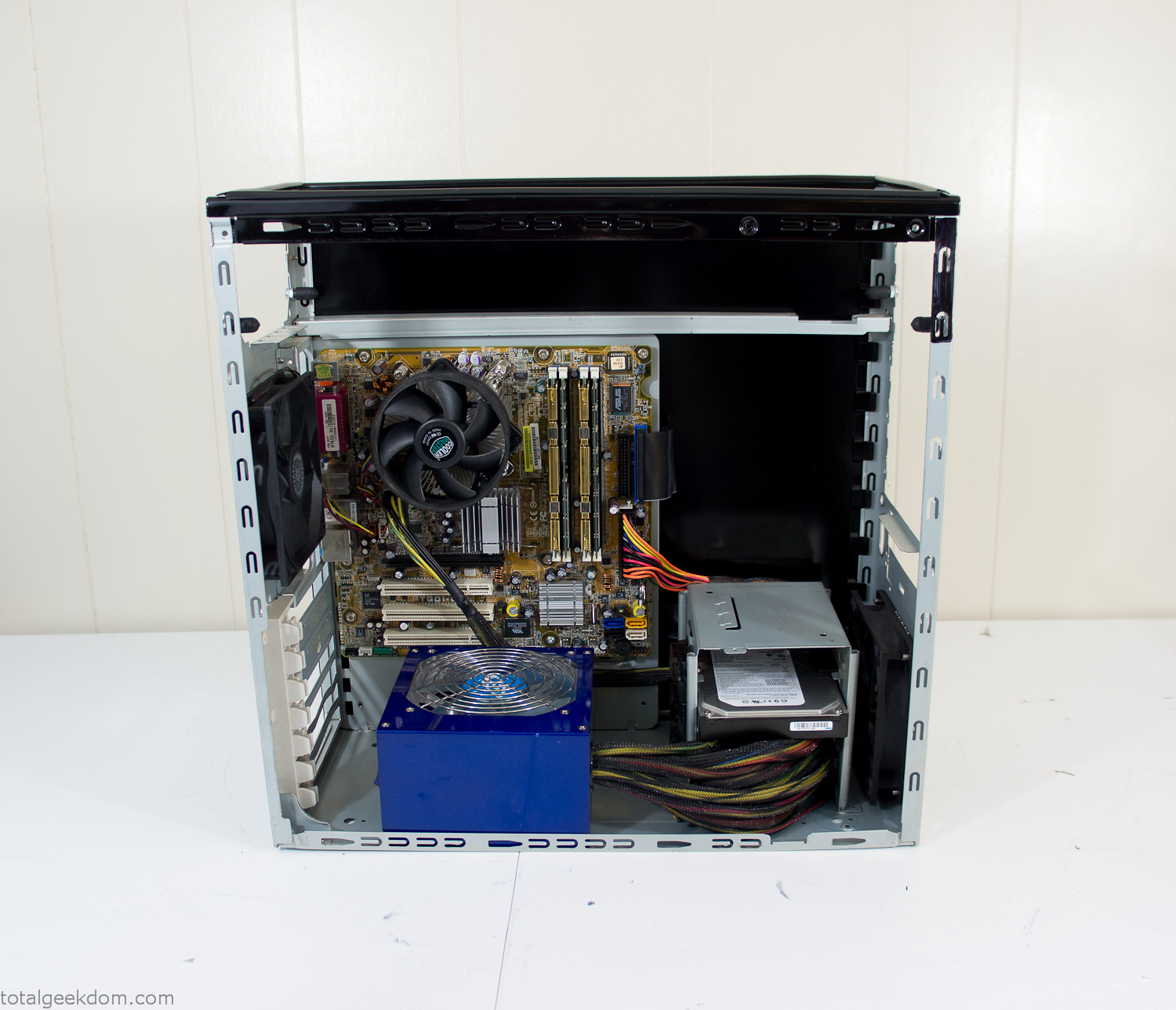
Case Panel Installed
At this point all that was left was to make a clear panel for the side of the case. I had some left over acrylic sheets from a different project that were really close to the right size, after test fitting, marking and cutting I then had a clear side panel to see into the case. (I left this off for the pictures because it caused a reflection)
The final step was filling the case with soil and adding some wheatgrass. I had been test growing other samples of wheatgrass during the build process. So I had already a couple of different patches of grass growing. I tried to keep the soil level just below the top of the acrylic case edge to make it a little more seamless.
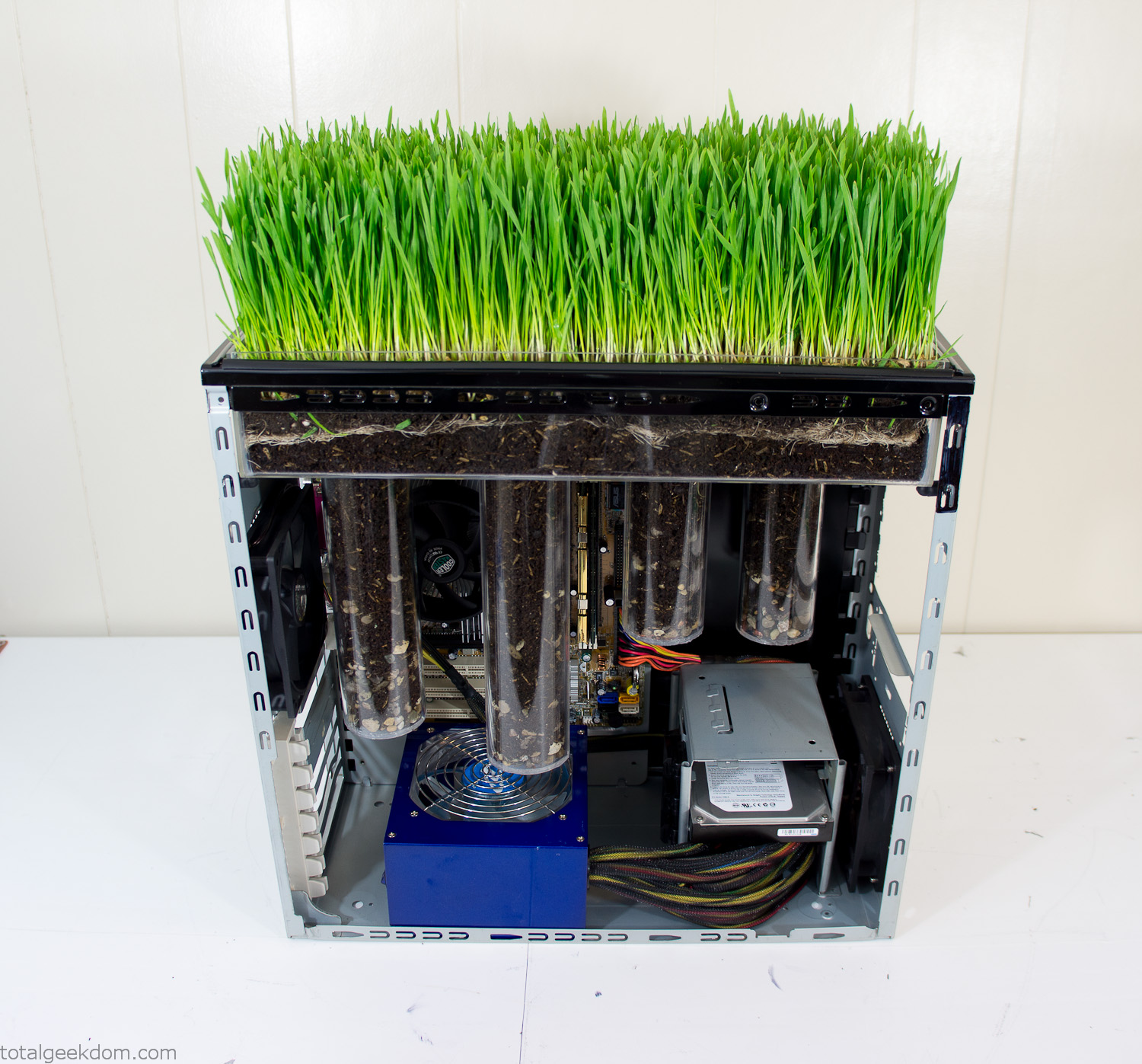
Grass Planted in Computer
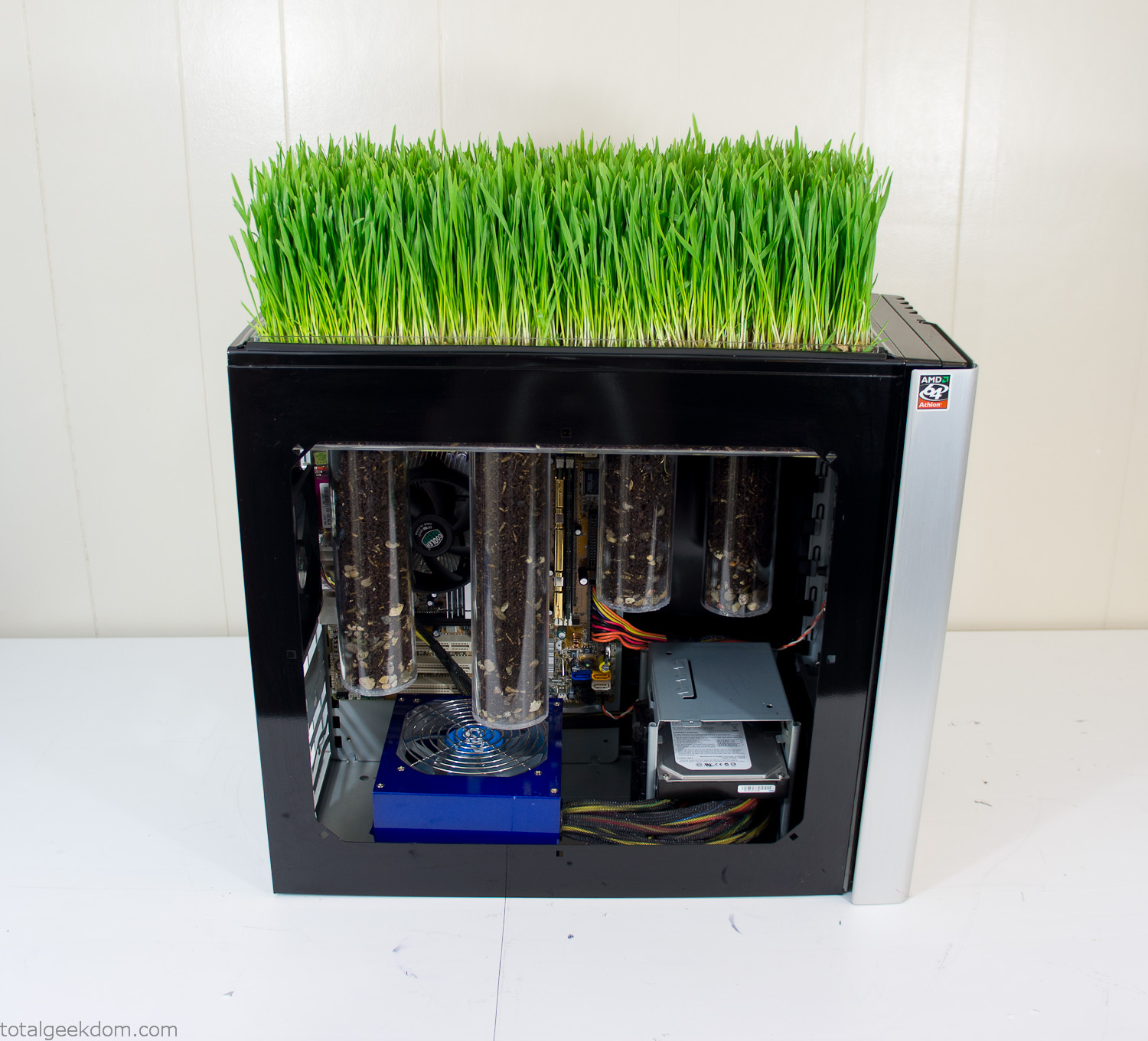
Grass and Case Panel Installed

Grass in Computer
For the computer itself I ended up installing Windows as well as Linux in a dual boot setup. Since the computer was going to be used by my son as something to play with I figured I should put both on there so he can tinker with them and learn as he goes. Besides, for important life decisions like picking an OS (Operating System) I think any good parent should present the options and then let their kid decide for themselves.
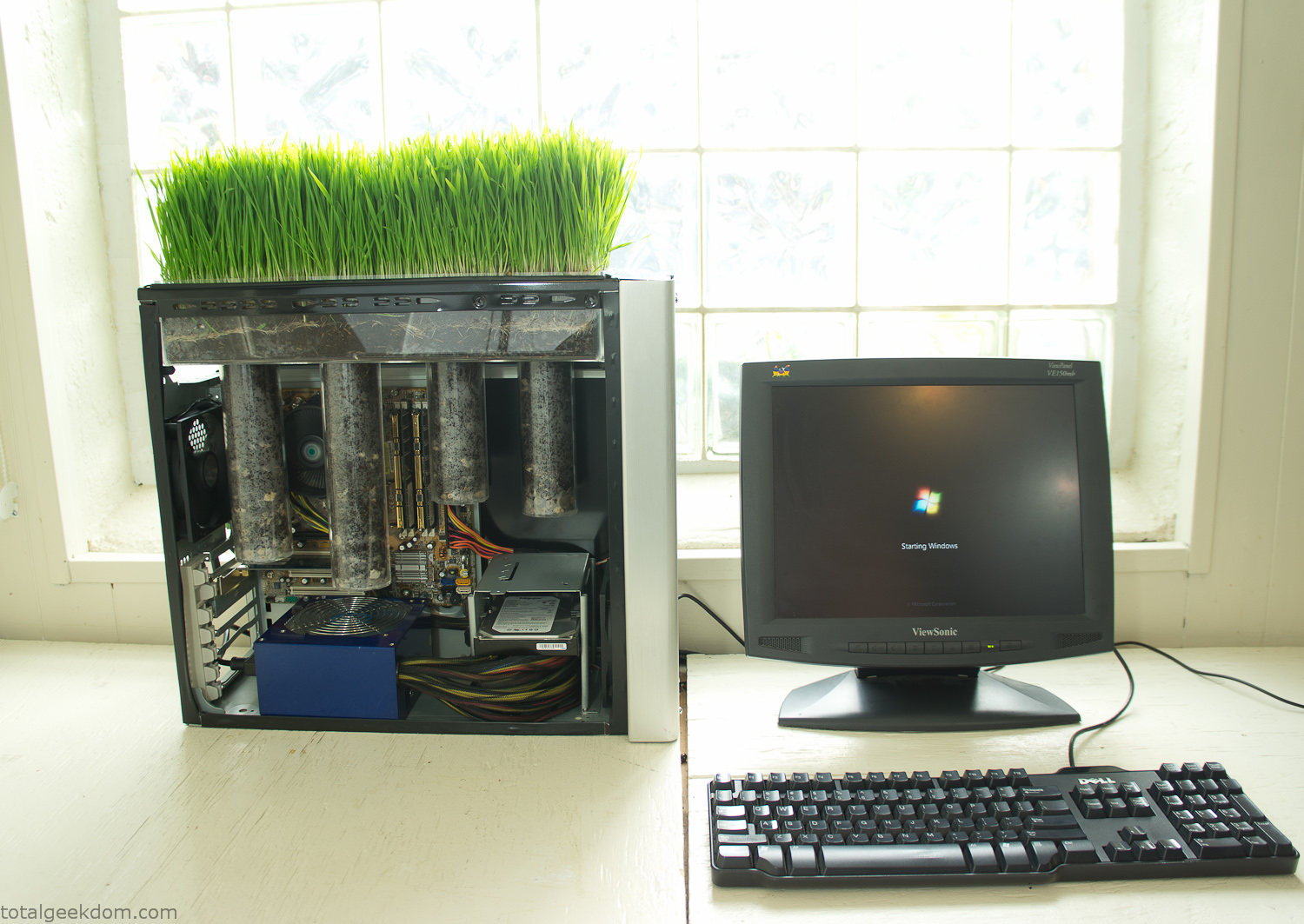
Starting Windows
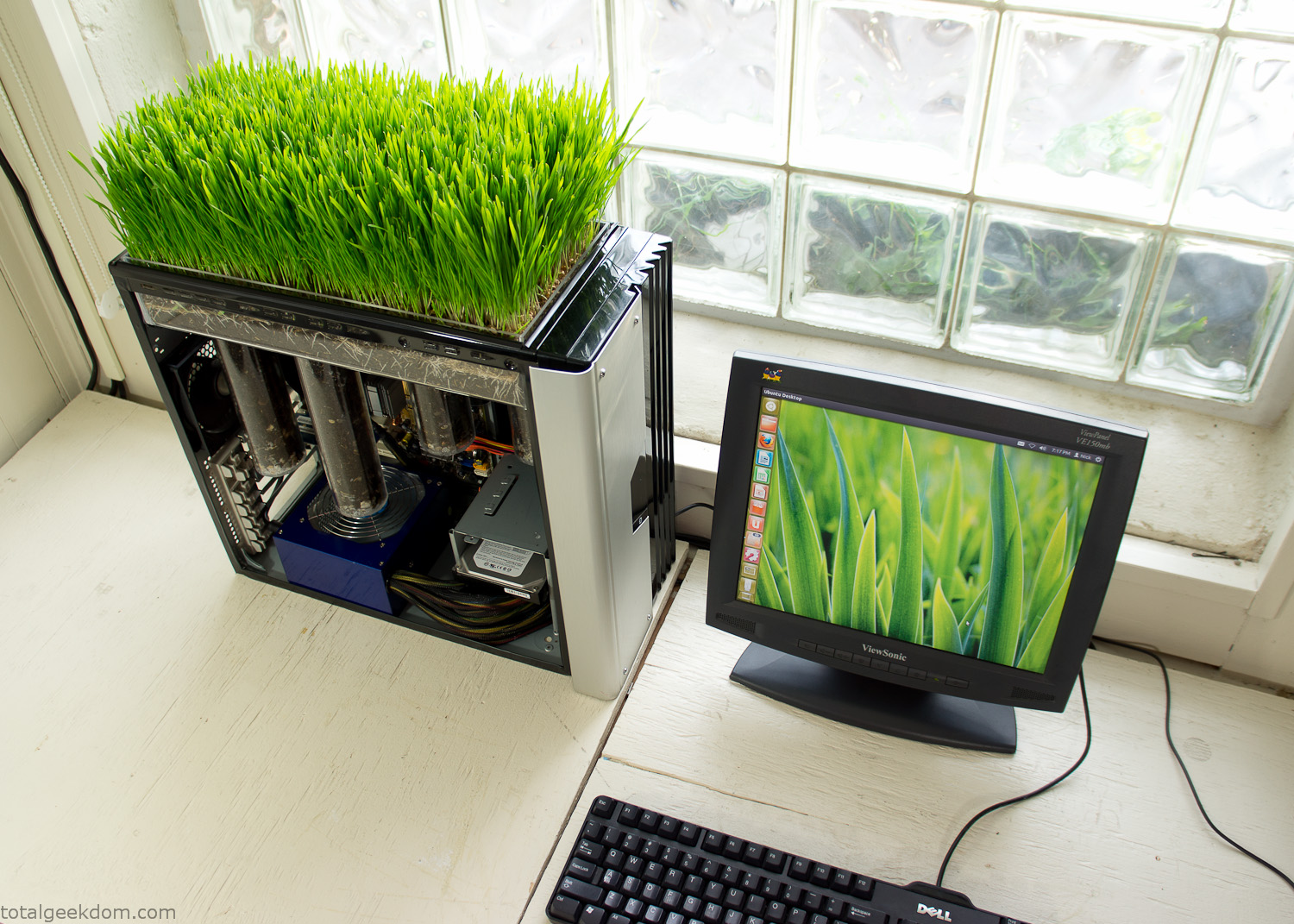
Linux Running
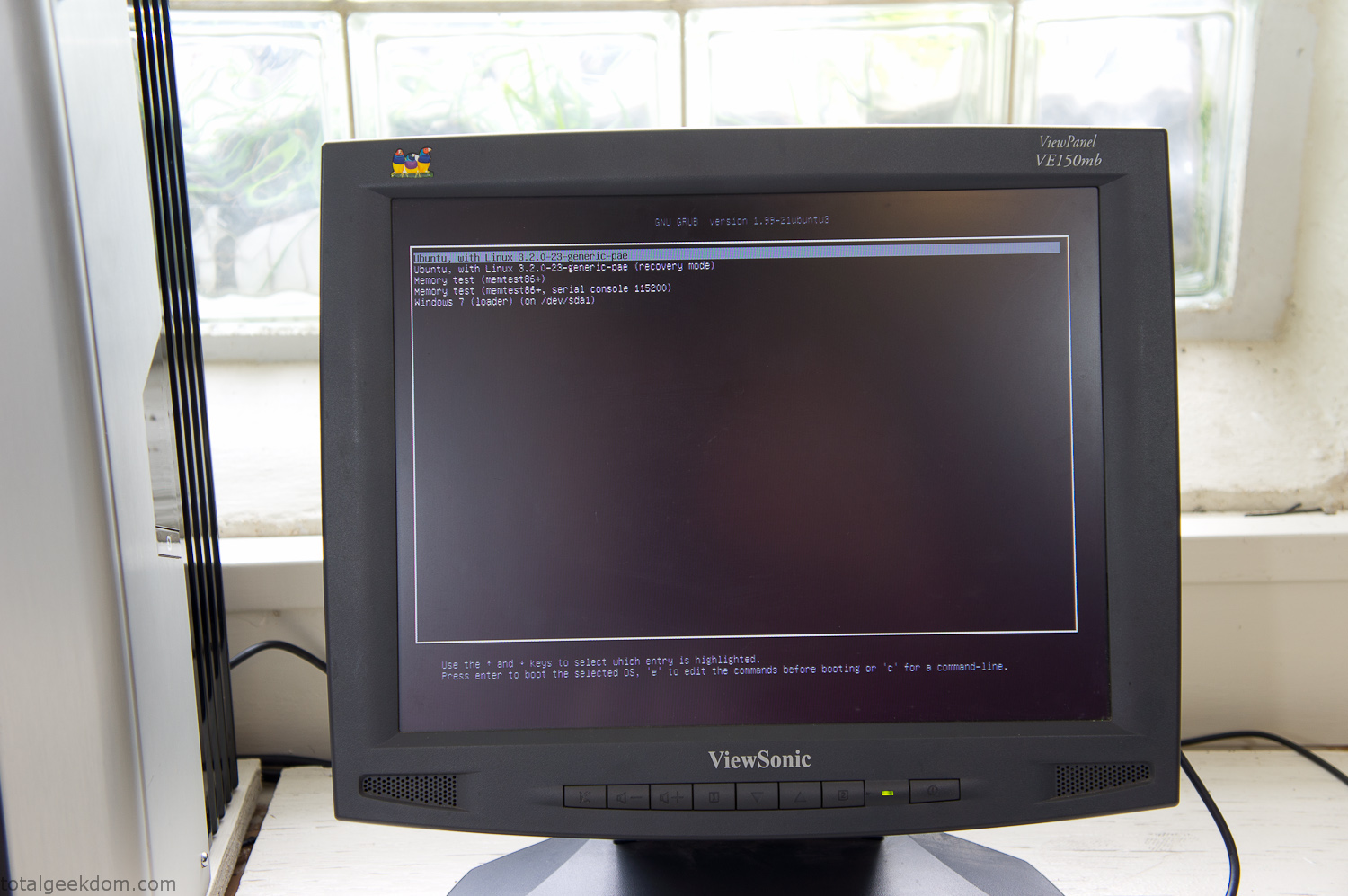
Dual Boot Screen
In the end I’m happy with the result of the project. It’s been fun experimenting with growing wheatgrass and I like how the natural look of grass is blended with the very modern, inorganic case.
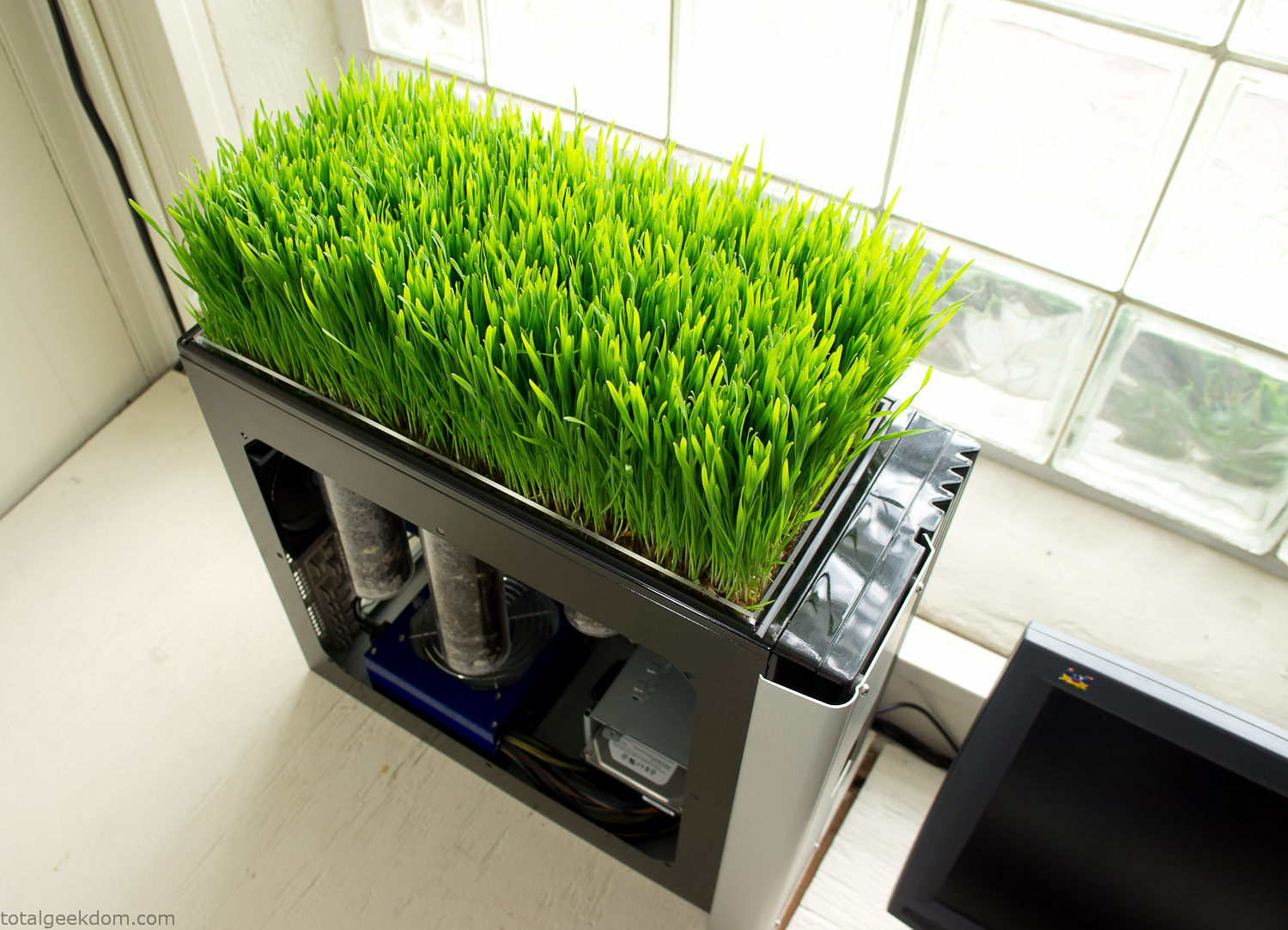
Computer Grass Growing
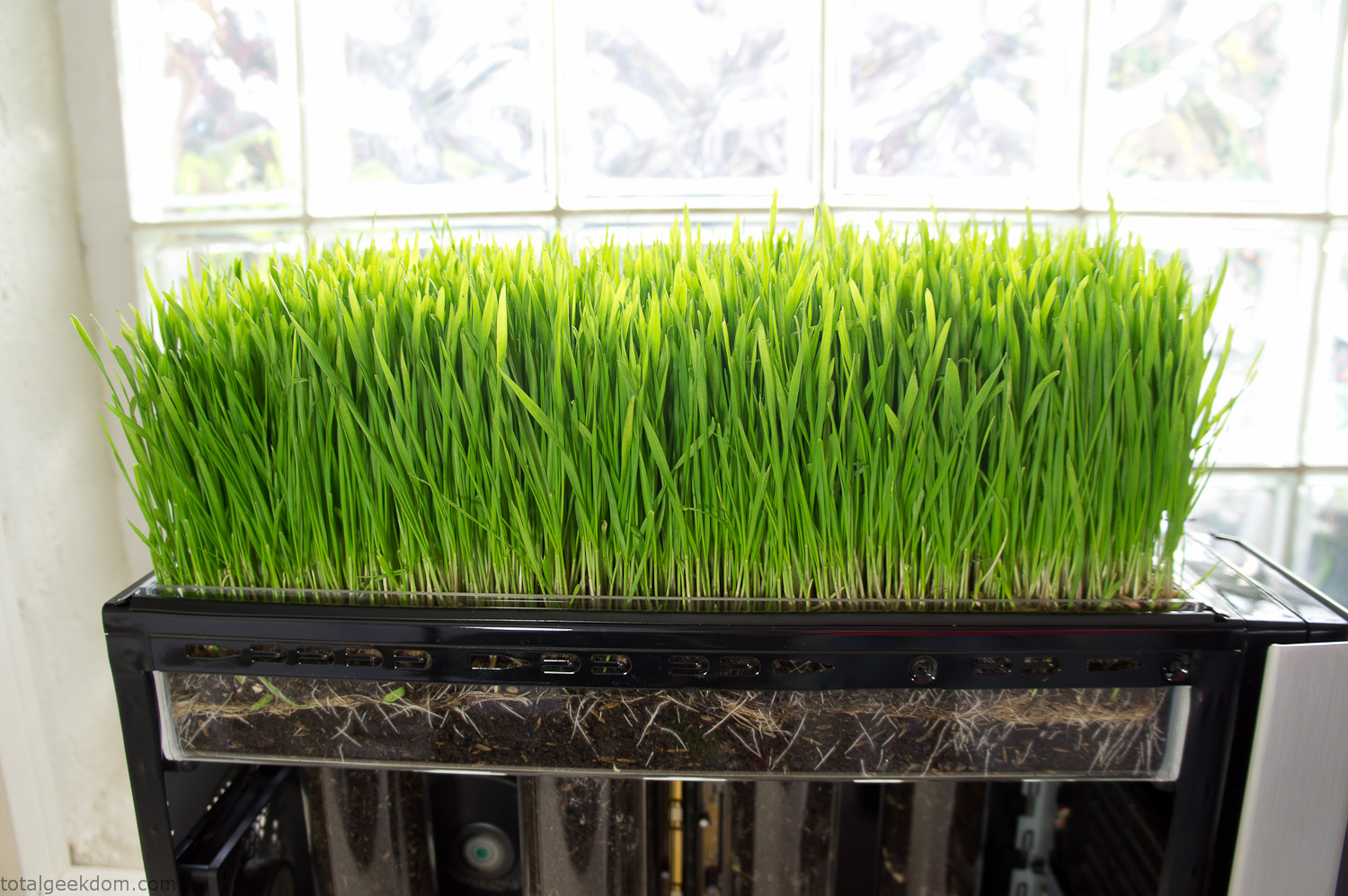
Grass in Computer Section
Notes
Temperature Testing
In testing the case temperature versus the soil temperature I found it was easiest to control the case temperature by using a variable fan speed control on both the inlet and outlet fans. By turning the fan speed down I could increase the temperature inside the case and correspondingly raise the soil temperature.
In order to maximize output of heat during these tests I used Prime95 to run the CPU at 100% load.
Using this method to control the case and soil temperature I played around with adjusting the soil temperature and then tracking the rate of growth of the Wheatgrass. The target temperature for peak growth seemed to fall around 66°F (19°C).
Using the fans to control the case temperature allowed me to vary the temperature inside the case from a low of 75°F (24°C) to a high of 91°F (33°C). In order to achieve the desired increase in soil temperature, I had to run the case temperature toward the higher end of the scale.
When the soil temperature was too high, the growth of the wheatgrass would slow.
Wheatgrass
The wheatgrass I used for my tests was nothing special, it can be found as seeds (berries) in a lot of health food stores and it grows relatively easily.
Caring for the wheatgrass is just a matter of keeping it watered. It’s a pretty easy plant to work with and doesn’t require any special skills.
Wheatgrass is often used as a nutritional supplement; it can be juiced and mixed into smoothies and other beverages. I plan on harvesting some of the grass and making some juices.
Plant Options
While wheatgrass offers a nice, attractive and easily grown option I do plan on trying other plants as well in the future. Since I already have the “planter” built all I have to do is add a different plant and see how it goes. I’m sure there will be some plants that don’t like the lower light environment, but it will be fun experimenting with other plants as well and seeing how they take.
Materials
Donated Computer- Free
Clear Acrylic Display Case- $5
Clear Acrylic Tube- $5
Plexiglass Side Panel- Free
Total- $10
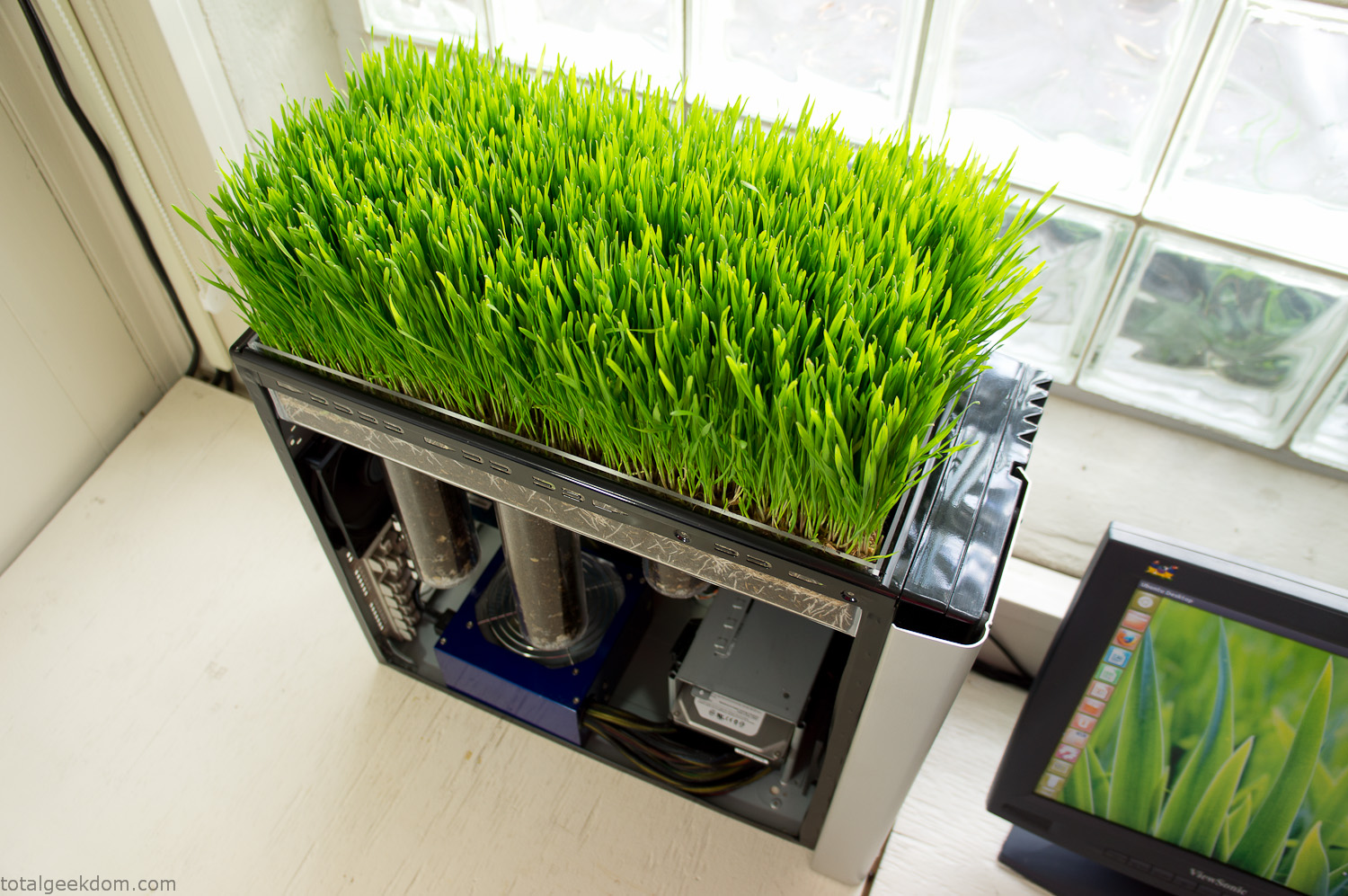
Bio Computer Running
 29.2k
29.2k
 13.2k
13.2k 7.1k
7.1k

 2.1k
2.1k 813
813 2.6k
2.6k
Comments 53,076
https://www.rwaq.org/users/ballanders31-20250802224057
Курс Нутрициолог – обучение нутрициологии с дипломом https://nutriciologiya.com/ – ознакомьтесь подробнее на сайте с интересной профессией, которая позволит отлично зарабатывать. Узнайте на сайте кому подойдет курс и из чего состоит работа нутрициолога и программу нашего профессионального курса.
Hey everyone,
I’ve been diving into the world of internet gambling lately, and I’ve gotta say — it’s way more exciting than I expected. At first, I was a bit wary. I mean, how do you even believe in an online platform with your hard-earned money, right? But after testing the waters (and trying out a few questionable sites so you can avoid that mess), I figured out a few things that separate a trustworthy casino from a risky mess. First off, if you’re new to all this, here’s the golden rule: **check the license**. If a casino doesn’t have a proper license (like from the Malta Gaming Authority or the UKGC), just walk away. No bonus is worth the gamble of never seeing your funds again. Also — and I know no one wants to — check the terms. That’s the only way to know what kind of hidden traps they’ve slapped onto those so-called “amazing” bonuses.
Now, let me share a site I’ve been using these last few weeks. It’s been a game-changer. The interface? Super easy to navigate. Payouts? Fast as hell. And the game selection? *Insane*. Slots, live dealers, blackjack, even some unique stuff I hadn’t tried before. Check it out here: marvel casino bonus What really stood out was the help desk. I had a tiny issue with a bonus not working, and they got back to me in like no time. Compare that to other sites where you’re just shouting into the void — yeah, hard pass.
Also, if you’re into bonuses (and who isn’t?), this place offers some awesome ones. But here’s the trick: don’t just go crazy over promos. It’s smarter to get fair terms than a huge bonus you’ll never be able to withdraw. I’m not saying you should go and blow your whole paycheck — please don’t. But if you’ve got a little extra cash and you’re looking for a fun way to unwind, online casinos can totally deliver. Just play smart, know your limits, and don’t treat it like a side hustle. It’s for fun, not for a paycheck. Anyway, just wanted to drop my experience here in case anyone’s looking for solid info or trying to find a decent place to play. If you’ve got your own recommendations or even some horror tales, I’m all ears — love talking shop about this stuff.
Good luck out there, and don’t let the house win too much ??
והביט בבקתת העץ בקצה הכביש הכפרי האמבטיה כבר עישנה-צינור מעל הגג זרק זרם דק, ואור חם פרץ לבית הזה, אפילו לא להוריד אותו לעבודה, והלבישה הקפדנית על הזונה מיד כשהיא באה אליהם. בהתחלה הם ליווי בחיפה
https://allmynursejobs.com/author/soryelroxely/
I like the valuable information you provide in your articles.
I’ll bookmark your weblog and check again here regularly.
I’m quite certain I will learn a lot of new stuff right
here! Good luck for the next!
https://allmynursejobs.com/author/youtsey-a_rose_1980/
https://www.rwaq.org/users/iamhelen78cool-20250805015123
https://bs2vveb.at
Hi, after reading this awesome piece of writing i am as well delighted to share my know-how here with mates.
https://allmynursejobs.com/author/croceshuaiai/
Attractive part of content. I simply stumbled upon your website and in accession capital to say
that I acquire in fact enjoyed account your blog posts.
Anyway I’ll be subscribing to your feeds or even I fulfillment you get entry to
consistently quickly.
https://pxlmo.com/Larry.Hudson
https://pxlmo.com/zsocipasila
https://imageevent.com/aprillyanits/gqtae
https://b2best.at
Учебный центр дополнительного профессионального образования НАСТ – https://nastobr.com/ – это возможность пройти дистанционное обучение без отрыва от производства. Мы предлагаем обучение и переподготовку по 2850 учебным направлениям. Узнайте на сайте больше о наших профессиональных услугах и огромном выборе образовательных программ.
What i do not realize is actually how you are not really a lot
more neatly-appreciated than you may be right now.
You are so intelligent. You understand therefore significantly in the case of this
matter, produced me in my view consider it
from numerous various angles. Its like men and women don’t seem
to be interested except it’s one thing to do with Girl gaga!
Your own stuffs great. At all times deal with it up!
I was recommended this blog via my cousin. I’m not positive whether this put up
is written via him as nobody else recognise
such particular approximately my trouble. You’re amazing! Thank you!
Оригинальные запасные части Thermo Fisher Scientific https://thermo-lab.ru/ и расходные материалы для лабораторного и аналитического оборудования с доставкой в России. Поставка высококачественного лабораторного и аналитического оборудования Thermo Fisher, а также оригинальных запасных частей и расходных материалов от ведущих мировых производителей. Каталог Термо Фишер включает всё необходимое для бесперебойной и эффективной работы вашей лаборатории по низким ценам в России.
https://potofu.me/4rm5o0n6
запуск нового продукта на рынок Стоимость услуг маркетолога: Инвестиции в рост и развитие Стоимость услуг маркетолога должна рассматриваться как инвестиция, а не как расход.
https://hub.docker.com/u/StaceyCox5287
Как выбрать и заказать экскурсию по Казани? Посетите сайт https://to-kazan.ru/tours/ekskursii-kazan и ознакомьтесь с популярными форматами экскурсий, а также их ценами. Все экскурсии можно купить онлайн. На странице указаны цены, расписание и подробные маршруты. Все программы сопровождаются сертифицированными экскурсоводами.
https://hoo.be/magufihybdt
Post writing is also a fun, if you know then you can write or else it is complicated to write.
lottostar mobile login
ISTRIPPER MOBILE
помощь наркозависимым
aviamasters demo
На сайте https://fakty.org/ изучите свежие новости на самые нашумевшие темы. Они расскажут много нового, чтобы вы были в курсе последних событий. Информация представлена на различную тему, в том числе, экономическую, политическую. Есть данные на тему финансов, рассматриваются вопросы, которые важны всем жителям страны. Вы найдете мнение экспертов о том, что интересует большинство. Все новости поделены на категории для вашего удобства, поэтому вы быстро найдете то, что нужно. Только на этом портале публикуется самая актуальная информация, которая никого не оставит равнодушным.
Бизонстрой предоставляет услуги по аренде спецтехники. Предлагаем бульдозеры, манипуляторы, погрузчики, автокраны и др. Все машины в безупречном состоянии и готовы к немедленному выходу на объект. Считаем, что ваши проекты заслуживают наилучшего – современной техники и самых выгодных условий. https://bizonstroy.ru – здесь представлена более подробная информация о нас, ознакомиться с ней можно прямо сейчас. Мы с клиентами нацелены на долгосрочное сотрудничество. Решаем вопросы профессионально и быстро. Обращайтесь и не пожалеете!
помощь наркозависимым
Utopia Bedding provides soft, durable bedding products designed to improve your sleep experience. From plush comforters to breathable sheets, every item is made with care and quality fabrics. Refresh your bedroom today by visiting https://utopia-bedding.com.
ISTRIPPER MOBILE
помощь наркозависимым
Way cool! Some extremely valid points! I appreciate you
penning this article and the rest of the site is also really good.
Расширительные баки
помощь наркозависимым
https://t.me/TriumphTime1
신용카드 현금화란, 신용카드 상으로 인출 가능한
한도를 현금으로 전환하거나 카드결제 후 수수료를
받고 현금으로 돌려주는 것입니다.
Уличные газовые котлы
помощь наркозависимым
На сайте https://www.cleanyerevan.am/ изучите все услуги популярного предприятия, которое предлагает профессиональную и качественную уборку в квартире при помощи уникального инвентаря, высокотехнологичного инструмента. В этой компании клининг выполняется максимально качественно, быстро и в соответствии с заданными требованиями. В работе применяется только качественная химия, а услуги оказывают настоящие мастера своего дела. Вы сможете воспользоваться уборкой офисных помещений, квартир, домов, заказать химчистку диванов.
помощь наркозависимым
Швейцарские часы в Москве
На сайте https://relomania.com оставьте заявку для того, чтобы воспользоваться высококлассными, профессиональными услугами популярной компании «Relomania», которая поможет вам притворить в жизнь любые планы, в том числе, если вы решили инвестировать в недвижимость либо приобрести дом для отдыха. Вам будет оказано комплексное содействие в выборе и приобретении автомобиля. Эта компания вызывает доверие из-за того, что она надежная, обеспечивает поддержку. Воспользуйтесь бесплатной консультацией.
Печи каменки газовые
Hey there! I just wanted to ask if you ever have any issues with hackers?
My last blog (wordpress) was hacked and I ended up losing many months of hard work due to no
back up. Do you have any methods to stop hackers?
chiken road apk
помощь наркозависимым
накрутка подписчков тг
помощь наркозависимым
Hey people,
I’ve been getting into the world of internet gambling lately, and I’ve gotta say — it’s pretty damn addictive. At first, I was honestly suspicious. I mean, how do you even trust an online platform with your cash, right? But after digging deep (and trying out a few questionable sites so you can avoid that mess), I figured out a few things that set apart a reliable casino from a total scam. First off, if you’re new to all this, here’s the golden rule: **regulation is key**. If a casino doesn’t have a proper license (like from the Malta Gaming Authority or the UK Gambling Commission), just walk away. No bonus is worth the risk of never seeing your funds again. Also — and I know no one wants to — check the terms. That’s the only way to know what kind of wagering requirements they’ve slapped onto those so-called “juicy” bonuses.
Now, let me share a site I’ve been playing on these last few weeks. It’s been a breath of fresh air. The interface? Super clean. Payouts? Quick — like 24 hours quick. And the game selection? *Massive*. Slots, live dealers, blackjack, even some unique stuff I hadn’t tried before. Check it out here: plinko appp What really won me over was the customer service. I had a tiny issue with a bonus not working, and they got back to me in like instantly. Compare that to other sites where you’re just left hanging — yeah, no thanks.
Also, if you’re into bonuses (and who isn’t?), this place offers some awesome ones. But here’s the trick: don’t just grab every shiny offer. It’s smarter to get fair terms than a huge bonus you’ll never be able to withdraw. I’m not saying you should go and drop your rent money — please don’t. But if you’ve got a little extra cash and you’re looking for a bit of online excitement, online casinos can totally deliver. Just keep your head on, control your bankroll, and don’t treat it like a side hustle. It’s for fun, not for a paycheck. Anyway, just wanted to drop my experience here in case anyone’s curious or trying to find a trustworthy place to play. If you’ve got your own go-to sites or even some casino nightmares, I’m all ears — love talking shop about this stuff.
Good luck out there, and may the odds be ever in your favor ??
помощь наркозависимым
https://fonovik.com/
zeus vs hades
драгон мани зеркало
помощь наркозависимым
drgn tg
I couldn’t refrain from commenting. Perfectly written!
драгон мани
помощь наркозависимым
Ищете проверка сайта онлайн бесплатно? Gvozd.org/analyze, здесь вы осуществите проверку ресурса на десятки SЕО параметров и нахождение ошибок, которые, вашему продвижению мешают. После анализа сайта вы ознакомитесь более чем с 80 показателями. Выбирайте в зависимости от ваших задач и целей из большой линейки тарифов.
помощь наркозависимым
помощь наркозависимым
Auf der Suche nach Replica Rolex, Replica Uhren, Uhren Replica Legal, Replica Uhr Nachnahme? Besuchen Sie die Website – https://www.uhrenshop.to/ – Beste Rolex Replica Uhren Modelle! GROSSTE AUSWAHL. BIS ZU 40 % BILLIGER als die Konkurrenz. DIREKTVERSAND AUS DEUTSCHLAND. HIGHEND ETA UHRENWERKE.
https://bs2bsme.at
БК «1XBET» является одной из самых лучших, к тому же, предлагает воспользоваться разнообразными способами получения денег. А узнать об этом подробности получится на официальном канале данного проекта. Теперь он окажется в вашем кармане, ведь заходить на него можно и с мобильного телефона. https://t.me/m1xbet_ru – на портале вы отыщете актуальные материалы, а также промокоды. Они выдаются во время авторизации, на значительные торжества. Также имеются и VIP промокоды. Все новое о компании представлено на сайте, где созданы все условия для вас.
помощь наркозависимым