
With every passing project I feel like my basement is being converted from a living only area, to a work and project area. Computers being built, gadgets being taken apart, Lego projects all around. I’m not complaining by any means, but I do feel as my basement becomes populated with more and more tech based projects that the environment is missing something organic, something natural to balance things out.
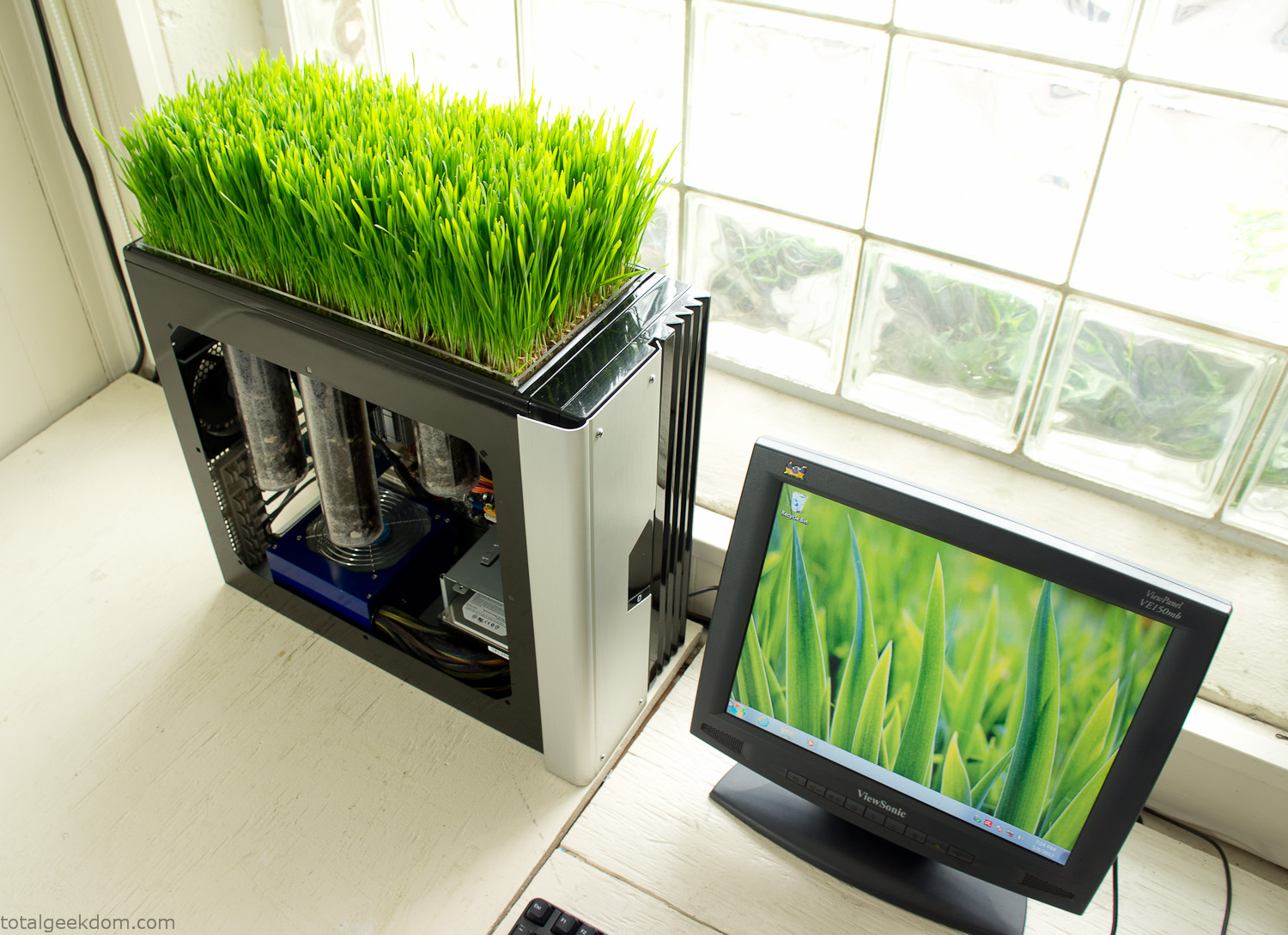
Bio Computer
I’ve been interested in working on a project for while that would combine something tech-based with something organic. Mixing the two elements intrigued me for a while. I’ve wanted to add flowers, or maybe plants of some sort to blend a little bit of nature into the space. I do receive a bit of sunlight through a glass block window, but the temperature in the basement is usually on the colder side. In the winter I don’t really heat the space because the folding farm outputs enough heat to keep the temperature comfortable. I didn’t want to change that aspect so I needed to come up with something that would tolerate slightly cooler temperatures and limited sunlight.
I can’t exactly recall when the idea came to me, but at some point I started wanting to use the heat from a computer as a way to warm the soil and help with germination/growth. I’m about as far from a botanist as it comes, I did some reading online and became pretty interested in the effects of soil temperature on germination/growth. I read different studies and papers from various universities. It was not too long into that process that I became hooked on the idea of using computer heat as a way to control the soil temperature of some sort of living plant life.
As the idea developed further I started looking into wheatgrass as a plant option. There is something clean and natural about the look and idea of a piece of grass growing in my basement. I thought the look would alter the space a little bit and add a bit of color along with something more than just metals and plastics. After reading enough studies and papers on the effects of soil temperature and germination with wheatgrass I felt like I had a good enough handle on the basics to tackle this.
The first step was finding a computer to adapt for the project. Luckily I had a lot of donated computers that people had given me for various project purposes. Most of them didn’t work, but by cobbling together various components from a bunch of different old computers I was able to come up with enough good parts to make a working computer.
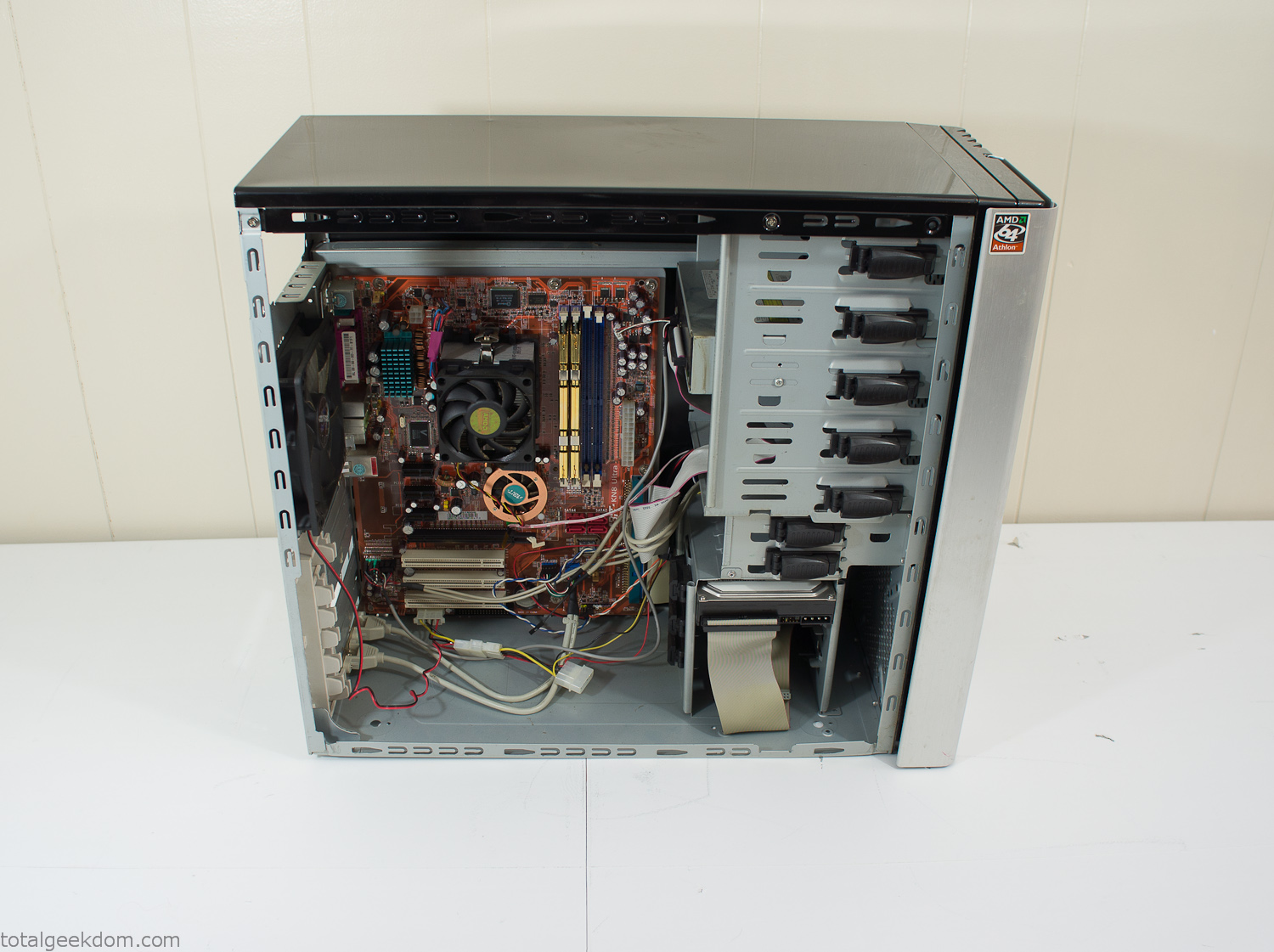
Donor Computer
At the time I was starting to get a formalized plan together for this project, another idea popped into my head. I’ve got a 5 yr. old who is already fairly geeky (just ask him to do his Jabba the Hutt impression for you) but he really does not get that much computer time. He’s getting to an age where he’s more inquisitive about tech stuff and I think he’s ready for his first computer. Since I was already well underway with this project it seemed like a perfect opportunity to orient the computer itself towards a learning tool for him in addition to using it as a way to blend something organic with a piece of technology.
With all of these goals in mind I started tinkering away. The computer hardware itself was nothing fancy, definitely outdated, but perfectly suited towards this project.
CPU- Pentium 4 (3 GHz)
Dell Factory Motherboard
Various Ram Sticks- 2gb
Old Maxtor 120gb IDE Hard Drive
Old FPS Power Supply
Donated Old Computer Case
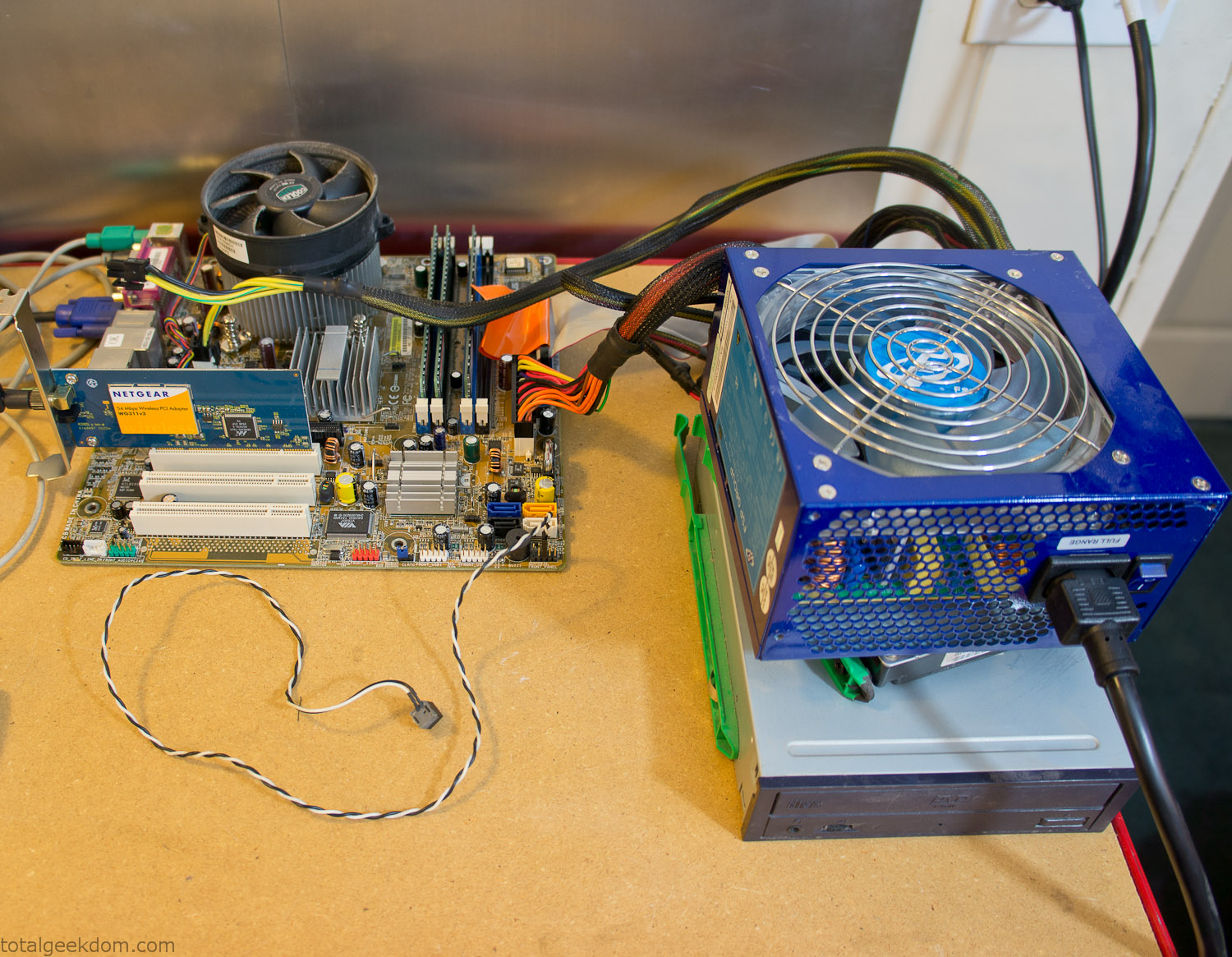
Computer Parts Testing
If you’ve spent any time around computer hardware in the last decade you’re probably well aware that Pentium 4 has a reputation for running hot. The 90nm Pentium 4 was named Prescott and it didn’t take long before the nickname Pres-hot popped up. In this case though that extra heat is going to be put towards good use.
Once the hardware was all in order I started working on the layout and arrangement for the case. I had originally envisioned the grass growing out of the top of the computer case. This seemed like it would provide a good blend between the hard edges of the computer and the soft feel of the grass. This also worked well with putting the soil area in the upper portion of the case, where the most heat should collect. After doing some initial tests with this configuration I found the measured temperature near the top of the case was the hottest. The placement of the CPU near the top of the case and the lack of airflow in that area contributed to these higher recorded temps.
After finishing with some initial tests I decided to completely strip the case down and start removing all the unnecessary brackets and pieces inside of the case. Like most computer cases all the internal brackets and mounts are riveted together, so I drilled all the rivets out of the components I wanted to remove and pulled them out. The gutted case looked pretty barren after being stripped.
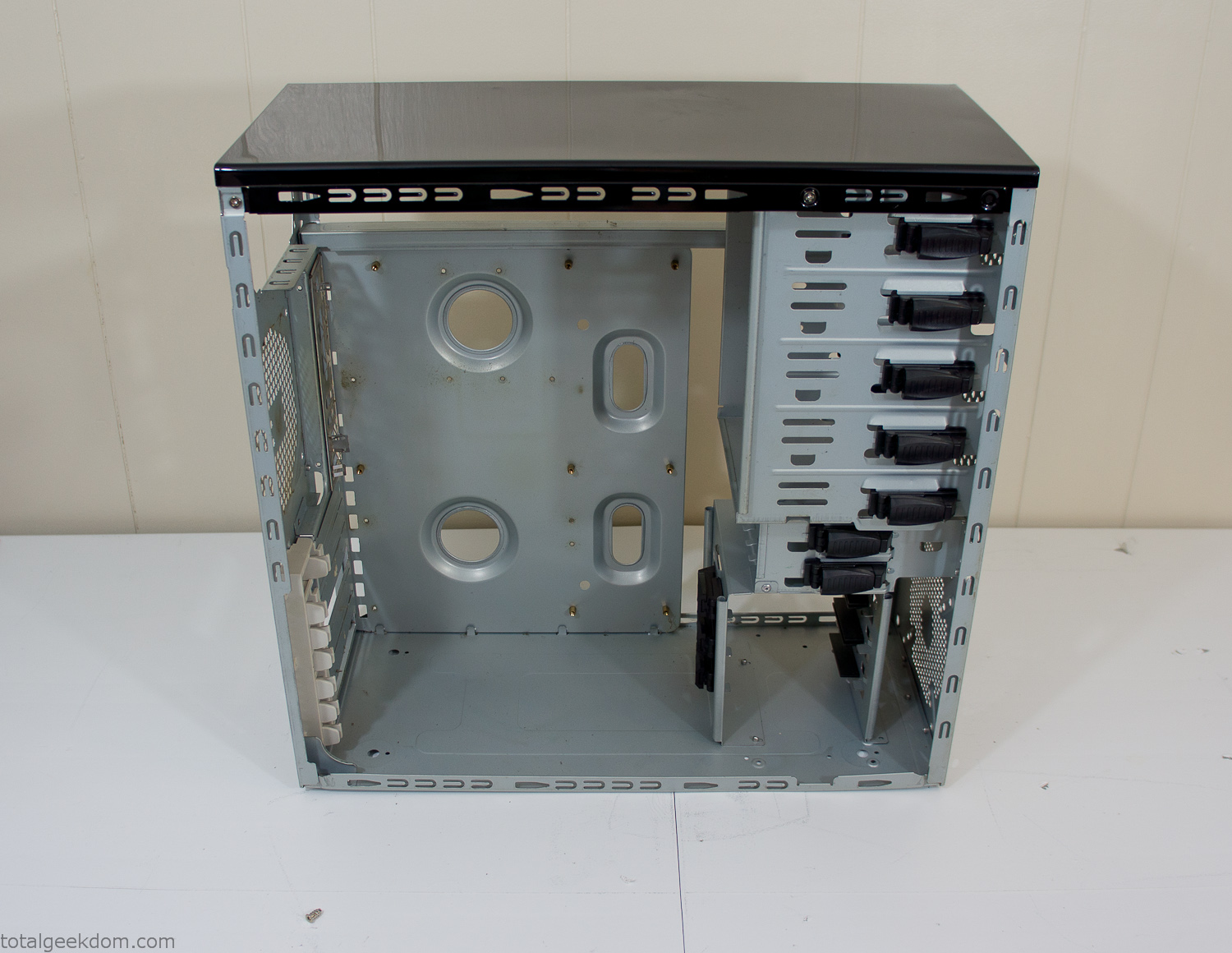
Empty Computer Case
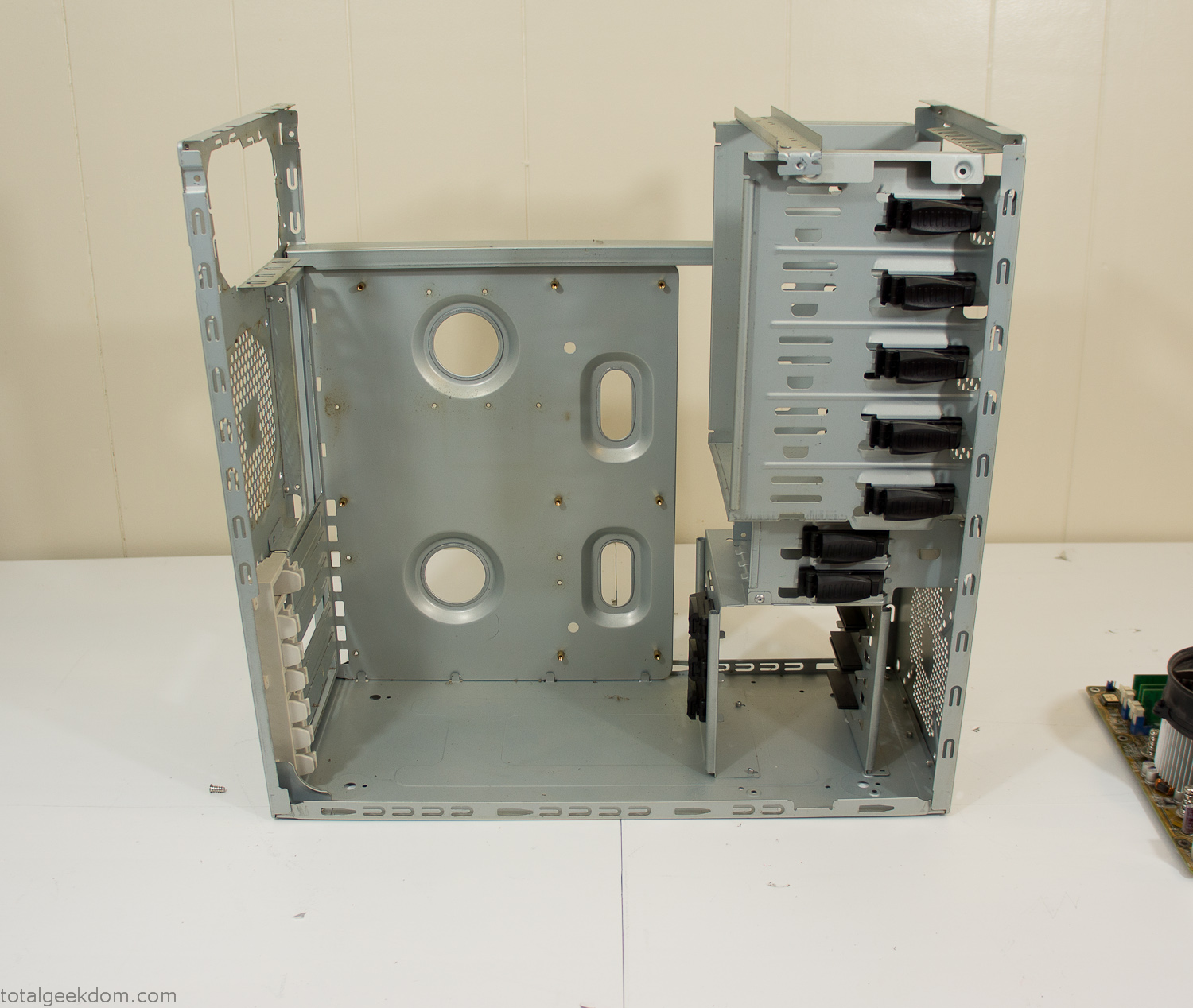
Dismantled Computer Case

Stripped Computer Case
In keeping with my original plan of having the computer blended with the organic grass I wanted it to be easy to see the inner workings of the computer and also the soil from the grass growing above. I needed something that was translucent, which left me with either glass or acrylic/polycarbonate as my options. I ended up choosing acrylic because I was able to find a cheap, used, die-cast model car display case top that was the perfect dimensions for the top of the case. Couldn’t go wrong for 5 bucks.
I test-fit the acrylic over the top of the computer case and marked my layout on the top of the case. My plan was to cut open the top of the computer case and insert the acrylic display case into the section I cut out. To cut open the top of the computer case I drilled a hole as a starting point and then used tin snips to cut through the thin gauge metal.
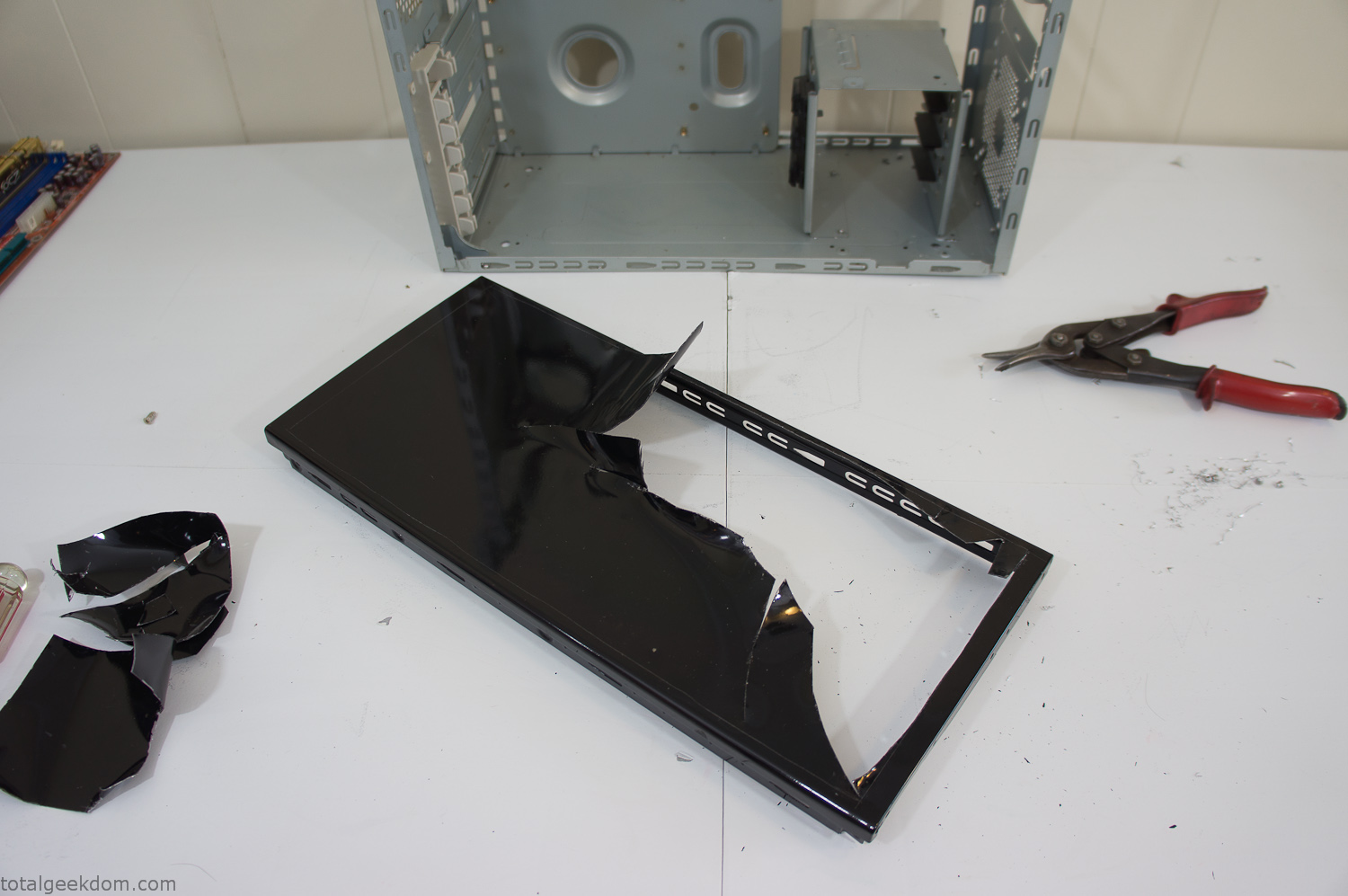
Computer Case Lid Modding
Once I had the metal opening cutout, I needed something to put along the edges of the freshly cut opening to create a clean and finished look. For $2 I was able to find some black, car-door-edge, plastic molding that worked perfectly.
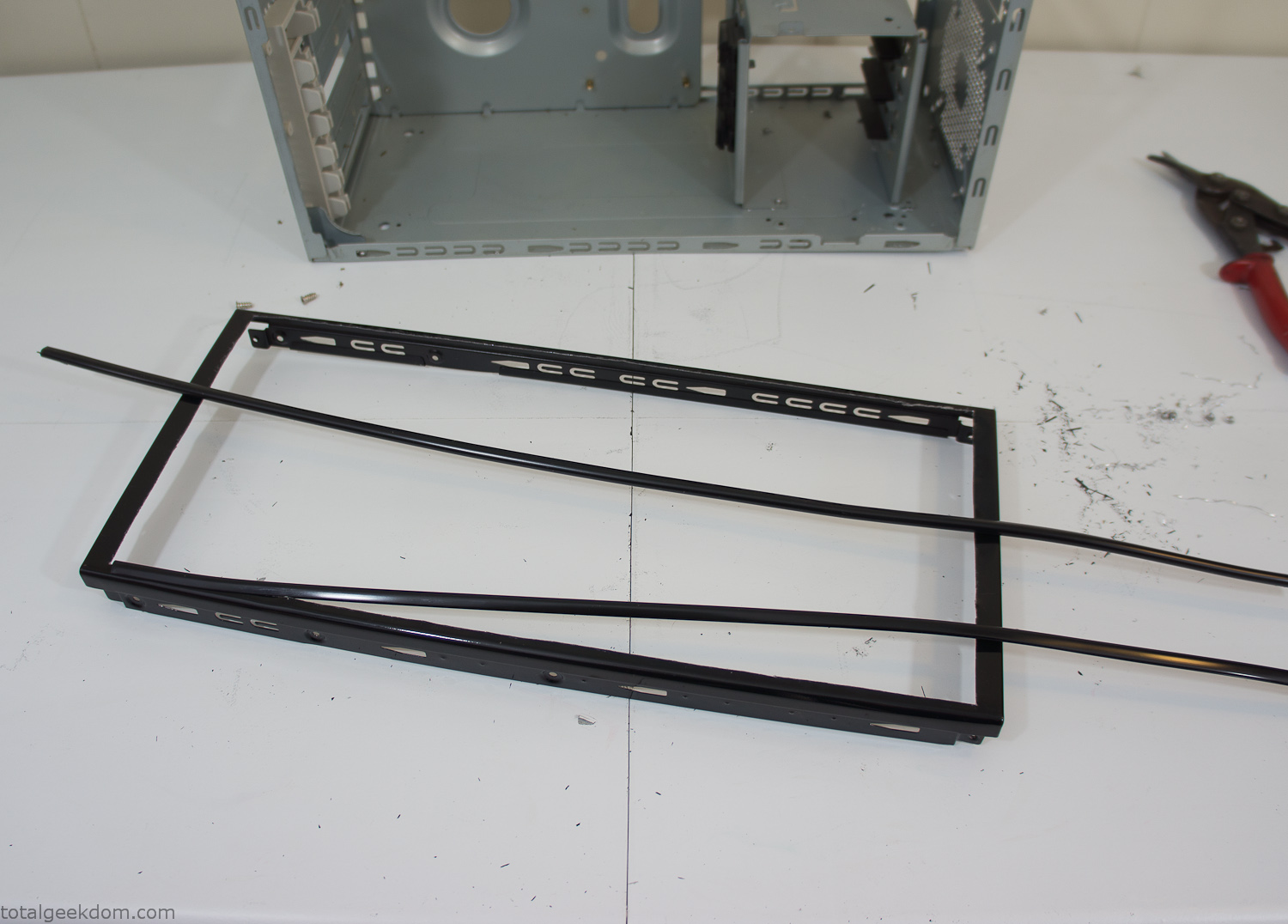
Modified Computer Case Lid
After getting the opening of the top of the computer handled and the acrylic case properly fitted, I moved onto some more testing with soil in the acrylic and the computer running. I wanted to see what kind of heat transfer I would get and how it would affect the soil temperature. I knew that using acrylic over glass would make it a little more difficult to heat the soil as acrylic is not that good at transferring heat. Luckily though I didn’t really need to alter the soil temperature that much, I just needed a little extra heat. Testing showed that heat transfer with just the single acrylic display case as my soil container was slow. So I decided to add some acrylic tubes. This would allow more surface are for soil to acrylic contact and also give me an area where I could add a mixed substrate to allow for soil drainage.
I went online and found a 3ft long section of 2 1/4″ clear acrylic tubing for $8 dollars. I wanted to add a couple of hanging cylinders off the main of the acrylic display case in the top of the computer case. To do this I needed to cut holes into the bottom of the display case. Cutting holes in acrylic is not always easy, it’s likely to chip and craze at the edges. To get around this I used a buildup of masking tape on both sides of the acrylic, to provide a little bit of resistance and strength. I placed the acrylic display case back into the computer and marked my layout for the tubes. I needed to leave clearance for the CPU cooler, power supply and hard drive mount.
After marking the layout, I used an air-powered pencil grinder and carbide tipped bit and cut through the acrylic case along my marked lines. After the initial shape was cutout I used a tube piece as a template and slowly worked on grinding the holes as perfectly round as I could get them so that the tube had a snug fit all the way around. The fit is pretty important as the acrylic cement that I used needs there to be a tight fit so that the acrylic can bond correctly.
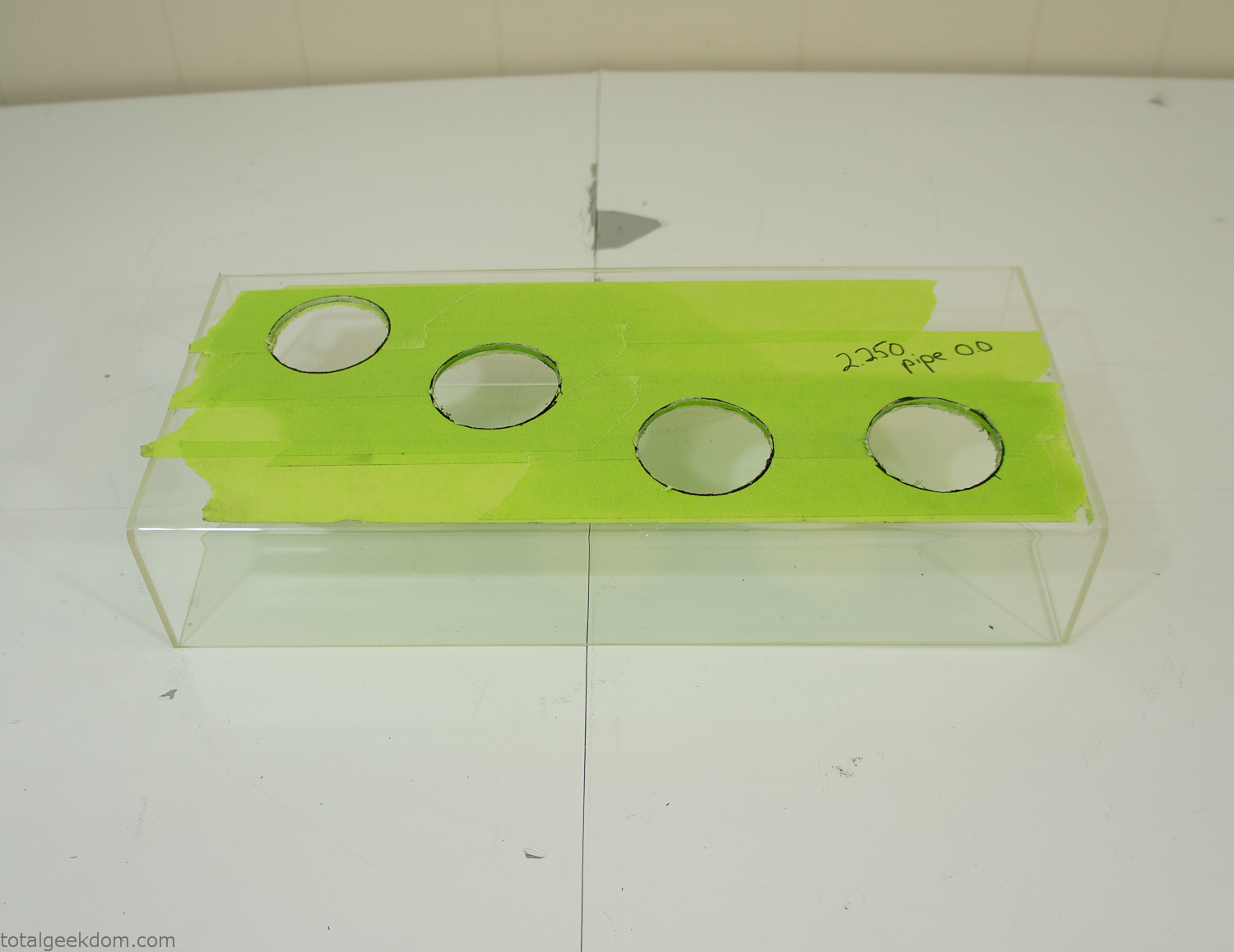
Acrylic Case Modifications
I placed the tubes into the acrylic case and mounted it in the computer and test fit the placement and height of the tubes. After getting everything lined up and oriented correctly I moved towards bonding the acrylic together. Using a needle dropper applicator I applied the cement to all the joints. After letting it set overnight I came back the next night and applied a thin coating of clear silicone caulk around all the joints just to ensure they were completely water tight
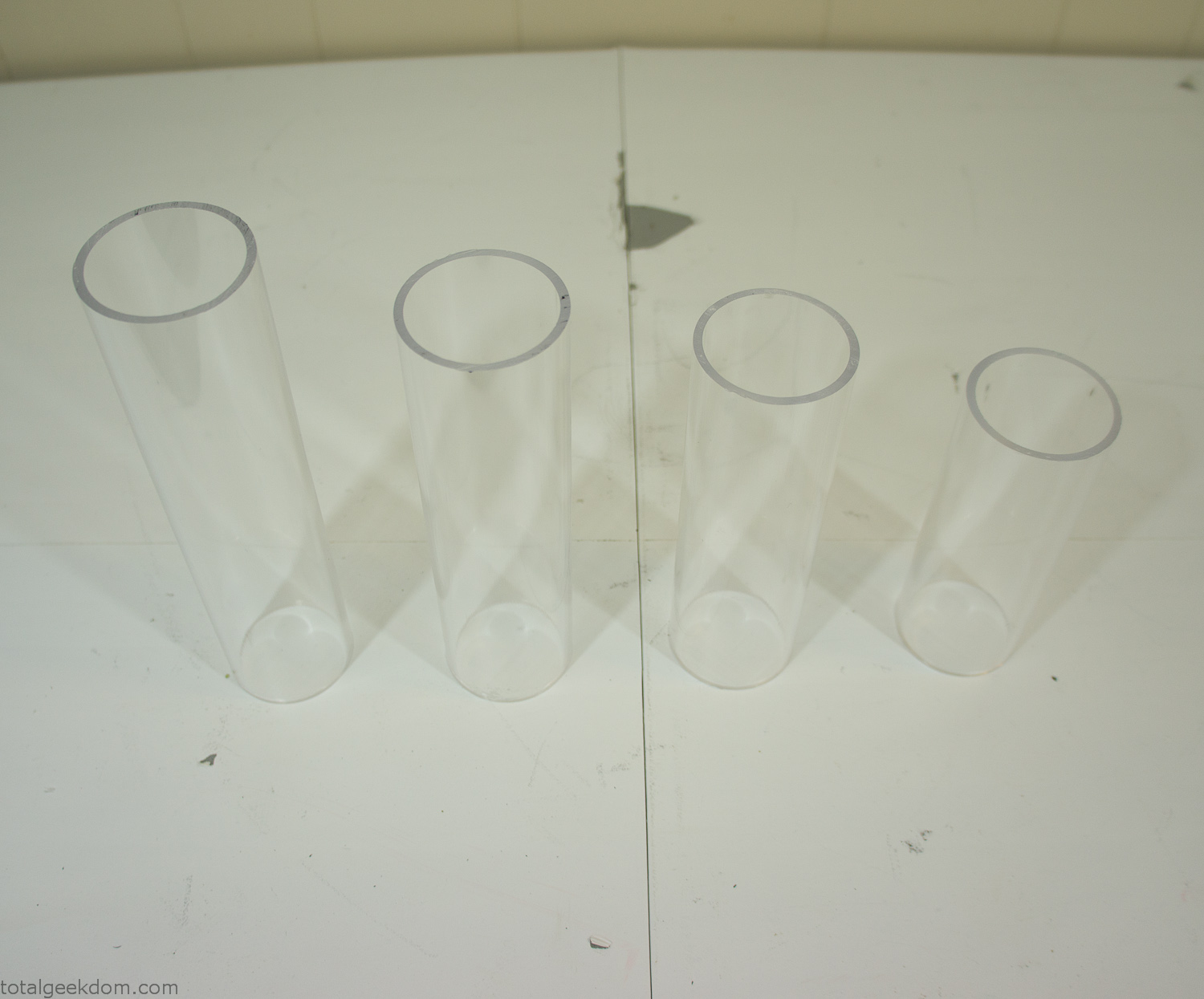
Acrylic Tubes
The next step was sealing up the bottom of the acrylic tubes. I looked at a couple of different options before realizing that the discs I had cut out of the acrylic case to fit the tubes would be almost the perfect size. Using a bench grinder and a test piece of tube I slowly ground each disc to the perfect size for a tight fit all the way around. I placed the clear acrylic discs into the bottom of each tube and repeated the same cementing and silicone caulking procedure to ensure they were water-tight. After a couple of days’ worth of drying I tested the case by filling it with water overnight and checking in the morning to make sure that no leaks had popped up.
In order to hold the weight of the acrylic case after adding soil, I drilled and installed a machine screw with a rubber cap at each corner of the computer case to bear the weight of the acrylic case.
Once all the work was done with the acrylic case section I started reinstalling all the components. The motherboard, hard drive and power supply were added and then wired up.
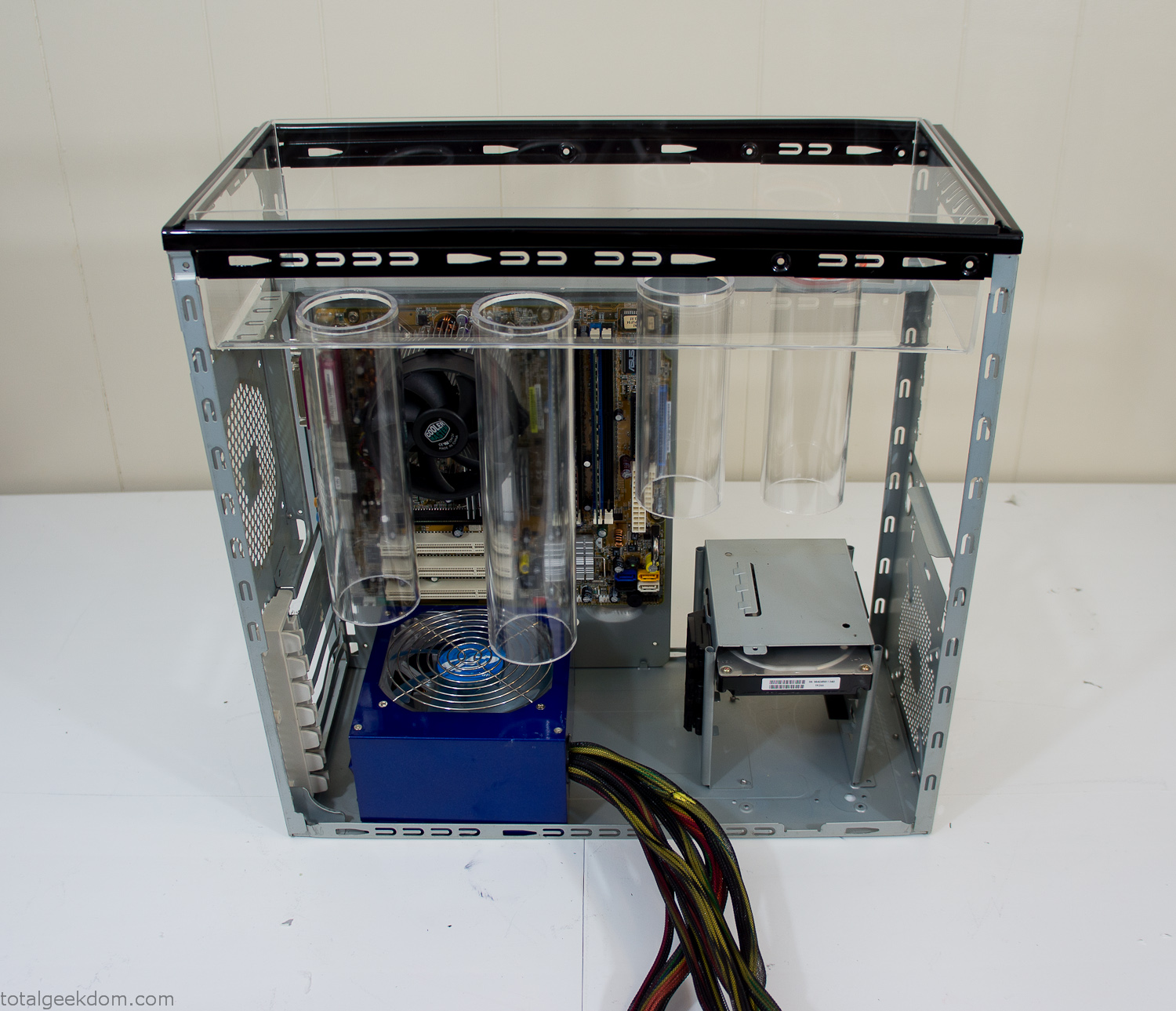
Mocked Up Computer Case
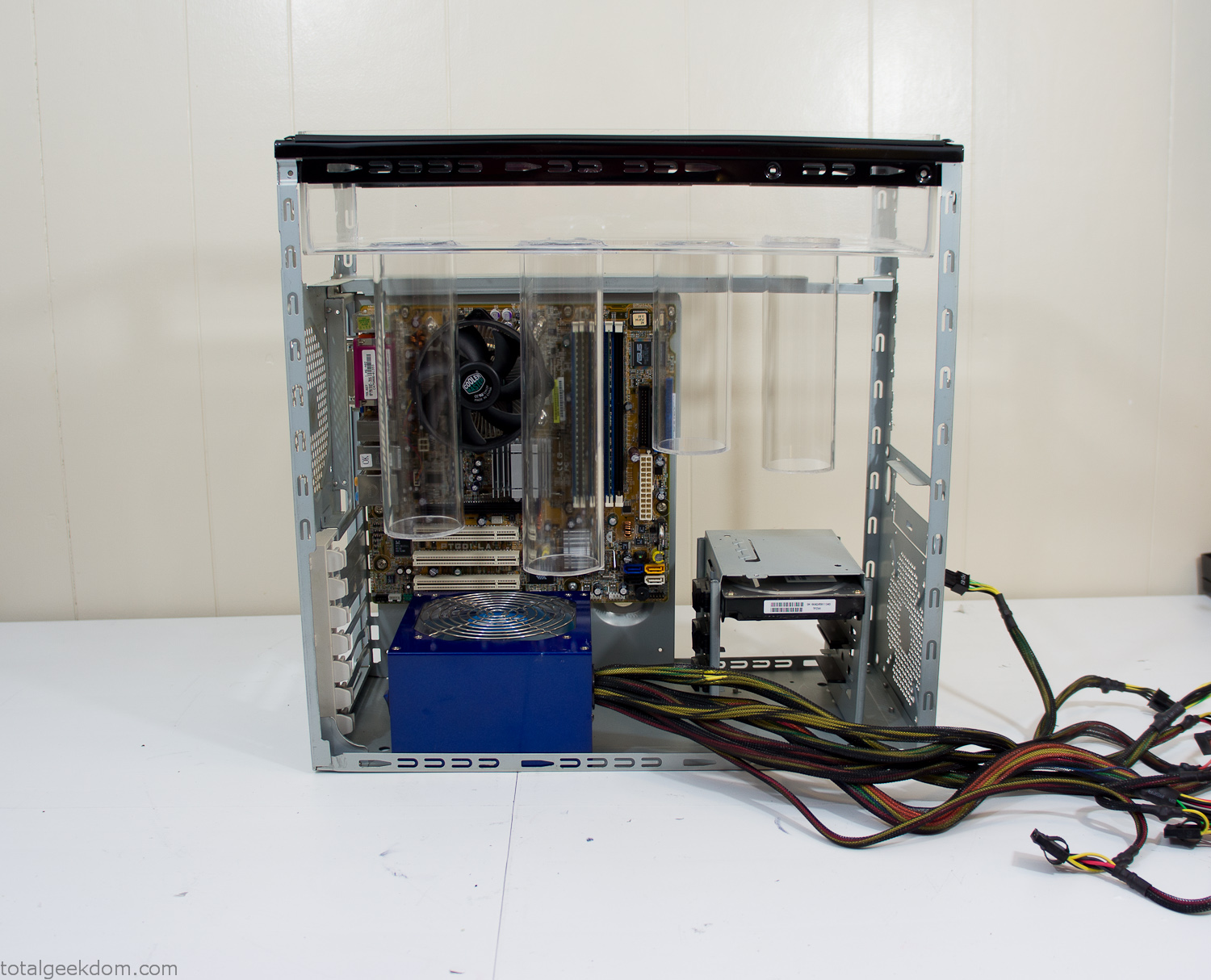
Power Supply Mockup
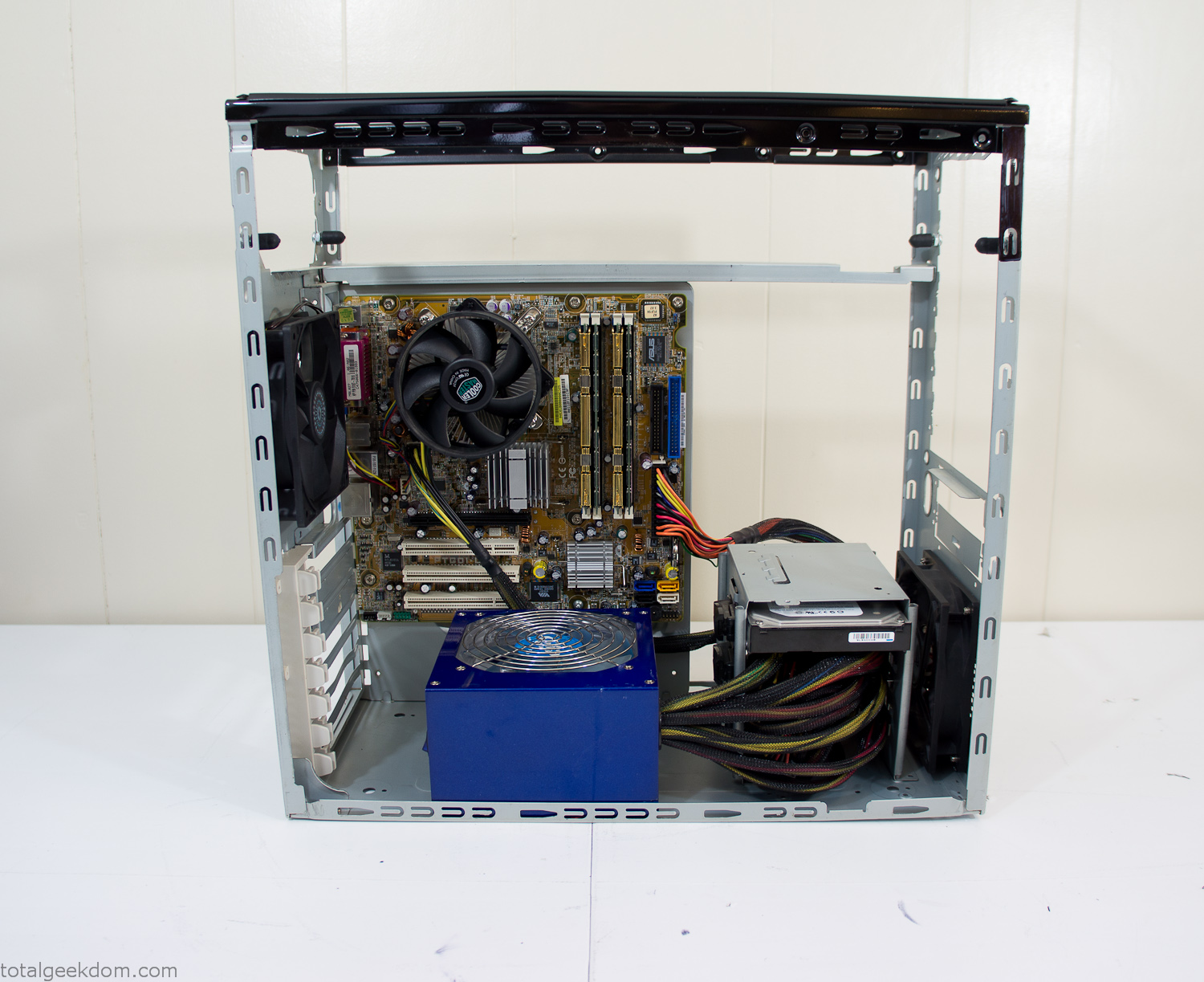
Computer Components Wired
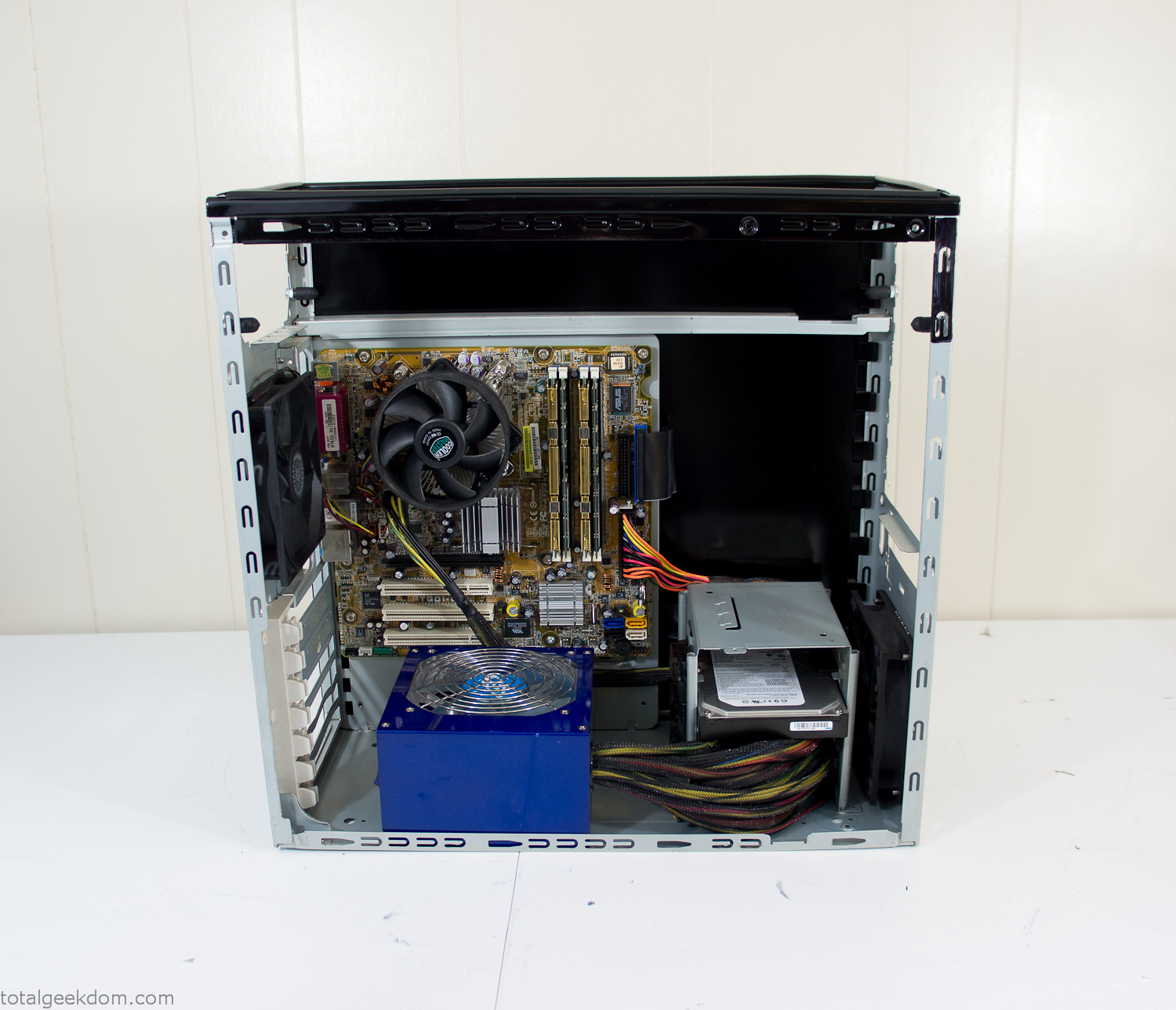
Case Panel Installed
At this point all that was left was to make a clear panel for the side of the case. I had some left over acrylic sheets from a different project that were really close to the right size, after test fitting, marking and cutting I then had a clear side panel to see into the case. (I left this off for the pictures because it caused a reflection)
The final step was filling the case with soil and adding some wheatgrass. I had been test growing other samples of wheatgrass during the build process. So I had already a couple of different patches of grass growing. I tried to keep the soil level just below the top of the acrylic case edge to make it a little more seamless.
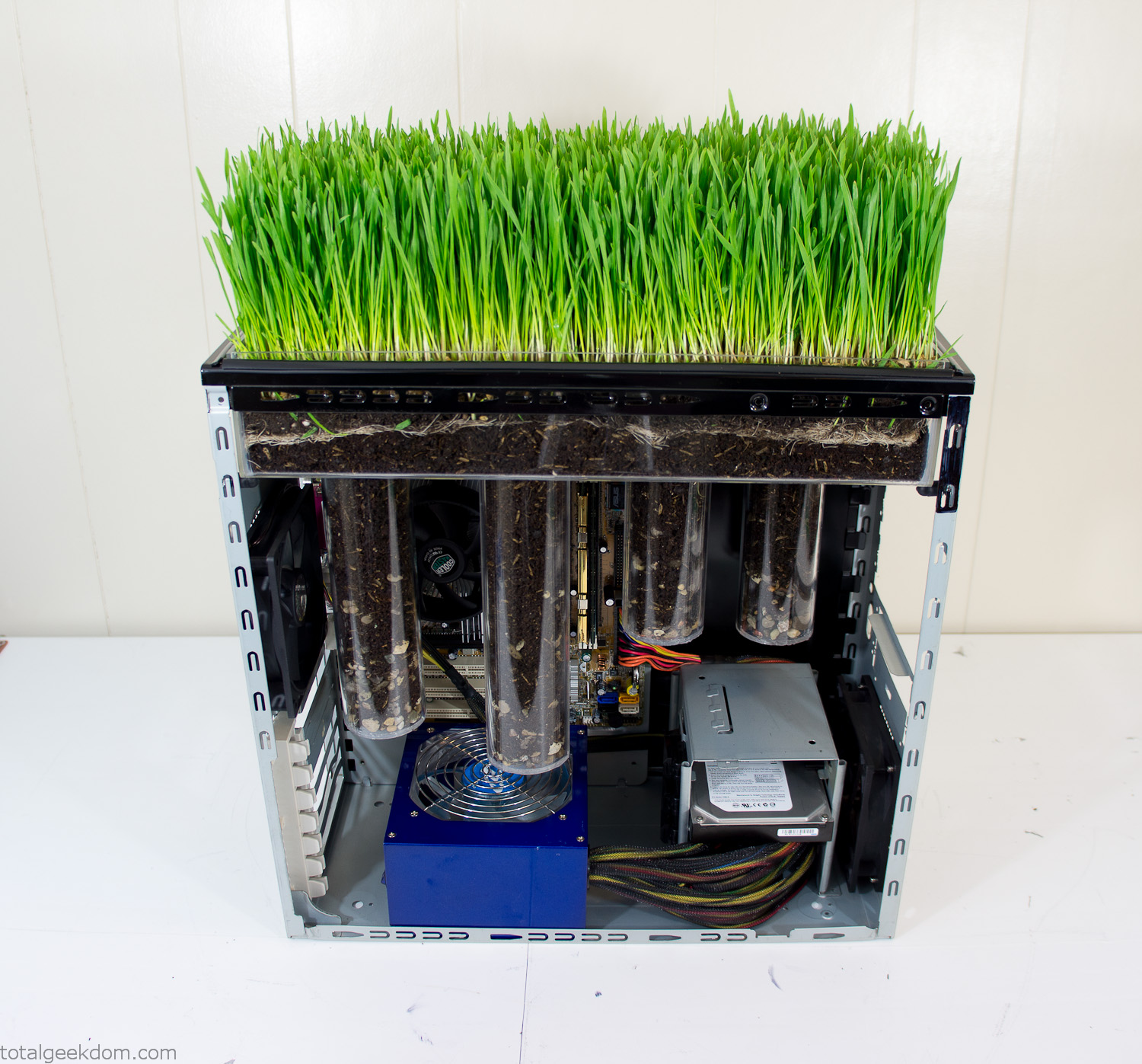
Grass Planted in Computer
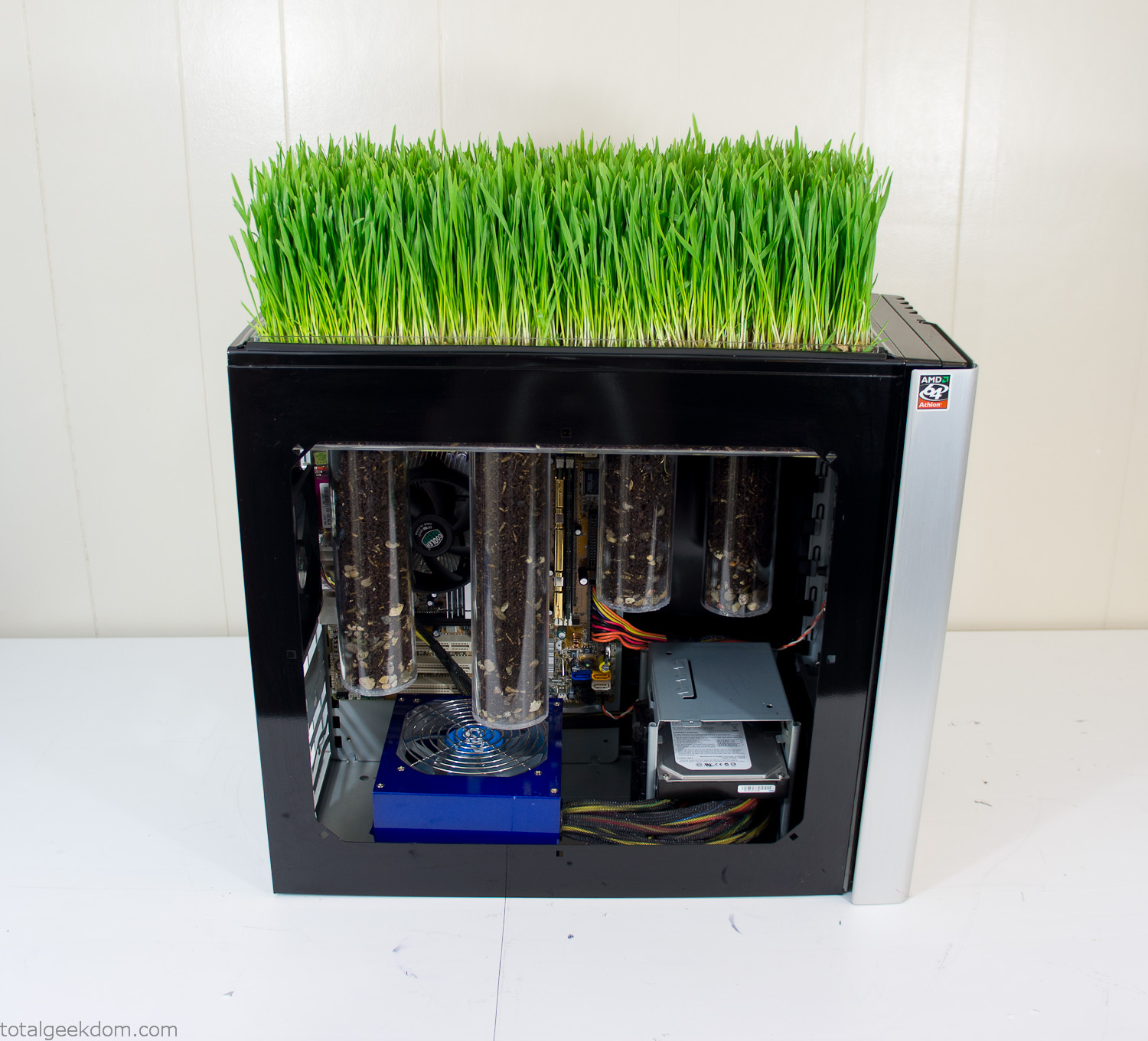
Grass and Case Panel Installed

Grass in Computer
For the computer itself I ended up installing Windows as well as Linux in a dual boot setup. Since the computer was going to be used by my son as something to play with I figured I should put both on there so he can tinker with them and learn as he goes. Besides, for important life decisions like picking an OS (Operating System) I think any good parent should present the options and then let their kid decide for themselves.
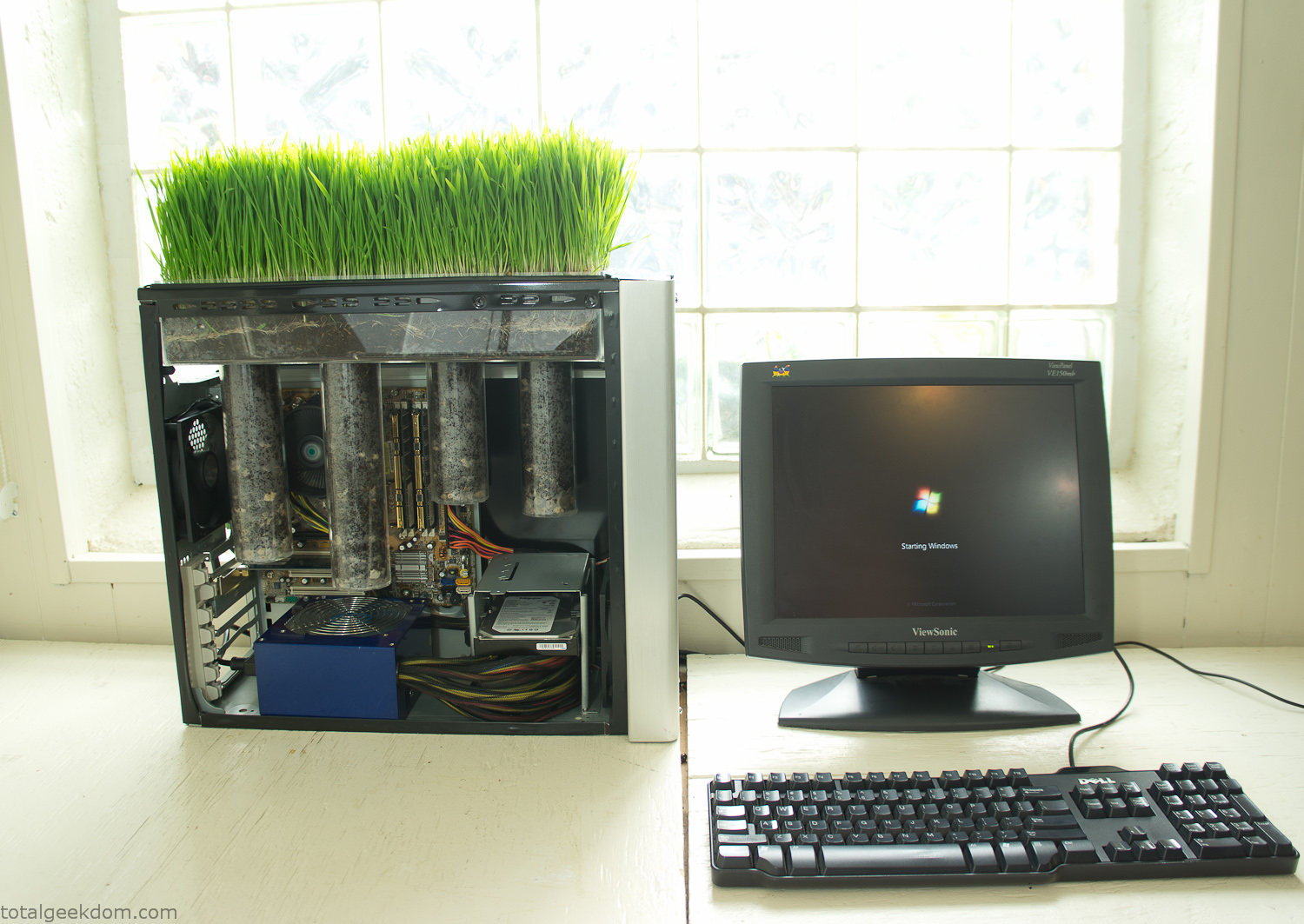
Starting Windows
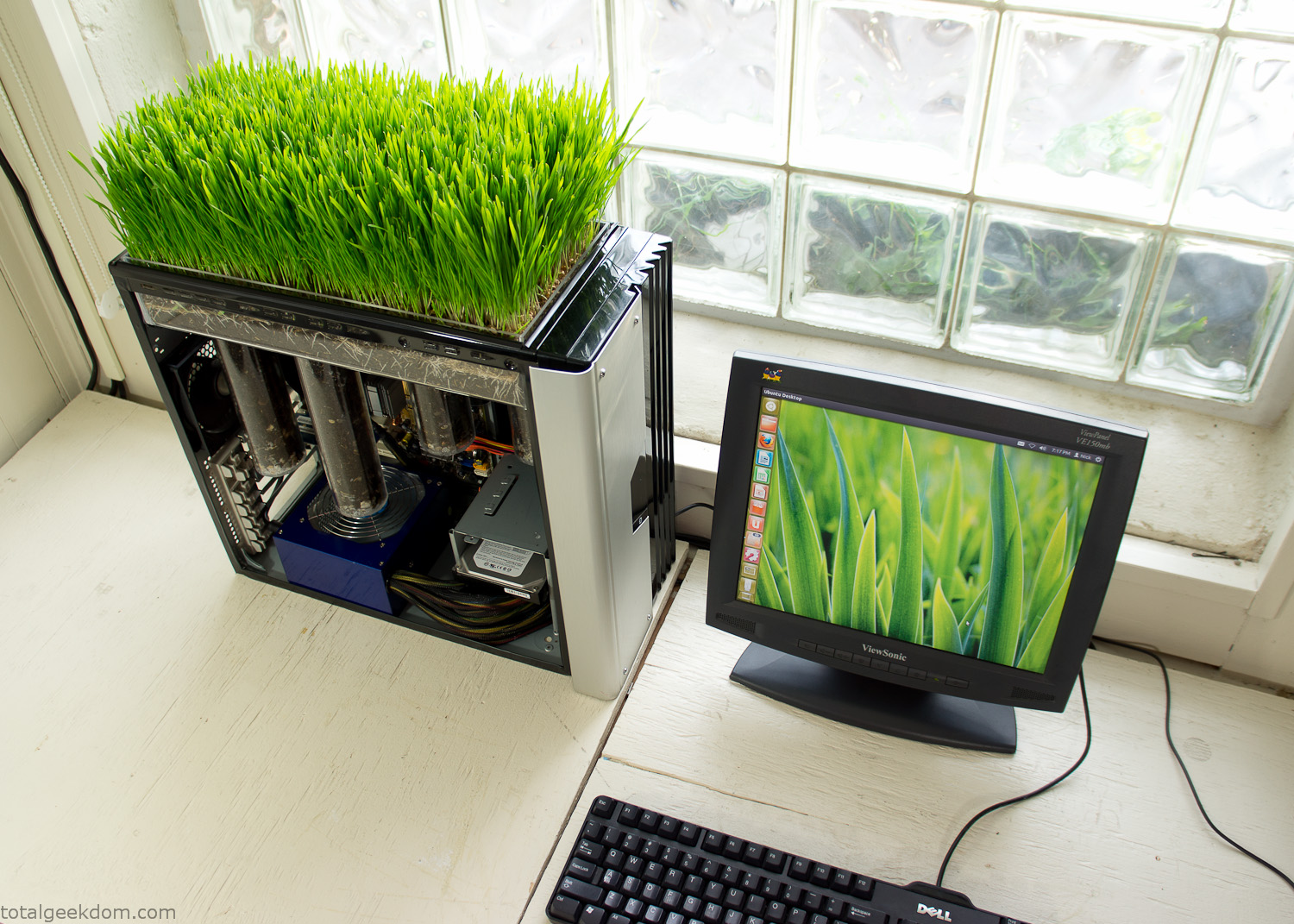
Linux Running
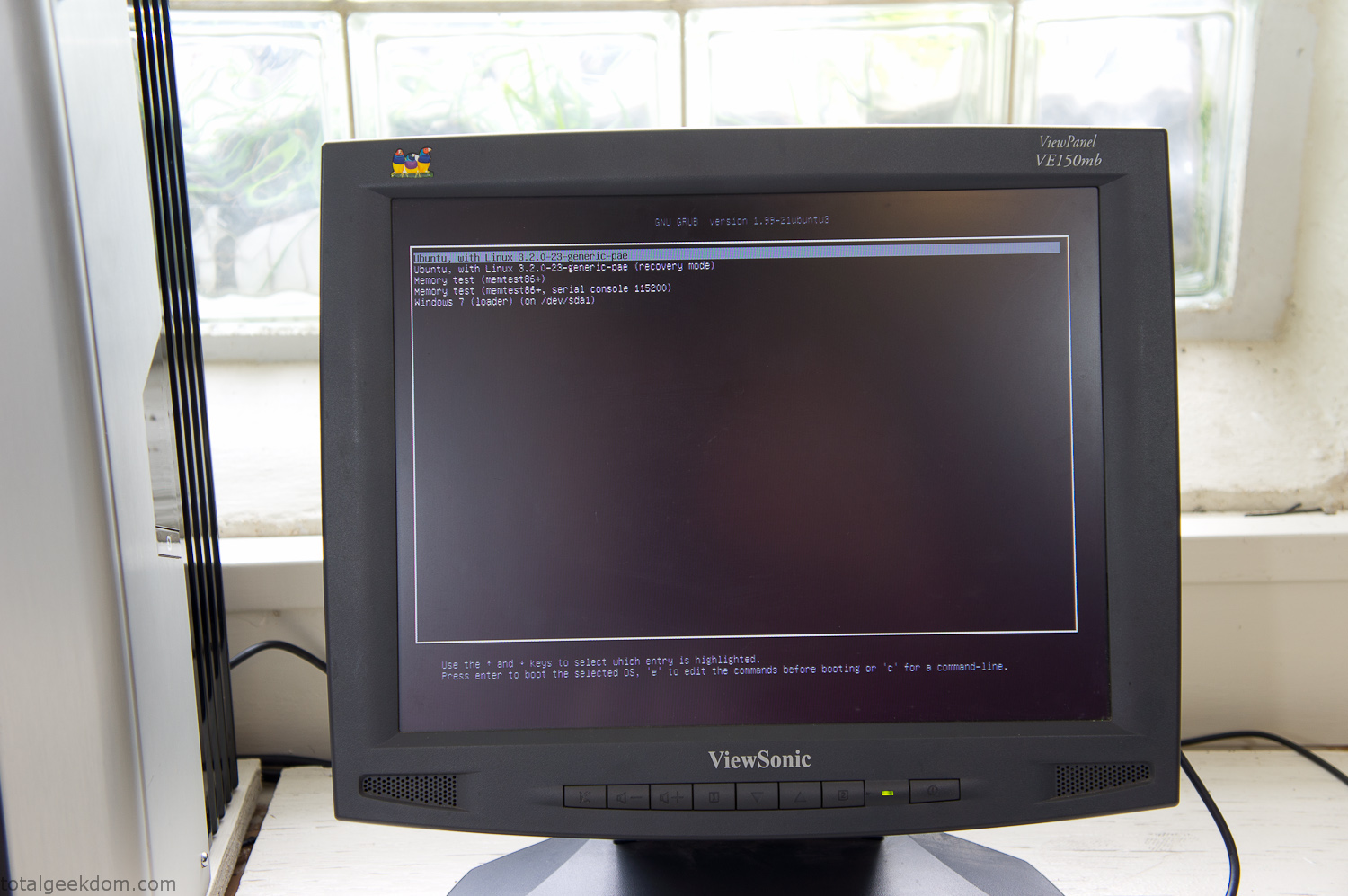
Dual Boot Screen
In the end I’m happy with the result of the project. It’s been fun experimenting with growing wheatgrass and I like how the natural look of grass is blended with the very modern, inorganic case.
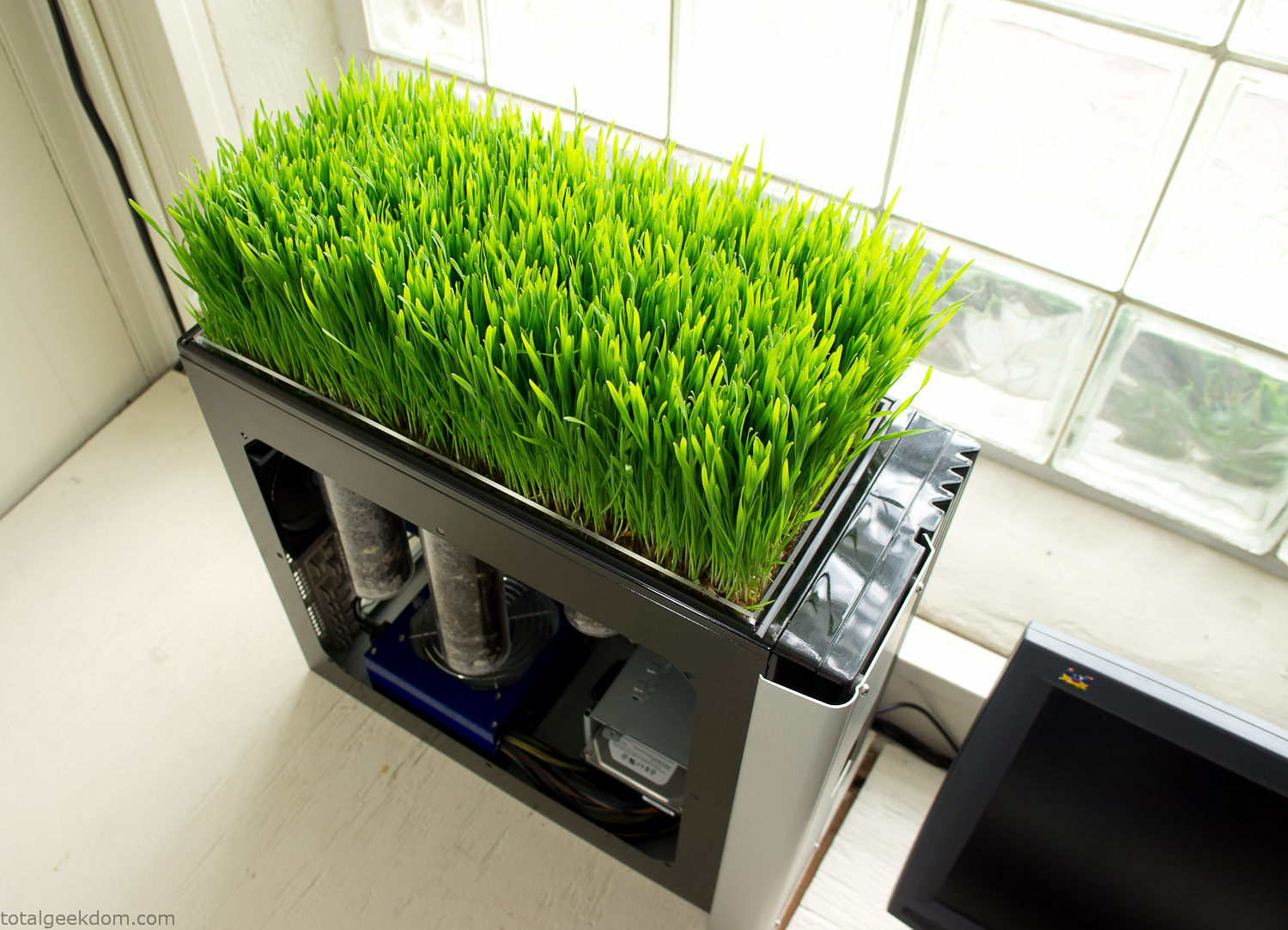
Computer Grass Growing
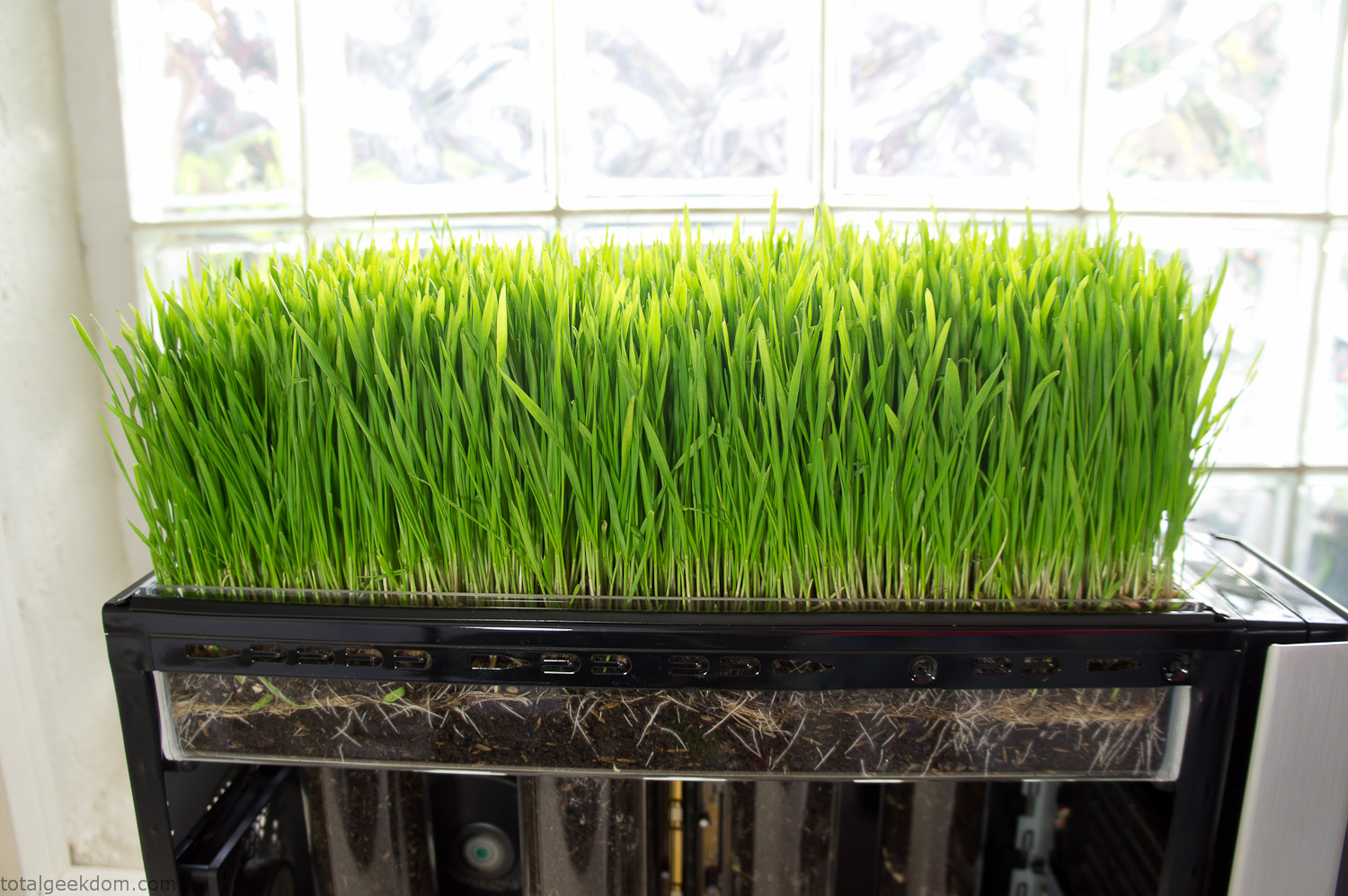
Grass in Computer Section
Notes
Temperature Testing
In testing the case temperature versus the soil temperature I found it was easiest to control the case temperature by using a variable fan speed control on both the inlet and outlet fans. By turning the fan speed down I could increase the temperature inside the case and correspondingly raise the soil temperature.
In order to maximize output of heat during these tests I used Prime95 to run the CPU at 100% load.
Using this method to control the case and soil temperature I played around with adjusting the soil temperature and then tracking the rate of growth of the Wheatgrass. The target temperature for peak growth seemed to fall around 66°F (19°C).
Using the fans to control the case temperature allowed me to vary the temperature inside the case from a low of 75°F (24°C) to a high of 91°F (33°C). In order to achieve the desired increase in soil temperature, I had to run the case temperature toward the higher end of the scale.
When the soil temperature was too high, the growth of the wheatgrass would slow.
Wheatgrass
The wheatgrass I used for my tests was nothing special, it can be found as seeds (berries) in a lot of health food stores and it grows relatively easily.
Caring for the wheatgrass is just a matter of keeping it watered. It’s a pretty easy plant to work with and doesn’t require any special skills.
Wheatgrass is often used as a nutritional supplement; it can be juiced and mixed into smoothies and other beverages. I plan on harvesting some of the grass and making some juices.
Plant Options
While wheatgrass offers a nice, attractive and easily grown option I do plan on trying other plants as well in the future. Since I already have the “planter” built all I have to do is add a different plant and see how it goes. I’m sure there will be some plants that don’t like the lower light environment, but it will be fun experimenting with other plants as well and seeing how they take.
Materials
Donated Computer- Free
Clear Acrylic Display Case- $5
Clear Acrylic Tube- $5
Plexiglass Side Panel- Free
Total- $10
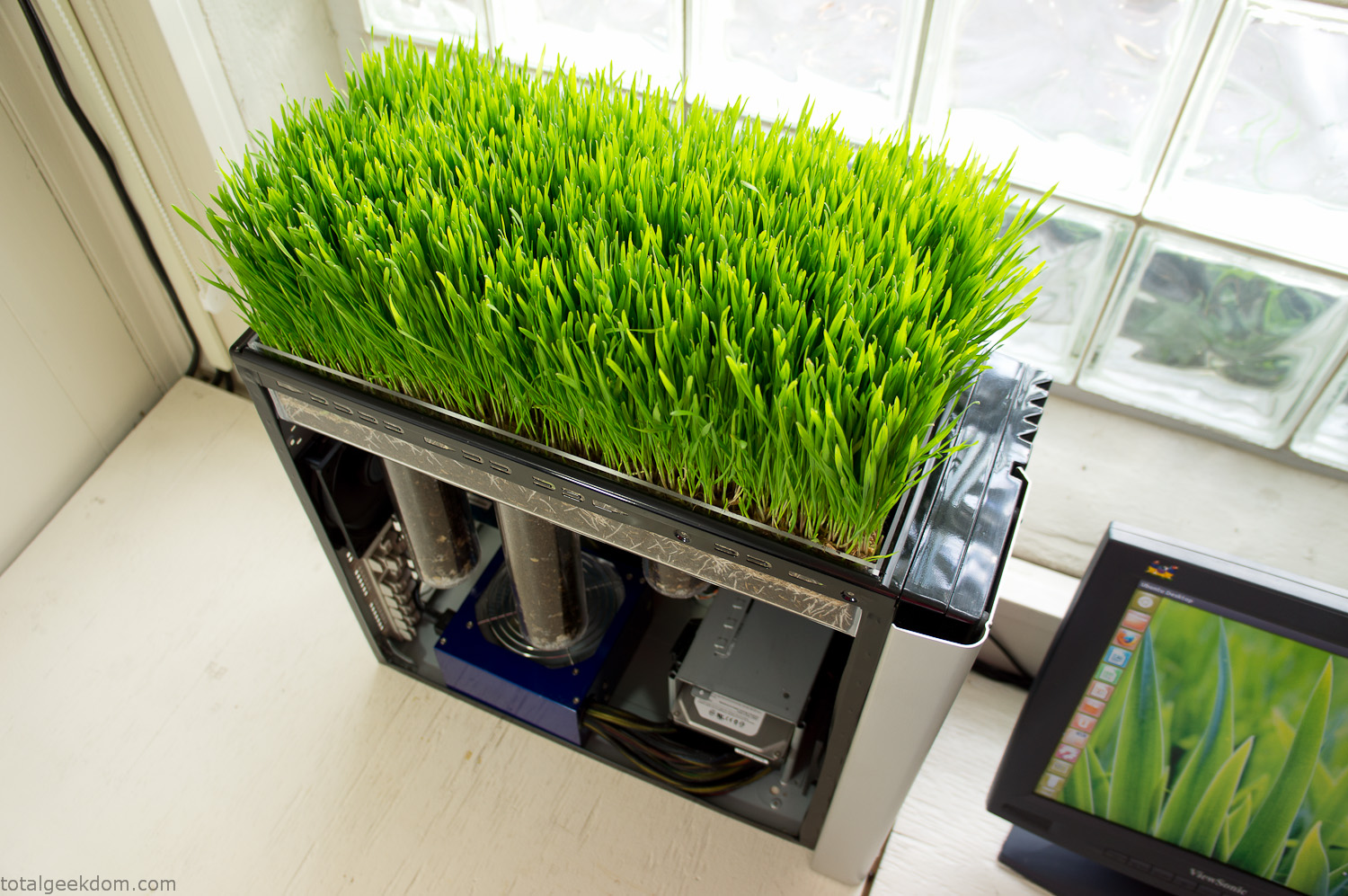
Bio Computer Running
 29.2k
29.2k
 13.2k
13.2k 7.1k
7.1k

 2.1k
2.1k 813
813 2.6k
2.6k
Comments 53,045
Meds information for patients. Cautions.
seroquel with risperdal
Everything about meds. Read now.
Need socially?proofed likes in seconds? Buffalo News pinpoints two safe paths to buy instant twitter likes.
Готовый комплект Инсталляция grohe с унитазом в комплекте инсталляция и унитаз — идеальное решение для современных интерьеров. Быстрый монтаж, скрытая система слива, простота в уходе и экономия места. Подходит для любого санузла.
крановое электрооборудование
Vertical video thread under?performed until we chose to strategically buy twitter post views.
Компания «Сэлф» предлагает безопасные минивэны и микроавтобусы. Работаем ежедневно круглосуточно. В автопарке больше 200 современных и ухоженных машин. Ваше удовлетворение и комфорт – наш главный приоритет. Присоединяйтесь к радостным клиентам! https://selftaxi.ru – здесь собраны ответы на часто задаваемые вопросы. Мы предлагает выгодные тарифы на поездки, и предоставляем качественные услуги. Готовы предоставить компетентную консультацию и с выбором авто помочь определиться. Нацелены на долгосрочное сотрудничество.
amoxil 1000 mg without prescription
Готовый комплект Лучшие инсталляции с унитазом в комплекте инсталляция и унитаз — идеальное решение для современных интерьеров. Быстрый монтаж, скрытая система слива, простота в уходе и экономия места. Подходит для любого санузла.
Bar III brings urban-inspired clothing that fits both casual and dressy looks. Known for bold patterns and quality fabrics, their collections help you stand out effortlessly. Whether it’s a night out or workday, Bar III has stylish options. Discover their latest styles on https://thebar-iii.com.
I am really impressed with your writing skills
as well as with the layout on your weblog. Is this a paid theme or did you customize it yourself?
Anyway keep up the nice quality writing, it is rare to see a nice blog like this one these days.
德州撲克規則
學會德州撲克規則,是踏入撲克世界的第一步。從掌握下注節奏、理解牌型,到實戰中運用策略,每一步都能讓你更加上手並享受對戰樂趣。想立刻開始實戰練習?我們推薦【Kpoker 德州撲克系統】,提供真實匹配環境與新手教學模式,現在註冊還能獲得免費體驗金,讓你零風險上桌實戰!
Готовый комплект Лучшие инсталляции с унитазом в комплекте инсталляция и унитаз — идеальное решение для современных интерьеров. Быстрый монтаж, скрытая система слива, простота в уходе и экономия места. Подходит для любого санузла.
It’s genuinely very complex in this busy life
to listen news on TV, so I simply use web for that reason, and take the most
up-to-date information.
Mega ссылка
德州撲克規則
學會德州撲克,不只是學會一套牌型規則,而是開始理解一場結合邏輯、心理與紀律的頭腦對決。無論你是剛入門的新手,還是已經上過幾次牌桌的玩家,只要願意花時間學習技巧、訓練判斷,並培養正確的資金控管與心態,人人都有機會從「交學費」變成「收學費」。打好每一手牌,不為一時輸贏情緒化,累積經驗與數據,就是長期勝率提升的關鍵!
Meds information sheet. What side effects can this medication cause?
does seroquel come in 150 mg tablets
All trends of pills. Read now.
Amazing! This blog looks exactly like my old one!
It’s on a entirely different topic but it has pretty much the same page layout and design.
Outstanding choice of colors!
салон свадебных платьев спб недорого
кайт “Школа трюков”: Как правильно тренироваться и прогрессировать
Mega darknet
элконтсервис
Оригинальный потолок натяжной потолок со световыми линиями отзывы со световыми линиями под заказ. Разработка дизайна, установка профиля, выбор цветовой температуры. Идеально для квартир, офисов, студий. Стильно, практично и с гарантией.
Компания «СХТ-Москва» предлагает автомобильные, карьерные, складские и железнодорожные весы. Продукция соответствует современным требованиям по точности и надежности. Гарантируем оперативные сроки производства весов. https://moskva.cxt.su – тут видео-презентация о компании СХТ представлена. На ресурсе узнаете, как изготовление весов происходит. Предлагаем широкий ассортимент оборудования и придерживаемся лояльной ценовой политики. Стремимся удовлетворить потребности и требования наших клиентов.
This is really interesting, You’re a very skilled blogger.
I’ve joined your rss feed and look forward to seeking more of your fantastic post.
Also, I’ve shared your web site in my social networks! http://13minhchau.com/index.php?title=Benutzer:MeredithAlgerano
Drug information for patients. What side effects can this medication cause?
how can i get cheap clomid price
Everything news about meds. Get information now.
Мега онион
Drugs information for patients. What side effects?
pregabalin tablets uk
Some news about drugs. Read now.
I blog often and I genuinely thank you for your information. Your article has really
peaked my interest. I’m going to book mark your website and keep checking for new information about once a week.
I subscribed to your Feed too.
Ищете вызвать мастера на час? Krasnodar.chastniymaster-sm.ru/ где вы найдете широкий перечень услуг по низким ценам, с гарантией на все работы, круглосуточно и по договору. Здесь по приемлемым ценам решение бытовых задач разного уровня сложности предоставляются. Посмотрите на портале услуги, которые мы больше 15-ти лет предлагаем. Все специалисты имеют высокую квалификацию, и значительный опыт работы. Вызвать мастера на час очень просто, с бесплатным выездом!
обучение кайтсёрфингу Кайтсёрфинг оборудование должно соответствовать вашему уровню подготовки и условиям катания. Правильно подобранный кайт, доска и трапеция обеспечат вам комфорт и безопасность на воде.
Keep on working, great job!
Проститутки ДНР Шлюхи Донецка
Drug information leaflet. Cautions.
buying generic lyrica no prescription
Best what you want to know about meds. Read here.
крановое электрооборудование
Оригинальный потолок стоимость натяжного потолка со световыми линиями со световыми линиями под заказ. Разработка дизайна, установка профиля, выбор цветовой температуры. Идеально для квартир, офисов, студий. Стильно, практично и с гарантией.
cost generic buspar for sale
варфейс магазин Рекомендую этот сайт всем геймерам, особенно любителям warface. Вы не пожалеете.
Оригинальный потолок сколько стоит натяжной потолок со световыми линиями со световыми линиями под заказ. Разработка дизайна, установка профиля, выбор цветовой температуры. Идеально для квартир, офисов, студий. Стильно, практично и с гарантией.
?аза? тіліндегі ?ндер Скачать казахские песни ж?рекке жа?ын ?уендер мен ?серлі м?тіндер. ?лтты? музыка мен ?азіргі заман?ы хиттер. Онлайн ты?дау ж?не ж?ктеу м?мкіндігі бар ы??айлы жина?.
кайтинг Кайтсёрфинг – это вызов, который изменит вашу жизнь навсегда.
Создаем и продвигаем сайты с 2004 года! Честные гарантия позиций, посещаемости и лидов. Фокус на SEO продвижении. Не нравится – возвращаем деньги https://webseosite.ru/
Drug information sheet. Short-Term Effects.
hypersomnia trazodone
Everything news about pills. Get here.
I like the valuable information you provide in your articles.
I’ll bookmark your weblog and check again here regularly.
I am quite sure I will learn lots of new stuff right here!
Best of luck for the next!
Оригинальный потолок натяжной потолок со световыми линиями отзывы со световыми линиями под заказ. Разработка дизайна, установка профиля, выбор цветовой температуры. Идеально для квартир, офисов, студий. Стильно, практично и с гарантией.
Ищете гражданство паспорт италии евросоюза ес? Expert-immigration.com – это профессиональные юридические услуги по всему миру. Консультации по визам, гражданству, ВНЖ и ПМЖ, помощь в покупке бизнеса, защита от недобросовестных услуг. Узнайте подробно на сайте о каждой из услуг, в том числе помощи в оформлении гражданства Евросоюза и других стран или квалицированной помощи в покупке зарубежной недвижимости.
Wonderful work! That is the kind of info that should be shared around the
internet. Disgrace on the seek engines for now not positioning this submit
higher! Come on over and discuss with my web site . Thank you =)
Оригинальный потолок натяжные потолки со световыми линиями москва со световыми линиями под заказ. Разработка дизайна, установка профиля, выбор цветовой температуры. Идеально для квартир, офисов, студий. Стильно, практично и с гарантией.
Medication information sheet. Cautions.
get generic clomid for sale
Some trends of meds. Get information here.
?аза? тіліндегі ?ндер Сборник хитов казахских песен ж?рекке жа?ын ?уендер мен ?серлі м?тіндер. ?лтты? музыка мен ?азіргі заман?ы хиттер. Онлайн ты?дау ж?не ж?ктеу м?мкіндігі бар ы??айлы жина?.
Visit the site https://melbet-malbet.com/ and you will learn everything about the Melbet bookmaker, and also use a special promo code on the site to get an additional bonus. Learn all about working mirrors, how to register, how to place bets and use the mobile application.
элконтсервис
Спасибо за свежесть и красоту!
цветы томск
Букет для свекрови – лед в отношениях растаял!
доставка цветов в томске
can i purchase forxiga
Hallo Genussfreund! Stell dir eine Welt vor, in der jede Beruhrung mit https://dassatisfyer.de/ lebendig wird. Ob luftige Pulswellen beim Pro 2, kraftvolle Vibrationen des Men Modells oder die vielseitigen Multifun-Kreationen – hier trifft Technik auf pure Lust. Wasserdicht und ergonomisch schmiegen sich diese Silikonwunder an dich, als waren sie gemacht, nur fur dich. Ein Zusammenspiel aus Gefuhl und Innovation, das neugierig macht und immer wieder uberrascht.
Ваш сервис – образец надежности и внимания к деталям!
доставка цветов
«Академия учителя» https://edu-academiauh.ru онлайн-портал для педагогов всех уровней. Методические разработки, сценарии уроков, цифровые ресурсы и курсы. Поддержка в обучении, аттестации и ежедневной работе в школе.
Hey everyone,
I’ve been checking out the world of online casinos lately, and I’ve gotta say — it’s surprisingly fun. At first, I was super skeptical. I mean, how do you even trust an online platform with your money, right? But after digging deep (and trying out a few questionable sites so you won’t have to), I figured out a few things that set apart a reliable casino from a risky mess. First off, if you’re new to all this, here’s the golden rule: **check the license**. If a casino doesn’t have a proper license (like from the MGA or the UK Gambling Commission), just run. No bonus is worth the trouble of never seeing your money again. Also — and I know no one wants to — go through the small print. That’s the only way to know what kind of hidden traps they’ve slapped onto those so-called “amazing” bonuses.
Now, let me share a site I’ve been hooked on these last few weeks. It’s been a total win. The interface? Super easy to navigate. Payouts? Fast as hell. And the game selection? *Insane*. Slots, live dealers, blackjack, even some oddball options I hadn’t tried before. Check it out here: file_links[“C:\Users\Administrator\Desktop\Project\allcroud\Links2.txt”,1,N] What really impressed me was the customer service. I had a tiny issue with a bonus not working, and they got back to me in like instantly. Compare that to other sites where you’re just ghosted by support — yeah, hard pass.
Also, if you’re into bonuses (and who isn’t?), this place offers some juicy ones. But here’s the trick: don’t just chase bonuses. It’s smarter to go for fair terms than a huge bonus you’ll never be able to withdraw. I’m not saying you should go and bet the farm — please don’t. But if you’ve got a little extra fun budget and you’re looking for a chill way to spend an evening, online casinos can totally deliver. Just stay sharp, set a budget, and don’t treat it like a side hustle. It’s for fun, not for a paycheck. Anyway, just wanted to drop my experience here in case anyone’s curious or trying to find a good place to play. If you’ve got your own go-to sites or even some horror tales, I’m all ears — love talking shop about this stuff.
Good luck out there, and may the odds be ever in your favor ??
Свежие скидки https://1001kupon.ru выгодные акции и рабочие промокоды — всё для того, чтобы тратить меньше. Экономьте на онлайн-покупках с проверенными кодами.
магазин пятерочка каталог
Желаете покупать продукты со скидками? Тогда вы по адресу!
Good-Promo.ru предоставляет все свежие акции и спецпредложения «Пятёрочки» в одном удобном ресурсе.
Преимущества:
Ежедневно обновляемые скидки
Каталог товаров со скидкой
Сведения о розыгрышах призов
Лучшие цены дня
Как использовать:
Зайдите на Good-Promo.ru
Найдите нужные предложения
Делайте покупки в «Пятёрочке» по лучшим ценам
Сайт поможет вам:
Не переплачивать за покупки
Получать актуальную информацию
Искать выгодные предложения
Экономьте легко и удобно с Good-Promo.ru!
«Академия учителя» https://edu-academiauh.ru онлайн-портал для педагогов всех уровней. Методические разработки, сценарии уроков, цифровые ресурсы и курсы. Поддержка в обучении, аттестации и ежедневной работе в школе.
Pills information sheet. Cautions.
how can i get cheap lyrica without rx
Best about medicine. Read here.
Букет вызвал настоящий восторг!
заказать цветы томск
Спасибо за учительский букет – оценила по достоинству!
доставка цветов в томске
Свежие скидки https://1001kupon.ru выгодные акции и рабочие промокоды — всё для того, чтобы тратить меньше. Экономьте на онлайн-покупках с проверенными кодами.
«Академия учителя» https://edu-academiauh.ru онлайн-портал для педагогов всех уровней. Методические разработки, сценарии уроков, цифровые ресурсы и курсы. Поддержка в обучении, аттестации и ежедневной работе в школе.
Как здорово, что есть место, где понимают с полуслова!
доставка цветов
Converts A1C to average glucose for quick patient coaching. hba1c % to mmol/mol
Clear, consistent entries across drug classes.
pocketdrugguide.com
Свежие скидки https://1001kupon.ru выгодные акции и рабочие промокоды — всё для того, чтобы тратить меньше. Экономьте на онлайн-покупках с проверенными кодами.