
With every passing project I feel like my basement is being converted from a living only area, to a work and project area. Computers being built, gadgets being taken apart, Lego projects all around. I’m not complaining by any means, but I do feel as my basement becomes populated with more and more tech based projects that the environment is missing something organic, something natural to balance things out.
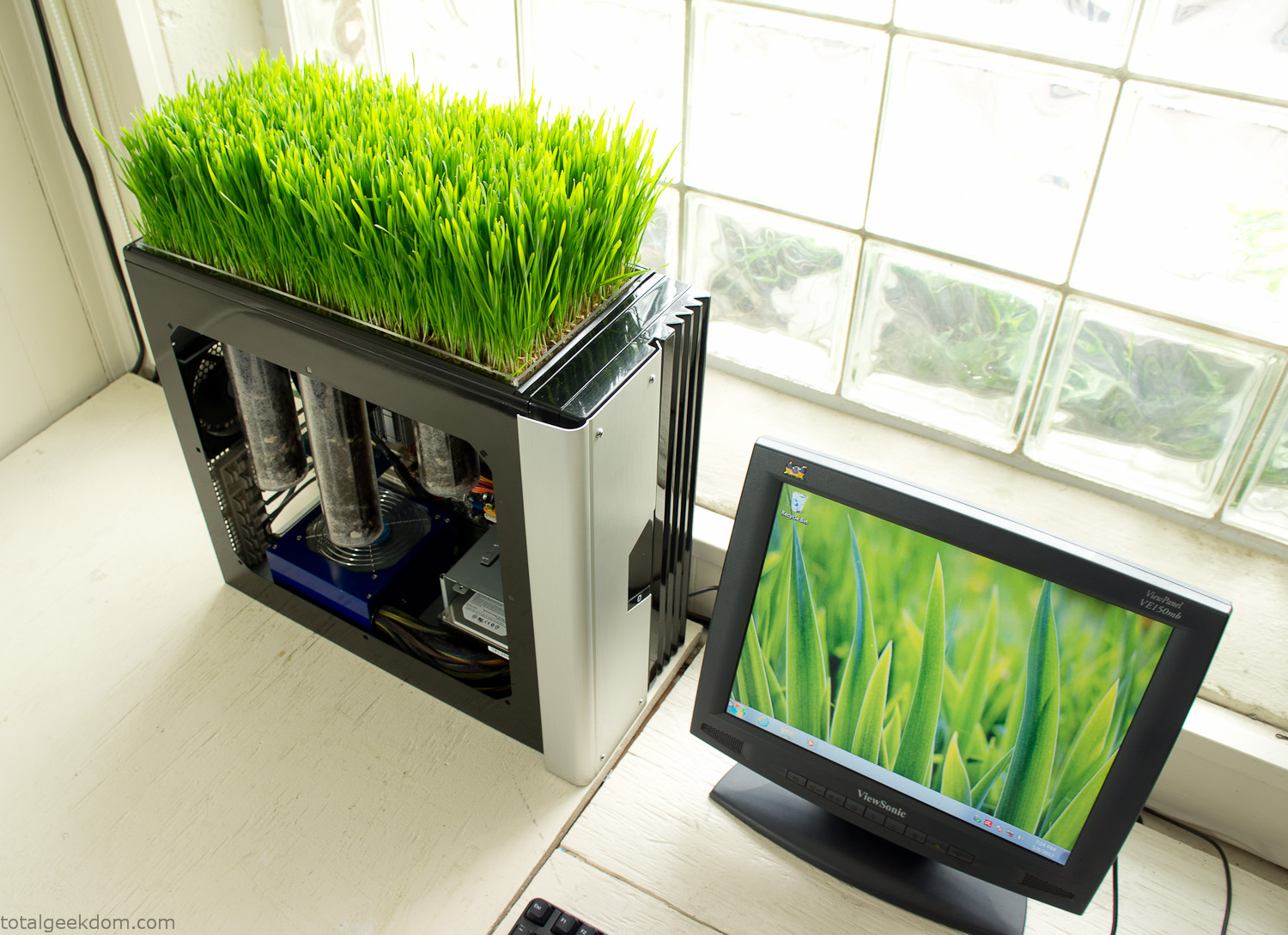
Bio Computer
I’ve been interested in working on a project for while that would combine something tech-based with something organic. Mixing the two elements intrigued me for a while. I’ve wanted to add flowers, or maybe plants of some sort to blend a little bit of nature into the space. I do receive a bit of sunlight through a glass block window, but the temperature in the basement is usually on the colder side. In the winter I don’t really heat the space because the folding farm outputs enough heat to keep the temperature comfortable. I didn’t want to change that aspect so I needed to come up with something that would tolerate slightly cooler temperatures and limited sunlight.
I can’t exactly recall when the idea came to me, but at some point I started wanting to use the heat from a computer as a way to warm the soil and help with germination/growth. I’m about as far from a botanist as it comes, I did some reading online and became pretty interested in the effects of soil temperature on germination/growth. I read different studies and papers from various universities. It was not too long into that process that I became hooked on the idea of using computer heat as a way to control the soil temperature of some sort of living plant life.
As the idea developed further I started looking into wheatgrass as a plant option. There is something clean and natural about the look and idea of a piece of grass growing in my basement. I thought the look would alter the space a little bit and add a bit of color along with something more than just metals and plastics. After reading enough studies and papers on the effects of soil temperature and germination with wheatgrass I felt like I had a good enough handle on the basics to tackle this.
The first step was finding a computer to adapt for the project. Luckily I had a lot of donated computers that people had given me for various project purposes. Most of them didn’t work, but by cobbling together various components from a bunch of different old computers I was able to come up with enough good parts to make a working computer.
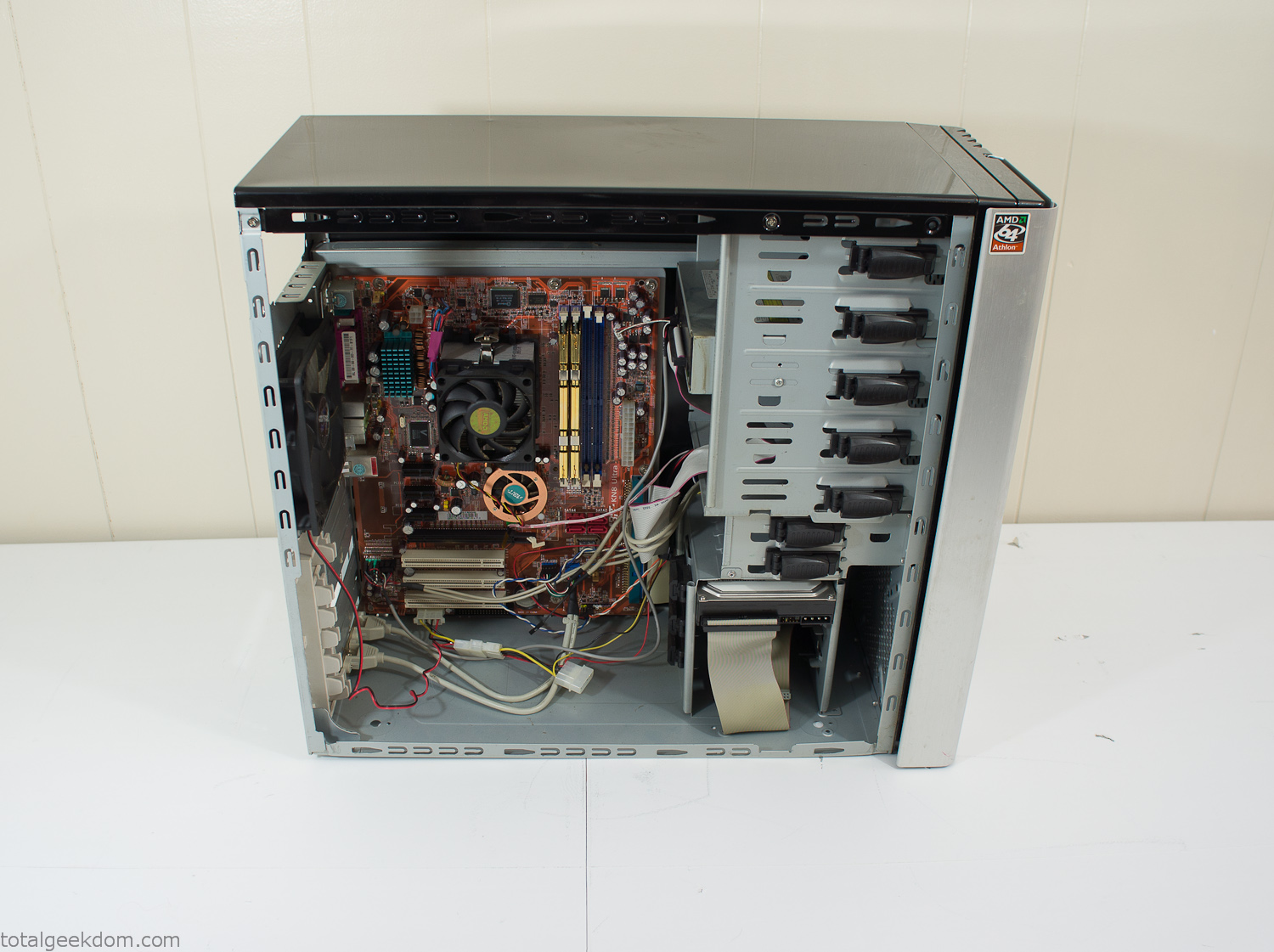
Donor Computer
At the time I was starting to get a formalized plan together for this project, another idea popped into my head. I’ve got a 5 yr. old who is already fairly geeky (just ask him to do his Jabba the Hutt impression for you) but he really does not get that much computer time. He’s getting to an age where he’s more inquisitive about tech stuff and I think he’s ready for his first computer. Since I was already well underway with this project it seemed like a perfect opportunity to orient the computer itself towards a learning tool for him in addition to using it as a way to blend something organic with a piece of technology.
With all of these goals in mind I started tinkering away. The computer hardware itself was nothing fancy, definitely outdated, but perfectly suited towards this project.
CPU- Pentium 4 (3 GHz)
Dell Factory Motherboard
Various Ram Sticks- 2gb
Old Maxtor 120gb IDE Hard Drive
Old FPS Power Supply
Donated Old Computer Case
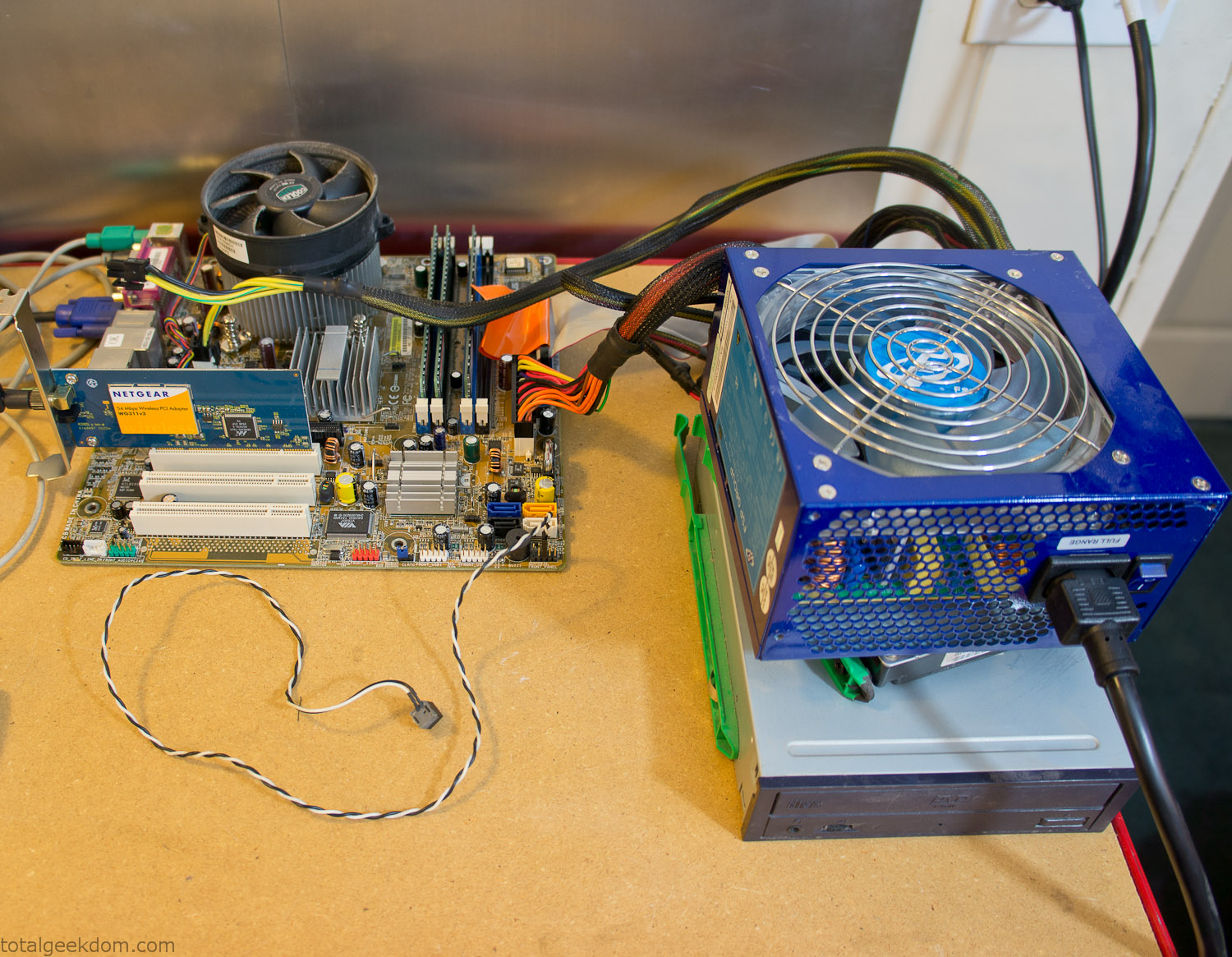
Computer Parts Testing
If you’ve spent any time around computer hardware in the last decade you’re probably well aware that Pentium 4 has a reputation for running hot. The 90nm Pentium 4 was named Prescott and it didn’t take long before the nickname Pres-hot popped up. In this case though that extra heat is going to be put towards good use.
Once the hardware was all in order I started working on the layout and arrangement for the case. I had originally envisioned the grass growing out of the top of the computer case. This seemed like it would provide a good blend between the hard edges of the computer and the soft feel of the grass. This also worked well with putting the soil area in the upper portion of the case, where the most heat should collect. After doing some initial tests with this configuration I found the measured temperature near the top of the case was the hottest. The placement of the CPU near the top of the case and the lack of airflow in that area contributed to these higher recorded temps.
After finishing with some initial tests I decided to completely strip the case down and start removing all the unnecessary brackets and pieces inside of the case. Like most computer cases all the internal brackets and mounts are riveted together, so I drilled all the rivets out of the components I wanted to remove and pulled them out. The gutted case looked pretty barren after being stripped.
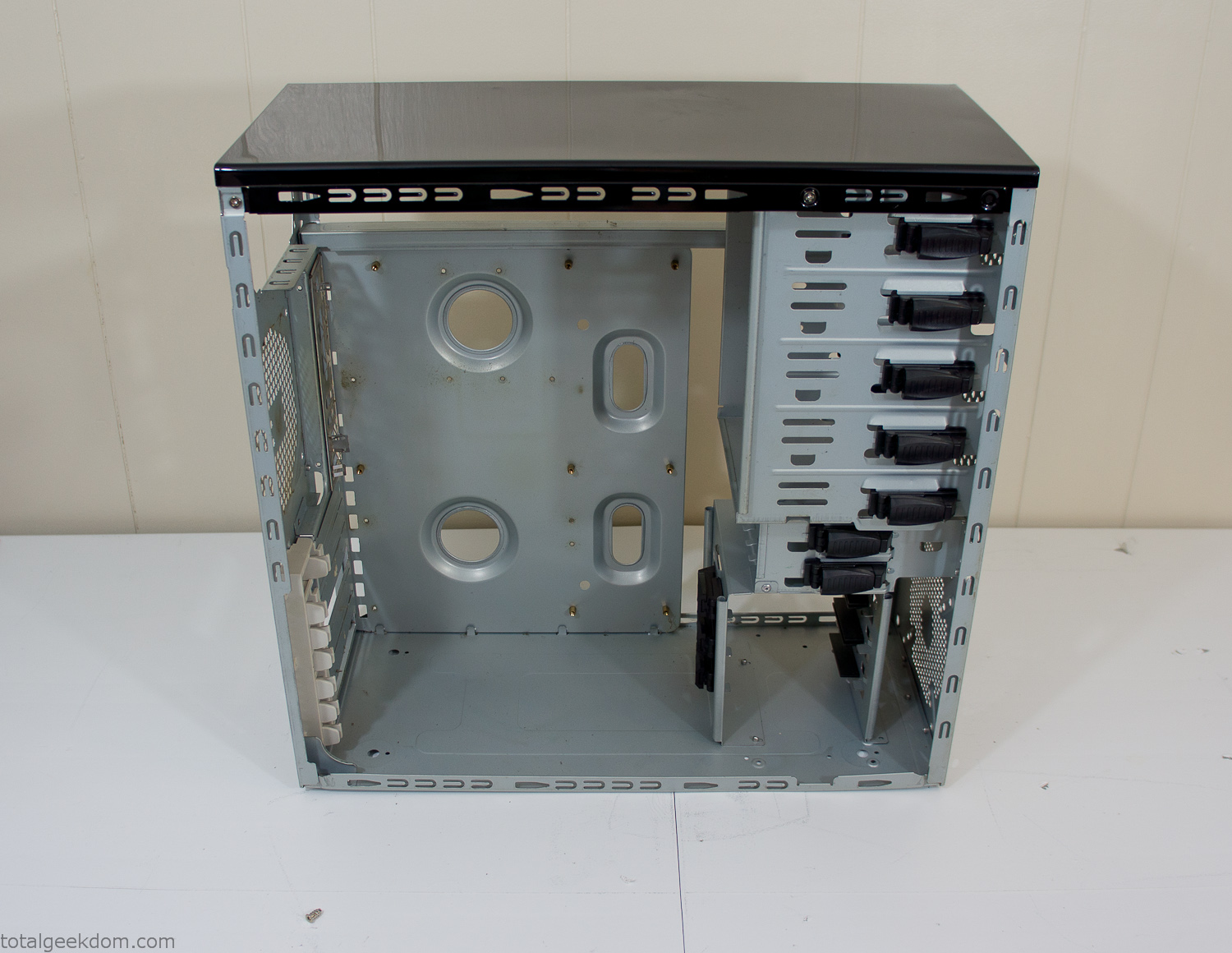
Empty Computer Case
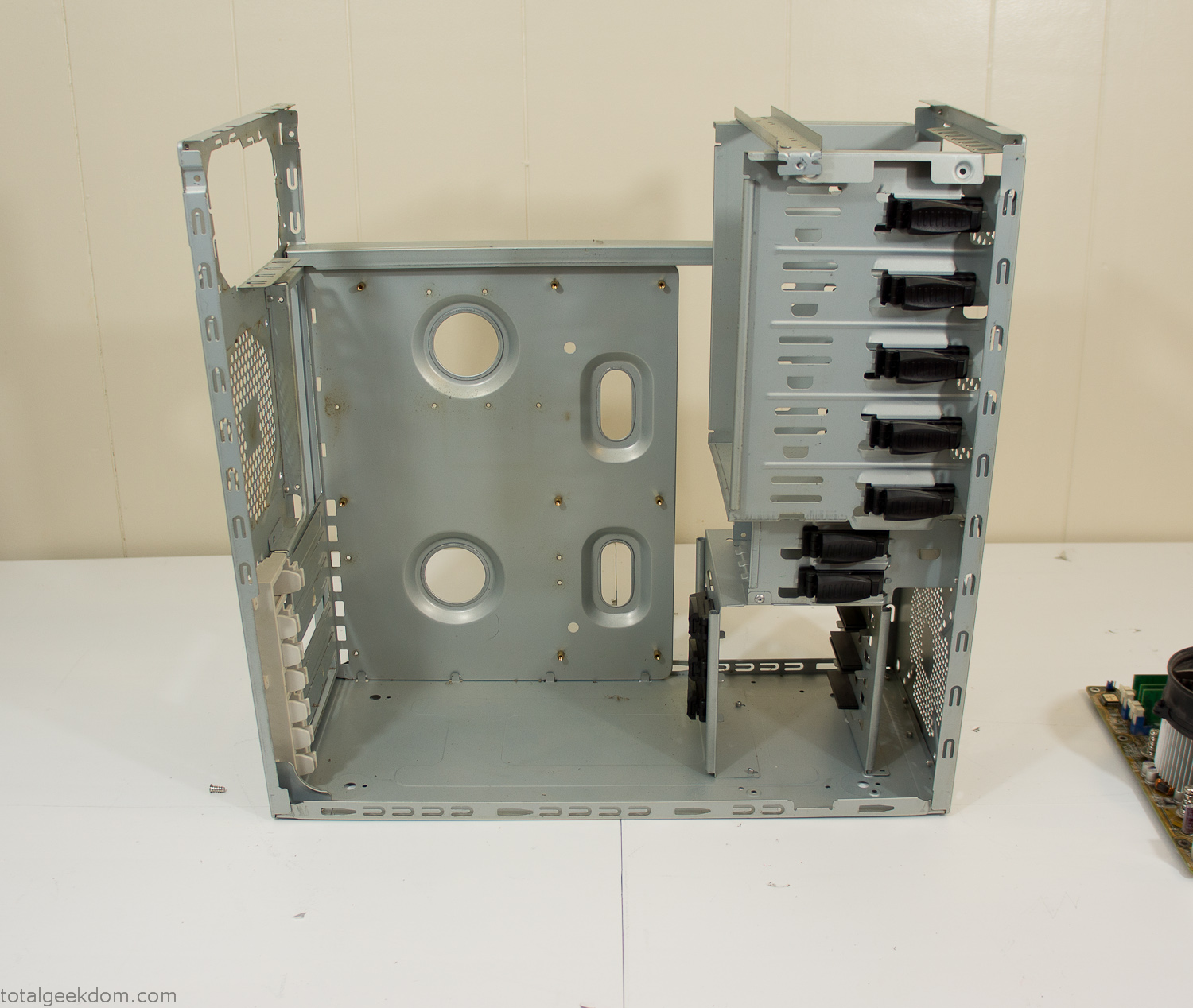
Dismantled Computer Case

Stripped Computer Case
In keeping with my original plan of having the computer blended with the organic grass I wanted it to be easy to see the inner workings of the computer and also the soil from the grass growing above. I needed something that was translucent, which left me with either glass or acrylic/polycarbonate as my options. I ended up choosing acrylic because I was able to find a cheap, used, die-cast model car display case top that was the perfect dimensions for the top of the case. Couldn’t go wrong for 5 bucks.
I test-fit the acrylic over the top of the computer case and marked my layout on the top of the case. My plan was to cut open the top of the computer case and insert the acrylic display case into the section I cut out. To cut open the top of the computer case I drilled a hole as a starting point and then used tin snips to cut through the thin gauge metal.
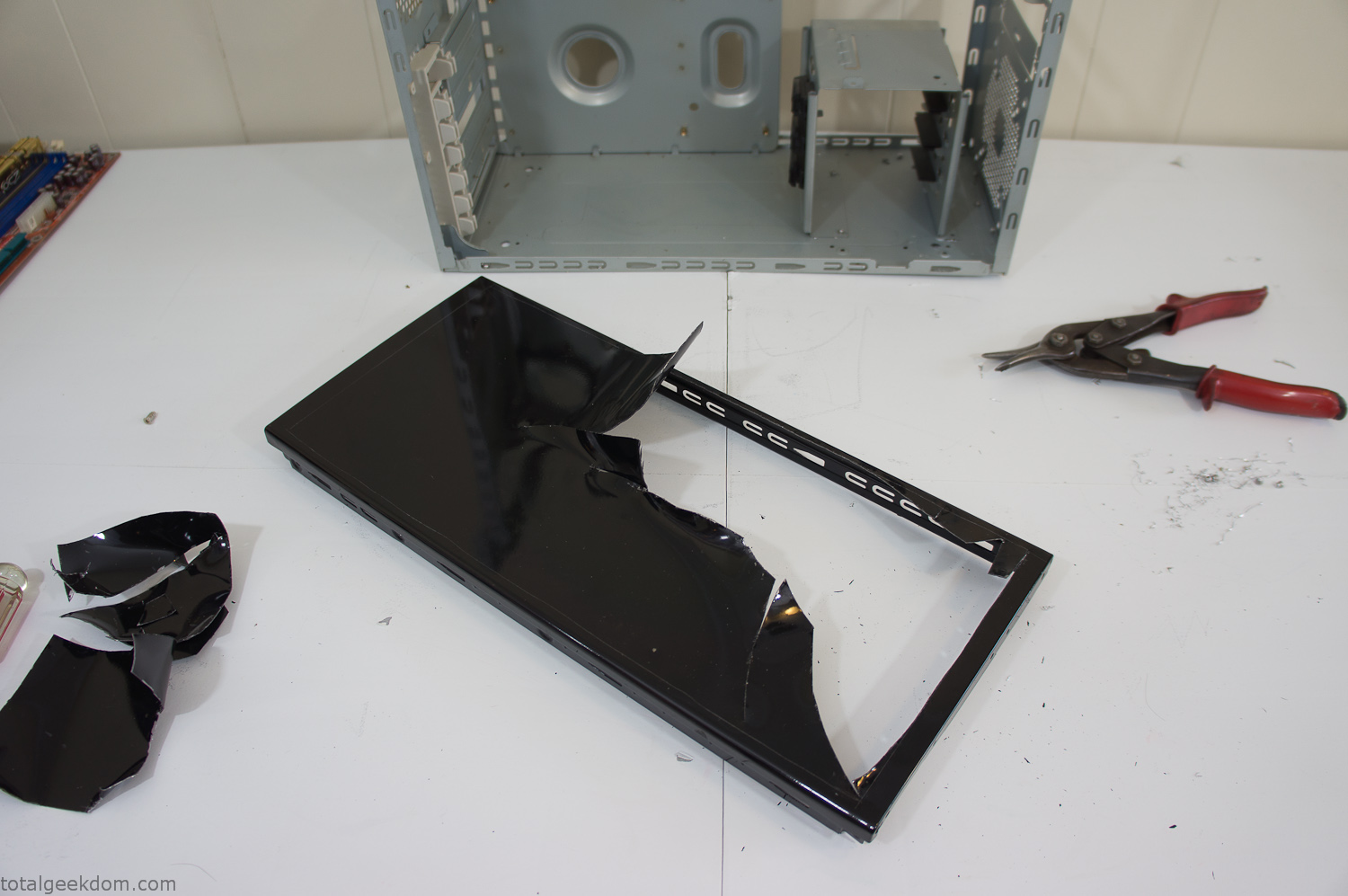
Computer Case Lid Modding
Once I had the metal opening cutout, I needed something to put along the edges of the freshly cut opening to create a clean and finished look. For $2 I was able to find some black, car-door-edge, plastic molding that worked perfectly.
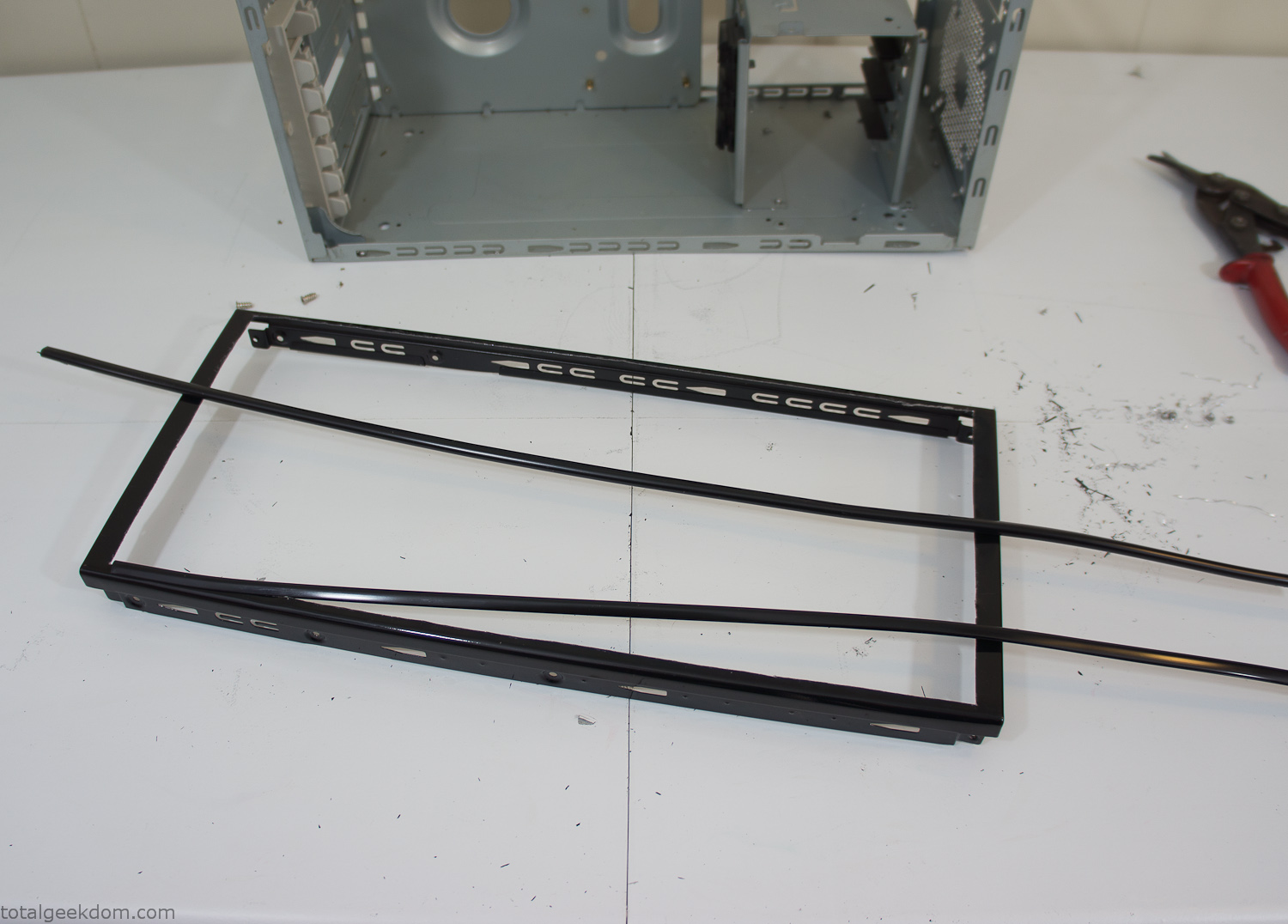
Modified Computer Case Lid
After getting the opening of the top of the computer handled and the acrylic case properly fitted, I moved onto some more testing with soil in the acrylic and the computer running. I wanted to see what kind of heat transfer I would get and how it would affect the soil temperature. I knew that using acrylic over glass would make it a little more difficult to heat the soil as acrylic is not that good at transferring heat. Luckily though I didn’t really need to alter the soil temperature that much, I just needed a little extra heat. Testing showed that heat transfer with just the single acrylic display case as my soil container was slow. So I decided to add some acrylic tubes. This would allow more surface are for soil to acrylic contact and also give me an area where I could add a mixed substrate to allow for soil drainage.
I went online and found a 3ft long section of 2 1/4″ clear acrylic tubing for $8 dollars. I wanted to add a couple of hanging cylinders off the main of the acrylic display case in the top of the computer case. To do this I needed to cut holes into the bottom of the display case. Cutting holes in acrylic is not always easy, it’s likely to chip and craze at the edges. To get around this I used a buildup of masking tape on both sides of the acrylic, to provide a little bit of resistance and strength. I placed the acrylic display case back into the computer and marked my layout for the tubes. I needed to leave clearance for the CPU cooler, power supply and hard drive mount.
After marking the layout, I used an air-powered pencil grinder and carbide tipped bit and cut through the acrylic case along my marked lines. After the initial shape was cutout I used a tube piece as a template and slowly worked on grinding the holes as perfectly round as I could get them so that the tube had a snug fit all the way around. The fit is pretty important as the acrylic cement that I used needs there to be a tight fit so that the acrylic can bond correctly.
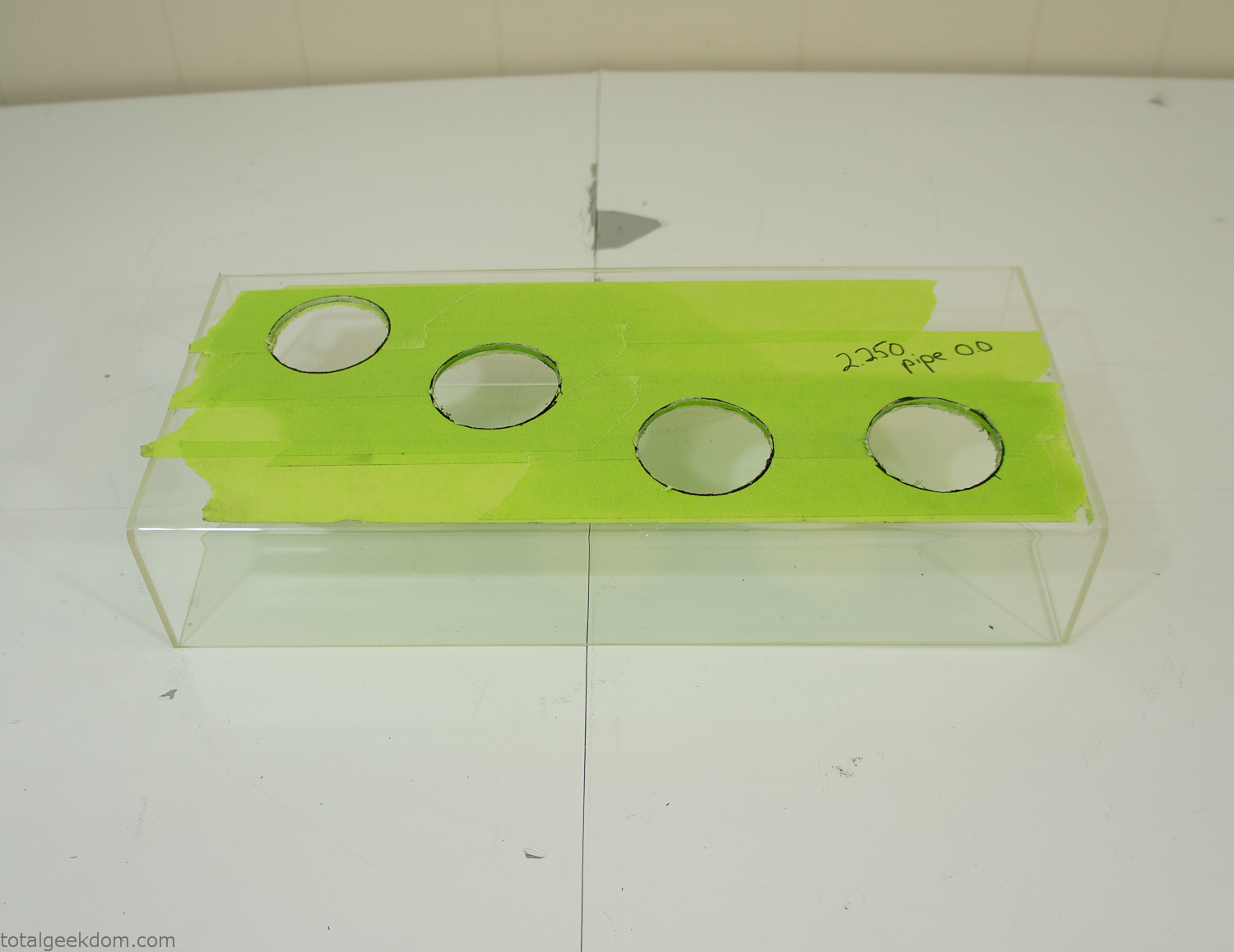
Acrylic Case Modifications
I placed the tubes into the acrylic case and mounted it in the computer and test fit the placement and height of the tubes. After getting everything lined up and oriented correctly I moved towards bonding the acrylic together. Using a needle dropper applicator I applied the cement to all the joints. After letting it set overnight I came back the next night and applied a thin coating of clear silicone caulk around all the joints just to ensure they were completely water tight
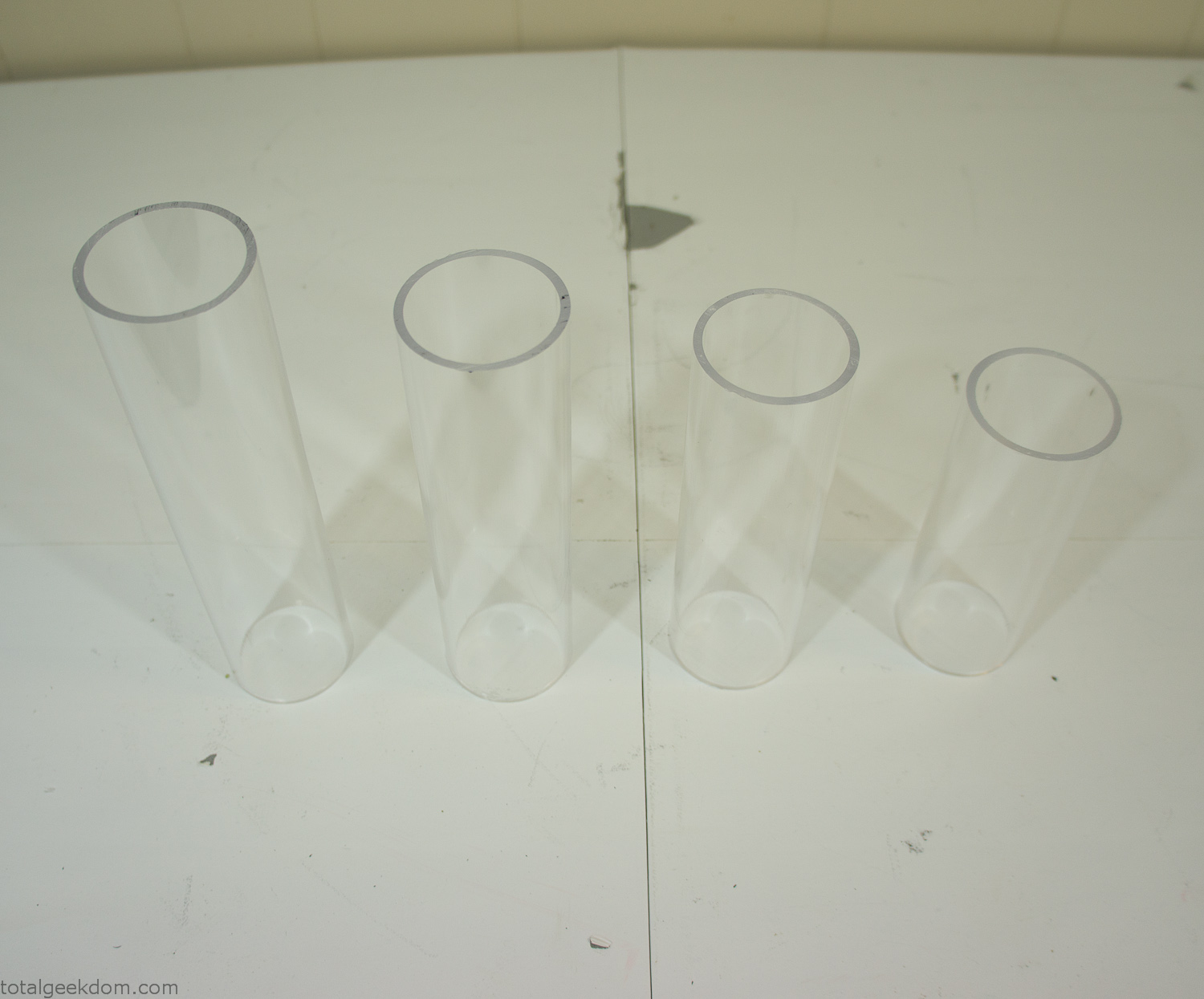
Acrylic Tubes
The next step was sealing up the bottom of the acrylic tubes. I looked at a couple of different options before realizing that the discs I had cut out of the acrylic case to fit the tubes would be almost the perfect size. Using a bench grinder and a test piece of tube I slowly ground each disc to the perfect size for a tight fit all the way around. I placed the clear acrylic discs into the bottom of each tube and repeated the same cementing and silicone caulking procedure to ensure they were water-tight. After a couple of days’ worth of drying I tested the case by filling it with water overnight and checking in the morning to make sure that no leaks had popped up.
In order to hold the weight of the acrylic case after adding soil, I drilled and installed a machine screw with a rubber cap at each corner of the computer case to bear the weight of the acrylic case.
Once all the work was done with the acrylic case section I started reinstalling all the components. The motherboard, hard drive and power supply were added and then wired up.
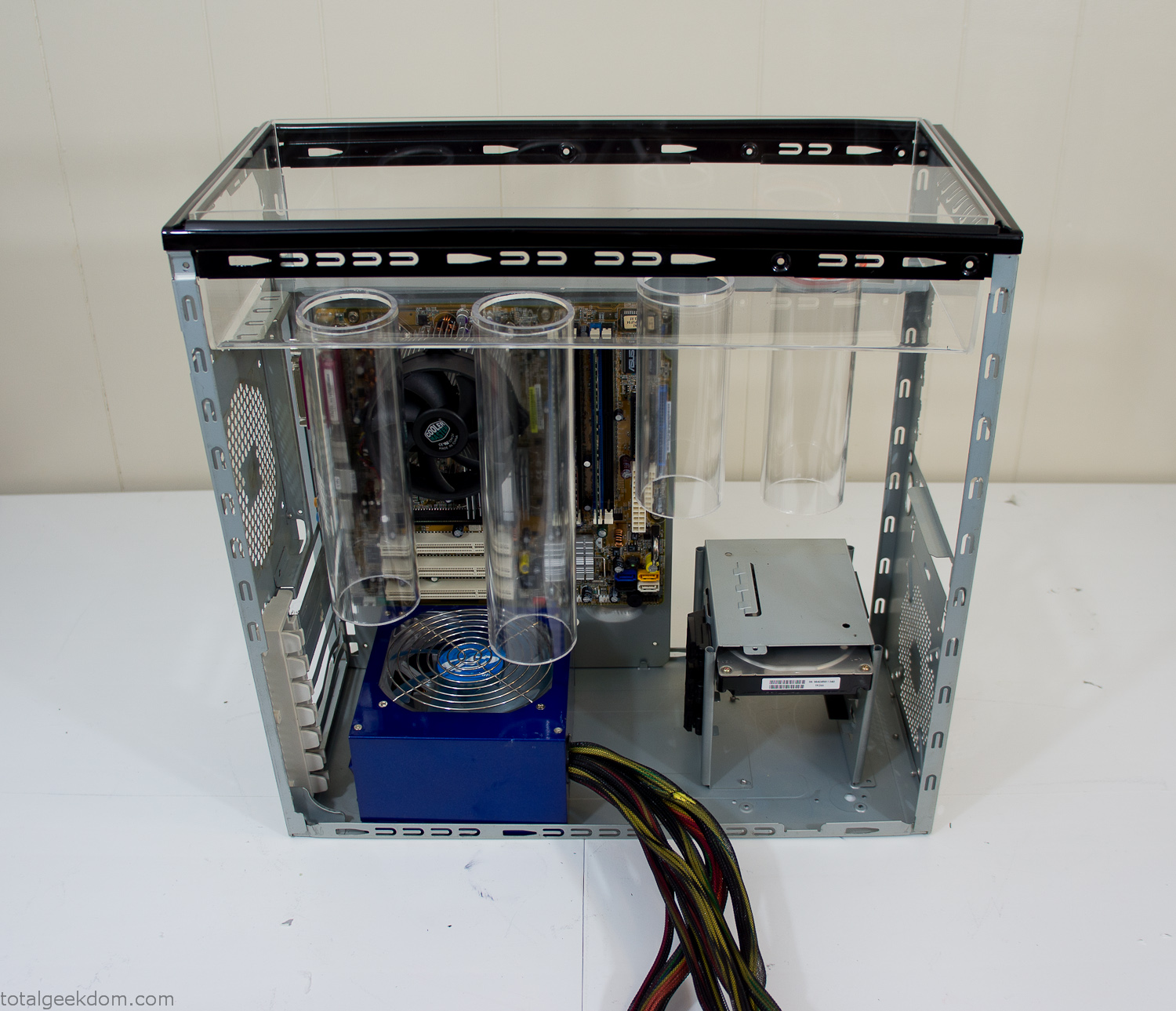
Mocked Up Computer Case
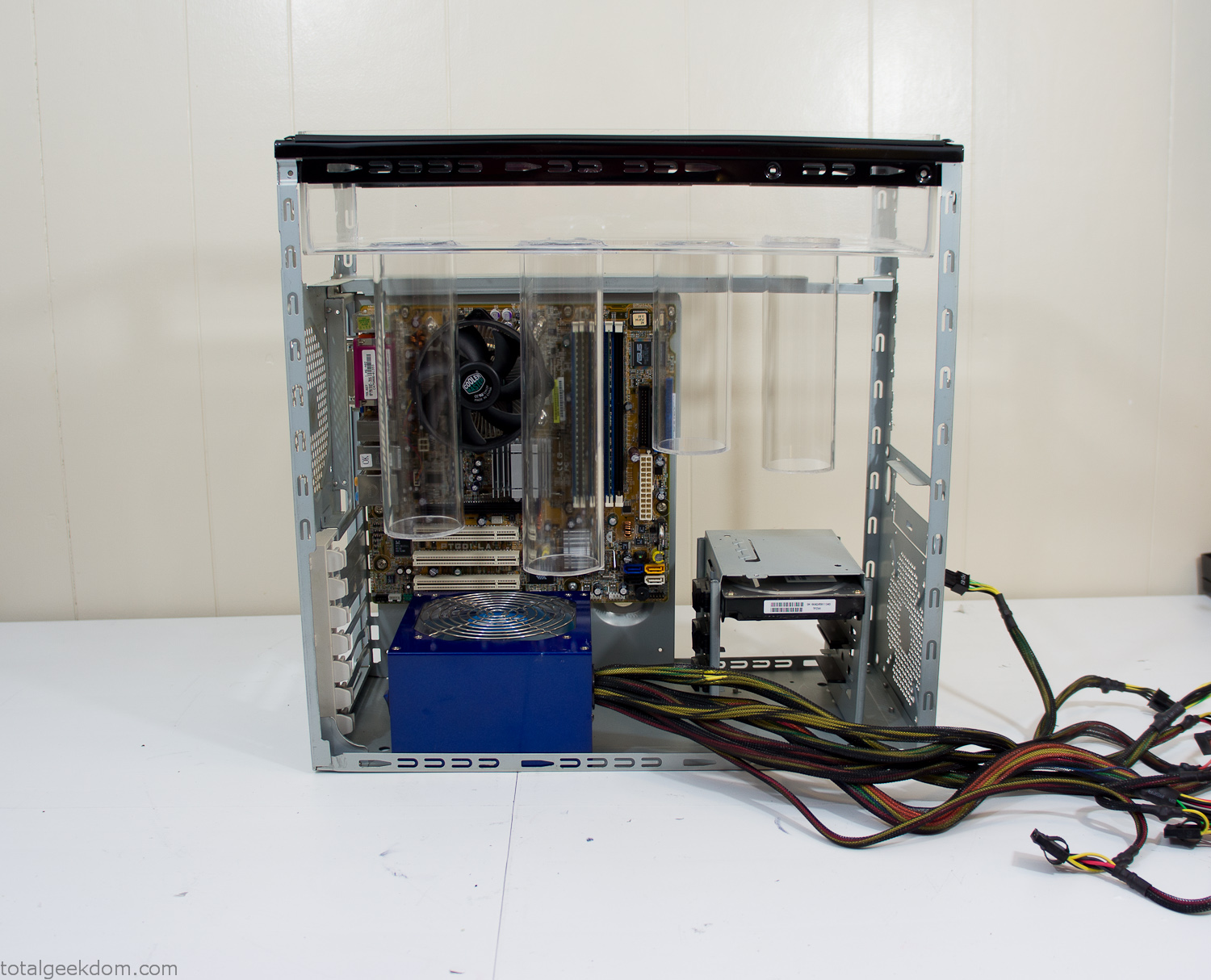
Power Supply Mockup
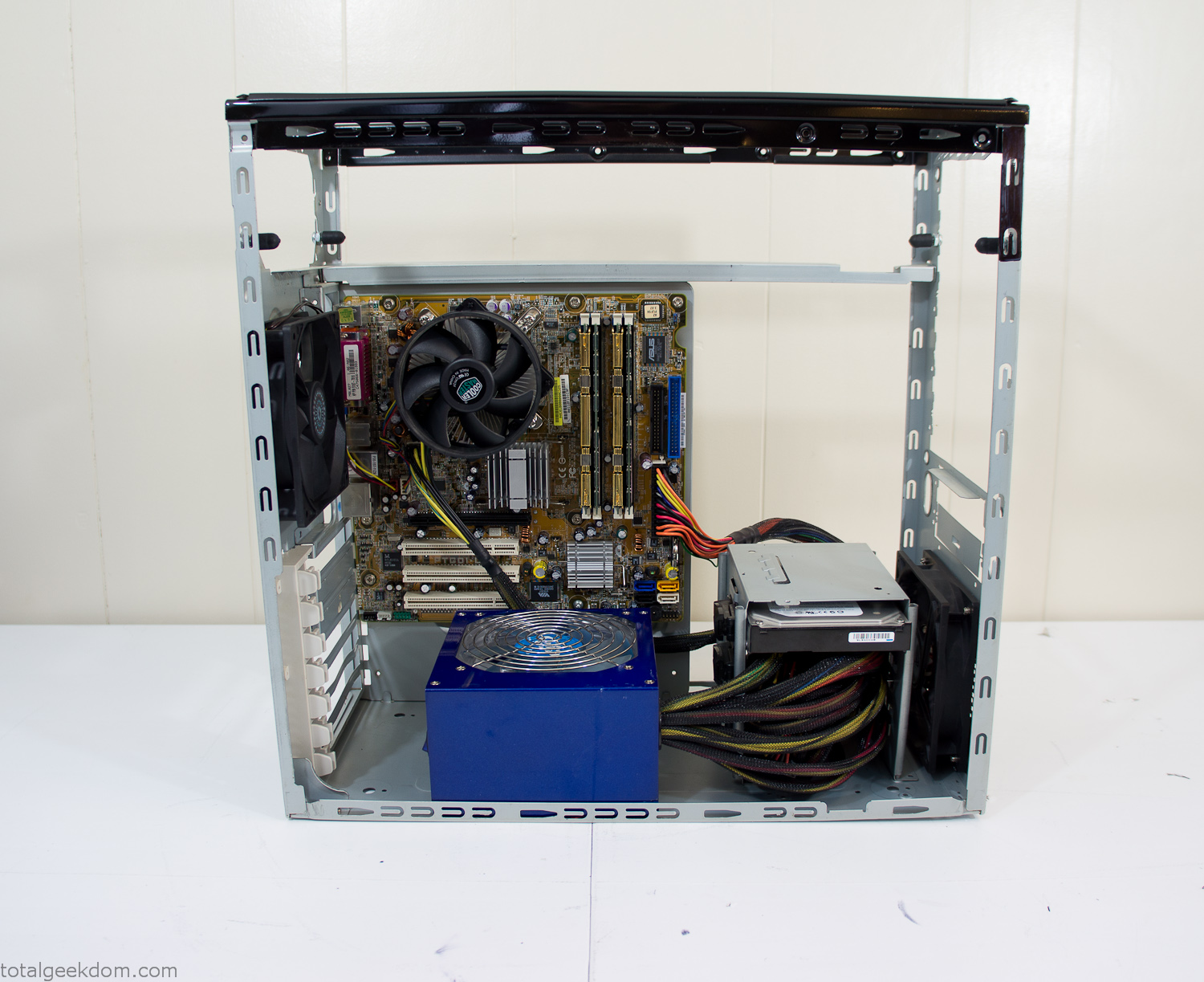
Computer Components Wired
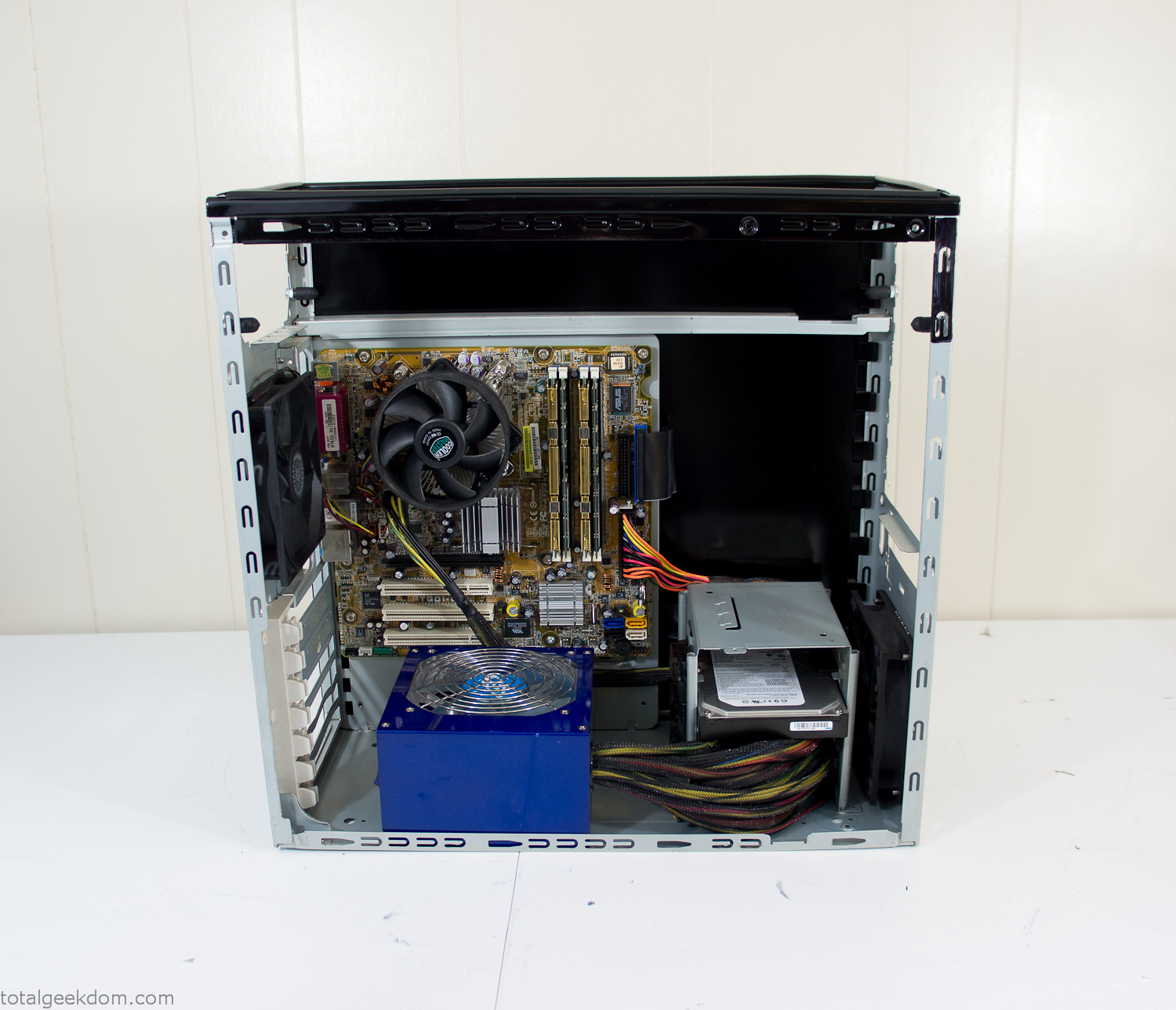
Case Panel Installed
At this point all that was left was to make a clear panel for the side of the case. I had some left over acrylic sheets from a different project that were really close to the right size, after test fitting, marking and cutting I then had a clear side panel to see into the case. (I left this off for the pictures because it caused a reflection)
The final step was filling the case with soil and adding some wheatgrass. I had been test growing other samples of wheatgrass during the build process. So I had already a couple of different patches of grass growing. I tried to keep the soil level just below the top of the acrylic case edge to make it a little more seamless.
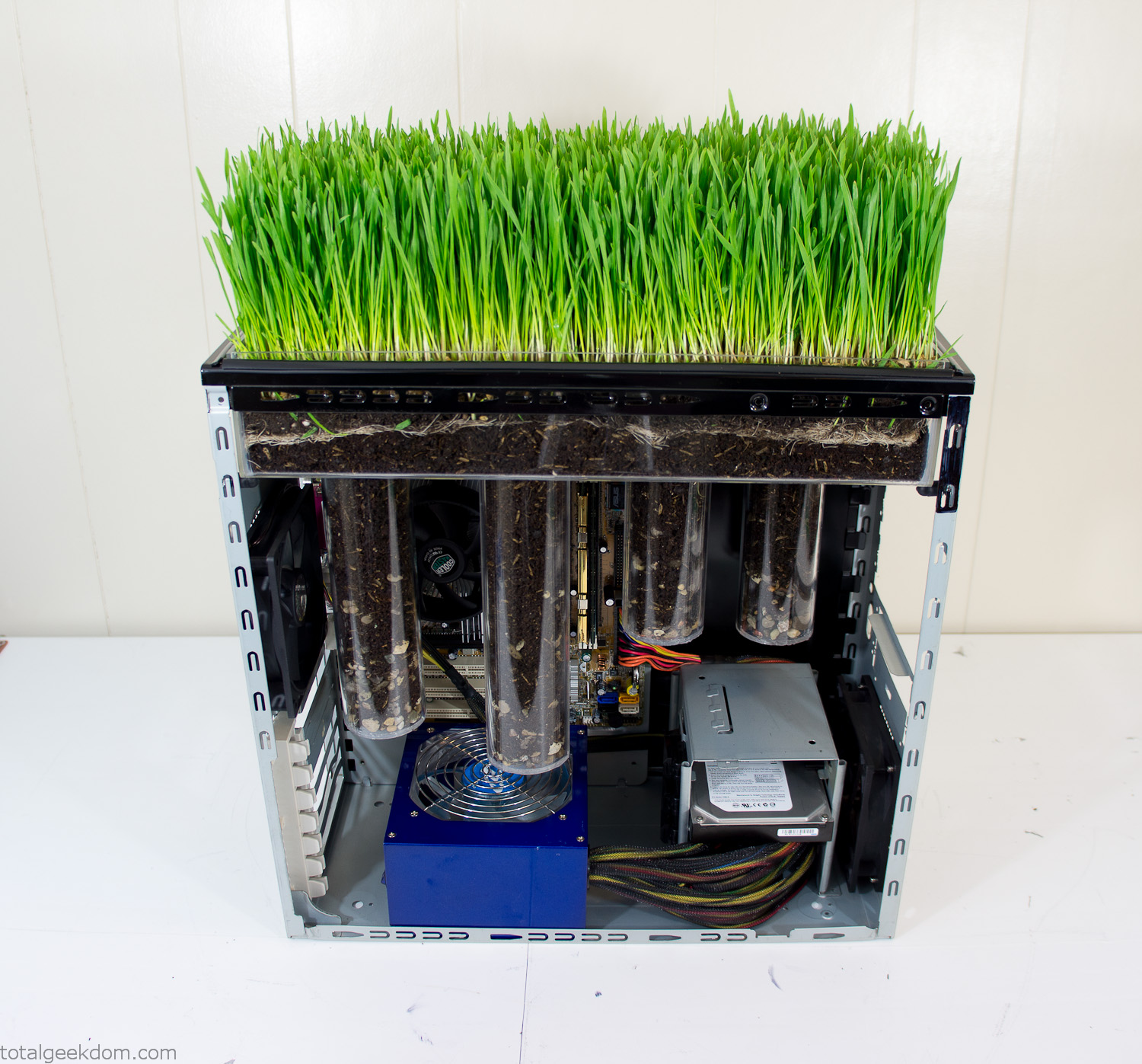
Grass Planted in Computer
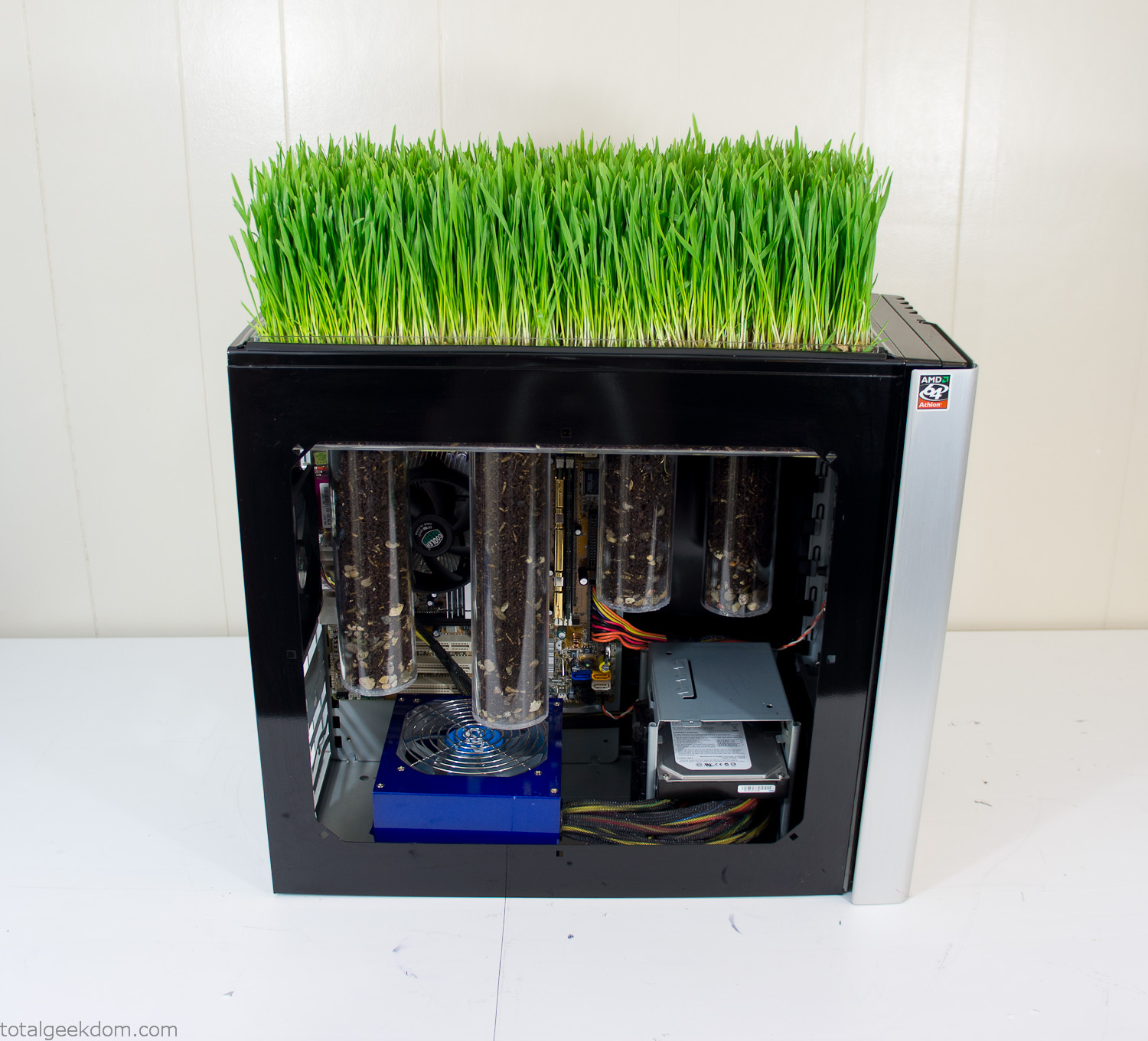
Grass and Case Panel Installed

Grass in Computer
For the computer itself I ended up installing Windows as well as Linux in a dual boot setup. Since the computer was going to be used by my son as something to play with I figured I should put both on there so he can tinker with them and learn as he goes. Besides, for important life decisions like picking an OS (Operating System) I think any good parent should present the options and then let their kid decide for themselves.
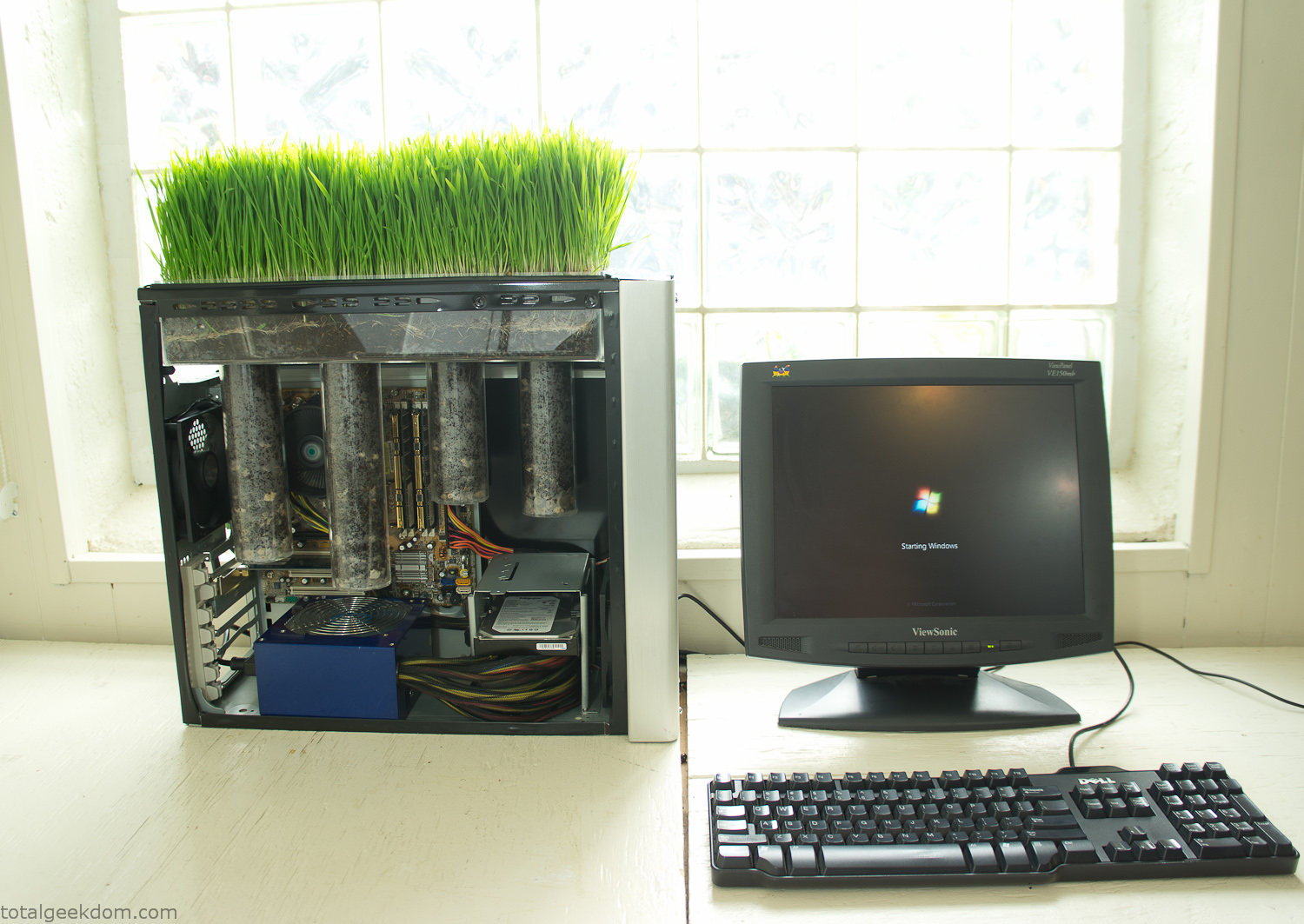
Starting Windows
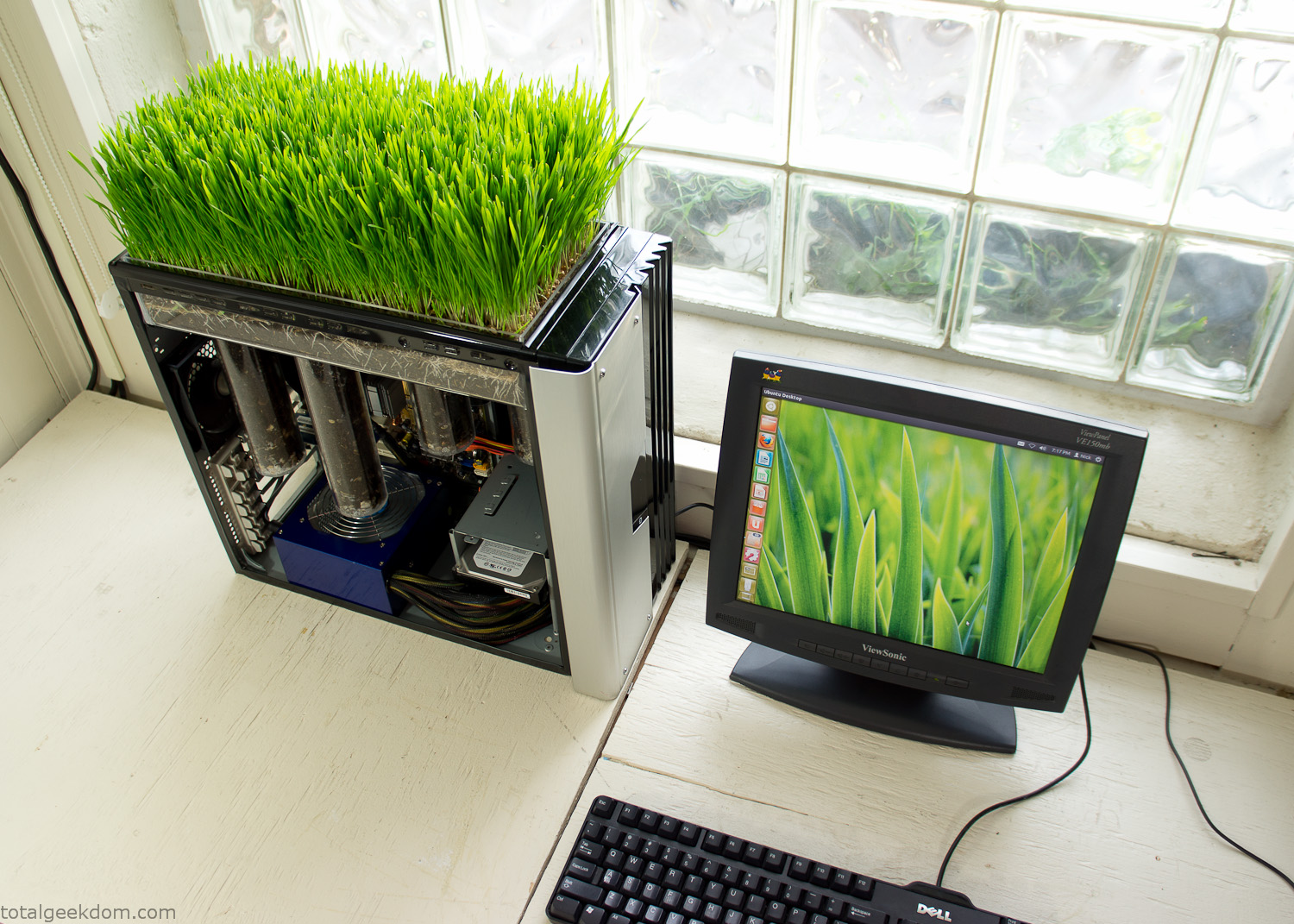
Linux Running
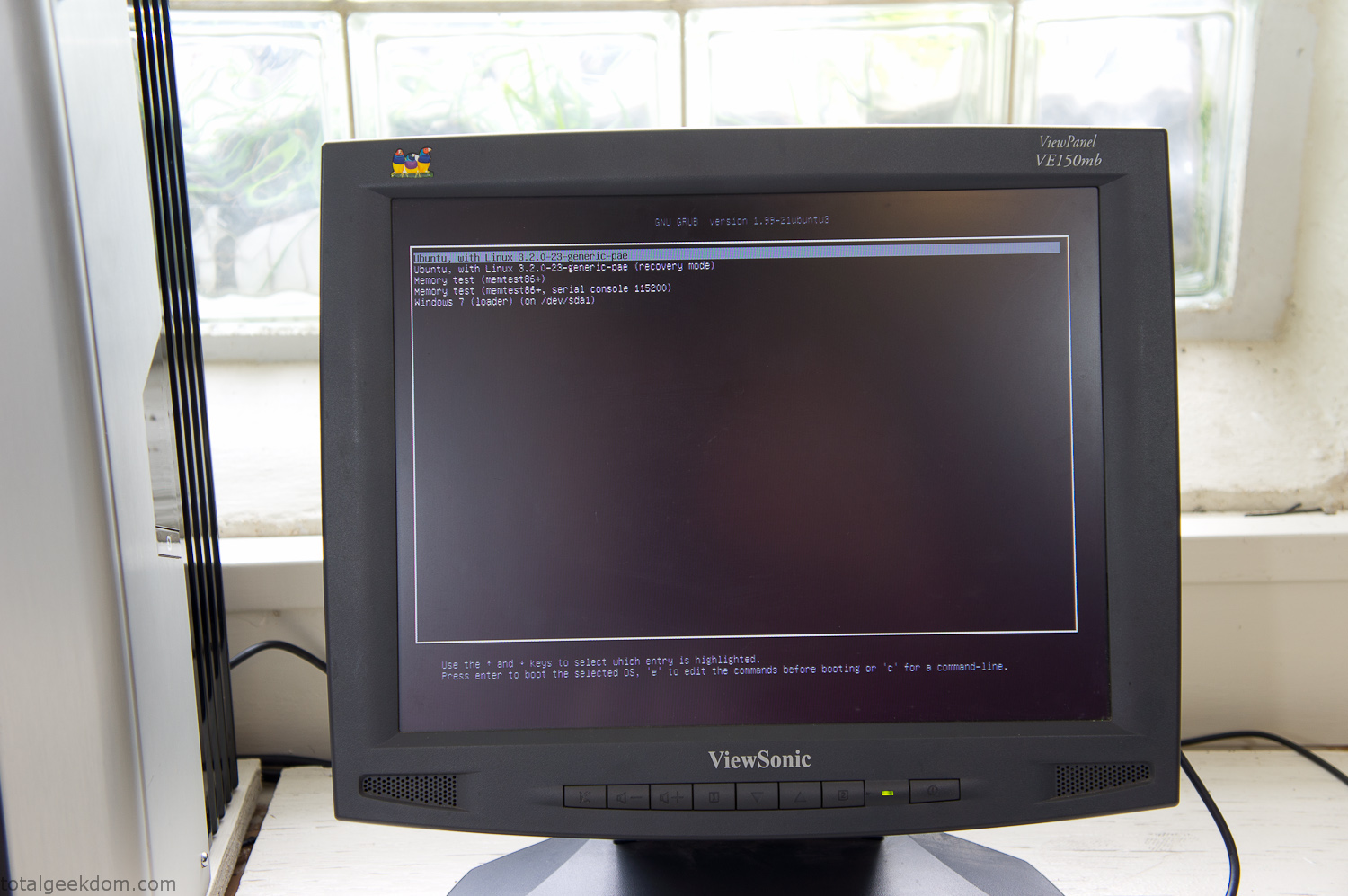
Dual Boot Screen
In the end I’m happy with the result of the project. It’s been fun experimenting with growing wheatgrass and I like how the natural look of grass is blended with the very modern, inorganic case.
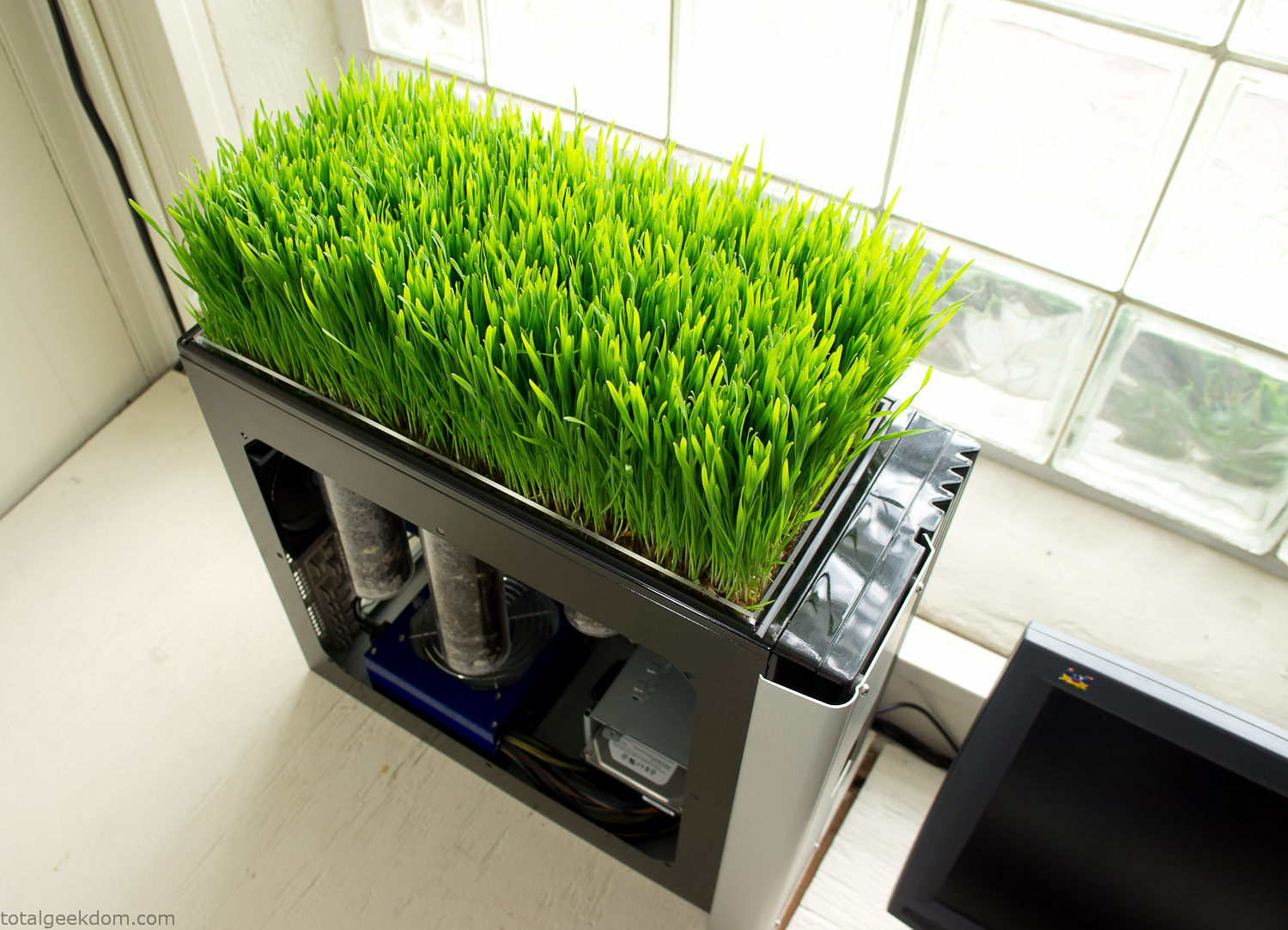
Computer Grass Growing
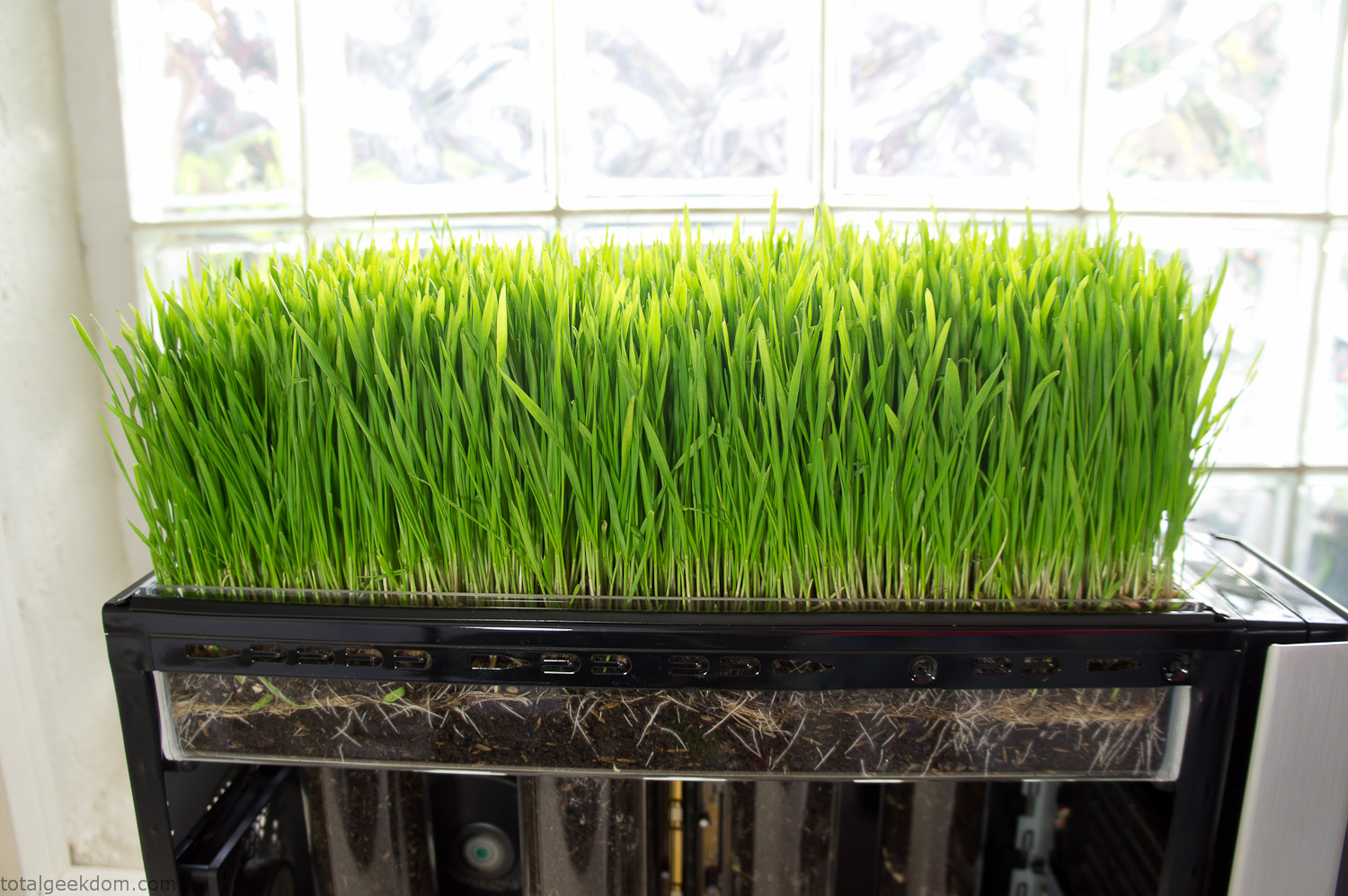
Grass in Computer Section
Notes
Temperature Testing
In testing the case temperature versus the soil temperature I found it was easiest to control the case temperature by using a variable fan speed control on both the inlet and outlet fans. By turning the fan speed down I could increase the temperature inside the case and correspondingly raise the soil temperature.
In order to maximize output of heat during these tests I used Prime95 to run the CPU at 100% load.
Using this method to control the case and soil temperature I played around with adjusting the soil temperature and then tracking the rate of growth of the Wheatgrass. The target temperature for peak growth seemed to fall around 66°F (19°C).
Using the fans to control the case temperature allowed me to vary the temperature inside the case from a low of 75°F (24°C) to a high of 91°F (33°C). In order to achieve the desired increase in soil temperature, I had to run the case temperature toward the higher end of the scale.
When the soil temperature was too high, the growth of the wheatgrass would slow.
Wheatgrass
The wheatgrass I used for my tests was nothing special, it can be found as seeds (berries) in a lot of health food stores and it grows relatively easily.
Caring for the wheatgrass is just a matter of keeping it watered. It’s a pretty easy plant to work with and doesn’t require any special skills.
Wheatgrass is often used as a nutritional supplement; it can be juiced and mixed into smoothies and other beverages. I plan on harvesting some of the grass and making some juices.
Plant Options
While wheatgrass offers a nice, attractive and easily grown option I do plan on trying other plants as well in the future. Since I already have the “planter” built all I have to do is add a different plant and see how it goes. I’m sure there will be some plants that don’t like the lower light environment, but it will be fun experimenting with other plants as well and seeing how they take.
Materials
Donated Computer- Free
Clear Acrylic Display Case- $5
Clear Acrylic Tube- $5
Plexiglass Side Panel- Free
Total- $10
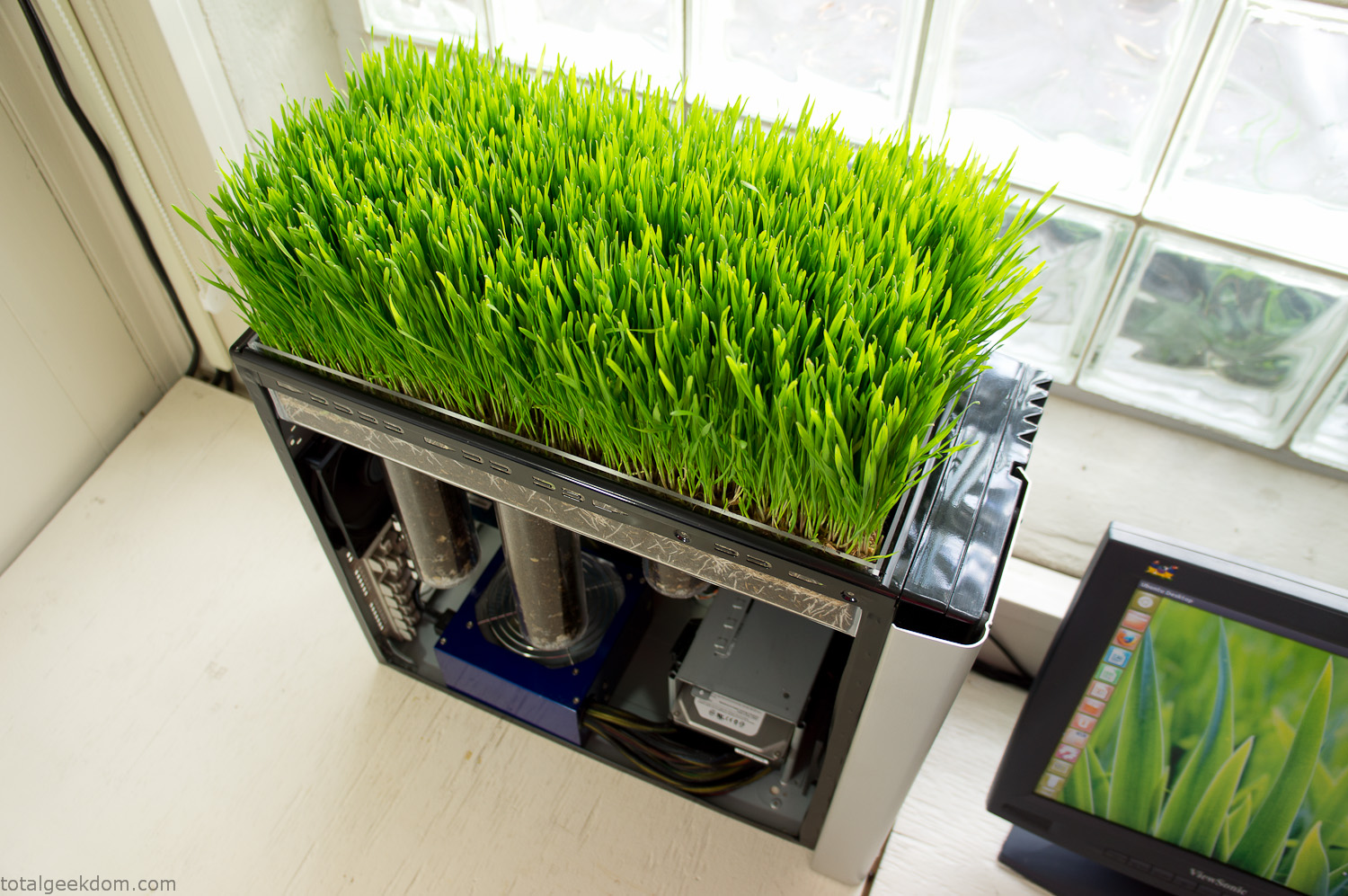
Bio Computer Running
 29.2k
29.2k
 13.2k
13.2k 7.1k
7.1k

 2.1k
2.1k 813
813 2.6k
2.6k
Comments 52,992
https://dom-nam.ru/index.php/forum/razdel-predlozhenij/167442-kurskaya-pivovarennaya-kompaniya-cheshskij-lev#207626
Car Air Conditioning Repair
I avoided sketchy casinos thanks to Reddit. Their list of top online casinos helped me find a legal and fast-paying site.
Good read on sourcing buy real tiktok likes rather than filler spam—worth bookmarking.
Thread idea bank hit 100 drafts; midway down that list sits a reminder to buy followers twitter before the next product drop.
This Reddit thread led me to the best casino site—smooth layout, trustworthy support, and real quick payouts that actually hit your account on time.
(Thread recap) We tried to buy likes tiktok, synced with trending sound, and CTR spiked 14 %.
Peer review: buy followers twitter; charts show churn < 1 %.
Great info. Lucky me I discovered your blog by chance (stumbleupon).
I have saved as a favorite for later!
Drug information leaflet. Brand names.
where can i buy keflex
All trends of drugs. Read information here.
Keep on writing, great job!
Medication prescribing information. Cautions.
minocycline without a prescription
All what you want to know about drug. Read information here.
can i buy cheap dipyridamole pills
Mobil cihazlardan rahat oynamaq üçün kazino oyunları tətbiqi yükləyin. Android və iOS üçün versiyalar mövcuddur.
Интернет-магазин Витамакс стал для многих надежным партнером в заботе о здоровье и благополучии. Мы предлагаем высококачественные биологически активные добавки. Они поддерживают энергию, улучшают общее самочувствие и состояние кожного покрова. Ищете оптимакс про? Vitamax.shop – тут оформление заказа интуитивно понятное и удобное. Гарантируем большой выбор продукции, быструю доставку и лучшие цены с максимальными скидками. Поможем подобрать продукты, учитывая ваши индивидуальные потребности.
https://stbvodokanal.ru
Drug information. What side effects can this medication cause?
lyrica price without insurance
Everything news about medicine. Get now.
kraken рабочая ссылка onion
Excellent article. Keep posting such kind of information on your site.
Im really impressed by it.
Hello there, You’ve done a fantastic job. I’ll certainly digg it and in my opinion suggest to my
friends. I’m sure they will be benefited from this website.
I all the time used to read piece of writing in news
papers but now as I am a user of internet so from now I
am using net for posts, thanks to web.
Thanks for ones marvelous posting! I seriously enjoyed reading it, you
may be a great author. I will ensure that I bookmark your blog and will eventually come back at some point.
I want to encourage you to definitely continue
your great job, have a nice weekend!
На сайте https://pacific-map.com/ находится карта США, на которой изображены не только города, но и штаты. Здесь представлены автомобильные дороги США. На этой карте отмечено все, что необходимо, чтобы быстрее сориентироваться. Имеется карта Тихоокеанского, Атлантического Побережья. Обязательно изучите физическую карту побережья США (Тихоокеанского). На всех дорожных картах указано то, где находятся мосты с незначительным дорожным просветом на автострадах, межштатных трассах. На карте указано то, сколько времени в пути вы проведете.
выставочные стенды москва Выставочный стенд заказать: Просто и удобно Выставочный стенд заказать сегодня можно онлайн. Многие компании предлагают услуги по проектированию и изготовлению стендов, не выходя из офиса.
Medicines prescribing information. Generic Name.
how to buy cheap seroquel no prescription
All news about medicine. Read now.
blacksprut
блэкспрут
black sprut
блэк спрут
blacksprut вход
блэкспрут ссылка
blacksprut ссылка
blacksprut onion
блэкспрут сайт
блэкспрут вход
блэкспрут онион
блэкспрут дакрнет
blacksprut darknet
blacksprut сайт
блэкспрут зеркало
blacksprut зеркало
black sprout
blacksprut com зеркало
блэкспрут не работает
blacksprut зеркала
как зайти на blacksprut
black sprout
how to get baycip prices
Awesome! Its truly awesome post, I have got much clear idea regarding from this paragraph.
Бесплатные ставки онлайн
blacksprut
блэкспрут
black sprut
блэк спрут
blacksprut вход
блэкспрут ссылка
blacksprut ссылка
blacksprut onion
блэкспрут сайт
блэкспрут вход
блэкспрут онион
блэкспрут дакрнет
blacksprut darknet
blacksprut сайт
блэкспрут зеркало
blacksprut зеркало
black sprout
blacksprut com зеркало
блэкспрут не работает
blacksprut зеркала
как зайти на blacksprut блэкспрут ссылка
Meds prescribing information. What side effects?
how to buy cheap nolvadex without rx
Best trends of medicine. Read information now.
Trade Smarter with theoption Binary Option Platform
Theoption offers a clean and easy-to-use interface for binary
options trading, ideal for beginners and experienced users alike.
Its quick execution and short-term trades provide opportunities
for fast returns. With mobile compatibility, users can trade on
the go with confidence. The platform’s high payout rates and
low entry barriers make it attractive to many traders. For
helpful insights and updated resources, be sure to visit
chokuyomi.jp. https://chokuyomi.jp/
https://remontkomand.kz/ Полный комплекс услуг для ремонта мастера профессиональная команда с высокое качество и качественно.
Бесплатные ставки онлайн
https://remontkomand.kz/ Ремонт квартир в Алматы под ключ, ремонт квартир в Алматы и качественно. Наши высокое качество выполняют работы быстро и надежно.
This is a topic that’s near to my heart… Best wishes!
Exactly where are your contact details though?
Бесплатные ставки в слотах
Meds information sheet. What side effects can this medication cause?
how to buy cheap seroquel prices
Everything information about drugs. Get now.
Бесплатные ставки онлайн
Бесплатные ставки онлайн
Trade Smarter with theoption Binary Option Platform
Theoption offers a clean and easy-to-use interface for binary
options trading, ideal for beginners and experienced users alike.
Its quick execution and short-term trades provide opportunities
for fast returns. With mobile compatibility, users can trade on
the go with confidence. The platform’s high payout rates and
low entry barriers make it attractive to many traders. For
helpful insights and updated resources, be sure to visit
chokuyomi.jp. https://chokuyomi.jp/
https://remontkomand.kz/ Ремонт квартир мастера индивидуальный подход, ремонт квартир в Алматы, специалисты, высокое качество. Звоните нашим мастера!
blacksprut
блэкспрут
black sprut
блэк спрут
blacksprut вход
блэкспрут ссылка
blacksprut ссылка
blacksprut onion
блэкспрут сайт
блэкспрут вход
блэкспрут онион
блэкспрут дакрнет
blacksprut darknet
blacksprut сайт
блэкспрут зеркало
blacksprut зеркало
black sprout
blacksprut com зеркало
блэкспрут не работает
blacksprut зеркала
как зайти на blacksprut
black sprut
тик ток мод последняя версия 2025 Скачать Тик Ток на Андроид Мод Процесс скачивания и установки мода на Android обычно включает в себя загрузку APK-файла и его установку с разрешением на установку приложений из неизвестных источников в настройках безопасности устройства.
Промокоды на бесплатные ставки онлайн
Trade Smarter with theoption Binary Option Platform
Theoption offers a clean and easy-to-use interface for binary
options trading, ideal for beginners and experienced users alike.
Its quick execution and short-term trades provide opportunities
for fast returns. With mobile compatibility, users can trade on
the go with confidence. The platform’s high payout rates and
low entry barriers make it attractive to many traders. For
helpful insights and updated resources, be sure to visit
chokuyomi.jp. https://chokuyomi.jp/
https://remontkomand.kz/ Ремонт квартир высокое качество ремонт квартир в Алматы, с гарантией, быстро и надежно, под ключ. Звоните нашим мастера!
https://droptopsite1.ru/
Промокод на бесплатную ставку
blacksprut
блэкспрут
black sprut
блэк спрут
blacksprut вход
блэкспрут ссылка
blacksprut ссылка
blacksprut onion
блэкспрут сайт
блэкспрут вход
блэкспрут онион
блэкспрут дакрнет
blacksprut darknet
blacksprut сайт
блэкспрут зеркало
blacksprut зеркало
black sprout
blacksprut com зеркало
блэкспрут не работает
blacksprut зеркала
как зайти на blacksprut
black sprout
Pills information for patients. Effects of Drug Abuse.
how to buy generic seroquel for sale
Actual trends of medicine. Read now.
https://poverkaekb.ru
Домашний мастер в Краснодаре – https://krasnodar.chastniymaster-sm.ru/ – это услуги от профессионалов, так называемый муж на час, который поможет справиться с любыми бытовыми проблемами от 200 рублей. От самой простой задачи, до сложных решений, требующих опыта и квалификации. Ознакомьтесь с нашими услугами, мужа на час, по выгодной стоимости.
Hey people,
I’ve been getting into the world of online casinos lately, and I’ve gotta say — it’s way more exciting than I expected. At first, I was totally unsure. I mean, how do you even believe in an online platform with your hard-earned money, right? But after spending hours researching (and trying out a few dodgy sites so you won’t have to), I figured out a few things that set apart a trustworthy casino from a total scam. First off, if you’re new to all this, here’s the golden rule: **licenses matter**. If a casino doesn’t have a proper license (like from the MGA or the UK Gambling Commission), just close that tab. No bonus is worth the risk of never seeing your funds again. Also — and I know no one wants to — check the terms. That’s the only way to know what kind of hidden traps they’ve slapped onto those so-called “juicy” bonuses.
Now, let me share a site I’ve been playing on these last few weeks. It’s been a breath of fresh air. The interface? Super easy to navigate. Payouts? Fast as hell. And the game selection? *Wild*. Slots, live dealers, blackjack, even some weird niche games I hadn’t tried before. Check it out here: spinmama What really impressed me was the support team. I had a tiny issue with a bonus not working, and they got back to me in like 10 minutes. Compare that to other sites where you’re just shouting into the void — yeah, no thanks.
Also, if you’re into bonuses (and who isn’t?), this place offers some juicy ones. But here’s the trick: don’t just chase bonuses. It’s smarter to stick to fair terms than a huge bonus you’ll never be able to withdraw. I’m not saying you should go and blow your whole paycheck — please don’t. But if you’ve got a little extra fun budget and you’re looking for a chill way to spend an evening, online casinos can totally deliver. Just keep your head on, know your limits, and don’t treat it like a side hustle. It’s for fun, not for a paycheck. Anyway, just wanted to drop my experience here in case anyone’s curious or trying to find a trustworthy place to play. If you’ve got your own recommendations or even some wild losses, I’m all ears — love talking shop about this stuff.
Good luck out there, and may the odds be ever in your favor ??
Yes! Finally something about igtoto.
blacksprut
блэкспрут
black sprut
блэк спрут
blacksprut вход
блэкспрут ссылка
blacksprut ссылка
blacksprut onion
блэкспрут сайт
блэкспрут вход
блэкспрут онион
блэкспрут дакрнет
blacksprut darknet
blacksprut сайт
блэкспрут зеркало
blacksprut зеркало
black sprout
blacksprut com зеркало
блэкспрут не работает
blacksprut зеркала
как зайти на blacksprut
блэкспрут сайт
Свойства камней Браслеты из натуральных камней: браслеты из натуральных камней – это не только красиво, но и полезно для здоровья и эмоционального состояния.
Medicine information leaflet. Brand names.
can you get generic zanaflex pills
Actual about pills. Get now.
https://remmosstroy.ru
Нужен дом? строительство частных домов — от проекта до отделки. Каркасные, кирпичные, брусовые, из газобетона. Гарантия качества, соблюдение сроков, индивидуальный подход.
blacksprut
блэкспрут
black sprut
блэк спрут
blacksprut вход
блэкспрут ссылка
blacksprut ссылка
blacksprut onion
блэкспрут сайт
блэкспрут вход
блэкспрут онион
блэкспрут дакрнет
blacksprut darknet
blacksprut сайт
блэкспрут зеркало
blacksprut зеркало
black sprout
blacksprut com зеркало
блэкспрут не работает
blacksprut зеркала
как зайти на blacksprut
блэкспрут вход
Ищете авторские туры по выгодной цене? Посетите https://discoverynn.ru/ и вы найдете туры по России и миру с туроператором Время Открытий. Мы предлагаем экскурсионные туры, фототуры, этнотуры, vip-туры. Небольшие группы. Авторские путешествия, созданные профессиональными гидами и фотографами. Гарантированные лучшие цены. Подробнее на сайте.
Drug information leaflet. Effects of Drug Abuse.
cost cephalexin online
Some information about meds. Read information now.
Nasklad Group широкий выбор складской техники для любых видов бизнеса предлагает. Мы только с надежными производителями сотрудничаем. Гарантируем качественное оборудование, оперативную доставку и приемлемые цены. Готовы на вопросы предоставить грамотные ответы. https://nasklad.ru – здесь вы найдете различные виды техники. Одним из главных преимуществ нашей компании является индивидуальный подход к любому заказчику. Обеспечим вам отменный сервис и на всех этапах сотрудничества поддержку. Всегда вам рады!
Hey just wanted to give you a brief heads up and let you know a few of
the images aren’t loading properly. I’m not sure why
but I think its a linking issue. I’ve tried it in two different internet
browsers and both show the same outcome.
I do believe all of the ideas you’ve introduced to
your post. They are very convincing and will definitely work.
Still, the posts are too brief for beginners.
May you please prolong them a bit from subsequent
time? Thank you for the post.
buy deep groove ball bearings bearing manufacturer in Latvia: Discover a reputable bearing manufacturer in Latvia, offering high-quality products and customized solutions for a broad spectrum of industries. Leverage local expertise, competitive pricing, and responsive customer service to optimize your procurement strategy and ensure reliable bearing performance in your applications.
blacksprut
блэкспрут
black sprut
блэк спрут
blacksprut вход
блэкспрут ссылка
blacksprut ссылка
blacksprut onion
блэкспрут сайт
блэкспрут вход
блэкспрут онион
блэкспрут дакрнет
blacksprut darknet
blacksprut сайт
блэкспрут зеркало
blacksprut зеркало
black sprout
blacksprut com зеркало
блэкспрут не работает
blacksprut зеркала
как зайти на blacksprut
блэкспрут зеркало
Читать полностью: В чем разница между бензином А-95 и А-98: советы экспертов для автомобилистов
Интересная статья: Что делать, если чернеют побеги роз: спасаем любимые цветы
Pills information leaflet. Brand names.
can i buy generic seroquel price
Best news about drugs. Get information here.