
With every passing project I feel like my basement is being converted from a living only area, to a work and project area. Computers being built, gadgets being taken apart, Lego projects all around. I’m not complaining by any means, but I do feel as my basement becomes populated with more and more tech based projects that the environment is missing something organic, something natural to balance things out.
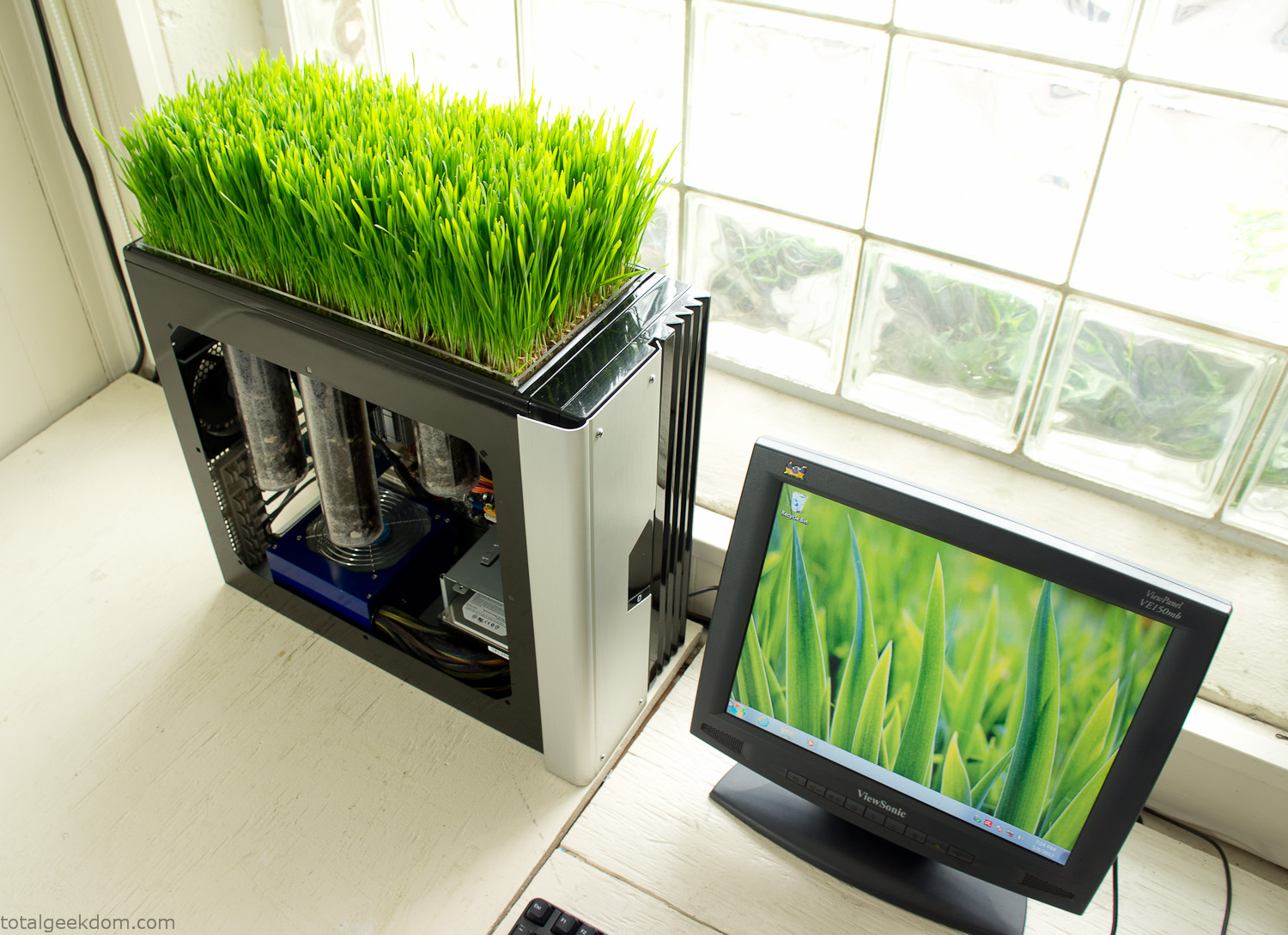
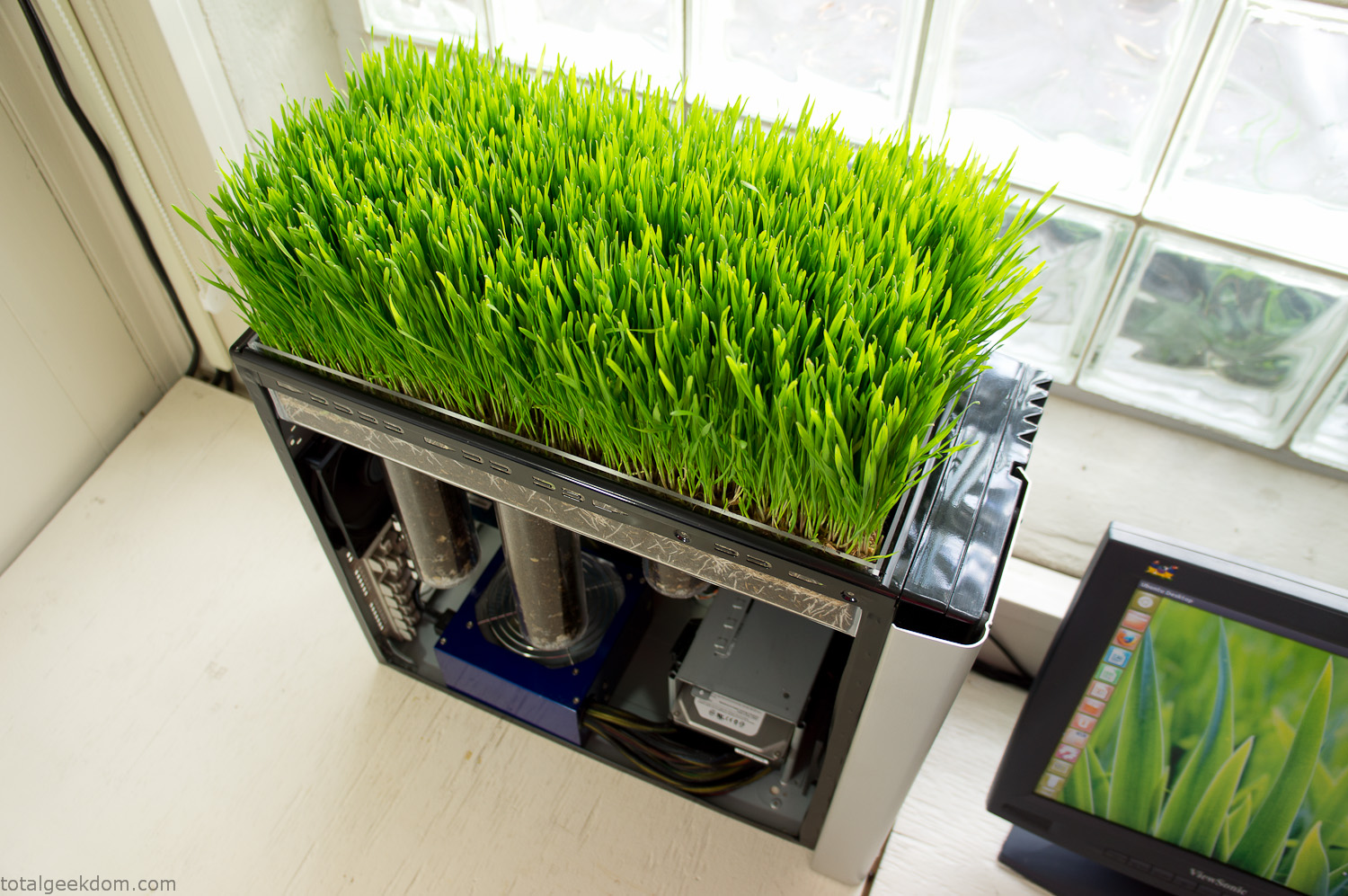
Bio Computer
I’ve been interested in working on a project for while that would combine something tech-based with something organic. Mixing the two elements intrigued me for a while. I’ve wanted to add flowers, or maybe plants of some sort to blend a little bit of nature into the space. I do receive a bit of sunlight through a glass block window, but the temperature in the basement is usually on the colder side. In the winter I don’t really heat the space because the folding farm outputs enough heat to keep the temperature comfortable. I didn’t want to change that aspect so I needed to come up with something that would tolerate slightly cooler temperatures and limited sunlight.
I can’t exactly recall when the idea came to me, but at some point I started wanting to use the heat from a computer as a way to warm the soil and help with germination/growth. I’m about as far from a botanist as it comes, I did some reading online and became pretty interested in the effects of soil temperature on germination/growth. I read different studies and papers from various universities. It was not too long into that process that I became hooked on the idea of using computer heat as a way to control the soil temperature of some sort of living plant life.
As the idea developed further I started looking into wheatgrass as a plant option. There is something clean and natural about the look and idea of a piece of grass growing in my basement. I thought the look would alter the space a little bit and add a bit of color along with something more than just metals and plastics. After reading enough studies and papers on the effects of soil temperature and germination with wheatgrass I felt like I had a good enough handle on the basics to tackle this.
The first step was finding a computer to adapt for the project. Luckily I had a lot of donated computers that people had given me for various project purposes. Most of them didn’t work, but by cobbling together various components from a bunch of different old computers I was able to come up with enough good parts to make a working computer.
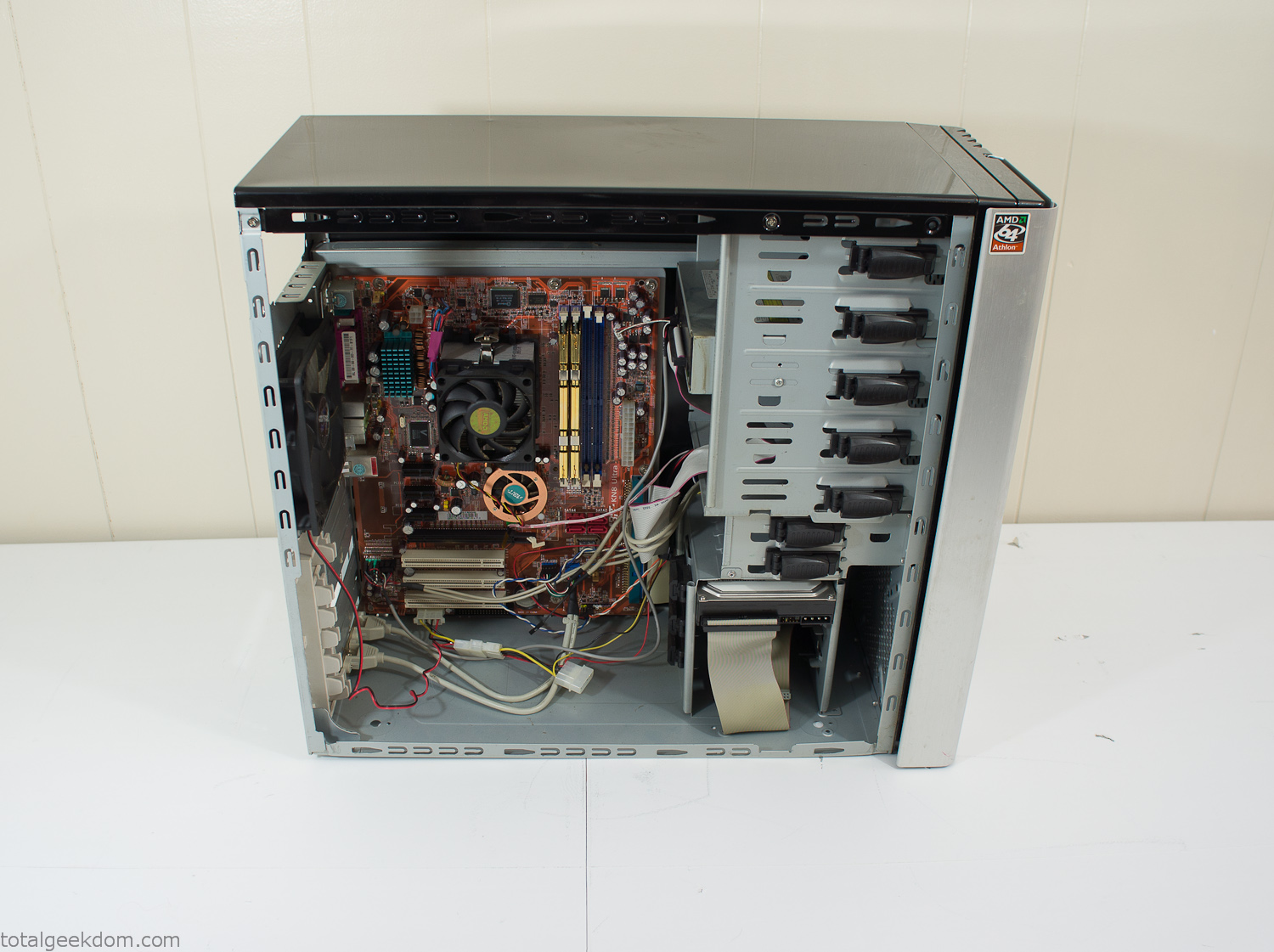
Donor Computer
At the time I was starting to get a formalized plan together for this project, another idea popped into my head. I’ve got a 5 yr. old who is already fairly geeky (just ask him to do his Jabba the Hutt impression for you) but he really does not get that much computer time. He’s getting to an age where he’s more inquisitive about tech stuff and I think he’s ready for his first computer. Since I was already well underway with this project it seemed like a perfect opportunity to orient the computer itself towards a learning tool for him in addition to using it as a way to blend something organic with a piece of technology.
With all of these goals in mind I started tinkering away. The computer hardware itself was nothing fancy, definitely outdated, but perfectly suited towards this project.
CPU- Pentium 4 (3 GHz)
Dell Factory Motherboard
Various Ram Sticks- 2gb
Old Maxtor 120gb IDE Hard Drive
Old FPS Power Supply
Donated Old Computer Case
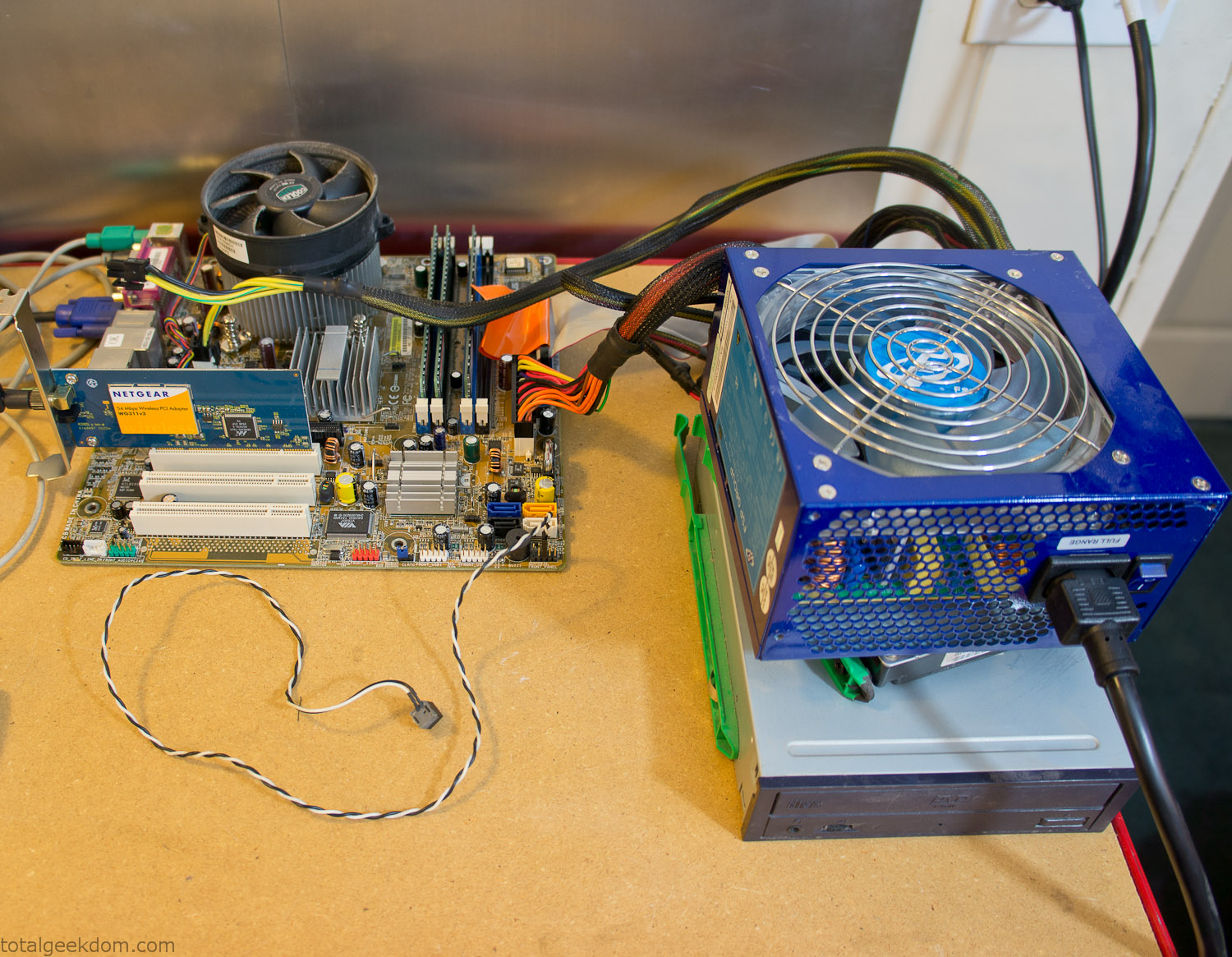
Computer Parts Testing
If you’ve spent any time around computer hardware in the last decade you’re probably well aware that Pentium 4 has a reputation for running hot. The 90nm Pentium 4 was named Prescott and it didn’t take long before the nickname Pres-hot popped up. In this case though that extra heat is going to be put towards good use.
Once the hardware was all in order I started working on the layout and arrangement for the case. I had originally envisioned the grass growing out of the top of the computer case. This seemed like it would provide a good blend between the hard edges of the computer and the soft feel of the grass. This also worked well with putting the soil area in the upper portion of the case, where the most heat should collect. After doing some initial tests with this configuration I found the measured temperature near the top of the case was the hottest. The placement of the CPU near the top of the case and the lack of airflow in that area contributed to these higher recorded temps.
After finishing with some initial tests I decided to completely strip the case down and start removing all the unnecessary brackets and pieces inside of the case. Like most computer cases all the internal brackets and mounts are riveted together, so I drilled all the rivets out of the components I wanted to remove and pulled them out. The gutted case looked pretty barren after being stripped.
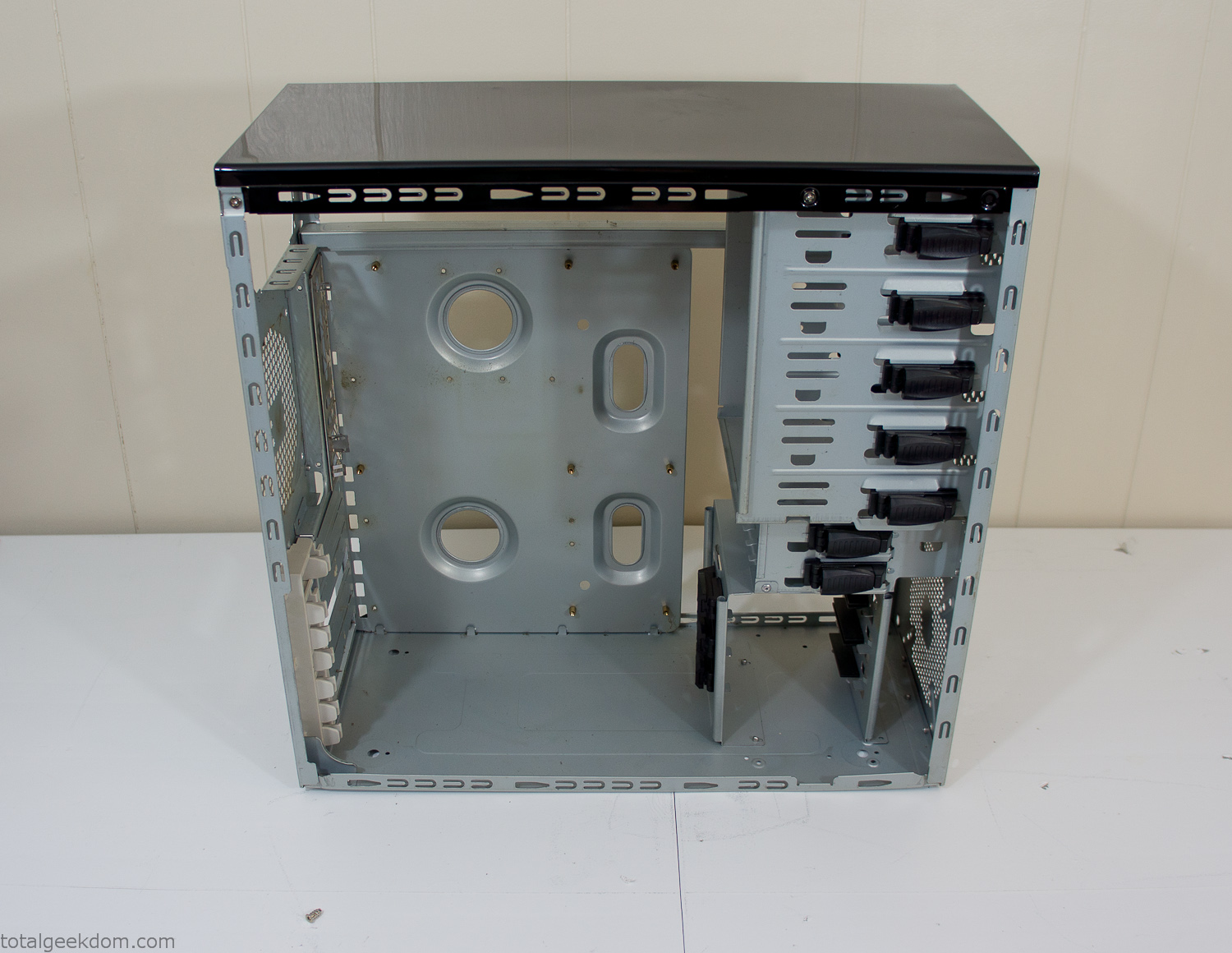
Empty Computer Case
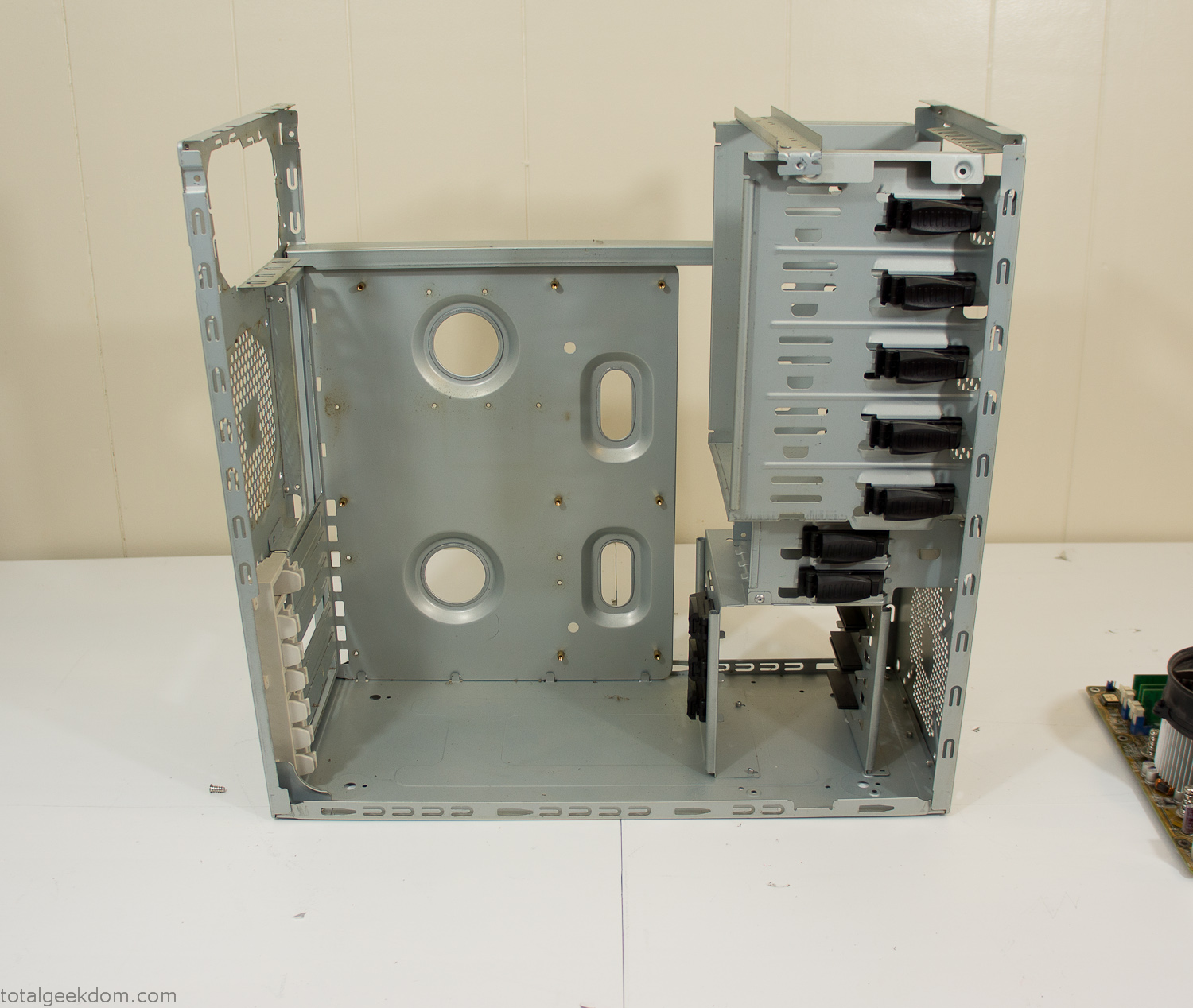
Dismantled Computer Case

Stripped Computer Case
In keeping with my original plan of having the computer blended with the organic grass I wanted it to be easy to see the inner workings of the computer and also the soil from the grass growing above. I needed something that was translucent, which left me with either glass or acrylic/polycarbonate as my options. I ended up choosing acrylic because I was able to find a cheap, used, die-cast model car display case top that was the perfect dimensions for the top of the case. Couldn’t go wrong for 5 bucks.
I test-fit the acrylic over the top of the computer case and marked my layout on the top of the case. My plan was to cut open the top of the computer case and insert the acrylic display case into the section I cut out. To cut open the top of the computer case I drilled a hole as a starting point and then used tin snips to cut through the thin gauge metal.
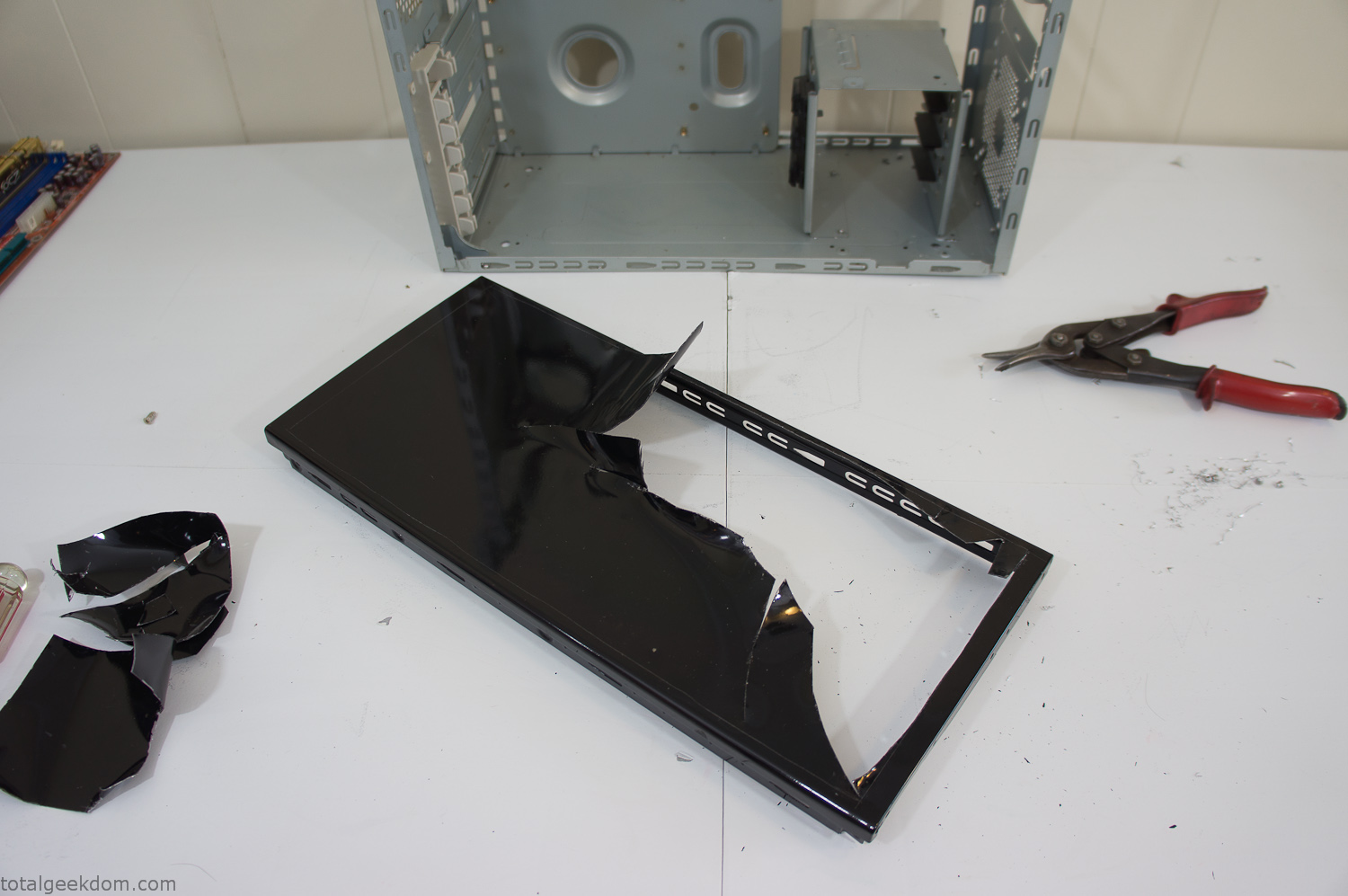
Computer Case Lid Modding
Once I had the metal opening cutout, I needed something to put along the edges of the freshly cut opening to create a clean and finished look. For $2 I was able to find some black, car-door-edge, plastic molding that worked perfectly.
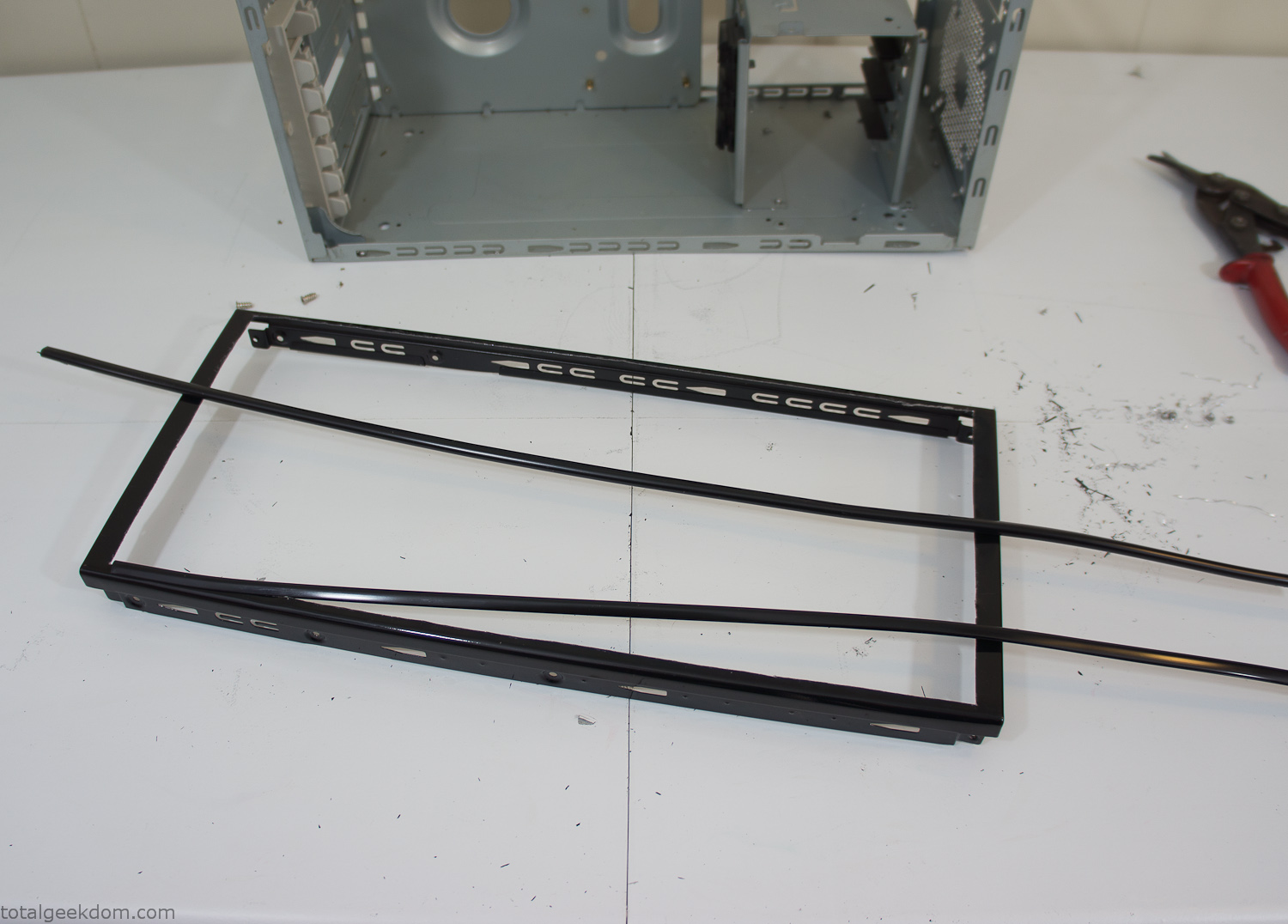
Modified Computer Case Lid
After getting the opening of the top of the computer handled and the acrylic case properly fitted, I moved onto some more testing with soil in the acrylic and the computer running. I wanted to see what kind of heat transfer I would get and how it would affect the soil temperature. I knew that using acrylic over glass would make it a little more difficult to heat the soil as acrylic is not that good at transferring heat. Luckily though I didn’t really need to alter the soil temperature that much, I just needed a little extra heat. Testing showed that heat transfer with just the single acrylic display case as my soil container was slow. So I decided to add some acrylic tubes. This would allow more surface are for soil to acrylic contact and also give me an area where I could add a mixed substrate to allow for soil drainage.
I went online and found a 3ft long section of 2 1/4″ clear acrylic tubing for $8 dollars. I wanted to add a couple of hanging cylinders off the main of the acrylic display case in the top of the computer case. To do this I needed to cut holes into the bottom of the display case. Cutting holes in acrylic is not always easy, it’s likely to chip and craze at the edges. To get around this I used a buildup of masking tape on both sides of the acrylic, to provide a little bit of resistance and strength. I placed the acrylic display case back into the computer and marked my layout for the tubes. I needed to leave clearance for the CPU cooler, power supply and hard drive mount.
After marking the layout, I used an air-powered pencil grinder and carbide tipped bit and cut through the acrylic case along my marked lines. After the initial shape was cutout I used a tube piece as a template and slowly worked on grinding the holes as perfectly round as I could get them so that the tube had a snug fit all the way around. The fit is pretty important as the acrylic cement that I used needs there to be a tight fit so that the acrylic can bond correctly.
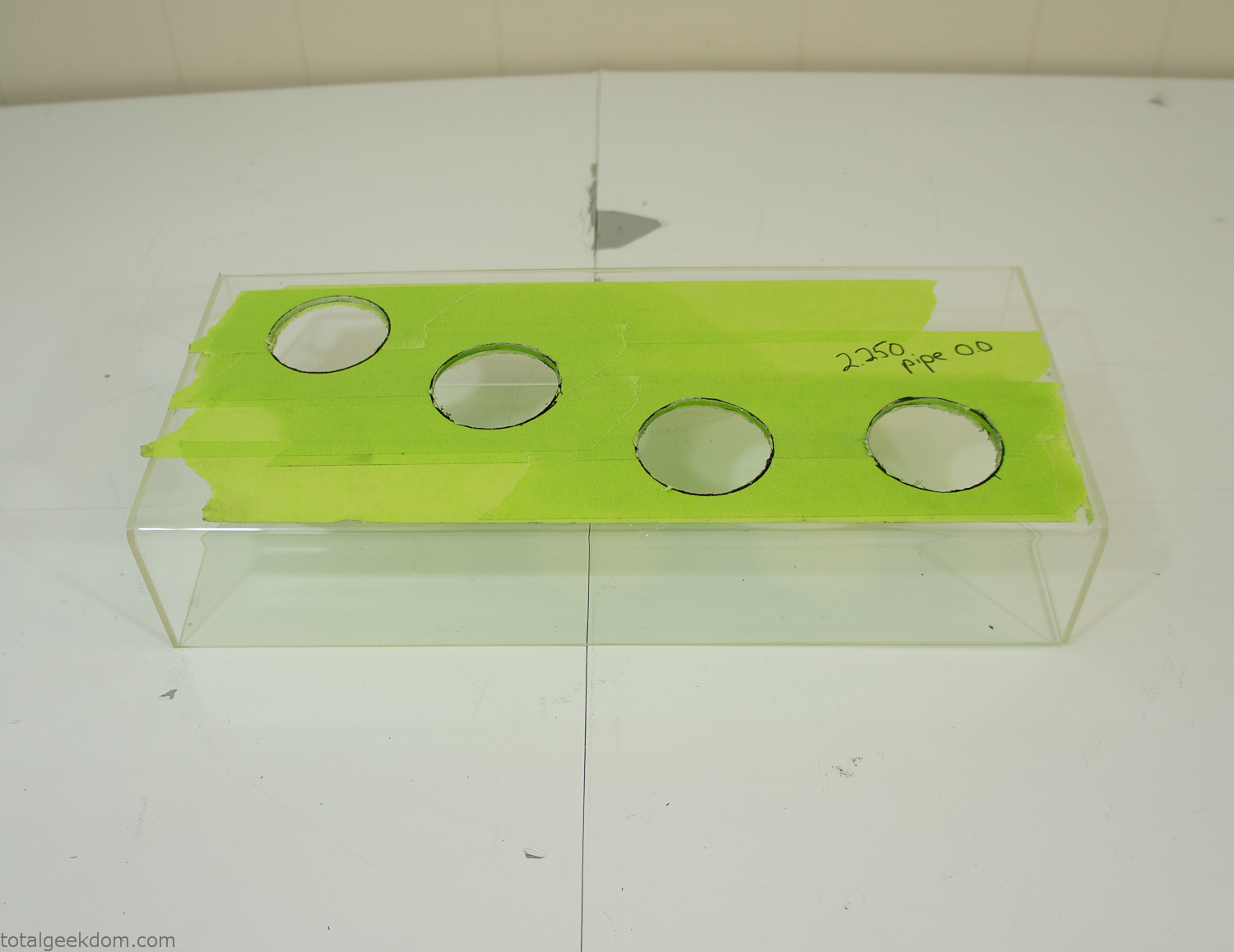
Acrylic Case Modifications
I placed the tubes into the acrylic case and mounted it in the computer and test fit the placement and height of the tubes. After getting everything lined up and oriented correctly I moved towards bonding the acrylic together. Using a needle dropper applicator I applied the cement to all the joints. After letting it set overnight I came back the next night and applied a thin coating of clear silicone caulk around all the joints just to ensure they were completely water tight
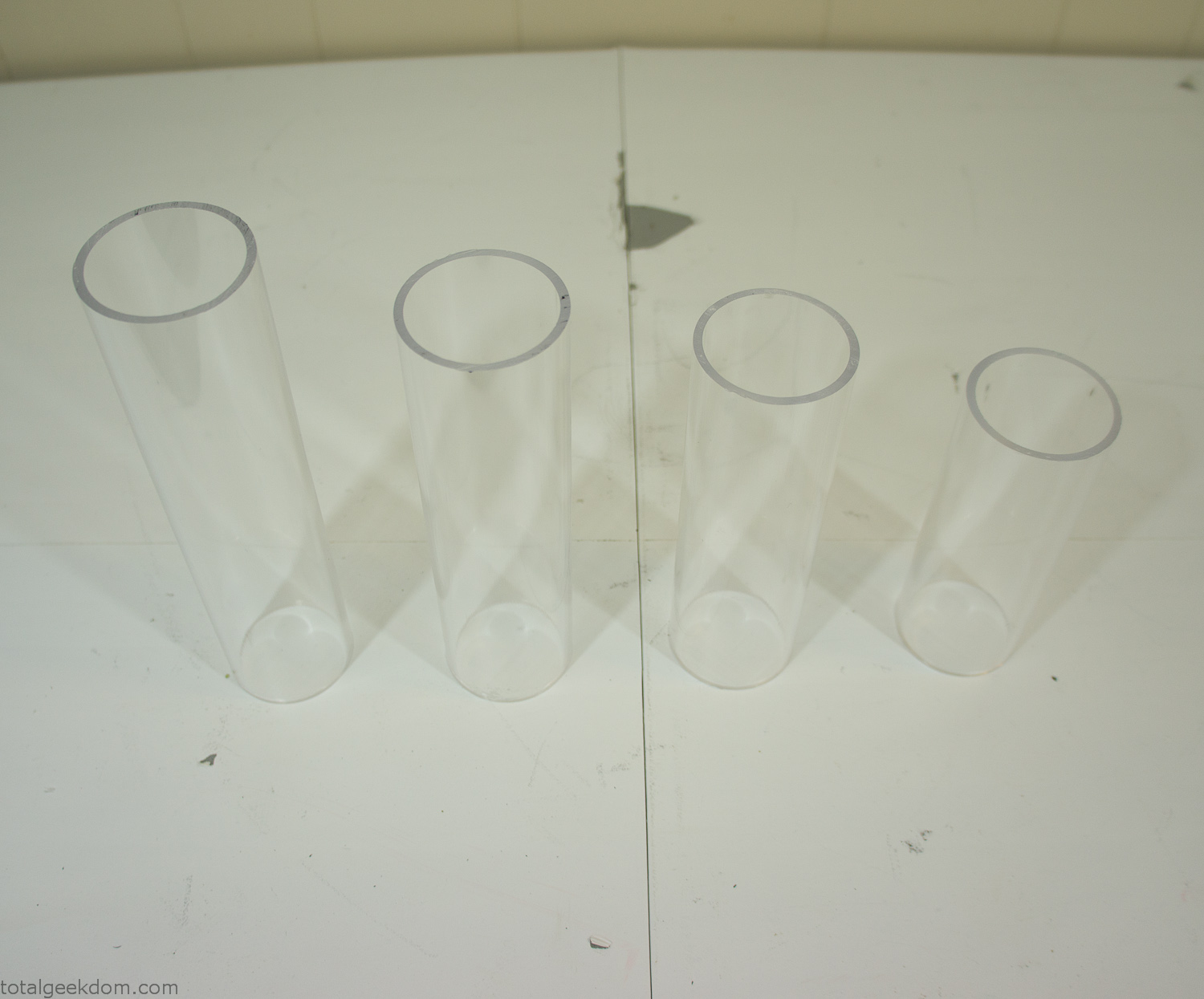
Acrylic Tubes
The next step was sealing up the bottom of the acrylic tubes. I looked at a couple of different options before realizing that the discs I had cut out of the acrylic case to fit the tubes would be almost the perfect size. Using a bench grinder and a test piece of tube I slowly ground each disc to the perfect size for a tight fit all the way around. I placed the clear acrylic discs into the bottom of each tube and repeated the same cementing and silicone caulking procedure to ensure they were water-tight. After a couple of days’ worth of drying I tested the case by filling it with water overnight and checking in the morning to make sure that no leaks had popped up.
In order to hold the weight of the acrylic case after adding soil, I drilled and installed a machine screw with a rubber cap at each corner of the computer case to bear the weight of the acrylic case.
Once all the work was done with the acrylic case section I started reinstalling all the components. The motherboard, hard drive and power supply were added and then wired up.
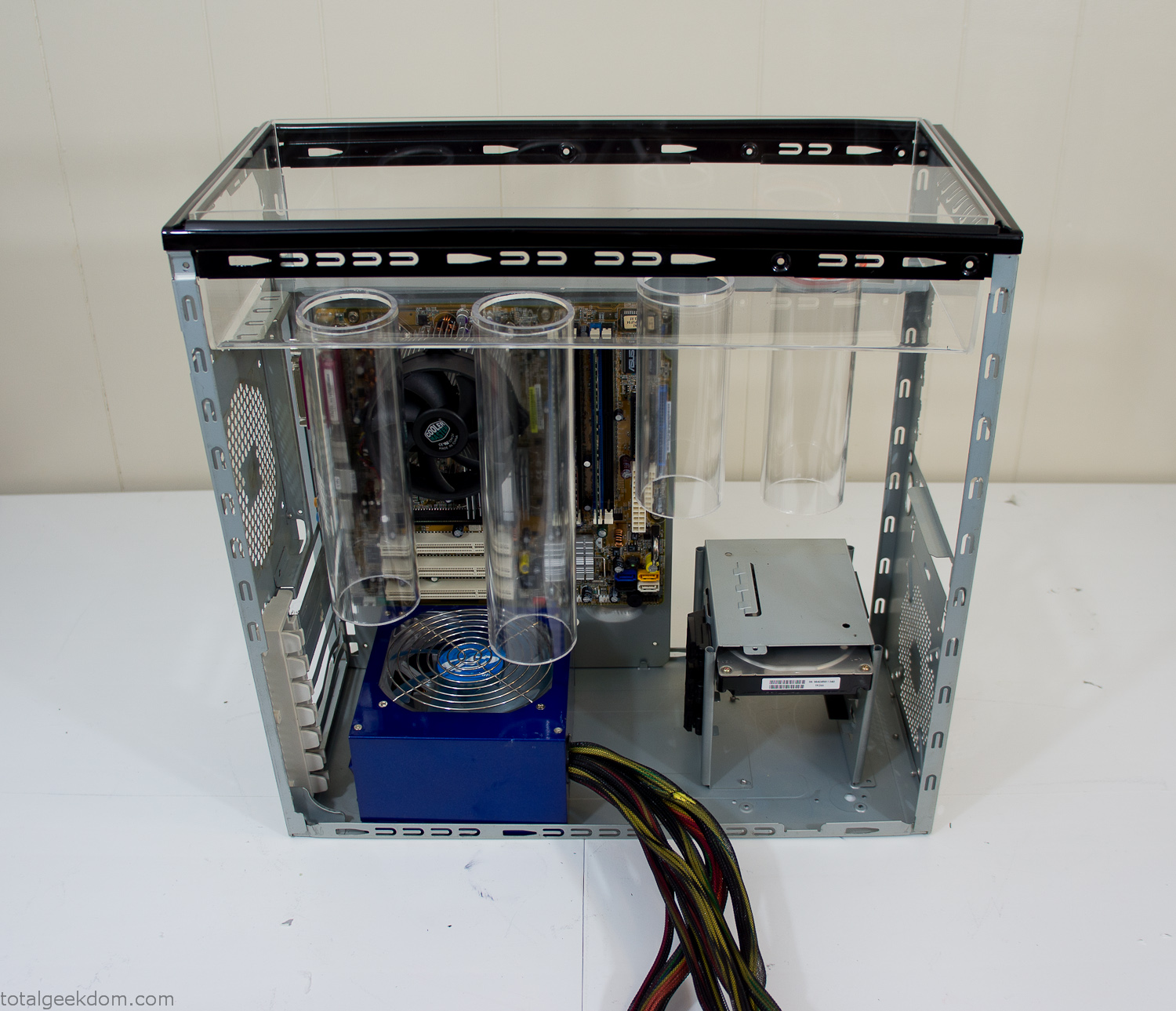
Mocked Up Computer Case
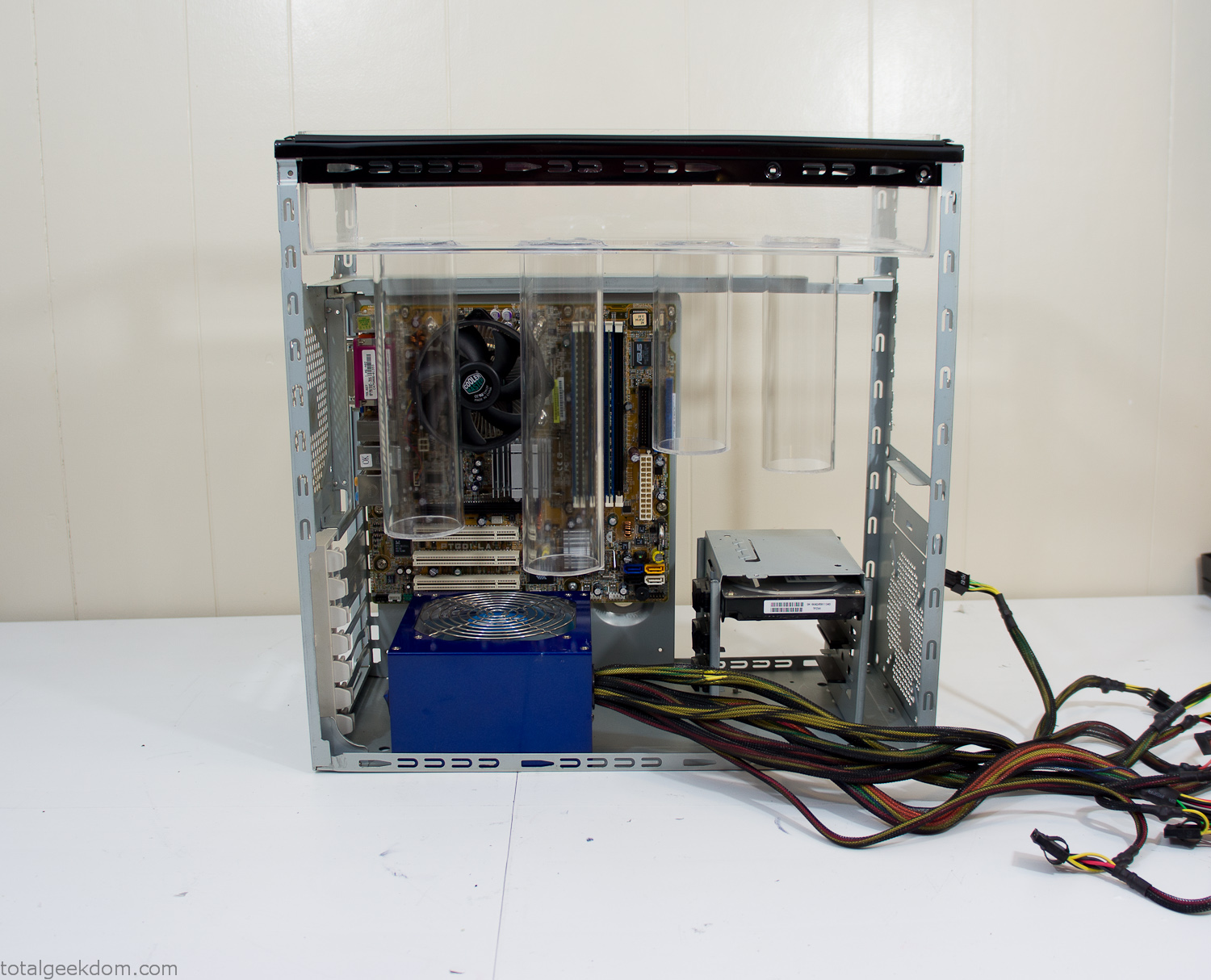
Power Supply Mockup
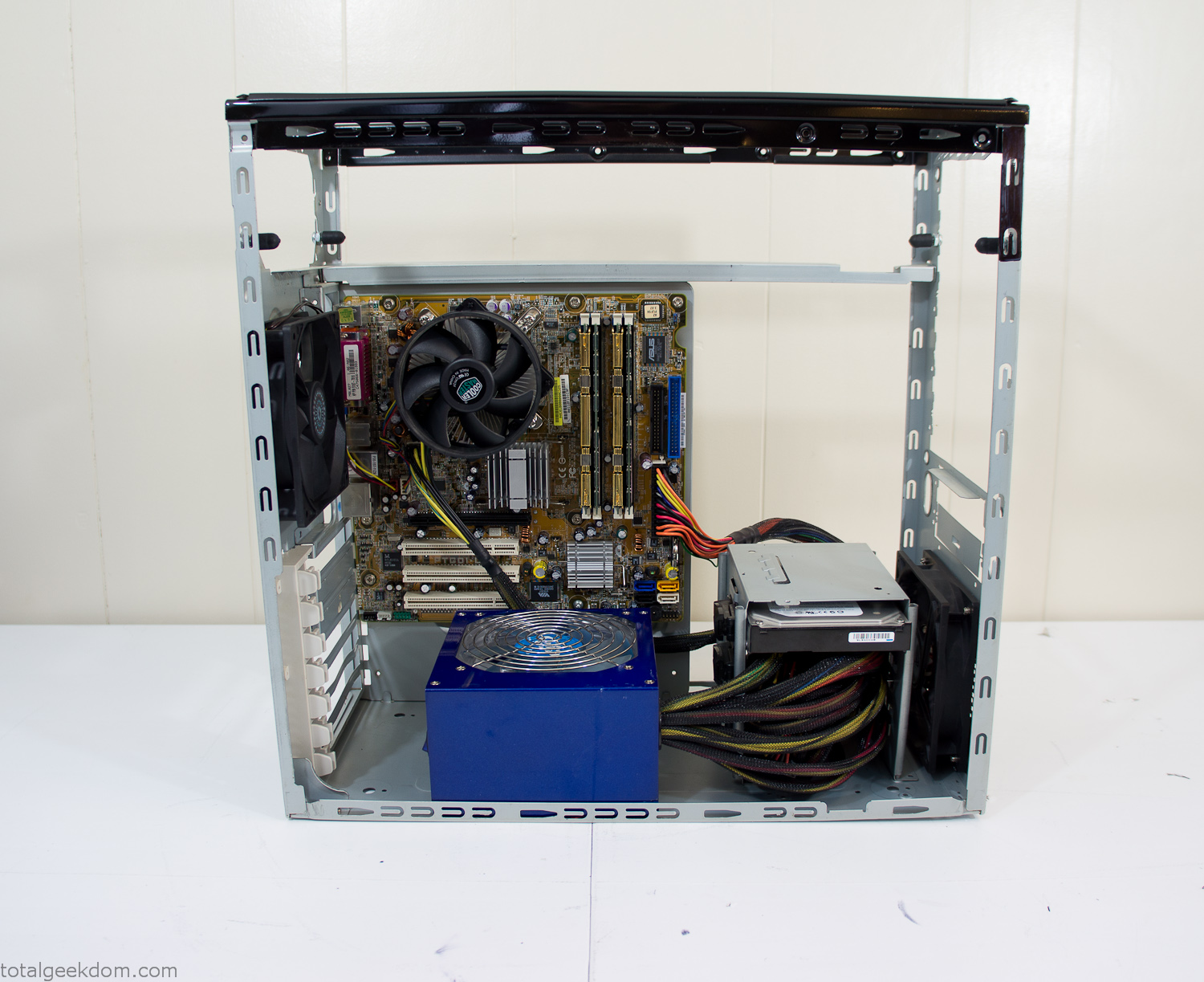
Computer Components Wired
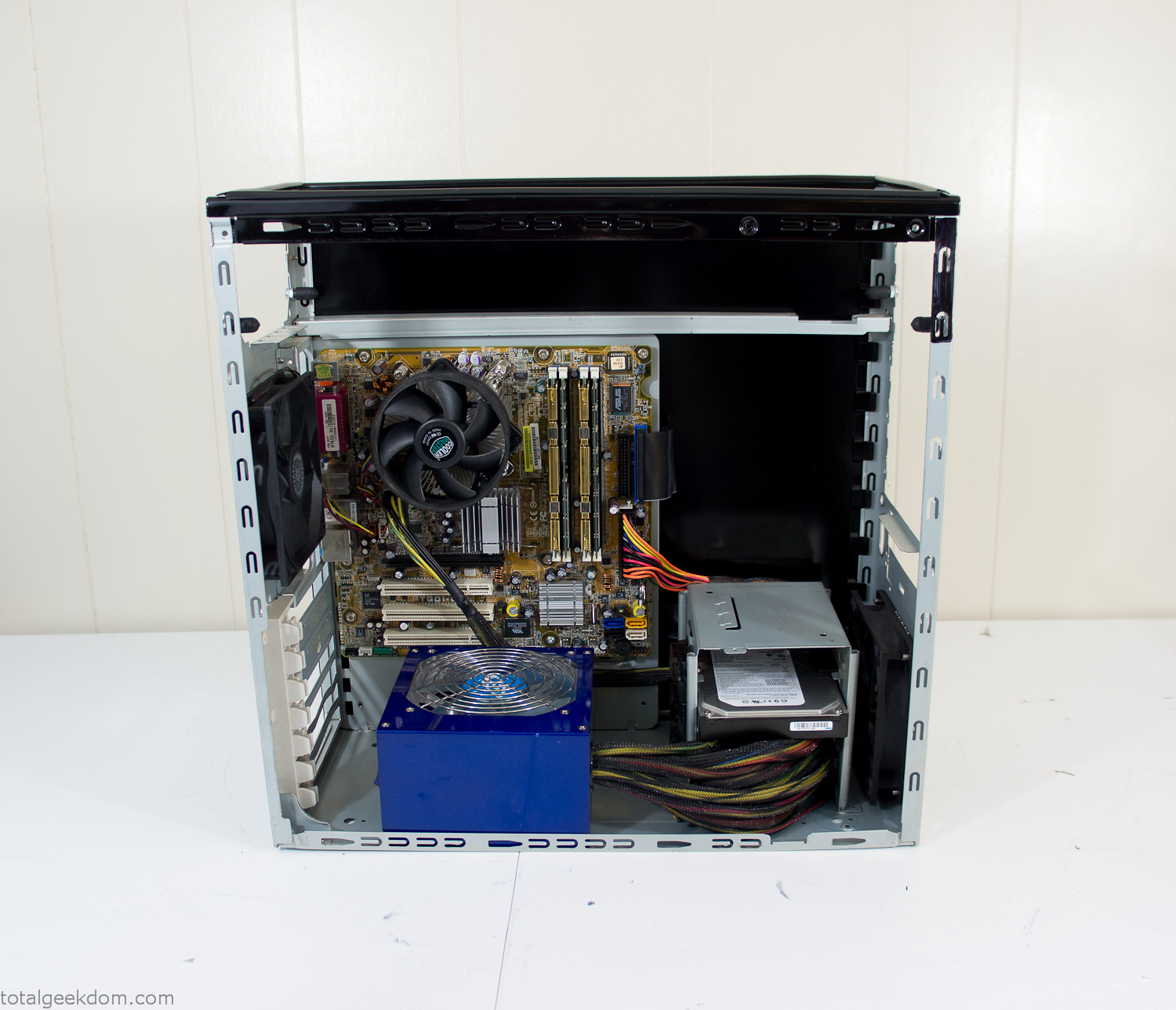
Case Panel Installed
At this point all that was left was to make a clear panel for the side of the case. I had some left over acrylic sheets from a different project that were really close to the right size, after test fitting, marking and cutting I then had a clear side panel to see into the case. (I left this off for the pictures because it caused a reflection)
The final step was filling the case with soil and adding some wheatgrass. I had been test growing other samples of wheatgrass during the build process. So I had already a couple of different patches of grass growing. I tried to keep the soil level just below the top of the acrylic case edge to make it a little more seamless.
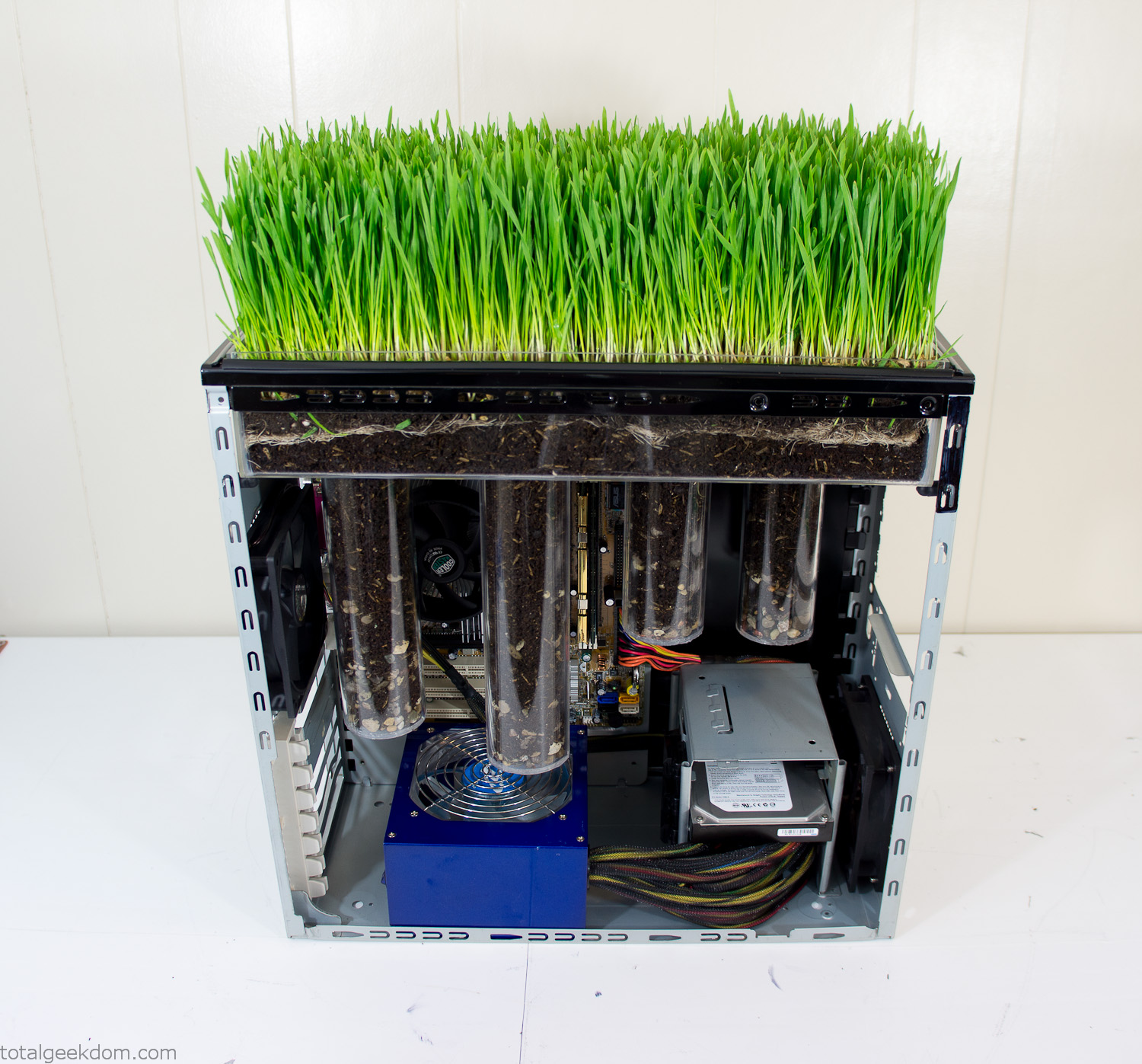
Grass Planted in Computer
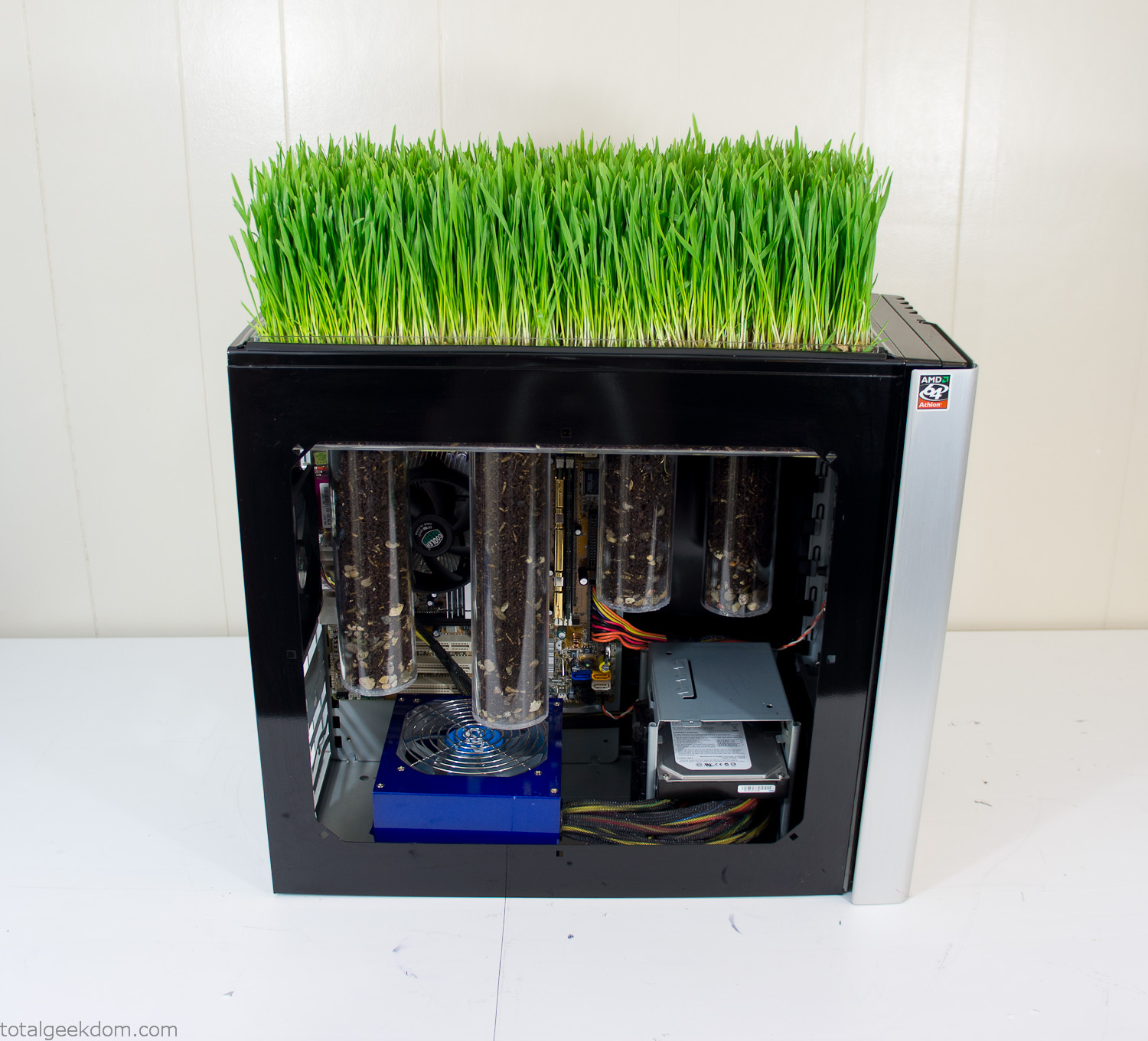
Grass and Case Panel Installed

Grass in Computer
For the computer itself I ended up installing Windows as well as Linux in a dual boot setup. Since the computer was going to be used by my son as something to play with I figured I should put both on there so he can tinker with them and learn as he goes. Besides, for important life decisions like picking an OS (Operating System) I think any good parent should present the options and then let their kid decide for themselves.
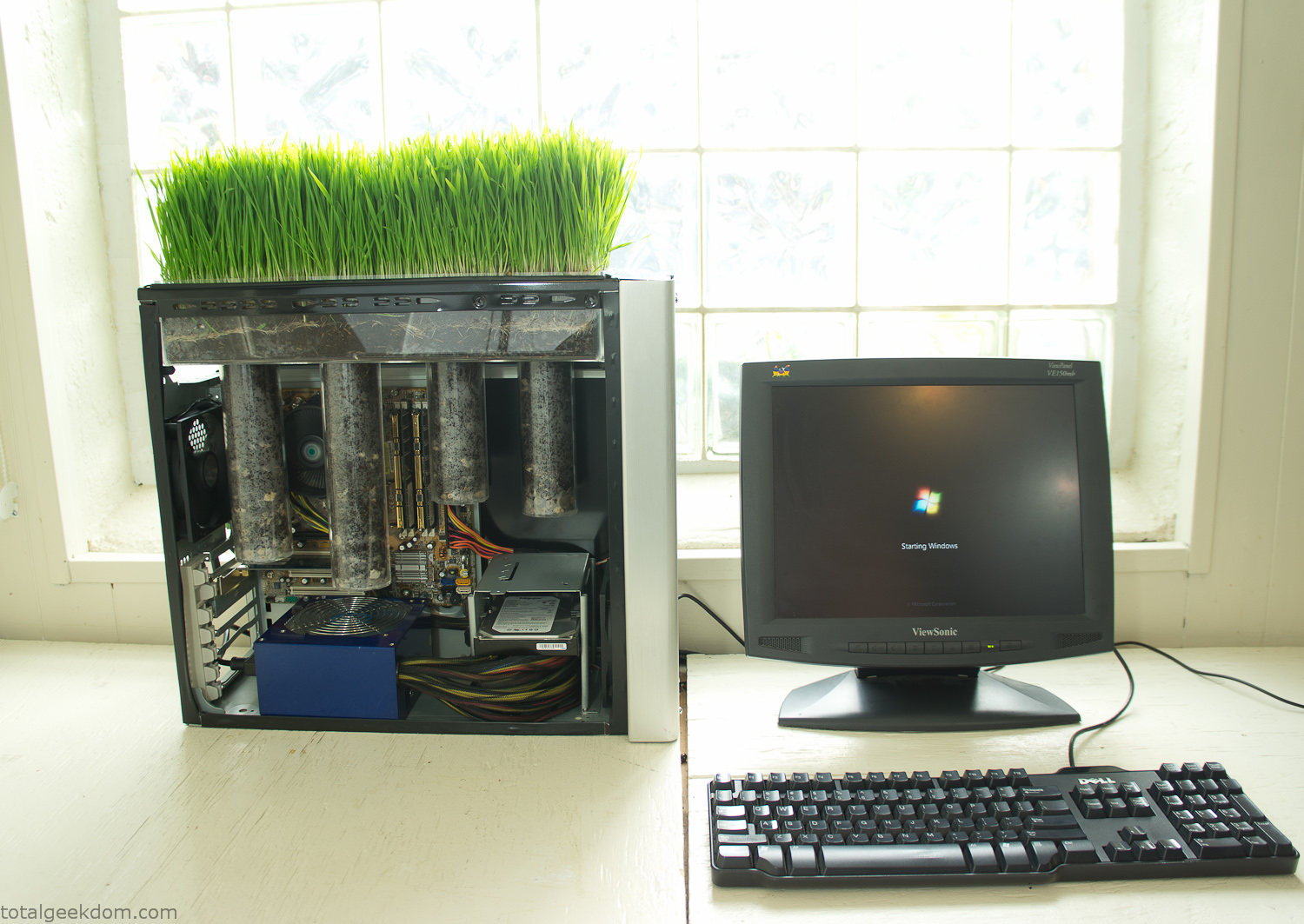
Starting Windows
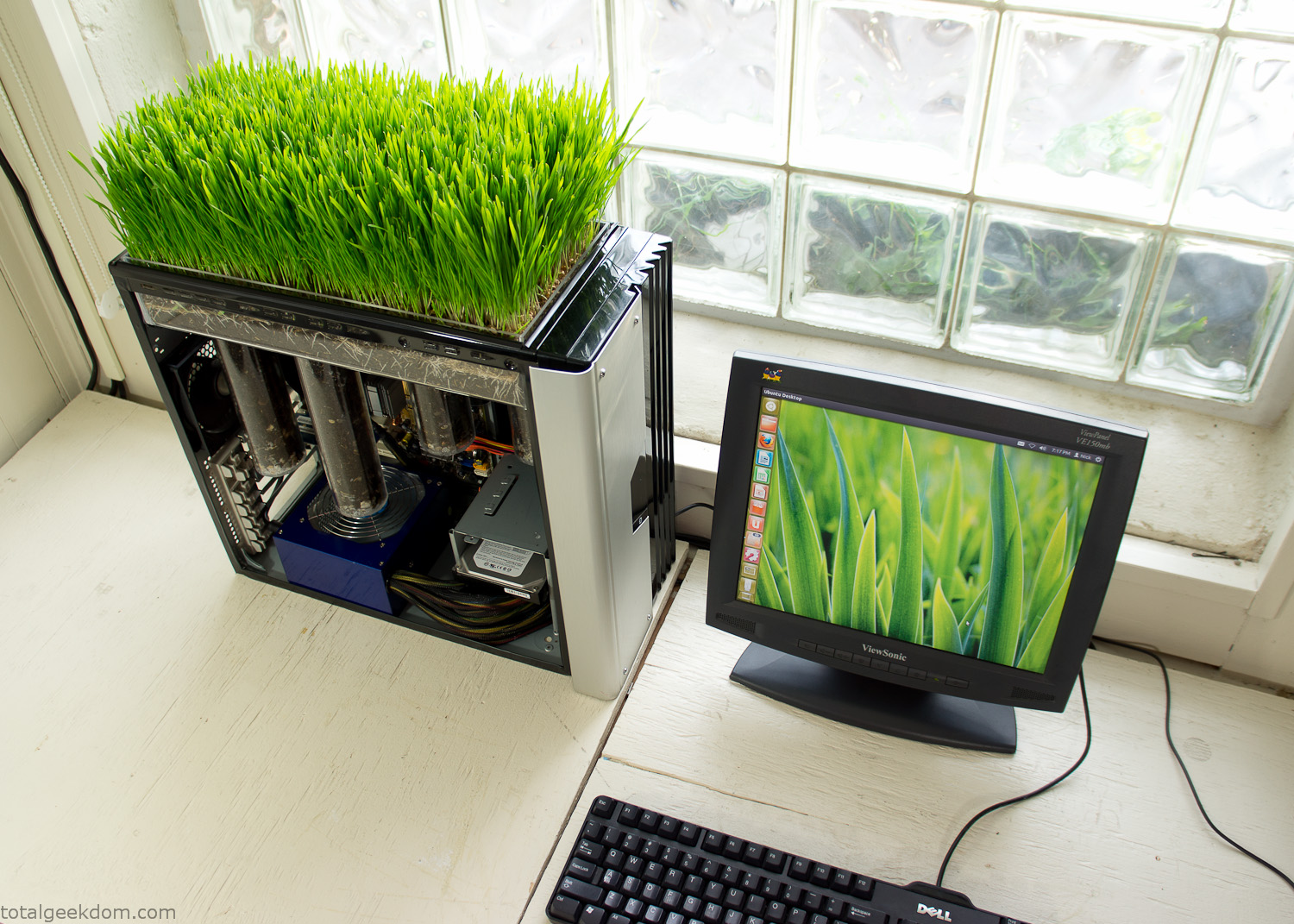
Linux Running
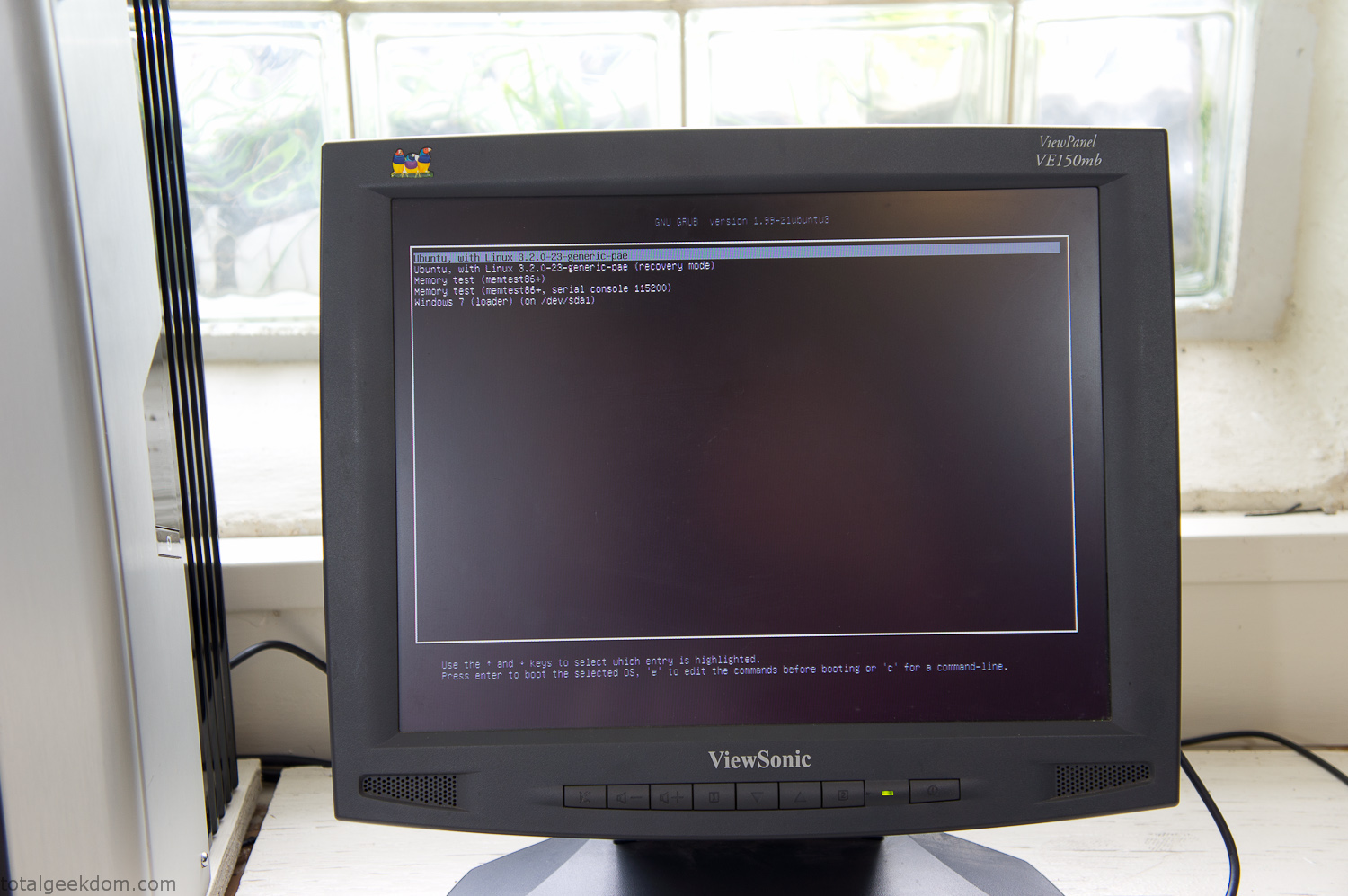
Dual Boot Screen
In the end I’m happy with the result of the project. It’s been fun experimenting with growing wheatgrass and I like how the natural look of grass is blended with the very modern, inorganic case.
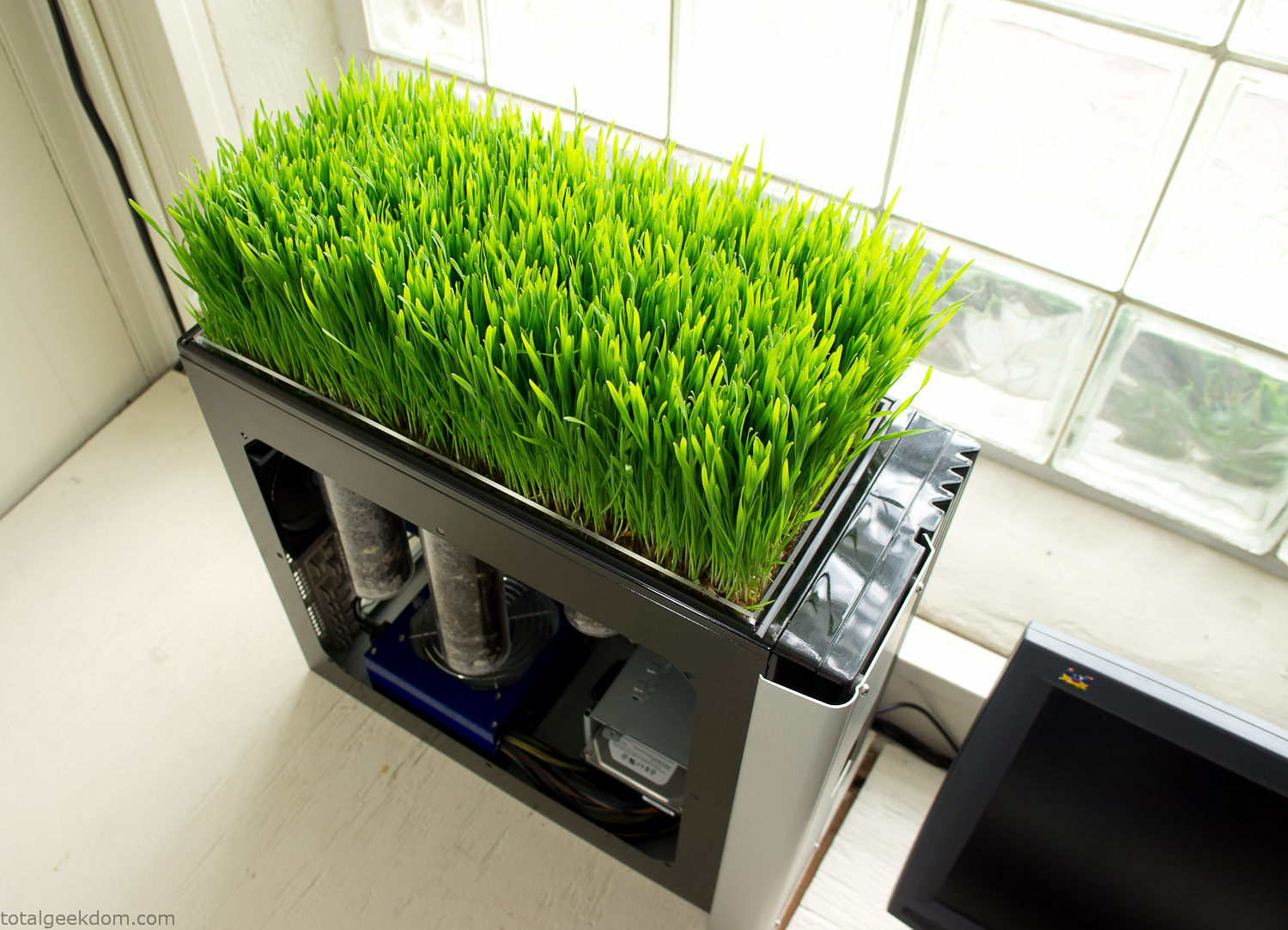
Computer Grass Growing
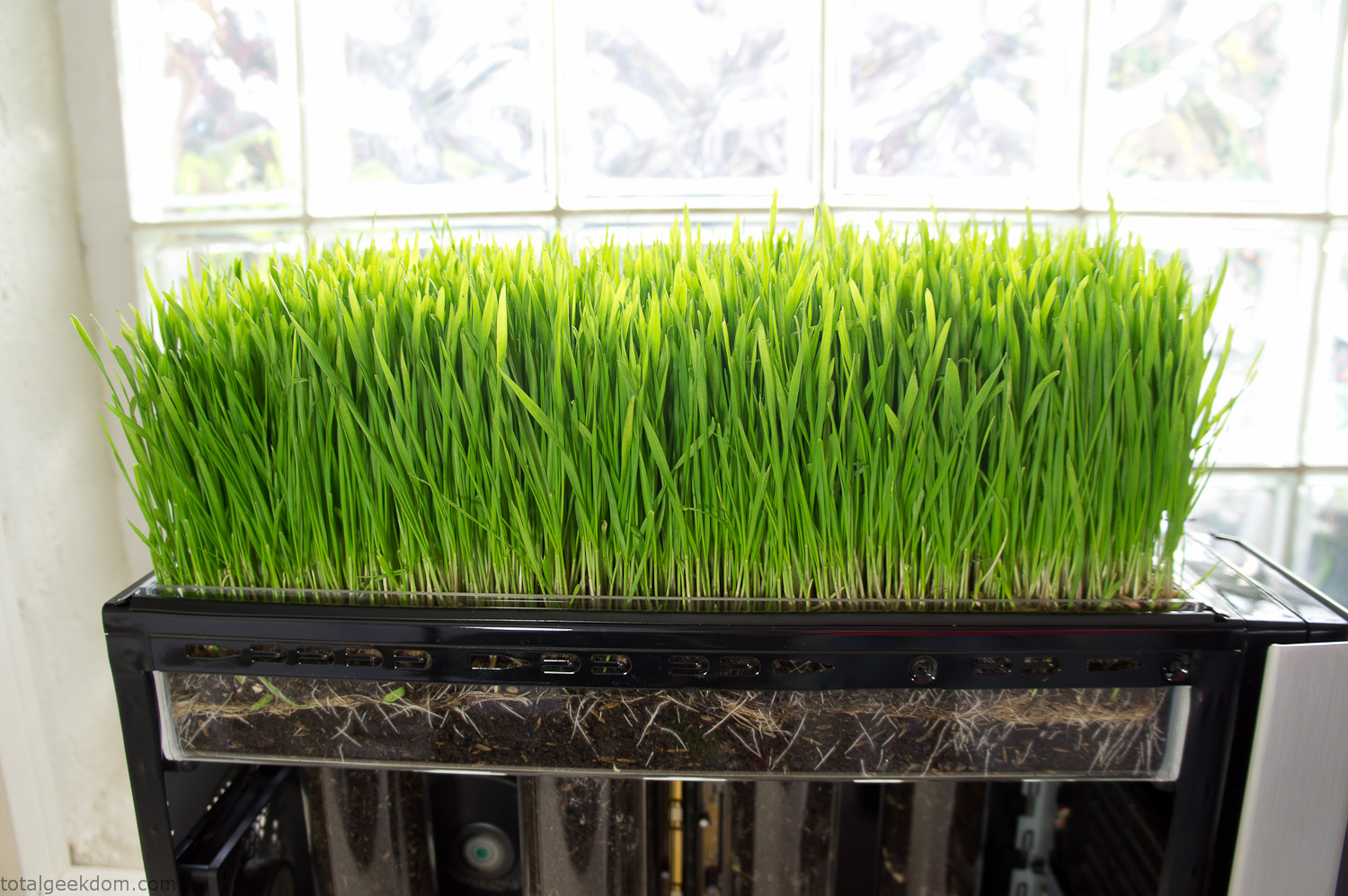
Grass in Computer Section
Notes
Temperature Testing
In testing the case temperature versus the soil temperature I found it was easiest to control the case temperature by using a variable fan speed control on both the inlet and outlet fans. By turning the fan speed down I could increase the temperature inside the case and correspondingly raise the soil temperature.
In order to maximize output of heat during these tests I used Prime95 to run the CPU at 100% load.
Using this method to control the case and soil temperature I played around with adjusting the soil temperature and then tracking the rate of growth of the Wheatgrass. The target temperature for peak growth seemed to fall around 66°F (19°C).
Using the fans to control the case temperature allowed me to vary the temperature inside the case from a low of 75°F (24°C) to a high of 91°F (33°C). In order to achieve the desired increase in soil temperature, I had to run the case temperature toward the higher end of the scale.
When the soil temperature was too high, the growth of the wheatgrass would slow.
Wheatgrass
The wheatgrass I used for my tests was nothing special, it can be found as seeds (berries) in a lot of health food stores and it grows relatively easily.
Caring for the wheatgrass is just a matter of keeping it watered. It’s a pretty easy plant to work with and doesn’t require any special skills.
Wheatgrass is often used as a nutritional supplement; it can be juiced and mixed into smoothies and other beverages. I plan on harvesting some of the grass and making some juices.
Plant Options
While wheatgrass offers a nice, attractive and easily grown option I do plan on trying other plants as well in the future. Since I already have the “planter” built all I have to do is add a different plant and see how it goes. I’m sure there will be some plants that don’t like the lower light environment, but it will be fun experimenting with other plants as well and seeing how they take.
Materials
Donated Computer- Free
Clear Acrylic Display Case- $5
Clear Acrylic Tube- $5
Plexiglass Side Panel- Free
Total- $10
Bio Computer Running
 29.2k
29.2k
 13.2k
13.2k 7.1k
7.1k

 2.1k
2.1k 813
813 2.6k
2.6k
Comments 52,956
how to buy cheap endep tablets
It’s hard to come by well-informed people for this subject, however,
you sound like you know what you’re talking about!
Thanks
Drugs information. Brand names.
seroquel constipation
Some information about medicine. Get information now.
Посетите сайт РемонтКли https://remontkli.ru/ и вы найдете профессиональный ремонт квартир и отделка помещений в Москве. Мы предлагаем комплексный ремонт квартир под ключ с гарантией качества от профессионалов. Точные сроки, только опытные мастера, фиксированные цены. Узнайте подробнее на сайте обо всех наших услугах и стоимость работ. Также на сайте вы сможете осуществить расчет стоимости ремонта.
doxycycline 40 mg generic cost
Medication information leaflet. Cautions.
buy cheap colchicine pill
Some news about pills. Get information now.
Drugs information. Generic Name.
keflex cost per pill
All about drug. Get now.
На сайте https://krsfoto.ru/ ознакомьтесь с тем, какие фотографии вы сможете заказать в мастерской, а также каких размеров. Также указаны и расценки. Снимки будут изготовлены максимально оперативно, качественно, с участием профессиональной техники. Получится сделать фото на визу, паспорт, визу Шенген. Можно сделать фото на охотничий билет, на личное дело. Как правило, на изготовление уходят не более 10 минут. Специалисты, которые работают в этой компании, создают такие фотографии, которые отвечают требованиям.
Cleocin 2% vaginal cream
Drug information for patients. Brand names.
cost cheap cephalexin without insurance
Some news about drugs. Get information here.
рефераты на заказ купить реферат срочно
На сайте https://selyatino.santex-uslugi.ru/ оставьте заявку для того, чтобы заказать такую полезную услугу, как установка водоснабжения, а также систем отопления. Такая услуга является крайне востребованной для того, чтобы с комфортом проживать в частном доме или коттедже круглый год. Если система качественно спроектирована, то это позволит получить оптимальную температуру внутри помещения. Компания гарантирует особый подход, практичность, а также детальное исполнение проекта. Сотрудники отличаются всеми необходимыми знаниями, опытом.
Medicines information. Brand names.
order coumadin prices
All information about drugs. Read now.
Посетите сайт Digital-агентство полного цикла Bewave https://bewave.ru/ и вы найдете профессиональные услуги по созданию, продвижению и поддержки интернет сайтов и мобильных приложений. Наши кейсы вас впечатлят, от простых задач до самых сложных решений. Ознакомьтесь подробнее на сайте.
отчет по судебной практике https://gotov-otchet.ru
Drugs information for patients. Effects of Drug Abuse.
clomid prices in south africa
Some what you want to know about medicines. Get now.
get maxalt pills
сушенные лакомства Лакомства для дрессировки: Поощрение и мотивация Сушеные лакомства идеально подходят для использования в качестве поощрения во время дрессировки. Они мотивируют собаку к выполнению команд и помогают закрепить полученные навыки.
лазерная эпиляция глубокое бикини лазерная эпиляция
На сайте https://oknaksa.ru/ закажите расчет технического задания, чтобы узнать, во сколько вам обойдется остекление. Для предприятий действуют особые привлекательные условия. На все окна, а также монтажные работы предоставляются гарантии – 20 лет. Обслуживание является бесплатным. Каждый клиент сможет рассчитывать на профессиональную, исчерпывающую консультацию. На ваш выбор огромное количество интересных готовых проектов, почитайте положительные отзывы. Предприятие разрабатывает окна самых разных форм, конфигураций, размеров.
sex
Drug information sheet. Effects of Drug Abuse.
cost of cheap cephalexin no prescription
All trends of medicament. Get information now.
типографии спб недорого типография официальный сайт
На сайте https://yesgloball.ru/ почитайте качественную, исчерпывающую информацию о популярной компании «YES GLOBAL», которая теперь присутствует и в России. Каждый клиент сможет надеяться на качественный, надежный, практичный товар, который разработан специально для улучшения здоровья. Все препараты созданы из отборных компонентов, которые не вызывают побочных эффектов. Предлагается качественное обучение, которое станет эффективным маркетинговым инструментом. Продукция отвечает самым высоким требованиям.
Эта платформа размещает актуальные инфосообщения со всего мира.
Здесь представлены новости о политике, бизнесе и многом другом.
Информация обновляется в режиме реального времени, что позволяет держать руку на пульсе.
Минималистичный дизайн делает использование комфортным.
https://e-copies.ru
Каждое сообщение написаны грамотно.
Редакция придерживается честной подачи.
Оставайтесь с нами, чтобы быть в курсе самых главных событий.
where can i get accutane for sale
Meds prescribing information. Long-Term Effects.
coste de flibanserina precio barato
All news about drugs. Get here.
типография сайт спб https://printrzn.ru
Pills information for patients. Brand names.
order cheap trazodone no prescription
All news about medicine. Read now.
I am genuinely pleased to glance at this website posts which
carries lots of useful information, thanks for providing
these information.
Medicament information sheet. Long-Term Effects.
can you buy celebrex without a prescription
Actual about medicines. Get information now.
типография санкт петербург типография быстро
На сайте https://russkiedali.ru/ ознакомьтесь с самыми популярными, интересными местами, которые находятся в Московской области. Изучите все исторические усадьбы, а также замки, которые есть в области. А если желаете больше узнать о своей родине, то погрузитесь в культуру и ознакомьтесь с театрами, музеями, фестивалями. А в местных ресторанах вы попробуете изысканные блюда. Изучите топ самых лучших ресторанов, в которых находятся самые вкусные и ароматные угощения. Устройте незабываемое путешествие по паркам, заповедникам, которые находятся в Московской области.
На сайте https://parkmotors.ru/ изучите весь ассортимент товаров, которые вы сможете приобрести прямо сейчас. Популярная компания реализует непосредственно со склада самые разные комплектующие на Газель и аналогичную грузовую технику. Всегда в наличии шины, которые представлены иностранными, отечественными производителями. Особенно востребованы двигатели, а также блок цилиндров. Есть возможность приобрести сцепление от турецких, немецких заводов-изготовителей. Также можно купить и электрический стеклоподъемник на Газель.
kraken онлайн
Meds information. What side effects can this medication cause?
buying cheap robaxin no prescription
Some trends of medication. Get now.
Medication information. Short-Term Effects.
can i get generic clomid prices
Actual news about drugs. Read now.
can i buy motilium without prescription
накрутка пф яндекс Накрутка ПФ: иллюзия контроля Накрутка ПФ создает иллюзию контроля над поисковой выдачей. Но это лишь временный эффект. Рано или поздно обман будет раскрыт, и сайт потеряет свои позиции. Гораздо разумнее сосредоточиться на создании качественного продукта, который будет интересен реальным пользователям.
Drugs information leaflet. Effects of Drug Abuse.
get generic clomid pills
Actual information about pills. Get here.
купить металлическую черепицу Профнастил С8: Экономичное и надежное решение для кровли и ограждений Ищете оптимальное сочетание цены и качества? Профнастил С8 – это легкий, прочный и долговечный материал, который идеально подходит для кровли, облицовки стен и строительства заборов. Его гофрированная поверхность обеспечивает дополнительную жесткость и устойчивость к нагрузкам, а широкая цветовая гамма позволяет подобрать идеальный оттенок для вашего дома.
does ashwagandha interfere with antidepressants
Medicine information. Effects of Drug Abuse.
cost of generic clomid for sale
All news about drug. Read information here.
sex
печать спб типография печать спб типография
На сайте https://pesokug.ru/ закажите качественный песок на выгодных условиях, по привлекательной стоимости. Предприятие ООО “Геотрейд” в течение долгого времени продает песок со своего карьера. Оно специализируется на добыче, обработке, продаже сеяного, природного песка. Выгодным моментом является то, что сотрудничество происходит напрямую, минуя посредников. К важным преимуществам покупки именно на этом предприятии является то, что товар является сертифицированным, соответствует ГОСТу. Используется высокотехнологичное оборудование.
служба по контракту оренбург Оренбург ждет своих героев: Если вы готовы к службе по контракту и хотите связать свою жизнь с армией, Оренбургская область ждет вас!
Medicine prescribing information. Cautions.
desyrel 100mg tablets pil
Actual what you want to know about medication. Get here.
лазерная резка на металле резка лазером по металлу
Ищете изготовление металлоконструкций и изделий в Иркутске? Посетите https://azmk38.ru/ – мы работаем с конструкциями любой сложности! Ознакомьтесь на сайте с нашими услугами: производство металлоконструкций, проектирование и разработка КМД, сварочные работы, плазменная и лазерная резка, гибка металла и многое другое. У нас выгодные цены! Подробнее на сайте.
На сайте https://prometall.shop/ вы сможете выбрать и приобрести чугунные печи от надежного и проверенного завода «ПроМеталл». Есть возможность воспользоваться полным спектром необходимых услуг, включая покупку, а также проведение монтажных работ. В ассортименте вы найдете банные печи, которые представлены в сетке, конструкции в камне, а также отопительные печи. Сетка произведена из нержавейки. На всю продукцию установлены разумные расценки, что позволит обязательно совершить приобретение. Каждая печь отличается привлекательным дизайном.
Medicines information sheet. Drug Class.
can you get seroquel pill
Everything information about pills. Read now.
can i order super p-force
Hello there! Do you know if they make any plugins to safeguard against hackers?
I’m kinda paranoid about losing everything I’ve
worked hard on. Any suggestions?
Mdnews.top имеет интерфейс продуманный и вам понравится точно. Свежие новости Молдовы будут вам интересны, советуем добавить наш сайт в закладки. Статьи снабжены четкими фотографиями. Мы полезным любой материал делать стараемся. Желаем приятного чтения вам. https://mdnews.top/ – здесь есть удобный поиск, можете им в любое время воспользоваться. Пишем о самых главных событиях в Молдове. Ценим доверие читателей. Работаем для того, чтобы вы всегда могли получать информацию в удобном формате. Скорее к нам присоединяйтесь. Вашему мнению рады!
Доска с объявлениями «TorgTut» рекомендует изучить самые интересные предложения от физических лиц, а также компаний. На страницах отыщете полезное объявление, получится опубликовать свое. Для управления аккаунтом создайте свой личный кабинет. Для этих целей пройдите регистрацию. http://torgtut.ru – на сайте представлены предложения по работе, продаже домов, покупке животных и многое другое. Вы всегда сможете договориться с продавцом о небольшой скидке. А если сами выкладываете объявление, то опишите все детали как можно подробней.
Medicines information for patients. What side effects?
can i order generic erythromycin price
All information about drug. Get here.
Pills information leaflet. Cautions.
where can i buy cheap clomid price
Best information about meds. Get now.
накрутка пф яндекс Альтернативы накрутке: фокус на пользователя Вместо того, чтобы пытаться обмануть поисковую систему, лучше сосредоточиться на улучшении пользовательского опыта. Создавайте качественный и полезный контент, оптимизируйте сайт под мобильные устройства, улучшайте скорость загрузки страниц и обеспечивайте удобную навигацию.
cost of generic cymbalta prices
На сайте https://www.parvenik.ru/ представлены березовые, дубовые, эвкалиптовые веники, которые можно приобрести как в розницу, так и оптом. Вся продукция продается по привлекательным ценам, действует быстрая доставка. Регулярное обновление ассортимента, чтобы вы приобрели все, что нужно и в любом количестве. Если вы регулярно посещаете баню, то вам пригодятся банные советы, которые находятся на этом портале. Огромное количество товаров, которые реализуются с большой скидкой. Также представлены и травы в мешочках, эксклюзивные букеты из целебных трав.
Drug information leaflet. Generic Name.
seroquel ocular manifestations
Best information about medicament. Get information now.
стиральная машина миля ремонт выездной ремонт стиральных машин
ремонт стиральных машин beko сервис по ремонту стиральных машин
центр ремонта стиральных машин ремонт стиральных машин whirlpool
действие спирали мирена мирена спираль купить цена
брускетта бокс с доставкой организация банкета
how to buy brand levitra
Medication information for patients. Generic Name.
how to get singulair without a prescription
All news about pills. Read information now.
Drug information leaflet. Effects of Drug Abuse.
clomid generic brand
All what you want to know about medication. Read now.