
With every passing project I feel like my basement is being converted from a living only area, to a work and project area. Computers being built, gadgets being taken apart, Lego projects all around. I’m not complaining by any means, but I do feel as my basement becomes populated with more and more tech based projects that the environment is missing something organic, something natural to balance things out.
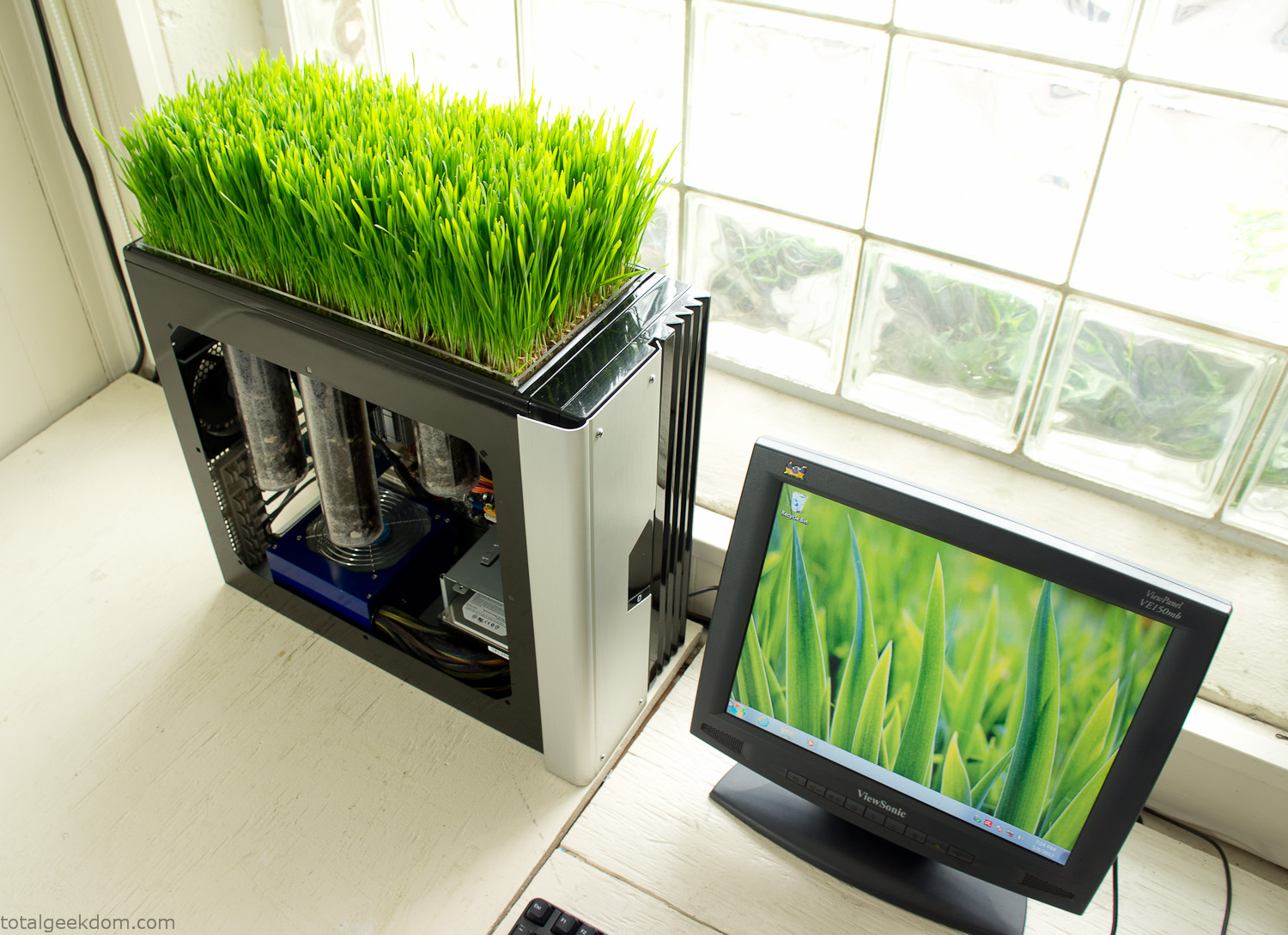
Bio Computer
I’ve been interested in working on a project for while that would combine something tech-based with something organic. Mixing the two elements intrigued me for a while. I’ve wanted to add flowers, or maybe plants of some sort to blend a little bit of nature into the space. I do receive a bit of sunlight through a glass block window, but the temperature in the basement is usually on the colder side. In the winter I don’t really heat the space because the folding farm outputs enough heat to keep the temperature comfortable. I didn’t want to change that aspect so I needed to come up with something that would tolerate slightly cooler temperatures and limited sunlight.
I can’t exactly recall when the idea came to me, but at some point I started wanting to use the heat from a computer as a way to warm the soil and help with germination/growth. I’m about as far from a botanist as it comes, I did some reading online and became pretty interested in the effects of soil temperature on germination/growth. I read different studies and papers from various universities. It was not too long into that process that I became hooked on the idea of using computer heat as a way to control the soil temperature of some sort of living plant life.
As the idea developed further I started looking into wheatgrass as a plant option. There is something clean and natural about the look and idea of a piece of grass growing in my basement. I thought the look would alter the space a little bit and add a bit of color along with something more than just metals and plastics. After reading enough studies and papers on the effects of soil temperature and germination with wheatgrass I felt like I had a good enough handle on the basics to tackle this.
The first step was finding a computer to adapt for the project. Luckily I had a lot of donated computers that people had given me for various project purposes. Most of them didn’t work, but by cobbling together various components from a bunch of different old computers I was able to come up with enough good parts to make a working computer.
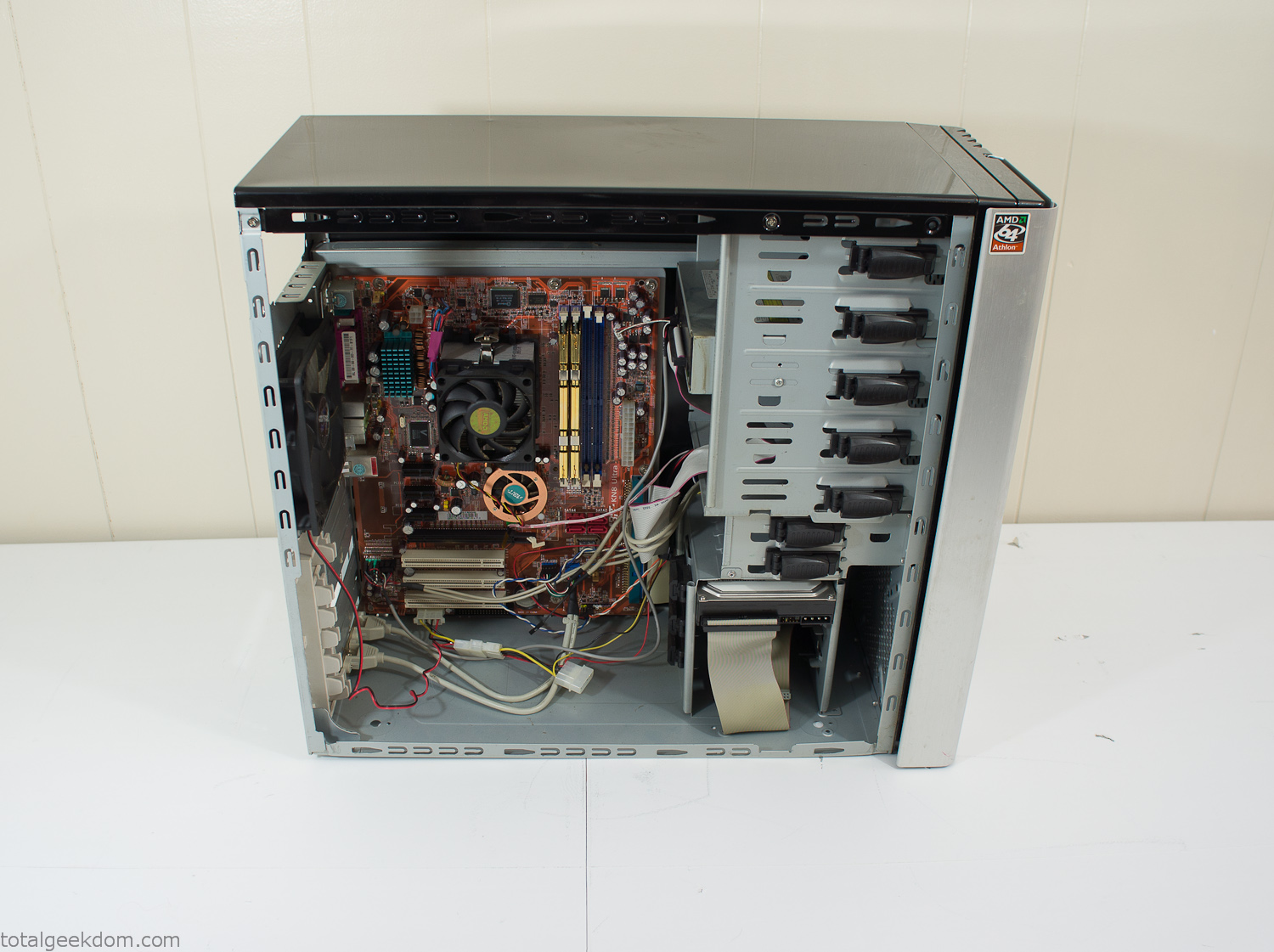
Donor Computer
At the time I was starting to get a formalized plan together for this project, another idea popped into my head. I’ve got a 5 yr. old who is already fairly geeky (just ask him to do his Jabba the Hutt impression for you) but he really does not get that much computer time. He’s getting to an age where he’s more inquisitive about tech stuff and I think he’s ready for his first computer. Since I was already well underway with this project it seemed like a perfect opportunity to orient the computer itself towards a learning tool for him in addition to using it as a way to blend something organic with a piece of technology.
With all of these goals in mind I started tinkering away. The computer hardware itself was nothing fancy, definitely outdated, but perfectly suited towards this project.
CPU- Pentium 4 (3 GHz)
Dell Factory Motherboard
Various Ram Sticks- 2gb
Old Maxtor 120gb IDE Hard Drive
Old FPS Power Supply
Donated Old Computer Case
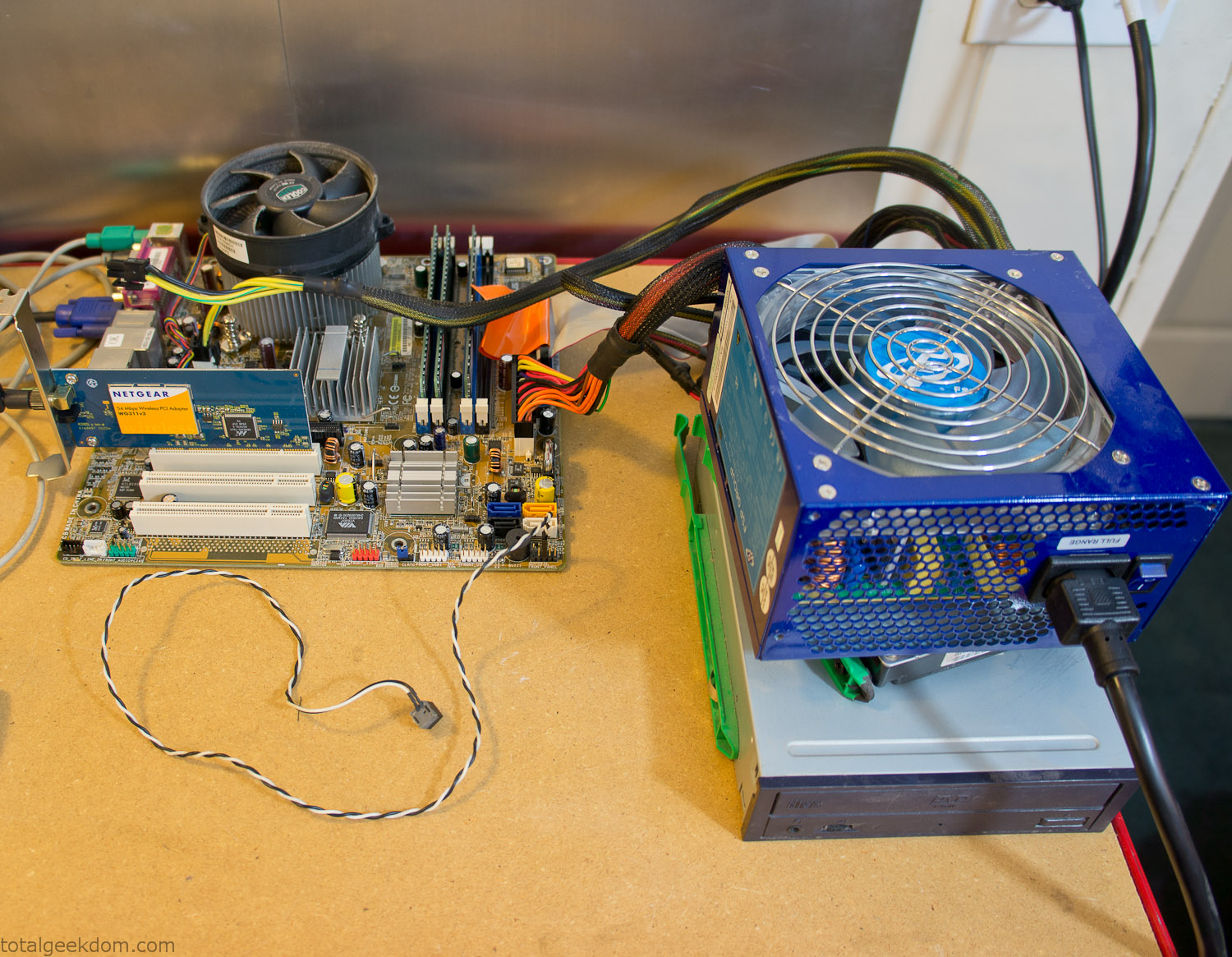
Computer Parts Testing
If you’ve spent any time around computer hardware in the last decade you’re probably well aware that Pentium 4 has a reputation for running hot. The 90nm Pentium 4 was named Prescott and it didn’t take long before the nickname Pres-hot popped up. In this case though that extra heat is going to be put towards good use.
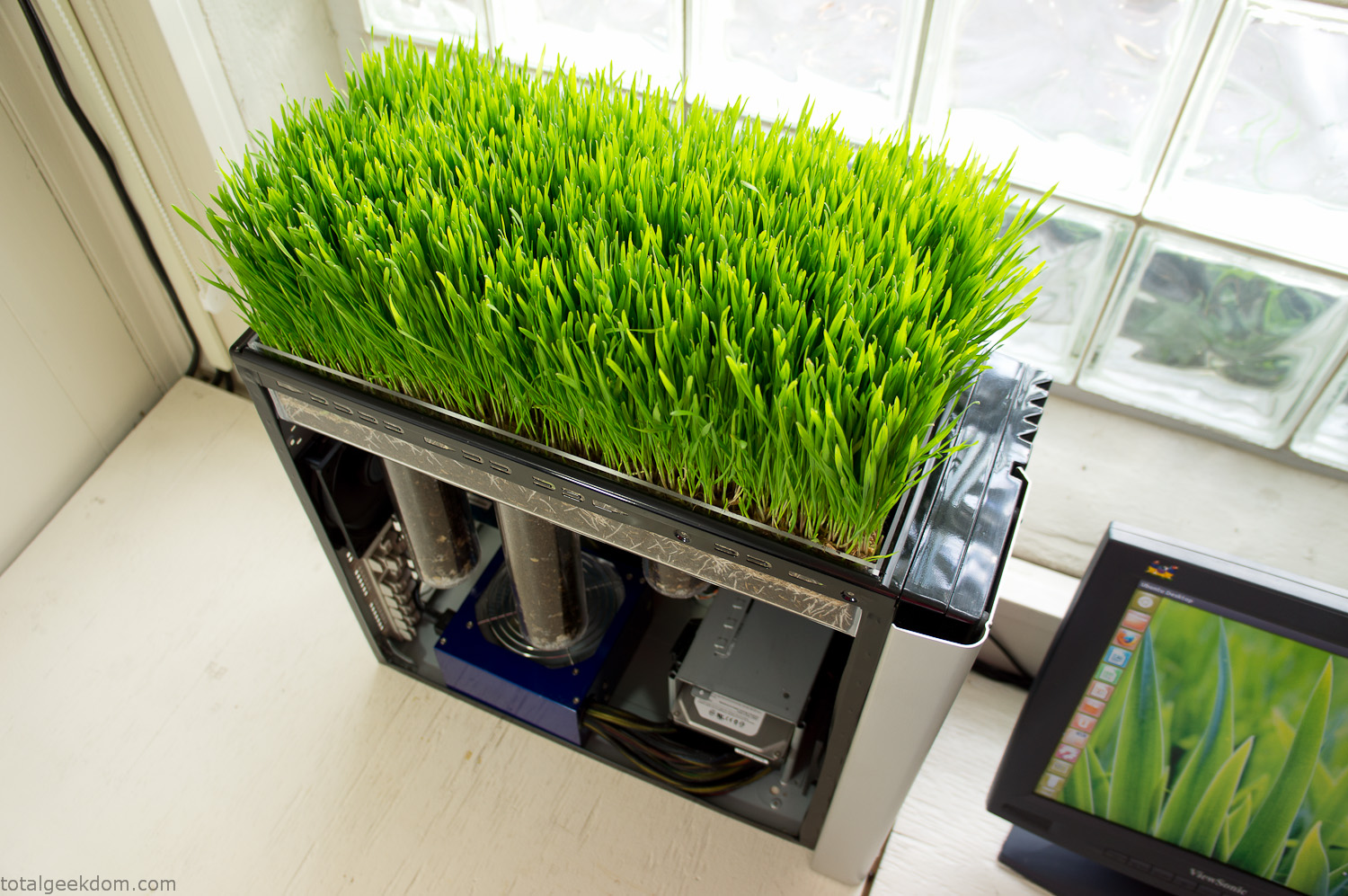
Once the hardware was all in order I started working on the layout and arrangement for the case. I had originally envisioned the grass growing out of the top of the computer case. This seemed like it would provide a good blend between the hard edges of the computer and the soft feel of the grass. This also worked well with putting the soil area in the upper portion of the case, where the most heat should collect. After doing some initial tests with this configuration I found the measured temperature near the top of the case was the hottest. The placement of the CPU near the top of the case and the lack of airflow in that area contributed to these higher recorded temps.
After finishing with some initial tests I decided to completely strip the case down and start removing all the unnecessary brackets and pieces inside of the case. Like most computer cases all the internal brackets and mounts are riveted together, so I drilled all the rivets out of the components I wanted to remove and pulled them out. The gutted case looked pretty barren after being stripped.
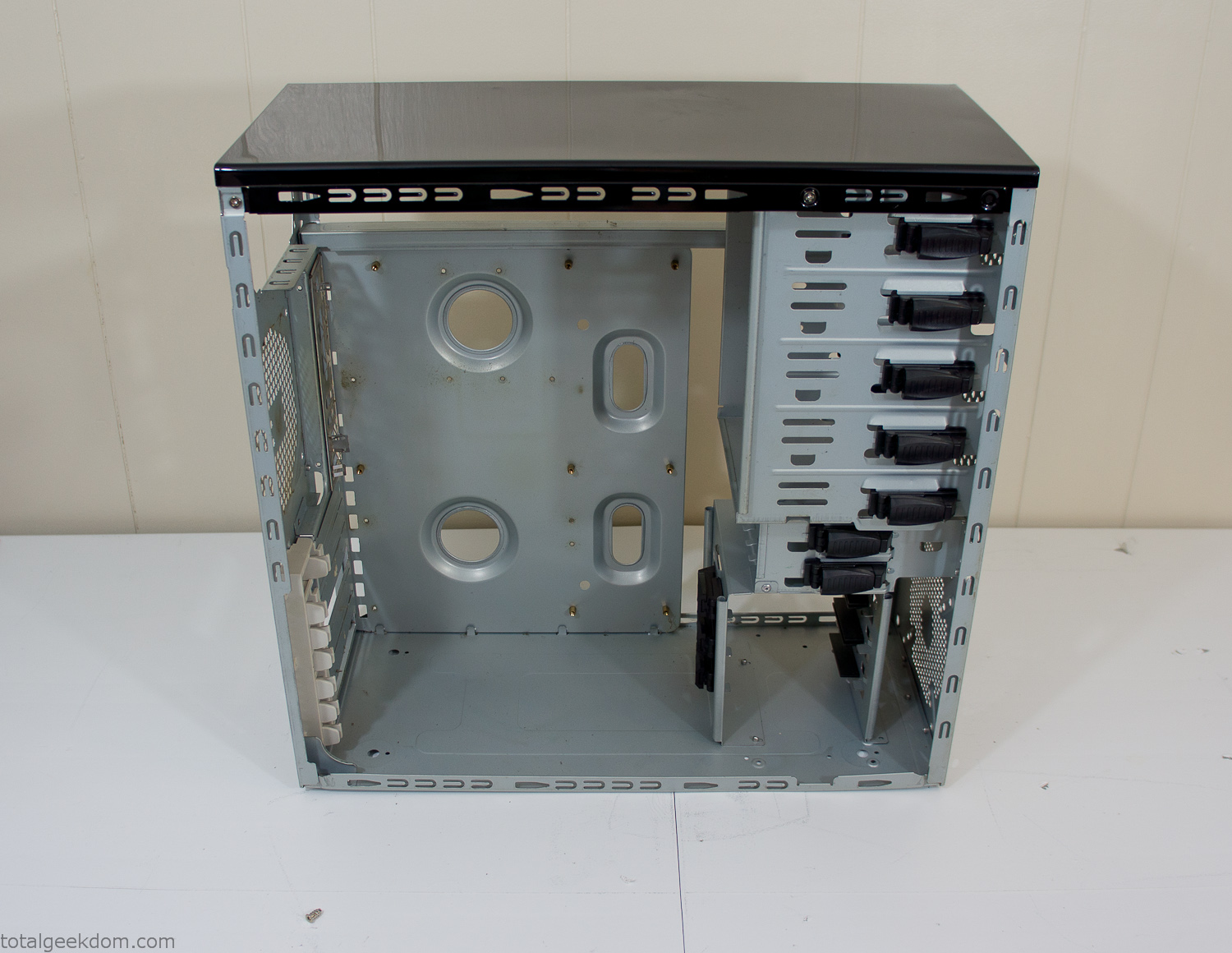
Empty Computer Case
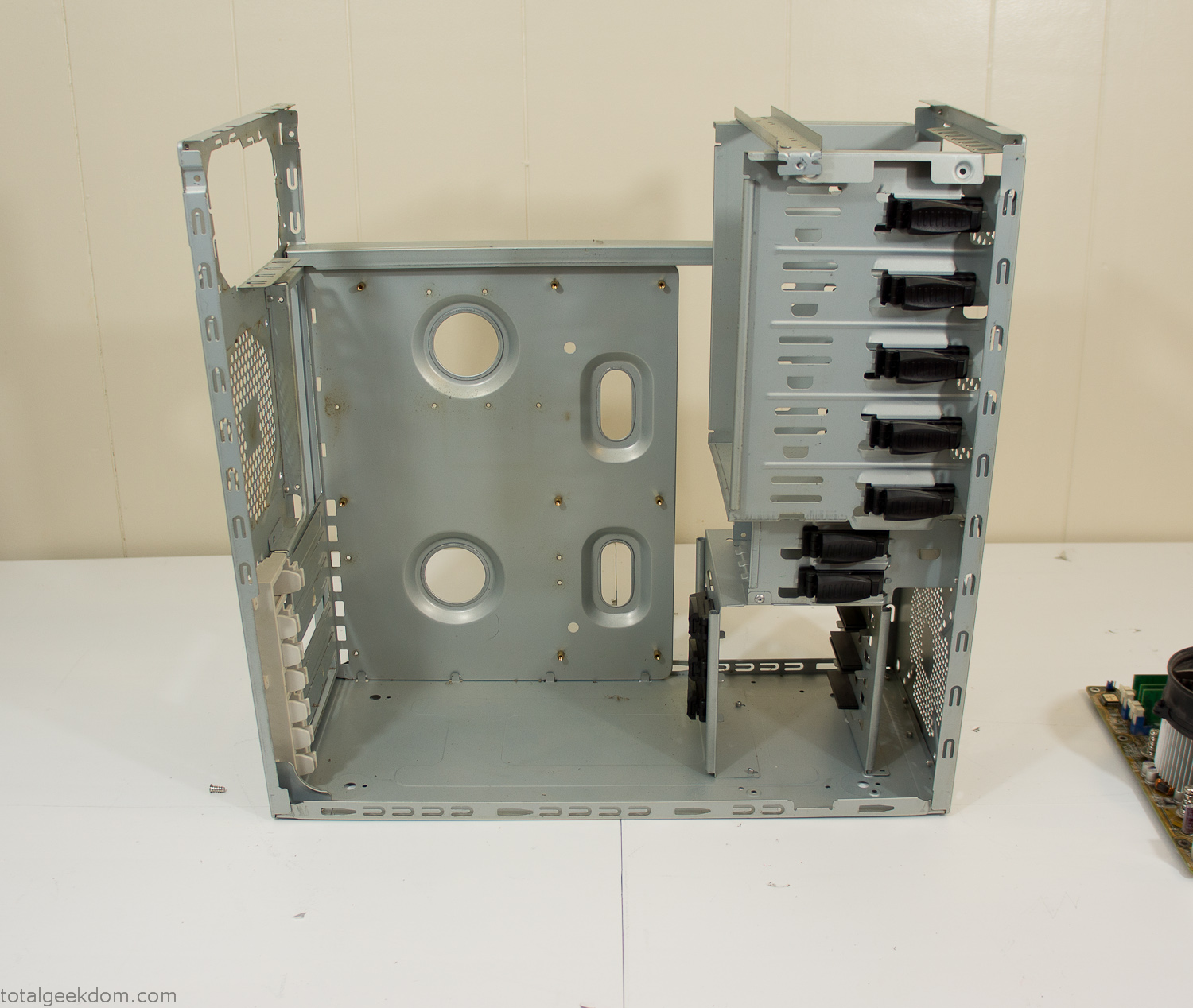
Dismantled Computer Case

Stripped Computer Case
In keeping with my original plan of having the computer blended with the organic grass I wanted it to be easy to see the inner workings of the computer and also the soil from the grass growing above. I needed something that was translucent, which left me with either glass or acrylic/polycarbonate as my options. I ended up choosing acrylic because I was able to find a cheap, used, die-cast model car display case top that was the perfect dimensions for the top of the case. Couldn’t go wrong for 5 bucks.
I test-fit the acrylic over the top of the computer case and marked my layout on the top of the case. My plan was to cut open the top of the computer case and insert the acrylic display case into the section I cut out. To cut open the top of the computer case I drilled a hole as a starting point and then used tin snips to cut through the thin gauge metal.
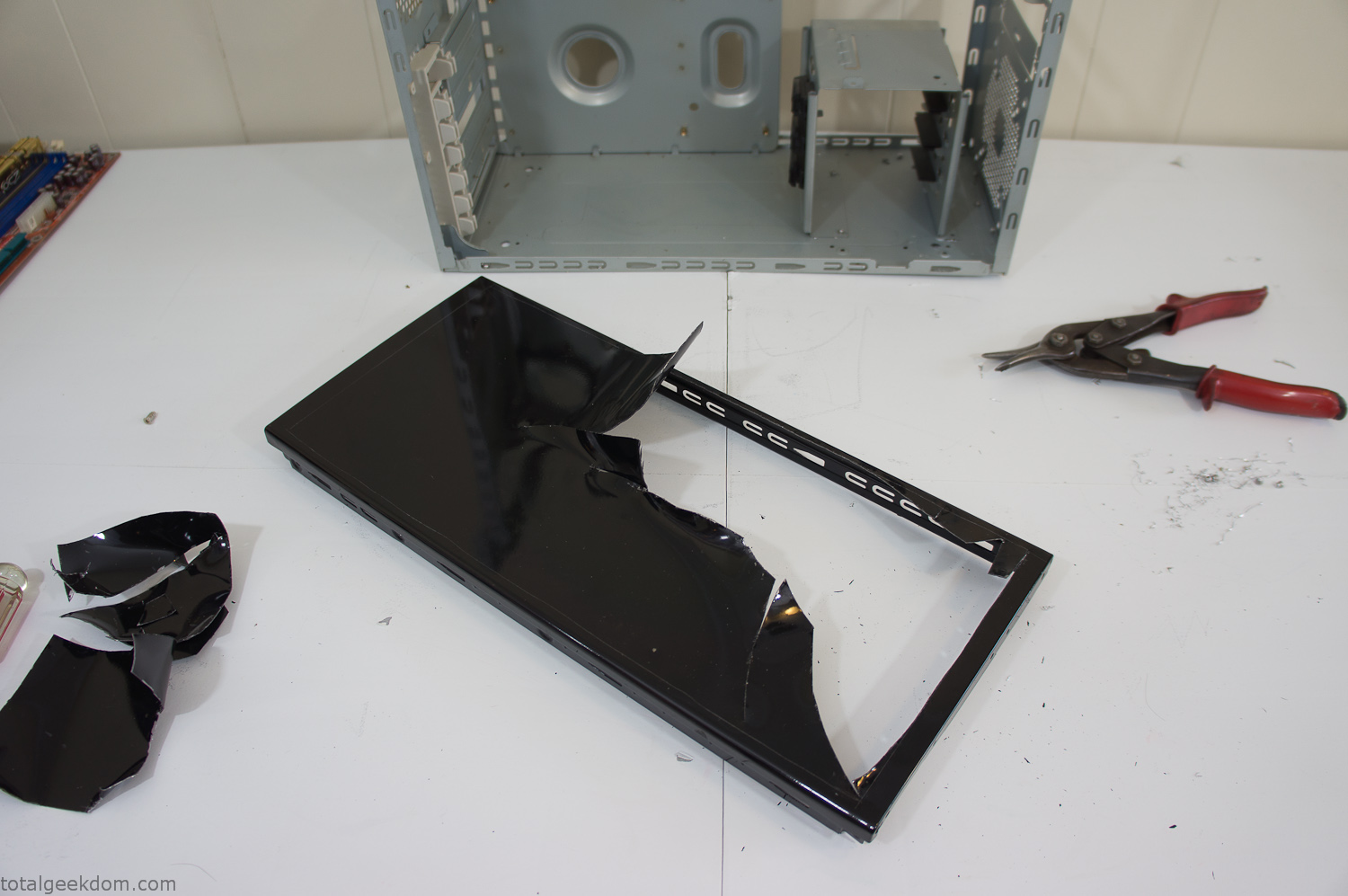
Computer Case Lid Modding
Once I had the metal opening cutout, I needed something to put along the edges of the freshly cut opening to create a clean and finished look. For $2 I was able to find some black, car-door-edge, plastic molding that worked perfectly.
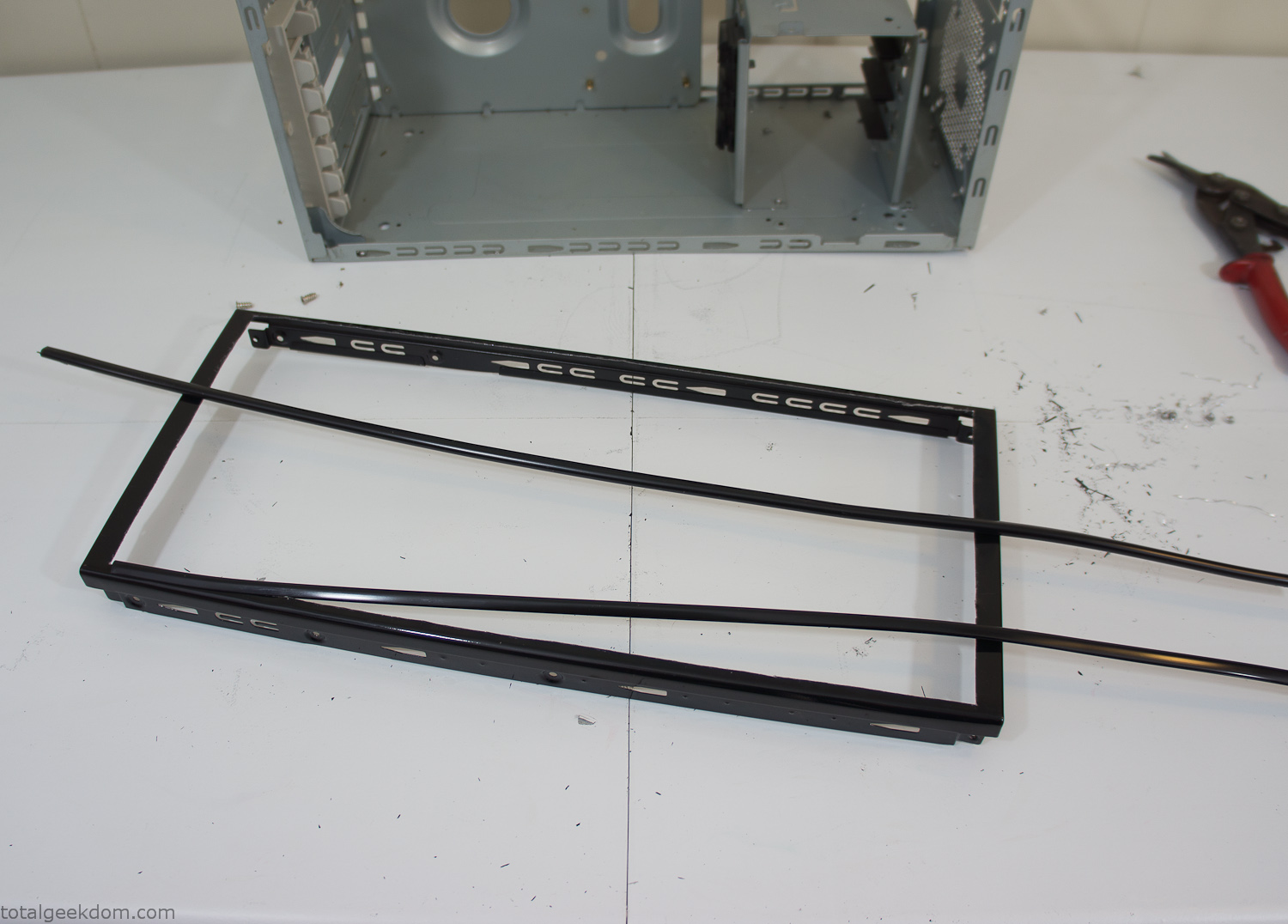
Modified Computer Case Lid
After getting the opening of the top of the computer handled and the acrylic case properly fitted, I moved onto some more testing with soil in the acrylic and the computer running. I wanted to see what kind of heat transfer I would get and how it would affect the soil temperature. I knew that using acrylic over glass would make it a little more difficult to heat the soil as acrylic is not that good at transferring heat. Luckily though I didn’t really need to alter the soil temperature that much, I just needed a little extra heat. Testing showed that heat transfer with just the single acrylic display case as my soil container was slow. So I decided to add some acrylic tubes. This would allow more surface are for soil to acrylic contact and also give me an area where I could add a mixed substrate to allow for soil drainage.
I went online and found a 3ft long section of 2 1/4″ clear acrylic tubing for $8 dollars. I wanted to add a couple of hanging cylinders off the main of the acrylic display case in the top of the computer case. To do this I needed to cut holes into the bottom of the display case. Cutting holes in acrylic is not always easy, it’s likely to chip and craze at the edges. To get around this I used a buildup of masking tape on both sides of the acrylic, to provide a little bit of resistance and strength. I placed the acrylic display case back into the computer and marked my layout for the tubes. I needed to leave clearance for the CPU cooler, power supply and hard drive mount.
After marking the layout, I used an air-powered pencil grinder and carbide tipped bit and cut through the acrylic case along my marked lines. After the initial shape was cutout I used a tube piece as a template and slowly worked on grinding the holes as perfectly round as I could get them so that the tube had a snug fit all the way around. The fit is pretty important as the acrylic cement that I used needs there to be a tight fit so that the acrylic can bond correctly.
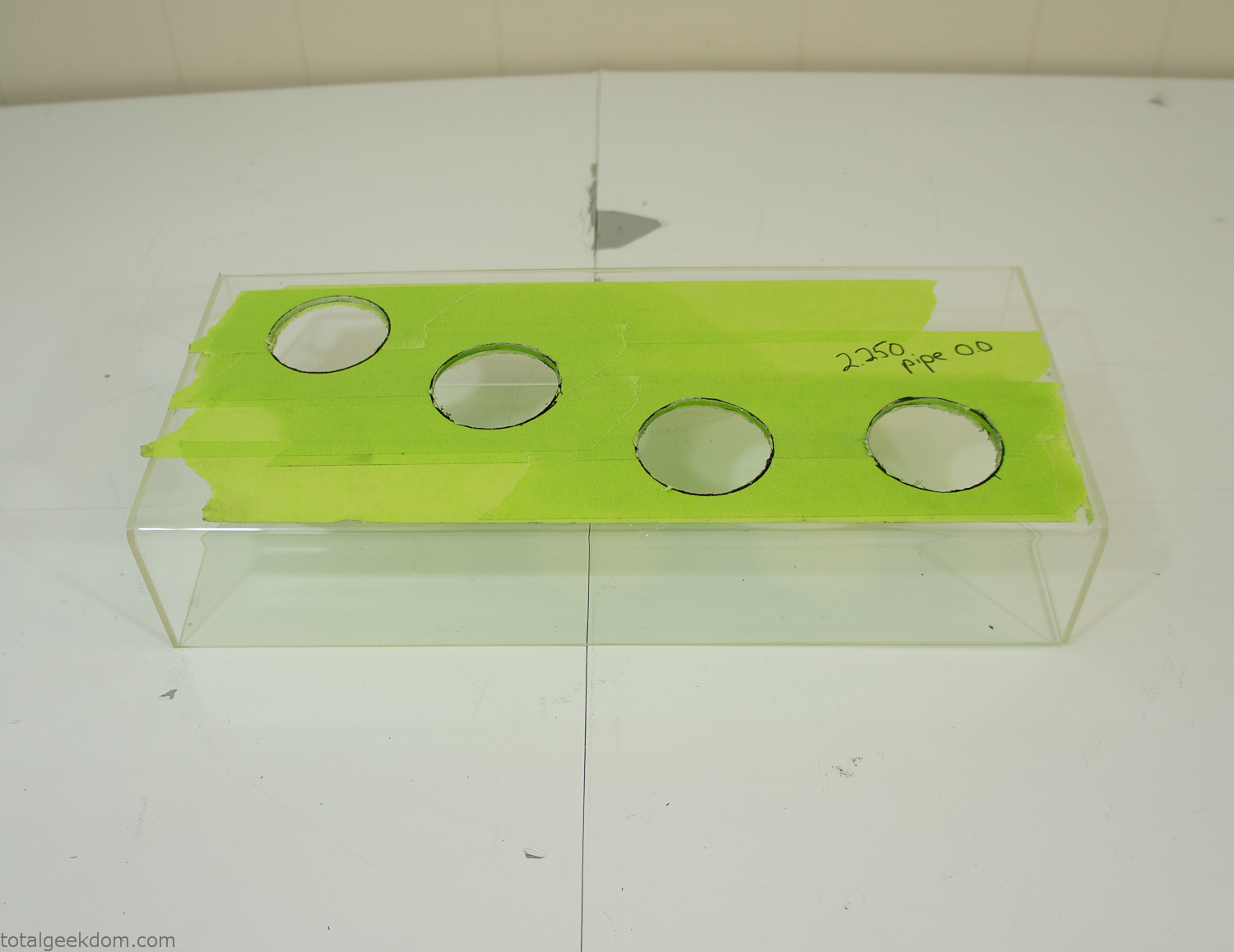
Acrylic Case Modifications
I placed the tubes into the acrylic case and mounted it in the computer and test fit the placement and height of the tubes. After getting everything lined up and oriented correctly I moved towards bonding the acrylic together. Using a needle dropper applicator I applied the cement to all the joints. After letting it set overnight I came back the next night and applied a thin coating of clear silicone caulk around all the joints just to ensure they were completely water tight
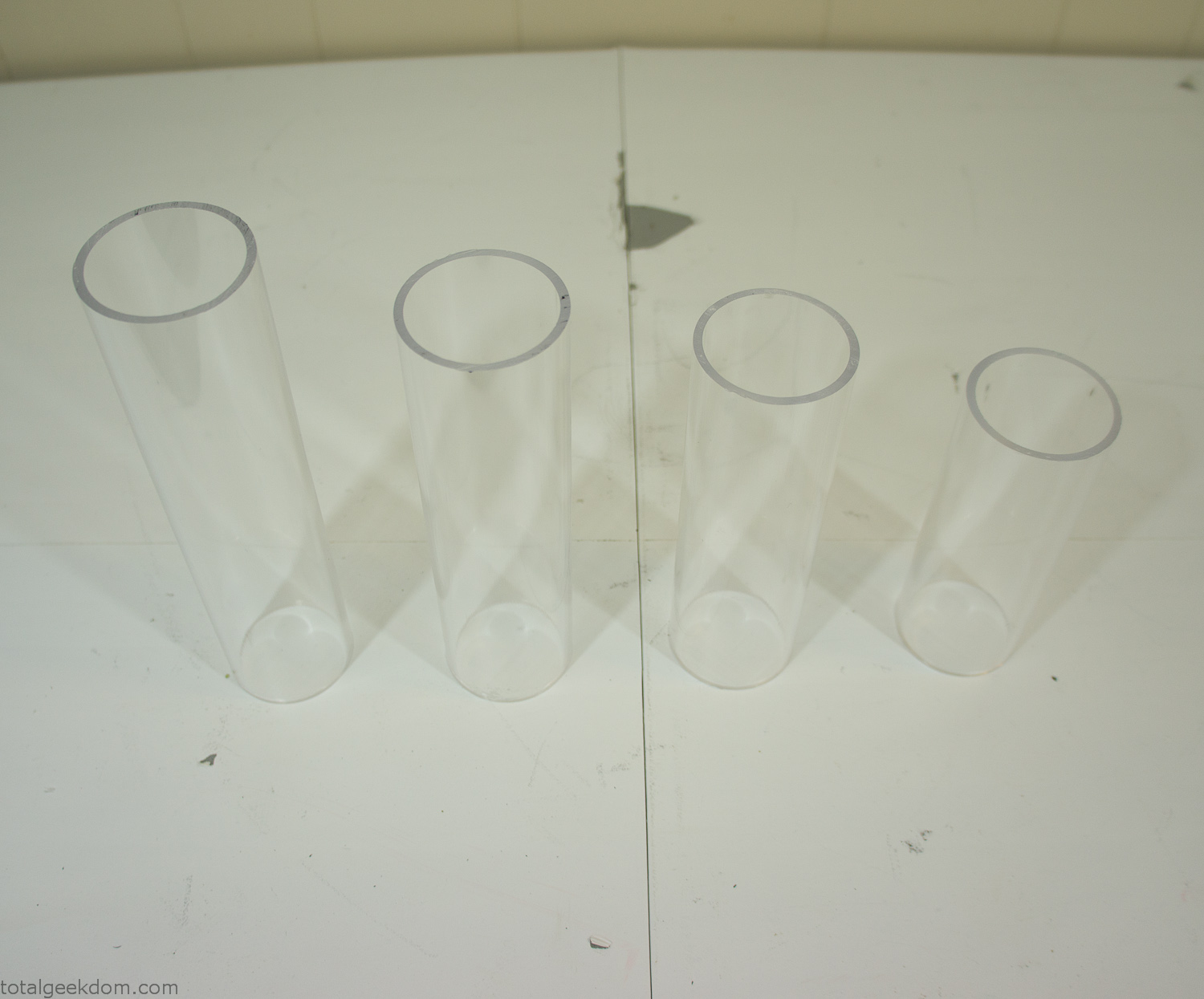
Acrylic Tubes
The next step was sealing up the bottom of the acrylic tubes. I looked at a couple of different options before realizing that the discs I had cut out of the acrylic case to fit the tubes would be almost the perfect size. Using a bench grinder and a test piece of tube I slowly ground each disc to the perfect size for a tight fit all the way around. I placed the clear acrylic discs into the bottom of each tube and repeated the same cementing and silicone caulking procedure to ensure they were water-tight. After a couple of days’ worth of drying I tested the case by filling it with water overnight and checking in the morning to make sure that no leaks had popped up.
In order to hold the weight of the acrylic case after adding soil, I drilled and installed a machine screw with a rubber cap at each corner of the computer case to bear the weight of the acrylic case.
Once all the work was done with the acrylic case section I started reinstalling all the components. The motherboard, hard drive and power supply were added and then wired up.
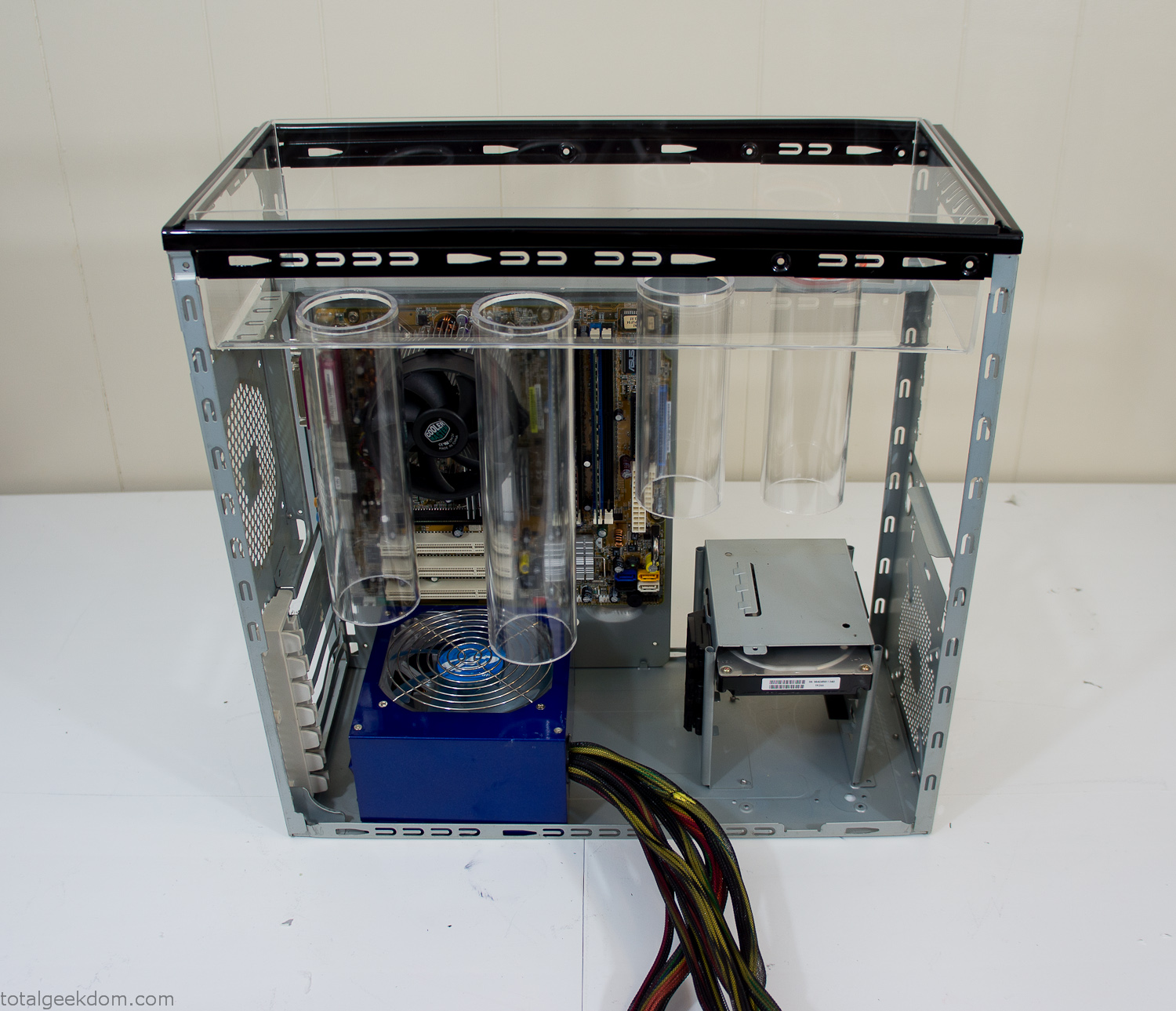
Mocked Up Computer Case
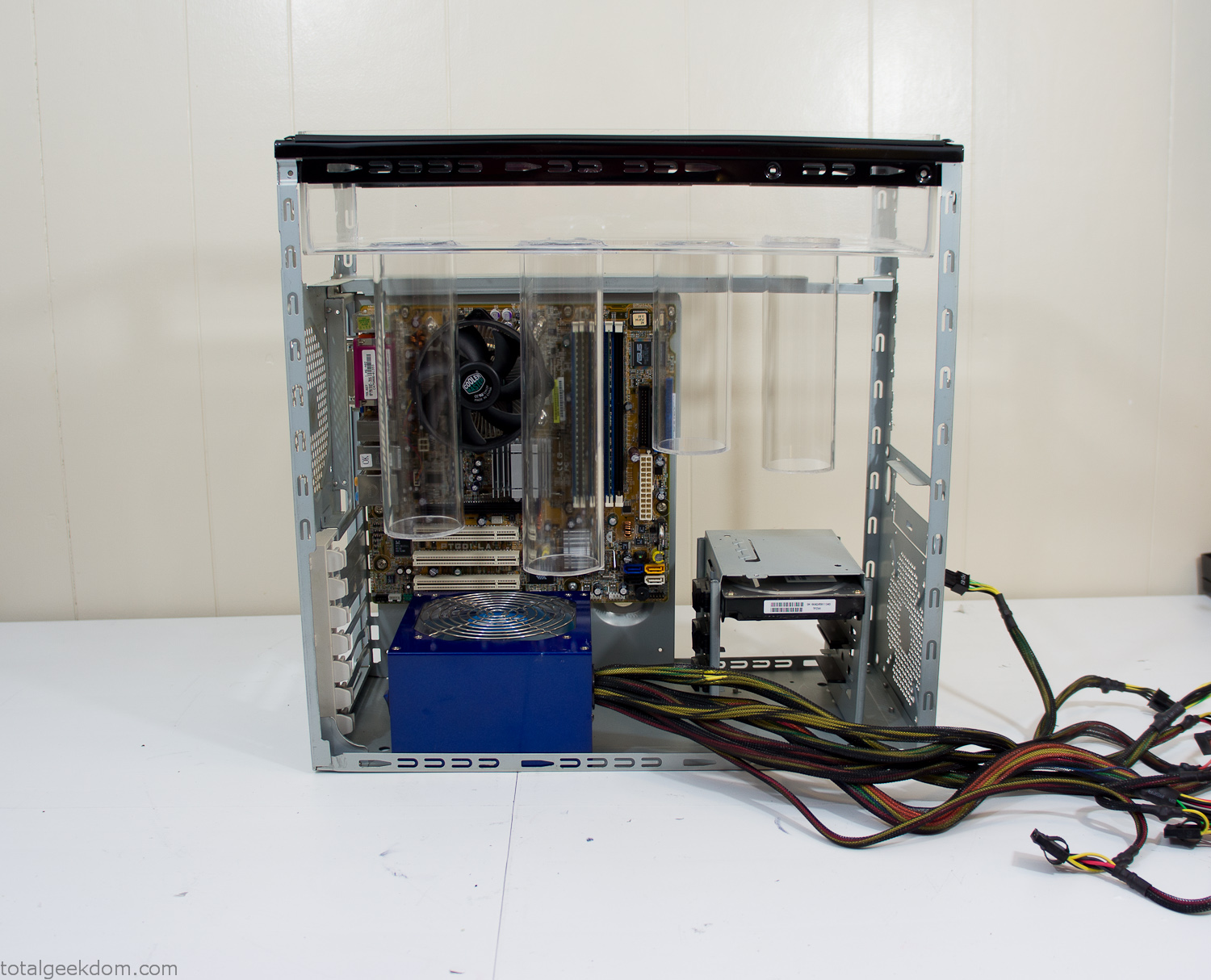
Power Supply Mockup
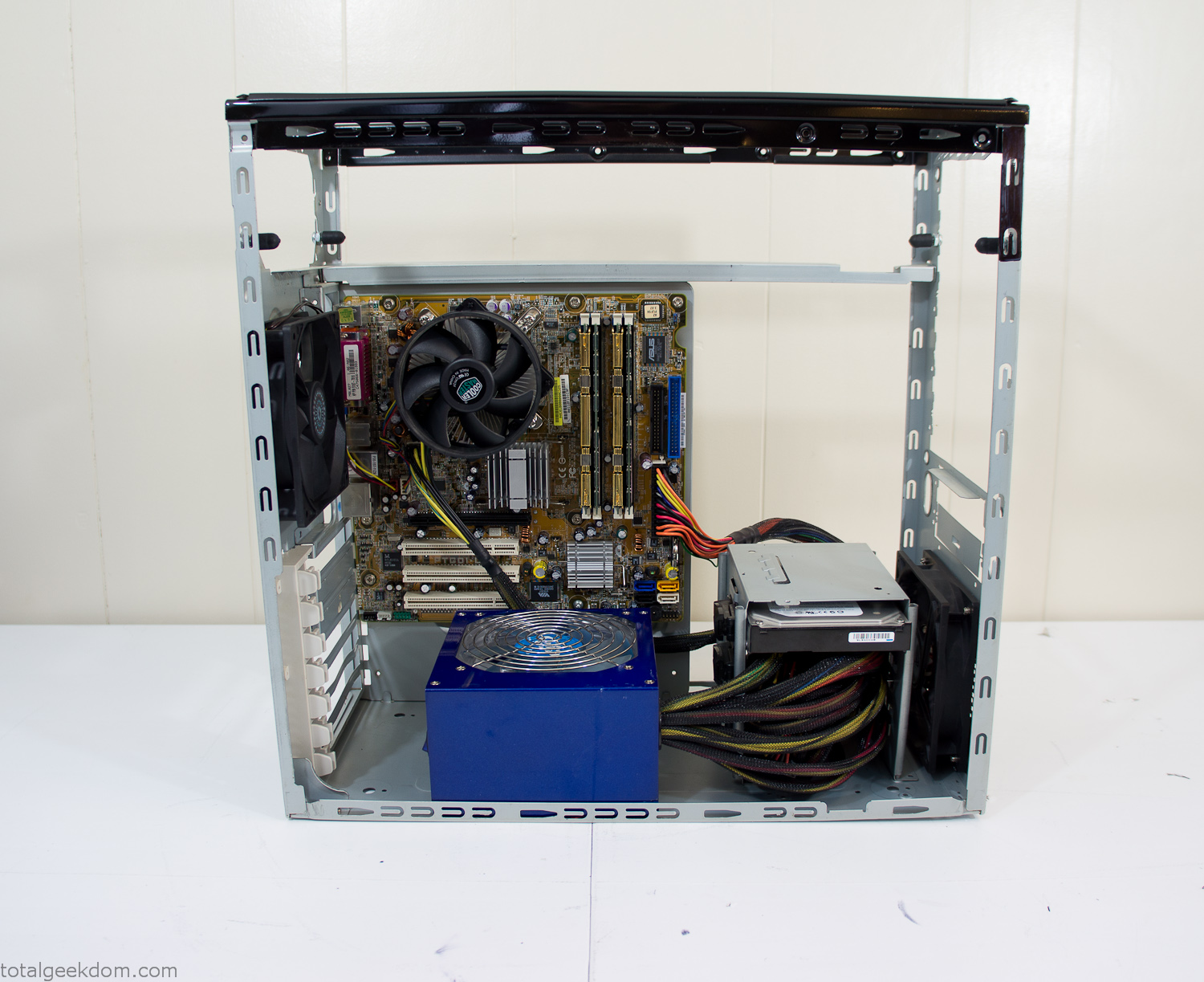
Computer Components Wired
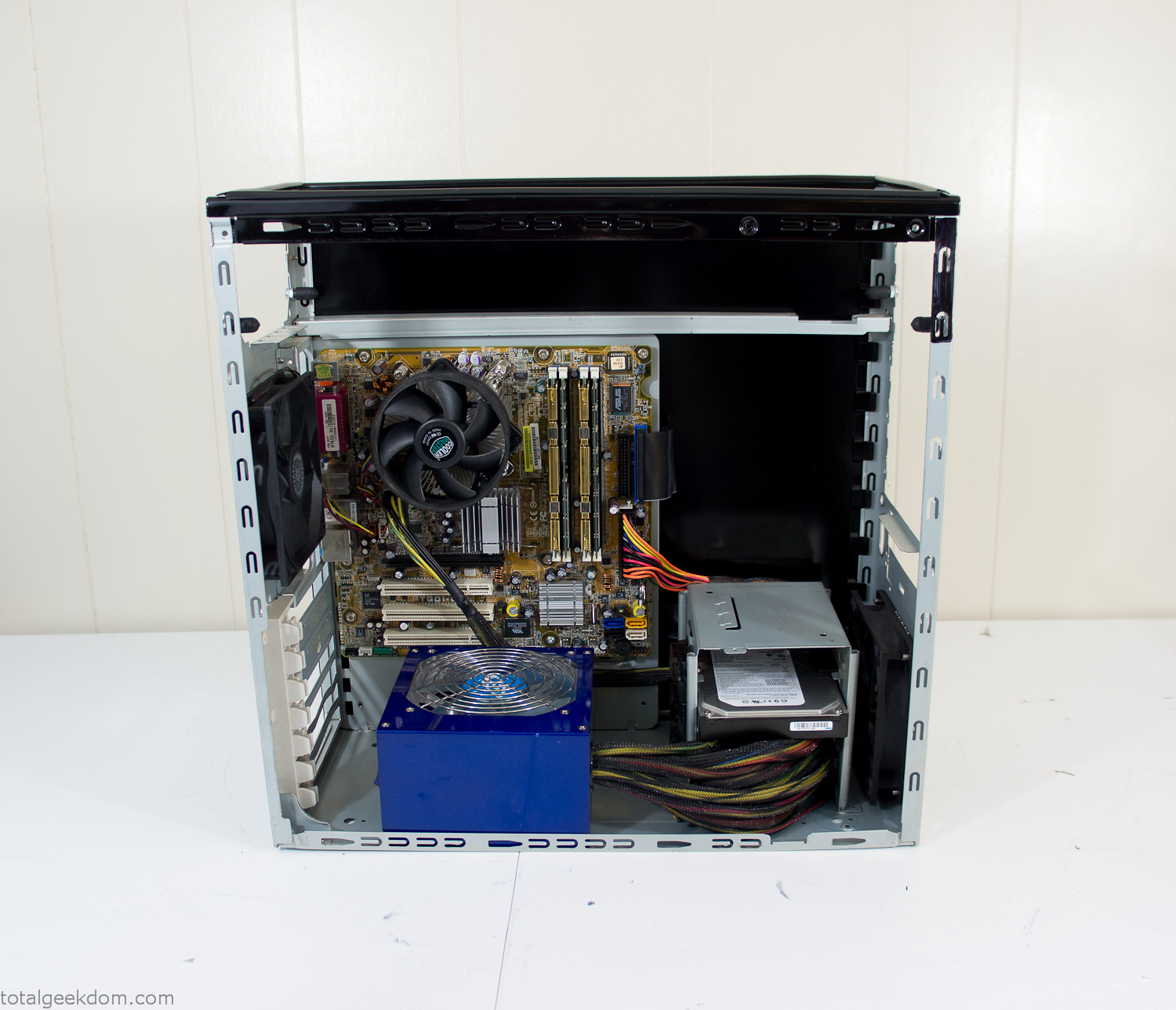
Case Panel Installed
At this point all that was left was to make a clear panel for the side of the case. I had some left over acrylic sheets from a different project that were really close to the right size, after test fitting, marking and cutting I then had a clear side panel to see into the case. (I left this off for the pictures because it caused a reflection)
The final step was filling the case with soil and adding some wheatgrass. I had been test growing other samples of wheatgrass during the build process. So I had already a couple of different patches of grass growing. I tried to keep the soil level just below the top of the acrylic case edge to make it a little more seamless.
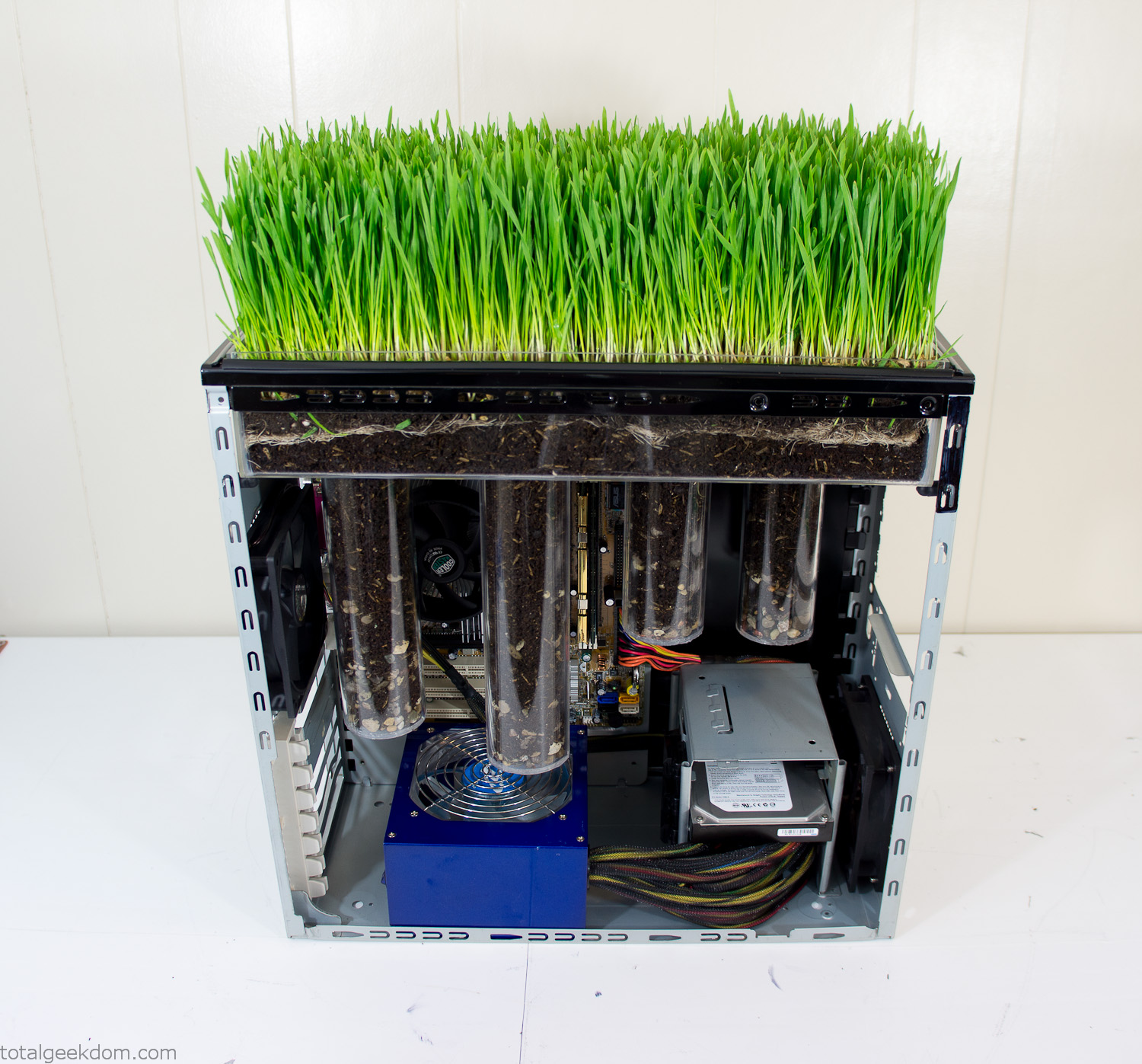
Grass Planted in Computer
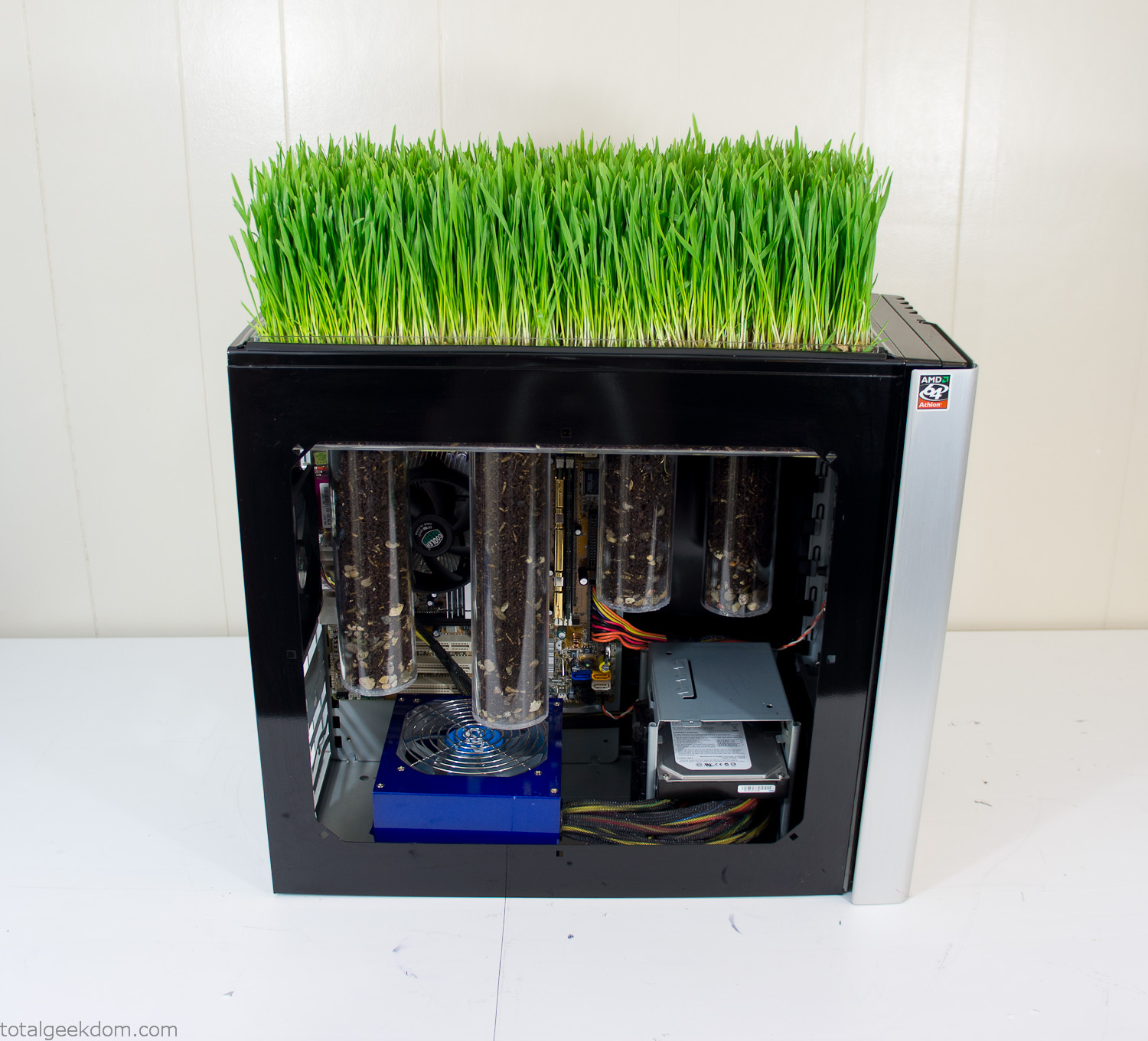
Grass and Case Panel Installed

Grass in Computer
For the computer itself I ended up installing Windows as well as Linux in a dual boot setup. Since the computer was going to be used by my son as something to play with I figured I should put both on there so he can tinker with them and learn as he goes. Besides, for important life decisions like picking an OS (Operating System) I think any good parent should present the options and then let their kid decide for themselves.
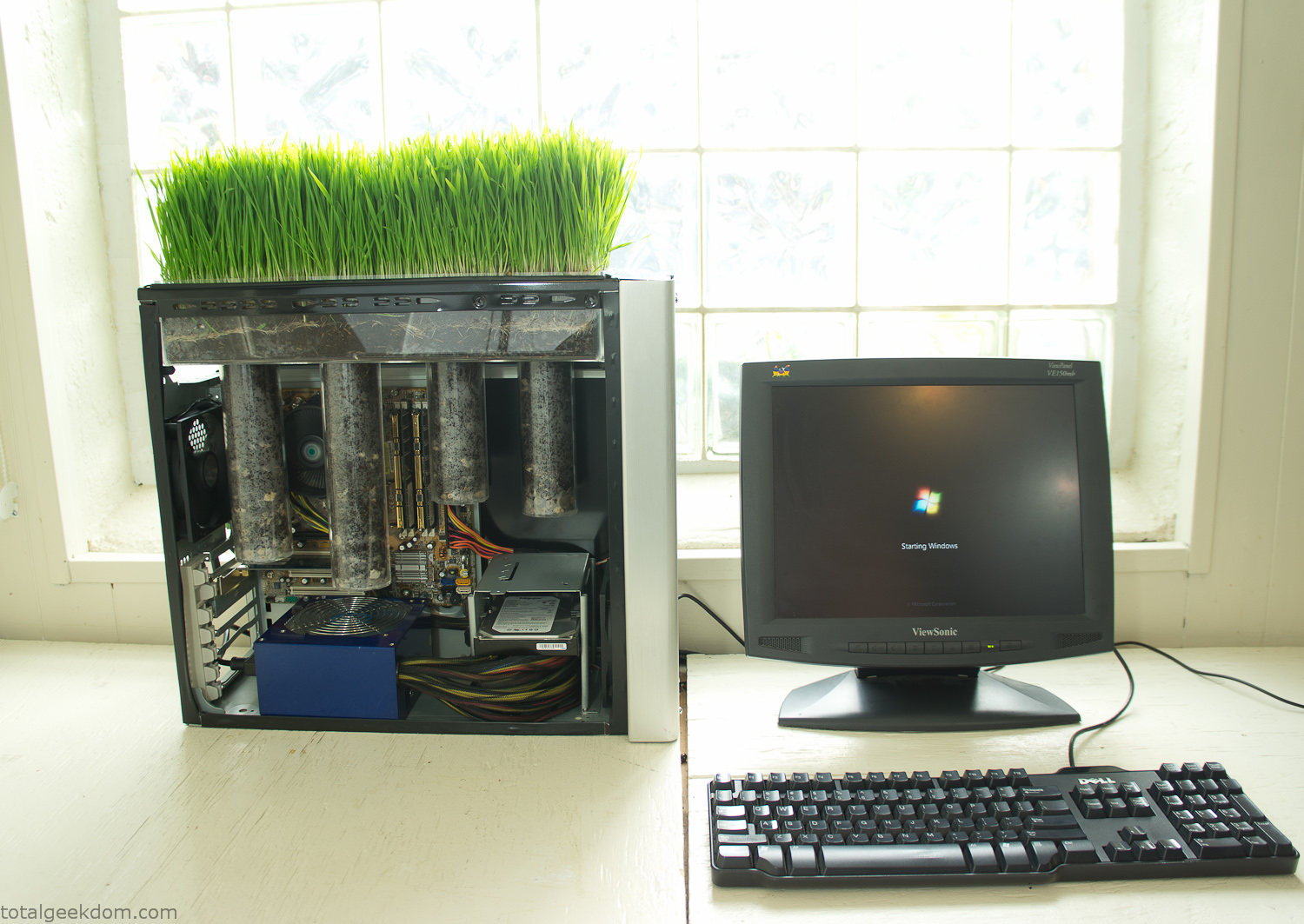
Starting Windows
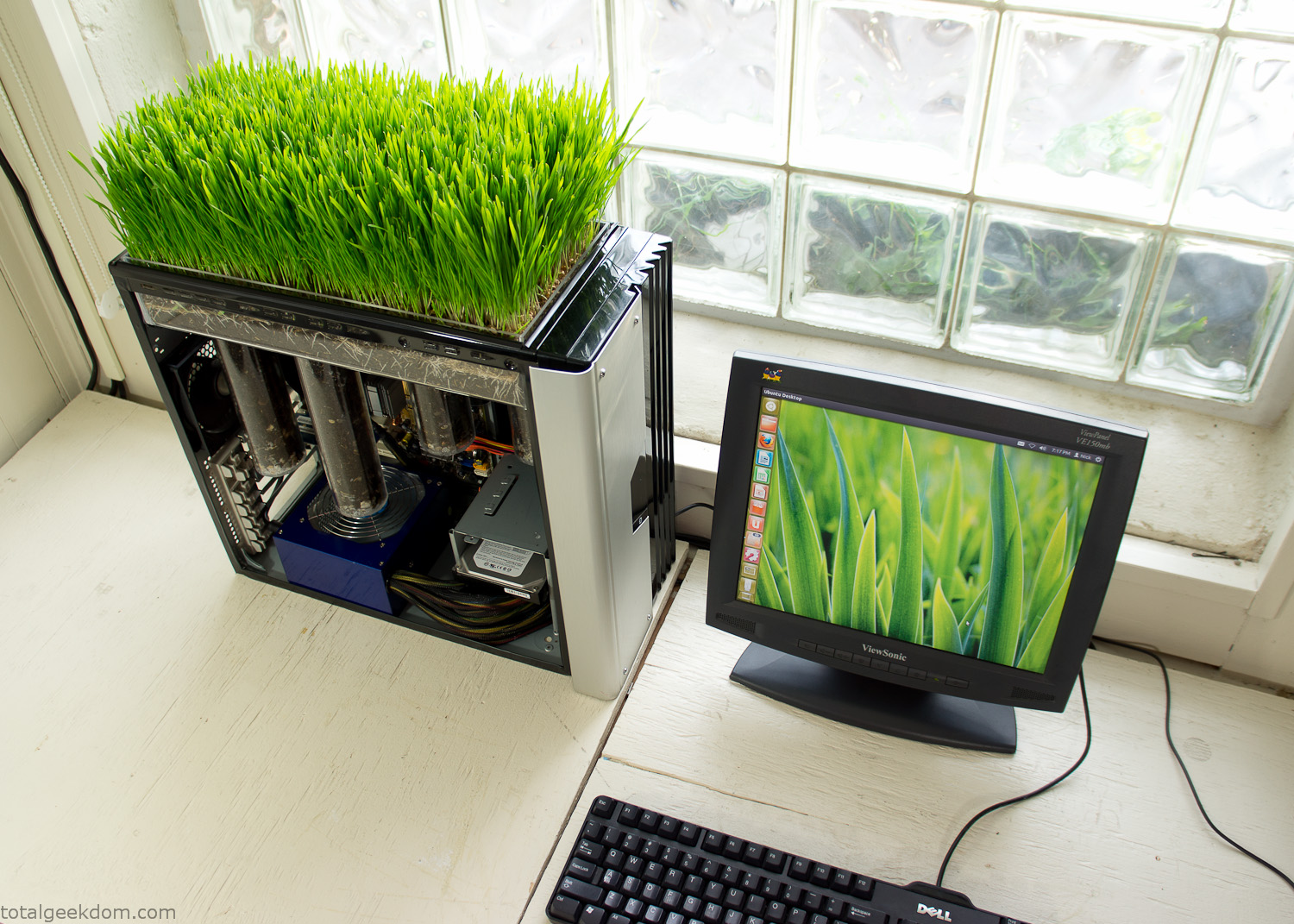
Linux Running
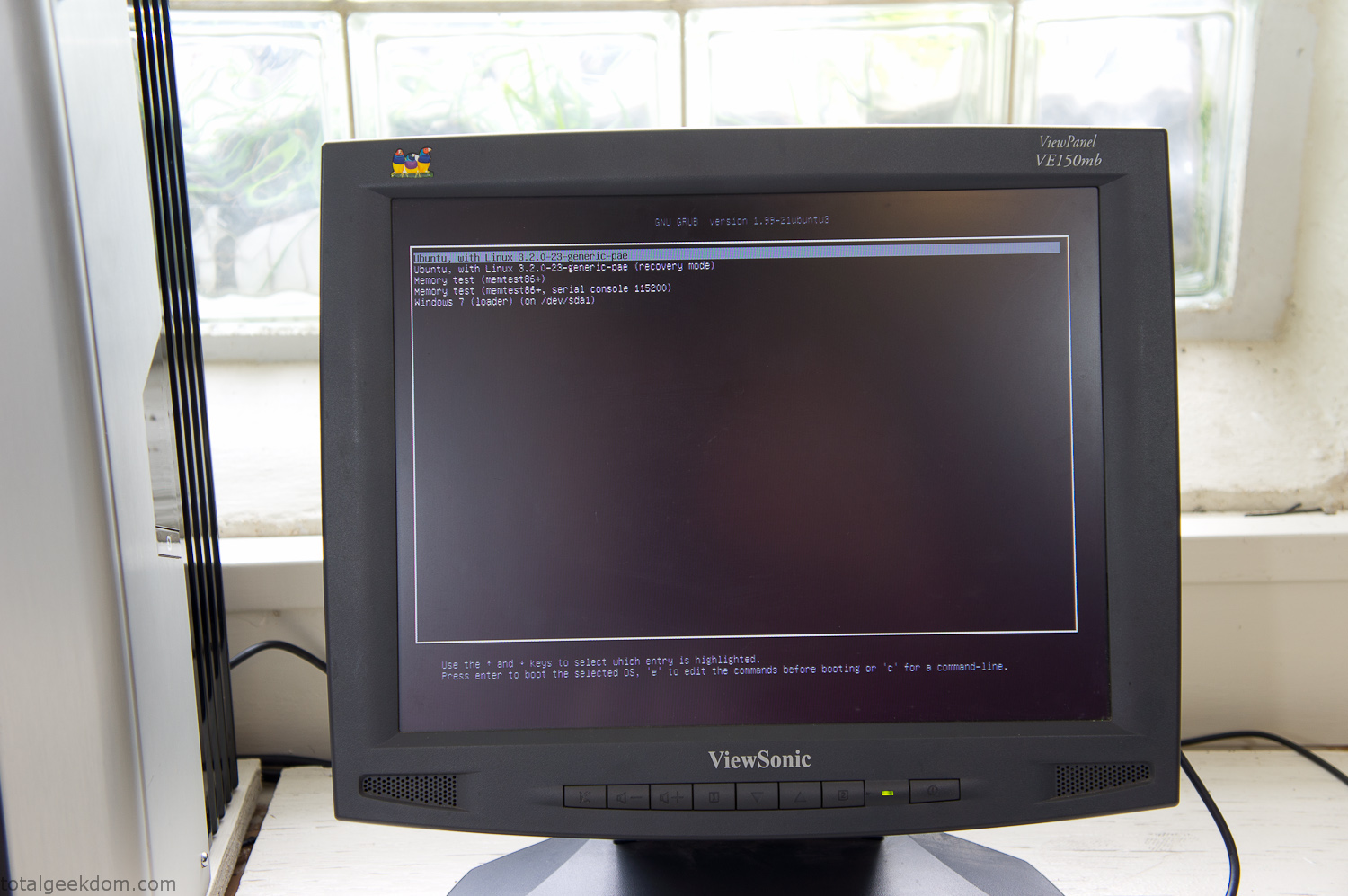
Dual Boot Screen
In the end I’m happy with the result of the project. It’s been fun experimenting with growing wheatgrass and I like how the natural look of grass is blended with the very modern, inorganic case.
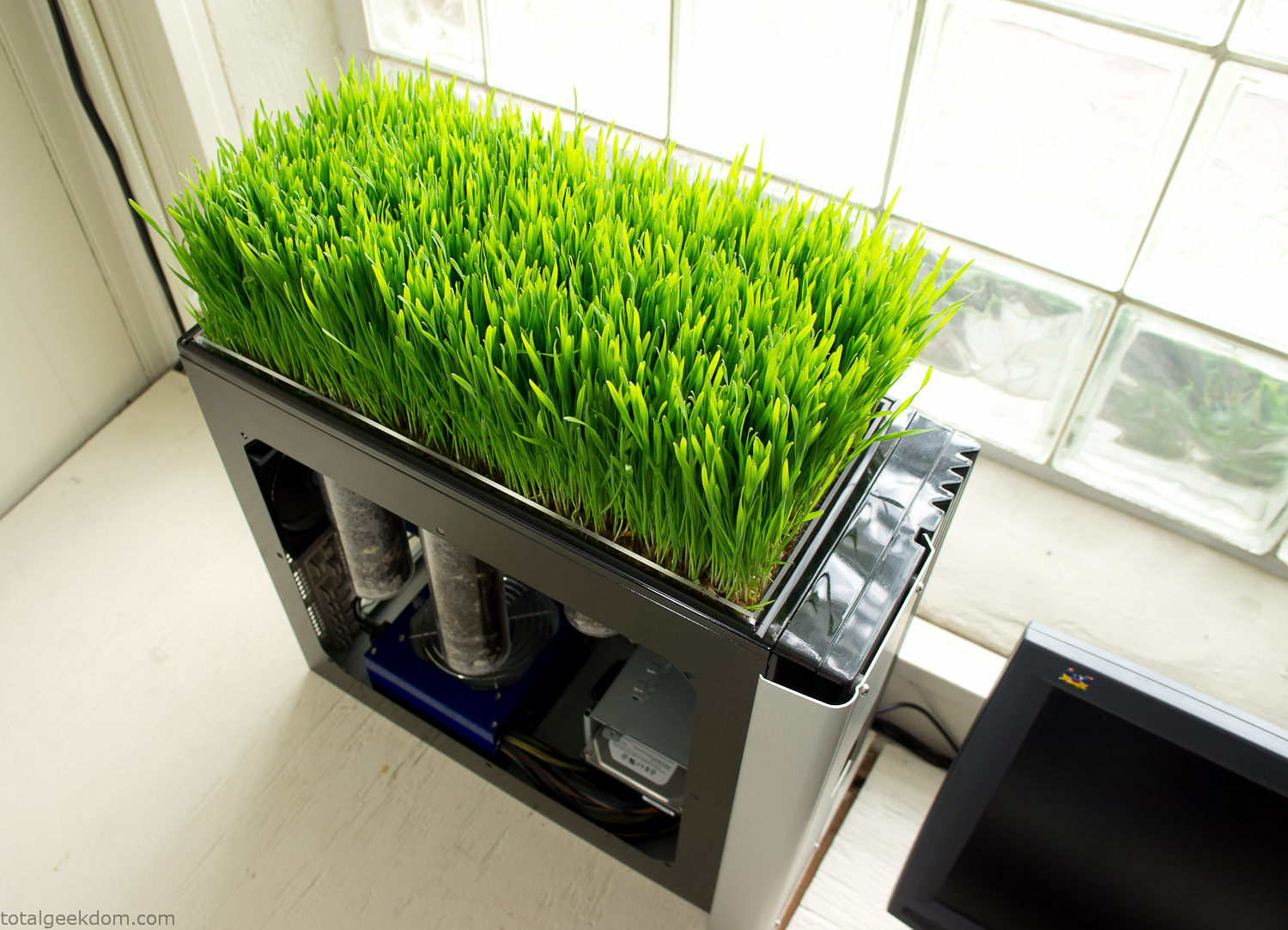
Computer Grass Growing
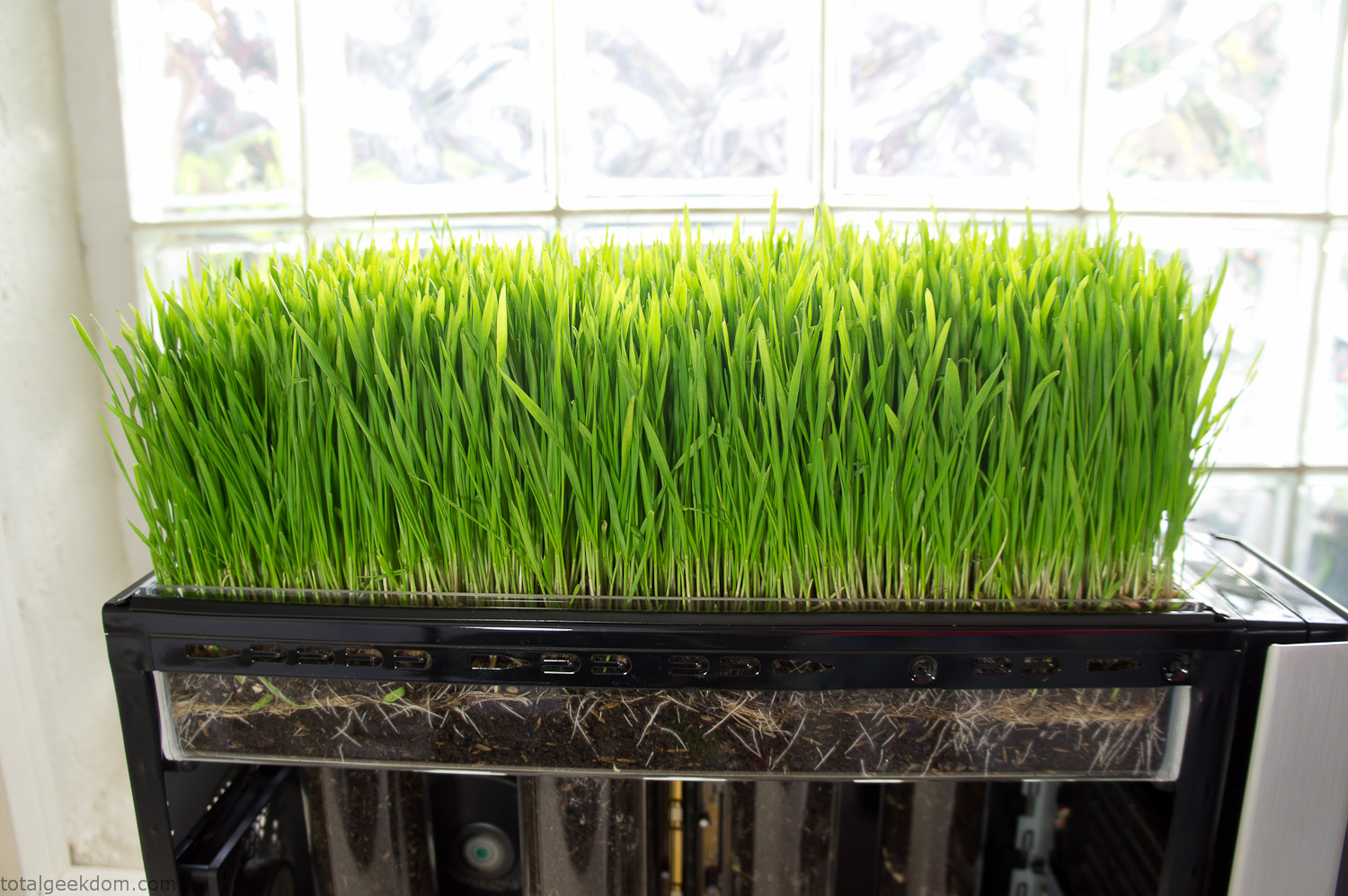
Grass in Computer Section
Notes
Temperature Testing
In testing the case temperature versus the soil temperature I found it was easiest to control the case temperature by using a variable fan speed control on both the inlet and outlet fans. By turning the fan speed down I could increase the temperature inside the case and correspondingly raise the soil temperature.
In order to maximize output of heat during these tests I used Prime95 to run the CPU at 100% load.
Using this method to control the case and soil temperature I played around with adjusting the soil temperature and then tracking the rate of growth of the Wheatgrass. The target temperature for peak growth seemed to fall around 66°F (19°C).
Using the fans to control the case temperature allowed me to vary the temperature inside the case from a low of 75°F (24°C) to a high of 91°F (33°C). In order to achieve the desired increase in soil temperature, I had to run the case temperature toward the higher end of the scale.
When the soil temperature was too high, the growth of the wheatgrass would slow.
Wheatgrass
The wheatgrass I used for my tests was nothing special, it can be found as seeds (berries) in a lot of health food stores and it grows relatively easily.
Caring for the wheatgrass is just a matter of keeping it watered. It’s a pretty easy plant to work with and doesn’t require any special skills.
Wheatgrass is often used as a nutritional supplement; it can be juiced and mixed into smoothies and other beverages. I plan on harvesting some of the grass and making some juices.
Plant Options
While wheatgrass offers a nice, attractive and easily grown option I do plan on trying other plants as well in the future. Since I already have the “planter” built all I have to do is add a different plant and see how it goes. I’m sure there will be some plants that don’t like the lower light environment, but it will be fun experimenting with other plants as well and seeing how they take.
Materials
Donated Computer- Free
Clear Acrylic Display Case- $5
Clear Acrylic Tube- $5
Plexiglass Side Panel- Free
Total- $10
Bio Computer Running
 29.2k
29.2k
 13.2k
13.2k 7.1k
7.1k

 2.1k
2.1k 813
813 2.6k
2.6k
Comments 52,956
работа военным Военная профессия требует постоянного совершенствования, изучения новых технологий и тактик, а также адаптации к меняющимся условиям.
https://dantemebs126.lucialpiazzale.com/como-elevar-tu-pyme-alineando-marketing-y-ventas
Si te soy honesto, por mucho tiempo senti que mi pyme estaba estancada. Tenia clientes, si. Facturaba, si. Pero no crecia. Era como si empujara un carro con el freno de mano puesto. Todo cambio cuando hice algo que antes evitaba: empece a pensar como empresario, no como empleado de mi propio negocio.
Lo primero fue salir del “modo bombero”, ese en el que estas apagando incendios todo el dia. Me sente, respire y escribi: ?a donde quiero llevar esta empresa? ?Que metas concretas tengo para este ano?
Despues, trabaje en algo clave: delegar. Durante anos crei que nadie lo haria como yo. Pero aprendi que si no solte algunas tareas, nunca tendria tiempo para pensar en crecer. Contrate a una asistente virtual y libere 10 horas semanales. ?El resultado? Pude enfocarme en estrategia, alianzas y nuevos productos.
Tambien inverti en mi marca. No hablo de gastar miles en diseno, sino en tener una imagen coherente, profesional y clara. El simple hecho de mejorar mi presentacion y presencia en redes sociales duplico el interes de nuevos clientes.
Y por ultimo: me eduque. Podcasts, libros, mentorias. Nada sustituye el aprendizaje constante. Cada nuevo conocimiento me daba una herramienta mas para escalar.
Todo esto, y mas, lo comparto en mi blog. Si quieres elevar tu pyme y salir del piloto automatico, este espacio es para ti. No importa si estas empezando o si llevas anos: siempre se puede subir al siguiente nivel.
No lo aprendi en una universidad. Lo aprendi en la calle. Y funciona.
Хостинг для сайта — это услуга, которая дает возможность хранить веб-ресурс в облаке, постоянно подключённых к интернету хостинг сайтов для майнкрафт Организации, предоставляющие такие услуги — называются хостерами.
Ребята нашел крутой порно сайт sosalkino.lol ! Вот тут мое любимое порно: https://sosalkino.lol/molodye/4136-zastenchivaya-devushka-soglasilas-trakhatsya-s-ottsom.html — террабайты бесплатного порно на sosalkino.lol ! Скинул Вам свою подборку! Советую!
https://blogfreely.net/jorgusfqzf/las-mejores-estrategias-de-marketing-digital-para-pequenas-empresas
Hace un año, mi presencia digital era… inexistente. Tenía un buen producto, sí, pero nadie lo conocía. Publicaba en redes sociales de vez en cuando y enviaba uno que otro correo, pero sin estrategia. Hasta que decidí sentarme, aprender y aplicar Estrategias de Marketing Digital efectivas. Y créeme, fue un antes y un después.
Lo primero que entendí fue que no se trata de estar en todas partes, sino de estar donde está tu cliente ideal. Empecé creando una estrategia de contenidos basada en sus necesidades reales, y usé herramientas de automatización para distribuirlos de forma consistente.
También diseñé un embudo de ventas digital, con contenido gratuito al inicio, correos de valor en el medio, y una oferta irresistible al final. A eso le sumé campañas en redes sociales bien segmentadas y una página de aterrizaje optimizada para conversiones.
El resultado: tripliqué mis ventas en 3 meses. Sin tener que invertir fortunas en publicidad, solo aplicando tácticas que funcionan.
En mi blog comparto todo este proceso paso a paso: desde cómo crear tu buyer persona, hasta cómo automatizar tu email marketing y medir resultados con herramientas como Google Analytics o Meta Ads.
Si sientes que estás haciendo “de todo” pero sin resultados claros, probablemente te falta estrategia. Y no te preocupes, no necesitas ser experto para aplicar lo que yo aprendí. Solo necesitas saber por dónde empezar.
selector casino промокод
Medication information. Cautions.
can you get cheap seroquel price
Best what you want to know about medicament. Get now.
драгон мани
selector casino промокод
https://squareblogs.net/lavellhsfo/como-elevar-tu-pyme-sin-perder-la-esencia
Si te soy honesto, por mucho tiempo senti que mi pyme estaba estancada. Tenia clientes, si. Facturaba, si. Pero no crecia. Era como si empujara un carro con el freno de mano puesto. Todo cambio cuando hice algo que antes evitaba: empece a pensar como empresario, no como empleado de mi propio negocio.
Lo primero fue salir del “modo bombero”, ese en el que estas apagando incendios todo el dia. Me sente, respire y escribi: ?a donde quiero llevar esta empresa? ?Que metas concretas tengo para este ano?
Despues, trabaje en algo clave: delegar. Durante anos crei que nadie lo haria como yo. Pero aprendi que si no solte algunas tareas, nunca tendria tiempo para pensar en crecer. Contrate a una asistente virtual y libere 10 horas semanales. ?El resultado? Pude enfocarme en estrategia, alianzas y nuevos productos.
Tambien inverti en mi marca. No hablo de gastar miles en diseno, sino en tener una imagen coherente, profesional y clara. El simple hecho de mejorar mi presentacion y presencia en redes sociales duplico el interes de nuevos clientes.
Y por ultimo: me eduque. Podcasts, libros, mentorias. Nada sustituye el aprendizaje constante. Cada nuevo conocimiento me daba una herramienta mas para escalar.
Todo esto, y mas, lo comparto en mi blog. Si quieres elevar tu pyme y salir del piloto automatico, este espacio es para ti. No importa si estas empezando o si llevas anos: siempre se puede subir al siguiente nivel.
No lo aprendi en una universidad. Lo aprendi en la calle. Y funciona.
драгон мани официальный сайт
get florinef prices
Подробнее здесь [url=https://kra34-at.at]kraken войти[/url]
посмотреть на этом сайте [url=https://kra—-34.cc]kra31.cc[/url]
онлайн казино россии лицензионные казино
Узнать больше [url=https://tripscanwin28.top/]трипскан вход сайт[/url]
https://www.heromachine.com/forums/users/dadlace09/
No te voy a mentir: pensé que mi pyme no sobreviviría este año. Entre la inflación, la caída de ventas y la incertidumbre, cada día era una batalla. Pero descubrí algo que me cambió el juego y quiero compartirlo contigo.
La clave fue dejar de esperar que todo mejore por sí solo. Empecé por revisar mis gastos uno por uno. Me pregunté: “¿Esto realmente aporta valor?” Lo que no sumaba, lo corté. Dolió, sí, pero me dio oxígeno.
Después, aprendí a digitalizar procesos simples, como cobrar por WhatsApp o automatizar respuestas. Parece básico, pero me ahorró horas y mejoró la atención al cliente.
También invertí en formación gratuita online. Hay muchísimo contenido útil (¡y gratuito!) sobre marketing, ventas, liderazgo… Cuando aprendí a vender por redes sociales, mis ingresos cambiaron.
Y ojo, no hice todo solo. Me uní a una red de emprendedores locales. Compartir experiencias me dio ideas frescas y motivación. Sentir que no estás solo hace una gran diferencia.
Por eso abrí este blog: para ayudarte a potenciar tu pyme, incluso en tiempos difíciles. Cada semana subo herramientas, ideas y pasos accionables. No prometo milagros, pero sí información que ya me sirvió a mí.
Si sientes que todo va cuesta arriba, te entiendo. Pero créeme: se puede salir adelante. Te invito a leer los próximos artículos y poner en marcha los cambios uno a uno.
Esto no es teoría, es experiencia real. Y si a mí me funcionó, a ti también puede ayudarte.
Рейтинг онлайн казино России Онлайн казино России и Big Data: Анализ данных для улучшения сервиса
Medication information leaflet. Effects of Drug Abuse.
cost clomid online
All news about medicament. Get now.
where buy trandate prices
Medicament information sheet. Brand names.
cost generic clomid for sale
Actual what you want to know about meds. Read information here.
kraken darknet
order generic colospa without dr prescription
Medicine information for patients. Generic Name.
where to buy clomid without prescription
Some about medication. Read information now.
https://online59269.blogpostie.com/41720369/se-desconoce-detalles-sobre-como-posicionar-mi-pagina-web
Te has preguntado por qué tu página no aparece en los primeros resultados de Google? Yo también pasé por eso. Creé mi web con toda la ilusión del mundo, pero nadie la encontraba. Hasta que entendí que tener una buena página no basta: hay que posicionarla estratégicamente.
Descubrí que el SEO (Search Engine Optimization) es la clave. Empecé por investigar las palabras clave que usa mi público. No basta con poner cualquier cosa: hay que saber qué buscan exactamente y adaptar tu contenido a eso.
Después trabajé el contenido de calidad, original, bien estructurado y útil. Google ama los textos que realmente ayudan a los usuarios. También me aseguré de usar títulos atractivos y etiquetas (H1, H2…) correctamente.
Otro truco que me ayudó mucho fue mejorar la velocidad de carga de mi web. A veces basta con comprimir imágenes o elegir un mejor hosting.
Y no te olvides del SEO off-page: conseguir enlaces de otras páginas hacia la tuya es como ganar puntos de autoridad. Yo contacté blogs del mismo sector y ofrecí colaborar con contenido a cambio de un enlace.
Con paciencia, estrategia y constancia, vi cómo mi página empezó a subir posiciones en Google. Ahora recibo visitas todos los días sin pagar publicidad.
Si estás empezando o no sabes por dónde ir, no te preocupes. Todos arrancamos desde cero. Pero te aseguro que con estos pasos, puedes lograr que tu web sea visible y atraiga tráfico real.
Портал avicenna-spb.ru – достойный информационный источник. Как организовать медицинский центр, мы рассказываем. Рассмотрим, как ухаживать за кожаным ремешком часов. У нас вы только интересное отыщите! https://avicenna-spb.ru – тут статьи о здоровье размещаются, о выгодных скидках Яндекс Еда, о ремонте сплит-систем, также вскрытии и установке замков. Разъяснили, почему происходит деформация ногтей. Постарались объяснить, как выбрать правильную стоматологическую щетку для оптимального ухода за зубами. Вы сможете узнать, где в Таганроге отметить день рождения.
can i get cheap caduet without a prescription
Medication information leaflet. Long-Term Effects.
ordering cephalexin online
Best news about drug. Get now.
spoofer hwid Hardware ID Spoofer: Hardware ID Spoofer для Boom Beach
кликните сюда [url=https://kra33.co.at]kraken[/url]
Medicament information. Long-Term Effects.
where to buy generic seroquel tablets
Actual trends of medicament. Get here.
На сайте https://technopodbor.ru/ представлена бытовая техника в огромном ассортименте. Вся продукция высокого качества, на нее имеются сертификаты, необходимая документация, подтверждающая подлинность. В магазине вы найдете климатическую, бытовую технику, все для сада, дачи, занятий спортом. Есть категория отдельностоящей бытовой техники. В нее входят стиральные машины, холодильники, морозильные камеры, вытяжки, плиты. Возможно, вас заинтересует встраиваемая бытовая техника, которая упростит ведение хозяйства.
Интернет-магазин «Orlando.by» большой выбор товаров для огорода, сада и дома предлагает. Гарантируем наилучшее соотношение качества и цены. Вас наши акции приятно удивят. Больше не нужно никуда идти и стоять в очередях. Просто изучите внимательно каталог и что вас интересует выберите. Ищете огород сад товары? Orlando.by – тут в два клика можно заказ сделать. Можете связаться с нами по контактным номерам. Каждого нашего клиента мы ценим. Предлагаем удобные способы оплаты. Сделаем все, чтобы вы сервисом и покупками остались довольны!
Боитесь промахнуться с капсулами? Наш рейтинг топ-10 Nespresso Original подскажет идеальную капсулу для эспрессо-машины. Ознакомьтесь и закажите на https://coffeeroom.by/
STRIPTEASE
Ищете рейтинг лучших сервисов виртуальных номеров? Посетите страницу https://blog.virtualnyy-nomer.ru/top-15-servisov-virtualnyh-nomerov-dlya-priema-sms и вы найдете ТОП-15 сервисов виртуальных номеров для приема СМС со всеми их преимуществами и недостатками, а также личный опыт использования.
Drugs information. Brand names.
can i order generic clomid for sale
Actual what you want to know about pills. Read now.
ДезКонтроль – компания, которая большой спектр услуг, помогающих с проблемами от вредителей предлагает. Мы приличный опыт накопили и множество от довольных клиентов положительных отзывов. Применяем только средства, которые прошли сертификацию. Гарантируем качественное осуществление всех видов санитарной обработки. https://dez53.ru – здесь можете ознакомиться с полной таблицей цен. Обслуживаем как частные, так и коммерческие объекты. Выполняем работы в срок. Выбирайте «ДезКонтроль». Обеспечьте для себя комфорт и спокойствие!
суши роллы барнаул суши на дом барнаул
Магазин брендовых кроссовок https://kicksvibe.ru Nike, Adidas, New Balance, Puma и другие. 100% оригинал, новые коллекции, быстрая доставка, удобная оплата. Стильно, комфортно, доступно!
Medicine information for patients. Brand names.
buy generic bactrim
Some news about pills. Read information here.
Сейчас самыми популярными направлениями являются Грузия и Азербайджан. Перечисленные направления станут оптимальным выбором для того, кто находится в поиске чего-то интересного, необычного, что обязательно понравится. Аня и Эмиль организуют незабываемые экскурсии только для вас с той целью, чтобы вы зарядились положительными эмоциями, привезли домой яркие снимки. https://aktivniy-otdykh.ru/ – на страницах сайта почитайте отзывы гостей, в которых они описывают то, как был организован их отдых. Если и вы хотите яркие и незабываемые кадры, то оставьте личные данные, чтобы вам перезвонили и проконсультировали.
Meds information for patients. Drug Class.
where can i buy generic clomid no prescription
Everything what you want to know about pills. Get now.
STRIPTEASE
На сайте https://parkmotors.ru/ изучите весь ассортимент товаров, которые вы сможете приобрести прямо сейчас. Популярная компания реализует непосредственно со склада самые разные комплектующие на Газель и аналогичную грузовую технику. Всегда в наличии шины, которые представлены иностранными, отечественными производителями. Особенно востребованы двигатели, а также блок цилиндров. Есть возможность приобрести сцепление от турецких, немецких заводов-изготовителей. Также можно купить и электрический стеклоподъемник на Газель.
Medicament information sheet. Short-Term Effects.
can i purchase generic clomid for sale
All news about drug. Read information now.
Хирургические услуги хирургия в Которе: диагностика, операции, восстановление. Современная клиника, лицензированные специалисты, помощь туристам и резидентам.
заказать суши в барнауле суши роллы барнаул
другие [url=https://kra33–at.at/]Kra34.at[/url]
Drug prescribing information. Brand names.
seroquel xr 50 mg
Everything about drug. Get now.
Свечная магия Как выйти из депрессии самостоятельно – существуют способы облегчить симптомы депрессии самостоятельно, такие как физические упражнения, правильное питание и общение с близкими людьми.
Ищете архитектурное проектирование и дизайн интерьеров коммерческой недвижимости? Посетите сайт Архитектурной мастерской Parallel https://amparallel.ru/ – мы команда профессионалов в области архитектурного проектирования и дизайна интерьеров. Ознакомьтесь со всеми нашими услугами на сайте, посмотрите портфолио – вам обязательно понравится!
https://athletes.by/kakie-samye-rasprostranennye-neispravnosti-noutbukov.html
На сайте http://energo-klimat.ru воспользуйтесь звонком для того, чтобы заказать качественные, надежные и функциональные кондиционеры, а также электрику, вентиляцию. Всем желающим доступна и аренда инструментов. С той целью, чтобы воспользоваться услугой, необходимо заполнить форму чуть ниже. В ООО “Энерго-Климат” получится заказать монтаж, а также пуско-наладочные работы, сервисное обслуживание. Предприятие отличается огромным опытом в перечисленных вопросах, а потому знает, как выполнить все работы на должном уровне.
Starting a new business setup in dubai in Dubai ensures
access to funding networks.
Pills information. Brand names.
cost of generic lyrica without rx
Best news about drugs. Read here.
металлообработка Металлообработка – это обширная сфера деятельности, охватывающая широкий спектр процессов, направленных на изменение формы, размеров и свойств металлов и сплавов. От простых ручных операций до высокотехнологичных автоматизированных производств, металлообработка играет ключевую роль во многих отраслях промышленности, обеспечивая создание деталей, инструментов и конструкций, необходимых для функционирования современного мира.
На сайте https://www.florion.ru/catalog/kompozicii-iz-cvetov воспользуйтесь возможностью заказать композиции из искусственных либо натуральных цветов, которые всегда будут выглядеть привлекательно, интересно и дополнять интерьер. Есть оригинальные варианты в стильной коробке, элегантной сумочке, завернутые в бумагу. Такие букеты можно преподнести на любое событие или просто так, чтобы порадовать вторую половинку. Есть решения из самых разных цветов, в том числе, ромашек, роз и самой разной цветовой гаммы.
Pills information leaflet. Cautions.
can i get lyrica
Everything about drug. Read information here.
Odjeca i aksesoari za hotele posteljina damast po sistemu kljuc u ruke: uniforme za sobarice, recepcionere, SPA ogrtaci, papuce, peskiri. Isporuke direktno od proizvodaca, stampa logotipa, jedinstveni stil.
Виртуальные номера для Telegram https://basolinovoip.com создавайте аккаунты без SIM-карты. Регистрация за минуту, широкий выбор стран, удобная оплата. Идеально для анонимности, работы и продвижения.
Drug information. What side effects?
where buy cheap trazodone pill
Best information about medication. Read here.
Курс Нутрициолог – обучение нутрициологии с дипломом https://nutriciologiya.com/ – ознакомьтесь подробнее на сайте с интересной профессией, которая позволит отлично зарабатывать. Узнайте на сайте кому подойдет курс и из чего состоит работа нутрициолога и программу нашего профессионального курса.
Medicines information sheet. Brand names.
how to get clomid price
Actual information about medicines. Get here.
гейтс оф олимпус слот
Врата Олимпа — динамичный слот от Pragmatic Play. Сетка 6×5, каскадные выигрыши, множители до x500. Зевс активирует фриспины с растущими множителями
https://www.fxmag.ru/blog-bqzgc.htm
Meds information leaflet. Generic Name.
cost generic lyrica pill
All what you want to know about medicines. Read information here.
https://info-tses.kz/novosti/5-luchshih-igr-desyatiletiya-na-ps4
На сайте https://edembusauto.ru/ воспользуйтесь поиском маршрута для того, чтобы заказать междугородние пассажирские перевозки, уточнить расписание автобуса. Также есть возможность заказать и туры выходного дня, увлекательные и разнообразные экскурсии. На портале изучите и стоимость билетов. В арсенале компании исключительно новые, исправные автобусы, работают водители с огромным опытом. Также существует возможность бронирования в режиме реального времени. Изучите самые популярные маршруты. Телефон для связи представлен на сайте.
Rainbet Casino