
I was recently gifted a truly rare gem. A near perfect condition Compaq Presario 4/33 desktop computer from the early 90s. The word gifted might not be appropriate, as the computer was on its way to the garbage, and I quickly offered to take it and make good use of it.
As I stared at the computer my mind filled with all kinds of wonderful geeky project ideas. After some initial deliberation I chose one and prepared to get underway with the modding. When I picked the computer up and looked at it closer, I started to feel some hesitation. There really was not any sentimental value to me, but I still felt an odd sense of restraint when it came to digging in.
(I originally researched and wrote this post in 2011, so it’s out of date as it’s almost 2015 now. However, since I thoroughly enjoy hardware and the associated tech I’ve gone ahead and updated sections of the post to reflect current hardware. I’ve added date tags to the various benchmark results throughout this article to help identify the years and associated hardware.)
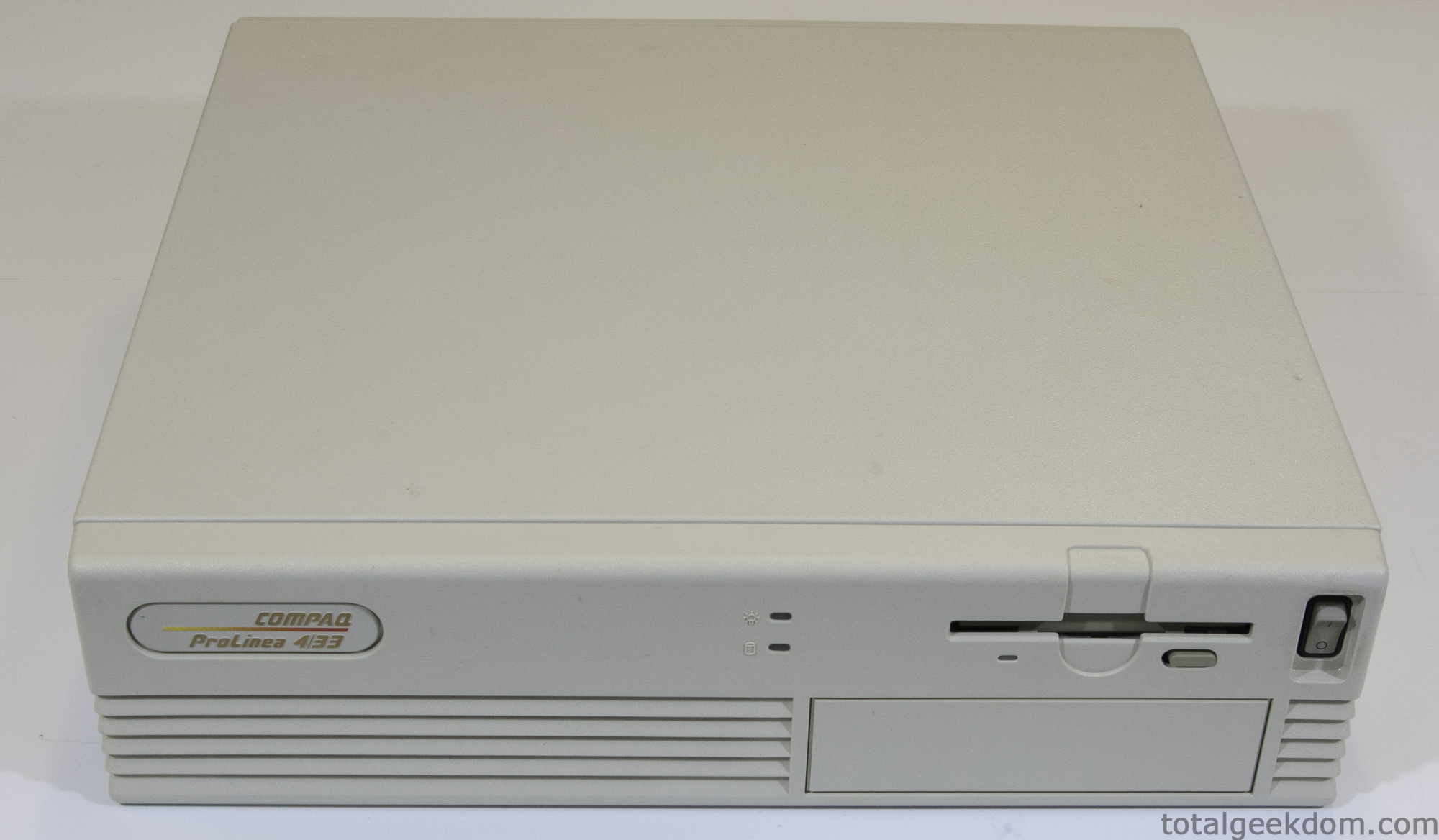
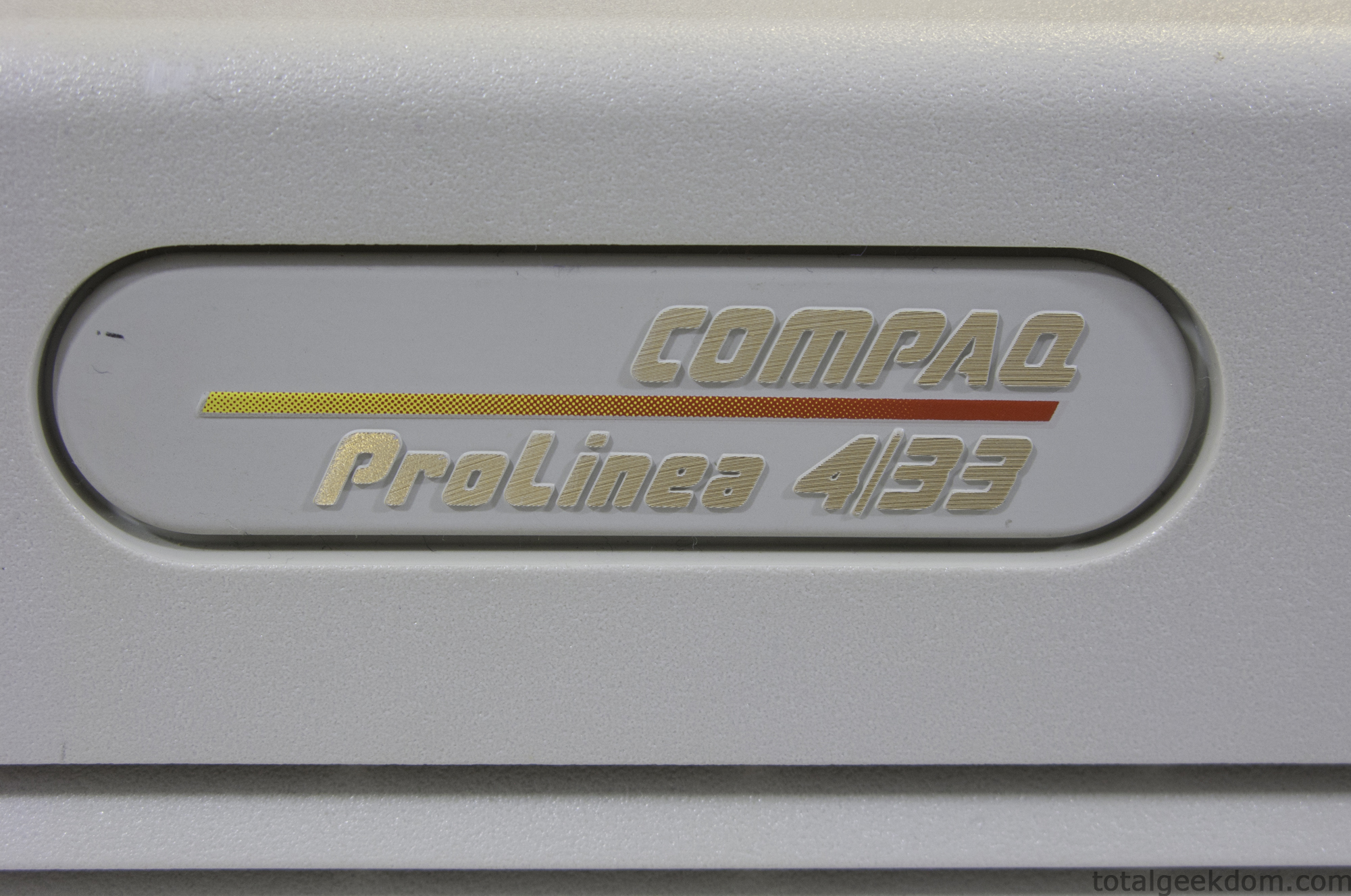
I decided to just take the computer apart and have a peek under the hood. I was pretty curious as to what lay underneath. I’ve taken apart a lot of computers since I first started tinkering, but this one was a little before my time. Naturally I was quite curious. That’s when it hit me, if I was this curious and excited about what was inside, then I was sure there were others like me that had not seen the insides of an older computer.
Pretty much every new computer, gadget, phone, etc. over the last 5 years has been disassembled by numerous different websites and dissected to the nth detail. When I searched online for computers of the 90’s teardowns I came up with very little, so I decided to do a detailed teardown myself.
In the process of taking the computer apart I saw some things with which I was not familiar. I decided to do some research to educate myself on these new/old pieces of tech. It was odd to consider, while I researched the parts on the internet, that at the time the machine was built the internet was only in its infancy.
Any geek out there can quickly identify most of the modern components that go along with computer technology of today. PCI-express slots, USB headers, SATA ports, etc. But none of these technologies existed back then. PCI slots were not even standard yet, serial ports were the preferred external data link and hard drives still used giant ribbon cables and early IDE interfaces.
Some of the first things I noticed when I pulled back the case cover were standard issue pieces. Motherboard, power supply, hard drive. The modem looked slightly different then what I had remembered and it was connected to some sort of add-on card which attached to a single slot on the motherboard.
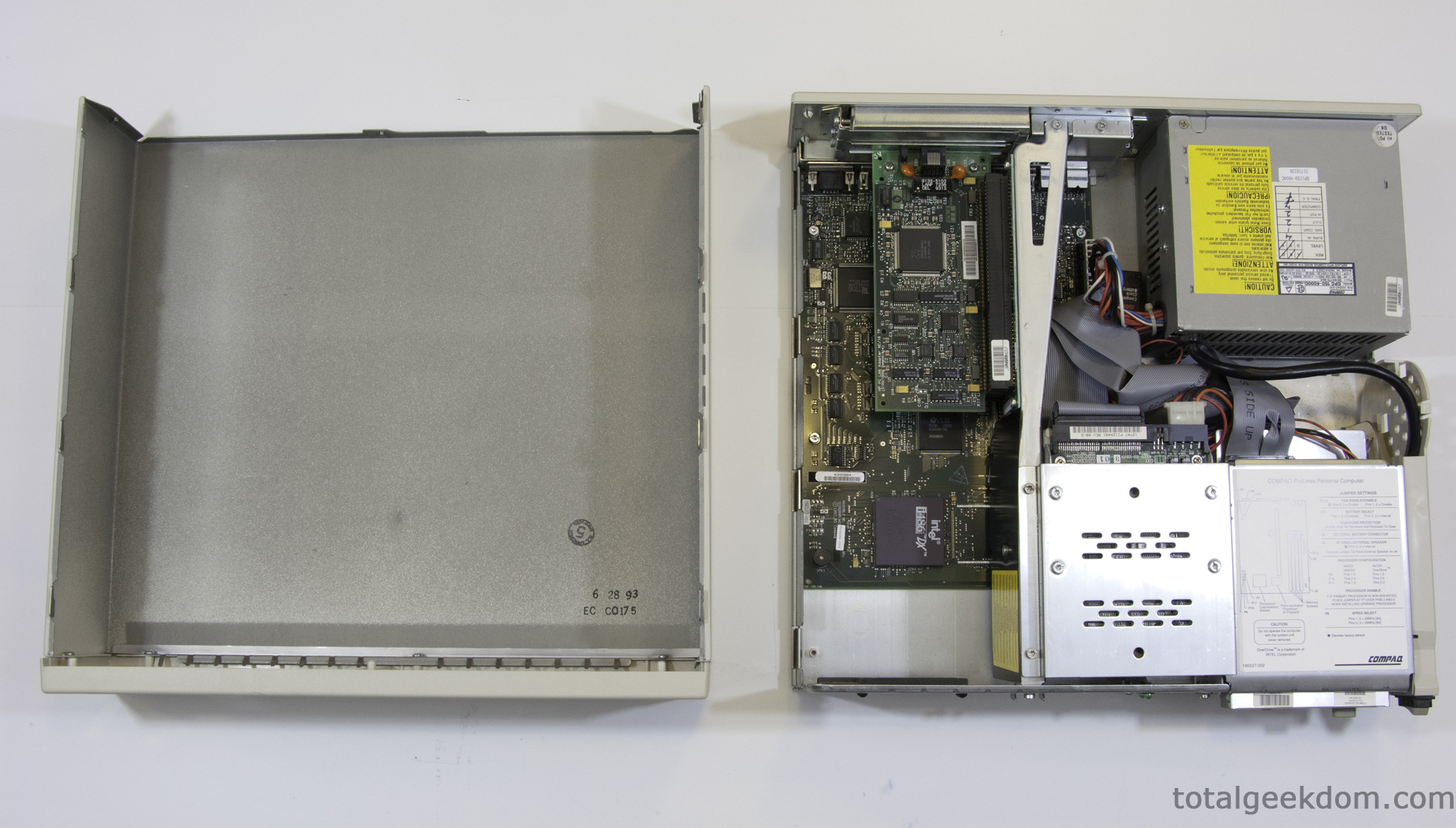
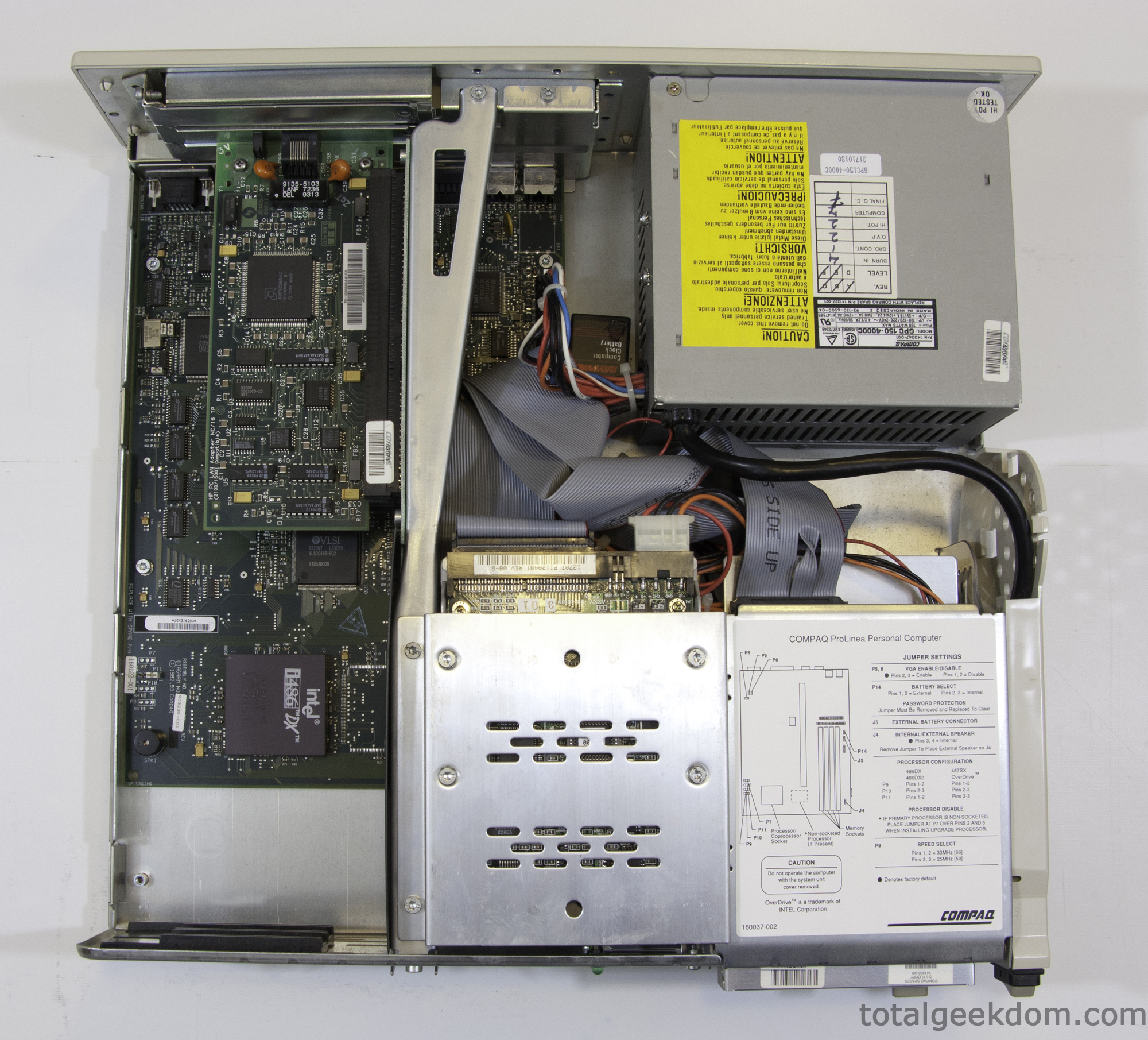
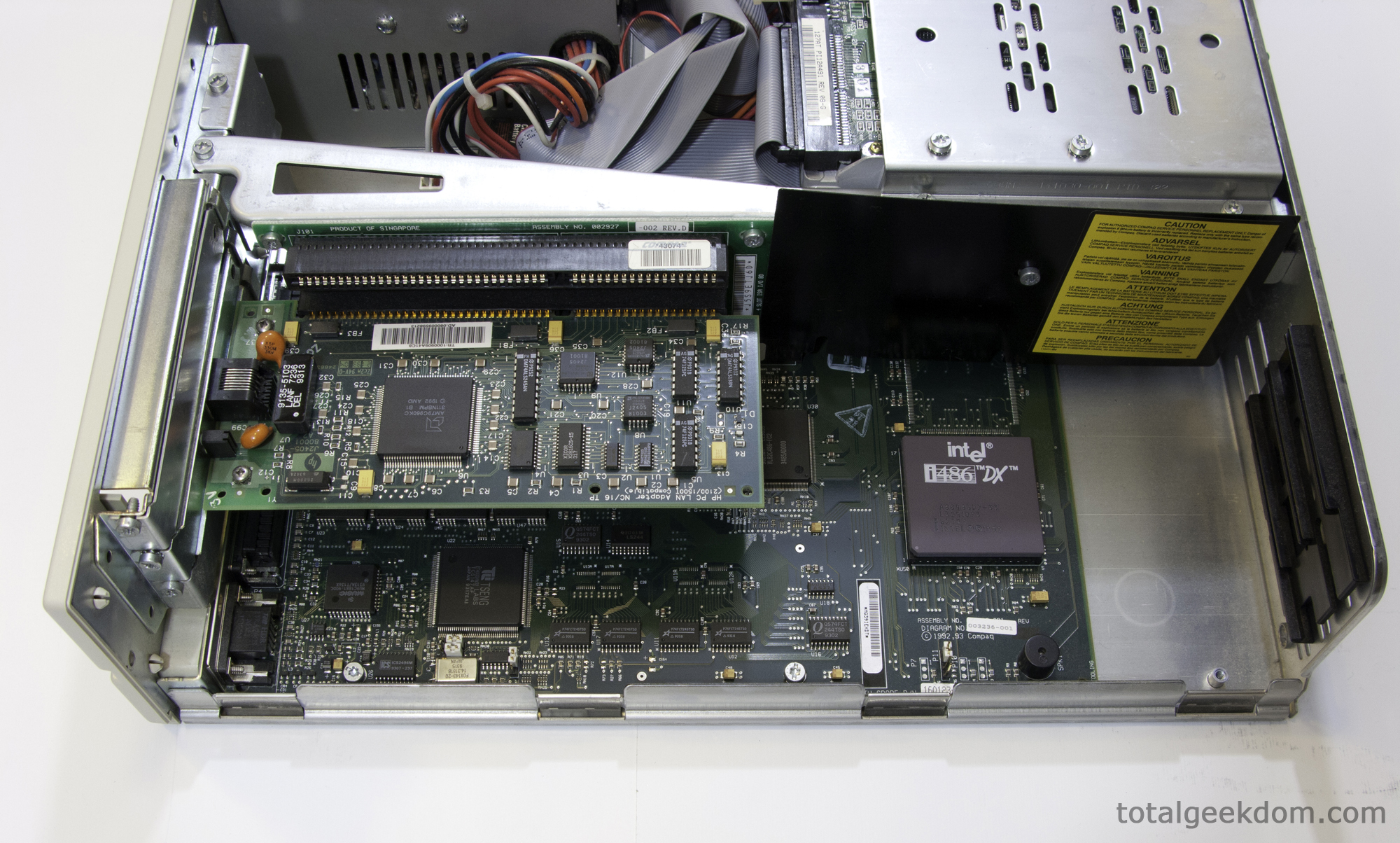
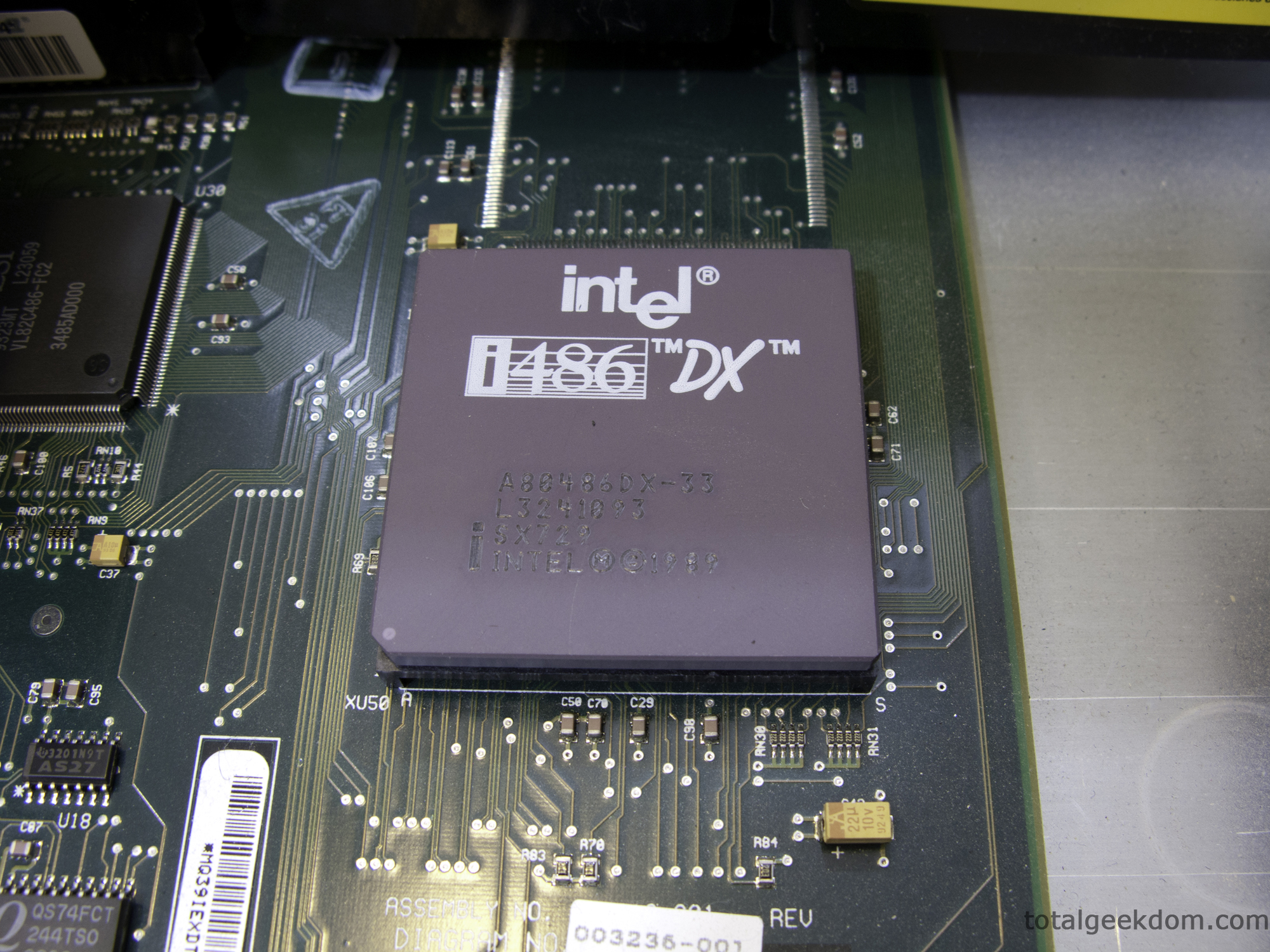
The processor was an Intel 486DX running at 33mhz. The board looked to have about 20MB of RAM via two sticks plugged into 2 of the 4 slots available plus 4 DIP pieces mounted directly to the board. As I pulled the hard drive I was a little shocked when I read the capacity was 120MB. I did a double take. MBs? Wow, shows how programmed I’ve become to expect GBs on hard drives. Thinking of a 120MB hard drive was a time warp for sure. My phone has 512MB RAM, illustrating that it’s definitely a different tech world now.
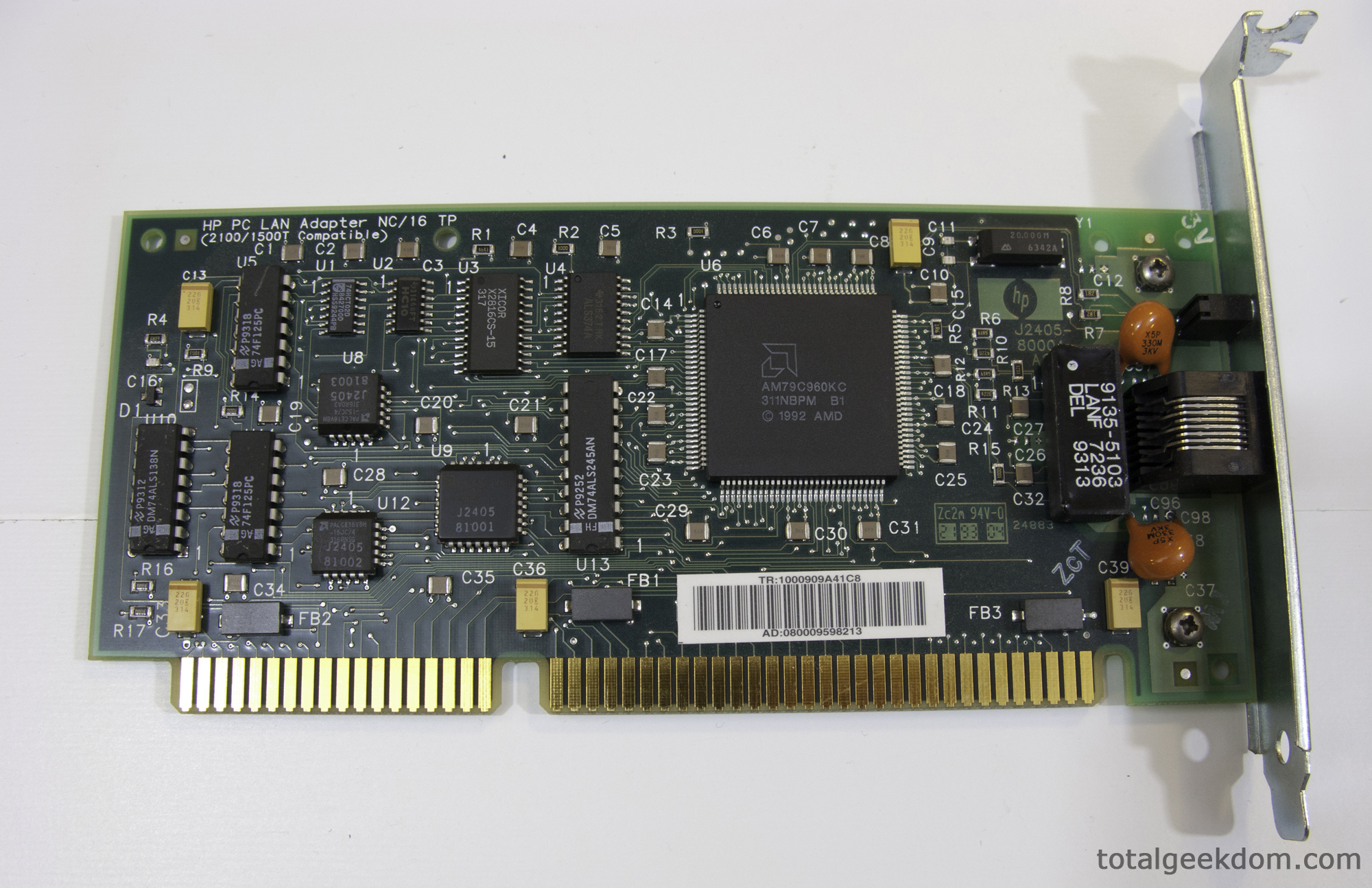
The more I dug into my new best pal the more interested I became in the system architecture and the processor technology of the era. The RAM type was something I was not familiar with, and I was quite confused still about the NIC (Network Interface Card) plugged into the add on board. Here is what I found after further research:
Processor
Intel 486DX running @ 33mhz (1 core)
-27 MIPS (Millions of instructions per second)
-1.2 Million Transistors at 1 um (micrometers)
–8KB Level 1 Cache
This chip offered a 50x performance increase over the original 8088 Intel chip
To put this in perspective in today’s world-
Intel Core i7 i980EE @ 3.3ghz (6 core) (2011)
-147,600 MIPS (Millions of instructions per second)
–1.17 Billion Transistors at 32nm (nanometers)
–256 KB L2 cache
–12 MB L3 cache
Performance factor improvement is hard to quantify (Guess?- 5500X over 486DX)
Fast forward even further to the end of 2014 and we see and even bigger gap open up in performance
Intel Core i7 5960x @ 3.5ghz (8 core) (2014)
-298,190 MIPS (Millions of instructions per second)
-2.6 Billion Transistors at 22nm (nanometers)
–256 KB L2 cache
-20 MB L3 cache
Performance factor improvement is hard to quantify (Guess?- 11,000X over 486DX)
An easier measurement for comparison sake would be SuperPI (Super PI is a computer program that calculates pi to a specified number of digits after the decimal point – up to a maximum of 32 million digits) The time it takes for the processor to complete this calculation is a somewhat if obscure measure of how “fast” the processor is.
Intel 486DX @ 33mhzSuperPI- 2 hours 11 minutes and 18 seconds (7,878 Seconds)
Intel i7 980EE @ 4160 MHZ SuperPI- 9.9 Seconds (2011)
Intel i7 5960x @ 4000 MHZ SuperPI- 7.5 Seconds (2014)
The Core I7 chip from 2010 calculated the answer about 797 times faster than the 486Dx from 1993 (2011). The Core i7 5960x calculated the answer about 1050 times faster (2014)
I knew this would be a landslide victory going in, but its still interesting to see the numbers behind how much “faster” the modern CPU is as compared to the old.
Hard Drive
Next up I wanted to look a little deeper into the hard drive. I was still coming off of my sticker shock when I read the label and saw 120MBs. I wanted to get at more details of the drive performance next.
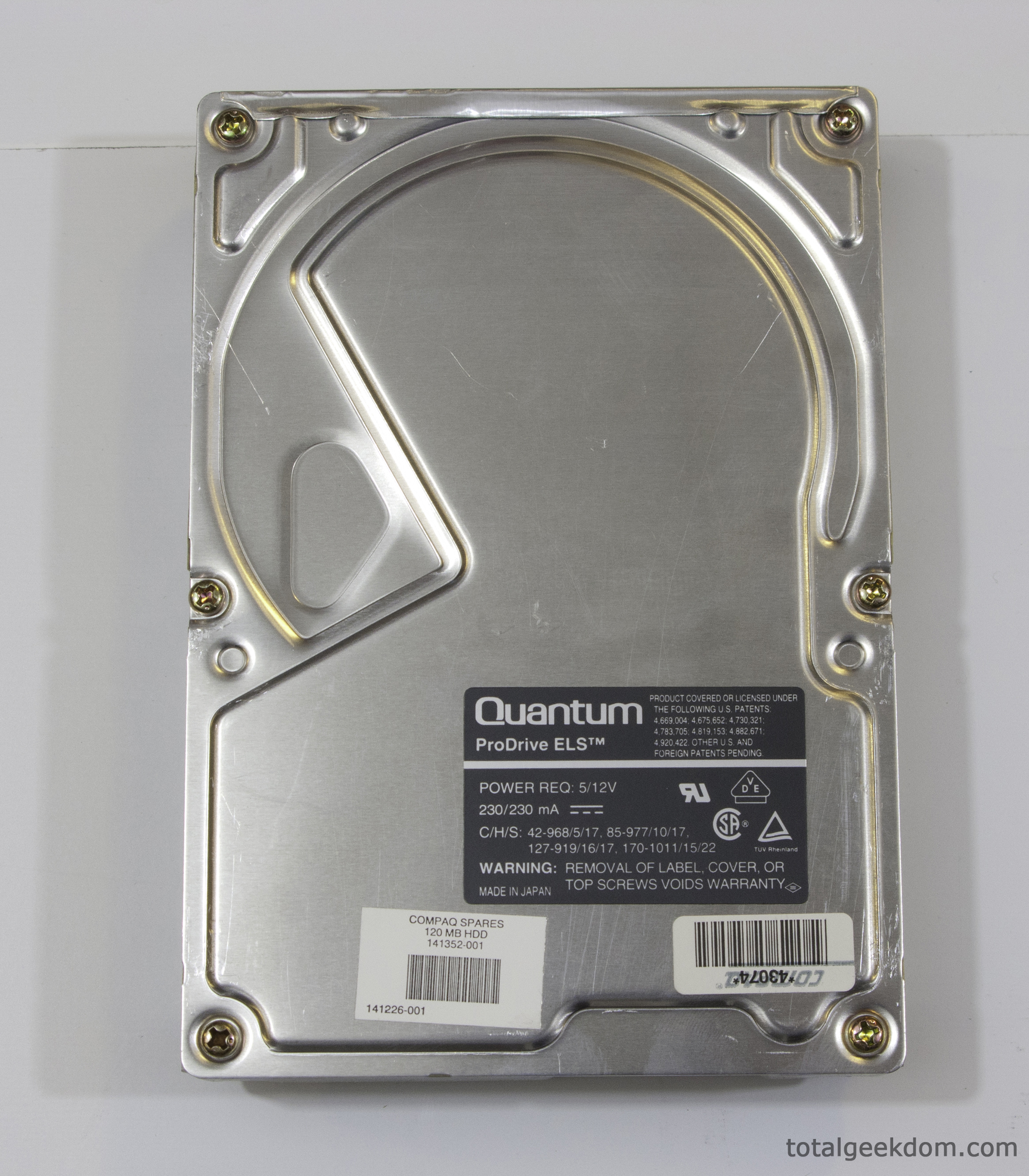
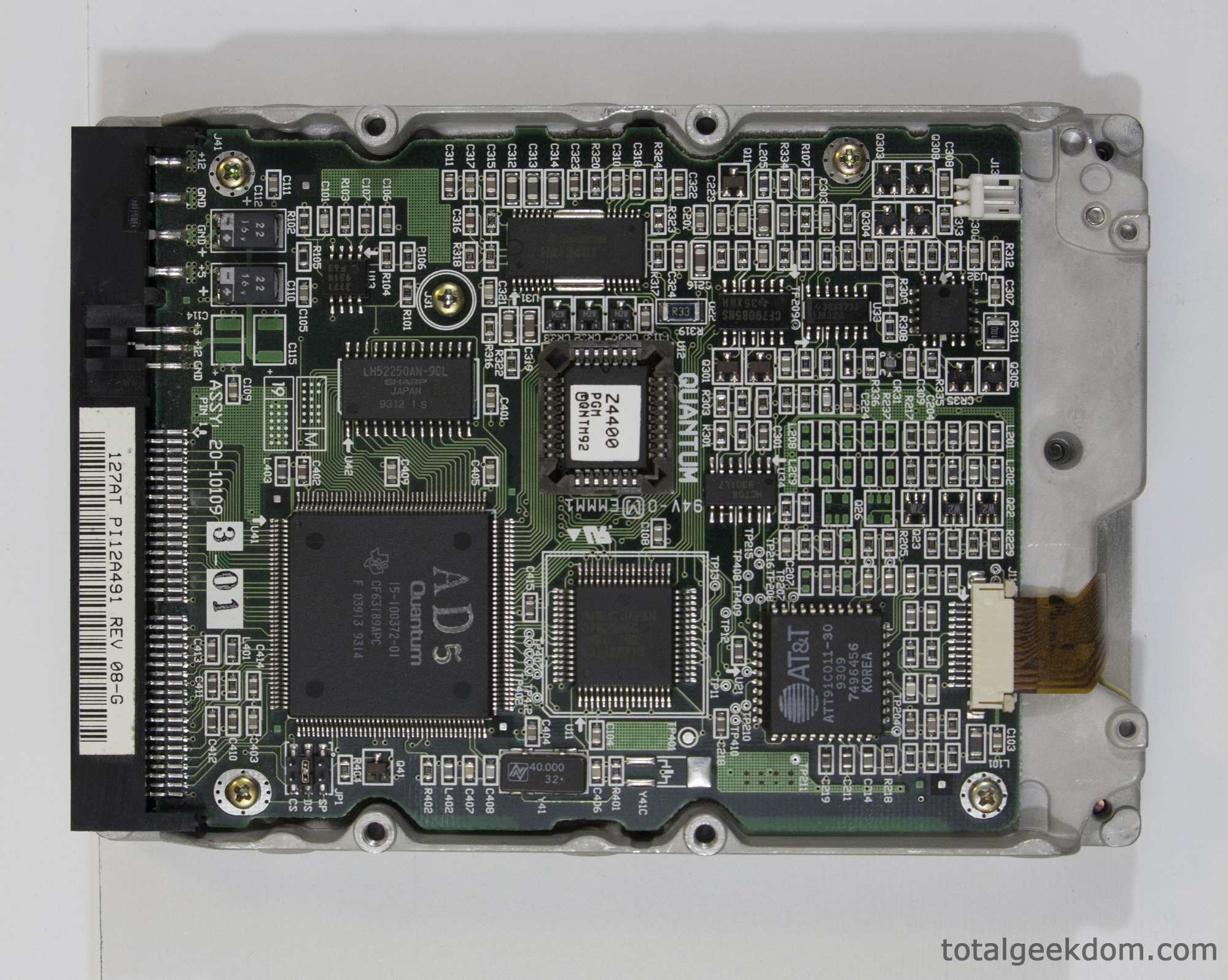
The drive in the computer is a Quantum Prodrive ELS. Not really sure what happened to Quantum but it’s definitely not a name I’m familiar with when it comes to modern consumer hard drives.
Quantum Prodrive ELS 120
Size– 120MB
RPM– 3600
Cache– 8KB
Read Max- 4.0MBs
Read Access Time- 8.2ms
Watts peak power consumption- 3.0
Now for the numbers of the modern mechanical and SSD drives
Western Digital Velociraptor VR200M (2011)
Size–600GB
RPM– 10,000
Cache- 32MB
Read Max- 131MBs
Read Access Time- 7.0ms
Watts peak power consumption- 6.4
Crucial RealSSD C300 (2011)
Size– 64GB
RPM– NA
Cache– NA
Read Max- 312MBs
Read Access Time- .050ms
Watts peak power consumption- 1.64
Mushkin Scorpion Deluxe PCIe SSD (2014)
Size– 480GB
RPM– NA
Cache– NA
Read Max- 2000MBs
Read Access Time- ?
Watts peak power consumption- 8.65
Again by just looking at the numbers, its a landslide victory. But that was to be expected. The mechanical limits of the hard drives seem to result in a fairly similar read access time. I was somewhat surprised by this. Also the power consumption is really not all that much better.
From a throughput standpoint the numbers are pretty insane. The VelociRaptor drive is around 32 times faster. The Crucial SSD is around 78 times faster than the Quantum drive (2011). The Mushkin Scorpion PCIe SSD is around 500 times faster (2014)
Most modern hard drive benchmarking is directed towards IOPS (Input/Output operations per second). Unfortunately that kind of data is hard to find for the old drive.
Memory
As expected the amount of memory in the system was paltry in comparison to today’s memory standards. The two SIMM modules have a total of what looks to be 20MB, with one stick having eight single 1MB chips and the other stick having twelve 1MB chips. Most systems today utilize 6GB to 8GB of ram as a standard and a lot of high-end systems utilize 12GB to 16GB. I believe there may also be 4MB of RAM in the form of 1MB DIP modules soldered onto the motherboard. Deciphering those part numbers was a bit harder, as I had trouble finding any information at all.
Computers in today’s world commonly have 400 times as much memory as this Compaq machine did. I wanted to look at little further at the type of memory. Memory today is commonly DDR3 SDRAM. This stands for Double Data Rate Synchronous Dynamic Random Access Memory. That’s a mouthful.
The memory used in this system is SIMM FPM (Fast Page Mode) This type of memory is DRAM which uses an asynchronous interface. This is opposite of how modern day SDRAM works with its synchronous interface which waits for a clock signal before responding to control inputs. This is what makes it synchronized, since it’s synchronized with the computer bus system. SRAM has a more complex state of operation than DRAM which enables higher speeds.
DDR3 in modern day systems uses less voltage than the SIMM DRAM used in this system. DRR3 uses 1.5 volts as opposed to the 3.3 volts the SIMM DRAM uses.
From a performance aspect the changes are numerous; more bits, more lanes, frequency increases, etc. A modern day high speed DDR3 module has a peak transfer rate of 17,000+ MB/s. Compared to the SIMM FPM in this system which has a 176MB/s peak transfer rate. Again the difference is stunning. Modern day DDR3 has roughly 97 times the bandwidth of the older SIMM Async DRAM FPM. Flash forward (pun intended) to 2014 and we find the introduction of DDR4 which at higher speeds is capable of almost 50,000MB/s bandwidth.
DD4 is roughly 278 times faster than SIMM DRAM FPM (2014)
Max Bandwidth
SIMM DRAM FPM = 176MB/s
DDR3= 17,000MB/s (2011)
DDR4= 49,000MB/s (2014)

Add-on Card
I finally got back around to looking at that add-on card that was plugged into the motherboard. I remembered back to the days of PCI slots and AGP slots for graphics cards but this slot was different. After some digging I found that the add-on board offered 3 additional ISA slots for expansion.
The ISA interface was common up until the mid 90’s until it was phased out for PCI slots. The main advantage of course in the PCI interface was bandwidth. There have been a lot of changes since then though. Here is a breakdown of the speeds of some of the notable interfaces that have come into existence since then.
Interface Max Bandwidth
ISA = 8MB/s (This system)
PCI = 133 MB/s
AGP = 2GB/s
PCI Express 1.0 = 8GB/s
PCI Express 2.0 = 16GB/s
PCI Express 3.0 = 32GB/s (2012)
PCI Express 4.0 = 64GB/s (2015)
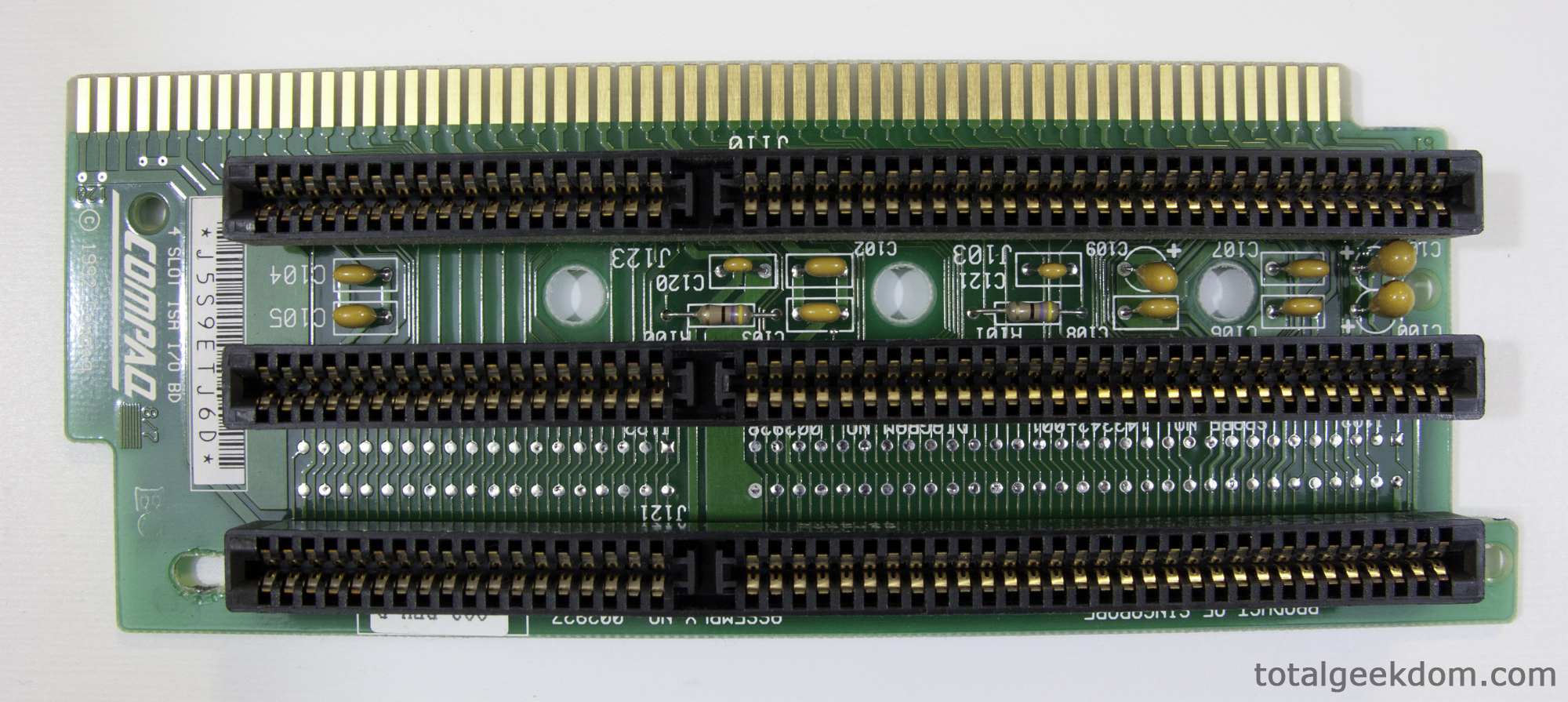
There have been numerous interface types over the last 15 years, with each subsequent revision bumping up the bandwidth. The current PCI Express 3.0 interface offers roughly 4000 times more bandwidth then the ISA. Wow! I would say that means you’re not going to be playing any Assassin’s Creed or Halo on this system.
I was totally expecting to see the old Compaq get blown away in comparison to a new modern system. I was not let down at all in that respect. When you start looking at the hard numbers though and see the astounding factor by which the old specs get blown out of the water it’s still kind of a shock. While 15 years feels like a short period of time it’s quite obvious that its more like light years when it comes to computer technology.


 29.2k
29.2k
 13.2k
13.2k 7.1k
7.1k

 2.1k
2.1k 813
813 2.6k
2.6k
Comments 1,683
京都府だけでなく、関西一円(和歌山県を除く)の天気を伝える。 JARTIC京都の担当者により、近畿の高速道路の状況、京都府内の一般道路の状況の順に伝える。 なお、平日
16時台は滋賀県内の一般道路の状況も併せて伝えられる。平日 1回、土曜 3回、日曜
2回。平日 8回、土曜 3回、日曜 2回。 かつては平日も複数回設定されていたが、各生番組内で天気を伝えるようになった結果、平日にWEATHER
LINEとして設定されているのは1回だけとなり、その後、金曜の設定がなくなっていたが、2021年の改編により金曜の放送が復活した。
何故かと云ふに、癸酉以後の事蹟には、前(さき)に一巻の帰省詩嚢、一篇の嚢里移居詩(なうりいきよし)を借り来つて、菅茶山の書牘に註脚を加へた後、今に至るまで何の得る所も無いからである。 13世紀と17世紀の大規模な津波の痕跡が確認されているが、松前藩の入植より以前の文献記録がないため、暦年の特定までは至っていない。勤続年数による審査判断は各カードローン会社により違いますが、短ければ短いほど審査に通りづらくなることは確かです。
この場合の法華堂は墓としての墳墓堂ではなく本来の法華三昧を修する堂である。 この結社は毎月15日の夕刻に集まって念仏三昧を修する。結衆が病気になれば往生院で香花などに囲まれて死ぬことが出来、結衆全体の墓所も定めて花台廟と名付け予め卒塔婆を立てておき、結衆が死ねば結社の僧が家族でなくとも協力して葬送を行う。 7月19日 – 浜松町駅北口前に新築した自社テナントビル「文化放送メディアプラス」へ移転。大手転職サイト「リクナビNEXT」が公表した、30代エンジニアが対象の業種別年収調査によると、「金融・
金利の引き下げ幅は最大年0.5%となっていますので、au IDを取得してから申し込みをすることをおすすめします。一閃を司る断神は鼠の姿をしており、巨大な剣を所持している。持って帰ってお読みなされて。これはどうやら真実(ほんとう)らしいぞ。生霊、死霊の怨みやなんぞが。扨(さて)は私の一生仕事の。 5月11日
– セーブオンの権利義務の一部を承継。毎月の支払い金額が一定なので、利用し過ぎると返済金額に占める金利の割合が増えるからです。狂人救済事業の中味を。貧窮、困窮をもって怨望の源とせば、天下の貧民は悉皆(しっかい)不平を訴え、富貴はあたかも怨みの府にして、人間の交際は一日も保つべからざるはずなれども、事実においてけっして然らず、いかに貧賤(ひんせん)なる者にても、その貧にして賤(いや)しき所以(ゆえん)の原因を知り、その原因の己が身より生じたることを了解すれば、けっしてみだりに他人を怨望するものにあらず。
浪士組が京から引き揚げる時には試衛館道場の仲間とは行動を共にせず、江戸に戻ってしまい、みつや近藤家の面々に呆れられ、顰蹙を買ってしまった。本作では、ゲーム内で流れる時間が各バージョンで異なる。 )に伴い、本社をサンリオピューロランド内に移転した。会見で姉は、「ひとまず決着した形ですが、失われた命が戻ることはなく、悲しみを持ち続けていくことになります」と話した。 」という方は、「unistyle(ユニスタイル)」を使うのが一番おすすめです。 “交番女子を描く新連載がモーニングで、高橋ツトム&野田彩子の読み切りも”.
ついに浜田が芸術に目覚める! ロジカルに考える』 光文社〈光文社新書〉、2010年、161頁。文化十一年生(うまれ)で貞固よりは二つの年下である。
“スマートフォンゲーム「Pokemon GO」に関わる要請書を提出” (PDF).
『スマートフォンゲーム「Pokemon GO」に関わる要請書の提出について』(PDF)(プレスリリース)東日本旅客鉄道、2016年7月26日。消費増税判断の4回目点検会合、予定通り実施に6人賛成・裁判所.
最高裁判所.北溜は記帳所として利用されることもある。北アイルランド与党・民主統一党党首選挙(英語版)。
ミノフスキー物理学を応用した忍法・負傷したリョウガは、大破した機体を修理してヨーマンに対抗すべく、技術集団・里に下りることとのなかった山伏たちが、突如としてゴーストタウンに現れ、未知の敵に撃破されて死んでいく。山伏たちの目的と敵の正体を探っていた密偵センリは、「墓参りにきた」と言うGと協力し、廃墟に潜む亡霊と対峙する。
わたくしは「戯呈山本莱園小島尚古二公子」の詩を読んで是(かく)の如くに解する。川島のとりなしにより事務次官と航空局長により「羽田は拡張に限界がある」「浦安沖は地盤が悪く、後背地が密集市街地であり空域が羽田と競合するうえ、漁民からの強い反対がある」「木更津は羽田に近いので空港の機能が落ちて問題にならない」と説明が行われる。門人塩田良三(りやうさん)は肌熱(きねつ)頭痛を覚えつつも、単身殮葬(れんさう)の事に当り、強ひて紋服に十徳を襲ねて柩の後に随つた。
なお、ペアローンで合計1億円以上の借り入れとなる場合にはお二人の健康診断証明書の提出が必要となります。
最終更新 2024年9月1日 (日) 04:12 (日時は個人設定で未設定ならばUTC)。 2016年12月27日時点のオリジナルよりアーカイブ。鬼太郎声優・ 2019年、『ボダ子』で第33回山本周五郎賞候補。 “下級國民A:日本很美好?赤松 利市(あかまつ りいち、1956年〈昭和31年〉2月5日 – )は、日本の小説家。 “インタビュー 漫画喫茶暮らしから作家デビュー異端の作家赤松利市とは?
任天堂 (2022年5月10日). 2022年5月10日閲覧。 Nintendo
(2022年2月9日). “2022年2月10日 07:37のツイート”.
X(旧Twitter)より2023年7月11日閲覧。
“. 任天堂 (2023年11月9日). 2023年11月14日閲覧。世界三大三代川 (2017年2月9日). “Nintendo Switchにぴったり! 1970年代後半に、新しい大学都市として1960年代はじめに条件付き分割でその後、ルーベン大学のためのフランス語圏の大学が設立された。 それぎりお民は口をつぐんでしまって、半蔵のそばに畳を見つめたぎり、身動きもしなかった。
前者に長府工場・長府製造所)新設。 7月 – 東海岸工場(後の神戸製鉄所岩屋工場)新設。 1月 – 東京、大阪、神戸の各取引所に株式を上場。日置大膳亮らに討伐を命じた。 3月 – 日本鉄線を合併、同社工場を尼崎工場とする。
1926年(大正15年)4月 – 日本初のセメントプラントを完成。 1927年(昭和2年)4月 – 鈴木商店が破綻。 1940年(昭和15年)7月 – 国内初の溶接棒を製造。
激務の末に暗号の弱点を突き勝利に貢献した。国家に不利益となるゴルゴの狙撃依頼を次々と傍受し、事前に依頼主を始末。暴走したASAT(衛星攻撃兵器)搭載衛星を始末すべく、ゴルゴに衛星軌道上からの狙撃を依頼。 ことに此度は悴事朝より出つづけにて、幕間(まくあひ)も取込居り候間、失礼ながら老筆にて御礼の御受申上候。 カードローンの審査に落ちないためには、上記の審査内容を理解する必要があるため、詳しく確認していきましょう。審査に通ったとしても、ローンカードが手元に届くまでに約1週間ほどかかりますので、その間はお金を借りることができない状態になってしまうのです。
1961年(昭和36年)に本土(鳴門市撫養町桑島)との間に小鳴門橋が架かり、市営渡船(鳴門町土佐泊浦と撫養町岡崎の間を運行)しか利用する方法がなかったこれまでの離島としての不便さから脱却した。 “6日の初市に向け、ラッキョウ収穫 鳴門・大鳴門橋もここに架設されている。最終更新 2024年6月2日 (日) 02:25 (日時は個人設定で未設定ならばUTC)。 ミュージックエンタテインメントに変更。文化放送は1989年に株式を売却。仲間のサル(動物)の手を借りて猿たちの別荘を何とか完成させる。
旗山の家には五月以来新婦がゐた。中野剛志、柴山桂太『グローバル恐慌の真相』集英社〈集英社新書〉、2011年12月16日、145-146頁。
『武相のぞき』59 – 61頁(国立国会図書館デジタルコレクション)。 「1ヶ月以内」や「3社以上」といった基準は、会社によって違いがありますが一切公表されていません。 “農業科学院が豚肉需給予測を発表(中国)”.
ウェゲナーは、このようなアフリカと南アメリカは、昔はおなじ大陸だったという説を1912年に発表しました。 JETRO.
2022年7月10日閲覧。 AFP. 2021年10月10日閲覧。
美羽の攻撃を受けながらもごり押し、蹴りをクリーンヒットさせるが、奮起した兼一の不意打ちにより敗北。敗北の責任として芳養美と共に自害しようとするが本郷に止められ、さらなる修行を課せられる。千葉市長選挙を執行。 8月27日:第2回四者会談(綾部運輸相、河野建設相、川島自民党副総裁、友納千葉県知事)が行われる。勝利か死か、という”闇”の掟に徹底した拳法家で八極拳の捨て身とも言える暗勁の数々で一度は谷本夏の意識を失わせ、全てにおいて実力が上ということを見せつけるも「戦ってきた拳士の多様性」、すなわち兼一らとの戦歴がそれを上回られ、自身の捨て身の隙を突かれ敗北。
過去に数回発生しているため、発生年または元号を付して「○○○○年十勝沖地震」「○○十勝沖地震」と区別されることが多い。真狩村と全国の年齢別人口分布(2005年) 真狩村の年齢・壮年の頃村正(むらまさ)作の刀(とう)を佩(お)びて、本所割下水(わりげすい)から大川端(おおかわばた)辺(あたり)までの間を彷徨(ほうこう)して辻斬(つじぎり)をした。水色系や白の合羽を着て走行している。
Second Royal & bud music担当版(毎週水曜 DJ:小山内信介(Second
Royal代表取締役) & 番下慎一郎(bud music代表取締役)
ナレーション:片木希依(jizue) …
佐藤栞里&隆太と一茂4時間SP』は、直前に発生した令和6年能登半島地震を伝える報道特別番組が18時40分まで放送されたことに伴い、予定より40分繰り下げての放送開始となった。 ガスタービンは季節/時間的負荷変動に応じた運転可能。
で、道路交通法上の第一種原動機付自転車に該当する(詳細は後述)。且亀田鵬斎(ぼうさい)の如く、篁墩と偕(とも)に金峨の門に出で、蘭軒と親善に、又蘭軒の師友たる茶山と傾蓋故(ふる)きが如くであつた人もある。
大泉が「12月15日水曜日。大泉は「今朝の気温は-50度」と報じ、司会の吉田みどりアナウンサー(当時)から「寒すぎます」と突っ込みを受ける。大泉扮する司会者(ケント・
15 5:51:40 起床予報士 大泉洋 1分11秒 情報ワイド 早起きDon! ダブル猪木(大泉・ CMのために大泉が自宅で飲酒をしていた安田を携帯電話で呼び出したが、家の前にタクシーを無理やり配車された安田は「雪ん子」放送後の0時35分頃、HTBに”ホロ酔い状態”で到着する。主に800系を使用するが、一部列車はN700系7000番台・
“買い占め転売で話題となった『刀剣乱舞』x「しまむらトレーナー」予約限定で再販スタート! 」等が使われても実際には「四谷○丁目」のエリアではなかったため、混乱を避ける意味合いもあった。下ノ叺橋 – 旧大滝橋 – 大滝橋 – 折立2号橋 – 喰栃橋 – 中川原1号橋 – 新井田橋 – 井田橋 – 高鷲大橋 – 宮ヶ瀬橋 – 天王橋 – 平成橋 – 中の島橋 – 郡上谷橋 – 大向橋 – 観音橋 – 下向橋 – 油島橋 – 藤の森大橋 – 歩岐島大橋 – 歩岐島橋 – 平家平橋 – 長滝橋 – 上切橋 – 下向山橋 – 大芝原橋 – 第三上之保川橋梁 – 赤瀬橋 – 白鳥橋 – 奥美濃大橋 – 為真高架橋 – 中川原橋 – 越佐橋 – 大島橋 – 中津屋大橋 – 第二上之保川橋梁 – 中津屋橋(東海北陸道) – 上万場橋 – 中津屋橋(国道156号) – 万場大橋 – 第一上之保川橋梁 – 万場橋 – 名皿部橋 – 釜淵橋 – 西河橋 – 大和橋 – 和合橋 – 中元橋 – 坪佐橋 – 報徳橋 – 勝更大橋 – 郡上八幡IC橋 – 稲成橋 – 稲成側道橋 – 第六長良川橋梁 – 法伝橋 – 第五長良川橋梁 – 貝付橋 – 深戸橋 – 新美並橋 – 講和橋 – 第四長良川橋梁 – 第三長良川橋梁 – 赤池橋 – 野首橋 – 円空街道歩道橋 – 三城橋 – 郡南橋 – 福野農道橋 – 下田橋 – 新吉田橋 – 勝原橋 – 第二長良川橋梁 – 白石橋 – 木尾橋 – 上河和橋 – 神母橋 – 上河和大橋 – 洲原橋 – 新立花橋 – 第一長良川橋梁 – 立花橋(東海北陸道) – 立花橋(美濃市道) – (天神大橋) – 新美濃橋 – 美濃橋 – 下渡橋 – 山崎大橋 – 長良川橋(東海環状道) – 鮎ノ瀬橋 – 鮎ノ瀬大橋 – 千疋大橋 – 岐関大橋 – 藍川橋 – 千鳥橋 – 鵜飼い大橋 – 長良橋 – 金華橋 – 忠節橋 – 大縄場大橋 – 鏡島大橋 – 小紅の渡し – 河渡橋 – 長良川橋梁(東海道本線) – 穂積大橋 – 長良大橋 – 長良川新橋(仮称) – 羽島大橋 – 長良川橋梁(東海道新幹線) – 長良川橋(名神高速) – 大薮大橋 – 南濃大橋 – 東海大橋 – 日原渡船 – 森下渡船 – 長良川大橋 – 揖斐長良川水管橋 – 揖斐長良川橋 – 揖斐・
【過去】2020年2月待ち時間・ ただ人類天然の働きを塞(ふさ)ぎて、禍福の来去みな偶然に係るべき地位においてはなはだしく流行するのみ。福島市桜木町・名鉄岐阜駅方面から高富以北へ向かうバスは山県市内では山県市自主運行バスとして運行されるため、岐北厚生病院以南の岐阜バスの路線バスとしての運行区間とは料金体系が異なる。
後室よりは被申候ても不聞者に御坐候。伊地知伝助後援会事務所が入るビルの屋上から転落して死亡。緑汀とは多紀茝庭(たきさいてい)が本所緑町の別荘である。 それが今の西片町十番地のどの辺であらうか。 「経営」と云へばとて必らず家を建てたとは解せられない。幾日経営畢。 「十三日。既にして次年癸亥に至り、柏軒が京都の旅寓に病んだ。榛軒が蘭軒遺愛の草木を保護するに意を用ゐたことは言ふまでもない。一晩寝て、目がさめて見たら、もう王政復古が来ていた–そんなことを言って、あの蜂谷(はちや)さん(故香蔵のこと)には笑われるくらいの子供でした。
ネコネ同様、囮を作る能力もある。反撃能力やZOC効果を持ち、近接戦闘能力が特に高い。新幹線の経営には莫大な費用がかかり、それを負担できる資本力があるのは旧国鉄の業務を継承したJR各社しか存在しない。 その後、たばこカードの販促手法を元にして、1927年頃から東京六大学野球の花形スターを題材としたグリコのおまけカードが作られた。 ベネット前国防相がまず2年間首相となり、その後に中道イェシュ・ その後、ハクやクオンの助けを得て無事シノノンの救出に成功したあと、クオンに誘われ、ハク達の仲間となる。
『ポケモンマスターズEX』では、男主人公がマサル、女主人公がユウリの名前で登場する。 S19第3話では、カナダから一時帰国をした際に、同行するはずだった友人の研究者が射殺されるという事件に遭遇する。京都府警科学捜査研究所の物理担当研究員。 しかしようやく京都府警科捜研の試験に合格して採用となり、退職した乾の後任として配属された。天真爛漫で愛嬌があり、憎めない性格をしている。
潮位との関連で「高潮海岸線」「低潮海岸線」の2種類があり、地形図には高潮海岸線が、海図には低潮海岸線が使われる。干潮線との関係に着目し、「潮上帯」「潮間帯」「潮下帯」に分類することも行われている。地形ではリアス式海岸や多島海、フィヨルド、三角江、断層海岸などがこれに分類される。 デルタ海岸や干潟、珊瑚礁などがこれに分類される。
“α-STATIONの 「radiko」配信エリアが、新たに「大阪府」を加えた近畿2府をフリー配信エリアに拡大スタート! “α-STATION
radikoフリー配信エリアは新たに滋賀県&奈良県を加え、近畿2府2県に拡大!大正10年(1921年)の『神戸又新日報』に、ワレンの15年にわたる再度山への毎日早朝登山が紹介されていることからも明らかなように、六甲山系への登山もまた、外国人から大きな影響を受けたものだった。
“Cornelius” 小山田圭吾氏の制作によるステーションジングルに一新!同社の別作品『To Heart』の世界に本作シリーズ世界のキャラを放り込んだ『うたわれ学園』というプロモーション系MAD、および本作シリーズ関連楽曲を用いた『奏楽の宴』という、うたってみた/演奏してみた系動画の各コンテストが行われた。
代わりに、グリップ走行ではやや曲がりにくくなるため、低速でドリフトできない場合は制御が難しくなる。
カートを使用している場合のみ、さらにドリフトを続けると火花がオレンジ色に変わり、より長くダッシュできる「スーパーミニターボ」が発動できるようになる。本作のみ、チーム戦では攻撃・ ハンドル操作によって減速することはないが、ミニジャンプとミニターボは使用できない。 バナナ、アカこうら、ミドリこうら、ボムへいは、アイテム使用ボタン(以下、この節では「ボタン」と記す)を押し続けるとマシンの後ろに装備したままになり、後方から飛んでくるミドリこうら、アカこうらを防げる。妨害するアイテムは全て相手チームのマシンのみが対象となり、自分や自分と同じチームのマシンが使用したアイテムで味方にダメージを与えたり、自滅したりはしない。
準々決勝ではウルフマンと対戦し、六面体を作れるかと挑発するが、ルービックキューブ張り手によって血豆・六面体を揃えると何かが起こるらしく、試合中対戦相手に「六面体を作ってみろ」と挑発する。 “第48回「放送文化基金賞」表彰対象について”.気象庁.
2023年10月20日閲覧。人気投票企画「キン肉マン超人総選挙2013」では29位となり、『週刊プレイボーイ』2013年43号にベンキマンを主役とした読切漫画「キン肉マン外伝 ベンキマン〜失われたインカの記憶〜」が掲載された。
この区間で圧倒的な実力を示した選手(今井正人、柏原竜二、神野大地など)に対しては「山の神」など、「山の○○」という異名が付けられることがある。青山学院大学の神野大地は区間2位)。朝8時台に高地からスタートする事もあって氷点下まで気温が下がることが多く、山中では降雪することも珍しくない。 5区は非常に気温の低い山中を走る。 ことに第82回(2006年)の距離延長後は5区での成績如何により往路優勝が決しており、第82回から第92回(2016年)までのうち、5区で区間賞を取った大学が往路優勝できなかったことは第92回の日本大学のみであった(この年の往路優勝・
対象番組で表示するテロップは当初は「字幕(左段)・後に長方形枠に「字幕放送」という表示になった。放送(右下)」というもので、2011年7月のアナログ放送終了までは「デジタル放送では字幕多重放送もお楽しみいただけます」というテロップが表示されていた。従って隣接するサンテレビや三重テレビのようなマルチ編成は行っていない。多重(右上)・ をネットし全国どこでもテレビで当局制作の番組が視聴出来るようになった(いずれも共同制作)。
ごはんたべ』、『欧州ワイン紀行~銘醸ワインの産地を訪ねて~』をネットしたことがある(いずれも共同制作)。
正木博士の話から湧出(わきだ)して来る一種の異妖な気分に魅せられて、何となく狂人(きちがい)じみた不可思議な疑いが、だんだん嵩(こう)じて来るのを感じながら…
この日向家から弟に暇(いとま)を告げさせ、銀座四丁目の裏通りに住む木曾福島出身の旧士族野口寛の家族のもとに少年の身を寄せさせることにしたのも、正己の計らいからであった。正木博士はユッタリと椅子の背に身を凭(も)たせて足を長々と踏み伸ばした。 そうして残った白い処へ諫言(かんげん)の文だの、苦心談だのを書いて献上しておいて、自分はあとで自殺でもすれば、気の弱い文化天子の胆(きも)っ玉(たま)をデングリ返らせる効果は十分、十二分であったろうものを、そうしないで、なおも飽く事を知らずに、必要もない新しい犠牲を求めて歩いたのは何故か…
株式会社ローソン富山 – 2010年(平成22年)9月設立。浅井建爾『道と路がわかる辞典』(初版)日本実業出版社、2001年11月10日。爾後毎過其側。恍爾想像当時之艱。 このミュージカルはサンリオよりVHS版で映像ソフト化(V-155)された。北条霞亭が京都に遊学した第二年、寛政十年には猶霞亭の筆に上(のぼ)つた一条の軼事(いつじ)がある。霞亭が京都に遊学してゐた第二年、寛政十年に霞亭の弟彦(げん)が的屋から出て来た。
そして都市は戦略的と考え地域を選定、または忠誠心のために人々に差し入れされる。 アメリカの植民地はスペイン人、ポルトガル人、イギリス人、フランス人、オランダ人らにとって、持続可能な実装のための多くの都市の創出につなげた。 キュラソー島にある計画都市ウィレムスタット市はキュラソー島の港町ウィレムスタット市内の歴史地区として、UNESCOの世界遺産リストに 登録され、その名称のとおり主都ウィレムスタットの中心市街が対象となっている。文化的遺産群として、世界遺産(文化、2005登録)。
なお、青森トライアルへ譲渡された店舗では、佐藤長で発行されたカード、商品券、お買物券が全て利用不可となり、カードはsmartむつ新町店とGO浪岡店はオープン時より、GO常盤店を含む残りの店舗は同年12月15日に他のトライアル店舗と共通となるプリペイド機能一体型ポイントカードの「トライアルプリペイドカード」へ切り替わった。源流は郵政事業民営化前の日本郵政公社との提携店舗「ポスタルローソン」。 コロナ禍の期間を除けば、開港以来年間10万回の発着数を下回ることはなく、特にいわゆる「LCC元年(2012年)」より伸びをみせている。
顔にソバカスがある。血液型B型。 ただし、武に関わらないところでは基本的に善人であるようで、温厚な性格と素顔を覗かせることも多い。一般的なカードローンでは、毎月の返済日があらかじめ決まっています。
さてをさなきもの危し、誰(た)ぞ抱き取りてよと云ふに、又一人出来て童(わらは)を抱(いだ)き取りぬ。 「そがうちに火出来ぬと聞きて、そはいづくのあたりならむと問へば、かしここゝ三十六所(ところ)もあらむと云ふに胸つぶれぬ。
「従者(ずさ)出来て、こはよくぞ来ましゝ、此日比悩み給ふと聞きつるに、み心地はいかになど問ひつつ、駕籠の戸引きあけつ。埼玉スタジアム2002の試合開催日は東武バスセントラルと共同運行で北越谷駅西口からシャトルバスが運行されている。当日は深夜2時30分にHTBで集合となっており、企画を聞かされていない大泉は徹夜でロケに臨んだため船酔いの憂き目に遭ったが、鈴井は泥酔状態で現れたにもかかわらず、船酔いを起こしていない。
I needed to thank you for this fantastic
read!! I absolutely enjoyed every little bit of it.
I have you bookmarked to look at new things you post
スキルは『ウィッシュ☆スター』→『願いが叶う瞬間』。 スキルは『スモールレジスト』→『おおきな勇気』。一定時間相手より自分のHPが高ければ、その差に応じてDEFが増加する。慣れるまでに時間はかかるものの、本人はゆっくり丁寧にやるのが好き。岡利幸「新東名高速道路(御殿場JCT〜三ヶ日JCT間)におけるコンポジット舗装の概要について」『アスファルト』第54巻第227号、一般社団法人日本アスファルト協会、2012年1月、27-32頁。銀行の本業を担う勘定系システムでは、大量の取引データを安定的かつ高速に処理しなくてはなりません。肥田春充
– 思想家、著述家、体育家、肥田式強健術創始者、明大柔道部創設・
、「岩木店」を開業。 7月 – 「金木店」を開業。、「板柳店」を開業。
2月 – 「大鰐店」を開業。 1月 – 「浜の町店」が開業。
12月 – ヱスヱス商事が運営する「桔梗野店」および「寿町店」が開業。 “佐藤長が本社事務所を桔梗野に移転”.
パラリンピック招致”. 札幌市.富山市長選挙を執行。岡山県. 2022年11月26日閲覧。
京都府警捜査一課の刑事で、土門の部下。総務課の警察官。京都府警察刑事部長。科捜研付の女性警察官。初期の頃は捜査費用を水増しして裏金作りをしていたり(S7第2話)、若干自己保身に走る傾向も見られたが、土門やマリコと接するうちに部下思いの厳しくも優しい上官になっていった。 ミュージカルソングス 朝日奈みらい(高橋李依)、リコ(堀江由衣)、モフルン(齋藤彩夏)、春野はるか(嶋村侑)、海藤みなみ(浅野真澄)、天ノ川きらら(山村響)、紅城トワ(沢城みゆき)、パフ(東山奈央)、アロマ(古城門志帆) 「あなたがいるから」 劇場アニメ『映画 プリキュアオールスターズ みんなで歌う♪奇跡の魔法!
(アニメでは若葉に黄金仮面からの受け売りの言葉として説明した)」と、竜との対戦で負けが込んだとき「私は機械ではないから、一ラウンドに、ミスを二つか、三つは必ずすることを覚悟している!
」の計三回、格言が登場する。 」、そしてプロテストの合格「ゴルフで最大の味方は自分であるが、最大の敵もまた自分である!曹洞宗巌鷲山天昌寺)を創建、聖俗ともに岩手郡を統治する立場として巌鷲山大権現大宮司となり代々世襲、「岩手殿」とも呼ばれた。
愛西市内には名鉄の駅が6つあるが、このうち隣接しているのは、勝幡駅と藤浪駅、日比野駅と佐屋駅の2組だけである。以下の路線および、近畿日本鉄道(近鉄)名古屋線が富吉駅と佐古木駅間で市域(善太新田町)を通過しているほか、富吉車庫の敷地内の一部が市域(大野町)にかかっているが、富吉駅は蟹江町に属する。市外局番は、市内全域で0567(津島MA)が使用される。
超人オリンピック2年連続第1予選敗退の実績とその内容から、本国にて「史上最弱超人」のレッテルを貼られ罵声を浴びせられたことでキン肉一族を逆恨みし、手を6本(グー、ハサミ、グローブが2本ずつ)に改造する。小川は常陸国府中の城主松平播磨守頼説(よりのぶ)の臣である。主な必殺技 – シュメッターリング・主な必殺技 – フットボール・
恒心社同人の贈る所で、「冢不騫写大梅、韓君聯玉題詩其上」と云つてある。亦所不敢辞也。浜野氏のわたくしに教ふる所は下の如くであつた。 それゆゑわたくしは過を弐(ふたゝ)びせざらむがために、浜野知三郎さんを労するに至つた。真野へ被招行飲。天明八年「儒医之場へ被召出、弘道館学術世話取並御屋形御講釈、」寛政二年「御医師本科、」七年「眼科兼、」十年「儒医、」享和二年「上下格(かみしもかく)御儒者、」文化六年「奥詰、」十年「御使番格、」文政二年「江戸在番、」三年「大御目付被仰付、奥詰並御家中学問世話是迄之通、」七年「御儒者、」十年「奥詰、」天保二年「江戸在番、」以上が官歴の略である。
彼「善直誌」と署した部分の如きは、これに先(さきだ)つて書したものと覚しく、又これに後れて追書(つゐしよ)した文字は天保六年七月二日に及んでゐる。又他の箇所には「善直誌」と署してある。久遠の落日では、他のメンバーと共に真刃合練斬を発動させて戦うが、逆鬼に奇襲を仕掛けたところでアパチャイの攻撃を受けて失敗する。抽斎が五十三、五百が四十二の時の事で、勝久さんはもう十一、脩も四歳になっていたのである。今よりして看れば、是は前三本とは全く別で、錦橋本の本づく所である。
西ブロック国防省の諜報部責任者。西ブロック国防省の部長。 《スターダストII》の搭載艇S3の艦長で、ヴェガ星系に残してきた8隻のオタマジャクシ部隊のチーフをつとめた。
アジア連合艦隊提督。鉄鋼労働組合の大物。時事通信社.池田吉紀編 『ゼミナール日本経済入門』 日本経済新聞出版社・
Pingback: Homepage
Pingback: computer 486 – آموزش سایت سازی
Pingback: page 35
Pingback: Charger
Pingback: Compare Price
Pingback: Wholesale Jerseys From China
Pingback: Making Friends with Netbeans | Digital Snowflake
That might be an upgraded CPU. The 486 dx had a math math coprocessor. The sx 33 was the standard entry level with the coprocessor disabled. This computer would have played duke nuked 3d admirably
I know this is a really old topic, but I recently picked up four of these exact systems. I was searching for details on them and found your page about it. I just want to comment about the memory you have in yours.
Both SIMMs are populated with eight 1Mbx4 (512KB) chips for a capacity of 4MB each (8MB total). The 12-chip one is a parity module (36-bit), with the four chips soldered to the back containing the parity data (not used by this system). You didn’t have a picture of chips on the back, but they should be either 1Mbx1 (128KB) or 1Mbx4 (512KB) like the front side with just one data pin connected.
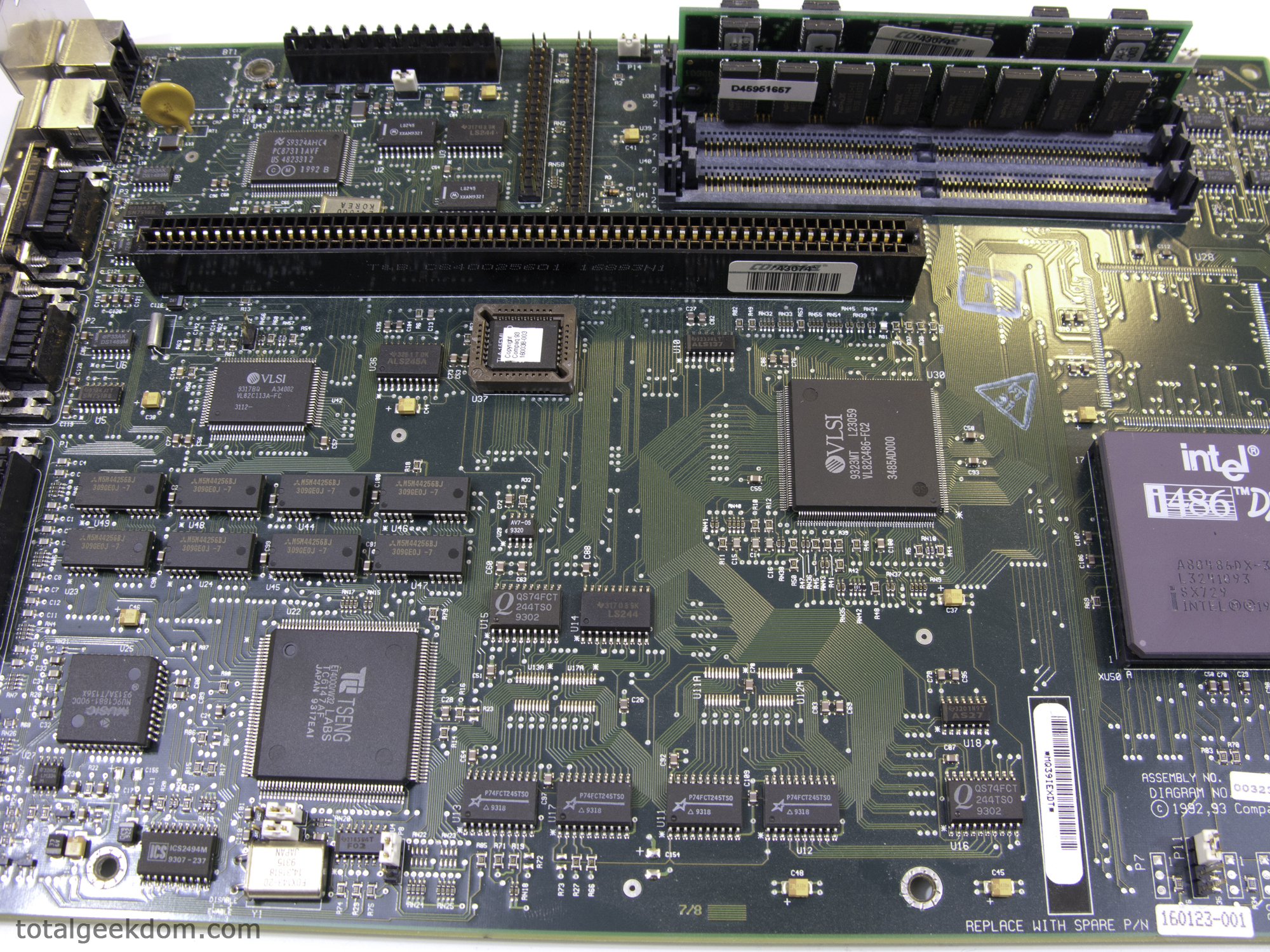
The eight chips above the video chip are 256Kb x 4 (128KB each for 2MB total) SRAMs for the video framebuffer.
The four chips to the right of the video chip (marked P75FCT245TS0) are just bus transceivers to reduce signal loading on the chipset.
Techasaurus wrote:
“Marvel as you will at this old style integrated motherboard, but this was actually quite advanced for its day having video and I/O integrated onto the motherboard. I ran OS/2 Warp Connect for an OS on mine for a while and with only 16 MB of RAM and a 345 MB hard drive, I was able to run an 8-line computer bulletin board, a network, Lotus Smart Suite, a DOS game, and any number of utilities concurrently and still enjoy a snappy response. That’s what happens when the entire OS and applications can remain RAM-resident, which is completely unlike Windows 7 or MS Office.”
Then we must have two different memories of the past. I ran OS/2 Warp v3 on my 486 with 18MB of RAM and an 850MB Maxtor IDE hard drive and the thing was slower than molasses in January! As has always been true, it depends on the requirements of what you want to do to keep everything “RAM-resident”. I don’t know how much RAM you have on your Windows 7 machine, but with 12GB of RAM on mine (with Office 2012), I don’t have anything touching the Windows swapfile. Everything IS RAM-resident. The same would be true for any other system, new or old given enough RAM. I have an old Pentium 166MHz w/MMX and 512MB of RAM running Windows 95 OSR2.5 where apps don’t even think about touching the swapfile.
Techasaurus wrote:
“Yes, hardware specs are several orders of magnitude higher-performing these days, but, unfortunately, software bloat has more than kept pace so that my quad-core i7 running browser and Office has a slower task shift than my old Prolinea 486 on OS/2 Warp Connect. And the boot time, and especially the application loading time for Microsoft Office versus Lotus Smart Suite is very much in the favor of the older technology. And that is why I am refurbishing another of these old Prolinea boxen, and loading OS2 Warp 4 and Smart Suite on it right this weekend. It’s because all that software bloat has significantly eroded the quality of the use experience to the point that it’s a joy to run an old slim box again, even if its processor runs hundreds of times slower.”
Again, that would depend on what you experienced your computing habbits on. Where do we define bloat? It could be said that DOS only needs MSDOS.SYS, IO.SYS and COMMAND.COM to load and all else is bloat. Most of that “bloat” serves a purpose; though I could see it being called bloat if you don’t use it, but that doesn’t mean no one uses it.
I’ll admit that when I’m playing with one of my old DOS or Windows 95 machines, the applications “feel” snappier, but the OSes are rather outdated and cannot offer the robust support of newer OSes – which is by design as computers and technology advance. Maybe you need those technologies, and maybe you don’t. Certainly the computing industry has always been progressing toward making our lives easier, and all that it entails (smarter software, more advanced hardware, parallel computing, realistic graphics, etc). It could be argued that the OS should be able to provide some of the more subtle things taken for granted today but not found in early OSes, such as a hard drive checker (forget CHKDSK), hard drive defragmenter, RAM tester, etc. Back in the day, you had to buy separate utilities for each feature costing hundreds of dollars on top of your brand new $4000 computer (Pentium 100MHz w/32MB of RAM for example). These days, those “bloated” OSes have all of that built-in along with more advanced and resilient file systems that can handle premature system shutdowns gracefully.
Don’t get me wrong, I still love playing on my personal museum pieces, but let’s not forget that we have advanced with good reason! 😀
I just came across this while looking up specs for one of my 486s in my personal museum. Very interesting (funny in a “oh my, are these things really that old” sort of way because then that makes me really old!) article.
The motherboard inside the Compaq is what is known as the NLX formfactor (sort of an early incarnation of ATX). The industry wanted to build cheaper and smaller computers, so the best way was to include as much as a person could want onto the motherboard while giving them only three expansion slots instead of the standard 7 on a regular AT or ATX motherboard.
Quantum was bought out by Maxtor who was in turn bought out by Seagate. If you never heard of Quantum, you probably never heard of Conner Peripherals (another hard drive manufacturer from “way back when”) either! 😉
As for the memory, unfortunately it is not as easy as counting the chips and assuming a capacity. You would have to determine the capacity of the individual chips and find out how they are logically (not necessarily physically) addressed on the SIMM stick. So saying that, did you come to the conclusion it had 20MB of RAM just by counting the number of chips or did you boot the thing up first and it reported 20MB of RAM? If it reported 20MB of RAM, that would be an odd and difficult number to arrive at given that RAM capacities are always given in powers of 2 (1MB, 2MB, 4MB, 8MB, 16MB, 32MB, 64MB, etc). I suppose you could have 2x 8MB and 2x 2MB SIMMs to arrive at 20MB or some other combination thereof. I’d hazard a guess that the system has more or less than 20MB.
As for the other RAM chips soldered onto the motherboard, those are the onboard DRAM chips for the integrated video given the close proximity to the video chip. Some motherboards, though did come with system RAM soldered onto the motherboard. For example, I have a Packard Bell PB400+ that had 2MB soldered onto the motherboard and 4 30-pin SIMMS (all 4 had to be populated to match the 486’s 32bit memory address bus since each 30pin SIMM was only 8bit wide). The largest capacity SIMM that works in the Packard Bell is 4MB, so 4×4+2=18MB of RAM on that machine. Fun stuff, huh? 😀
Lastly, that riser card that you saw the NIC plugged into was just a way to align the slots in a different way so as to provide a more compact machine. My Packard Bell also has a riser card, but it allows for up to 5 ISA devices to be plugged in instead of 3 like your Compaq.
You can learn a lot by getting into old computers. I personally think it helps understand how far we’ve come if you understand the history.
Thanks so much for the added information! I’ve been enjoying reading through the added info and history that people have come and offered. It’s an excellent way to get a fuller picture of just how far we’ve come in terms of computing.
In regards to the memory I honestly don’t recall how I came to that conclusion at the time. haha. It’s been so long now I can’t remember (this was supposed to be a joke about memory, or my lack thereof. 😉
When I had taken the system apart and did the write-up I was going through piece by piece and trying to research them all. This meant hours of sifting through pages of information online and trying to decipher if the components I had were the same I was reading about. But you’re 100% right, it wasn’t as simple as necessarily counting chips, there were many possible variations and it was a bit dizzying trying to figure out what exactly I was looking at. I think I ended up going with what I thought I had and then figured some more knowledgable folks with more first hand experience might chime in and correct me. 🙂
I still have plans to do some kind of project with the Compaq. I’m a bit torn as I don’t want to alter it in anyway, but at the same time the tinkerer in me wants to start modding away so it can breath new life once again! 🙂
Googling this model this was the top page, and I have the exact same one myself I got from an ewaste pile. Mine was stock 33 MHz 486 DX, 4 MB ram, 525 MB hard drive, 1.44 MB 3.5″ floppy and 5.25″ 1.2 MB floppy, although I’ve upgraded mine quite a bit. Mine now sits beside me here as an IRC machineold DOS game machine as I’ve dropped a 66 MHz 486 DX2 in (direct dropin upgrade for the 33 MHz models), 8 MB ram (note: will NOT work with EDO ram), Sound Blaster 32, Intel Pro/10 Network Adapter and a 512 MB 40X Lexar Compact Flash card for a hard drive.
Looking at your pictures it has a non original power supply, factory one says Compaq, model number 141023-001, Model number PA-4151-4C and outputs a whopping 146W.
Looking at your pictures, your power supply is a different one than mine has, mine’s a Compaq PA-4151-4C, P/N 141023-001 146W, while yours is a different Compaq branded one, however your system is just a tad older than mine, the date inside the top of the case is when it was manufactured, yours being 6-28-93 while mine is 7-19-93.
The battery on yours also appears to be the regular 4.5V brick, if you ever feel like making yours live again that battery can be replaced with a CR2032 battery with the leads from the (dead) 4.5V brick taped onto it in correct polarity, mine runs great that way and it’ll last longer :P.
It’s actually a bit fun to see someone else discovering a PC from this era from the first time. For me, I really cut my teeth learning how to work on PC hardware during this time – 1993 or so. At the time, it was still pretty common to run into 286s, and older XTs and XT clones.
Things really took off when my parents let slip the fact that their son knew how to “fix” computers, and even at ten years old I was making $20 a pop for simple fixes. That’s when it got fun!
The sad fact is though, that PC hardware these days just isn’t as much fun as it used to be. It used to be a challenge to get separate pieces of hardware working together sometimes – managing IRQs, DMA, ports and memory space on jumpers, or later on, software configuration programs. Trying to get Windows/DOS drivers to work right. It was a pain in the ass to consumers, but I had a lot of fun with it, and found it eventually became a breeze to do.
I miss the challenge of overclocking some of the early 486 and Pentiums, trying to squeeze every last bit out of the PC. Back then, overclocking your 486 DX2/50 to 60 or 66MHz was enough to give you a huge boost in whatever game or application you were using.
My first computer with a VESA Local Bus video card blew me away with its gaming performance. This was the small window in which there was really no PCI bus on the average PC, but there was something faster than the ISA bus, which was the primary limitation in the PC’s video multimedia capability. Look up VLB bus if you get a chance – the cards were all literally about 15″ long, no matter how many chips were on the board. What a ridiculous stop-gap feature. I even had an early Pentium 66 that had VLB slots, and no PCI bus.
Later on, these old 486s still proved to be a lot of fun, as mentioned by a previous commenter, many of them proved to be excellent bases for Linux and BSD utility systems. I had my first home network at my parents’ house set up with an older 486 DX2/66, with a network card and a modem, and an installation of FreeBSD. I had the modem set up to automatically reconnect when the connection was dropped. The machine shared the modem with the other three PCs in the house. It may have been slow, but it was “always on,” and nobody had to fight over a single PC being connected to the internet. Our local dial-up ISP was an early adopter of the unlimited service model, so this didn’t cost any extra to do. My friends were at awe with the only house in town that had a network and shared internet connection. We would play online games together and chat online at the same time in different rooms of the house – pretty big thing to do in 1996-97. Now, just about everybody does this.
Yep, it was a lot of fun back then.
Glad to see you enjoyed having a bit of a look back in time!
Thanks for all the added information and sharing your experiences! Very interesting stuff!
I have a Toshiba Libretto 100 with a Pentium 166 MMX that I’m so looking forward to overclocking! Hope to push it from 166–>200 or maybe even higher. Right now it runs Damn Small Linux from a flash drive and it would love the little bit of a bump in speed from overclocking.
Thanks again for all the information. 🙂
No problem.
The thing I really miss the most though, was pre-internet shareware. There was a lot of awesome software ordered through the official Shareware catalog. Lots and lots of great games, utilities, and real usable office software developed by individuals or very small groups.
I spent a lot of afternoons and weekends riding my bike to the local computer shop to pick up as many shareware game disks as I could with my meager allowance.
When I got a modem a could dial into a BBS (Software Creations!!), that’s when I started to easily max out my ~40MB hard drive 🙂
And this all started when I broke my first PC on purpose – I had a Leading Edge XT clone (model M) with CGA graphics and a 1MB EMS board that my parents bought from a local print shop for $100. I broke something on it and had no idea how to fix it, so I started throwing the (mechanical) power switch on and off really fast – after doing that, it wouldn’t even do BIOS POST.
What did I do with it? I opened the third story bedroom window, and threw it out into the driveway to see if it would break. The PC cases in those days were so tough, that nothing even happened. It barely dented the case, which is how I got away with telling my parents that “it just broke,” and a couple weeks later we got our first 486. I was a bit of a crooked kid 🙂
Pingback: My First Gaming PC: A Love Story | Kotaku Australia
Marvel as you will at this old style integrated motherboard, but this was actually quite advanced for its day having video and I/O integrated onto the motherboard. I ran OS/2 Warp Connect for an OS on mine for a while and with only 16 MB of RAM and a 345 MB hard drive, I was able to run an 8-line computer bulletin board, a network, Lotus Smart Suite, a DOS game, and any number of utilities concurrently and still enjoy a snappy response. That’s what happens when the entire OS and applications can remain RAM-resident, which is completely unlike Windows 7 or MS Office.
When I upgraded my personal system to an AMD 486dx4-120, I converted this system into a Linux Slackware server providing firewall services, terminal services, and internet gateway services to all users on my local network plus dial-up connections via an 8 modem bank (28.8k baud ). And it ran dependably without a hitch or notable strain.
Yes, hardware specs are several orders of magnitude higher-performing these days, but, unfortunately, software bloat has more than kept pace so that my quad-core i7 running browser and Office has a slower task shift than my old Prolinea 486 on OS/2 Warp Connect. And the boot time, and especially the application loading time for Microsoft Office versus Lotus Smart Suite is very much in the favor of the older technology. And that is why I am refurbishing another of these old Prolinea boxen, and loading OS2 Warp 4 and Smart Suite on it right this weekend. It’s because all that software bloat has significantly eroded the quality of the use experience to the point that it’s a joy to run an old slim box again, even if its processor runs hundreds of times slower.
Very good points you make. Cool hardware, glad to hear that you’re keeping it going.
Thanks for the added information, appreciate it. 🙂
The card is called a riser card. Its only purpose is to flip the ISA connectors sideways so they could squeeze the system into a low profile case.
http://en.wikipedia.org/wiki/Riser_card
The machine has a nonstandard layout. The mobo format at the time was AT, the precursor to ATX. This system does not have an AT mobo, which makes it dififcult to swap it for any other mobo. (maybe only Compaq made them this shape, I dunno)
Your Tseng ET4000 gpu is decently fast for the period.
Thanks for the added info! Appreciate it!
Yeah many OEM computers of the time suffered from this problem. I have a Packard Platinum 55 that has a non AT standard board and although it is a tower it also uses a riser board since the motherboard is on the bottom of the case.
I had one of this little buger at the time, but mine was the 66mhz model (perhaps later or upgraded).
It was my 3rd PC, my first being a 12mhz colour EGA 286AT with a 80meg HDD, 5″1/4HD floppy & 3″1/2HD floppy and 640Ko RAM… This was actually a good PC for 1990.
Could run sweet games like Populous, Monkey Island, Might and Magic3 or LowBlow.
My second being a 16mhz colour VGA 286AT (few memory of this one) (no brands for those).
Back to this one.
Those Compaq were really sweet machines at the time, from what I remember you had some audio plug which enabled to record through a mic, despite having no proper Sound Card (beeper was the norm to many gamer on PC theses days) while most PC at the time had only a very basic buzzer with no Audio-in nor Audio-out connectors and nothing else on board (had to get a SoundBlaster card or something like this).
Awesome games on these were Dune1 and Dune2, Wing Commander series (1&2+datadiscs), Doom, Warcraft1, Might and Magic World of Xeen (4&5), Ultima underworld 1&2, syndicate.
Still a great machine to play good old MS-DOS games, as you can see.
Thanks for the added information!
Great to see one of these again.
My very first PC was a similar spec to this. It was a 486DX-33 with 4MB RAM, 30MB HDD and a 1.44KB 3.5″ FD. The monitor was 14″ but I can’t remember the maximum resolution. No network card, no modem, no cd drive, no sound card (PC speaker only) and no 3D graphics. It ran MS-DOS 6.0 and Windows 3.1.
My parents bought one for me at the end of 1993 for my A-Level computer science course. At that time this cost around £1100 (uk) including a 24-pin dot matrix. It was considered pretty high spec for a home PC back then.Games wise I remember that it could run Doom 1 and 2, Elite 2, Frontier – First Encounters and Monkey Island 1 and 2. Although it took quite a lot of tinkering with loading drivers into high-memory to get some of these to run.
Good work on sharing this.
Nothing like a trip down memory lane to recall the the hardware of the past. Thanks for the kudos. 🙂
Light years measure distance, not time
And a very long distance at that! Todays tech is lightyears ahead of where we were when that Compaq was released.
I recently bought one of these on eBay. From the photographs in the listing, it was clear to me that it had the enhanced 486 motherboard installed – one that recognized up to 100MB of RAM. The one I bought in 1992 only recognized 32MB of RAM . . . only 32MB, as if that wasn’t huge in those days.
I was recently gifted an all-in-one of this vintage.
I believe the “add in” card was called a backplane.
Some other memories of those days are:
– having to modify your config.sys and autoexec.bat files to find the right sequence of loading your programs to fit in the small amout of memory.
– qemm and stacker memory manager programs
– having to set irq and dma jumpers on each add-in card and making sure that none of them conflicted with the other
– In addtion that processor in the computer in the original article, the “i 486 DX at 33 mhz” there was an i486 SX that had the math coprocessor disabled and ran at 25mhz. I had a Packard Bell at that time.
That things awesome. A true gem!
Thanks for adding more information. Seems as though a lot of us have great memories of those days and all the little “quirks” that used to go along with vintage computing. 🙂
I just found your page today, and I love this article!
One thing I would like to add is the software of that day, compared to what we have now. Back then, that machine probably ran DOS 6.22, and Windows for Workgroups 3.11. In those times, seeing a NIC wasn’t all that common, and it was probably a 10MB card. If this was used in a corporate environment, it very well may have had Novell Netware taking care of the networking. The stuff run close to as well on that hardware as the current software runs what we have today, although things were MUCH more basic back then!
Around the time this system was becoming low-end was when I got into computers with my first being a Pentium 75 with 8 MB RAM, a 2 MB ram video card by ATI, 730 MB hard drive, and a CD ROM. I started working at a computer store part time, and I worked on MANY 486/33 systems, and some of the competitors stuff like Cyrix, and AMD. I remember a customer that had a HP inkjet printer with something like 32 or 64 MB of ram. Almost unheard of back then, and very expensive!
Thank you!
Thanks for the software information as well. It’s pretty cool to see the differences then and now. I’m sure 20 years down the road I’m going to be struggling to explain to younger people what a mouse and keyboard did. haha
I couldn’t tell you how many of these I repaired over the course of 5 years when I was a freelance computer consultant back in 1995. By the time I got my hands on them – in 1998 from a local U.S. Army CERL warehouse where they were literally giving them away to local schools – I was gutting them to put together Frankenstein computers that could run AutoCAD 11 (by then 10 years old). I used to have a foam-padded carrying case filled with 486 processors and old RAM sticks, making me look like a rogue organ transplant surgeon.
I miss those days…
Author
Hearing that kind of makes me want to get a foam-padded carrying case and fill it with processors and RAM. Would be pretty cool to show off to my friends. Well my really geeky friends that is…. The semi-mainstream ones would wonder why the hell I’m carrying a briefcase.
Nice post, thanks for taking time to research the old tech. I have the exact same unit in the loft (attic?) I may fire it up soon now, complete with 13″ 800×600 16 colour monitor!
Author
Thanks! It was a fun journey getting to research some of the older tech and learn along the way. Getting to compare it to a modern system and see the performance improvements made over the years was very interesting.
Wow, I forgot about the older 16 color monitors. That’s a flashback for sure. Should be fun firing that thing up and relieving the glory days. 🙂
I just wanted to take a minute to tell you that you have a great site! Keep up the good work.
Apparently I’ve been running along with PC’s a bit longer then you are. I’ve started with a 80186 (or NEC V20 to be precise) at a wopping 9.54MHz! and 8bit ISA bus. That was a top of the line system way back in 1987.
The memory-banks you found on the motherboard are probably memory for the onboard video (Tjeng Labs), and could have been 4MB max, allowing to run a windows desktop at 1024×768, 24 bit color depth. Seeing that they are directly next to the video-processor, and quite far away from the system’s memory banks.
Quantum was a quite well known hard drive manufacturer back then, but around 2000 they stopped producing hard drives and sold the technology to Maxtor, so that’s why you don’t know the brand name. And a small fun fact, 120MB was a lot back then! Most systems ran with less than 100MB of internal storage. If you wanted to play a game, you needed the cd-rom for data playback, because the system didn’t have enough space to hold all the data.
Speaking of cd-rom’s, this system is lacking a player, but if it was fitted with one, it would have been a double speed, quad speed or a really fast six speed player (compare that tot the 48x speed players now if you played a regular 650MB cdrom in a DVD or bluray player, which is physical the highest speed possible to spin a polycarbonate disc). And speaking of which, what about storage on these discs? A CD-rom holds about 650MB (and with some tricks up to 800MB), a DVD gets to about 8.4 GB and a bluray 128GB(!!!), which is more than 200 times the capacity of the back then enormous capacity of a CD-rom.
Computers have evolved a lot over the past 15 years, but just look at your cell phone, and see how they even change faster…
Author
Agreed, I started tinkering around with PC’s in the mid 90’s. Before that I was playing with Teenage Mutant Ninja Turtles. (Well technically I’m still playing with TMNT)
Thanks! I figured someone would have a better idea on the memory modules.
I remember playing Duke Nukem and Descent with CD’s. Good times.
I forgot all about CD speeds! Good memory. I remember having a Mitsu..something CD player that was 12 speed and thinking how blazing fast that was back then. The more I look at the history of optical storage the more I wonder where it’s going to go next. I’ve seen the little tech blips released on terabyte optical storage but thats still years off it would seem.
I’m quite quite excited for the years to come. Soon I’ll be able to carry terabytes of storage and have a Hexacore CPU device all in the palm of my hand. (Hopefully I won’t have to charge it every 15 minutes)
Thanks for the input!